Test Orchestration with SAP Cloud ALM
Accelerated implementation that empowers modern businesses
Effective testing is crucial for smooth business operations, especially when it comes to SAP-Implementations and-Upgrades. SAP Cloud ALM (Application Lifecycle Management)is a cloud-based solution that provides an integrated platform for managing the entire lifecycle, from project planning to testing. In this blog, we’ll look at the key features of test orchestration in SAP Cloud ALM, as well as the benefits of using test automation, analysis, and planning capabilities.
Introduction to Test Orchestration in SAP Cloud ALM
SAP Cloud ALM offers a comprehensive orchestration platform for all types of functional tests that can be linked to solution processes, requirements, and user stories. This supports a consistent implementation process with complete traceability. It structures test cases across scopes and processes, and includes manual and automated functional tests, multiple test cycles via test plans, and traceability.
The testing concepts in SAP Cloud ALM are characterized by simplicity, speed, practicality, and process orientation. The lean concept focuses on keeping testing simple by avoiding unnecessary complexity and streamlining the process. The agile concept prioritizes testing as early as possible to enable rapid feedback and flexible responses during development cycles.
Flexible test levels ensure that testing is targeted and directly linked to processes, requirements, and user stories, guaranteeing complete traceability and clarity. The process-oriented concept derives the test structure from the process flows, making particular use of assets such as S/4 HANA, and includes test actions. Overall, these concepts ensure efficient, traceable, and well-integrated test management within SAP Cloud ALM.
Key components of test orchestration in SAP Cloud ALM
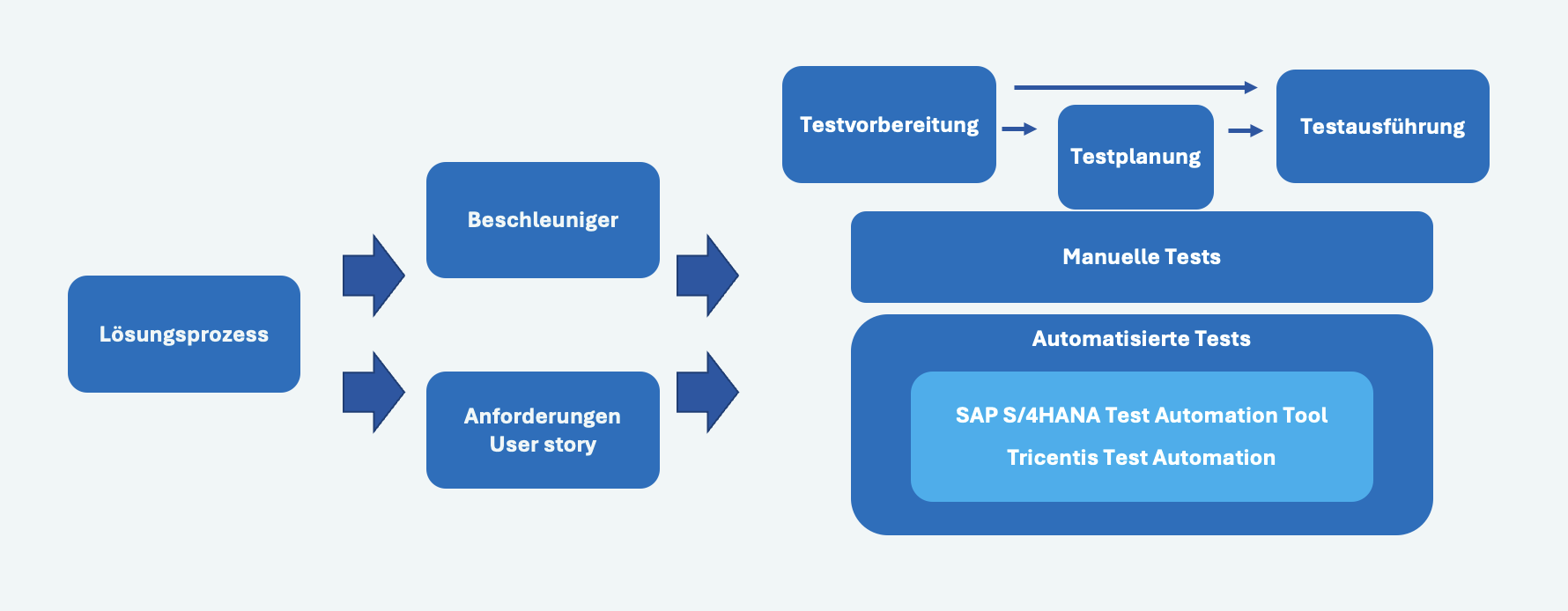
Test preparation
Test preparation involves creating manual or automated test cases based on business activities. The starting point is usually a solution process. If you are familiar with the standard processes, you can create test cases directly from the process flows within the SAP Best Practices content. This ensures that all critical processes are covered without having to start from scratch. Accelerators in the solution process help increase efficiency with test scripts, tutorials, and setup instructions. You can download the test script and then upload it to speed up test creation.
(Note: Accelerators are only available for SAP Best Practices processes.)
For more complex projects, you can customize the standard solution process once and then document the requirements—user stories.
Efficient regression tests can be performed using automated tests, which are also offered in SAP Cloud ALM—I will explain below which tool you can use.
Test planning
The test planning module allows you to manage test cycles across multiple organizations. An important difference to the Solution Manager is that there are no test packages here.
The advantages of SAP Cloud ALM’s testing capabilities include efficient test planning, the ability to support multiple test cycles or rollouts across multiple organizations, detailed management of test phases, and status tracking through preparation, execution, and completion. It enables the assignment of specific testers, dedicated execution contexts, start and end dates for plans, draft editing, and provides detailed reports per test plan.
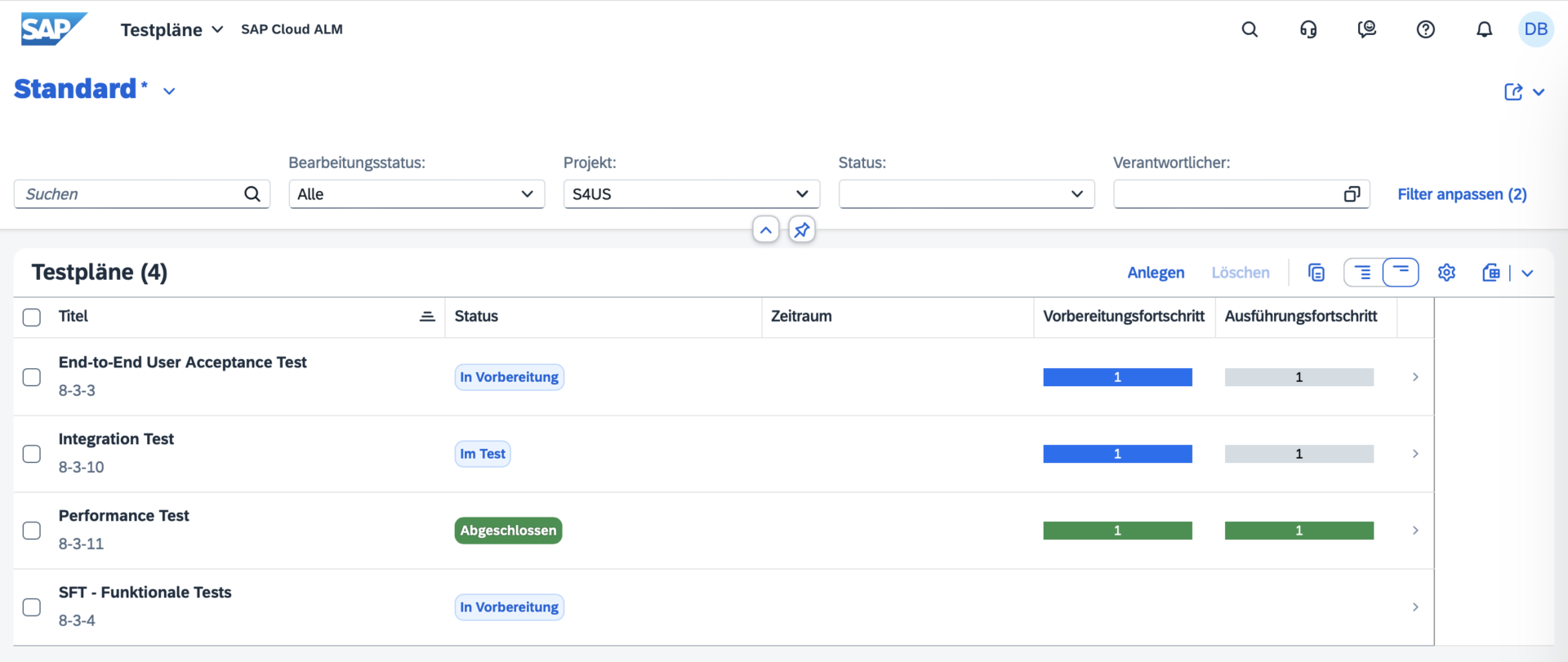
Test execution
During test execution, test cases are run and their results are tracked. The advantages of test execution in SAP Cloud ALM include easy navigation through the overview, analysis, and tracking views, as well as the ability to search for relevant test cases and apply filters. Users can filter test cases by assigned tester, view test plans marked as “In Review” for execution, and view test cases grouped by test plans. Lean testing without the creation of test plans is still supported, and test managers or reviewers can use list views for reporting. In addition, filter settings can be saved as variants for later use.
Defect Management
Defect management is an important part of the testing process in SAP Cloud ALM. It ensures that all defects or problems discovered during testing are tracked, resolved, and linked to the corresponding test case or user story. Defects can be reported directly from test cases when a test step fails, and they are automatically linked to the corresponding process or requirement.
The most important functions of defect management in SAP Cloud ALM include:
– Real-time defect tracking: Defects can be created immediately during test execution, so that they are logged immediately after problems are identified.
– Defect reporting: Comprehensive reports show defect trends, including newly created, resolved, and open defects.
This helps teams prioritize defect fixes and prepare for the go-live phase.
– Defect assignment: Defects can be assigned to specific developers, testers, or teams to ensure accountability and speed up defect resolution.
– Traceability: Defekte werden mit den zugehörigen Testfällen, User Stories oder Anforderungen verknüpft, so dass Auditoren und Projektbeteiligten eine vollständige Rückverfolgbarkeit gewährleistet ist.
Test automation
SAP Cloud ALM integrates with automation tools such as Tricentis Test Automation, which is available free of charge to Enterprise Support customers. Automated tests are linked to processes, requirements, and user stories to ensure complete traceability. Below is an overview of test orchestration with Tricentis.
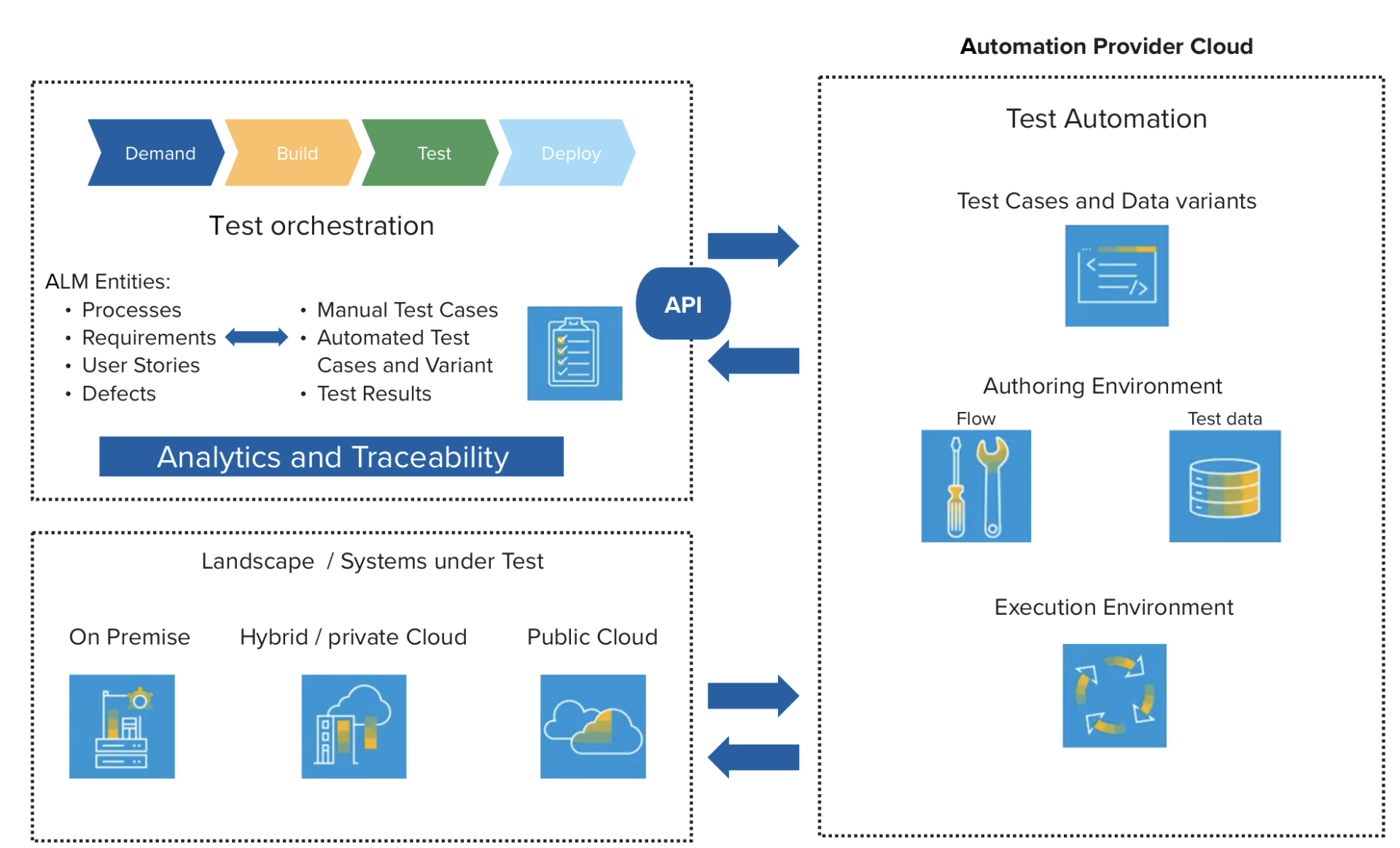
Since integration is done via an API, other automation tools such as Worksoft, UiPath, Suxxesso, etc. can also be connected. The latter two are working on full integration with SAP Cloud ALM by the end of the year.
Analytics and reporting
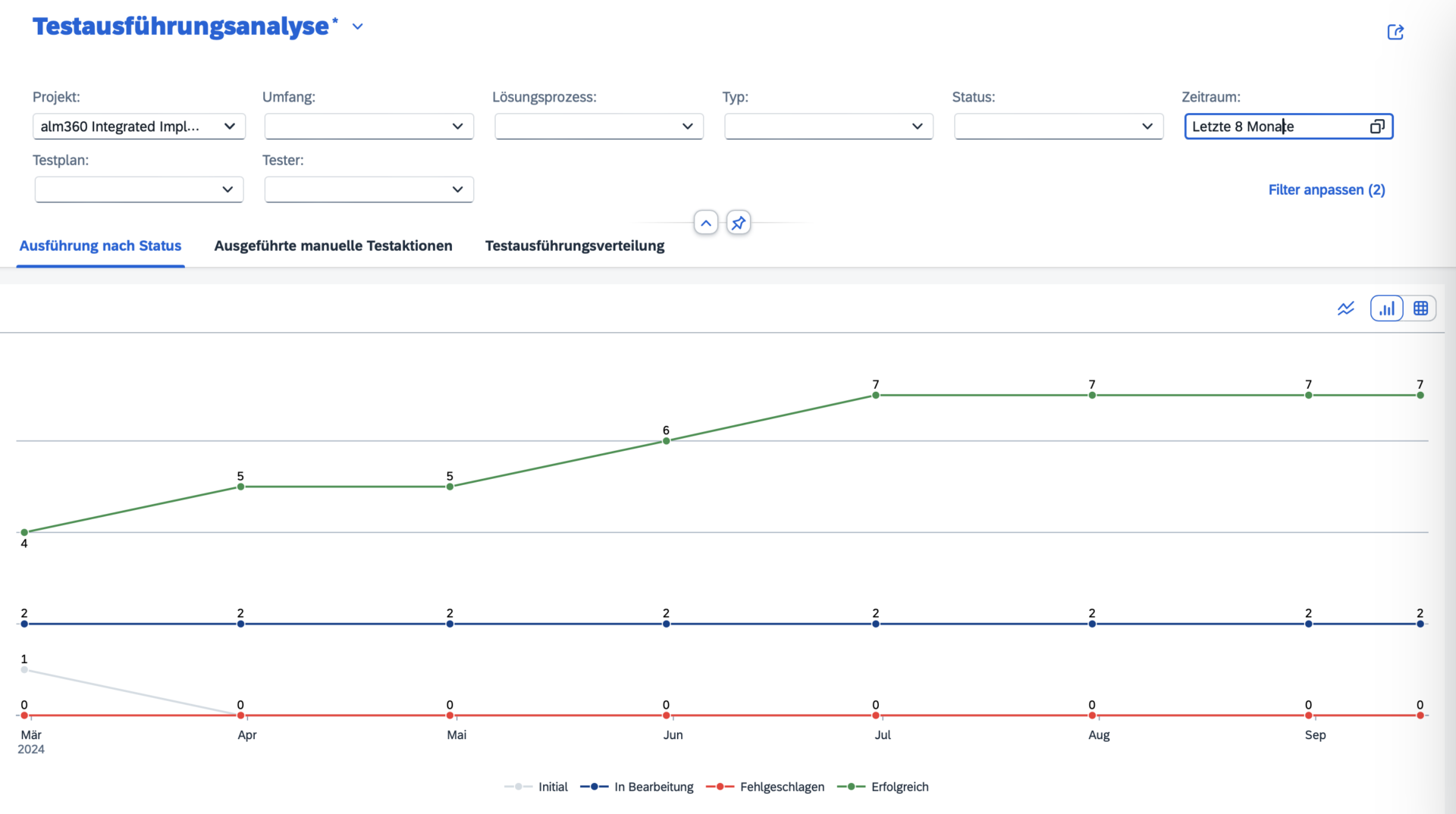
Analytics plays an important role in SAP Cloud ALM test orchestration. Users can generate reports on test execution progress, defect trends, and readiness for production. This transparency ensures that issues are identified early on, allowing teams to focus on resolving problems before deployment.
Key analysis features:
Project overview Centralized dashboards with custom filters for test status.
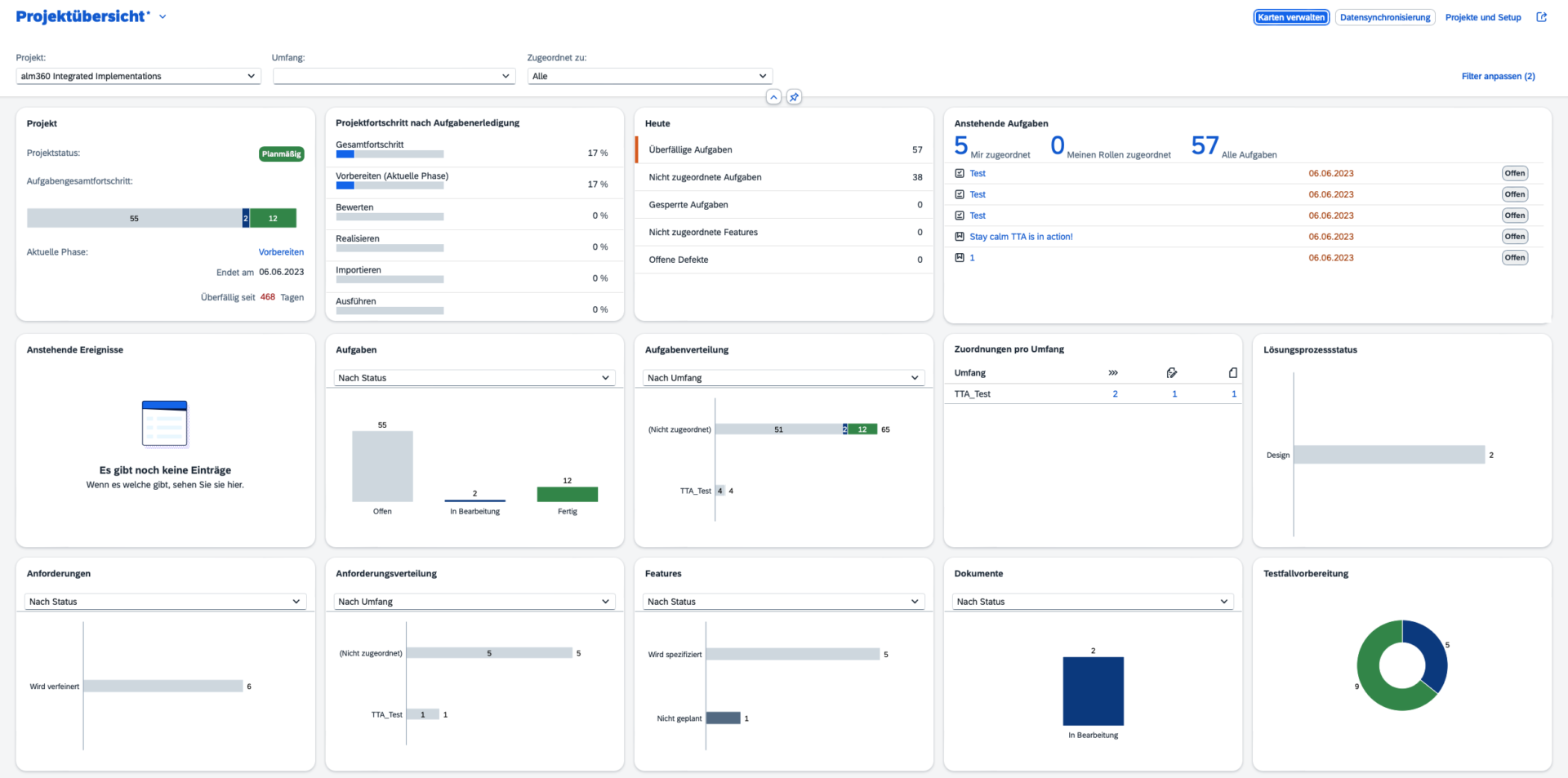
- test execution analysis
- Defect reporting: Detailed defect analysis for tracking defects and solution duration.
- Traceability reports: Ensure that test results are linked to requirements and user stories.
Outlook
If you are not yet familiar with the SAP Roadmap, it is an excellent tool for checking what is planned. The SAP Cloud ALM functions for test orchestration are constantly being developed, and below you will find some of the planned enhancements:
- Mass upload: Mass upload of test cases is expected in Q4 2024, allowing multiple test cases to be uploaded in a single file. Creation of new test cases from the file upload.
- APIs for test cases: Upload of partner and customer-owned test cases and support for SAP standard upload formats is expected in Q1 2025.
- Link test plan to release: Linking test plans to the new task type to reflect the status, start and end dates, and creator in the project plan and Gantt chart is also expected by Q1 2025.
- Bulk editing of test cases: also by Q1 2025.
Fazit
Test orchestration in SAP Cloud ALM was developed to simplify and support the testing process in SAP ecosystems. From manual to automated testing, it offers integrated traceability, powerful analytics, and support for SAP and non-SAP environments. With a clear roadmap and continuous improvements, SAP Cloud ALM will become an indispensable tool for test management in SAP projects.