

SAP Cloud ALM – What’s New in Week 40
SAP Cloud ALM keeps moving forward. The week 40 updates bring smarter validation in the Business Transformation Center, region-specific IP allowlists in Administration, stronger monitoring in Operations, and practical upgrades in Implementation. Together, they make projects clearer, operations smoother, and daily work more efficient.
SAP Business Transformation Center – Cycle and Monitoring, Transition
The latest updates in SAP Business Transformation Center focus on making transformation projects more structured and reliable. By deepening integration with validation tools and requiring clearer definitions of project approaches, these enhancements help ensure that data is consistent, methodologies are transparent, and teams are aligned from the very beginning.
Enhancement to DTV Integration – Cycle and Monitoring
A new enhancement strengthens the integration between SAP Business Transformation Center and the Data Transformation Validation (DTV) tool. With this update, cycles can now set up a DTV project in both the source and target systems and import business reports directly.
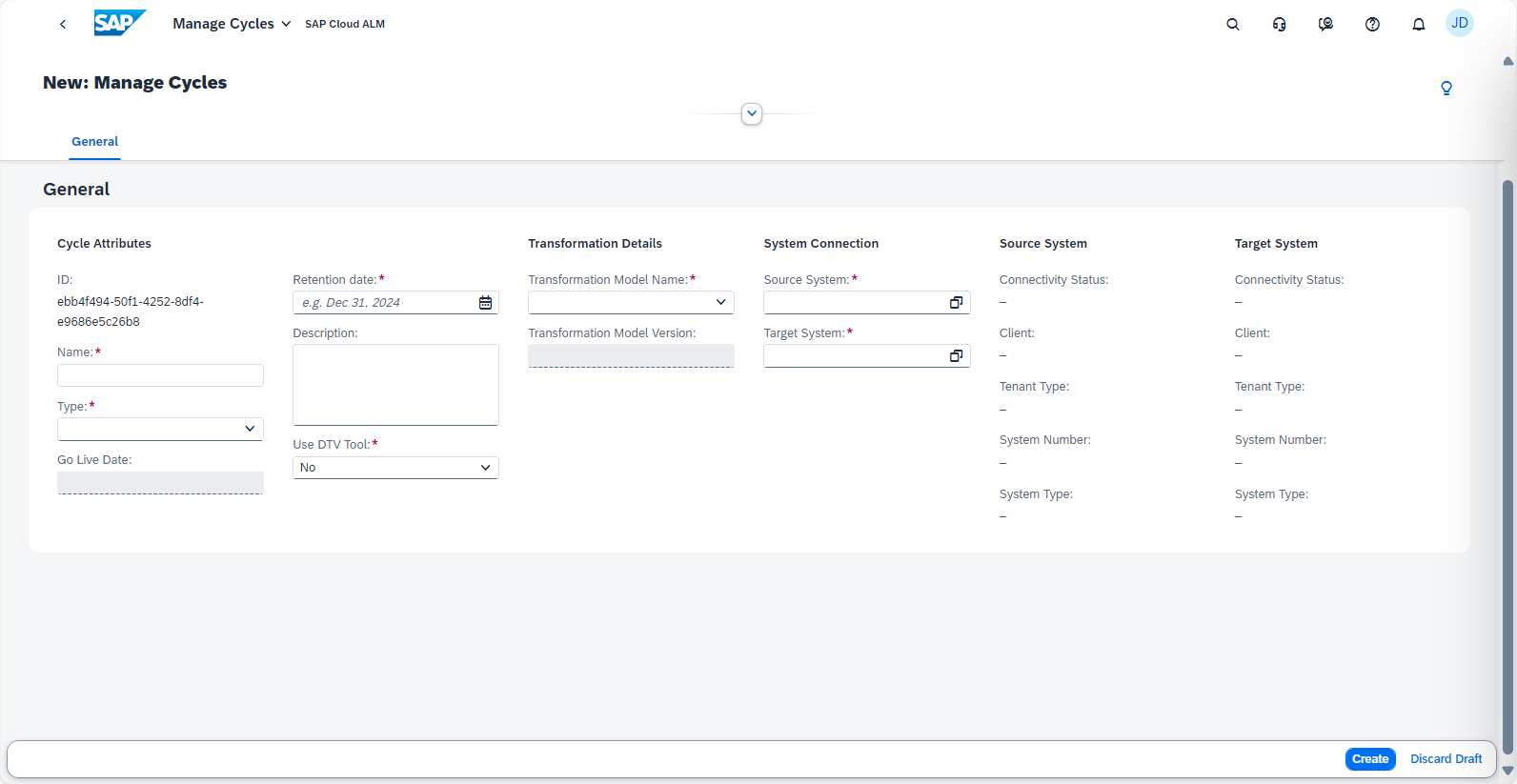
This integration makes it possible to validate transformation results with DTV more seamlessly, ensuring that data between systems aligns correctly. By embedding DTV into the cycle setup, project teams gain a more reliable way to confirm data integrity and reduce the risk of inconsistencies before moving forward.
TL;DR:
Cycles can now set up DTV projects in source and target systems and import reports for smoother, more accurate data validation.
Transformation Approach Information – Transition
When creating a new transformation project in the Manage Transformation Projects app, teams are now required to specify a transformation approach. Once the project is created, a new Transformation Approach tab is available, providing an overview of the approach details.
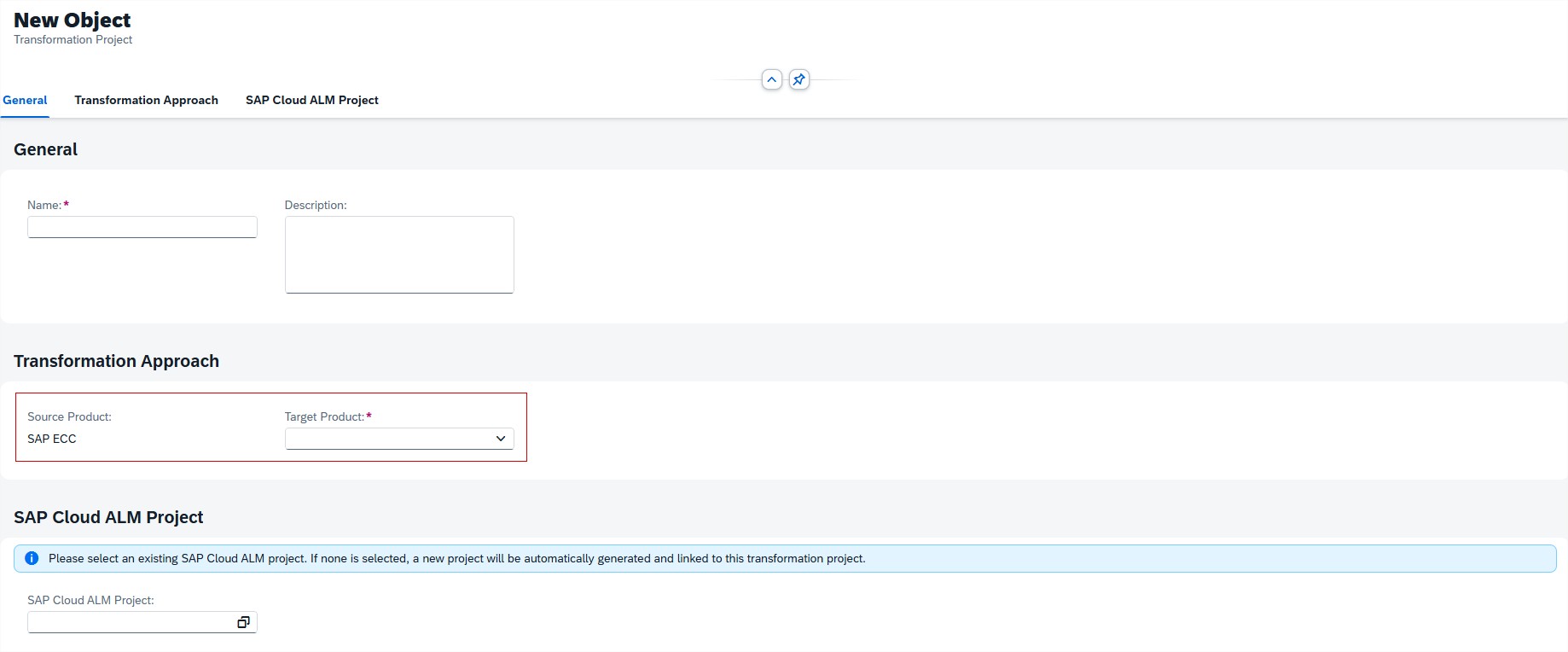
This improvement helps ensure consistency and transparency from the start of each transformation initiative. By explicitly defining the chosen transformation approach, stakeholders gain clarity on project direction, expectations, and methodology – reducing ambiguity and enabling better alignment across teams.
TL;DR:
Transformation projects now include mandatory transformation approach information, improving clarity, alignment, and governance from the outset.
Administration & Cross-Area Update – Network & Firewall Access
To ensure smooth connectivity between SAP Cloud ALM and your systems, SAP has released a new requirement for region-specific IP allowlists. Administrators must verify that their network and firewall configurations include all IP addresses used by SAP Cloud ALM in their respective region.
If organization maintains IP allowlists for firewalls, Cloud Connector, or proxy restrictions, it is essential to include not only the SAP BTP Cloud Foundry application ranges but also the new IP ranges specific to SAP Cloud ALM. These are defined per region and ensure uninterrupted connectivity for Cloud ALM services. Failing to update allowlists may block access to Cloud ALM services and prevent monitoring data from flowing correctly.
The required ranges differ by region. A full, detailed list of current IP addresses is provided in the official documentation: IP Addresses Specific to SAP Cloud ALM (Unified Gateway).
TL;DR:
Check and update your allowlists to include SAP Cloud ALM regional IP addresses alongside SAP BTP Cloud Foundry ranges. This is a critical change to avoid disruptions in connectivity and monitoring.
Operations – Job & Automation Monitoring, Alert & Event Management, Exceptions
Today’s updates in the Operations area strengthen visibility and responsiveness across system monitoring. New capabilities in Health Monitoring, Job & Automation Monitoring, Alert & Event Management, and Exception handling provide operations teams with clearer insights, more actionable notifications, and faster access to critical data. Together, these enhancements help reduce downtime risks, improve efficiency, and support proactive system management.
Access Control and Enhanced Download Options – Job & Automation Monitoring
The Job & Automation Monitoring app now comes with Access Control, ensuring that users only see data relevant to their role and responsibilities. Access is based on the Access Control List defined in the Landscape Management app, so each user can view only the systems and services maintained in their list. This provides stronger governance, reduces noise, and makes monitoring more secure and targeted.
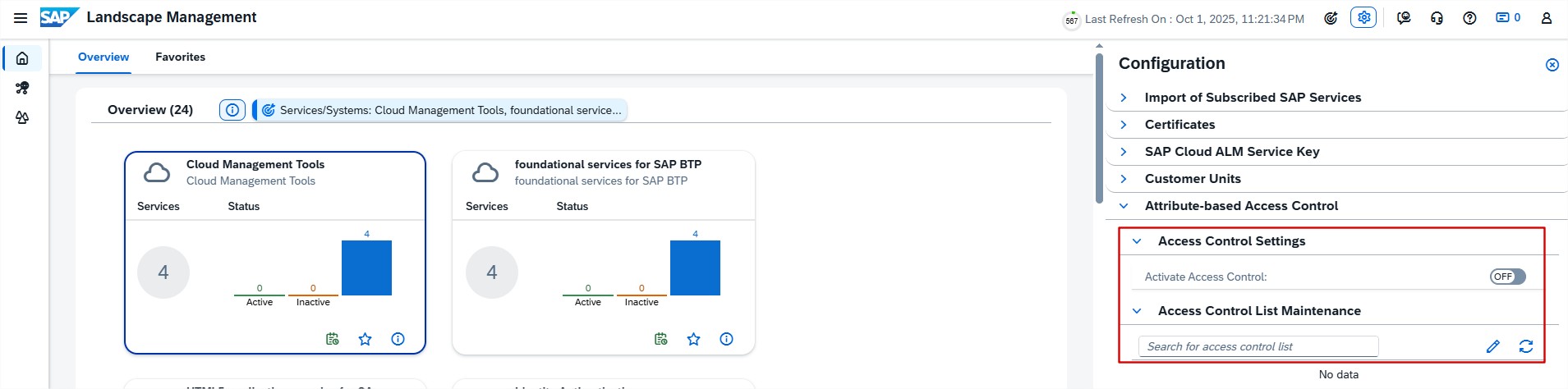
Alongside this, SAP has enhanced the download options on the Monitoring page. Previously, users could only download job overviews. With this update, it’s now possible to also export job executions and step executions. This richer level of detail makes it easier to analyze performance offline, troubleshoot execution issues, and prepare documentation for audits or reports.

TL;DR:
Access Control restricts monitoring visibility to assigned systems and services, while new download options provide more detailed job execution data for deeper analysis.
Smarter Event Filters and Value Help – Job & Automation Monitoring
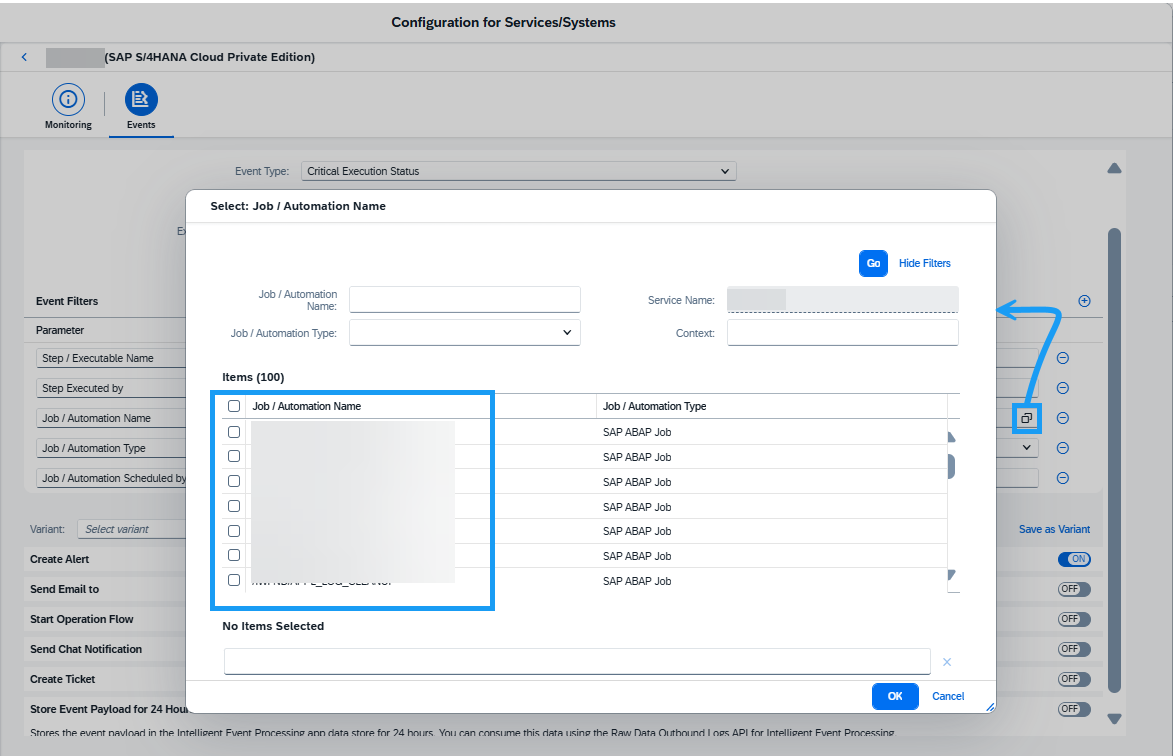
Event configuration in Job & Automation Monitoring is becoming both smarter and easier. The app now validates Job/Automation Name filter parameters to prevent conflicts – such as combining operators like Is and Is Not or Contains and Not Contains. When such conflicting conditions are detected, a warning is shown so teams can correct the setup. This ensures more accurate and reliable event filtering.
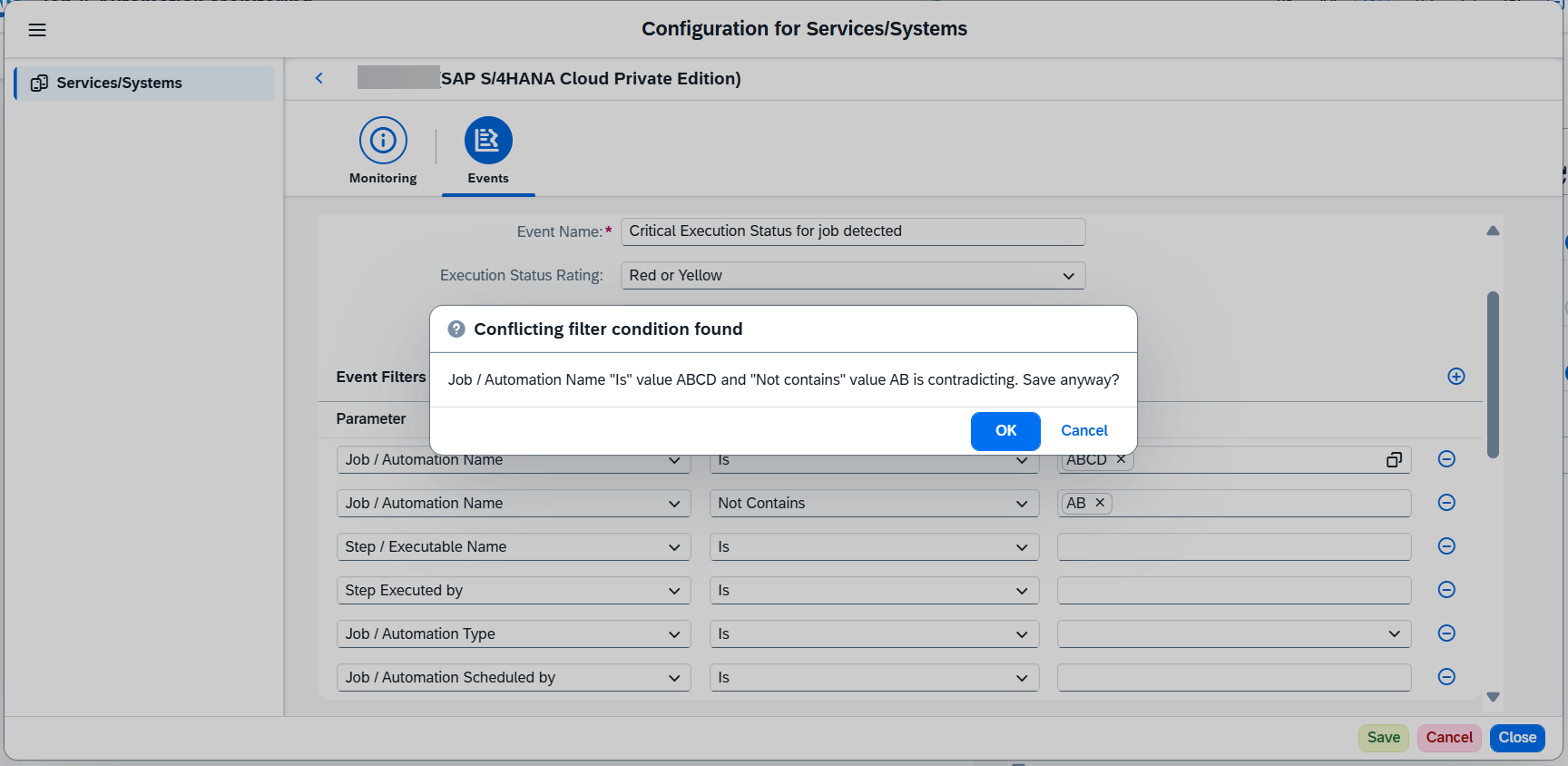
In addition, a new value help for Job/Automation Name simplifies filter setup. Instead of manually typing job names, users can now pick directly from a list of available jobs and automations within the selected scope. This reduces the risk of typos, speeds up configuration, and helps ensure consistency.
TL;DR:
Event filters now validate conditions to avoid conflicts, and value help makes job/automation selection faster and more reliable.
Email and In-App Notifications for Processor Changes – Alert & Event Management
Alert handling just became more transparent and responsive in Alert & Event Management. With this update, users can now receive both email notifications and in-app notifications whenever a processor is assigned to or removed from an alert.
This means that the right people are immediately informed when ownership of an alert changes – reducing the risk of missed handovers and ensuring accountability. Email notifications include direct links back to the alert itself, as well as a link to the Alert List page showing all alerts assigned to a particular processor when the “Select All” option is used.
For teams managing high volumes of alerts, this enhancement provides a clearer chain of responsibility and faster access to the relevant items, ultimately improving response times and coordination.
TL;DR:
Stay informed when processors are assigned to or removed from alerts, with direct links provided via email and in-app notifications for faster follow-up.
Enhanced Exception Analysis Across Multiple Apps
The Exceptions page has been significantly improved with new filtering and visualization options, making it easier to drill down and analyze exceptions across your monitored landscape.
In the second-level drilldown (category view), users now have access to:
- Filter bar – refine exceptions based on parameters like Message, User, or Service Name.
- Interactive charts – visualize exception distribution across parameters and quickly drill into specific categories.
- Table-driven filters – add values directly from table entries in selected columns to fine-tune results.
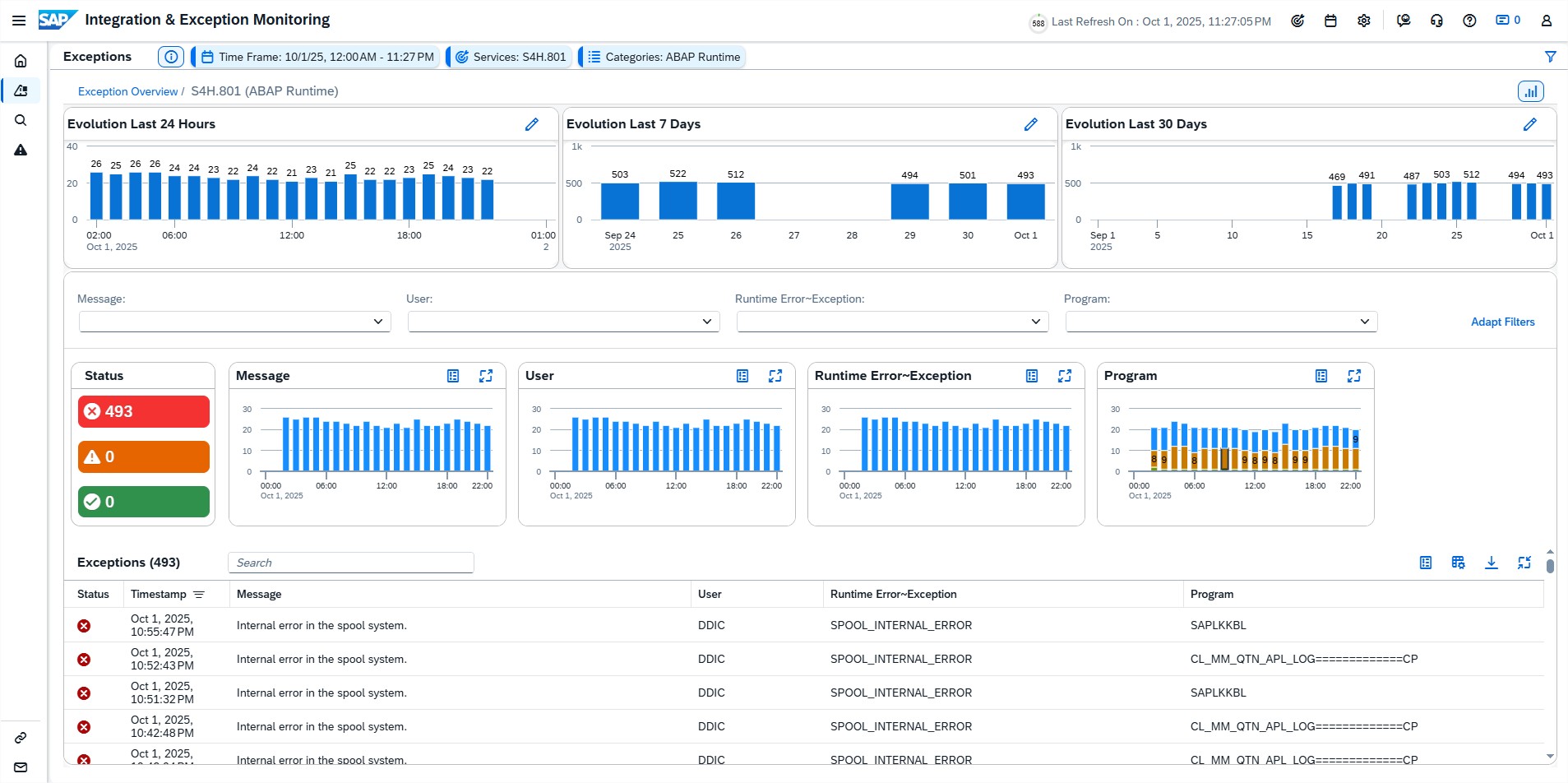
Previously, exception analysis was limited to simple time-based views (last 24h, 7 days, or 30 days). With these enhancements, teams can now combine parameter-based filters with timeline views for much more targeted analysis – helping them isolate recurring issues, identify trends, and act faster.
The improved functionality is available in the Exceptions pages of:
- Integration & Exception Monitoring
- Job & Automation Monitoring
- Real User Monitoring
Implementation – Analytics, Documents, Processes, Test Execution
The latest enhancements in the Implementation area focus on making project work more flexible, traceable, and efficient. From new options in test preparation and execution, to better document handling, to expanded mass edit capabilities in processes, these updates provide teams with practical tools to streamline project execution and maintain consistency across complex landscapes.
Analytics Enhancements
Recent updates in the Analytics area of SAP Cloud ALM strengthen traceability and improve filtering, giving project teams clearer insights and more focused reporting across requirements, user stories, tests, and defects.
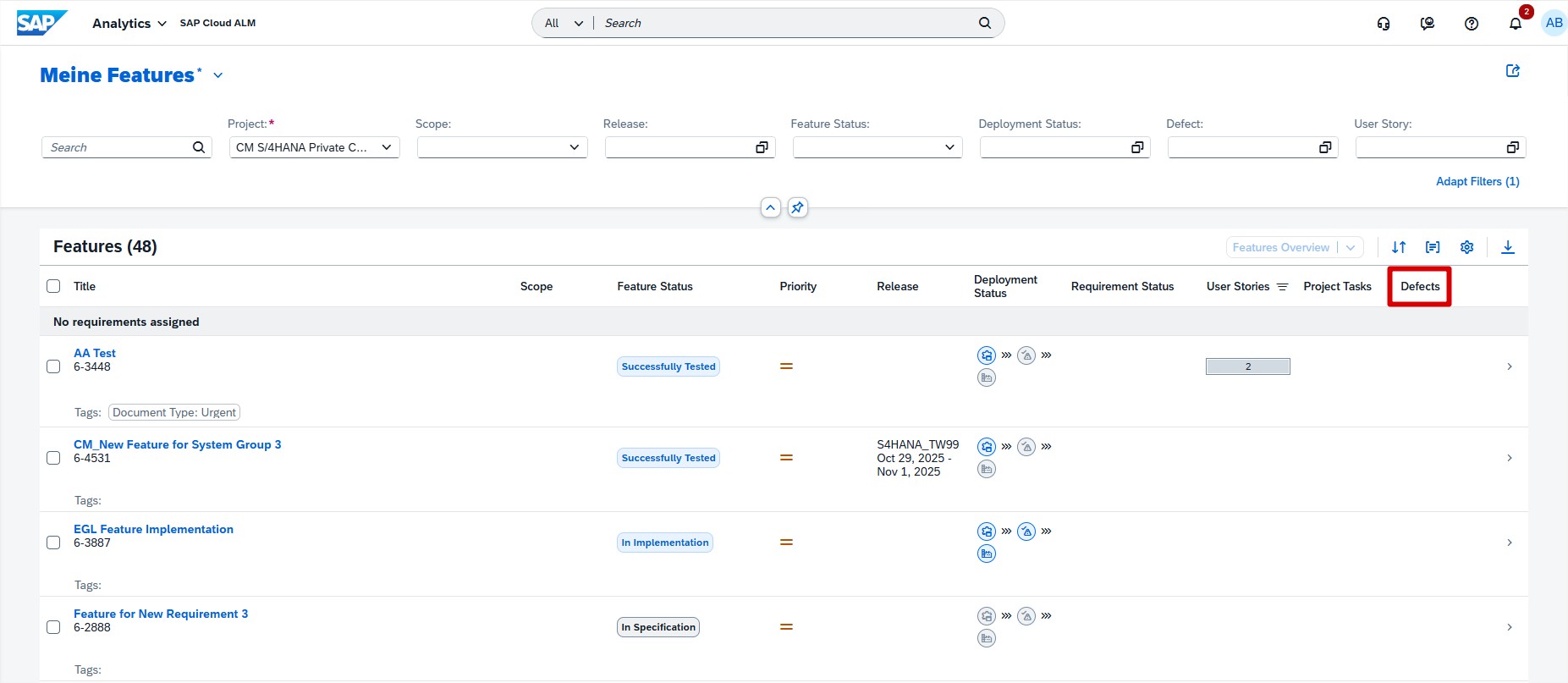
- Defects column in Feature Traceability app – A new column makes it easier to spot and track defects linked to features, with detailed information available via the side panel.
- Refined filtering logic in User Story Traceability app – The Test Plan filter now also applies to related items such as test cases, test executions, and defects, ensuring more accurate reporting and end-to-end traceability.
- Process Hierarchy Node filter in Requirement Traceability app – Requirements can now be filtered by process hierarchy nodes, making it simpler for business analysts and solution architects to align requirements with specific business processes.
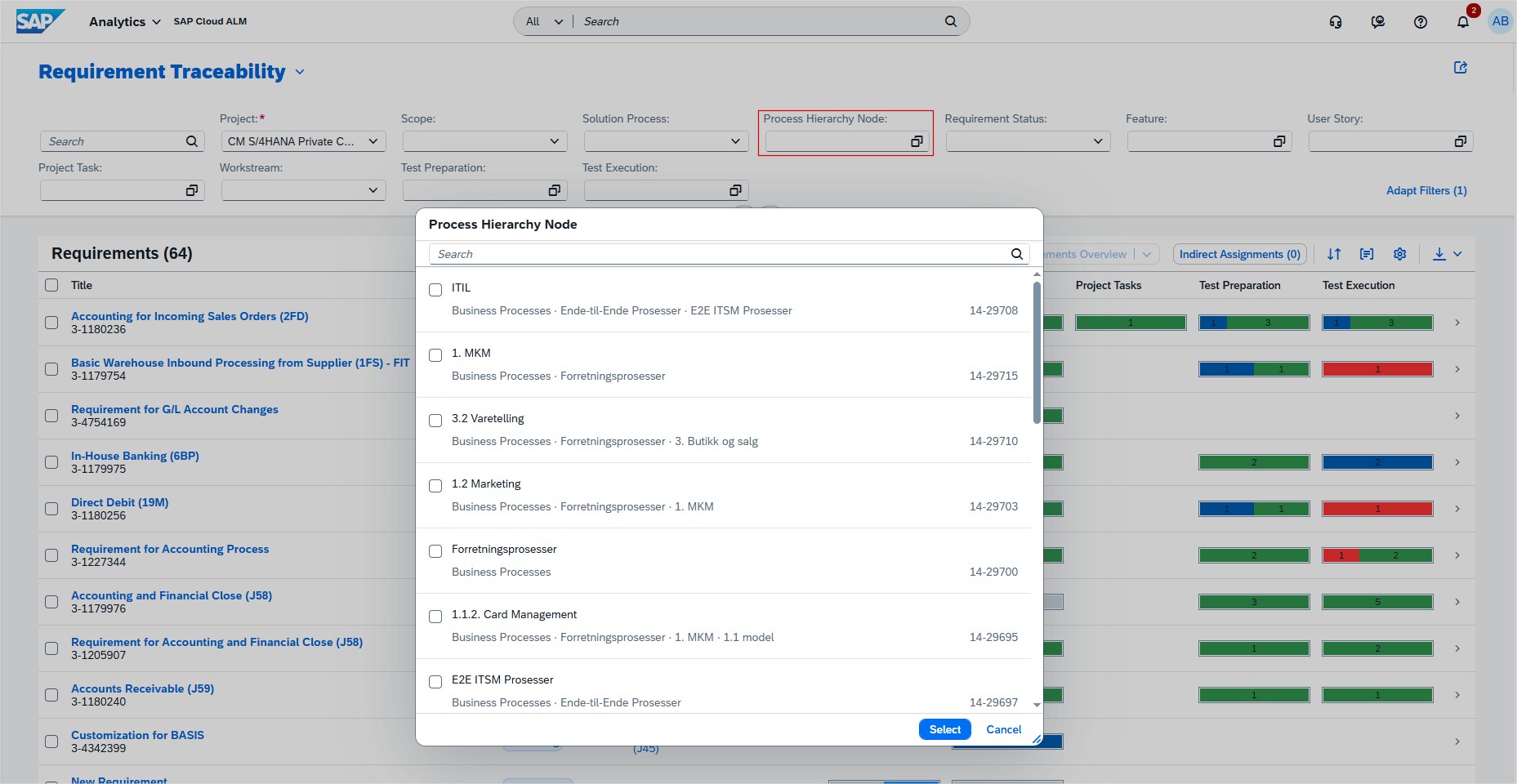
These enhancements help teams improve quality tracking, streamline analysis, and keep requirements, tests, and defects better connected to the business processes they support.
TL;DR:
Analytics is now improved with defect tracking, smarter Test Plan filtering, and process hierarchy-based requirement filtering, making analysis and reporting more reliable.
Document Management Enhancements
The Documents app in SAP Cloud ALM has been improved with new features that make document handling more transparent, controlled, and reversible.
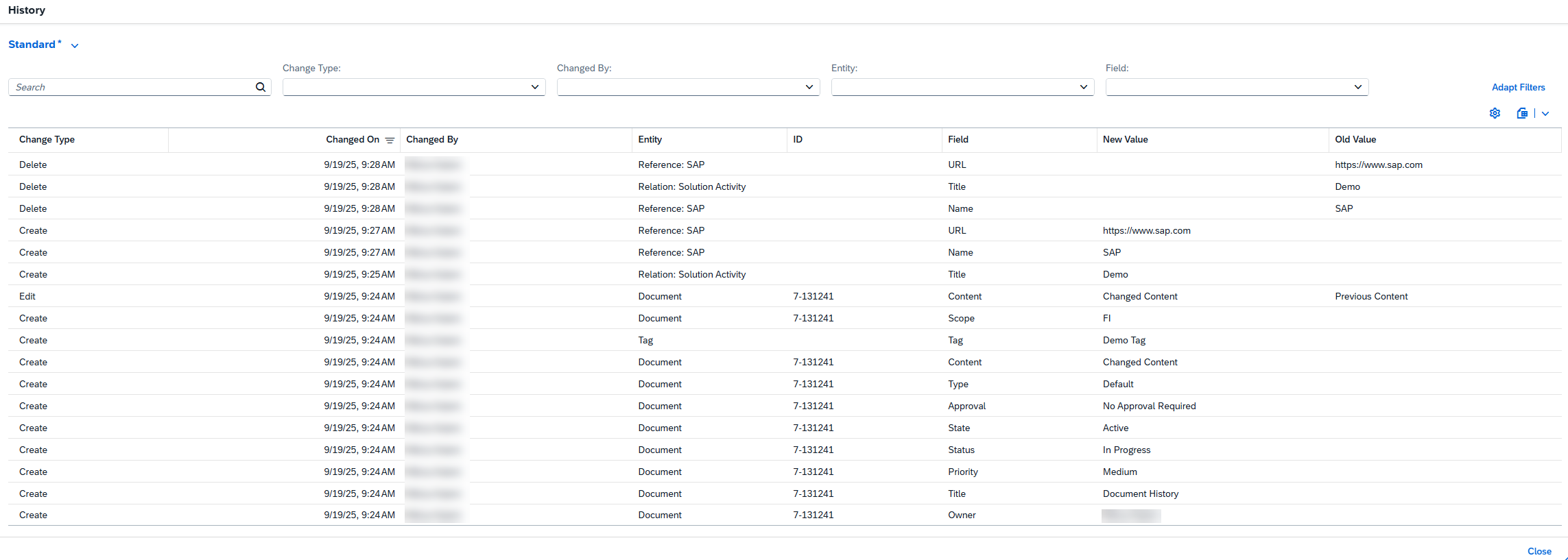
- Document History – A new history feature now tracks all modifications made to documents once they exit draft status for the first time. Teams can monitor changes over time and even export the history for further analysis or compliance purposes. It’s worth noting that history is only available from the release of this feature onward – past changes are not included.
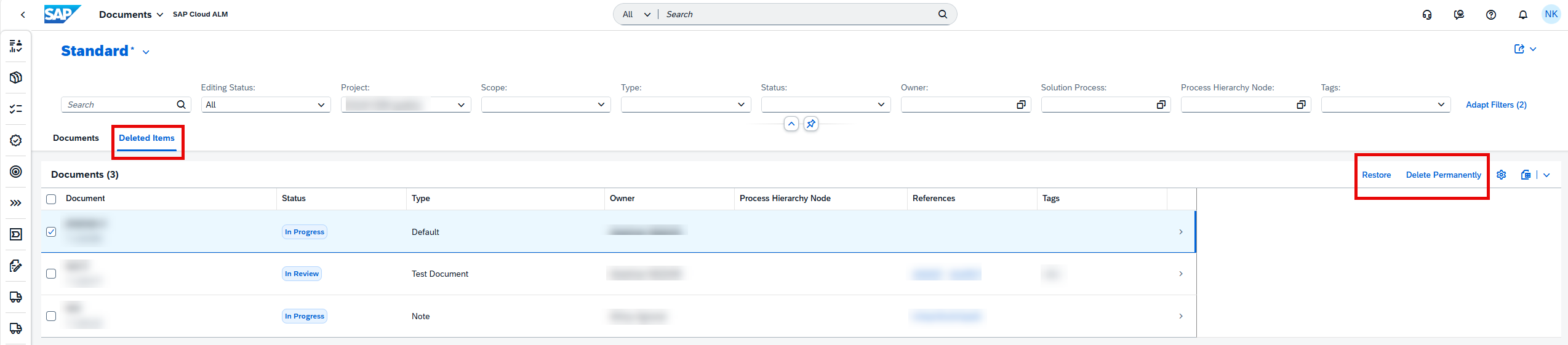
- Two-Step Deletion – Instead of being permanently removed immediately, deleted documents now move to a new Deleted Items tab. From there, users can choose to restore documents if deleted in error or permanently remove them when no longer needed. This provides a safety net against accidental deletions and improves governance around document lifecycle management.
Together, these enhancements bring more transparency and control to project documentation, helping teams maintain accuracy while reducing the risk of accidental loss.
TL;DR:
Track all changes with the new document history feature and benefit from safer handling of deleted documents with a restore option.
Processes Enhancements
The Processes app has received several new features that give teams more flexibility and clarity in managing solution processes at scale. These enhancements focus on bulk editing capabilities and improved visibility into solution components.
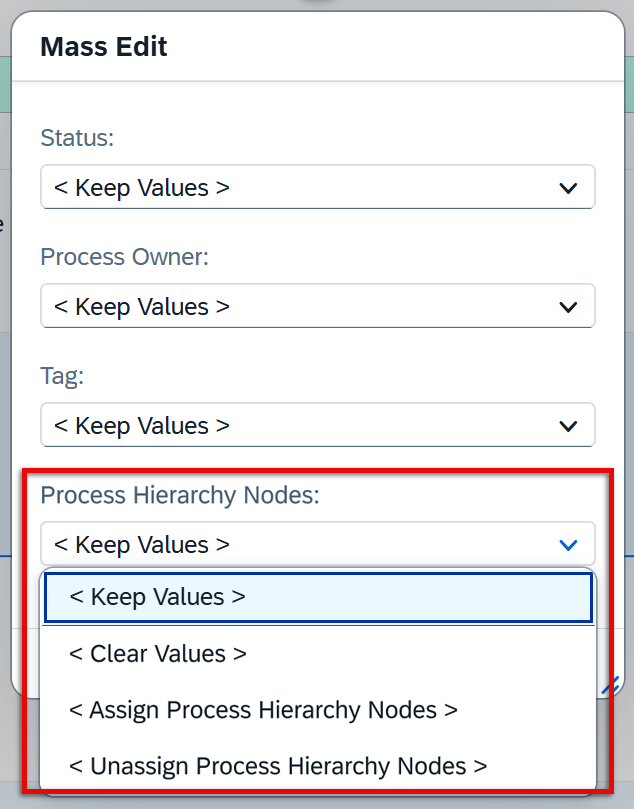
- Mass Edit of Process Hierarchy Node Assignments – Administrators can now edit process hierarchy node assignments for multiple solution processes at once using the Mass Edit function. Options include keeping existing values, clearing assignments, assigning new nodes, or unassigning selected nodes (with the exception of those set in Process Authoring). This streamlines updates across large process sets, especially when adjusting by country/region or during scope changes.
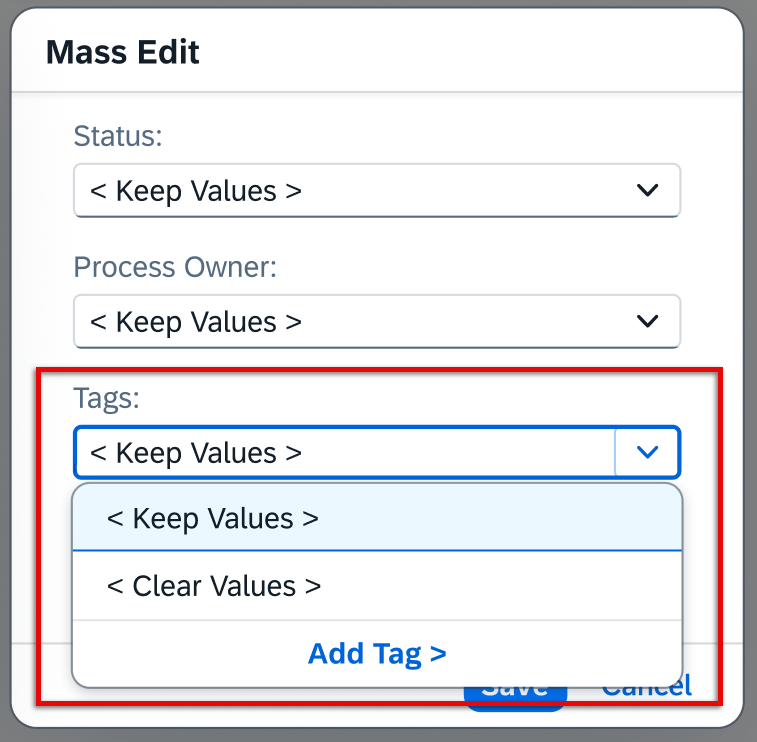
- Mass Edit of Tag Assignments – Similarly, tags can now be edited in bulk. Teams can keep, clear, or add tags to multiple solution processes at once, ensuring faster alignment with project structures or reorganizations. Standard content tags and those created in Process Authoring remain protected, preventing accidental loss of important classifications.
- Visibility of Leading and Optional Solution Components – In the solution process viewer, users can now see which solution components are marked as leading or optional. This distinction makes it easier to understand component dependencies and prioritize efforts accordingly. If no label is shown, the component is considered mandatory.
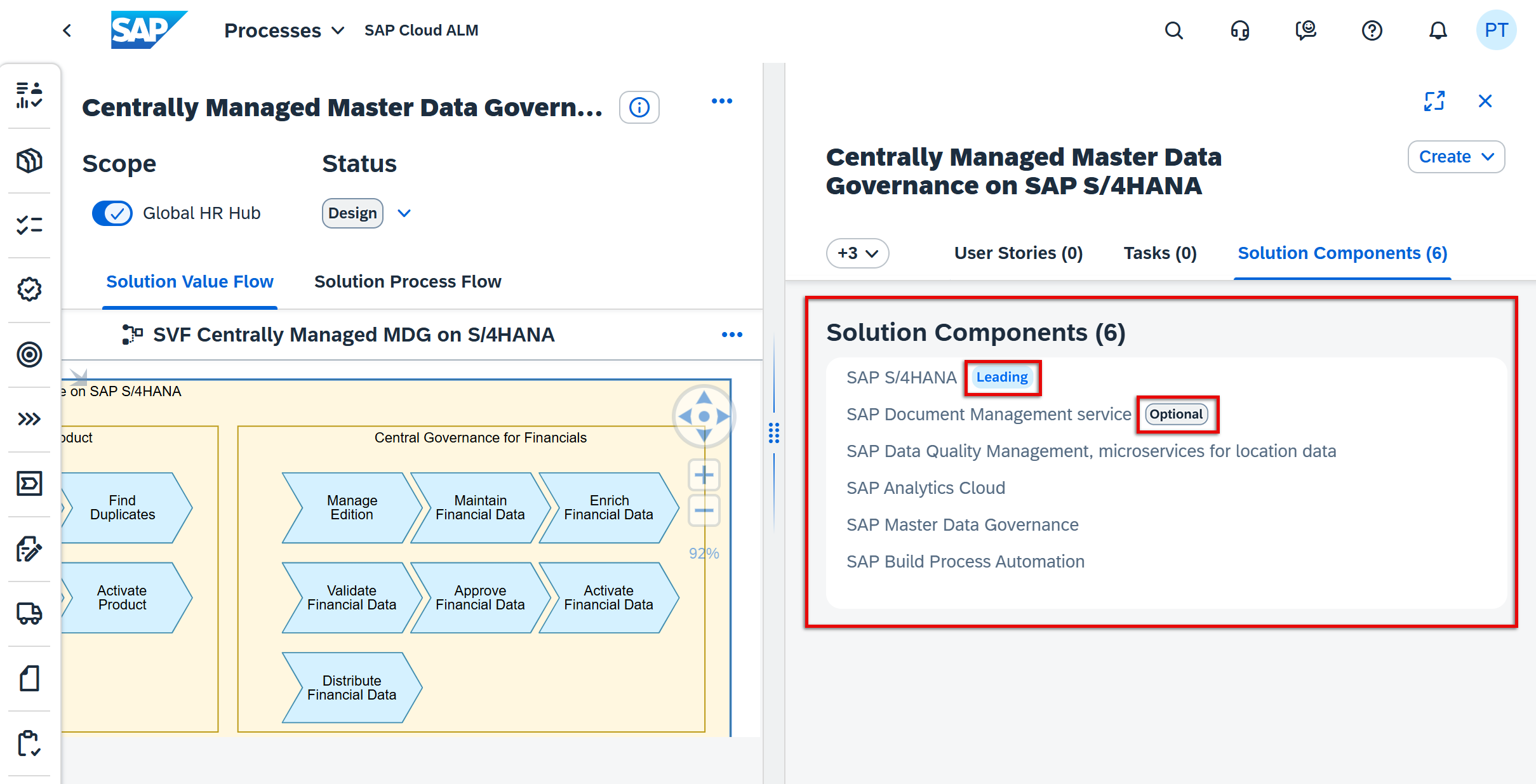
Together, these updates help reduce repetitive work, improve governance, and give clearer insights into how processes are structured and supported within SAP Cloud ALM projects.
TL;DR:
New mass edit options for process hierarchy nodes and tags speed up large-scale updates, while new labels highlight leading and optional solution components for better transparency.
Reset Test Actions in Manual Test Execution
A new reset option has been introduced in the Test Execution app, giving testers more flexibility when working with manual test cases. Testers can now reset the status of individual test actions back to their initial state at any point during execution – even after the test case has been saved.
Importantly, any associated defects or comments linked to the reset action remain intact, ensuring that valuable information is not lost while allowing the test execution flow to be corrected or repeated as needed.
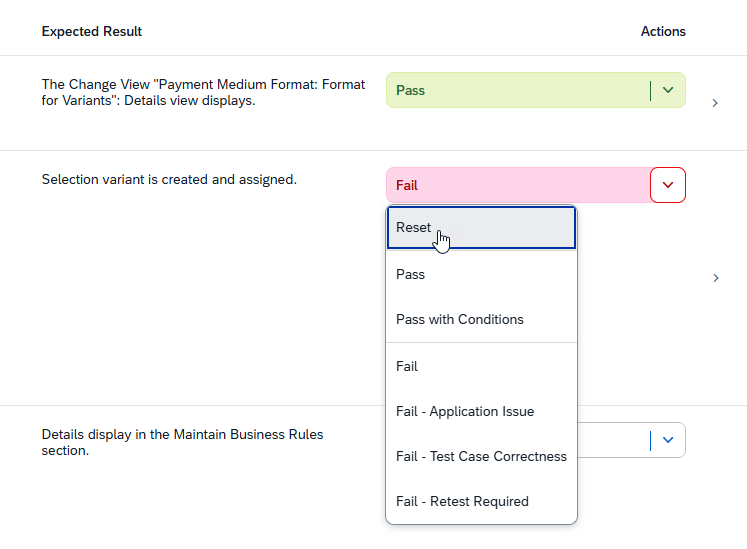
This enhancement reduces the need to recreate test cases when execution steps need to be retried, saving both time and effort. It also helps maintain the integrity of test documentation while offering testers more control during execution.
TL;DR:
Testers can now reset test actions to their initial state during manual test execution without losing linked defects or comments, making test cycles more flexible and efficient.
