

SAP Cloud ALM – What’s New in Week 42
SAP Cloud ALM continues to evolve with updates that focus on clarity, control, and usability. The week 42 release introduces detailed role documentation for administrators, smarter filtering in Services, new validation capabilities and app structure in Operations, and enhanced ownership and access control in Implementation.
These updates refine how teams collaborate, manage responsibilities, and ensure compliance – making SAP Cloud ALM an even stronger foundation for reliable delivery and efficient operations.
Service – Issues and Actions Management
The latest enhancement in the Service area focuses on improving transparency and traceability within issue and action management. New filtering options make it easier for teams to track ownership, review changes, and ensure proper follow-up throughout the project lifecycle.
Filter by Created By and Last Changed By
A new filtering enhancement in the Issues and Actions Management app makes it easier to track ownership and accountability. Users can now filter issues and standalone actions by Created By and Last Changed By directly on the Issues and Actions Overview page – helping teams quickly identify who created or last modified an item. The filter supports both auto-suggestion and value help, allowing flexible user lookups based on configured user IDs, such as an email address or corporate ID.
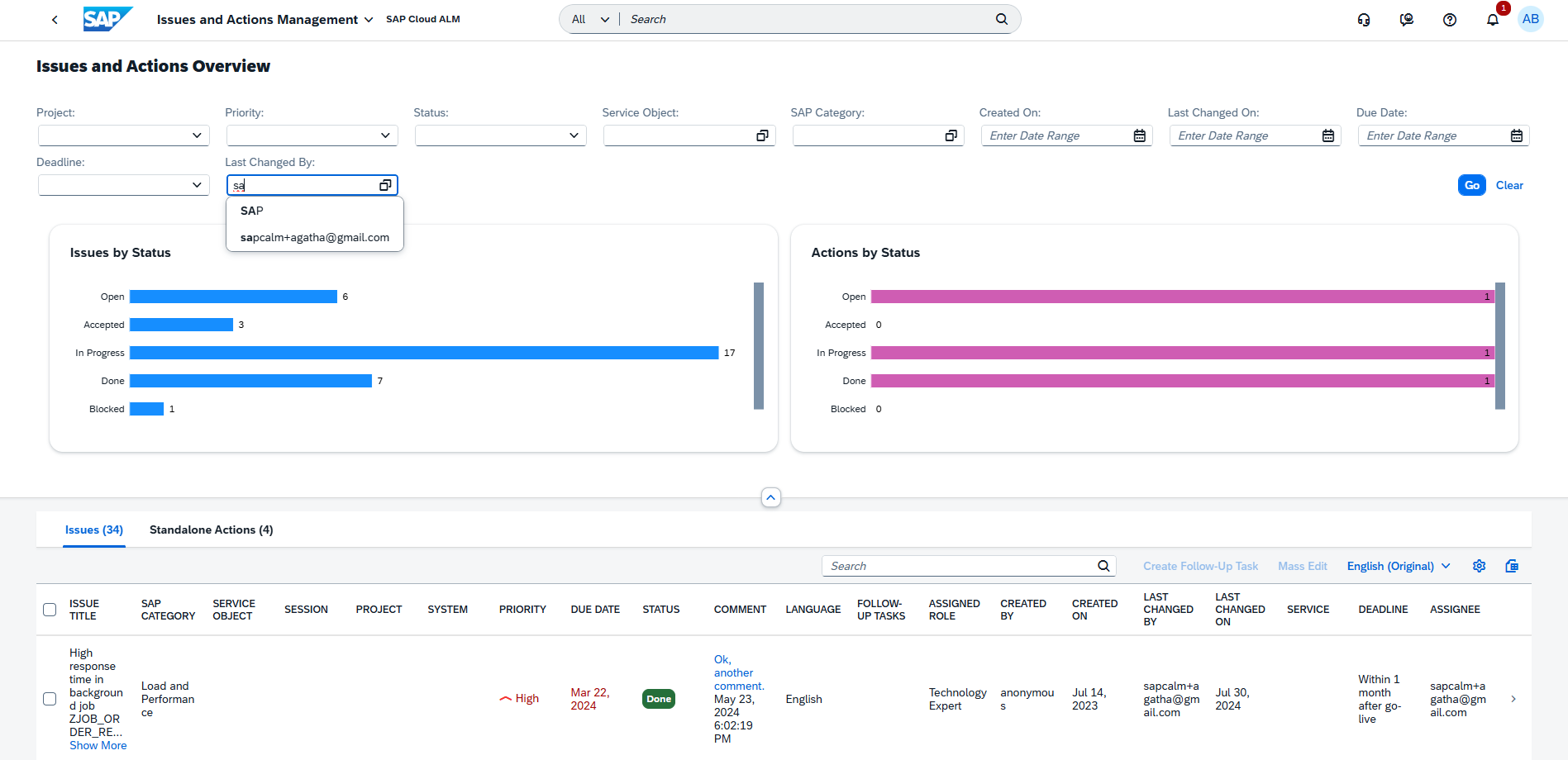
This improvement is especially useful for project managers reviewing activity history, consultants validating updates, and service delivery leads ensuring proper follow-up ownership. It provides greater transparency across collaborative workstreams and simplifies issue tracking in complex projects.
TL;DR:
Filter issues and actions by creator or last editor to improve traceability and accountability in project collaboration.
Administration – User Management
The latest update in the Administration area focuses on improving transparency and control in user and access management. With newly released detailed role documentation, administrators now have a clear reference for predefined roles and permissions across SAP Cloud ALM and SAP Business Transformation Center – making role assignment and governance simpler and more reliable.
Detailed Role Documentation
SAP has released comprehensive role documentation for SAP Cloud ALM and SAP Business Transformation Center, providing administrators with a clear overview of all predefined roles, their permissions, and application coverage.
This new reference material, available in the Setup and Administration Guide under the Roles section, helps User Administrators assign roles with confidence and transparency – ensuring users have the exact level of access needed to perform their tasks across different functional areas.
Each role in SAP Cloud ALM corresponds directly to a role collection in the SAP BTP subaccount, making administration simpler and more consistent. Roles are predefined, ready to use, and designed to reflect the real-world responsibilities of specific business roles – such as Project Lead, Health Monitoring Administrator, or Integration Architect.
The documentation also highlights where roles span multiple apps, for example, how a Health Monitoring Administrator requires authorizations in both Intelligent Event Processing and Landscape Management to perform configuration and monitoring activities effectively.
This level of transparency makes user provisioning more efficient, supports compliance and audits, and helps organizations establish a well-structured access management model across their SAP Cloud ALM landscapes.
TL;DR:
A new detailed role reference helps administrators understand predefined roles, their permissions, and cross-app coverage – improving clarity, governance, and efficiency in user access management.
Operations – Business Process Monitoring, Configuration & Security Analysis
The latest updates in the Operations area enhance visibility, compliance, and flexibility across system monitoring and configuration management. Organizations can now create custom processes to reflect their own operational structures, while the Configuration & Security Analysis capabilities have been expanded and reorganized to provide clearer navigation and powerful new validation tools. Together, these improvements help teams better align SAP Cloud ALM monitoring with their real-world processes and maintain stronger compliance with SAP’s security standards.
Custom Processes and Process Configuration – Business Process Monitoring
Business Process Monitoring now supports the creation and configuration of custom processes, providing greater flexibility alongside the predefined standard processes delivered by SAP. This enhancement allows organizations to represent their own operational structures and define monitoring in line with specific business needs. In the Configure Processes view, all available processes – both standard and custom – are listed in one place. The Visible column determines which processes appear on the Home page.
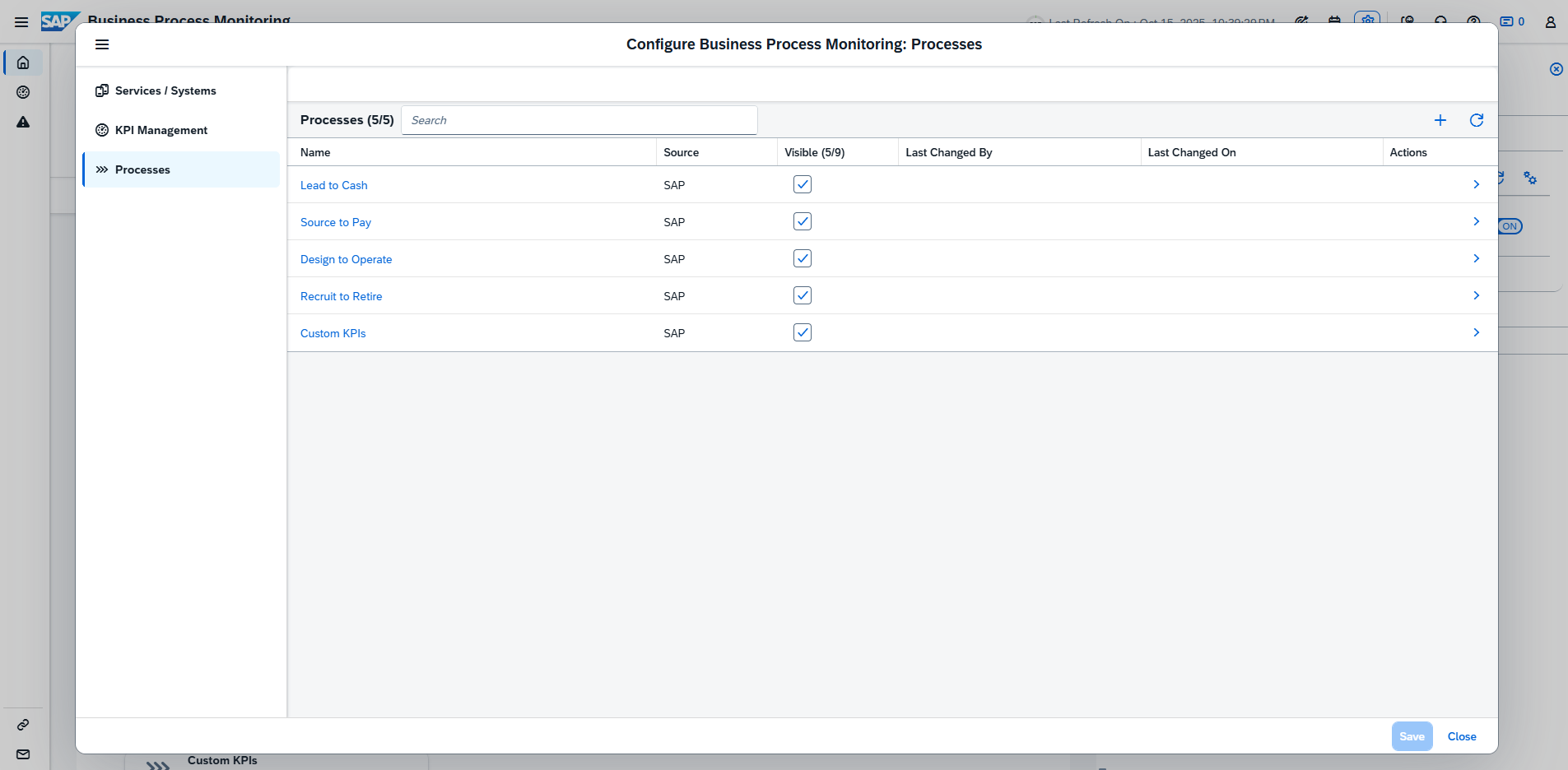
From the list, it is possible to:
- Access detailed information about process nodes and assigned KPIs.
- Restructure and modify process nodes for custom processes.
- Add or remove KPIs.
- Create new custom processes as needed.
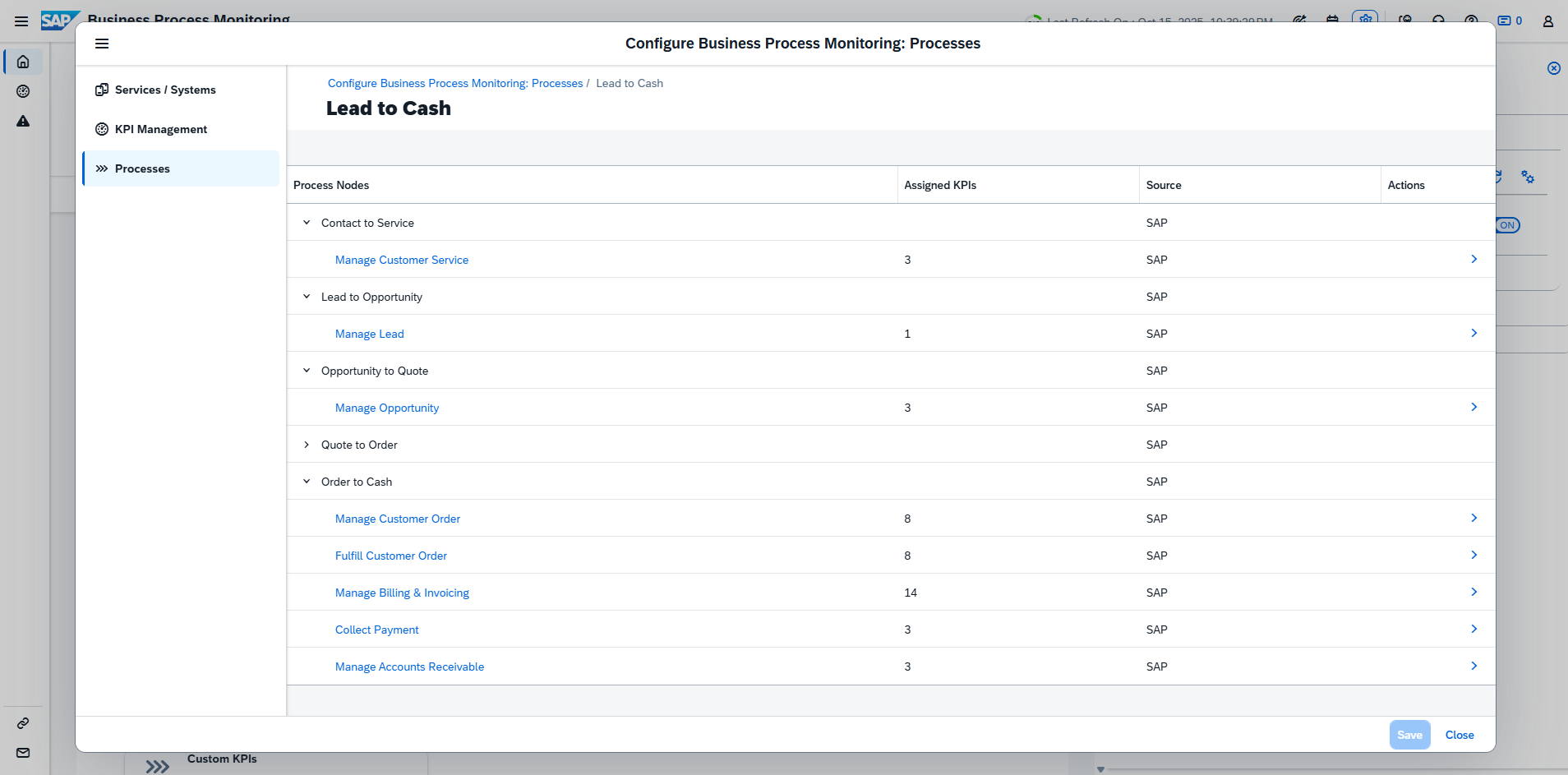
This update enables a more accurate reflection of business operations and simplifies the management of monitored process structures.
TL;DR:
Custom processes can now be created and configured in Business Process Monitoring, allowing closer alignment with organizational workflows and KPIs.
New App: Configuration & Security Analysis – Validation
A new app, Configuration & Security Analysis – Validation, is now available in SAP Cloud ALM. This app introduces validation and compliance checking capabilities, allowing organizations to assess whether their systems and services comply with SAP’s recommended security configurations.
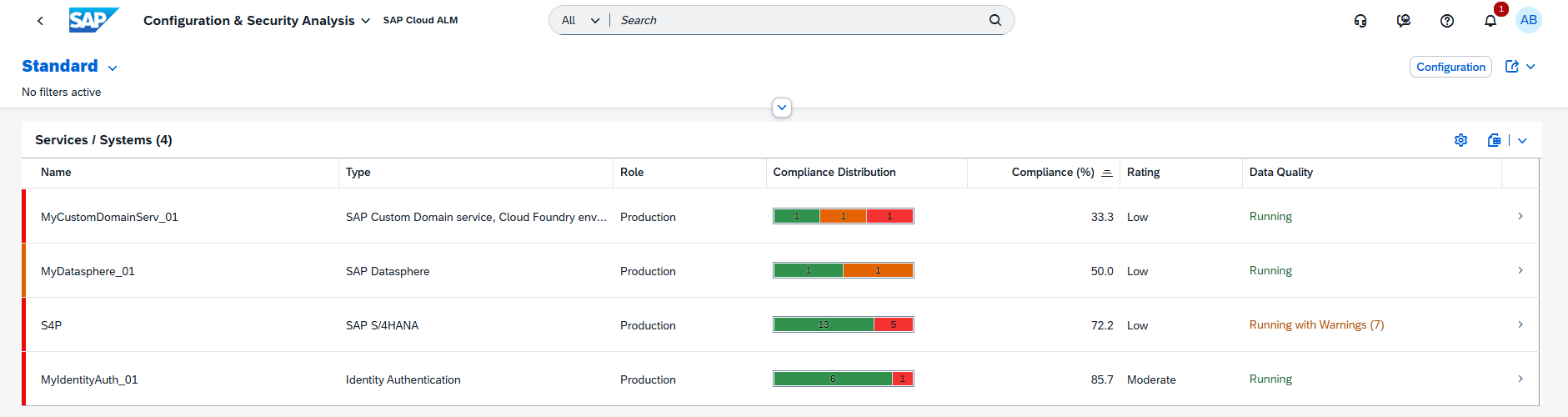
Key capabilities include:
- Running automated compliance checks against predefined SAP security recommendations.
- Viewing compliance scores that summarize how closely each system aligns with best practices.
- Accessing the app directly from the SAP Cloud ALM Launchpad or via Validation in the left navigation of the Configuration & Security Analysis area.
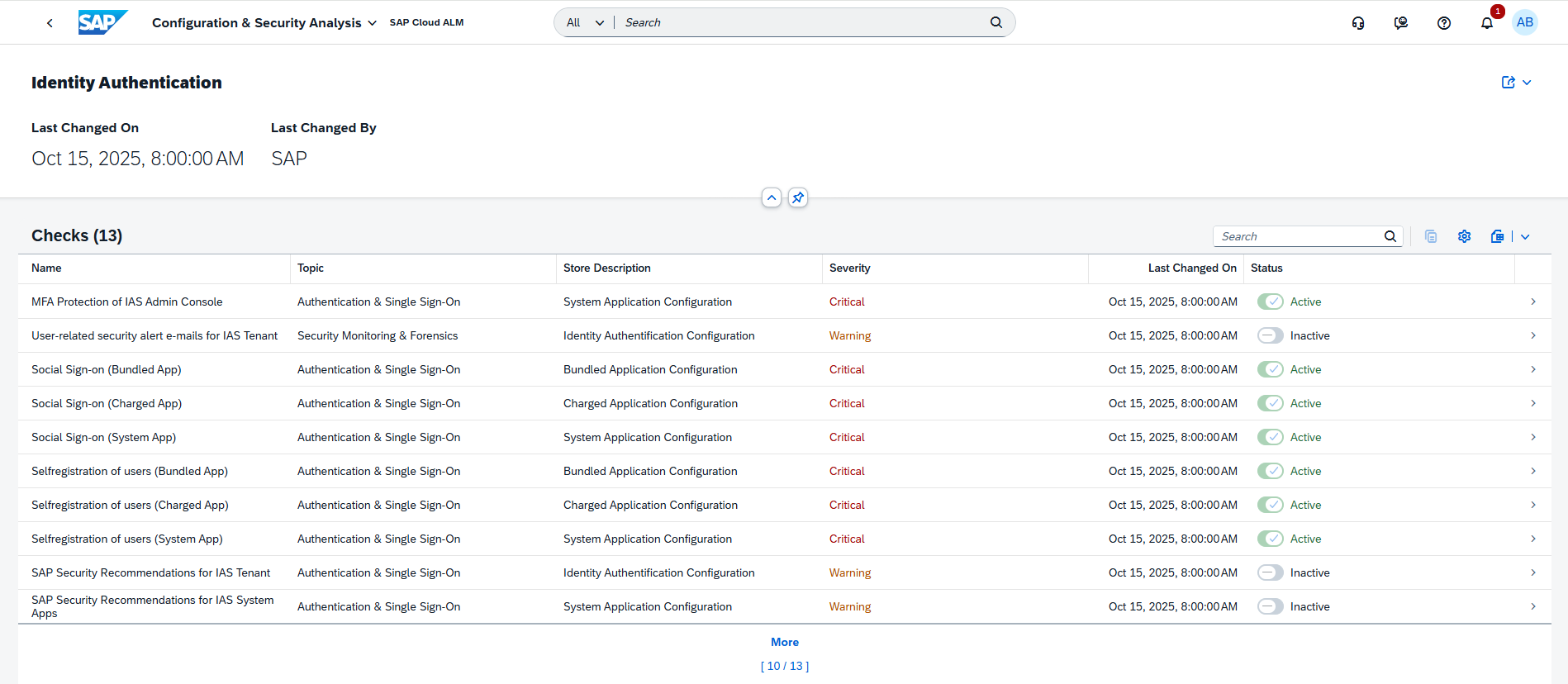
These new validation functions provide actionable insights into configuration quality and help maintain secure, compliant system landscapes.
TL;DR:
A new Validation app enables automated compliance checks and scoring, helping assess alignment with SAP’s security recommendations.
Name Change in Configuration & Security Analysis
The Configuration & Security Analysis app has been renamed to Configuration & Security Analysis – Data Stores, marking the first step in separating its different capabilities for clearer navigation and focus.
This change helps distinguish between the existing functionality for collecting configuration data and the new validation-focused features introduced in a separate app.
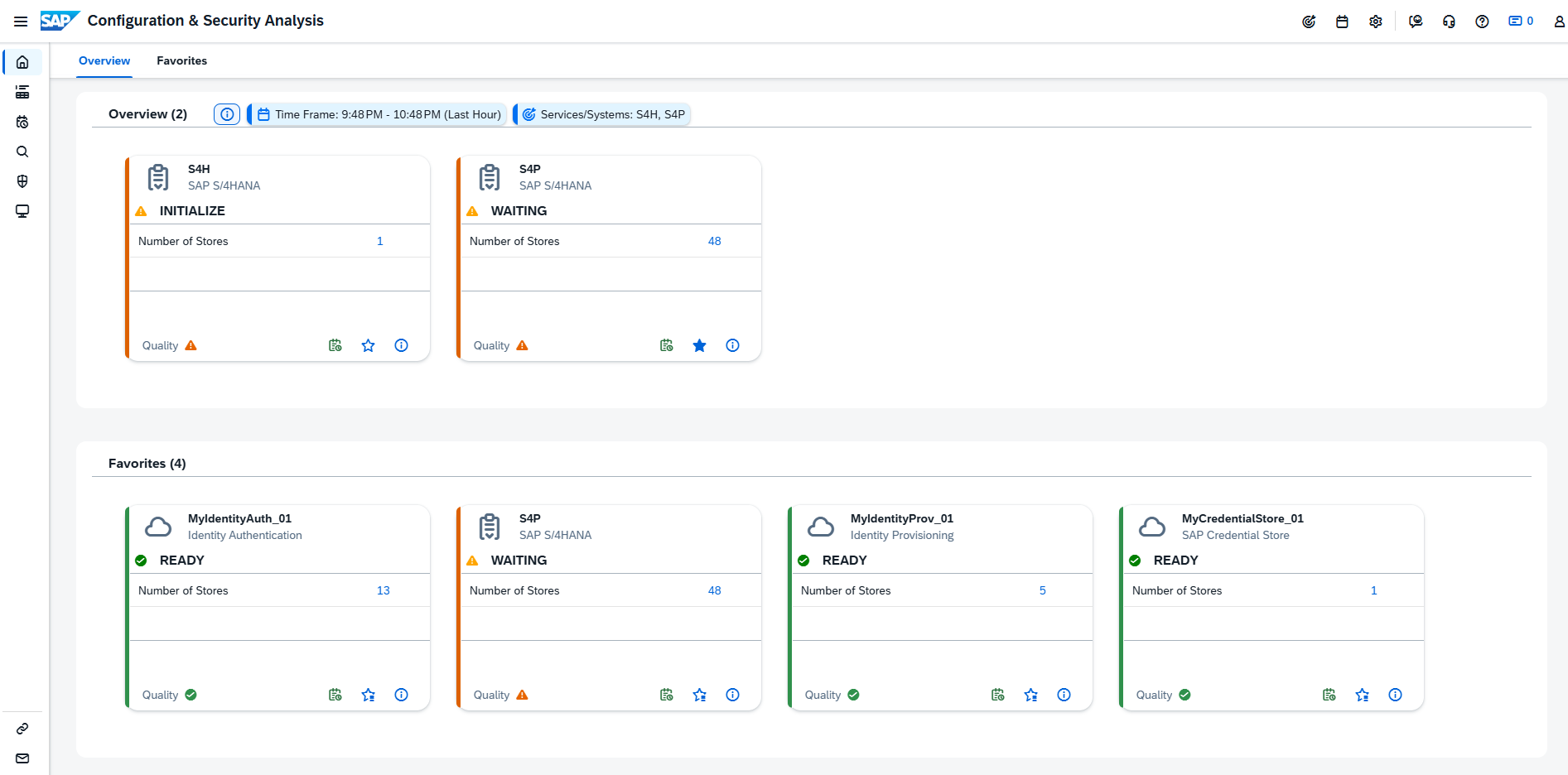
The following applications are now available under Configuration & Security Analysis:
- Configuration & Security Analysis – Data Stores: The existing application for collecting configuration items from systems and services, and for browsing and analyzing data stores.
- Configuration & Security Analysis – Validation: A newly introduced app dedicated to compliance checks and validation. It allows direct access to validation capabilities via the Validation option in the left navigation or a separate launchpad tile.
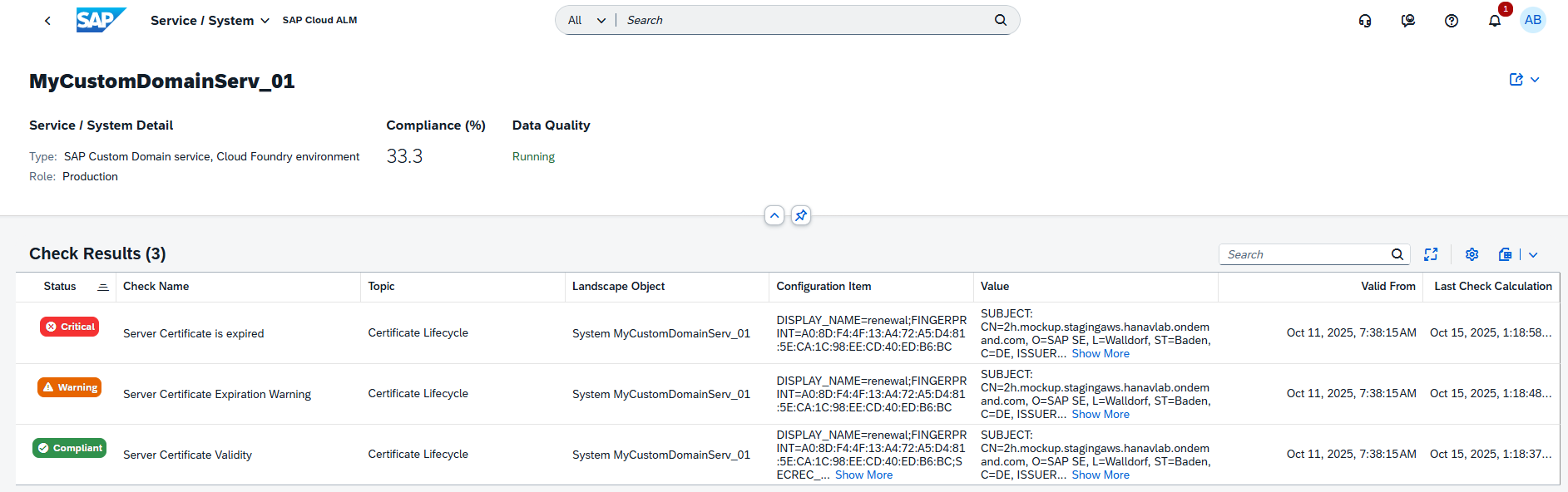
This renaming ensures a more structured experience, making it easier to navigate between data collection and validation activities.
TL;DR:
The Configuration & Security Analysis app is now split into two – Data Stores for configuration collection and Validation for compliance checks – providing clearer functional separation.
Implementation – Documents, Process Authoring, Processes
This week’s updates in the Implementation area enhance control, traceability, and collaboration across key project activities – from documentation and process design to test management. Teams can now assign responsible users and receive targeted notifications for document updates, manage access and test case relations more securely in Process Authoring, and directly maintain test cases within solution processes and diagrams. Together, these improvements streamline day-to-day project work, strengthen governance, and make it easier to keep implementation artifacts consistent and aligned across teams.
Assign Responsible Users and Receive Document Notifications
The latest enhancements in the Documents app further strengthen governance and collaboration around project documentation. Two new capabilities make it easier to manage accountability and stay informed about document changes.
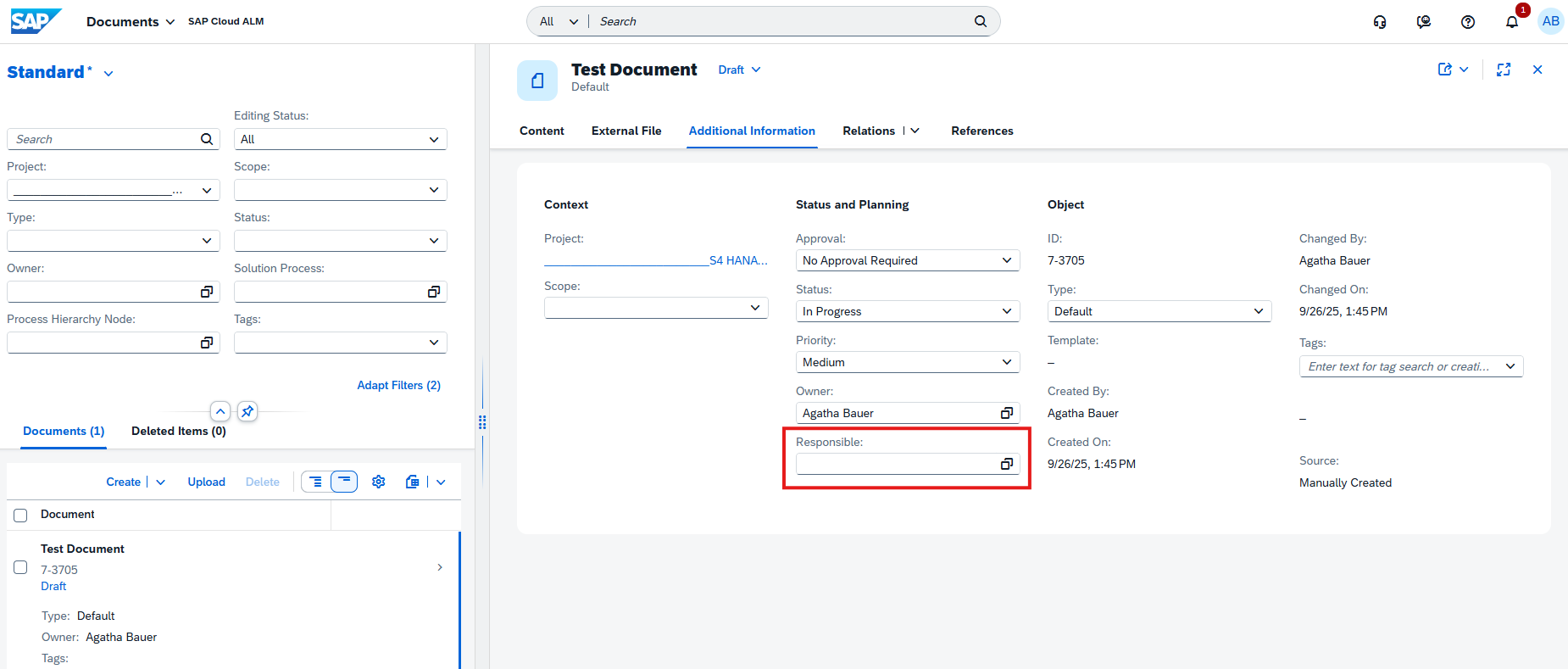
First, a new Responsible attribute has been added to the Additional Information tab. The Responsible user acts as an active contributor – they can receive notifications about updates, perform approvals, and edit the document. This role supports better collaboration by clearly defining ownership for document actions.
Keep in mind that same person cannot be both the Owner and Responsible for a document.
Second, the app now includes new notification options, allowing users to stay updated on key document activities. Notifications can be triggered when:
- A document is assigned to you.
- The status or content of a document changes.
- The approval state of a document is updated.
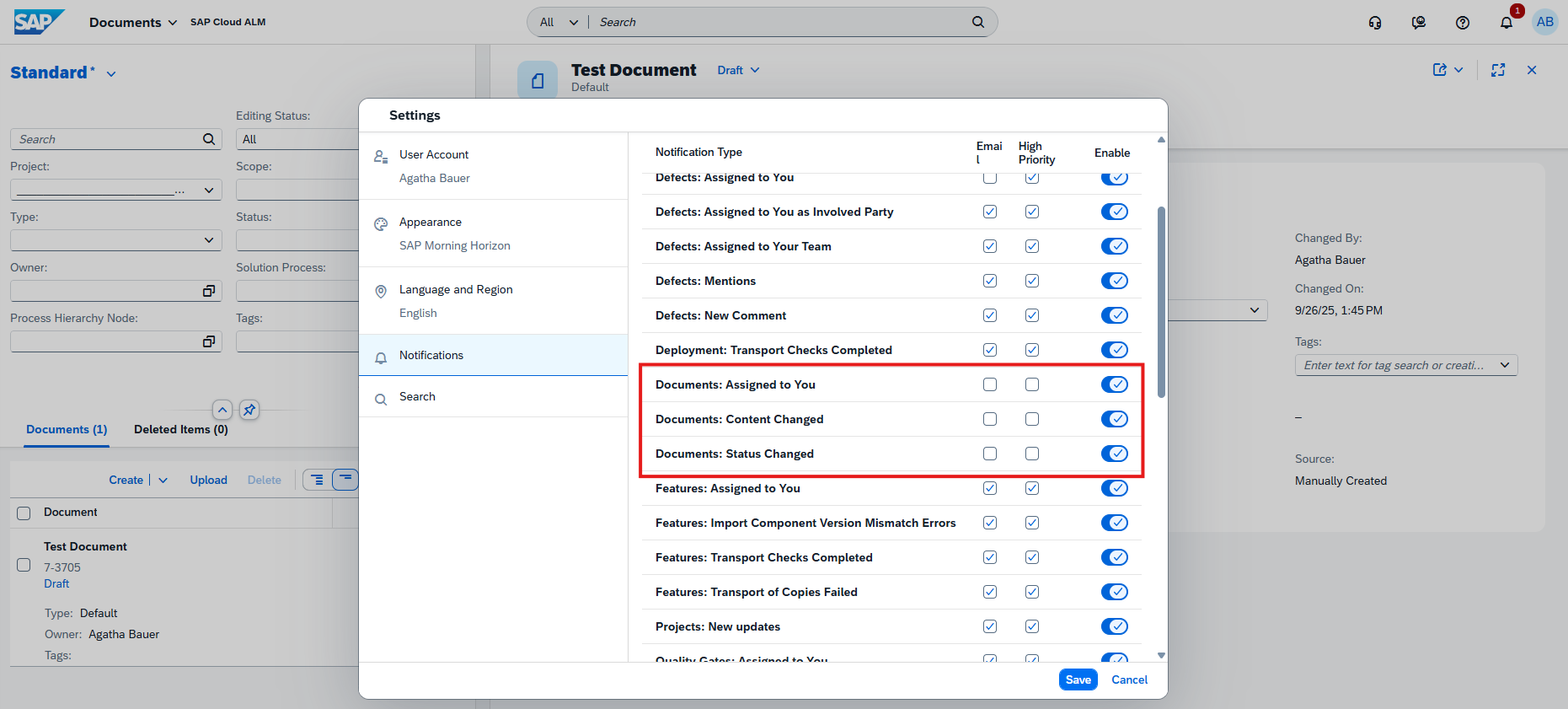
These enhancements help ensure that document workflows remain transparent and responsive, making it easier for teams to coordinate reviews and maintain control over evolving project assets.
TL;DR:
Assign a Responsible user to share accountability and receive targeted notifications when document content, status, or approvals change – improving transparency and collaboration.
Improved Access Control and Test Case Management in Process Authoring
The Process Authoring app receives significant usability and security improvements that help ensure users see and manage only what’s relevant to their role and permissions – while making it easier to connect test cases directly to solution activities.
With this update, users can view and maintain only those relations for which they have the appropriate access authorization. This restriction is based on their assigned roles and the project-level access controls defined in SAP Cloud ALM. Unauthorized relations now appear as “Unauthorized Item” entries in the list, helping maintain transparency while protecting sensitive content.
In edit mode, users can only modify relations tied to entities they’re authorized to maintain – meaning some sections may include active Assign/Unassign options, while others remain read-only.
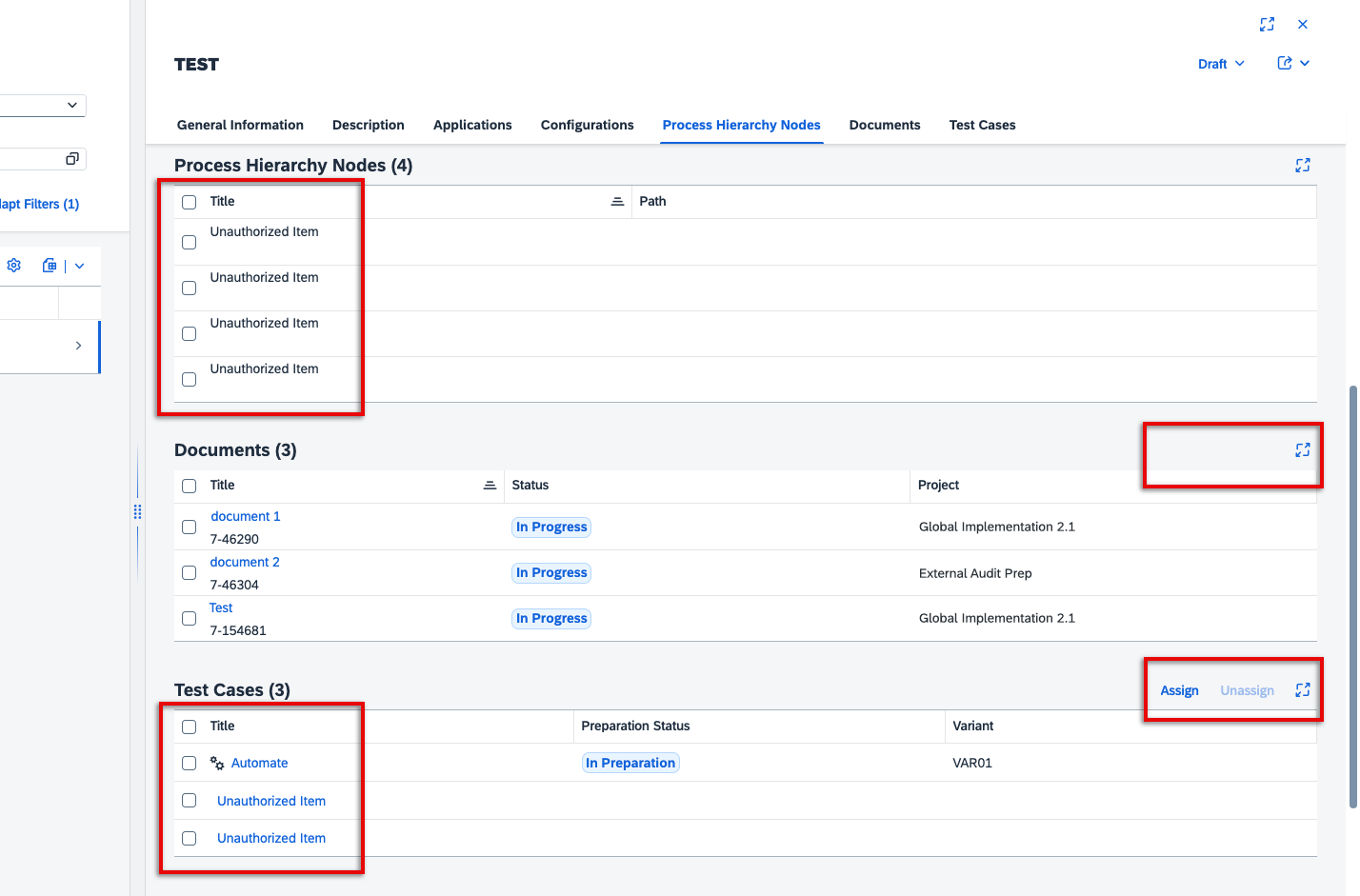
In addition, users can now view and manage test cases directly from a solution activity’s detail view. Each assigned test case shows its title, preparation status (In Preparation or Prepared), variant (if applicable), and type (manual or automated). From edit mode, users can assign or unassign test cases on the spot, with the test case name linking directly to its detailed view in the Test Preparation app for seamless navigation.
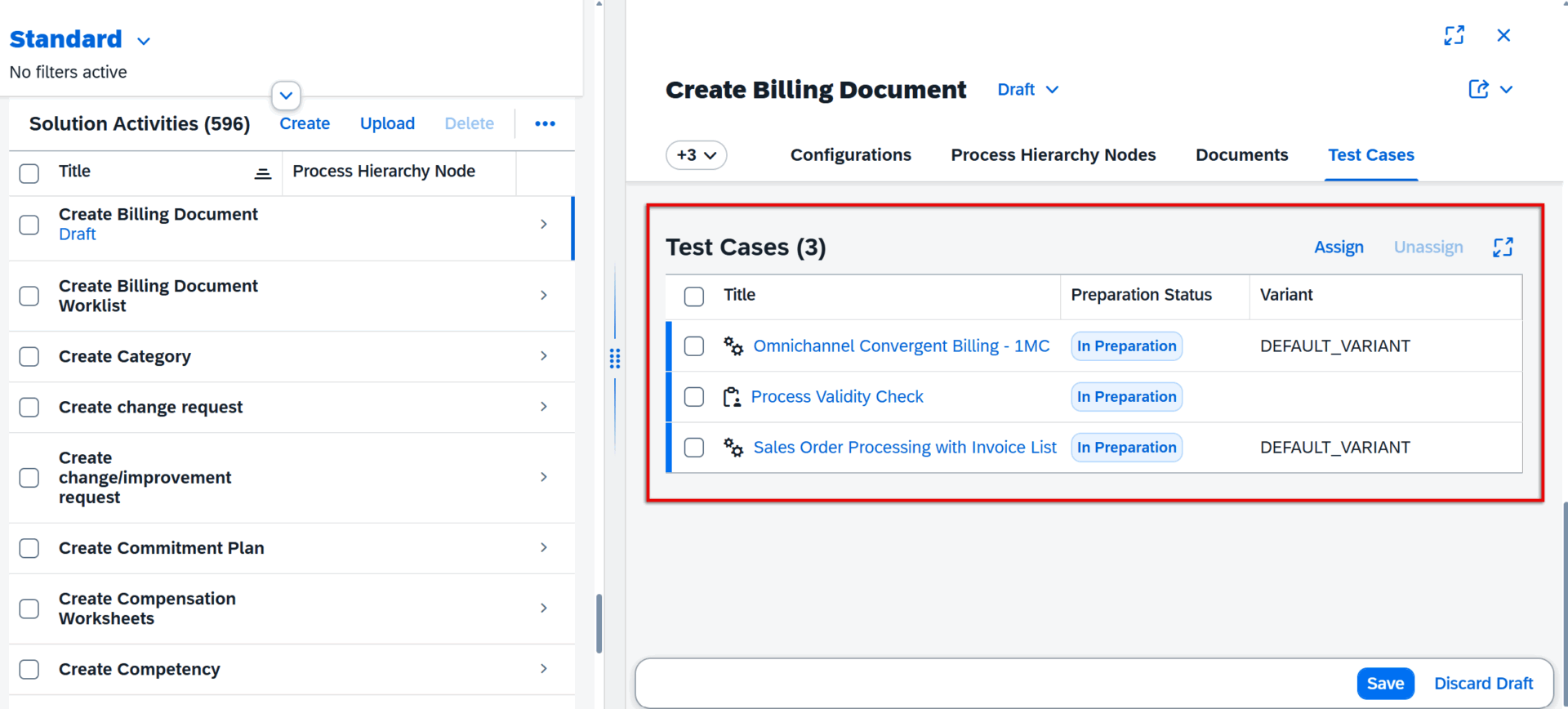
Together, these enhancements give project teams finer-grained access control and more integrated test management, ensuring data integrity while improving authoring efficiency.
TL;DR:
Users now see and edit only authorized relations in Process Authoring and can directly view, assign, and unassign test cases for solution activities – improving control, security, and workflow efficiency.
Maintain Test Cases for Solution Process Entities
The Processes app now provides greater flexibility in managing test case assignments, allowing users to directly link testing assets with solution processes and process flow diagrams.
With this update, users who have the appropriate authorization can assign and unassign test cases directly from the Solution Process Viewer. Multiple test cases can be assigned in a single action, simplifying setup and maintenance for complex project scopes. Only test cases that belong to the current project and scope – and are not already assigned to another process or diagram – can be added.
Assignments follow a clear hierarchy:
- Assigning a test case to a solution process flow diagram also links it to the parent solution process automatically.
- Conversely, unassigning a test case from a diagram will remove it from the parent process as well.
- Test cases originally assigned in Process Authoring cannot be unassigned here.
It’s also important to note that automated test cases can be assigned to solution processes, while manual test cases apply to process flow diagrams. This structure ensures consistency in how testing is aligned with different process types.
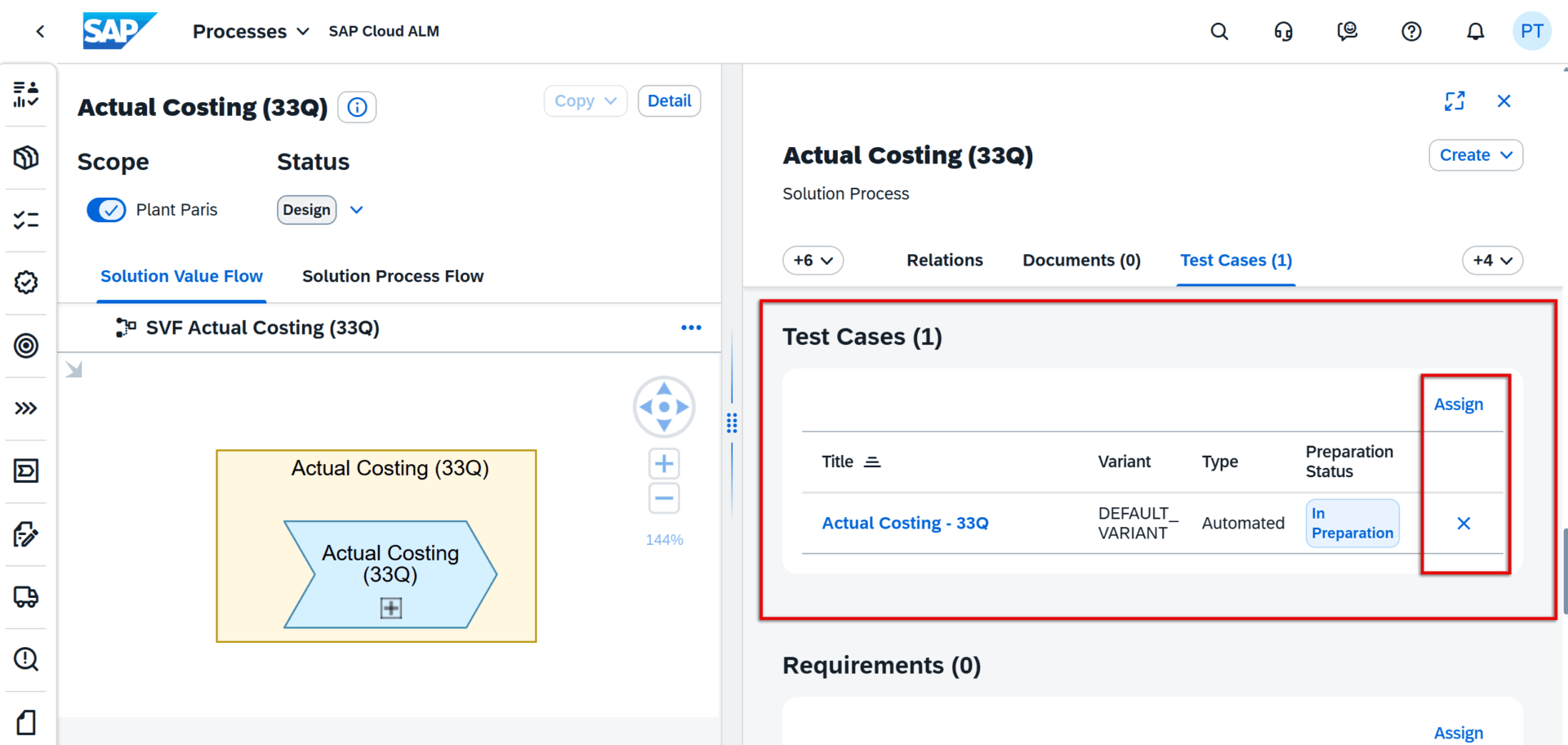
These enhancements strengthen the integration between process design and testing, helping teams maintain traceability and ensuring that every process element is validated appropriately.
TL;DR:
Users can now assign and unassign test cases for solution processes and flow diagrams directly in the viewer – with hierarchy-based behavior and support for both automated and manual test cases, improving traceability and efficiency.
