

SAP Cloud ALM – What’s New in Week 51
SAP Cloud ALM continues to move forward with updates that emphasize precision, usability, and consistency. The week 51 release introduces data-driven insights in SAP Business Transformation Center, clearer structure in RISE with SAP Methodology, improved identity and landscape management in Administration, and practical productivity enhancements across Implementation and Operations. Together, these updates help teams work more efficiently while maintaining stronger control and transparency across their SAP landscapes.
SAP Business Transformation Center – Data Management
This update expands SAP Business Transformation Center with a stronger focus on data-driven decision-making. By introducing a dedicated Data Management domain, the platform now provides clearer insights into data quality and risks – helping teams prioritize actions, manage transformation complexity, and move ERP data to the cloud with greater confidence.
New Data Management Domain for Data-Driven Transformations
SAP Business Transformation Center introduces a new Data Management domain, designed to support data-driven SAP ERP cloud transformations. The focus is on delivering actionable insights and data health indicators that help teams manage risks, highlight priorities, and simplify decision-making throughout the transition.
The new domain is built around three tightly integrated applications:
- Manage Data Assessments – Create and manage data assessments per source system and client, forming the foundation for ongoing data quality evaluations.
- Manage Runs – Execute and monitor automated quality check runs based on defined assessments.
- Analyze Data Quality – Review KPIs, track inconsistencies, and drill down into specific data issues, including guidance on how to resolve them.
A data assessment is created once and then reused for periodic quality checks. From a single workflow, teams can switch seamlessly between assessment creation, run execution, and detailed analysis, with key parameters carried over automatically. This makes it easier to monitor data quality trends over time and act on issues early.
By providing transparency into data quality and clear guidance on remediation, the Data Management domain helps reduce migration risks and supports more confident, informed transformation decisions.
For more information, see Data Management.

TL;DR:
The new Data Management domain introduces assessments, automated quality runs, and analytics to deliver clear data quality insights – helping teams manage risks and make better decisions during ERP cloud transformations.
RISE with SAP Methodology – System View
The latest updates in the RISE with SAP Methodology area focus on improving transparency and decision-making around system lifecycle management. By extending System View insights with additional KPIs, teams gain a clearer understanding of upgrade behavior and its impact – supporting better planning and more predictable operations.
New Software Stack KPIs for Upgrade Planning
The System View dashboard has been enhanced with two new KPI cards under the Overview tab, providing better visibility into system upgrade history and impact:
- Technical Downtime per Upgrade – Shows the technical downtime associated with past upgrades.
- Upgrade History – Displays completed upgrade and update events over time.
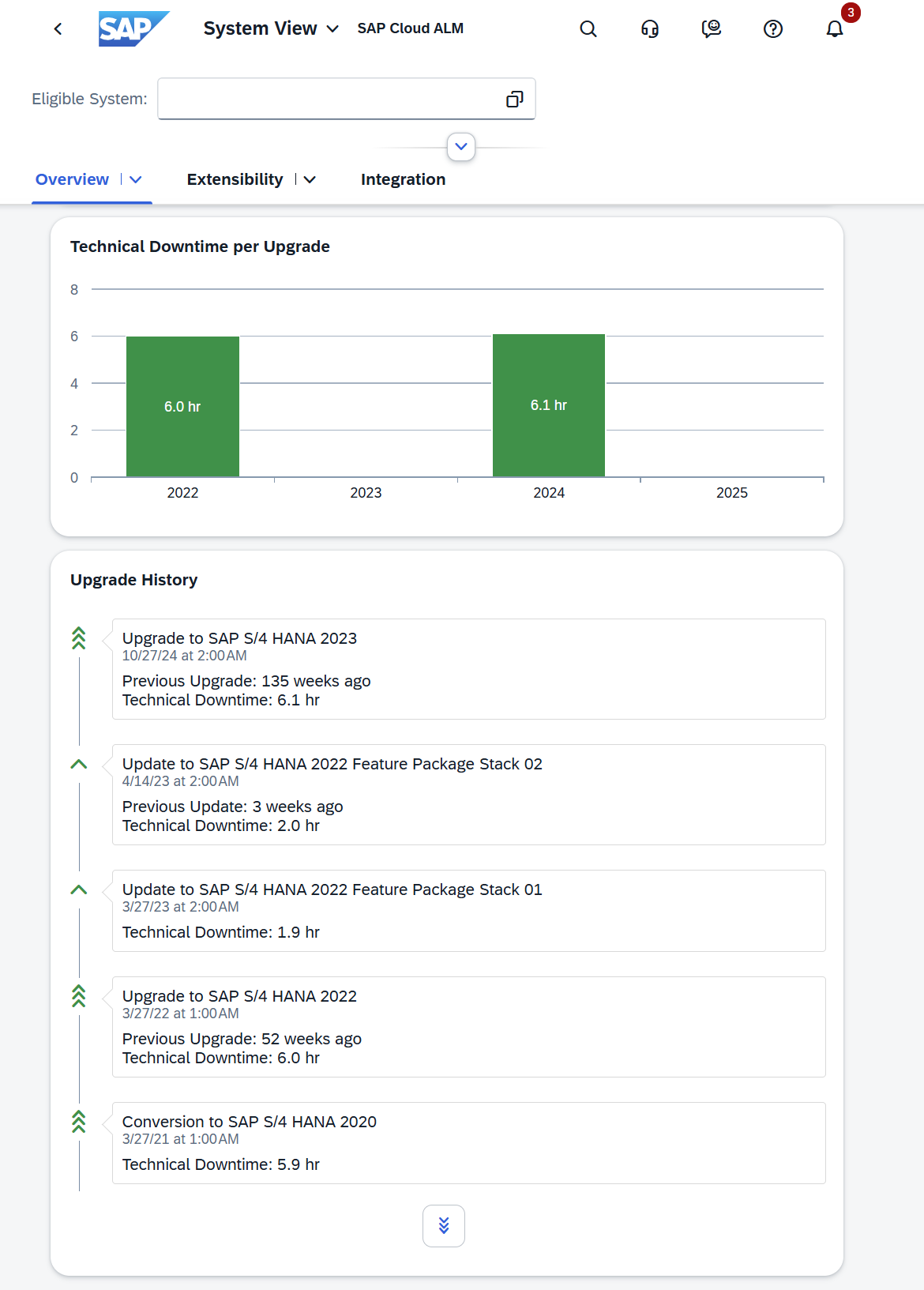
Together, these KPIs help teams better understand how often systems are upgraded and how much downtime upgrades typically introduce. This insight supports more informed planning of future upgrades, improved maintenance scheduling, and clearer communication with stakeholders about system availability.
Restrictions to note:
In certain scenarios, these cards may appear empty due to technical limitations:
- For SAP S/4HANA systems, required historical data may be unavailable, even if lifecycle events (such as conversions or upgrades) have occurred.
- For SAP HANA Enterprise Cloud systems without lifecycle events yet, the information may also be unavailable.
In these cases, no action or support request is required.
TL;DR:
Two new System View KPIs – Technical Downtime per Upgrade and Upgrade History – provide better insight into past upgrades and downtime, helping teams plan future upgrades more effectively.
Operations – Business Process Monitoring, Business Service Management, Configuration & Security Analysis, Integration & Exception Monitoring
The latest updates in the Operations area focus on stronger governance, clearer insights, and easier system lifecycle management. New capabilities enhance access control, improve compliance visibility, refine business and service monitoring, and simplify clean-up activities – helping operations teams maintain control, transparency, and efficiency across their landscapes.
Access Control for Monitoring Data, Custom Process Enhancements and New KPI for SAP Revenue Growth Management – Business Process Monitoring
Access Control for Monitoring Data
Access control lists defined in Landscape Management now also apply to Business Process Monitoring. When access control is active, users can only see monitoring data, alerts, and configuration options for the services and systems they are explicitly entitled to. These restrictions apply across the Home, Monitoring, Configuration, and Alerting pages and complement existing access group settings within Business Process Monitoring.
Custom Process Enhancements
Working with custom processes is now more efficient and user-friendly. Processes can be copied to speed up configuration, KPI assignment provides additional attributes such as KPI ID and source (standard or custom), and custom process nodes can be pinned to the Home page as favorites for quick access.
New KPI for SAP Revenue Growth Management
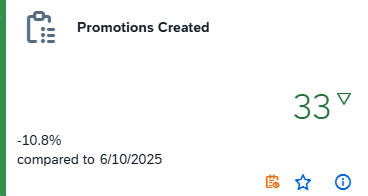
A new KPI, Promotions Created, is now available for SAP Revenue Growth Management. Once the required setup steps are completed, the KPI is activated automatically. As it’s not part of the standard end-to-end processes, it must be assigned to a custom process to be monitored.
TL;DR:
Business Process Monitoring now enforces landscape-based access control, offers richer and more reusable custom process handling, and adds a new KPI for SAP Revenue Growth Management – improving security, usability, and business insight.
Impact Reassessment for Status Events – Business Service Management
Business Service Management now supports Impact Reassessment directly in the Event Calendar. This enhancement allows teams to reassess the impact of status events – such as disruptions or degradations – after detection and resolution, especially in cases where events were identified as false positives and notifications can no longer be changed.
With impact reassessment, additional context can be documented in a text field, and the reassessment is treated as a status update for the event. Once updated, the changes are reflected consistently across the system, including the event’s end time, overview cards, the Event Calendar or tabular views, and the action logs. Any configured event actions are also triggered based on the updated information.
TL;DR:
Impact Reassessment enables teams to correct and document false-positive status events, with updates automatically reflected across calendars, dashboards, logs, and event actions.
Enhanced Compliance Visibility and Check Transparency – Configuration & Security Analysis
Configuration & Security Analysis now provides clearer, more actionable insights into compliance status across both Data Stores and Validation.
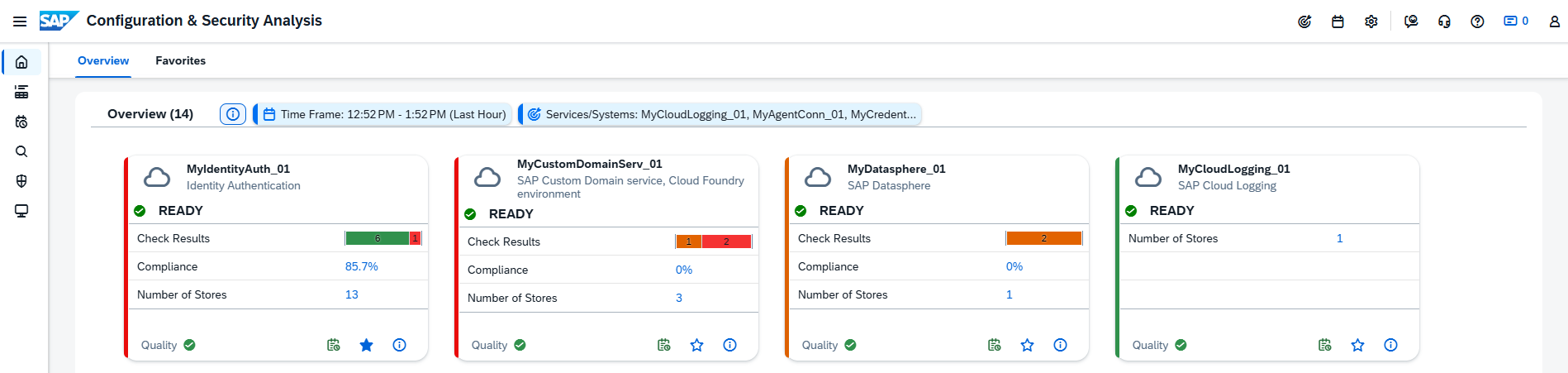
In the Configuration & Security Analysis – Data Stores app, overview cards now include Check Results and an overall Compliance Score, sourced directly from the Validation app. This gives teams an at-a-glance understanding of how services and systems align with SAP security recommendations. The new metrics are also factored into the card color calculation, making compliance issues immediately visible. From the overview, users can jump straight to the relevant check results in the Validation app for deeper analysis.
At the same time, the Configuration & Security Analysis – Validation app now offers richer detail for each check result. Selecting an entry in the Check Results table opens a side panel with comprehensive information, including the check description, severity, related store and topic, and runtime context such as affected systems, configuration items, and values. Warnings and critical findings are clearly highlighted to support faster remediation.

TL;DR:
Compliance status is now visible directly on overview cards, and detailed check insights are available in Validation – making it easier to spot issues quickly and understand exactly what needs attention.
Central Clean-Up for Integration & Exception Monitoring
A new clean-up option is now available for Integration & Exception Monitoring directly from the Landscape Management app. Using the Clean-Up action, administrators can remove both configuration and collected monitoring data for a specific service or system in a single step.
This option is available in the Actions column under Services/Systems à Supported Use Cases in Landscape Management. Once executed, the configuration for Integration & Exception Monitoring is deleted, all related monitoring data is removed, and the service or system is reset to a Not Configured state.

This enhancement simplifies lifecycle management, making it easier to retire systems, reset configurations, or clean up obsolete monitoring data without navigating multiple apps.
TL;DR:
Integration & Exception Monitoring configurations and data can now be centrally removed via Landscape Management, resetting services or systems to a clean, unconfigured state.
Implementation – Retrofit, Features, Requirements, Test Execution, Test Preparation
The latest updates in the Implementation area focus on improving structure, traceability, and efficiency across projects. From stronger support for retrofitting and AI-assisted requirements, to enhanced testing, document handling, and project organization, these enhancements help teams work more consistently, reduce manual effort, and maintain better control throughout the implementation lifecycle.
New app: Retrofit
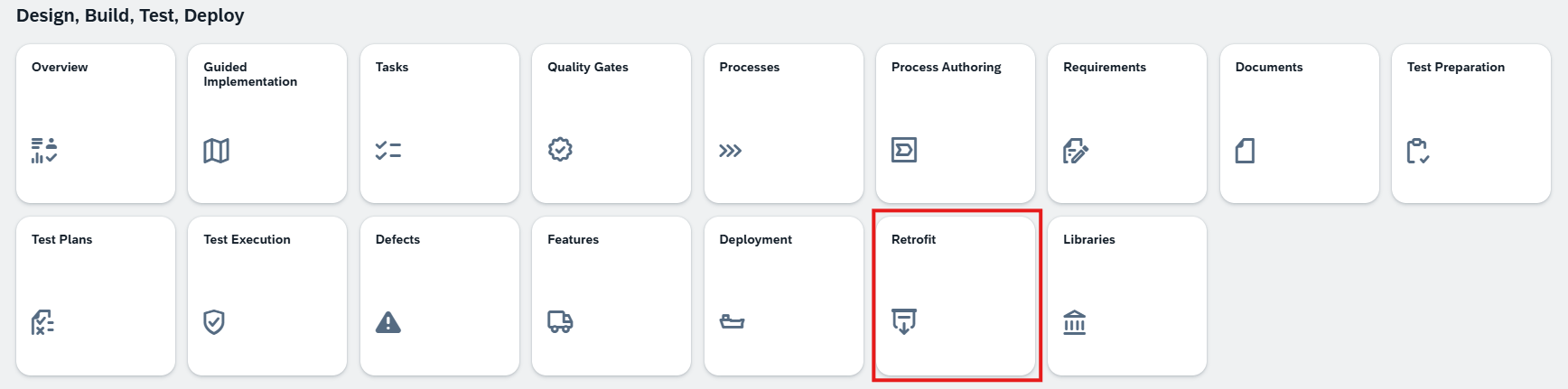
A new Retrofit app is now available in SAP Cloud ALM, designed to support dual-track (n+1) development landscapes. The app enables the synchronization of changed objects – both customizing and workbench – from a maintenance development system into an implementation development system, helping teams keep parallel tracks aligned.
Retrofit is especially valuable in landscapes where maintenance and innovation run in parallel. Instead of manually moving transport requests between systems, the app detects differences automatically and supports controlled synchronization, including conflict detection when the same object has been changed in both tracks. This reduces risk, avoids overwriting changes unintentionally, and improves transparency in complex release scenarios.

Currently, the Retrofit app supports CTS-managed landscapes and provides a structured way to manage ongoing maintenance fixes alongside new project developments – ensuring that system versions stay consistent over time without slowing down delivery.
TL;DR:
The new Retrofit app simplifies synchronization between maintenance and project systems in dual-track landscapes, helping teams manage parallel changes, detect conflicts, and keep releases aligned.
Retrofit Integration in Transports – Features
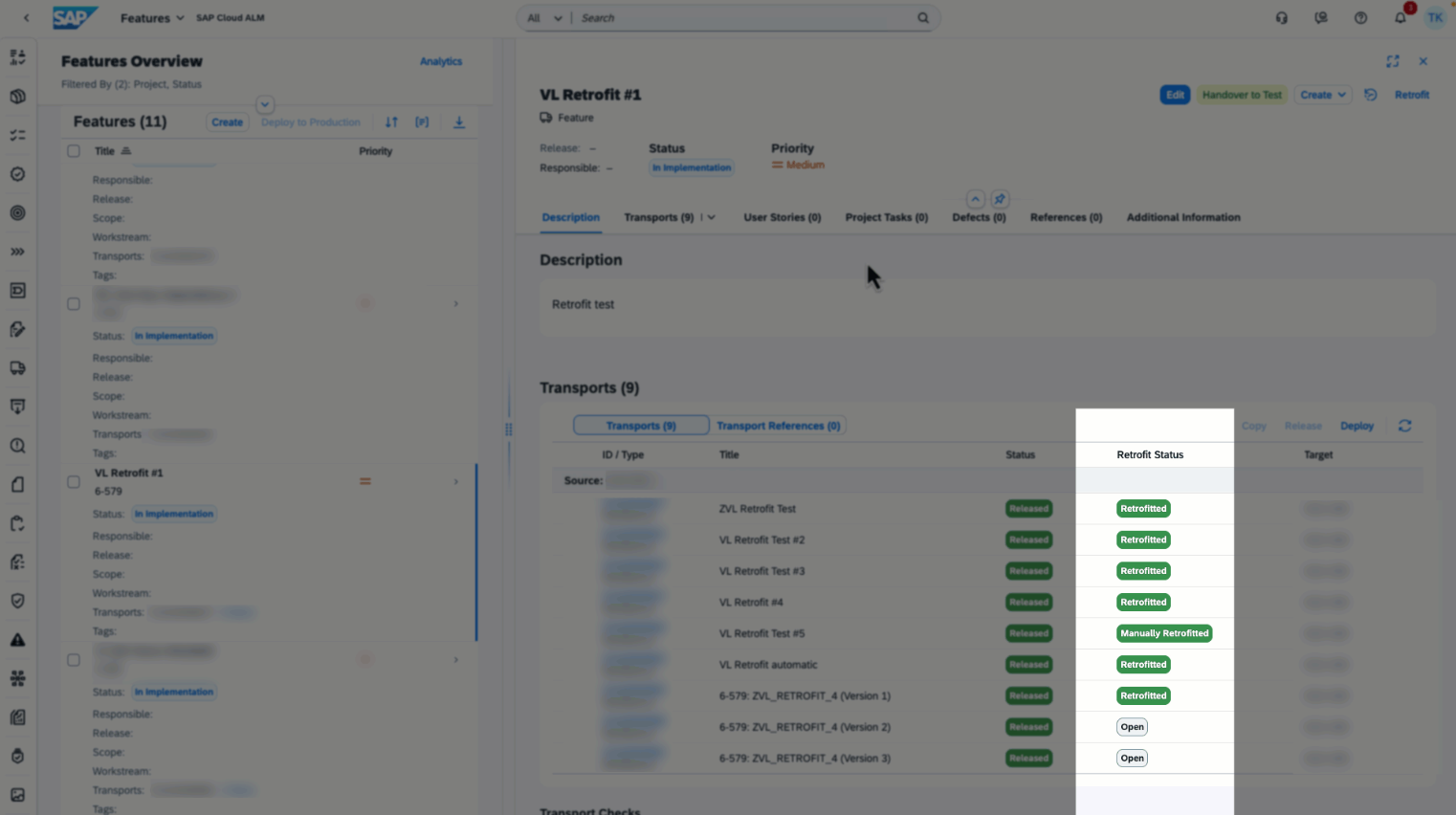
Retrofit capabilities are integrated directly into the Features, making it easier to track retrofit relevance without leaving your current context. In the Transports section, a new Retrofit Status column shows the retrofit status of source transports.
The status values are aligned with those in the Retrofit app and include an additional Not Applicable status for transports that don’t require retrofitting. This gives teams immediate visibility into whether a transport needs attention, helping them manage dual-track landscapes more efficiently.
If retrofit isn’t configured for the landscape, the Retrofit Status column is hidden, keeping the interface clean and relevant. For users with the required authorizations, the header also provides a direct navigation link to the Retrofit app, allowing quick follow-up and deeper analysis when needed.
TL;DR:
Retrofit status is visible directly in the Transports view, giving instant insight into which transports require retrofitting and enabling quick navigation to the Retrofit app.
Smarter Requirement Creation and Reuse – Requirements
Two new enhancements in the Requirements area make it easier to create and manage requirements across projects, reducing manual effort while improving reuse and consistency.
AI-Assisted Requirement Generation
SAP Cloud ALM now supports AI-generated requirements based on existing project context. The AI uses inputs such as Fit-to-Standard workshop transcripts, solution processes, and related project documents to propose requirement content. This helps teams accelerate requirement creation, ensure better alignment with documented discussions, and reduce the risk of missing key points early in the project lifecycle.
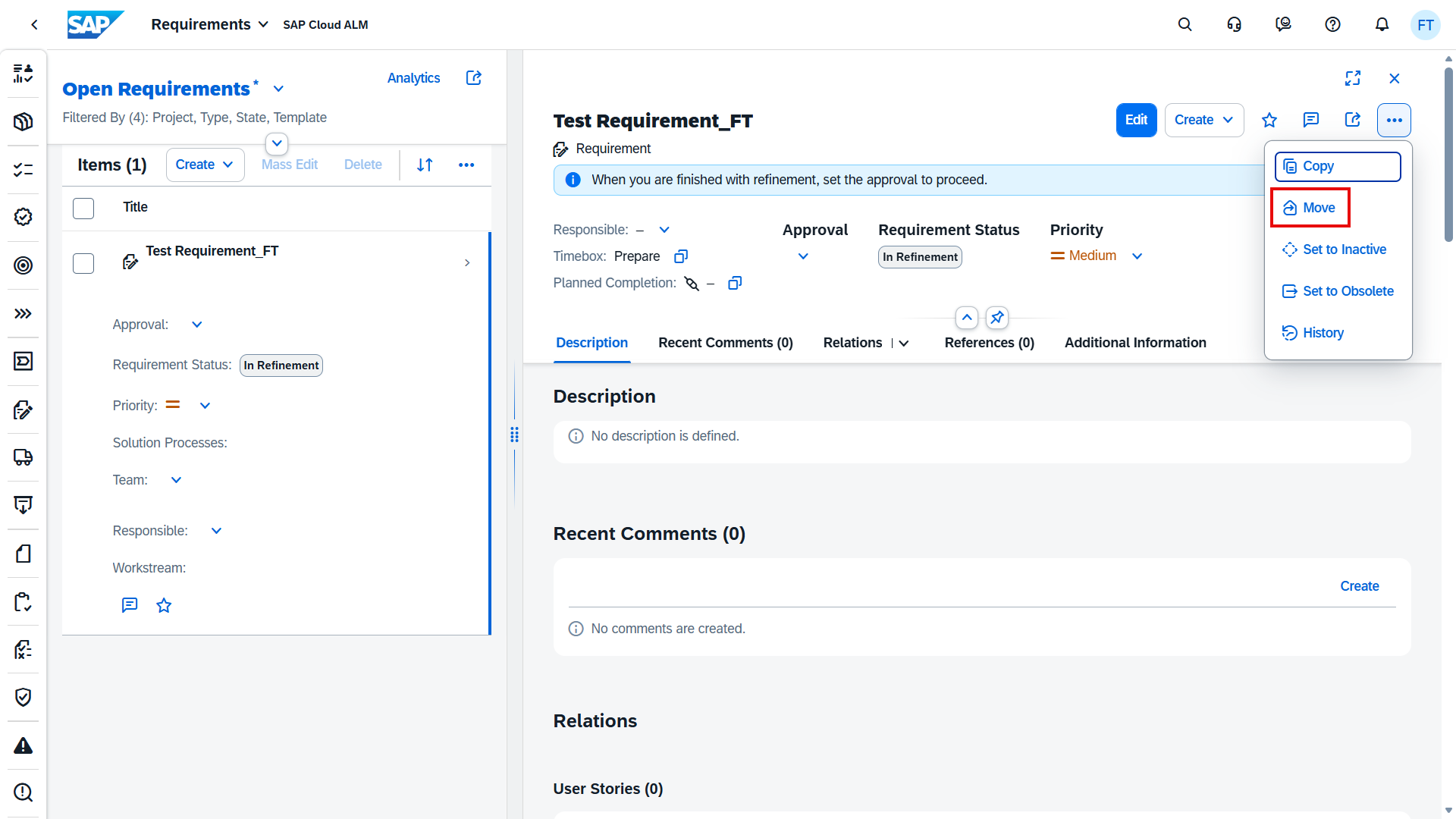
Move Requirements Between Projects
Requirements can now be moved from one project to another. This is especially useful when scopes change, projects are restructured, or requirements need to be reused across initiatives. Instead of recreating content, teams can simply transfer existing requirements and continue working without losing history or context.
TL;DR:
Create requirements faster with AI-generated content based on project documents, and move requirements between projects to support reuse and changing scopes.
Enhanced Test Preparation and Execution with Evidence Support
Several improvements across Test Preparation and Test Execution make manual testing more structured, traceable, and audit-ready. During test preparation, test designers can now define which test actions require testers to provide screenshots as evidence during execution. This ensures a clear and verifiable record of what was tested and the actual results for critical steps.

On the execution side, this evidence concept is now fully enforced. For manual test cases, testers are required to upload screenshots for actions where evidence is mandatory, while still being able to add screenshots optionally for other actions. This new evidence handling replaces the former Comments field, providing a more consistent and outcome-focused way to document test results.

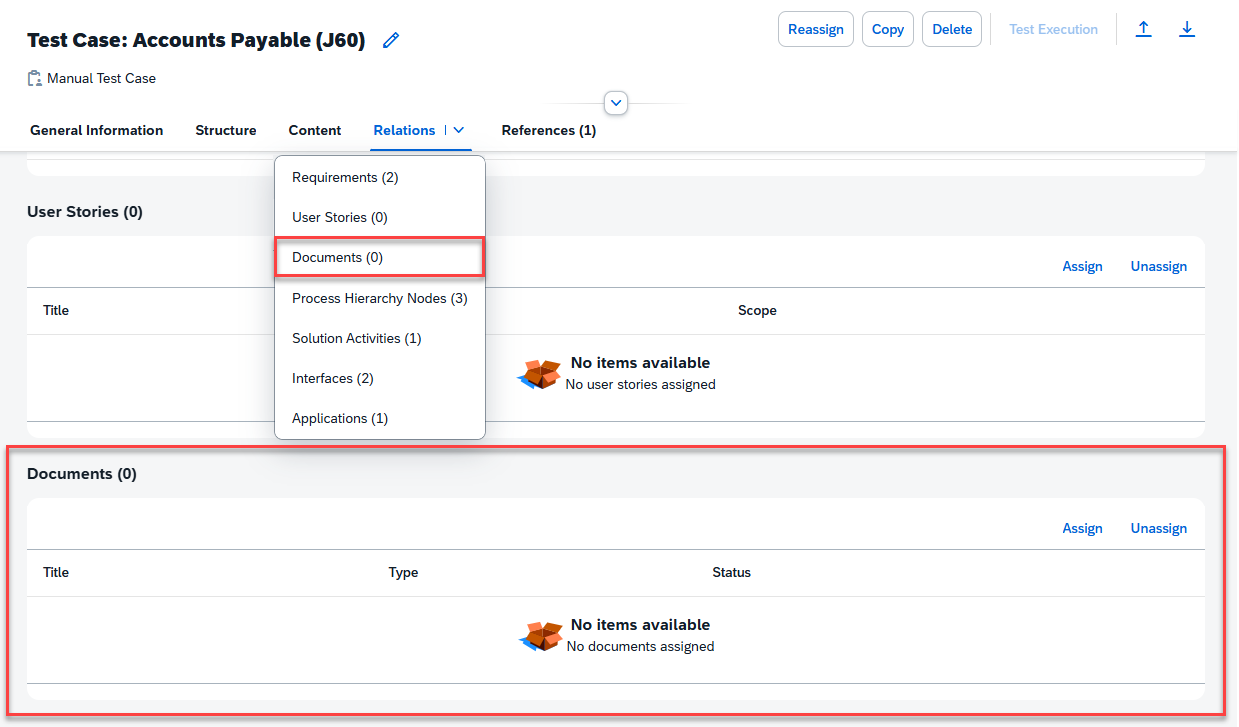
In addition, the generation of manual test cases from solution process flow diagrams has been refined. The activity sequence now more closely matches the order of solution activities in the diagram, reducing manual rework and making test cases easier to follow. Test cases can also be linked directly to relevant project documents, ensuring testers have the necessary context and guidance at hand during preparation and execution.
TL;DR:
Define mandatory screenshot evidence in test preparation, enforce evidence capture during test execution, benefit from improved activity sequencing, and link relevant documents to test cases for clearer, more reliable manual testing.
Administration – Landscape Management
The latest enhancements in the Administration area focus on improving system maintainability and clarity. Updates in Landscape Management help optimize memory usage while also making it easier to clearly identify cloud service tenants – supporting administrators in keeping landscapes clean, compliant, and easy to manage.
Action Log Housekeeping for Memory Optimization
To reduce unnecessary data growth, SAP Cloud ALM now automatically cleans up Landscape Object–related action logs that are older than 90 days. This housekeeping runs in the background and helps optimize memory usage without manual effort from administrators.
Importantly, logs that are required for security purposes (such as Access Control) or legal reasons (for example, data transfer consent) are excluded from deletion and are retained indefinitely.
TL;DR:
Old landscape action logs are automatically cleaned up after 90 days, improving memory usage while keeping security- and compliance-relevant logs intact.
Enhanced Tenant Identification for Cloud Services
Identifying cloud service tenants is now clearer thanks to enhanced default descriptions in Landscape Management. For service types where tenant names alone aren’t sufficient, SAP Cloud ALM automatically enriches the description with an additional identifying attribute – such as the sub-account display name.
This enhancement is currently supported for:
- SAP HANA Cloud – Sub-account display name
- SAP Market Communication for Utilities – Sub-account display name
- Identity Provisioning – External tenant name
By making tenants easier to distinguish immediately, this update reduces ambiguity and simplifies landscape administration.
TL;DR:
Cloud service tenants are now easier to identify with enriched default descriptions, reducing confusion in complex landscapes.
Service – Issues and Actions Management
The latest update in the Service area further refines how issues and actions can be analyzed and filtered. With enhanced search options in Issues and Actions Management, service teams gain better visibility into responsibilities and communication touchpoints – making follow-ups more precise and service collaboration more efficient.
Enhanced Service Object Filter by Customer Contact
The Issues and Actions Overview page now offers an enhanced Service Object filter that allows teams to search for issues and standalone actions by Customer Contact. This refinement makes it easier to narrow down items related to specific customer stakeholders, improving traceability and follow-up in service delivery scenarios.
By enabling filtering based on customer contact details, service teams can more quickly identify relevant issues, streamline communication, and ensure that customer-related actions are handled efficiently and transparently.
TL;DR:
Filter issues and actions by Customer Contact to refine searches and improve visibility in service-related follow-ups.
