

ALM Coffeeparty X – Permissions for hybrid transport control
There are many ways to put your life at risk.
For example, you can get in the way of the legendary Ireland correspondent for the TAZ newspaper when the bell rings for last orders in the pub. Things get dicey when you break spaghetti for a carbonara in Rome and then—capital crime!—pour cream into the sauce! It also gets very unpleasant when you demand the highest quality from a craftsman but refuse to let him use the tools of his choice.
In our SAP ABAP world, transport requests are the tool developers use to record their work so that it can be sent to the production system. Preventing them from creating these transports themselves always generates a tsunami of protests. But that is exactly what we have to do in order to have a stringent transport workflow.
The time before ChaRM
In the ancient days of R/3 development, it was the task of the authorized project leader to create transport requests and then set up a task for each developer. When the developers had finished, they signaled this by releasing the task assigned to them. Once all tasks had been released, the project management could finally release the transport itself, which started the kernel programs tp and R3trans, which controlled by the transport objects read the database and wrote it to an archive file on disk.
However, this division of labor did not withstand the onslaught of developers, and pretty soon all developers and customizers were given the authority to create and approve transports themselves.
This was a paradise of freedom for development, and it was a chaotic hell for administrators and CCOE managers.
Not only were hundreds of transports lying around in the development system, with no one knowing what they were supposed to do – I have assisted more than once in rebuilding a completely botched development system out of a database copy of the QA system. Not only were hundreds of transports lying around in the import queues of the downstream systems, with no one knowing who had sent them to production, when, why, and why they had been left there.
Because now highly paid auditors came into the company, opened the import history of the production system, and with rhabdomantic certainty pointed their tiny fingers at a transport and asked the simple question of who had approved this change, who from the business had tested it and released it for production, and who had imported it into production: Lo and behold, it was a sensitive FI transport. The auditors are delighted with their hit: a finding! The application development management, however, turns pale: the audit certificate is at risk, and a career setback looms.
The Realm of ChaRM
After an interregnum of folders full of printed and signed forms, which nobody could find anything in quickly, but which at least appeased the auditors, according to the motto: the main thing is that they get a lot of paper in their hands, ChaRM was introduced in SAP Solution Manager at the beginning of 2005.
ChaRM now took over the role of project management for the creation and approval of transports. Only the activity of approving the respective transport tasks and thus signaling the end of development to the new electronic project manager remained with development.
But what a discussion! Because in a source system managed by ChaRM, you can no longer create transport requests using the ancient Transport Organizer transactions SE09/SE10, even though you would have had the authorization to do so since time immemorial.
Now, the transport attribute SAP_CTS_PROJECT for the work client forces you to specify such a CTS project when creating a transport request, and at the same time, the evil, deceitful ChaRM administrator ensures that the project switches for creating, releasing, and importing transports are always closed, preventing you from transporting data bypassing ChaRM.
Every ChaRM novice grumble and complains and denounces this requirement as an obstacle to their work. Well, as a ChaRM implementer and responsible person, you learn to be patient but obdurate.
Of course: Internally, ChaRM opens the project switches when transport-related status changes occur, executes the respective transport action, and quickly closes the switches again. Sometimes this open-close mechanism gets tangled up when these actions overlap with multiple users working almost simultaneously, but most of the time it works fine.
Unfortunately, word has gotten around about how easy it is to manipulate these project switches. In general, those responsible at the CCOE are content to use the method described in SAP Note 2207598 “What log shows the user who changed CTS Project Status Switch setting for a ChaRM project? – Solution Manager,” to find out who did it this time and then give them a stern talking-to. But – to paraphrase Hegel – Saint Anthony of Padua achieved more than he preached to the fish.
Strangely enough, no one has been able to bring themselves to reform the authorization roles. Experience has shown that such a change is tantamount to a Herculean task.

The Post-ChaRM Era
The mighty ChaRM (and its fair-weather Sunday version, Focused Build) now has a young successor in Cloud ALM, the Feature.

Since the feature no longer supports CTS projects, you must remove the constraint for setting the SAP_CTS_PROJECT attribute in the ABAP development system, thereby reopening the door to the warming old arbitrariness and cold chaos.
Previously, in my “ALM Coffee Party VIII,” I recommended creating transports in the ABAP system and then assigning them to the Feature due to the error-proneness associated with the transport creation. This avoids the confusion that arises when, due to incorrect “Owner” information, transports are created under the system user who performs the synchronization jobs.
Meanwhile, there has been a slight improvement. The ominous “Owner” input field is now a mandatory field, but the content is still not checked.
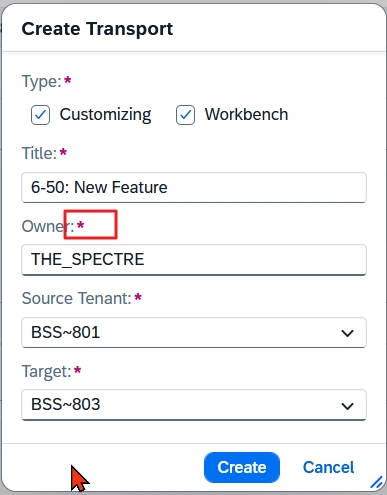
As long as the feature does not offer any input help for the “owner” and allows any selection of the “target,” we find ourselves in a dilemma!
If you prefer to avoid the error-prone creation of the transport from within the feature, you should, as suggested previously, create transports in the system and then assign them to the feature. The transports are thus automatically assigned to the correct user and target the correct system. However, there is a certain risk that chaos will ensue.
If, on the other hand, you want to avoid the chaos that arises when everyone is allowed to create transports, as we have learned from many years of painful experience, you must force the creation of transports from the feature and accept the current susceptibility to errors.
However, this dilemma is only temporary, as SAP will close the gaps in transport creation in the feature in the course of 2026, and then you can enforce the creation and release of transports only from within the feature without any risk.
Tuning of Authorization Roles
You could now set the transport attribute CALM_CDM_FEATURE_ID, which was introduced with note 3322679 “SAP Cloud ALM – CDM: Master Note up to ST-PI SP 24” to mandatory for the work client:
PIC09
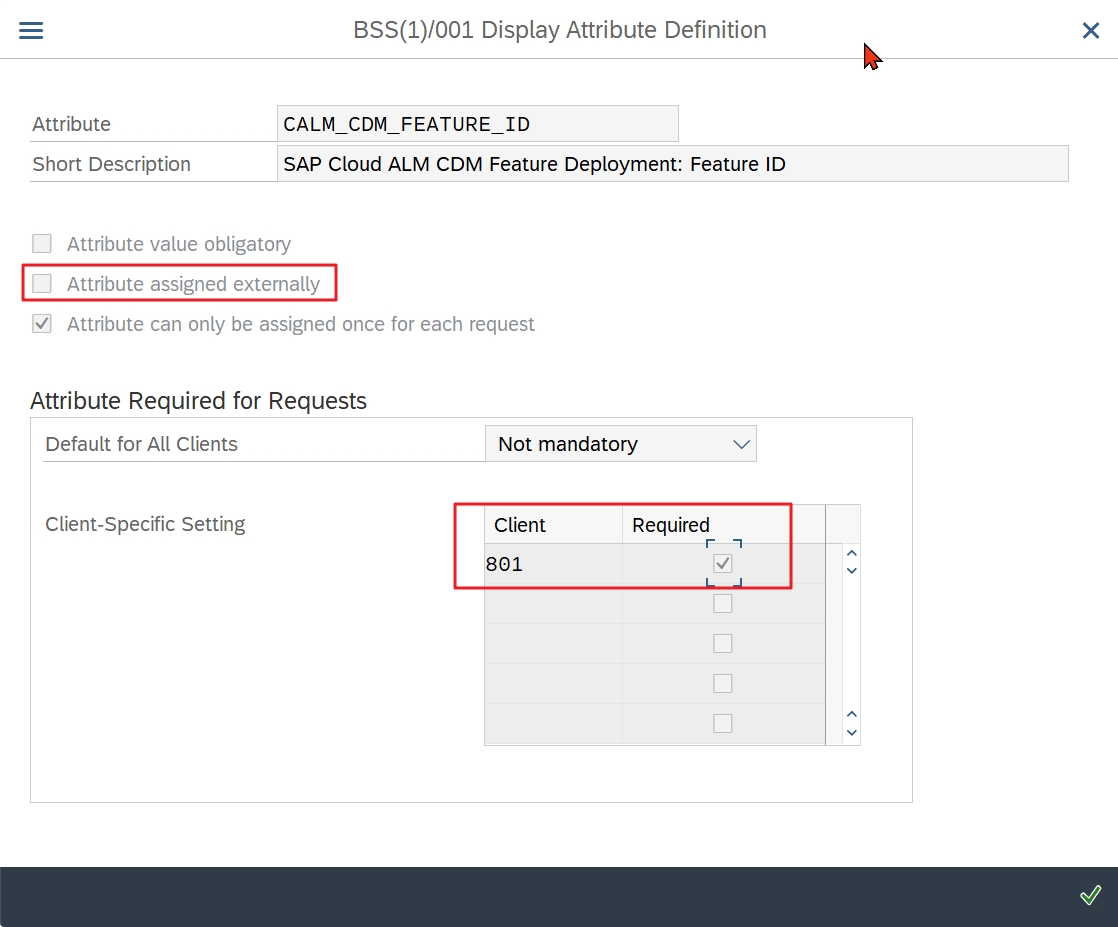
You can still create a transport, but you can no longer release it:
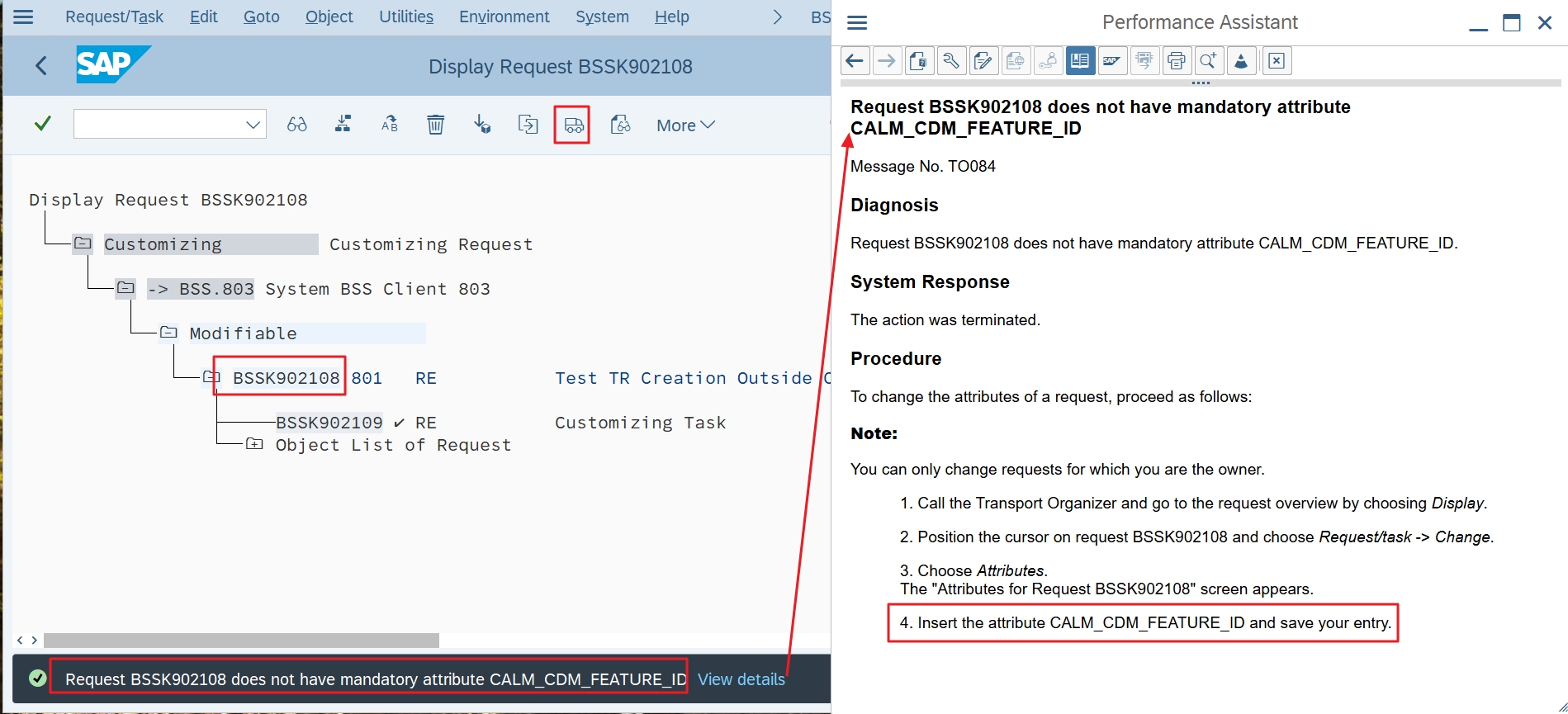
However, the long text of the error message reveals how you can still cheat your way around the feature, because the flag “Attribute assigned externally” (see above) is not set:
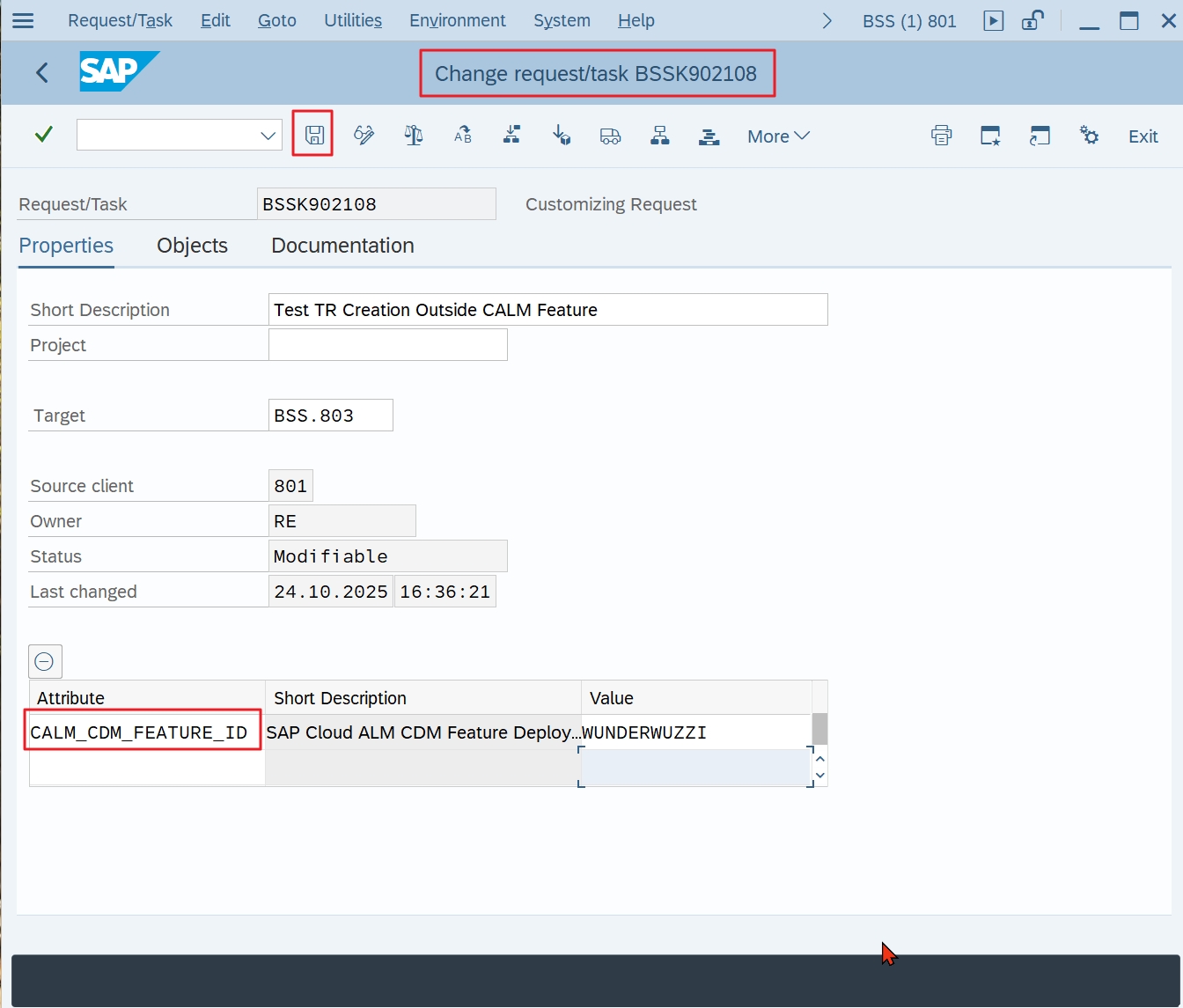
(Wunderwuzzi = Whizz-Kid)
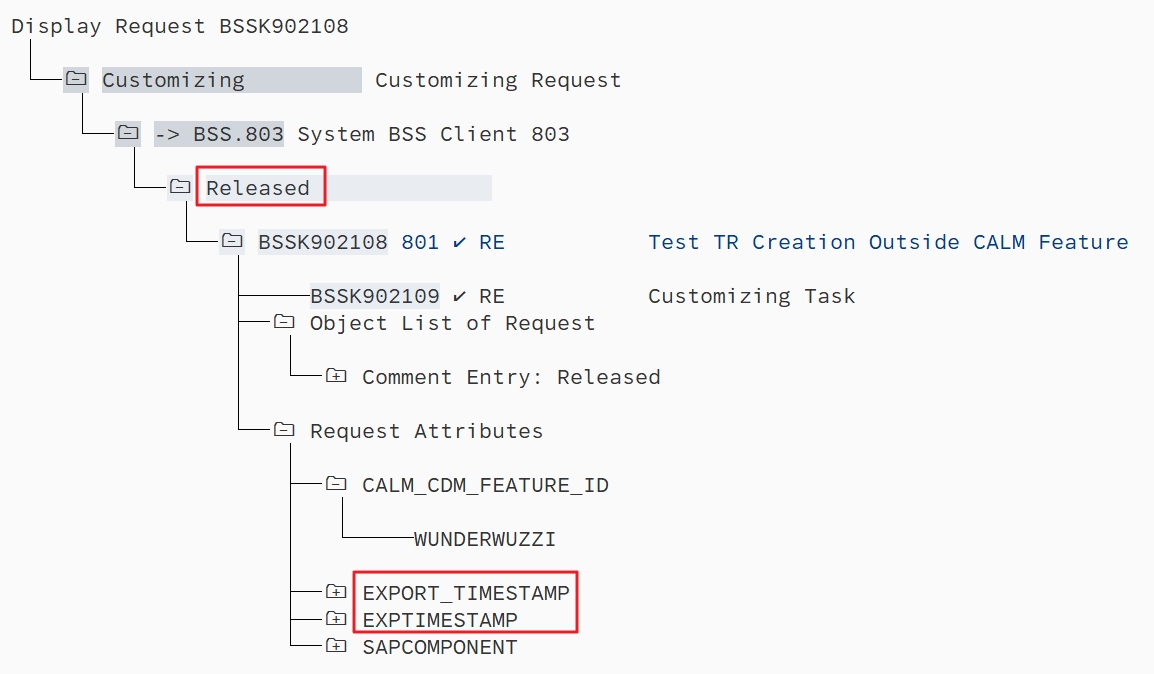
Thus, regardless of whether you decide to enforce the feature now or prefer to wait until the gaps are closed, you will definitely have to adjust the authorization roles.
The two authorization objects that control the creation and release of transports are S_TRANSPRT and S_SYS_RWBO, which also allows fine control for individual systems.
Since S_SYS_RWBO offers exactly the same values for the ACTVT and TTYPE fields, I will focus here on the S_TRANSPRT object, but be careful! If S_TRANSPRT only allows display (ACTVT=03), the system additionally checks S_SYS_RWBO to see whether an action is permitted for the respective system after all. This means that you always have to maintain both.
First, you have to use transaction SUIM to search for all roles that have S_TRANSPRT with ACTVT=01 “Create” or =43 “Release.” To restrict the results list to the roles that are actually used, you can display the extended selection options, which are rarely used:
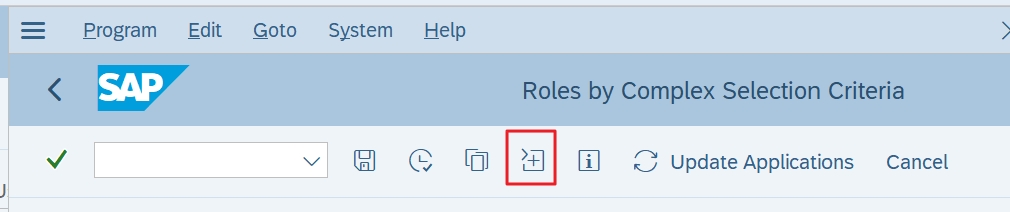
And voilà!
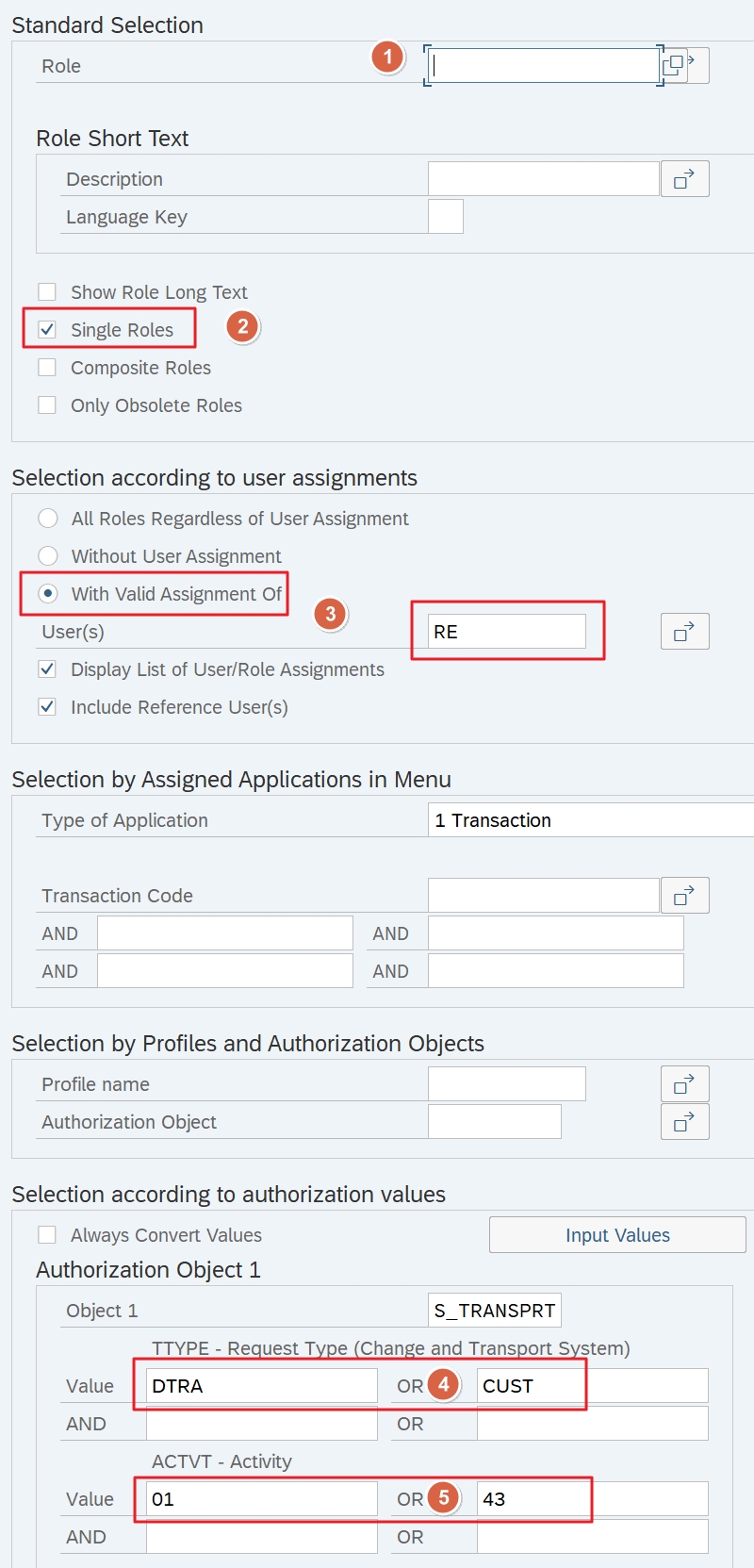
- Role namespace: We want to see all roles
- We only want to see single roles, because that’s what we’re interested in
- Here, you should enter suitable users who actually have the team role of developer/customizer
- DTRA=Workbench, CUST=Customizing
- 01=Creation, 43=Release
The result on our sandbox system:
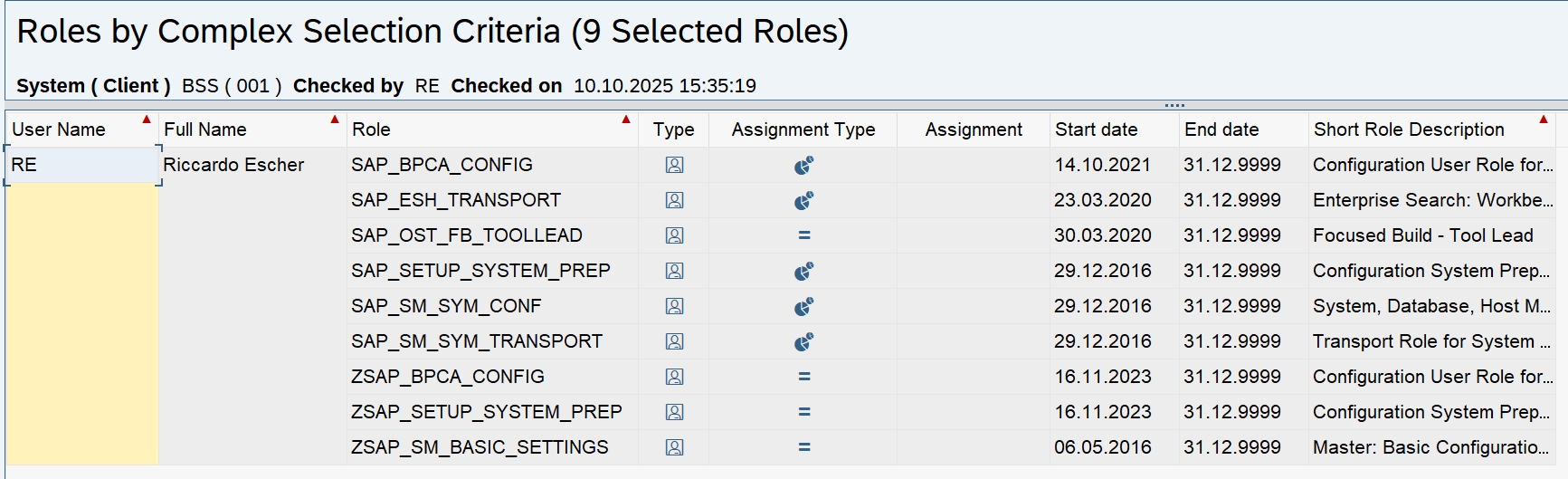
Some descriptions of the actions in the PFCG value help are confusing. For example, who would guess that ACTVT=75 “Remove” means that you can release another user’s transport? A complementary explanation of the possible values for the actions can be found here.
Proposal
For Workbench and Customizing transports, I would suggest these authorizations:
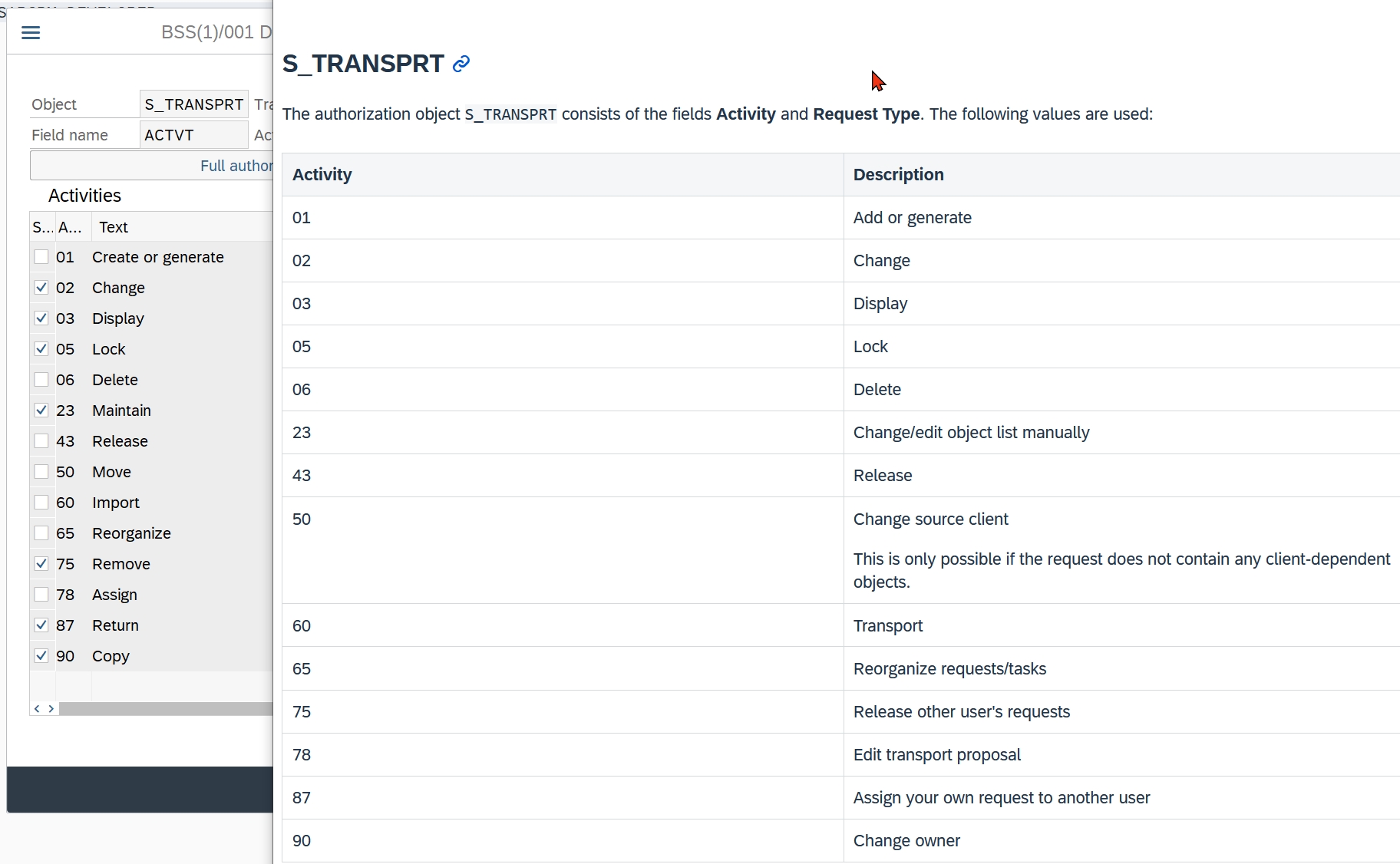
You can see that I would not allow deletion – because as of today (October 2025), Cloud ALM does not notice when transports have been deleted. And unfortunately, you cannot remove transports from the replication list in Cloud ALM.
You need more freedom for transport tasks (TTYPE=TASK), for which I would suggest the following permissions:
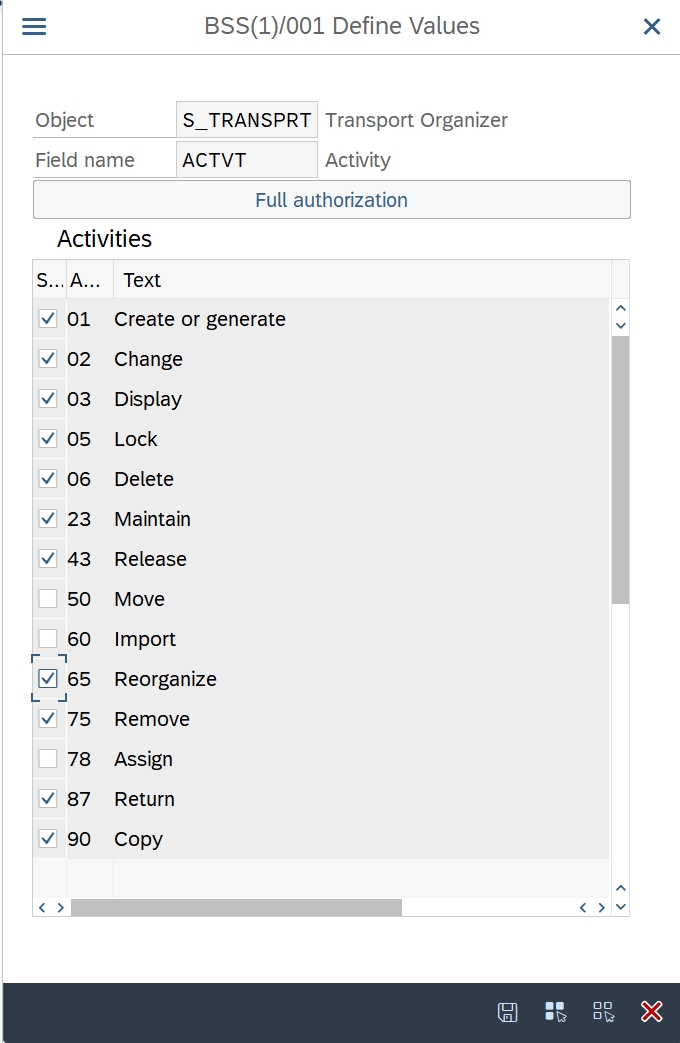
Transport of Copies (ToCs) (TTYPE=TRAN) can be generated from the Feature. Normally, no on-premise authorizations would be necessary here.
However, experience shows that for large transports that take a long time to import into the QA system, it is often better to transport only the changed transport tasks to the QA system via ToC.
Since Cloud ALM does not support such delta transports, the same authorizations for tasks could also be assigned for handling ToCs.
With a Little Help From My Friends
Below are some very interesting improvement requests that address urgently needed but still missing capabilities. If you are interested, please vote for them. A valid S-number is required for this.
And here is an improvement request that fits the topic, but was unfortunately rejected:
