

SAP Cloud ALM – What’s New in Week 26 and 32
SAP Cloud ALM continues to evolve with a steady stream of enhancements, each designed to make daily work smoother, more transparent, and more efficient. This update covers improvements from week 26 through week 32, with changes that strengthen planning, monitoring, and collaboration across projects and operations. We’ve reviewed the latest additions and highlighted the ones we think are worth your attention.
From exporting issues directly to Excel for offline analysis, to automating data transformation steps, to extending operational dashboards, the newest features cater to administrators, project managers, consultants, and operations teams alike. Let’s walk through the highlights.
Services – Issues and Actions Management
The Services area in SAP Cloud ALM is all about keeping teams aligned, informed, and in control of project progress. Recent enhancements to Issues and Actions Management focus on making it easier to share information, speed up updates, and focus on what matters most. Whether it’s exporting key data to Excel for offline analysis, updating multiple actions in a single step, or filtering work by category and deadlines, these improvements help project teams, service delivery consultants, and team leads work smarter and keep projects on track.
Export Issues and Actions to Excel
Users can now export filtered issues or standalone actions directly from the Issues and Actions Overview page into Excel. The export preserves all visible columns (except Comments and Follow-Up Tasks) and includes clickable links back to the original items in SAP Cloud ALM.
This feature is particularly useful for project managers preparing progress updates or status reports, service delivery consultants summarizing issues and actions for customer follow-ups, and team leads who need to review and share action lists outside of SAP Cloud ALM.
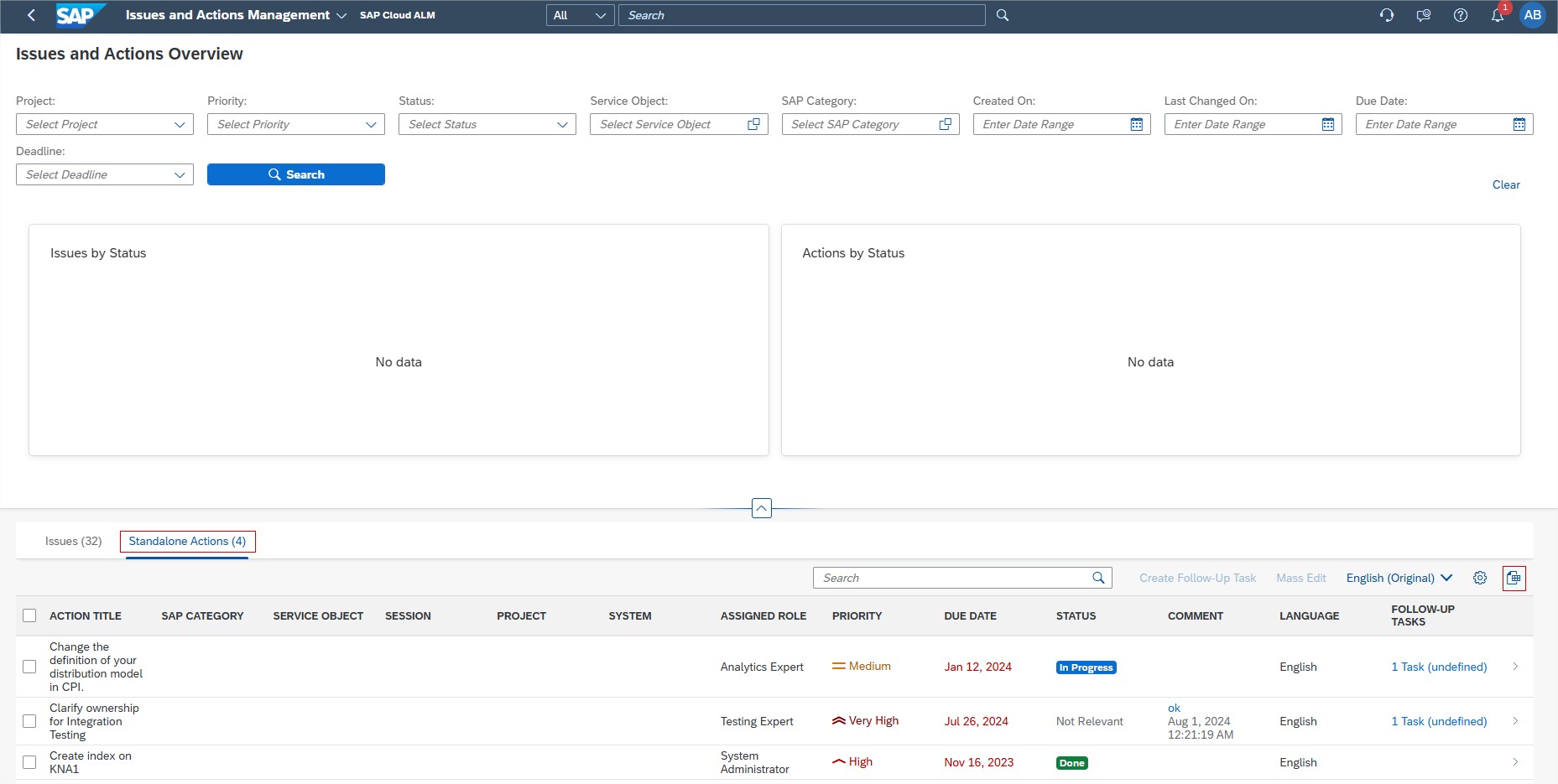
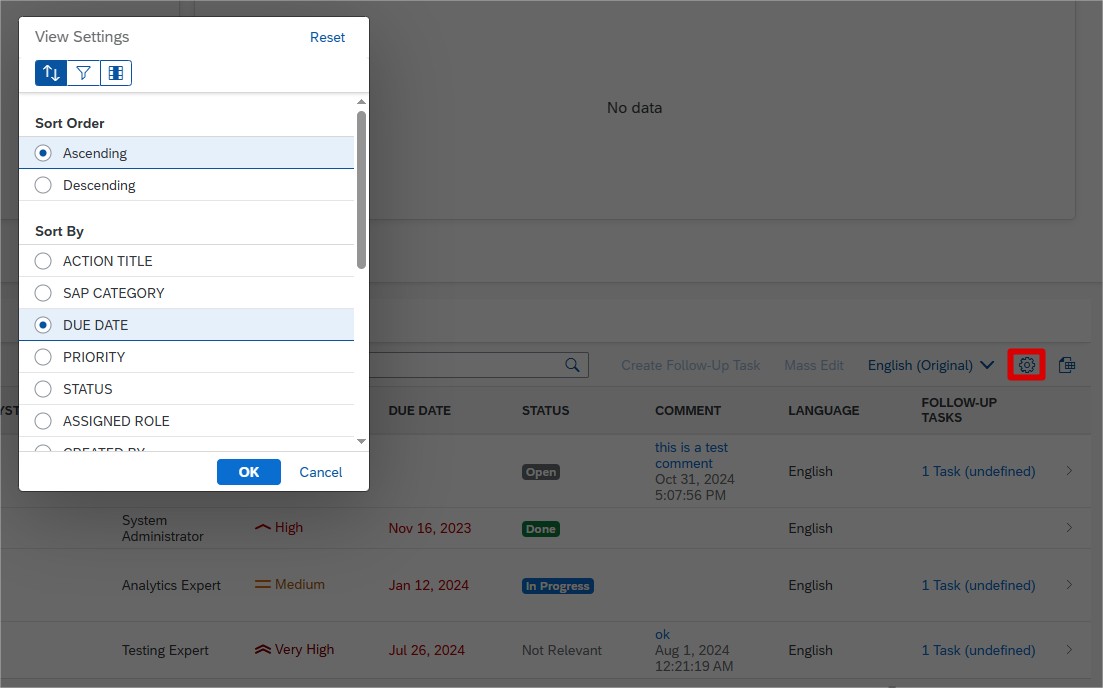
Apply filters before exporting to ensure the spreadsheet contains only the relevant issues or actions for the intended audience. The export file automatically includes all visible columns (except Comment and Follow-Up Tasks) and provides clickable links back to each item in SAP Cloud ALM.
It is recommended to run exports ahead of status meetings, reviews, or project handovers so teams can distribute clear, and consistent records.
TL;DR:
Export filtered issues or actions to Excel for offline use, reporting, and quick access back to SAP Cloud ALM.
Mass Update of Recommended Actions
This feature lets users update the status of multiple recommended actions linked to a single issue directly from the Issue Details page. It eliminates repetitive updates, saves time, and ensures consistent status tracking across related actions.
This feature is especially valuable for project managers who need to quickly update several actions after review meetings, service delivery consultants managing large volumes of recommended actions from a single issue, and team leads who need to align statuses across related actions before reporting.
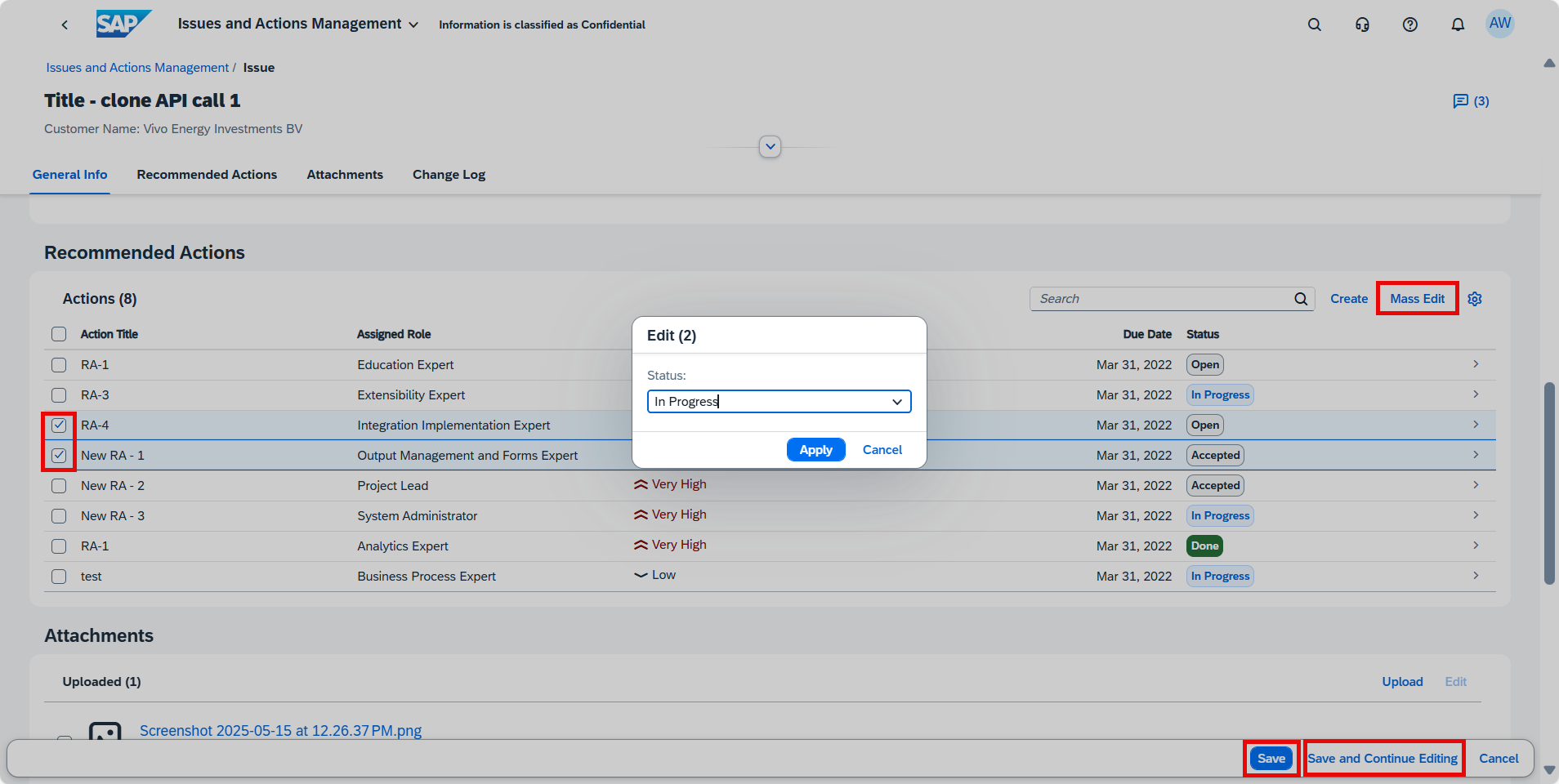
Use this feature during regular action reviews or after meetings to apply updates in bulk. This helps maintain clean, up-to-date records and speeds up preparation for reporting.
TL;DR:
Update multiple recommended actions in one step to save time and ensure consistency.
New Filters by SAP Category
Users can now refine their search on the Issues and Actions Overview page using two new filters designed to enhance focus and improve issue handling:
- SAP Category – Allows users to group issues and actions by specific technical or functional areas (e.g., Change Management, System Management, Data Migration). This provides clarity on ownership and accelerates topic-specific reviews.
- Deadline – View items based on due dates to keep track of what needs attention now.
These filters support more efficient prioritization, clearer work distribution, and faster decision-making, especially in projects with many tasks or teams involved.
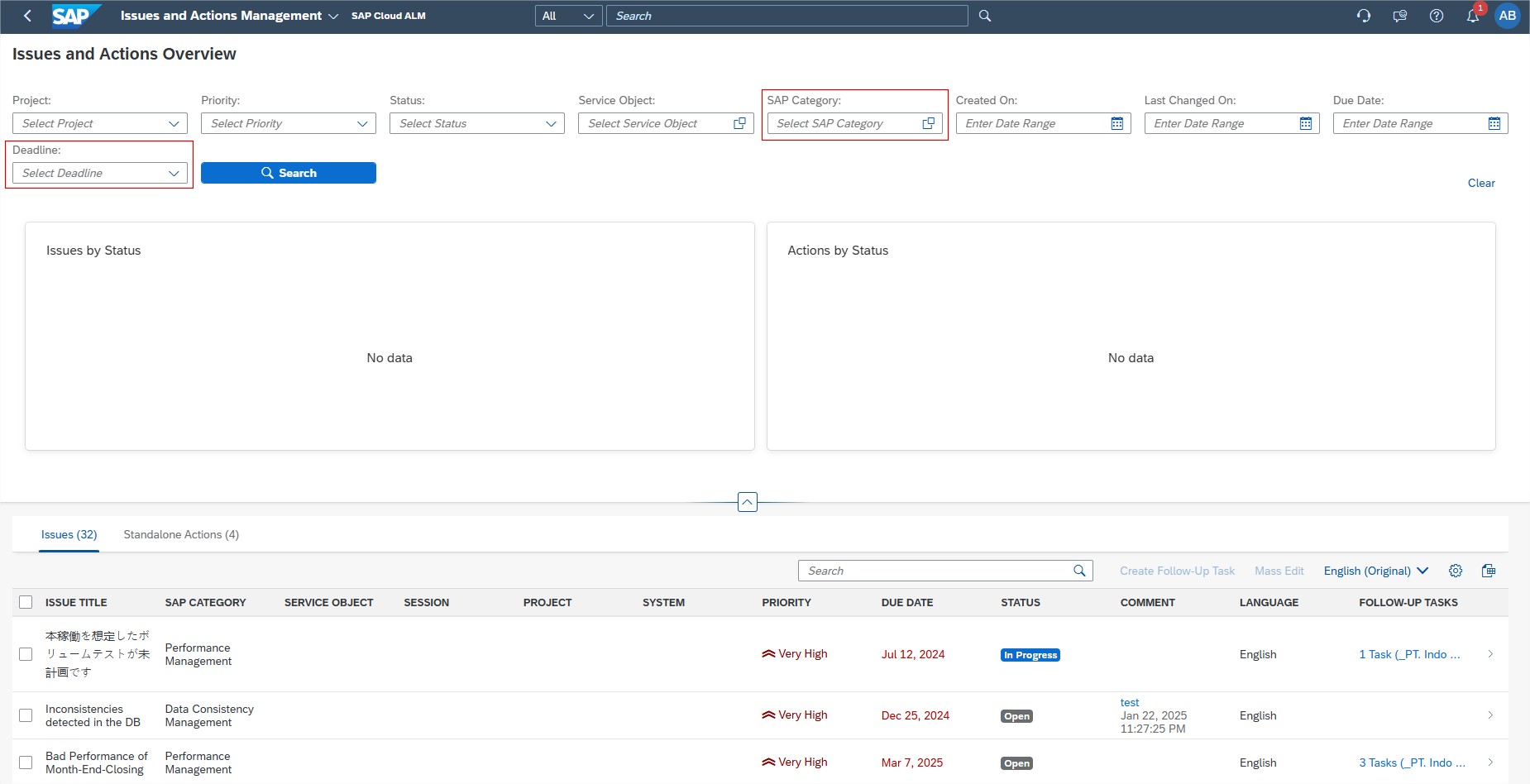
These filters are useful for anyone responsible for tracking tasks, deadlines, and responsibilities across different areas, including project managers who need to quickly identify overdue or upcoming issues to keep projects on schedule, service delivery consultants who want to focus on specific topics such as System Performance or Data Management, and team leads who need to review progress in their area of responsibility to ensure nothing is overlooked.
To get the most value from these filtering capabilities:
- Standardize the use of SAP Categories when creating or updating issues and actions. This ensures consistency across teams and simplifies later analysis.
- Incorporate the Deadline filter into weekly planning or review cycles to identify overdue or near-due items that require immediate attention.
- Leverage both filters in combination for focused, high-impact reviews – e.g., identifying “Data Migration issues due this week” to support targeted decision-making.
TL;DR:
Use Category and Deadline filters for faster prioritization and more focused reviews.
SAP Business Transformation Center – Cycle and Monitoring, Modeling
The SAP Business Transformation Center continues to strengthen its capabilities, making transformation projects more accurate, automated, and transparent. Recent updates focus on reducing manual effort, improving rule application between systems, and providing clearer visual insights into transformation cycles. From smarter transformation rules to specialized automation and the ability to download detailed execution graphs, these enhancements help data migration specialists, functional consultants, and project managers deliver cleaner, faster, and more controlled transformation outcomes.
Enhanced Transformation Rules – Cycle and Monitoring
Transformation rules are now applied to relevant transformation objects between the source and target systems based on matching unique entities present in both systems. This ensures greater accuracy and reduces manual adjustments during transformation activities.
This enhancement is valuable for data migration specialists who need to ensure consistent object mapping between systems, project teams looking to minimize transformation errors and rework, and functional consultants who require precise rule application across multiple transformation objects.
TL;DR:
Transformation rules now apply automatically to objects with matching unique entities in both systems, improving accuracy and reducing manual work.
New Transformation Rule – Incoterms 2 Rule – Modeling
A new rule, Incoterms 2 Rule, is available in the Transformation Model Version app. When both KNVV and LFM1 tables have empty fields for INCO2/INCO2_L, the rule automatically copies the value from INCO2 to INCO2_L. This applies when Customer Master and Vendor Master transformation objects are part of the model, eliminating manual post-processing for these cases.
This feature benefits data migration teams handling customer and vendor master data, functional consultants involved in logistics and supply chain transformations, and project teams seeking to automate repetitive data adjustments.
Include the Incoterms 2 Rule in transformation models where both Customer and Vendor Master objects are in scope. This will prevent unnecessary manual corrections during post-processing.
TL;DR:
The Incoterms 2 Rule automatically fills INCO2_L from INCO2 when relevant fields are empty, reducing manual corrections in customer and vendor master data.
Download Graph – Cycle and Monitoring
Users can now download transformation and postprocessing graphs once cycle preparation is complete.
- Transformation phase – Run All graph is available when status is Ready or Error.
- Postprocessing phase – Run Without Interruption graph is available when status is Blocked, Error, or Ready.
This provides a clear, shareable visual representation of cycle execution status.
This feature is valuable for project managers who need a visual reference for tracking progress, technical leads analyzing transformation or postprocessing flows, and stakeholder reporting teams preparing visual project updates. Consider downloading and archiving the relevant graphs after each cycle to document progress, identify bottlenecks, and share updates with project stakeholders.
TL;DR:
Users can now download transformation and postprocessing graphs to visualize cycle progress and share project status more effectively.
RISE with SAP
New App – Operations View
The Operations View dashboard is now available on the SAP Cloud ALM launchpad under the RISE with SAP page. It provides a clean core compliance overview from an operations perspective, displaying KPIs to monitor, evaluate, and improve the operational quality and efficiency of eligible systems.
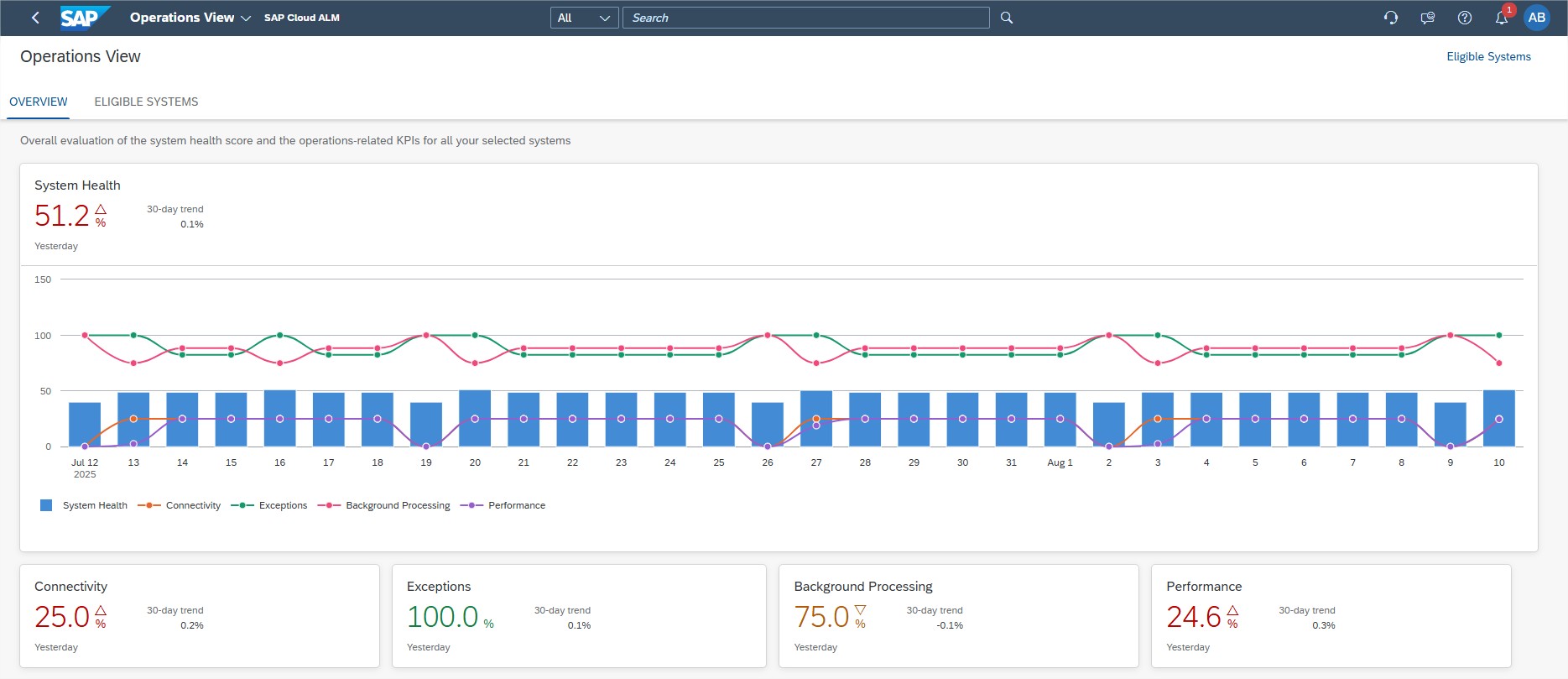
Metrics include Connectivity, Exceptions, Background Processing, and Performance, giving users a consolidated System Health score.
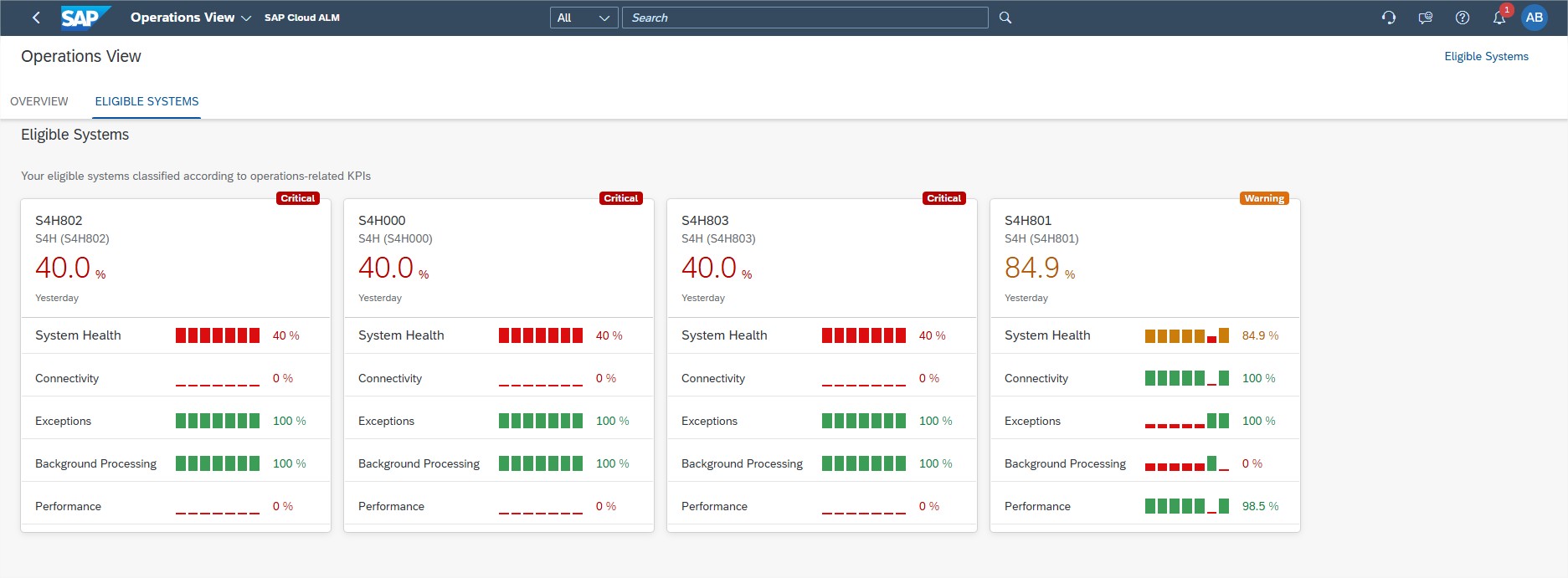
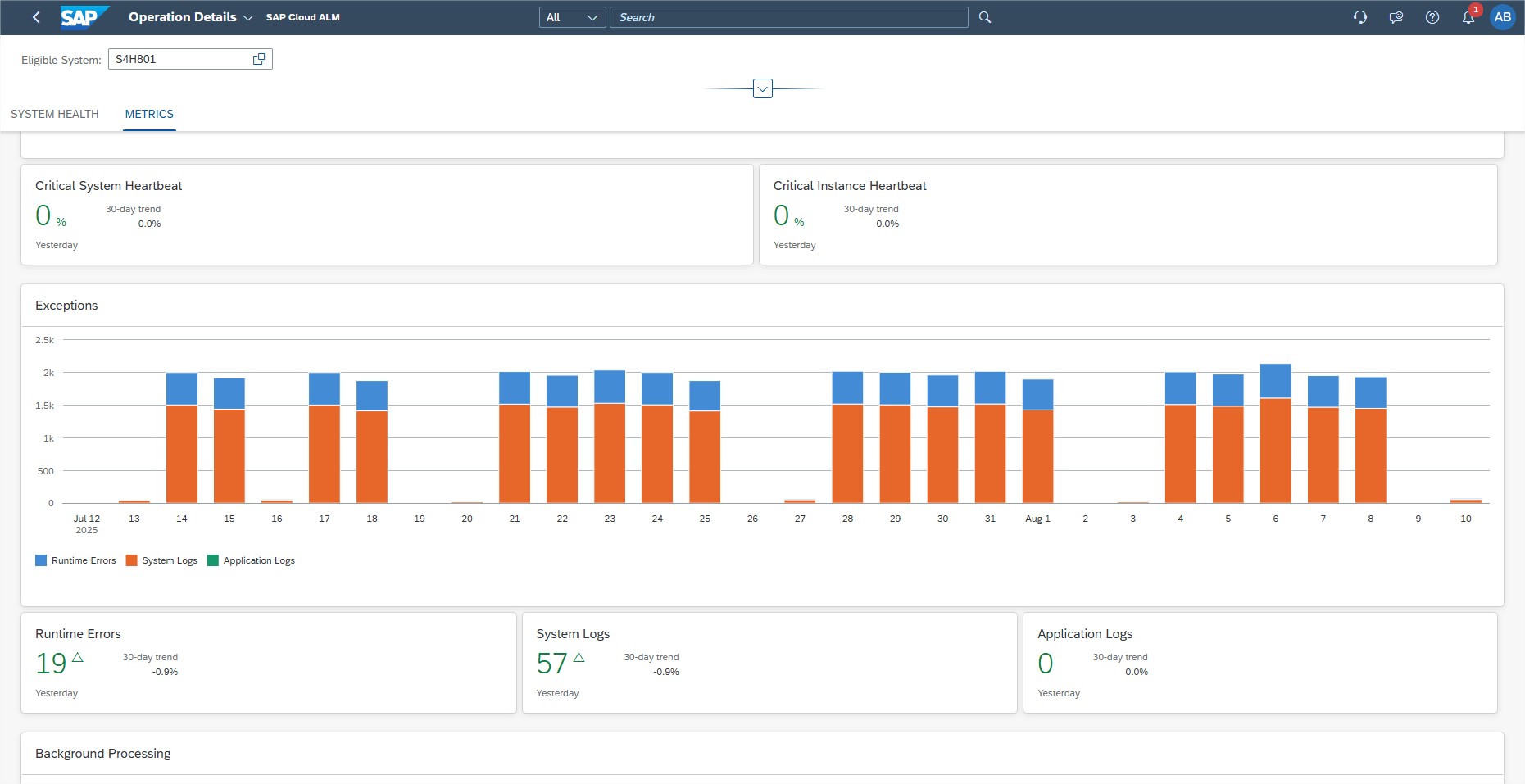
From each system tile, users can drill down to Operation Details for a breakdown of KPI calculations and contributing metrics.
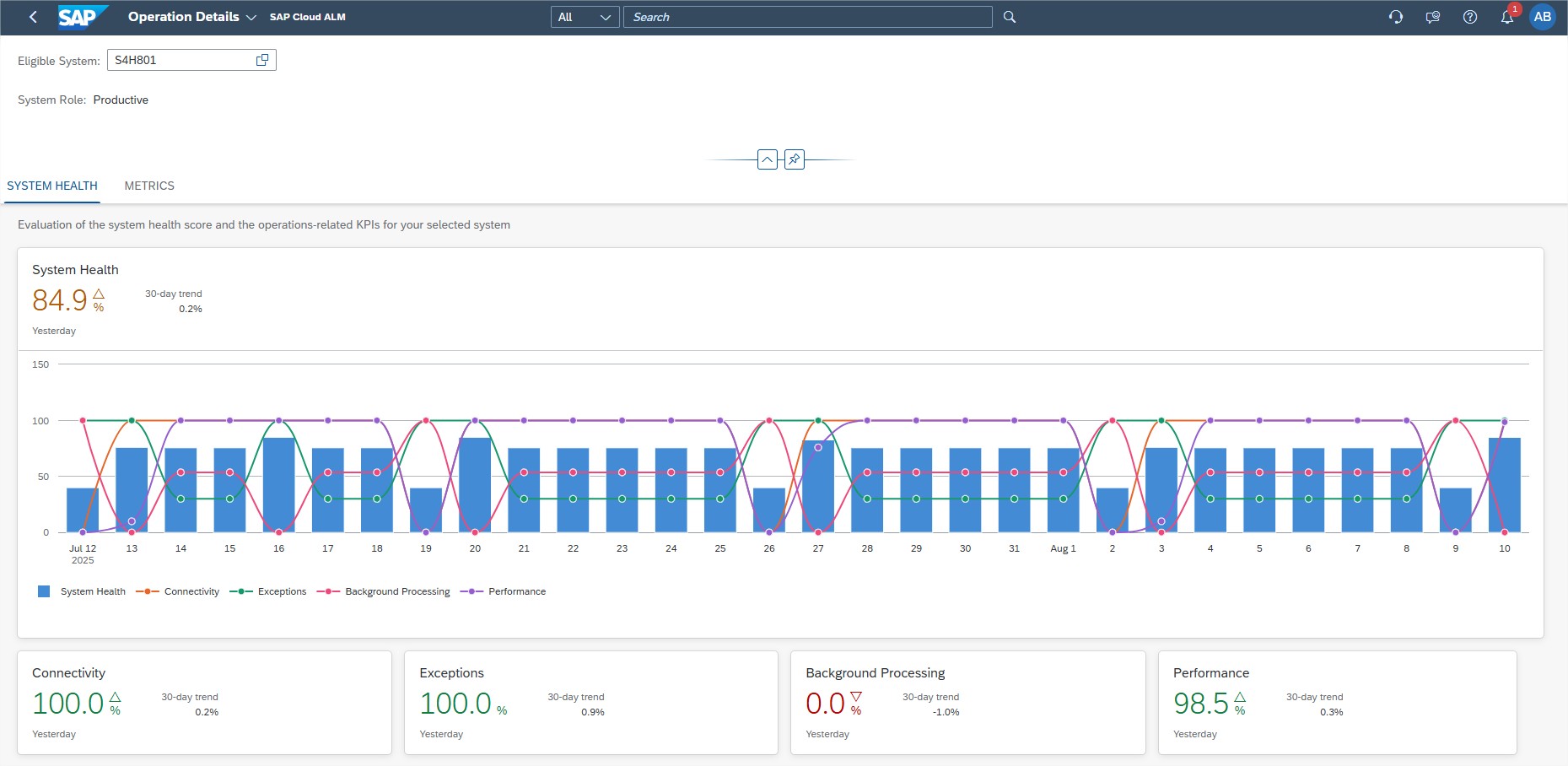
System administrators monitoring operational KPIs for RISE with SAP systems, IT operations teams working to maintain high performance and compliance, and project managers tracking operational health for reporting purposes will all benefit from this feature.
Ensure all prerequisites are met for dashboard access, including enabling the dashboard for productive SAP S/4HANA systems and assigning the Customer ERP ID in the Landscape Management app. Use the System Health score as a regular checkpoint in operational review meetings.
TL;DR:
The Operations View dashboard gives a consolidated health score for RISE with SAP systems, helping teams monitor and improve operational quality.
Operations – Integration & Exception Monitoring, Operations Automation
The latest updates in SAP Cloud ALM’s Operations area bring powerful new tools to help organizations maintain smooth, reliable, and high-performing system landscapes. From proactive anomaly detection in message processing to broader automation capabilities, these enhancements empower operations teams to spot issues early, respond faster, and optimize workflows across SAP and non-SAP environments.
Our alm360 Operations service incorporates relevant advancements in SAP Cloud ALM to deliver targeted, end-to-end operational support, helping organizations maintain stability, performance, and compliance across their SAP landscapes. Get in touch with us today to see how we can help you get the most out of SAP Cloud ALM.
Anomaly Detected in the Number of Messages Processed event for Business Services – Integration & Exception Monitoring
Users can now configure an Anomaly Detected in the Number of Messages Processed event for Business Services. This enables notifications or corrective actions when the message volume for a business service exceeds or falls below a set threshold within a defined time period. It provides a proactive approach to identifying irregular patterns in message flow, helping prevent disruptions.
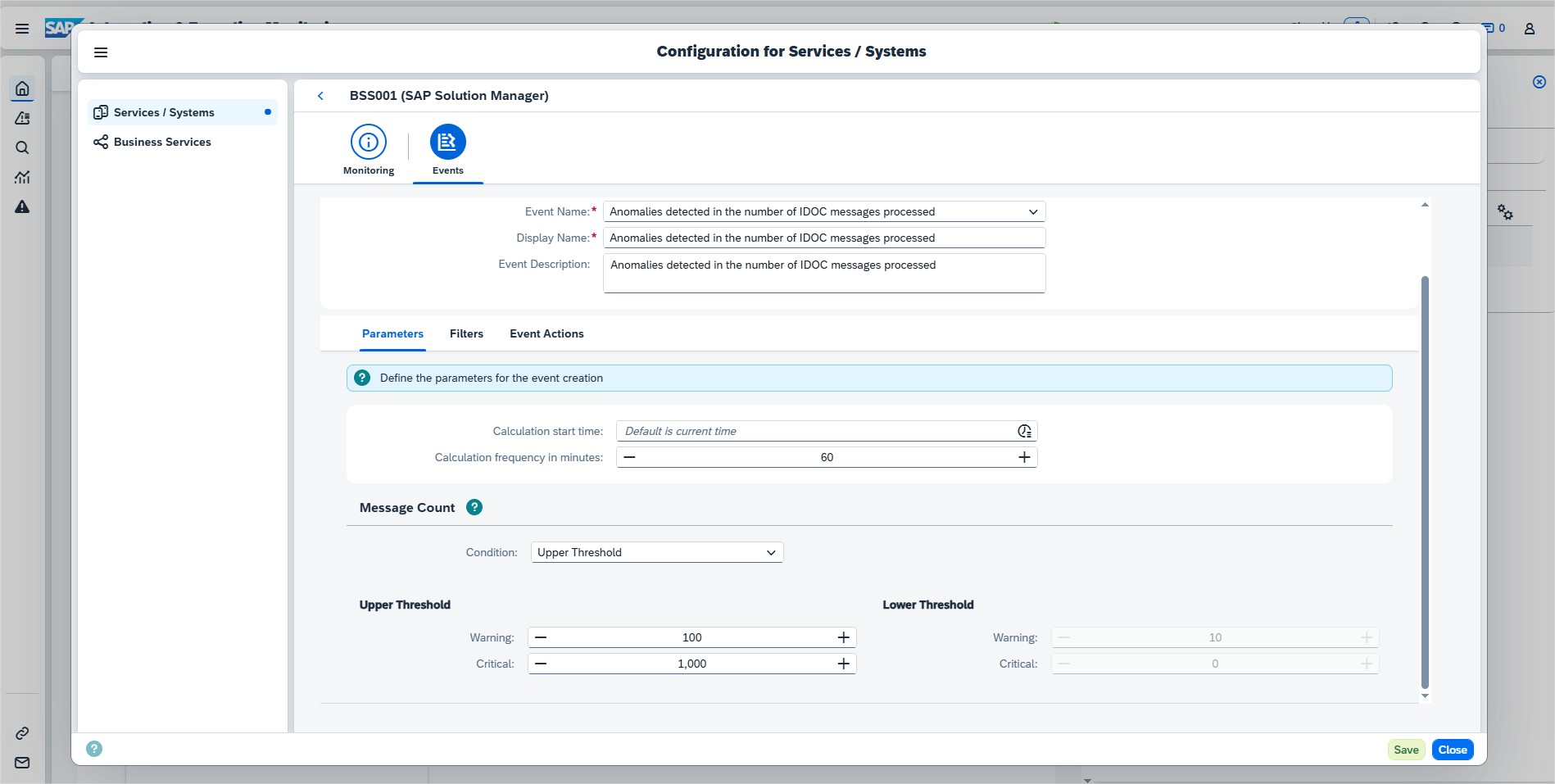
This feature is particularly valuable for integration monitoring teams working to keep message volumes within expected thresholds, operations teams seeking to detect performance or stability issues before they escalate, and service managers responsible for ensuring SLA compliance for business services.
We recommend setting precise thresholds for each monitored business service by analyzing historical message patterns and identifying normal operating ranges. Pair these thresholds with well-defined event actions that immediately alert responsible teams or automatically trigger remediation workflows, ensuring anomalies are addressed before they impact performance or service levels.
TL;DR:
Users can now set anomaly detection for message volumes in Business Services, enabling early alerts and faster corrective action.
Generic Data Provider for Integration Monitoring Analytics API
A new generic data provider, Integration Monitoring Messages, is available for the Integration Monitoring Analytics API. It allows collection of data from the Integration & Exception Monitoring app across all message categories in a single API call, replacing the previous need for multiple calls per category.
This feature is particularly useful for integration architects who design custom dashboards or analytics, technical teams that need to aggregate integration data across multiple categories for consolidated reporting, and developers focused on optimizing API calls for greater efficiency and reduced system load.
TL;DR:
The new generic data provider collects all integration messages in one API call, simplifying data access and reporting.
Support for Third-Party Automation Engines – Operations Automation
SAP Cloud ALM events can now trigger jobs, workflows, and automations in third-party automation and orchestration platforms. This extends automation capabilities beyond SAP solutions, allowing integration with existing enterprise automation tools. Context from monitoring and status events is passed directly to the chosen automation engine.
This feature is especially beneficial for IT automation teams working with non-SAP orchestration platforms, operations teams seeking to unify automation across SAP and non-SAP landscapes, and solution architects designing complex cross-platform automation workflows that require seamless event-triggered execution.
Integrating SAP Cloud ALM with the preferred automation platform allows predefined workflows to trigger automatically upon specific events, improving response times and boosting overall operational efficiency.
TL;DR:
SAP Cloud ALM events can now trigger actions in third-party automation engines, enabling unified cross-platform automation.
Implementation – Documents, Task Distribution, Processes
The latest updates in SAP Cloud ALM’s Implementation area bring practical new features to help teams work more efficiently, stay organized, and keep projects on track. From structured document approvals to new ways of visualizing task distribution and faster process ownership changes, these enhancements give project teams better tools to manage complexity, maintain compliance, and deliver results with confidence.
Take a look at our alm360 Implementations to see how we can help to leverage these capabilities in projects – and feel free to contact us to discuss how we can support your SAP Cloud ALM journey.
Document Approval Workflow in the Documents App
The controlled document approval workflow ensures documents follow a defined approval process within the Documents application. This strengthens compliance in SAP Cloud ALM projects by introducing clear approval stages and structured status changes. Once a document is approved or rejected, it can be returned to editing via the Rework option for further updates.
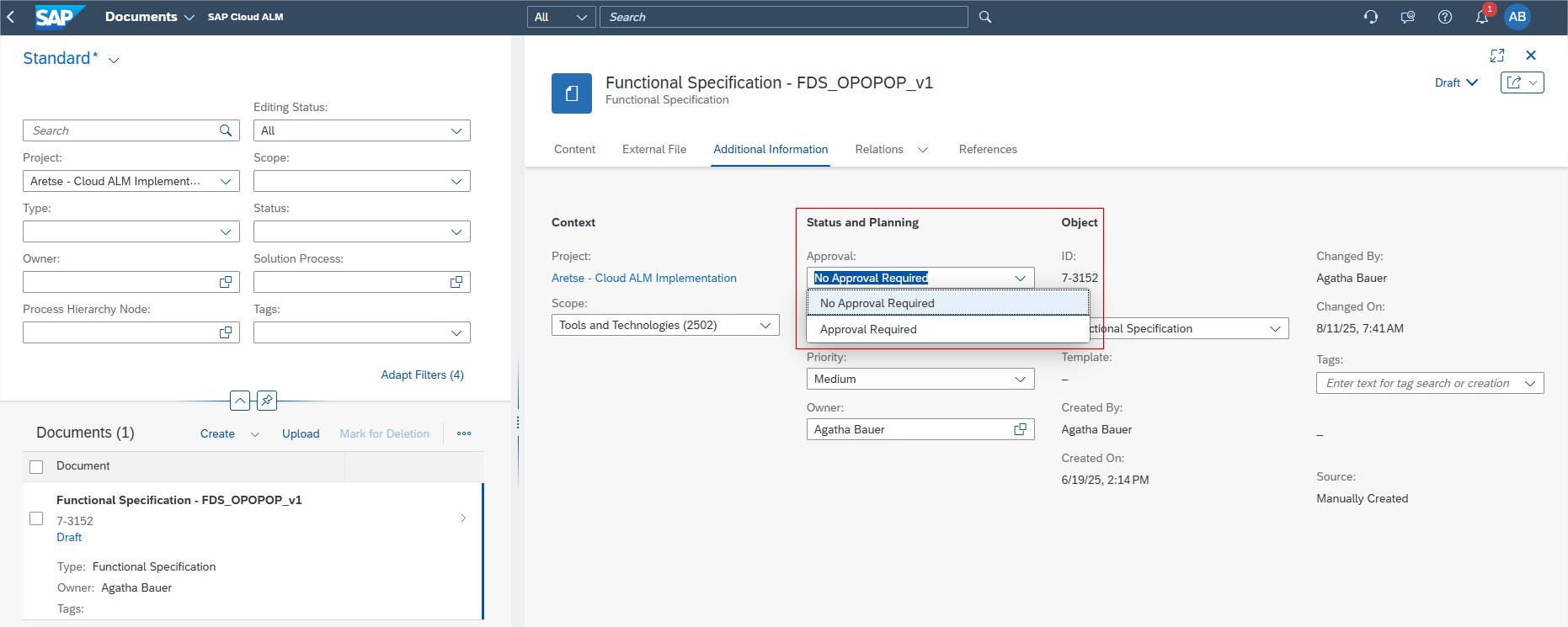
This feature is valuable for project managers who oversee documentation quality and compliance, quality leads who ensure controlled review processes before releasing documents, and team members responsible for preparing and approving project documentation. Enabling the approval requirement for documents that are critical to compliance or project governance helps maintain high standards and accountability.
By using status changes strategically—such as Start Approval, Approve, or Reject—teams can keep a clear audit trail of decisions, ensuring transparency and supporting strong governance throughout the project lifecycle.
TL;DR:
The document approval workflow enforces a structured review process, improving compliance and governance for project documentation.
New Views in Task Distribution
The Task Distribution app and card now offer three additional views – By Priority, By Tag, and By Release. These provide new perspectives for analyzing and managing task assignments, helping teams focus on urgent, categorized, or release-related work.
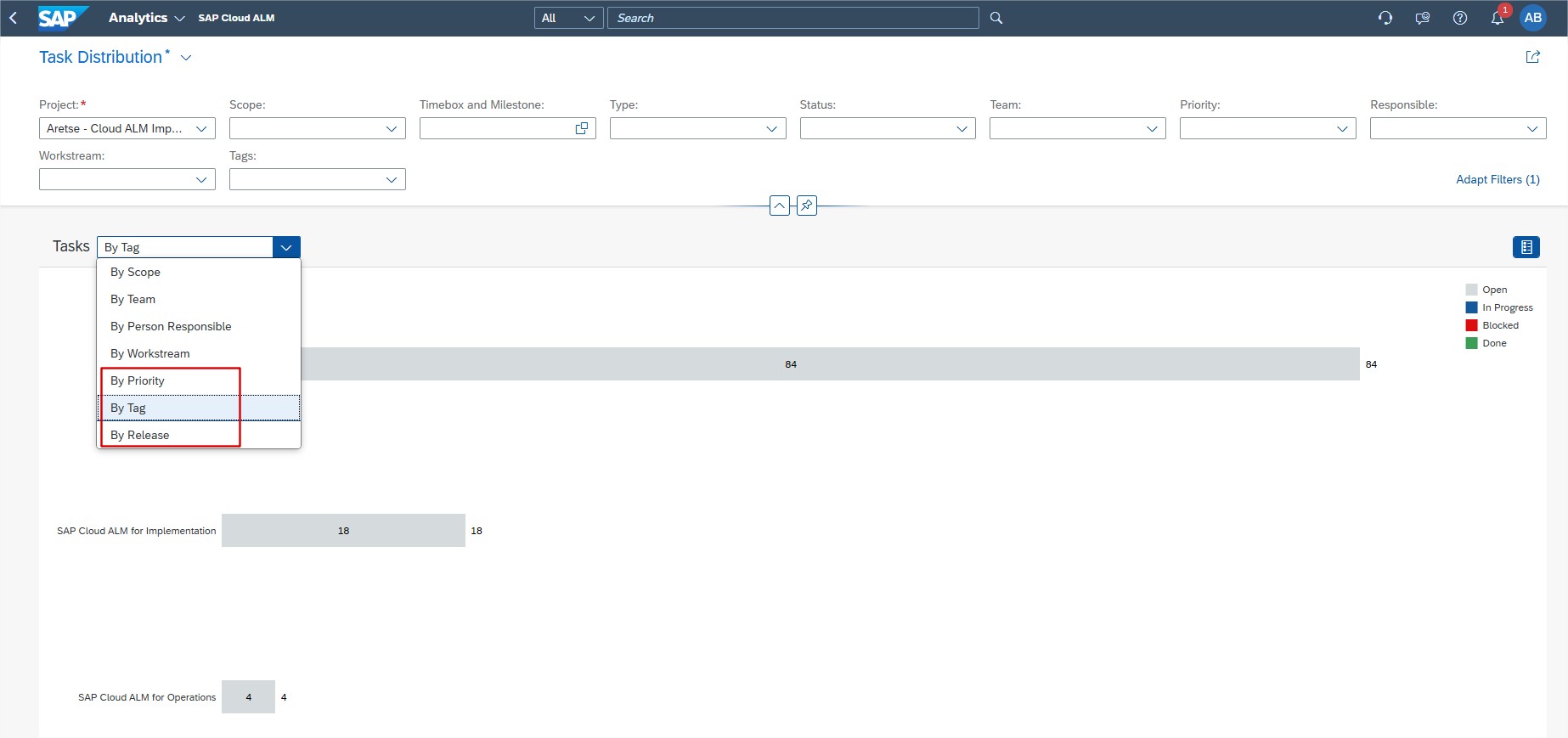
This enhancement is especially useful for project managers who need to balance workloads based on priority, scrum masters who organize tasks by release or category tags, and team leads who monitor progress across multiple parallel work streams.
The By Priority view can support daily stand-ups by highlighting urgent items, the By Tag view helps filter work streams or topics for focused discussions, and the By Release view enables tracking readiness for upcoming deployments, ensuring that teams stay aligned and deliver on schedule.
TL;DR:
New Task Distribution views let users manage tasks by priority, tag, or release, improving focus and workload planning.
Change Process Owner for Multiple Solution Processes at Once
Users can now update the process owner for multiple solution processes in a single action using the Mass Edit function in the Processes app. This is particularly useful for reassignments based on Process Hierarchy or Country/Region criteria, reducing the time and effort required for individual updates.
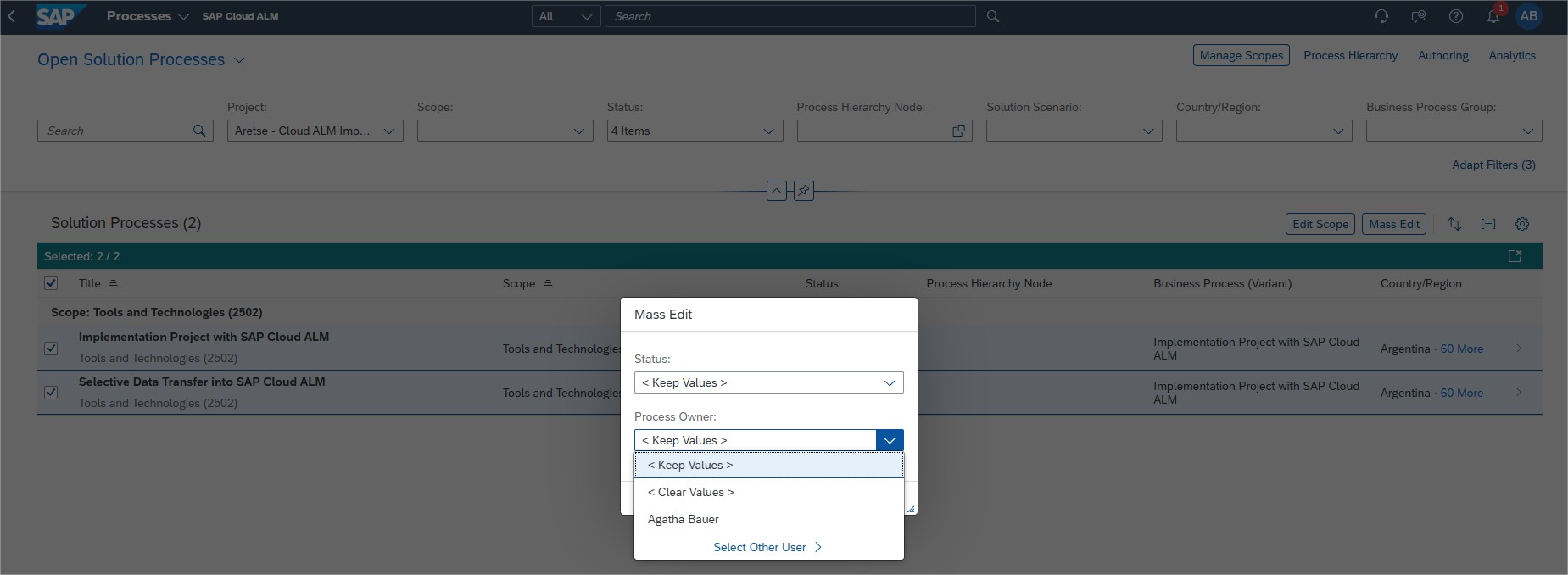
This capability is particularly valuable for process managers responsible for aligning ownership across multiple processes, project leads who need to quickly reassign responsibilities following organizational changes, and implementation teams handling ownership updates based on country, region, or process hierarchy.
We recommend using Mass Edit for ownership changes during project onboarding or when restructuring responsibilities. Keep in mind that updates overwrite existing assignments – even for processes not currently in scope – and that only the first 100 selected entries will be processed at a time.
TL;DR:
Mass Edit lets users reassign process owners for multiple solution processes in one step, streamlining large-scale updates.
Administration
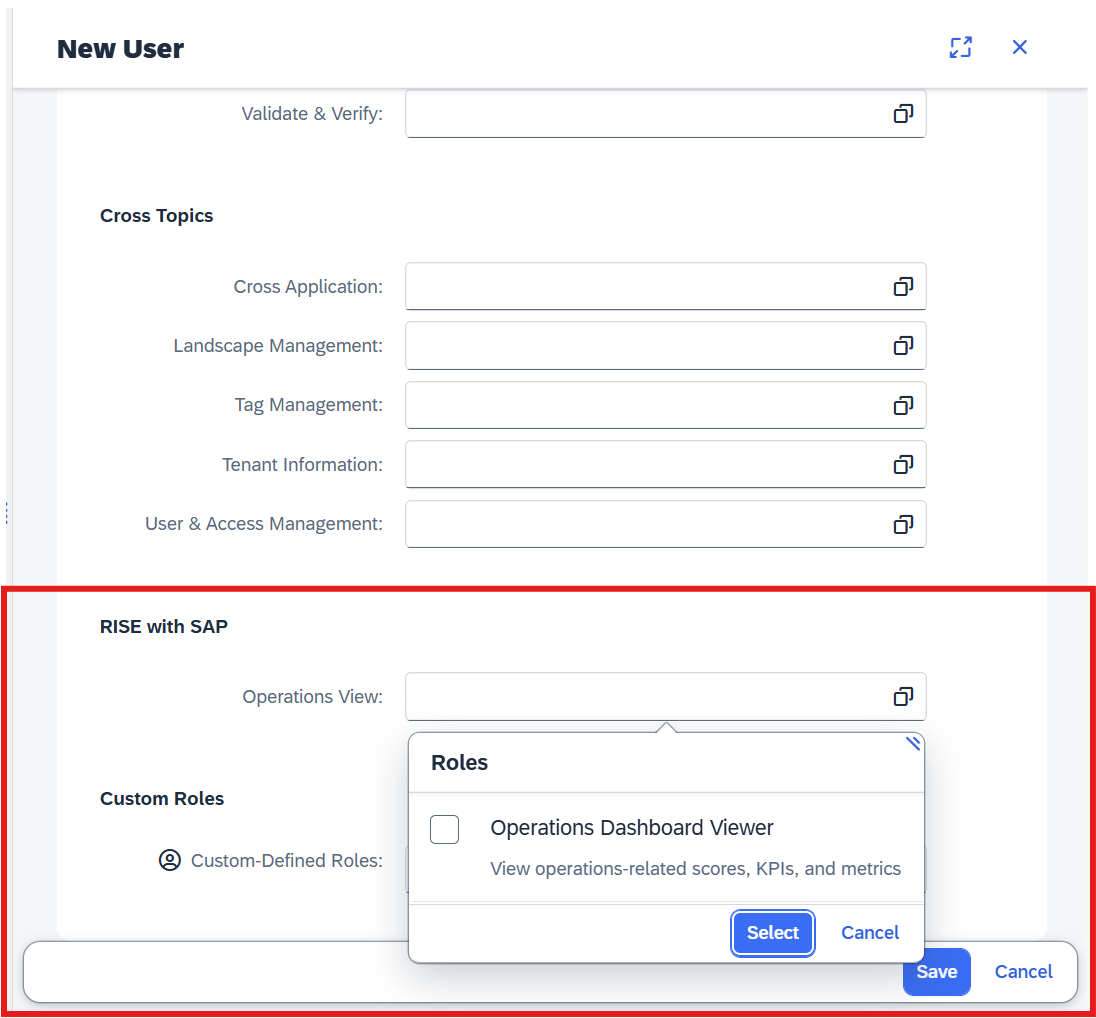
New Section for RISE with SAP Role Management
A new section, RISE with SAP, is now available in User Management (visible only to eligible RISE with SAP customers). This section includes the standard role for the Operations View dashboard, simplifying access management for this capability.
This enhancement is especially useful for user administrators who manage roles and access for RISE with SAP dashboards, system administrators tasked with maintaining operational visibility for authorized users, and project leads who need to grant dashboard access as part of project onboarding.
TL;DR:
A new RISE with SAP section in User Management provides a standard role for the Operations View dashboard, making access management easier and more consistent.
