

SAP Cloud ALM – What’s New in Week 34
SAP Cloud ALM continues to evolve with frequent updates, bringing new capabilities that make daily work more efficient, transparent, and easier to manage. The latest set of enhancements delivered in week 34 introduces features that simplify administration, strengthen project execution, and provide greater operational insights.
We’ve taken a closer look at the updates and selected the ones we believe add the most value. From streamlining issues and action handling, to improving scoping in digital blueprints, to extending monitoring with new KPIs, these enhancements offer practical improvements for administrators, project managers, consultants, and operations teams alike.
Services – Issues and Actions Management
The latest updates in Issues and Actions Management focus on making task handling more efficient, transparent, and user-friendly. Whether it’s managing supporting documentation, reassigning multiple items at once, or quickly finding the right assignee, these improvements save time and reduce friction in daily project work.
A readable display of all uploaded documents for issues and standalone actions
With the latest update, all uploaded, or newly attached documents are now displayed in a structured, readable tabular format. This small but impactful change improves visibility and makes it much easier for project managers, consultants, and teams to access, review, and verify the supporting information tied to each issue or action.
The result is a clearer, more transparent workflow, ensuring that supporting documentation is never overlooked and can be used more effectively in reviews, audits, or handovers.
TL;DR:
Documents uploaded to issues or actions are now displayed in a user-friendly table, improving visibility and traceability.
Update the assignee of multiple issues and standalone actions in one go
Reassigning multiple issues or actions has traditionally been a time-intensive, repetitive task, requiring updates one by one. For large projects with frequent ownership changes, this quickly became a bottleneck for keeping responsibility aligned and workloads balanced.
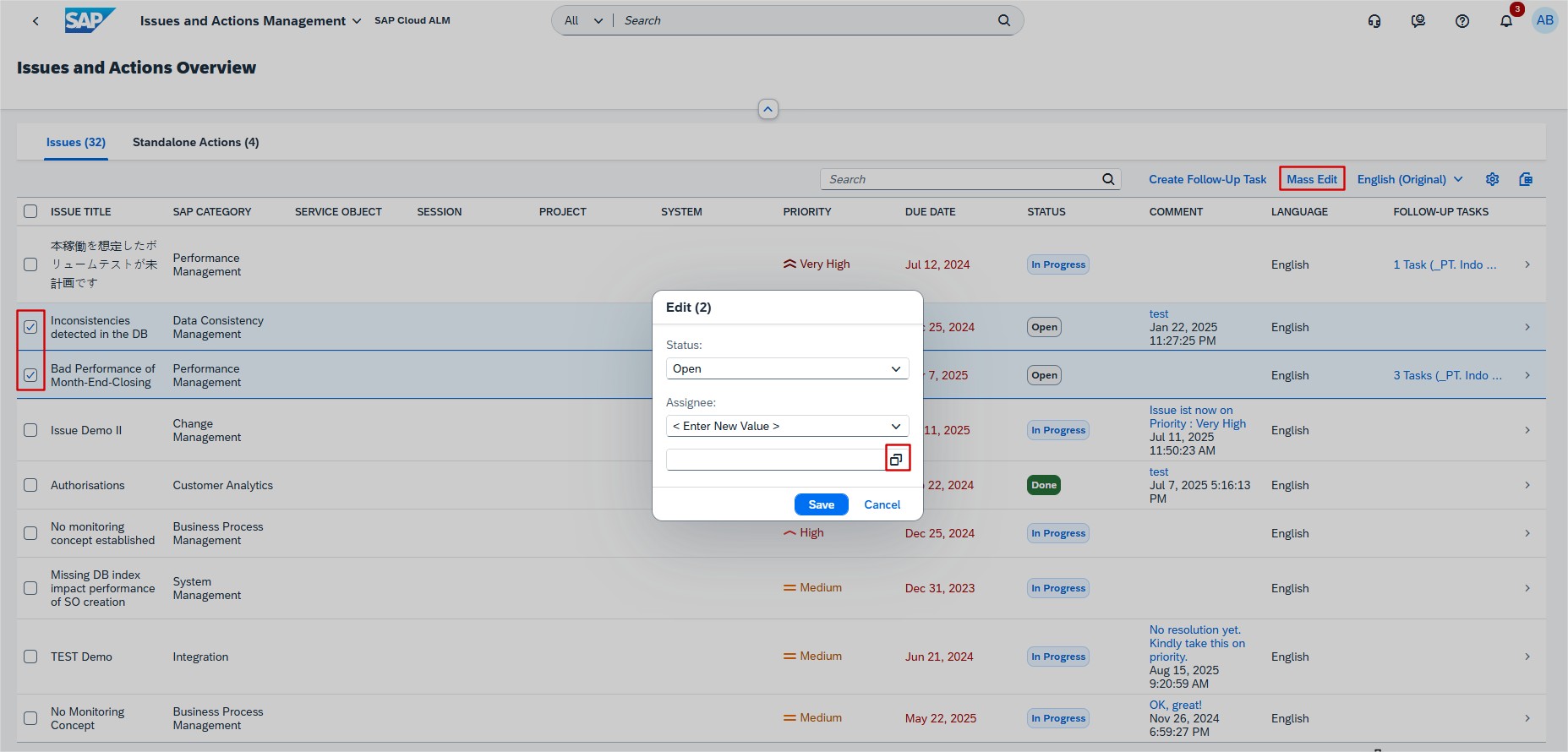
The new feature allows administrators, and team leads to update the assignee of multiple issues and standalone actions at once, directly from the Issues and Actions Overview page. This streamlined workflow saves valuable time, reduces administrative effort, and helps teams stay agile when responsibilities shift.
By simplifying the reassignment process, this enhancement also minimizes the risk of missed updates, ensuring that ownership remains consistent across the project.
TL;DR:
Update the assignee for multiple issues and actions in one go, saving time and keeping responsibilities aligned.
Search for Assignee with auto-suggestions and value help
Assigning or reassigning tasks is one of the most common actions in Issues and Actions Management. However, manually searching for users could slow down workflows, particularly in larger organizations with many potential assignees.
The new auto-suggestion and value help functionality on the Issue Details and Action Details pages significantly improves this process. Users can now quickly search by name or value, receive smart suggestions, and easily assign or override the current assignee with the right person.

This enhancement not only speeds up day-to-day work but also reduces errors when assigning tasks, ensuring that the right responsibilities are always matched to the right team members.
TL;DR:
Smart assignee search with auto-suggestions makes it faster and easier to assign or reassign issues and actions.
SAP Business Transformation Center – Scoping
The recent enhancements in the SAP Business Transformation Center focus on improving scoping clarity and flexibility within digital blueprints. By offering better visibility of active solution patterns and enabling selective scoping through organizational slices, these updates make it easier for project teams to design migration strategies that are both efficient and transparent.
Active solution patterns list
You can now view a list of all active solution patterns directly in the Digital Blueprint Overview app. Until now, project teams had to rely on memory or manual documentation to keep track of which solution patterns were applied to a blueprint. With this update, the system provides a clear, consolidated view of all active patterns in one place.
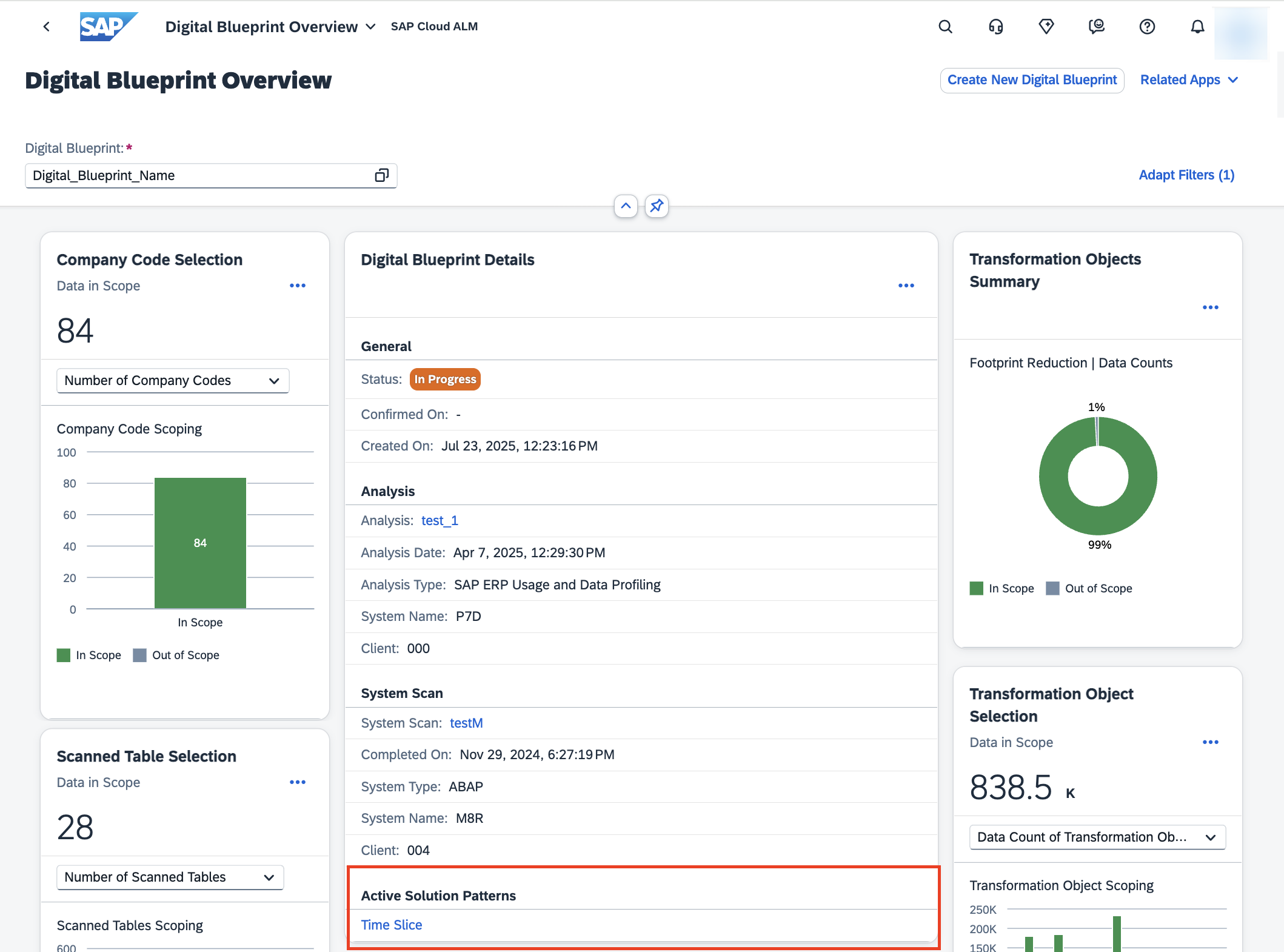
This improvement increases transparency and alignment across teams. Project managers can quickly verify the scope, consultants can validate whether the right patterns are applied, and stakeholders gain a reliable overview of the blueprint setup without additional effort. By eliminating guesswork and improving visibility, it becomes easier to manage scope and avoid inconsistencies during transformation.
TL;DR:
View all active solution patterns for a digital blueprint in one place to improve scope transparency, alignment, and decision-making.
New org slice solution pattern
A new org slice solution pattern is now available, enabling users to selectively exclude data for specific organizational units (such as company codes) from the scope of a digital blueprint. This feature is particularly valuable in complex landscapes, where only certain parts of the organization need to be migrated at a given time.
By narrowing the migration scope to targeted organizational units, project teams can reduce system size and complexity, which often results in faster processing, fewer errors, and more efficient transformation activities. For example, if a company is migrating only selected regions or business units in a phased approach, the org slice pattern ensures that the blueprint reflects only the relevant data, avoiding unnecessary workload.
TL;DR:
Apply org slices to exclude specific organizational units from a digital blueprint, reducing complexity and supporting more efficient, targeted migrations.
Operations – Business Process Monitoring
The latest enhancements in Business Process Monitoring continue to strengthen data quality and operational reliability across end-to-end processes. By introducing targeted KPIs, SAP Cloud ALM helps organizations identify gaps, detect risks early, and ensure smooth execution of business-critical activities such as payroll. These improvements support HR, operations, and project teams in maintaining accuracy, compliance, and employee satisfaction.
New KPI for SAP SuccessFactors Payroll
A new KPI, Employees Without Payroll Area Assignment, is now available within Business Process Monitoring for SAP SuccessFactors Payroll, under the end-to-end process Recruit to Retire.

This KPI is activated automatically once the setup steps for SAP SuccessFactors Payroll are completed and the relevant data is being generated. It helps organizations identify employees who have not been assigned to a payroll area, a critical prerequisite for correct payroll processing.
This update is especially valuable for HR and payroll teams who need to ensure accurate master data maintenance, project managers overseeing HR process reliability, and operations teams monitoring overall data quality in end-to-end HR processes. By detecting missing assignments early, payroll errors can be avoided and employee satisfaction maintained.
TL;DR:
The new KPI “Employees Without Payroll Area Assignment” in SAP SuccessFactors Payroll helps ensure data quality and prevents payroll disruptions by identifying unassigned employees early.
Implementation – Test Plans, Cross-Project Overview, Guided Implementation
Recent updates in the Implementation area add new flexibility for managing test plans, better visibility of process structures, and more control over documentation and project timelines. These enhancements make it easier for teams to organize, track, and align implementation activities across projects.
Tag assignment for Test Plans
A new tagging capability has been introduced in the Test Plans app. Tags allow users to assign meaningful labels to test plans, grouping them based on business area, scope, priority, or any other project-specific attribute. This makes it far easier to search for and filter test plans in the list view, particularly in large projects with extensive testing scope.

An additional benefit is that tags are automatically removed when no longer in use, ensuring that the system remains free from clutter or outdated entries. For project managers and test leads, this means they can quickly identify related test plans, keep test cycles organized, and support structured test execution.
At blue.works, we complement capabilities with dedicated Test & Quality services – from operative test management and test automation to tailored test strategies, concepts, and tool support. Explore our Test & Quality offering to see how we can help strengthen testing in your projects.
TL;DR:
Assign tags to test plans to organize them by common attributes and simplify searching, filtering, and reporting.
Process Hierarchy Assignments – Interface column enhancement
The Process Hierarchy Assignments app has been enhanced with a new column for library type Interfaces. This addition improves transparency in how interfaces are mapped to hierarchy nodes. Until now, managing and validating interface dependencies often required switching between views or relying on external documentation.
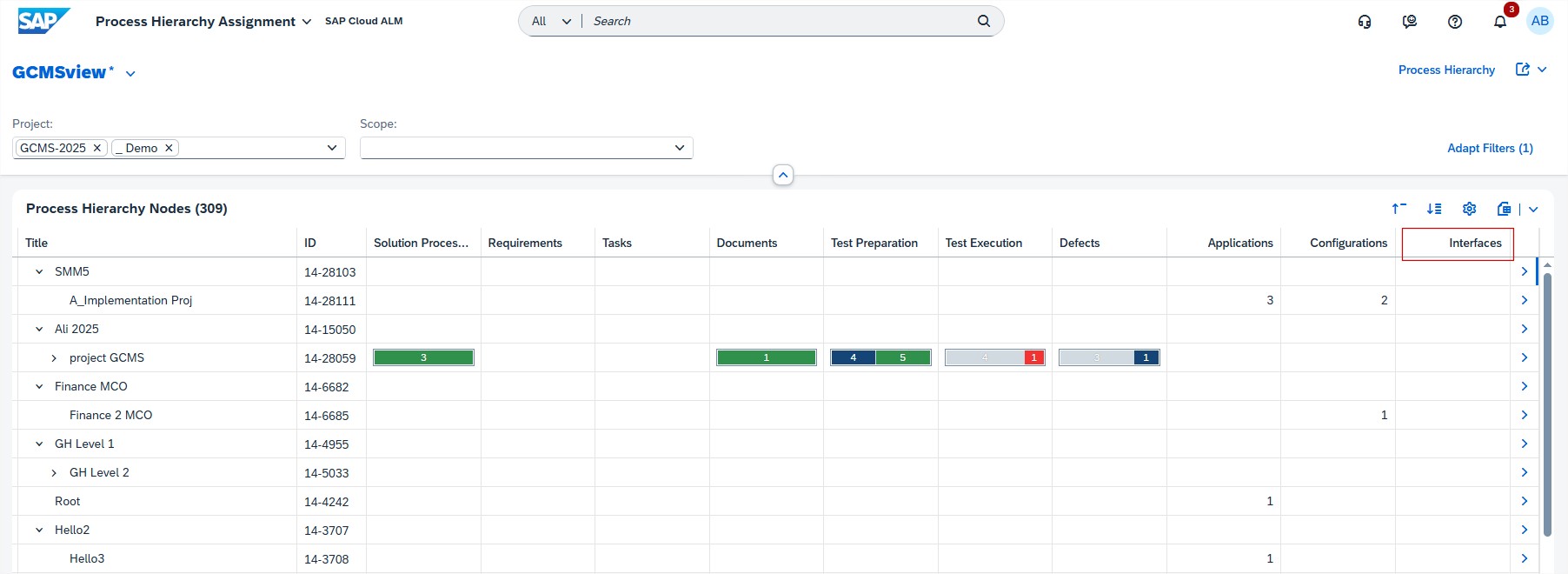
With this enhancement, teams can directly see which interfaces are tied to specific hierarchy elements, helping ensure all dependencies are accounted for during project scoping and design. This is particularly valuable in integration-heavy projects, where overlooking a single interface could cause downstream issues.
TL;DR:
The new Interfaces column in Process Hierarchy Assignments provides clearer visibility of interface dependencies, making scoping and validation easier.
Edit sprints and milestones in detail view
Project timelines often need adjustment as priorities shift and new requirements emerge. To support this, the Guided Implementation task Define Timelines now allows sprints and milestones to be edited directly in the detail view.
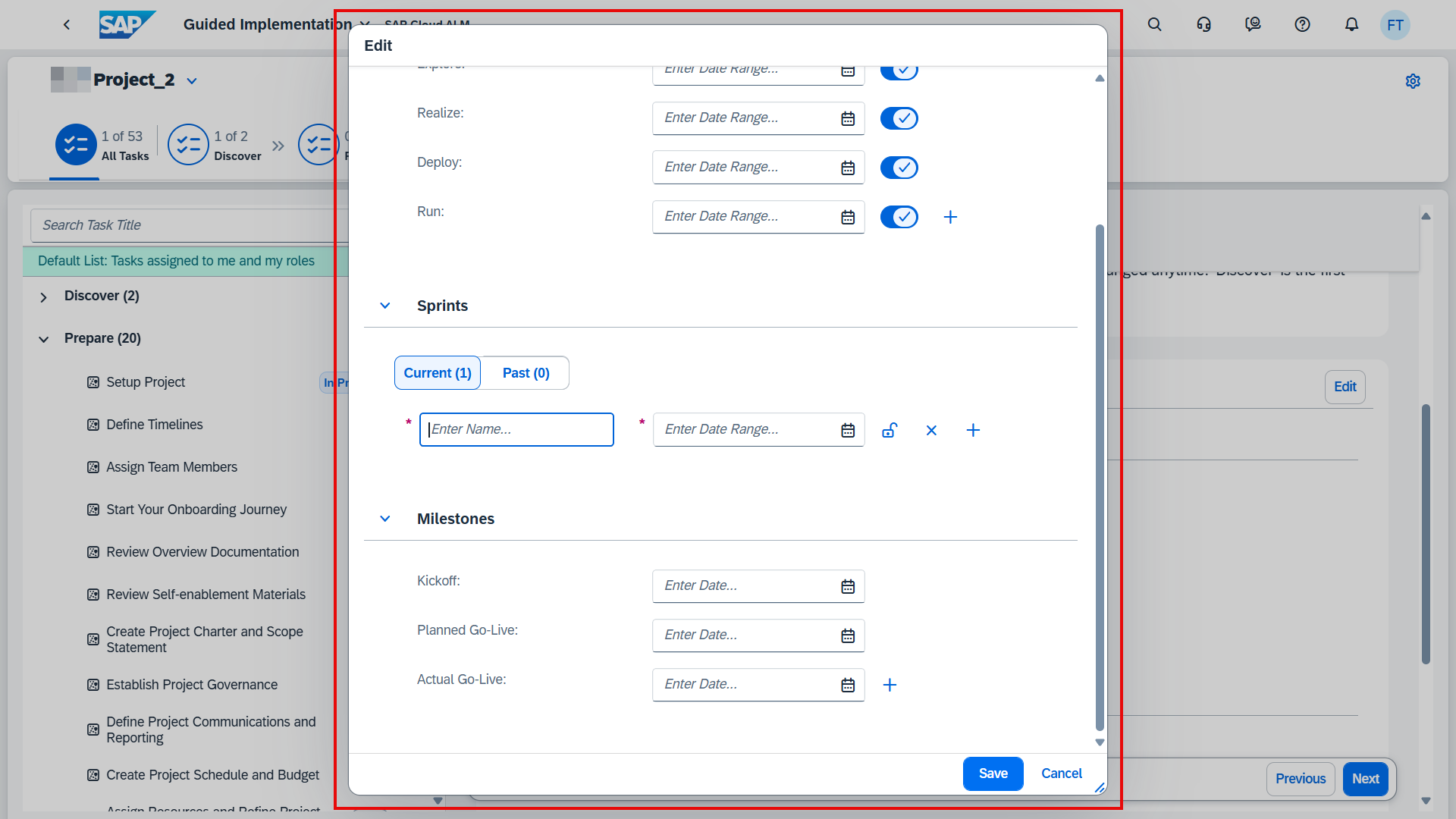
This enhancement streamlines planning by letting teams make timeline adjustments where they are already working, without navigating back to separate configuration areas. For project leads and scrum masters, it enables more agile project management, making it easier to keep plans aligned with reality while maintaining a clear structure of tasks and milestones.
TL;DR:
Sprints and milestones can now be edited directly in the Define Timelines task, giving teams greater flexibility and agility in project planning.
Administration – Landscape Management
The Administration area of SAP Cloud ALM is steadily evolving to give system administrators and user managers more streamlined tools to handle configuration, access, and governance. Recent enhancements aim to reduce complexity, improve efficiency, and respond directly to community feedback shared through SAP Influence requests.
Central Clean-Up for use case configuration
One of the more time-consuming challenges administrators have faced in SAP Cloud ALM is the complexity of de-registering use cases. Until now, removing configurations for a particular use case required following a multi-step, fragmented procedure across different monitoring applications – such as Health Monitoring, Business Process Monitoring, Integration & Exception Monitoring, or Job & Automation Monitoring. Each application had its own steps, making the process not only lengthy but also prone to oversight or errors.
With the new Central Clean-Up capability in Landscape Management, SAP has taken the first step toward addressing this pain point. This feature allows administrators to centrally clean up configurations for supported use cases, starting with Health Monitoring. This marks a significant improvement in reducing complexity, saving time, and ensuring a more consistent and user-friendly de-registration workflow.
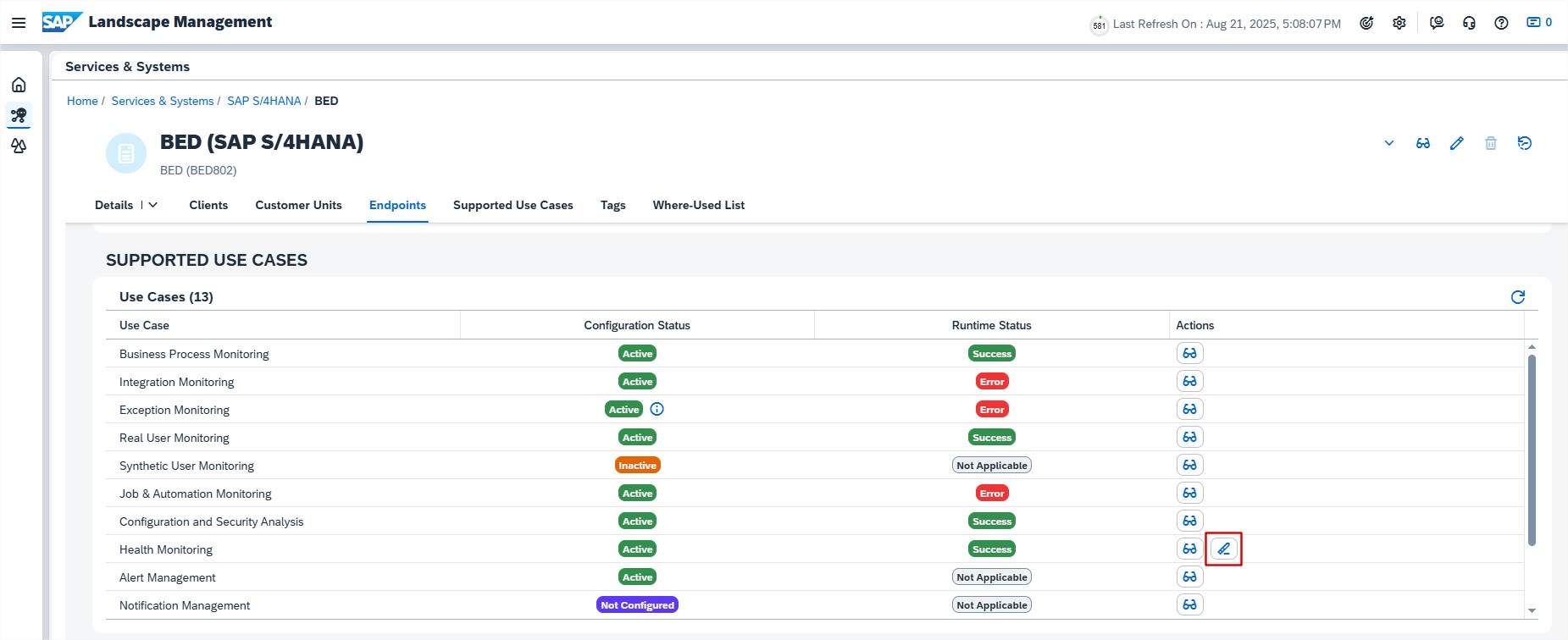
This capability also reflects feedback from the SAP community. In fact, we initiated an SAP Influence request to simplify and unify the de-registration process, which has now materialized into this first step toward the streamlined clean-up we envisioned. You can follow the progress of our request and add your support here.
The benefits are clear: administrators gain efficiency by avoiding repetitive steps across multiple applications, the risk of errors is lowered through a standardized approach, and overall productivity is improved by freeing up time for more value-adding tasks.
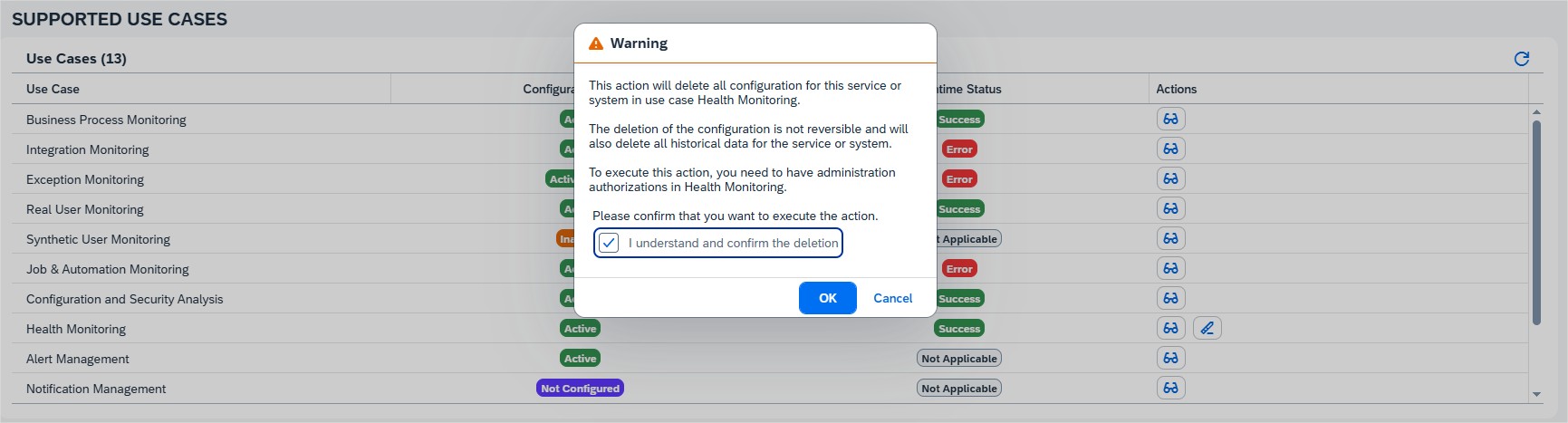
While currently available only for Health Monitoring, this enhancement is the first real step toward a unified, streamlined clean-up process across all monitoring use cases. At blue.works, we’re looking forward to seeing this capability extended to other areas like Job & Automation Monitoring, Integration & Exception Monitoring, and Business Process Monitoring in future updates – making system clean-up faster, simpler, and far less error-prone.
TL;DR:
Central Clean-Up in Landscape Management simplifies the de-registration of Health Monitoring configurations, delivering time savings, reduced complexity, and more consistency. It also marks progress on the SAP Influence request for a unified de-registration process – paving the way for similar improvements across other monitoring use cases.
