

SAP Cloud ALM – What’s New in Week 36
SAP Cloud ALM is steadily maturing into a more complete platform with each release. The updates from week 36 continue this trajectory, adding features that make system oversight simpler, project work more adaptable, and operations more transparent.
This round of enhancements is not just about new functionality but about removing friction in day-to-day tasks – whether that’s keeping issues and actions organized, fine-tuning digital blueprint scoping, or strengthening monitoring with new KPIs and security coverage.
In this blog, we highlight the improvements we see as especially valuable and share our recommendations on how they can best support administrators, project managers, consultants, and operations teams in practice.
Services – Issues and Actions Management
The Services area in SAP Cloud ALM continues to evolve with features that simplify issue and action handling. The latest updates focus on making searches more precise and task ownership easier to manage. By enhancing filters and introducing bulk assignment options, these improvements save time, reduce manual effort, and help teams keep responsibilities clear and consistent.
Enhanced Service Object filter
The Service Object filter on the Issues and Actions Overview page has been enhanced to allow searches by Service and Session. This refinement gives users more precise control when filtering issues and standalone actions, especially in projects with many entries.
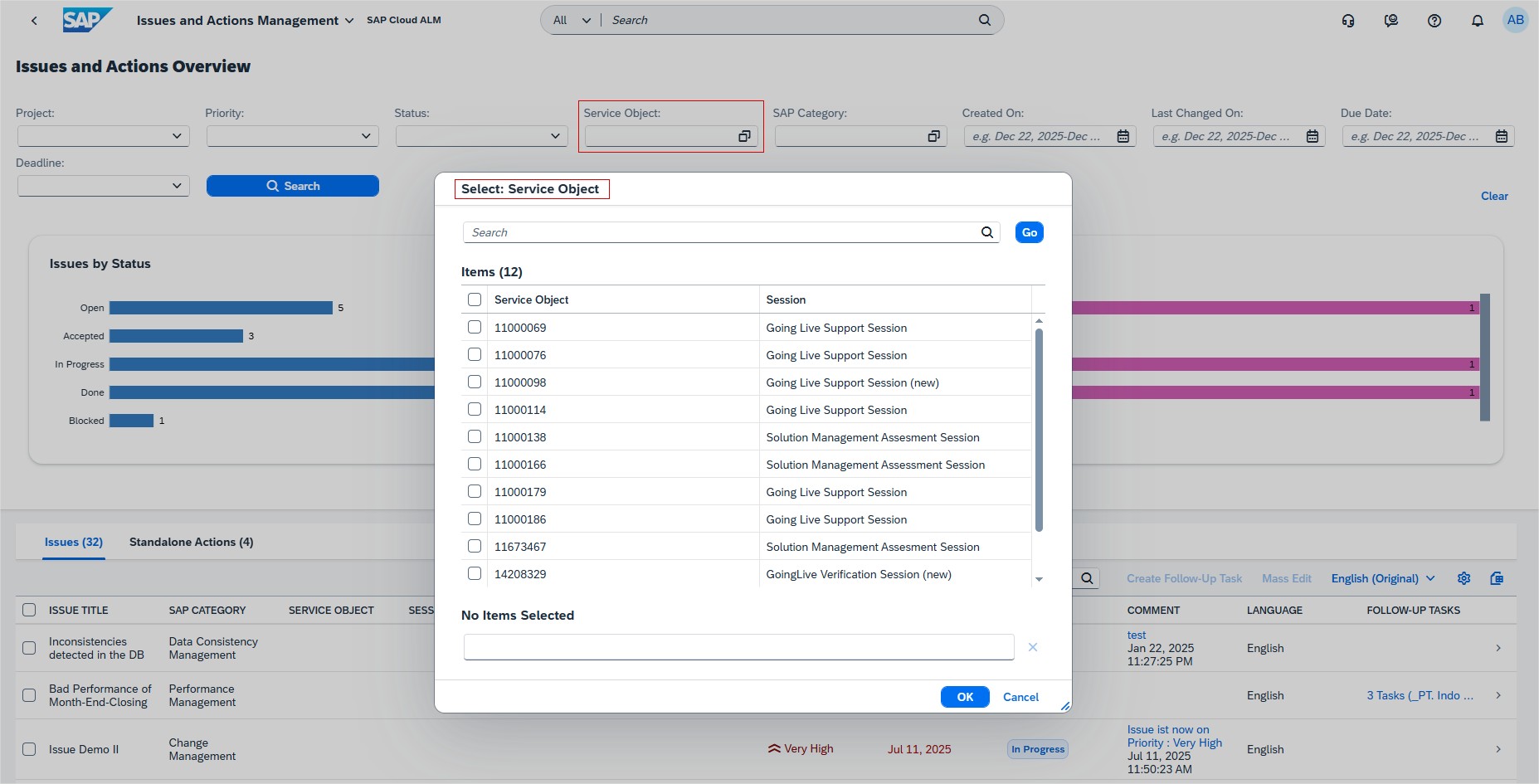
For project managers and consultants, this means less time spent scrolling through irrelevant records and more focus on the items that truly matter. By narrowing searches to a specific service or session, teams can quickly locate relevant issues, review their status, and act faster.
TL;DR:
Filter issues and actions more precisely by Service or Session to save time and improve focus.
Update of Assignee for Recommended Actions
A new capability now allows users to update the assignee of multiple recommended actions linked to an issue directly on the Issue Details page. Instead of reassigning each action individually, several actions can be updated in one go, streamlining workload distribution.
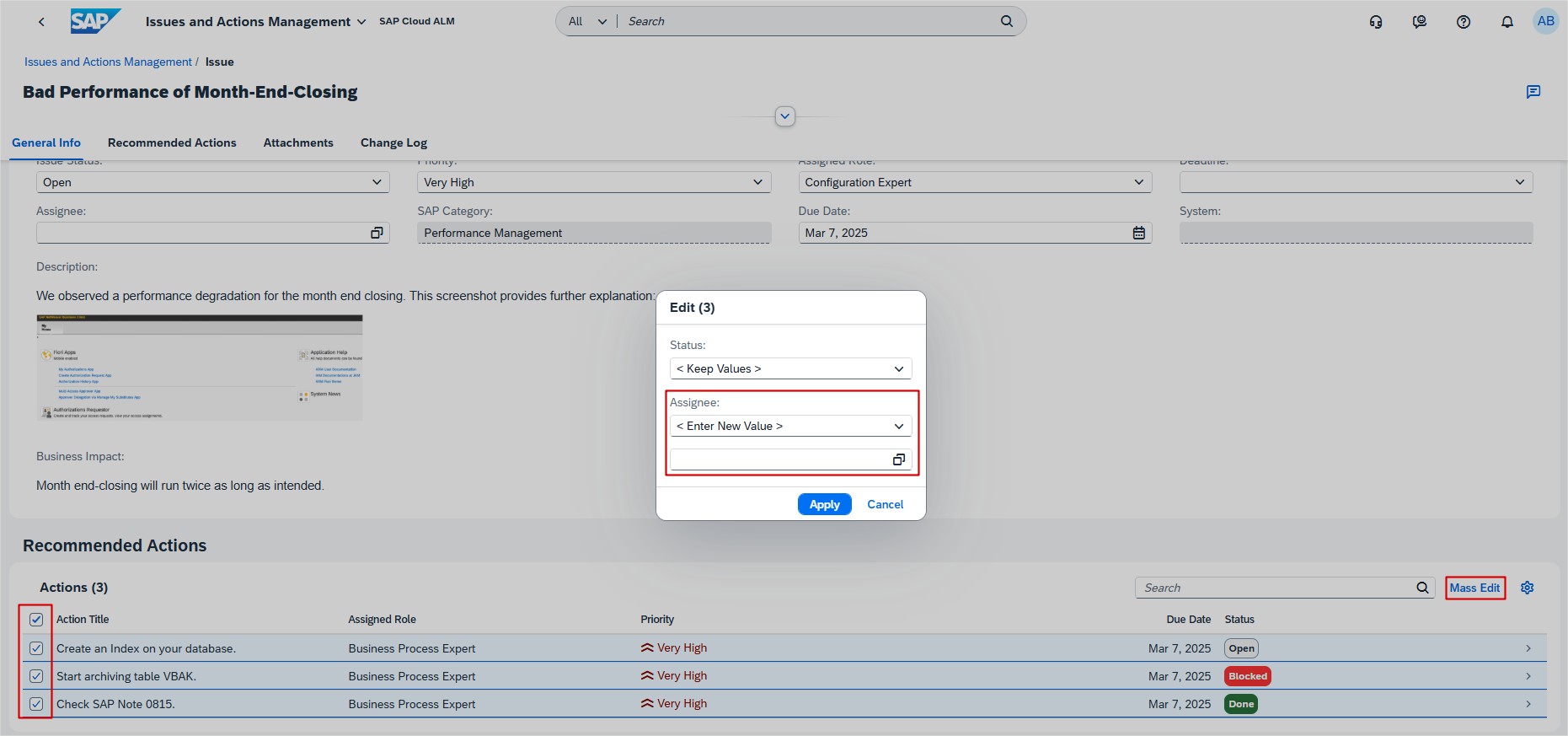
This enhancement is especially useful for service delivery consultants and team leads during reassignment of tasks, for example after role changes, handovers, or when balancing workloads across the team. It ensures responsibilities are updated consistently while reducing manual effort.
TL;DR:
Reassign multiple recommended actions at once from the Issue Details page to save time and ensure consistent ownership.
RISE with SAP – System View
The RISE with SAP dashboards in Cloud ALM continue to expand, giving organizations clearer visibility into system health and compliance. With recent updates to both the Operations View and System View, teams can now monitor KPIs that go beyond performance and availability to include clean core practices. These enhancements help administrators, project managers, and architects ensure systems remain stable, efficient, and aligned with SAP’s clean core strategy.
New Integration section and Clean Core Compliance of Interfaces card
The System View dashboard has been expanded with a new Integration section, designed to evaluate clean core compliance from an integration perspective. At the heart of this section is the Clean Core Compliance of Interfaces card, which provides an overview of the share of compliant, conditionally compliant, and non-compliant interfaces in a system.
Interfaces are categorized as Standard, Traditional, or Custom, making it easier for teams to understand where deviations from clean core practices exist and which areas may require attention. Each category includes compliance status details, helping organizations take a structured approach to remediation.
The card is powered by data from the SAP Readiness Check results stored in SAP Cloud ALM. Users can view details from the latest analysis or trigger a new SAP Readiness Check directly from the dashboard to ensure they are working with up-to-date compliance information.
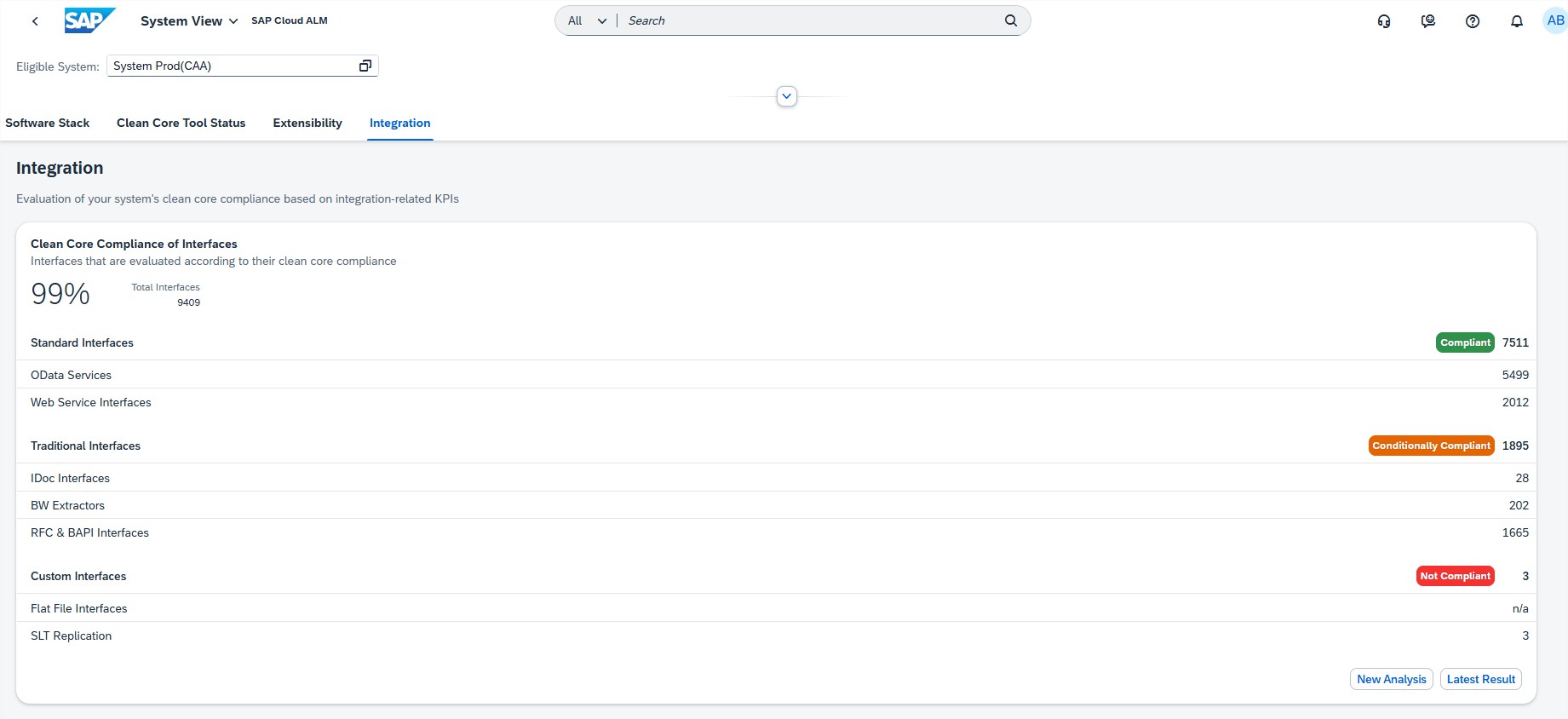
This enhancement is particularly valuable for system administrators and IT operations teams monitoring clean core compliance, as well as project managers and architects who need accurate insights into integration health during transformation or continuous improvement initiatives.
TL;DR:
The new Integration section in System View helps track clean core compliance of interfaces by category and status, supported by SAP Readiness Check results for accurate, up-to-date insights.
Operations – Configuration & Security Analysis
Security monitoring in SAP Cloud ALM has taken another step forward with extended coverage for SAP SuccessFactors Agent Connection. By surfacing key configuration risks and daily compliance checks, this update strengthens visibility into one of the most critical integration services in SuccessFactors landscapes.
Support for SAP SuccessFactors Agent Connection service
The Configuration & Security Analysis app in SAP Cloud ALM now supports monitoring of the SAP SuccessFactors Agent Connection service, adding visibility into one of the key integration components of SuccessFactors landscapes.
This update enables administrators to continuously check whether Agent Connection tenants are configured in line with SAP’s security recommendations. Data is reported to SAP Cloud ALM daily, and additionally whenever important security settings are changed, ensuring near real-time insights.
Among the monitored areas are roles and authorizations. For example, when defining navigation item permissions, the use of wildcards (*) can override other access rules, potentially allowing unintended access. SAP Cloud ALM surfaces such risks and provides clear guidance to ensure safer, more compliant configurations.
For system administrators and security teams, this means faster detection of vulnerabilities, improved governance, and fewer blind spots in hybrid landscapes. By integrating Agent Connection into the broader security monitoring framework, organizations can strengthen their overall security posture and reduce the risk of misconfiguration.
TL;DR:
Configuration & Security Analysis now monitors SAP SuccessFactors Agent Connection, reporting daily and highlighting critical security recommendations – such as avoiding risky wildcard authorizations – to help maintain secure and compliant operations.
Implementation – Test Preparation, Documents, Processes
The Implementation area of SAP Cloud ALM continues to expand with features that improve flexibility, transparency, and governance in project execution. Recent updates make it easier to adapt and reassign test cases as project structures evolve, provide clearer document version control with support for larger external files, and strengthen the connection between solution processes and their assigned test cases. Together, these enhancements help project teams maintain alignment, reduce rework, and ensure compliance throughout the implementation lifecycle.
Reassignment of test cases
A new capability in the test case editor now allows users to reassign test cases to a different scope, solution process, or solution process flow diagram. This makes it easier to adapt existing test cases to evolving project structures or correct initial assignment errors without the need to delete and recreate them from scratch.
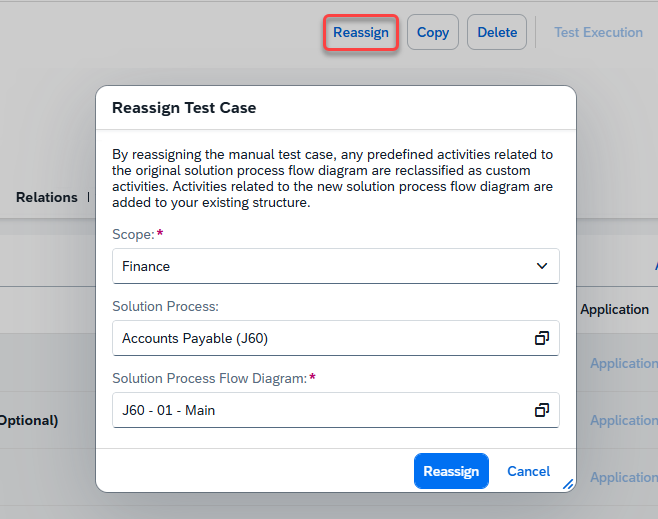
For project managers and test leads, this streamlines test maintenance by reducing redundant work and preserving the continuity of test execution data. It also provides greater flexibility as projects shift, ensuring that testing remains aligned with current solution design.
This feature is especially helpful in large or long-running projects where scope and process structures often change, as it allows teams to keep testing assets up to date without unnecessary duplication.
TL;DR:
Reassign test cases to a different scope or process without recreating them, saving time and keeping testing aligned with evolving project structures.
File Version Attribute and Larger External File Support
Two enhancements have been introduced in the Documents app to improve external file handling:
- A new File Version attribute is now available in the External File tab. It provides visibility into the different DMS (Document Management System) versions of an external file, ensuring that project teams can identify which version they are working with. Only major versions are displayed, and if no DMS version is provided, the File Version is set to “–”. This helps reduce errors and supports compliance by ensuring consistency in document usage.
- The maximum size for external files has been increased to 120 MB, allowing users to upload larger files directly into the system. While this provides more flexibility, note that the upload will time out after 80 seconds, which may affect users with slower connections.
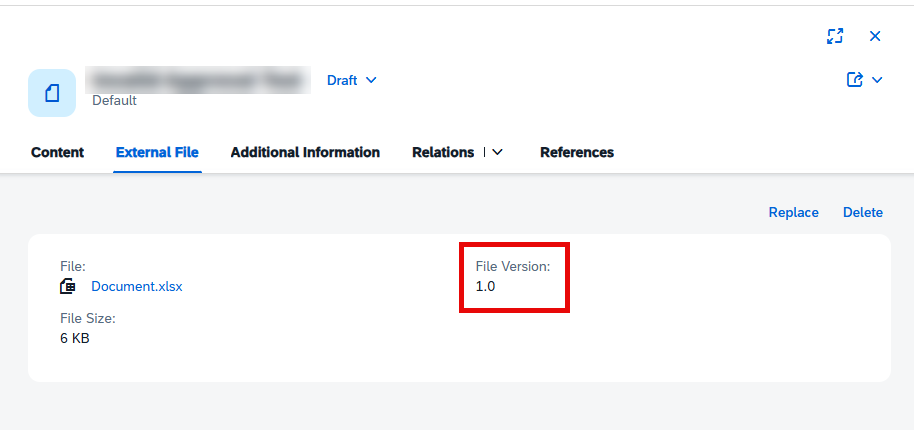
Together, these updates strengthen transparency and flexibility in document management. Project managers, document owners, and auditors benefit from clearer version control, while teams handling complex projects can now store and manage larger files more easily.
TL;DR:
The Documents app now supports larger external files (up to 120 MB) and introduces a File Version attribute for better DMS version visibility, improving consistency, flexibility, and compliance in document management.
Visibility of Test Cases in Solution Process Entities
The Solution Process Viewer now provides enhanced transparency by showing all test cases assigned to solution process entities. When viewing a solution process, solution process flow diagram, or solution activity, users can see details of assigned test cases directly in a new section.
Displayed attributes include the test case name, its variant (used to execute automated test cases with different values), its type (manual or automated), and its preparation status (in preparation or prepared). Assignments that originate from Process Authoring are clearly marked with a dedicated icon, ensuring traceability of where test cases were created or linked.
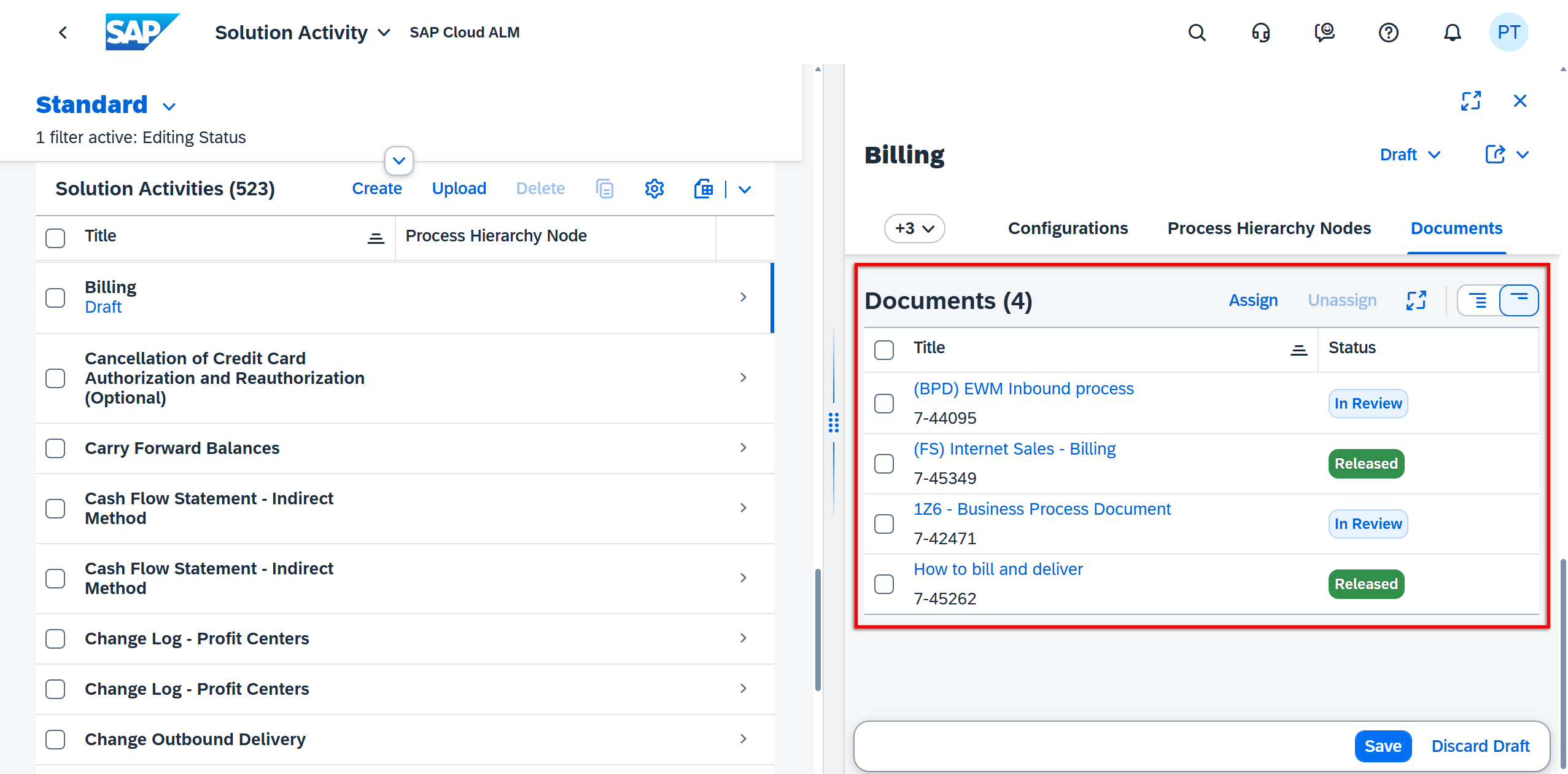
This improvement is particularly valuable for project managers, test leads, and process owners, as it provides an integrated view of processes and their associated testing coverage. It ensures that testing is visible in the context of solution design, supports quality assurance, and helps avoid gaps between documented processes and actual test execution.
TL;DR:
The Solution Process Viewer now displays assigned test cases (including type, variant, and status), improving transparency and helping align process design with testing activities.
Administration – Landscape Management
The Administration area in SAP Cloud ALM continues to evolve with features that improve transparency and governance. The latest update enhances Landscape Management by surfacing contract-related details, helping administrators and project leads make more informed decisions when managing systems.
Contract Information for RISE with SAP customers
A new label, Contract Type, has been added to the Services & Systems overview and details views in Landscape Management. This label provides visibility into the system’s contract type, giving administrators a clearer picture of the contractual context for their environments.
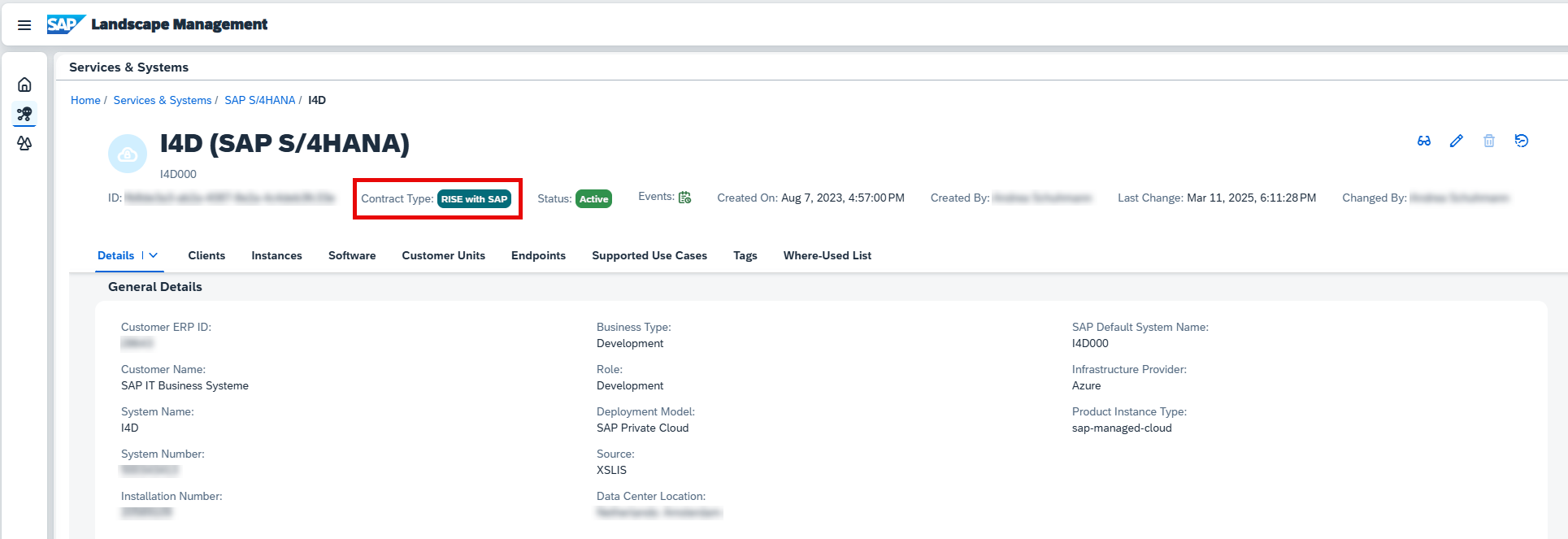
It is important to note that this information is available only for RISE with SAP customers, where contract alignment is a central aspect of system management.
For administrators and project leads, this small but meaningful enhancement helps ensure transparency when reviewing systems and simplifies cross-checks during planning or audits.
TL;DR:
Landscape Management now shows the Contract Type label in Services & Systems views, improving transparency for RISE with SAP customers.
