

SAP Cloud ALM – What’s New in Week 38
SAP Cloud ALM continues to evolve with updates that focus on practicality and user experience. The enhancements delivered in week 38 bring improvements across multiple areas: Services gets more flexibility in handling issues and actions, RISE with SAP extends its System View with new clean core integration insights, Operations strengthens monitoring with features like ABAP heartbeat and job runtime details, Implementation adds new tools for risks, documents, and testing, while Administration improves transparency with contract information.
Together, these updates make it easier to manage complexity, ensure compliance, and keep projects and operations running smoothly. In this blog, we take a closer look at the highlights of week 38 updates.
Services – Issues and Actions Management
The Services area continues to receive refinements that make Issues and Actions Management more efficient and user-friendly. A small but useful change: the Search button on the Issues and Actions Overview page is now labeled Go. While minor, this aligns the app more closely with SAP’s standard UI conventions, making the interface more intuitive for users.
Filter Issues Without a Service Object
A new filtering option on the Issues and Actions Overview page allows users to separate issues with assigned service objects from those without. This improvement is particularly valuable in large projects where service object assignments are used to categorize and connect issues to technical or functional areas.
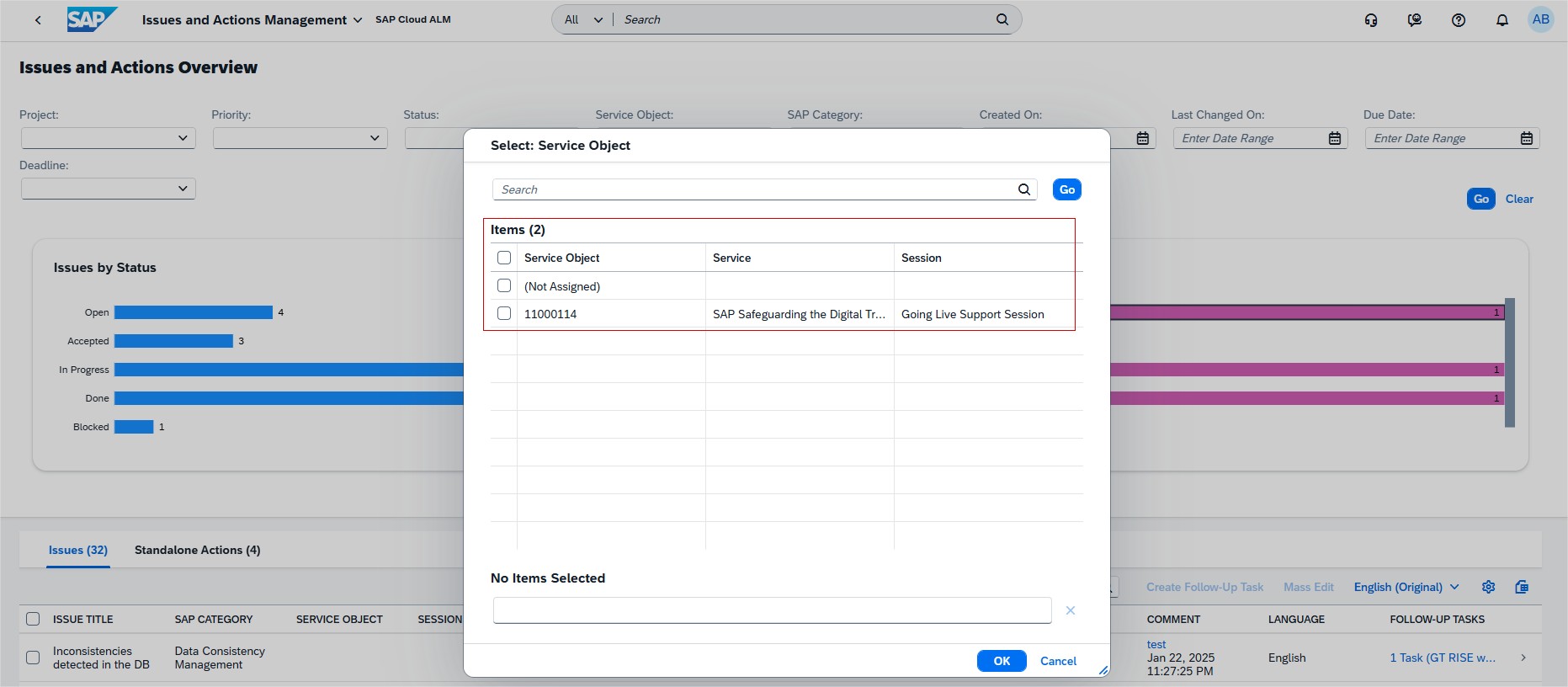
By filtering Issues without service objects, project managers and consultants can quickly identify gaps in classification and ensure that all issues are documented with the proper context. This not only improves reporting accuracy but also helps streamline ownership and accountability. With all issues correctly assigned, teams can analyze trends more effectively and reduce the risk of unresolved tasks falling through the cracks.
TL;DR:
Filter issues with or without a service object to spot missing assignments and maintain completeness.
Quick Status Update in Display Mode
Updating the status of recommended actions no longer requires switching into edit mode. Instead, teams can now adjust statuses directly while viewing the action in display mode.
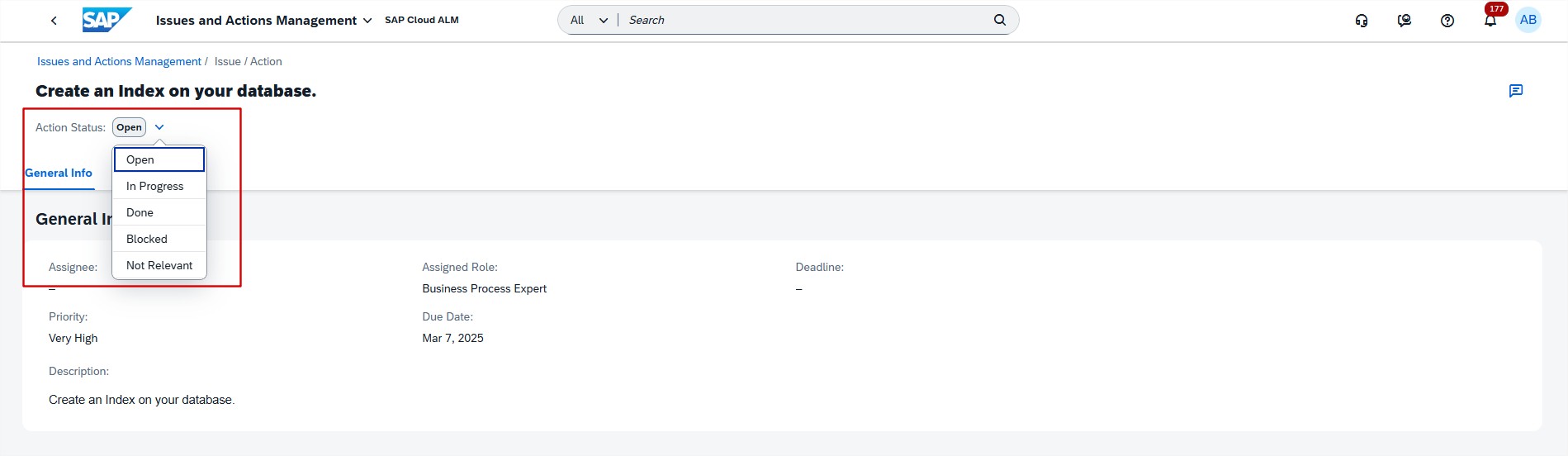
This enhancement removes unnecessary clicks and speeds up status updates, especially during project review meetings or status checks where many actions are discussed in quick succession. For consultants and project managers, it means more focus on the discussion itself rather than navigating the tool. The ability to make quick updates in real time helps ensure that SAP Cloud ALM always reflects the latest progress without delaying follow-up work.
TL;DR:
Update recommended action statuses directly in display mode for faster reviews.
Automatic Closure of Recommended Actions
New automation makes issue handling more efficient: when an issue is marked as Done, all its linked recommended actions are now automatically closed.
Previously, users had to manually review and close each related action, a process that often led to overlooked items and inconsistent records. With this improvement, teams benefit from a consistent workflow where completed issues automatically bring closure to all associated actions. This reduces administrative effort, prevents lingering open items that no longer require attention, and ensures dashboards and reports always present a true picture of project progress.
For consultants and project managers, this translates into less manual clean-up and more confidence that completed issues are fully resolved within SAP Cloud ALM.
TL;DR:
Recommended actions now close automatically when the parent issue is marked as Done, improving consistency and reducing manual work.
RISE with SAP – System View
The RISE with SAP continues to expand its dashboards to give customers better insights into clean core compliance. With the latest update, the System View now includes integration-related KPIs, helping teams evaluate interface compliance and align more closely with SAP’s Clean Core Level Concept.
Card Details Relabeled in System View
The System View dashboard has been updated to improve consistency with SAP’s new Clean Core Level Concept. On the ABAP Cloud card, details that were previously labeled with “Tier 1” terminology are now aligned with the new naming convention:
- Tier 1 Customer Objects is relabeled to Level A Objects
- Potential Tier 1 Objects is relabeled to Potential Level A Objects
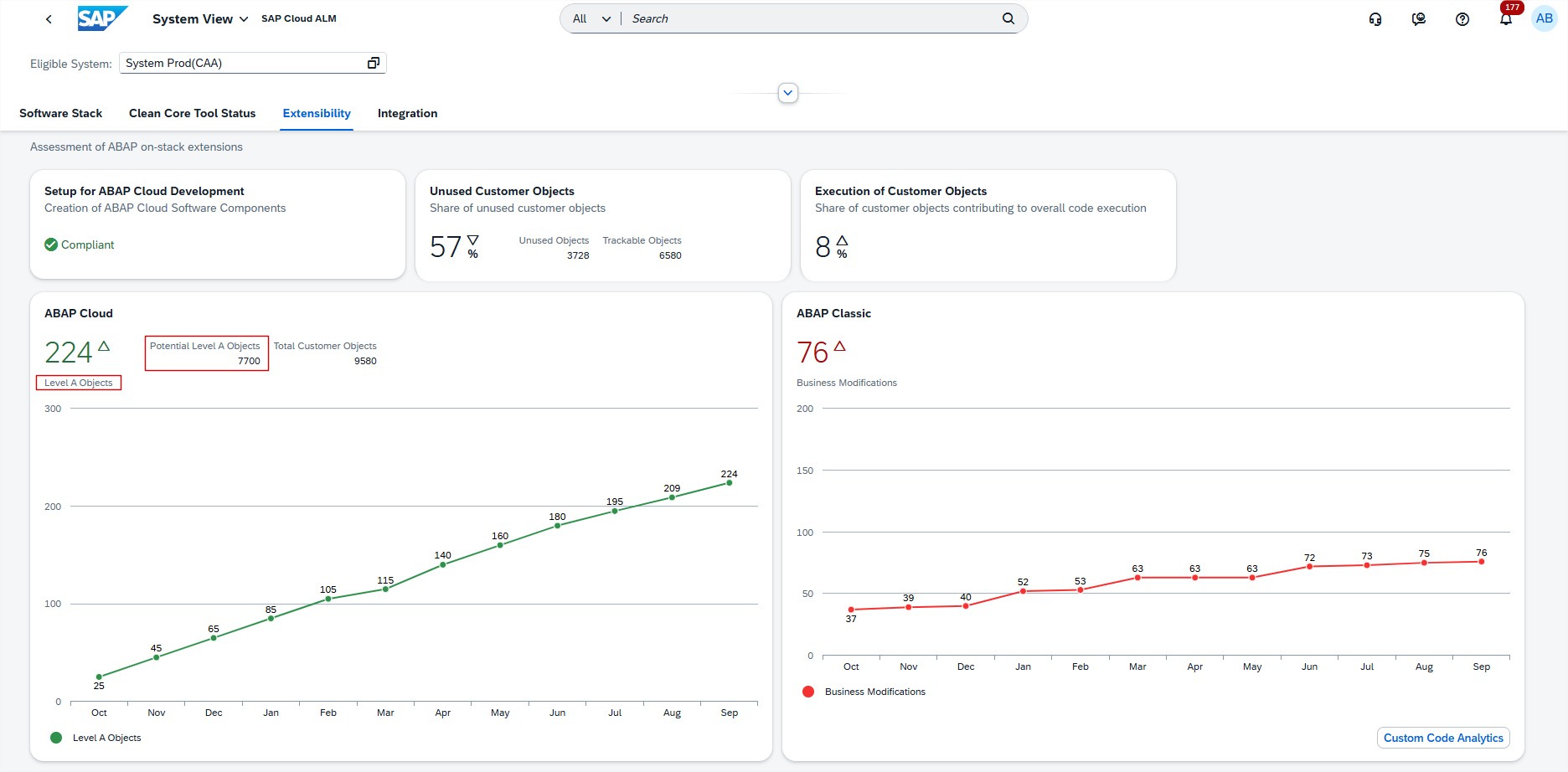
This change does not affect the underlying data but ensures that the dashboard reflects SAP’s latest terminology, making it easier for users to align their clean core practices with the new Level A/B/C model introduced by SAP.
By providing consistent naming across the dashboard, project teams and administrators can better interpret results and communicate findings without confusion caused by legacy labels.
TL;DR:
System View aligns with the new Clean Core Level Concept: “Tier 1” objects are now labeled as Level A Objects, improving clarity and consistency.
Operations – Health Monitoring, Job & Automation Monitoring, Real User Monitoring
The latest updates in SAP Cloud ALM’s Operations area introduce new monitoring and features that improve visibility, provide faster context, and help teams react more efficiently to issues across systems, jobs, and end-user activities.
Health Monitoring: ABAP Heartbeat Monitoring
ABAP systems and instances now send a heartbeat metric every minute to indicate their availability. This enables teams to detect potential downtime or disruptions in metric transmission more quickly.
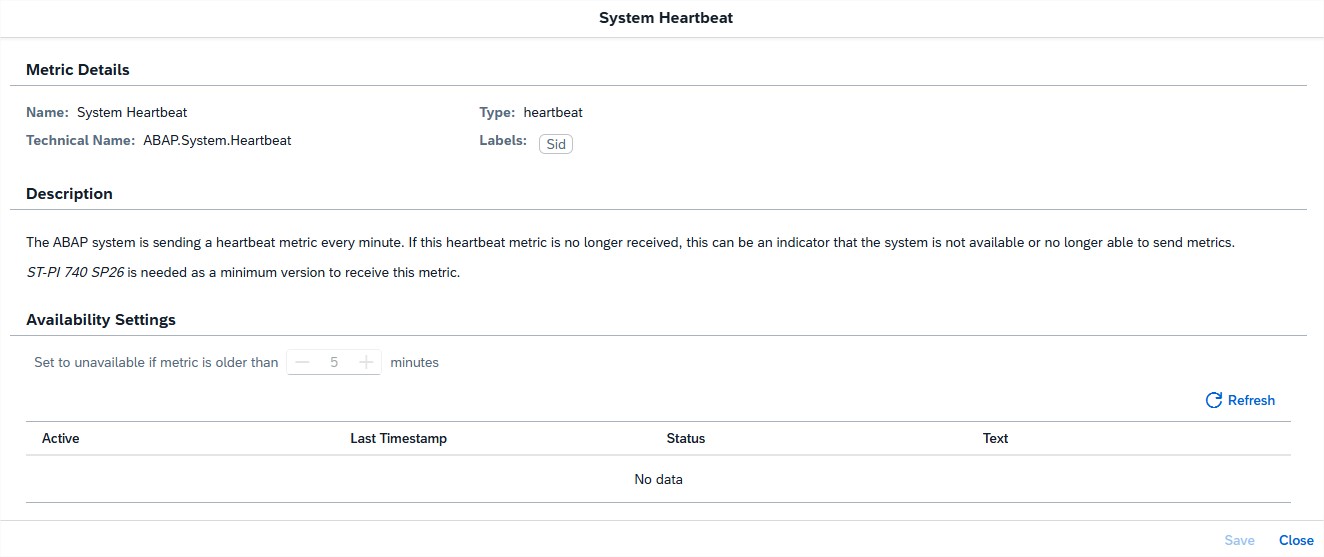
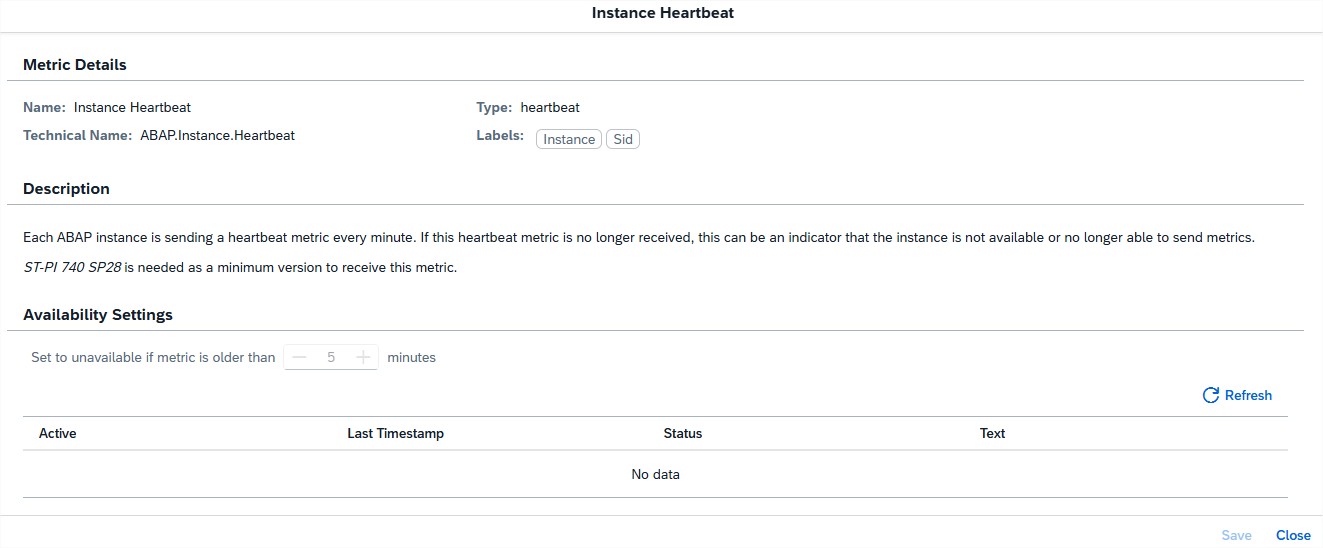
It’s important to note that a negative heartbeat response does not definitively confirm unavailability but should be treated as an early signal to investigate possible outages or interruptions.
TL;DR:
ABAP systems now provide minute-by-minute heartbeat signals, giving teams an early warning mechanism for potential downtime.
Enhanced Job Monitoring Notifications
Job-related alert emails now provide more context and quicker navigation options. Alongside the Start Time, notifications now include End Time and Run Time, allowing operations teams to assess job performance directly from the email without needing to log into SAP Cloud ALM.
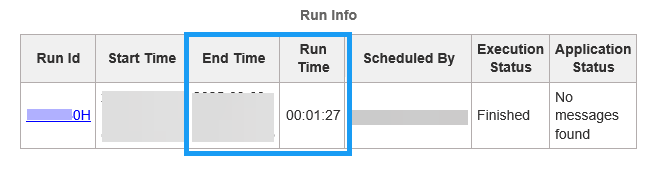
In addition, recipients can now navigate directly to the specific job run by selecting the Run ID in the notification. This reduces investigation time, supports faster handovers, and ensures that even stakeholders without full ALM access can track and process job-related alerts more effectively.
TL;DR:
Job alert emails now show End Time and Run Time and include direct links to job runs, giving teams faster insights and quicker access to investigations.
New Exceptions Page in Real User Monitoring
A new Exceptions page has been added to the Real User Monitoring app. It surfaces user-relevant exceptions for the selected application and scope, with the ability to drill down into detailed descriptions and context information.
Currently, the page covers:
- ABAP Dumps
- ABAP Web Service Exceptions
- ABAP Gateway Errors
This provides a centralized way to track and analyse exceptions impacting end users, enabling teams to resolve issues faster and improve user experience.
TL;DR:
Real User Monitoring now includes an Exceptions page for ABAP dumps, web service errors, and gateway errors, helping teams resolve user-impacting issues more quickly.
Implementation – Test Preparation, Risks, Processes
The latest updates in the Implementation area make project execution more structured and efficient. New features include harmonized relation assignments in test cases, a brand-new Risks app for structured risk management, the option to create documents from templates, and improved collaboration with recent comments displayed directly in detail views. Together, these enhancements boost transparency, consistency, and teamwork across projects.
Harmonized Relation Assignment in Test Preparation
The Test Preparation app has been streamlined with a new harmonized approach to relation assignment. Previously, requirements and user stories were handled in separate tabs, creating a fragmented experience when linking test cases to other project objects. With this update, both are now integrated into a single Relations tab, giving teams one central place to assign and manage all related objects.
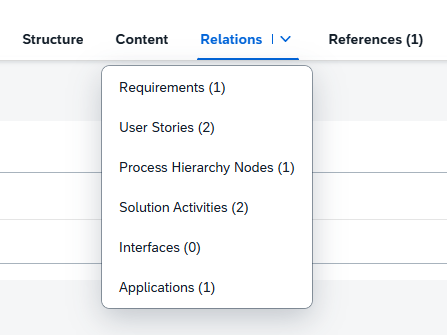
Beyond simplification, the update also introduces direct navigation links for all assigned relations (except for process hierarchy nodes). This makes it easier to move between test cases and their related requirements, user stories, or other objects, ensuring smoother workflows and faster access to relevant details.
This enhancement saves time, reduces confusion, and strengthens traceability across testing activities by consolidating relation handling into one intuitive view.
TL;DR:
All relation assignments for test cases are now handled in one central tab, with direct links to related objects for faster navigation and improved traceability.
New Risks App Released
The new Risks app in SAP Cloud ALM introduces a structured way for project teams to identify and manage risks that could adversely affect objectives related to scope, timelines, quality, or budget. By embedding risk management directly into the project environment, teams gain visibility and control over potential challenges before they escalate.
In the app, risks can be created, edited, searched, and deleted with ease. Teams can also assign statuses, categories, owners, responsible persons, and mitigation strategies to ensure accountability and structure. Each risk can be assessed based on impact, probability, priority, and mitigation measures, providing a clear framework for evaluation.
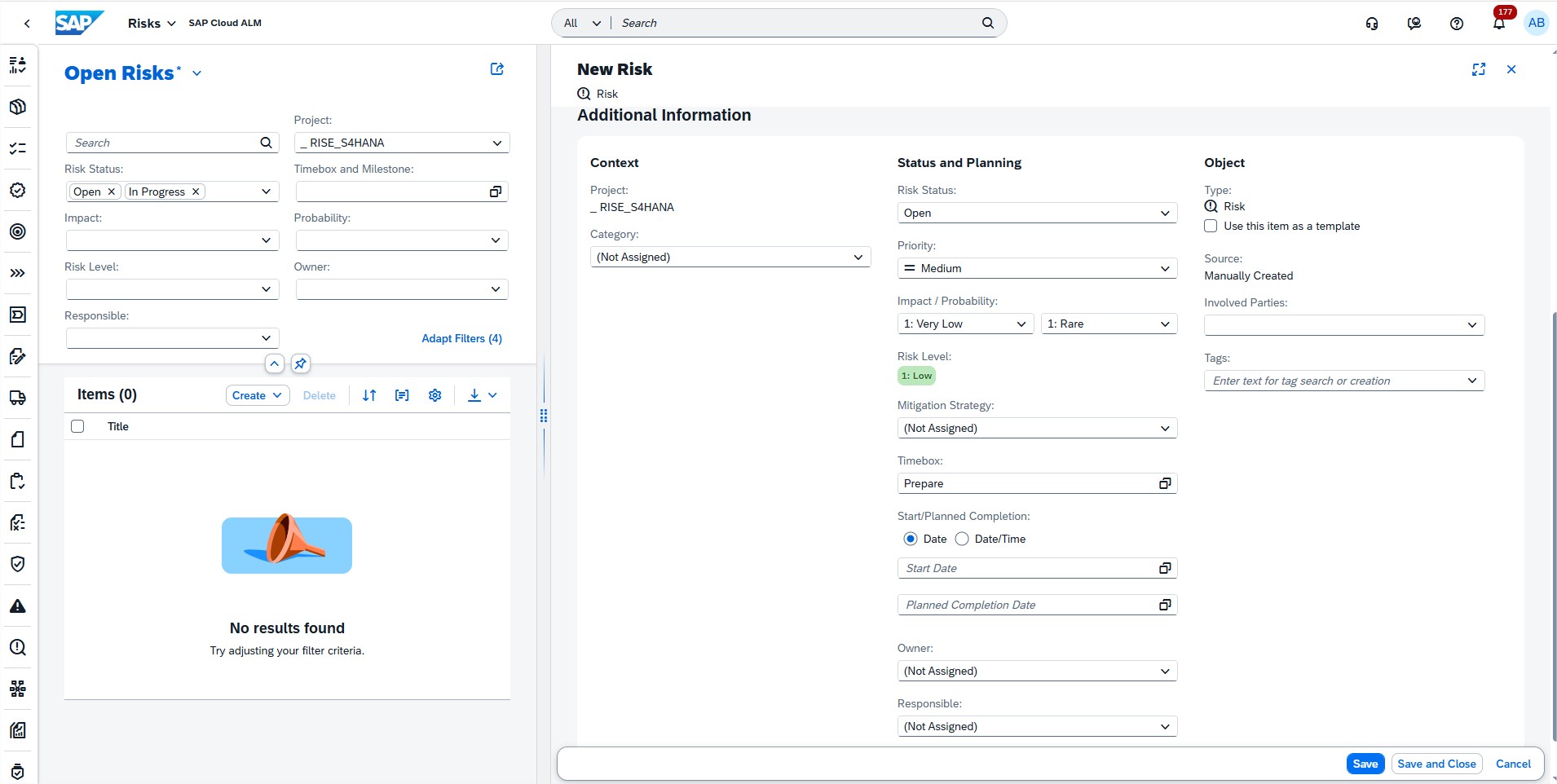
Additional capabilities such as tagging risks for easier grouping and creating templates from existing risks make it simple to reuse and adapt established patterns across projects. Together, these features help streamline risk governance and strengthen decision-making.
TL;DR:
The Risks app allows teams to create, categorize, and assess risks, assign responsibilities, and apply mitigation strategies – helping projects stay on track and reducing uncertainty.
Create Documents from Templates in Processes
Creating project documentation just became easier and more consistent. In the Processes app, when working in the solution process viewer, users can now create new documents based on predefined templates instead of starting from scratch.
This enhancement helps ensure uniform formatting and governance across project documentation, reducing the risk of inconsistencies and saving time on repetitive setup tasks. When selecting Create Document, users are redirected to the Documents app as before, but now have the option to:
- Select the template icon to browse and use available document templates, or
- Choose Continue, to create a completely new document.
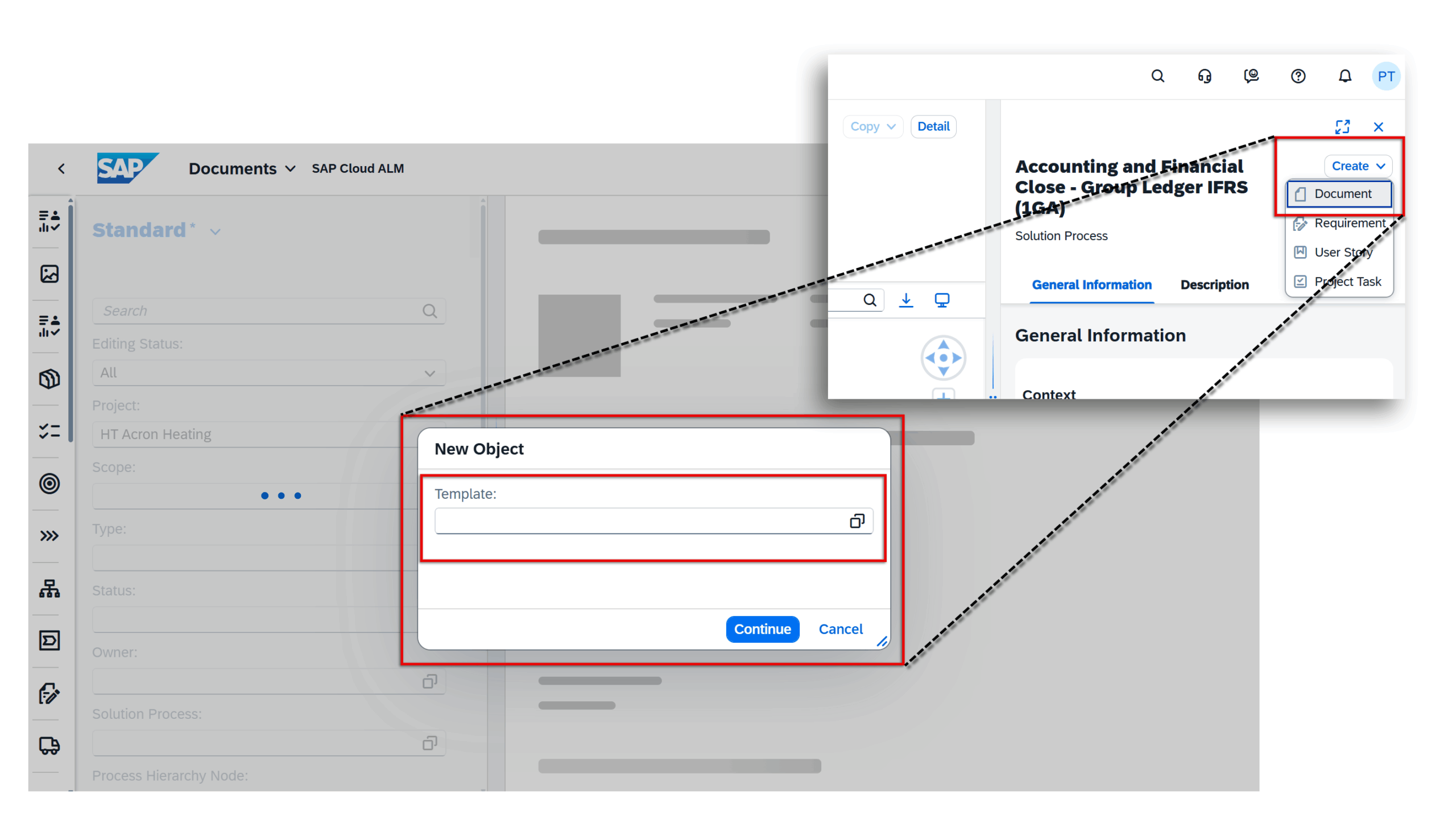
Once the document is created, the system takes users back to the Processes app automatically, streamlining the workflow.
TL;DR:
New documents in the Processes app can now be created from templates, ensuring consistency and saving time while keeping governance standards intact.
View the Last Five Comments in Detail View
Collaboration around tasks and project items becomes smoother with a new comment visibility enhancement across multiple apps. In the Tasks, Quality Gates, Requirements, Defects, and Risks apps, the latest five comments for an item are now displayed directly in the detail view.
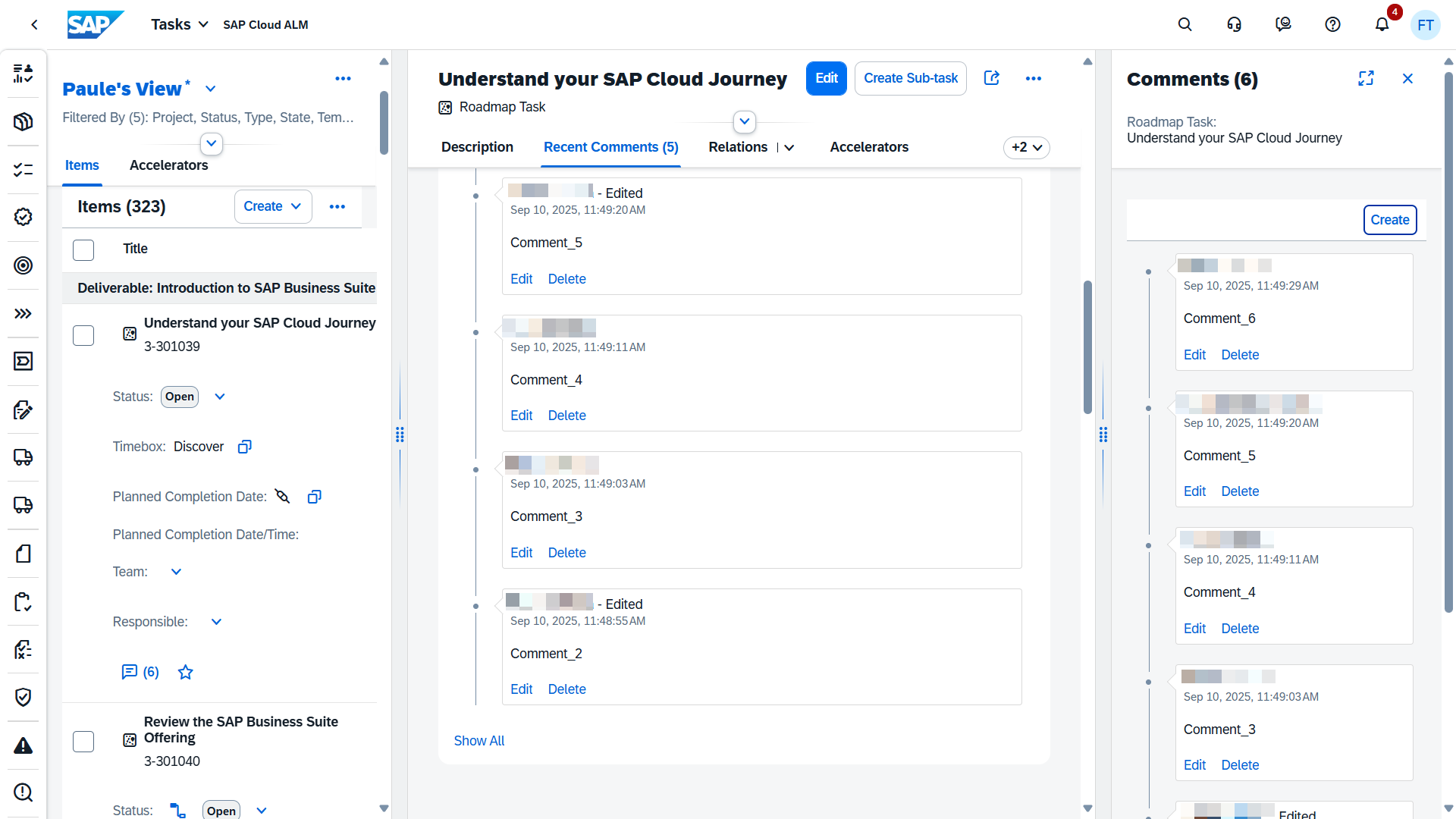
This change makes it much easier for project members to stay informed about the most recent discussions without having to navigate through long comment histories. If additional context is needed, users can simply choose the Show All option to view the complete comment thread.
The feature supports faster alignment during project reviews, reduces the chance of overlooking important updates, and ensures that all team members can quickly access recent inputs.
TL;DR:
See the last five comments in item detail views across multiple apps, with the option to expand and view the full comment history when needed.
