ALM Coffee Party – ITSM and ChaRM Archiving
Again ye come, ye hovering Forms! I find ye,
As early to my clouded sight ye shone!
[…]
And grasps me now a long-unwonted yearning
For that serene and solemn Spirit-Land
Goethe – Faust
Once Upon a Time
Full of enthusiasm, we ventured into the ALM Cloud and used Selective Data Transfer (SDT) to upload our Solution Documentation (SolDoc) to SAP Cloud ALM (CALM) and (rather laboriously) to our DMS. The latter now contains the Functional and Technical Specifications for our customizations and in-house developments. We feel we’re on the safe side.
As recommended by SAP, we have completed all ChaRM and Focused Build Transactions, followed by the Cycles, and now document our Transports exclusively using SAP Cloud ALM Features.
The fact that CALM doesn’t offer an ITSM solution doesn’t bother us, since we’ve been using external ticketing systems – one for bugs and the other for project work—for a long time anyway.
Until now, in the SAP Solution Manager (affectionately known as SolMan), all Focused Build Transaction Types have been created and remotely managed from our ticketing systems via online synchronization with the help of the grandios blueworks alm360 Hub and ist SolMan API.
With a single intervention, the SolMan side of the synchronization was replaced when switching to the Cloud: Now, all transport-related workflows are remotely controlled via CALM Features. Users continue to work in their familiar environment on the ticketing systems and have barely noticed the change.
Everything is running like clockwork – oh, life is so wonderful!


Our internal audit department has assured us that, following the audit firm’s certification, we no longer need to retain all the old CRM Documents (ITSM, ChaRM, Focused Build).
Finally, as a last step, we disabled the CSOL functionality across the entire transport landscape and boldly shut down the glorious SAP Solution Manager (praise be to its name!), which for two decades had both slightly irritated us with its strictness in the change process but also provided us with strong support on a daily basis. Shortly thereafter, we released the considerable resources allocated to the provider. The cost savings were very well received by the CIO.
One fine day, ugly inconsistencies are discovered in the Production System, or a new project gets underway, or a new external auditor decides to dig deeper into the past, or whatever else might happen- reality is almost always more imaginative than we’d like—well, whatever the reason for this journey back in time may be: We need to know about one or more past changes to the Production System: Who initiated them, who developed them, who tested them, who deployed them?
Fortunately, we have set the tp-Parameter «vers_at_imp = always» in the Production System, so we can easily identify the offending Transport number in the respective Workbench Editor under Utilities -> Versions -> Version Management. This is because, in an ABAP system, Transports are always versions as well.
Unfortunately, customizing does not offer versioning. Here, you have to use the SE03 tool “Find Objects in Requests/Tasks” to painstakingly identify the importing transports—which is difficult, since customizing objects can be quite complex…
We have now identified the offending transport numbers: Perhaps the short text will reveal something. But it is sparse and highly unreliable.
The realization is slowly dawning on us that we need the old CRM Documents and their concatenation from the transport back to the Incident or Requirement in order to trace the changes that interest us. Because, unfortunately, this information is not included in our diligently migrated SolDoc Documentation. Perhaps we and our audit department were far too optimistic…
“Backup” is that icy feeling that creeps up your spine (back up) when you realize, with a sinking feeling, that you need a backup but don’t have one (anymore)!
Suddenly we understand why Goethe’s Faust, whose opening lines we quoted at the beginning, bears the subtitle “A Tragedy.” For we long in vain for the old CRM Documents, yet these, along with the glorious SolMan, have been irretrievably plunged into the depths of the past.
Panic sets in: Are there really no records left anywhere?

O Freunde, nicht diese Töne!
“Better safe than sorry,” thought some savvy and experienced IT colleagues at a blueworks customer, and decided – just in case – to archive the Incidents from the ITSM application they were using in SAP Solution Manager before they decommissioned their SolMan. Neither Charm nor Focused Build were in use.
A key feature of the required archiving solution was the ability to search through archived incidents using standard Office applications. So they opted for an Excel solution (what else, an experienced IT professional might ask with a laugh). And since some of these incidents contained important attachments, they treated themselves to a little luxury and commissioned us to also archive the existing attachments.
Thus, the first version of the archiving report /BLUWRKS/INCIDENT2EXCEL_ARCH was created in response to a direct customer request.
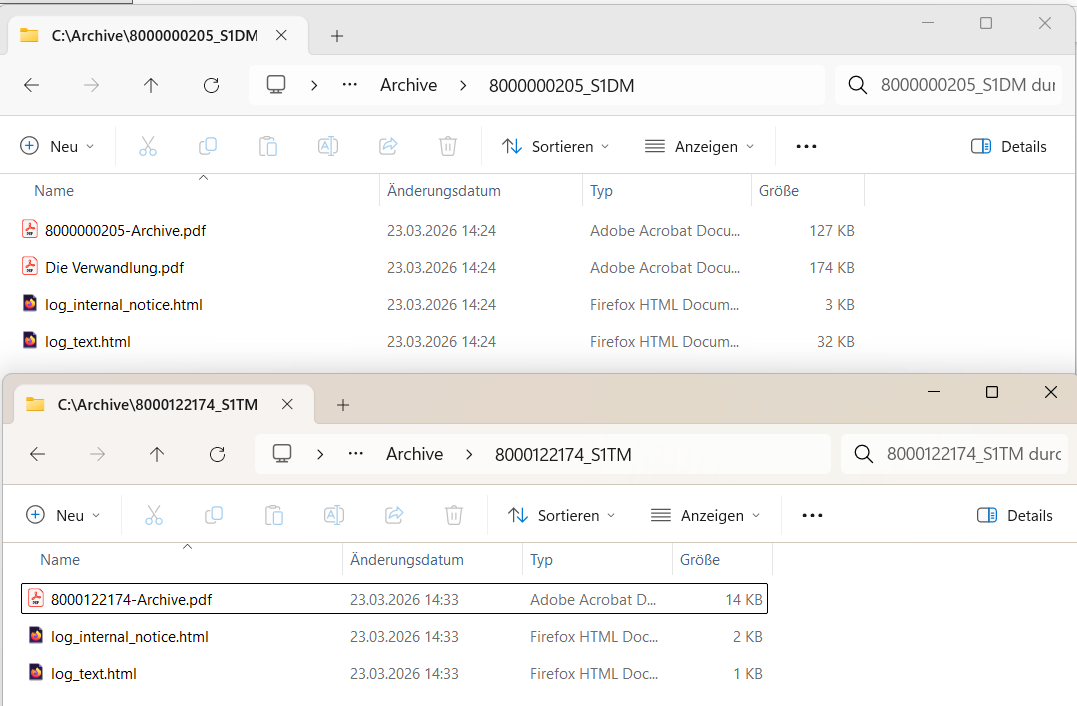
The report allows you to select the CRM Documents to be backed up by number or Transaction Type. The output consists of a spreadsheet, available as either an Excel xlsx or LibreOffice odt file, which is downloaded via the SAP GUI to a directory on the local PC; each row contains all relevant data for the Incident CRM Document in its cells. If attachments are present, a subdirectory is created for each Transaction with its Transaction number and populated with the attachments.
Since Excel has a limit on row height, it is cumbersome to read longer texts in Excel; therefore, we offer the option to additionally output the texts as easily readable html documents into the respective subdirectory for attachments.
We finally ran the report for the customer. An Excel file containing nearly five thousand Incidents and several attachments in the respective subdirectories was generated. After a final “beautifying” step on the spreadsheet, the entire set was transferred to the archiving system, and the glorious SAP Solution Manager was shut down.
Farewell, old friend!

Crescendo
The next customer who wanted to migrate permanently to SAP Cloud ALM was a long-time Focused Build (FB) user. They had the additional requirement that CRM Documents also be archived as PDFs.
So we expanded the spreadsheet generated by /BLUWRKS/INCIDENT2EXCEL_ARCH to include several columns of ChaRM/FB-specific information and enhanced it with a SmartForm output. And to ensure the entire document flow was traceable, we added the Transport numbers and the predecessor and successor relationships to both output formats wherever available.
It quickly became clear that archiving an army of nearly 15,000 active and content-rich Focused Build CRM Documents – full of comments and attachments—was a whole different ballgame.
Batch processing had to be enabled.
Furthermore, the archive system used by the customer required a flat structure without subdirectories for indexing. So we now offer the option of assigning a unique identifying prefix to all outputs.
Well, you can’t always be a firefighter solving other people’s problems; sometimes you need to tackle your own problems to compensate, so, simply for the joy of ABAP development, we’ve added some extra comfort features, such as a summary of the selections made, the activation of line breaks in the Excel output for multi-line cells, and the provision of the spool log as an additional PDF document so it can be archived along with the rest.
Finale Furioso
This is what the selection screen of /BLUWRKS/INCIDENT2EXCEL_ARCH looks like now:
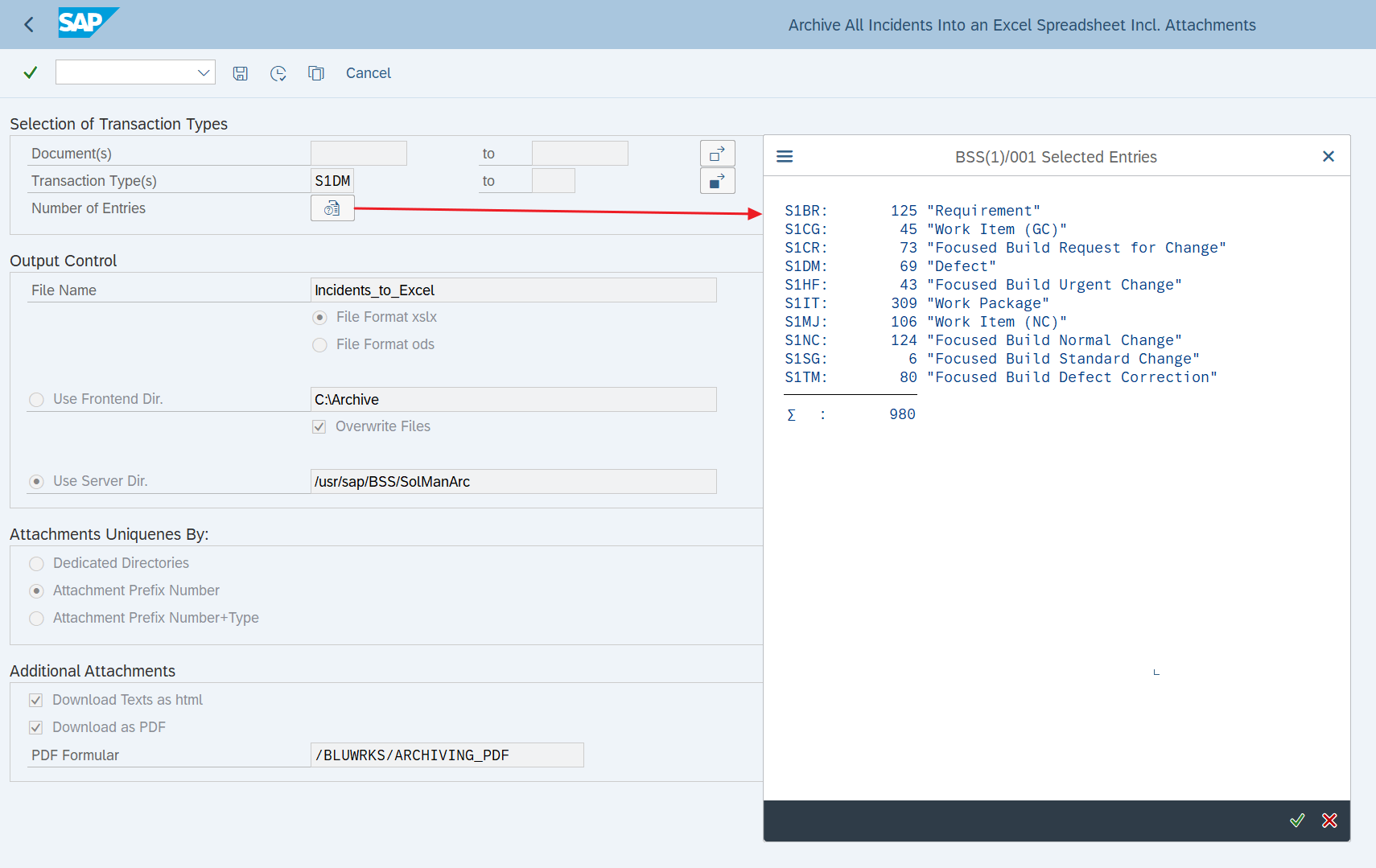
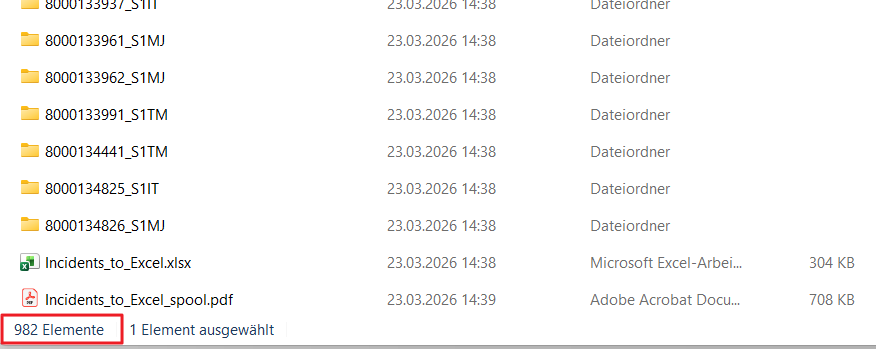
In this example, we are selecting all Focused Build Transaction Types from our sandbox system and expect 980 entries in the resulting Excel spreadsheet, as well as 980 subdirectories containing the attachments, html texts, and PDF files.
After a runtime of just over 25 minutes, we already have the result:
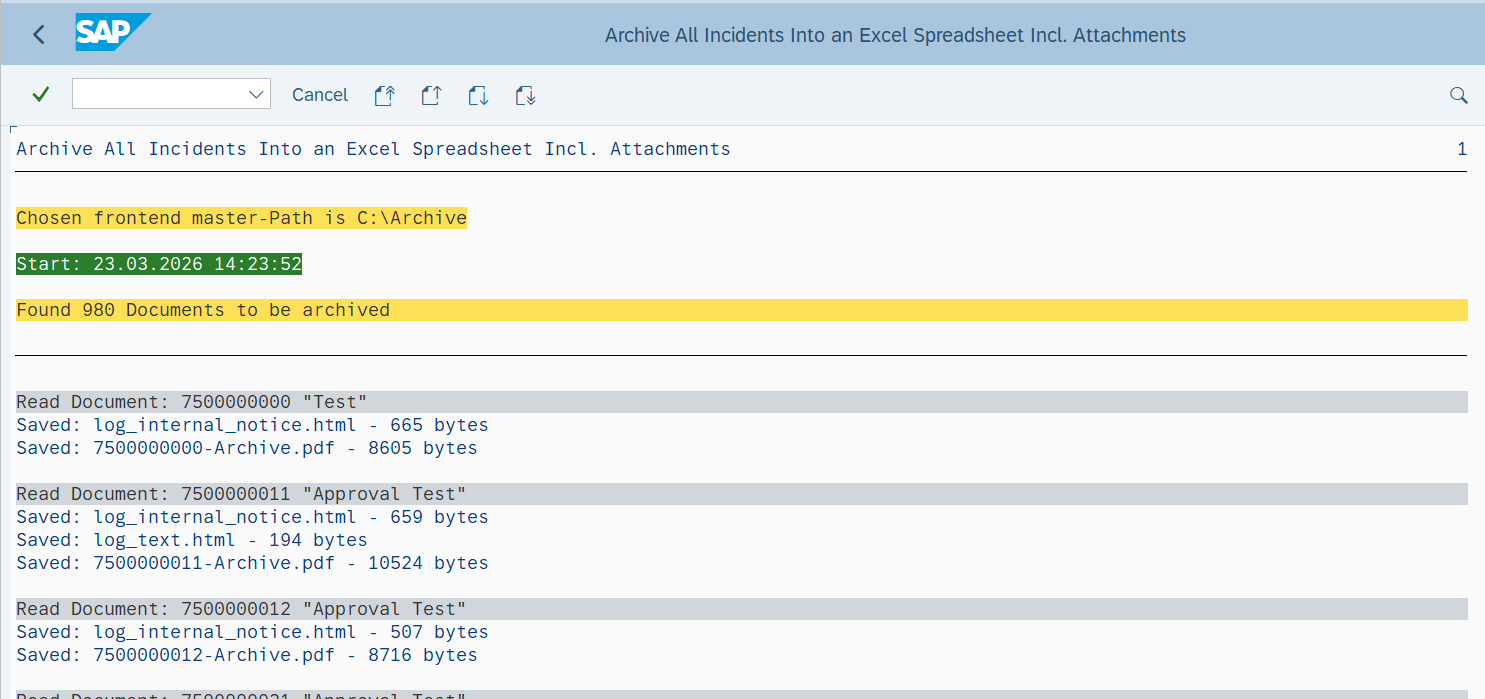
[…]
The output was saved to a dedicated directory on the PC:
Here are two examples selected from the Excel list condensed for this display: a Defect Correction and the Defect it addresses:
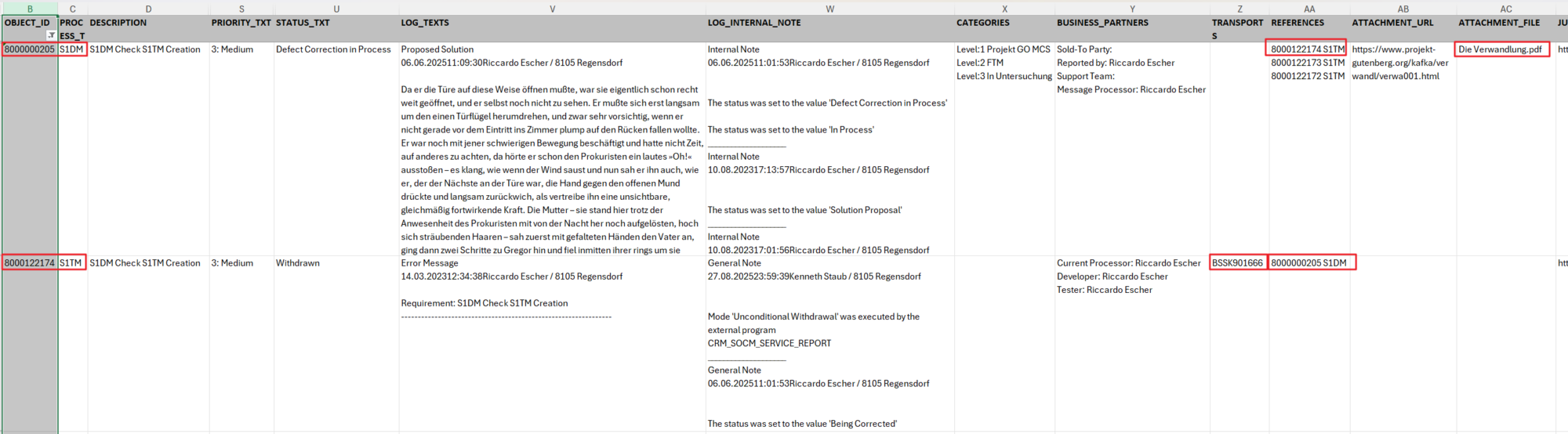
As you can see here, for the sake of clarity, the text has been split into two cells: LOG_TEXTS for manually entered text such as Reason, Proposed Solution, etc., and LOG_INTERNAL_NOTE for text generated automatically during actions.
The two directories containing the attachments for the two sample Documents:
The additional publication of Defect Correction as a PDF:
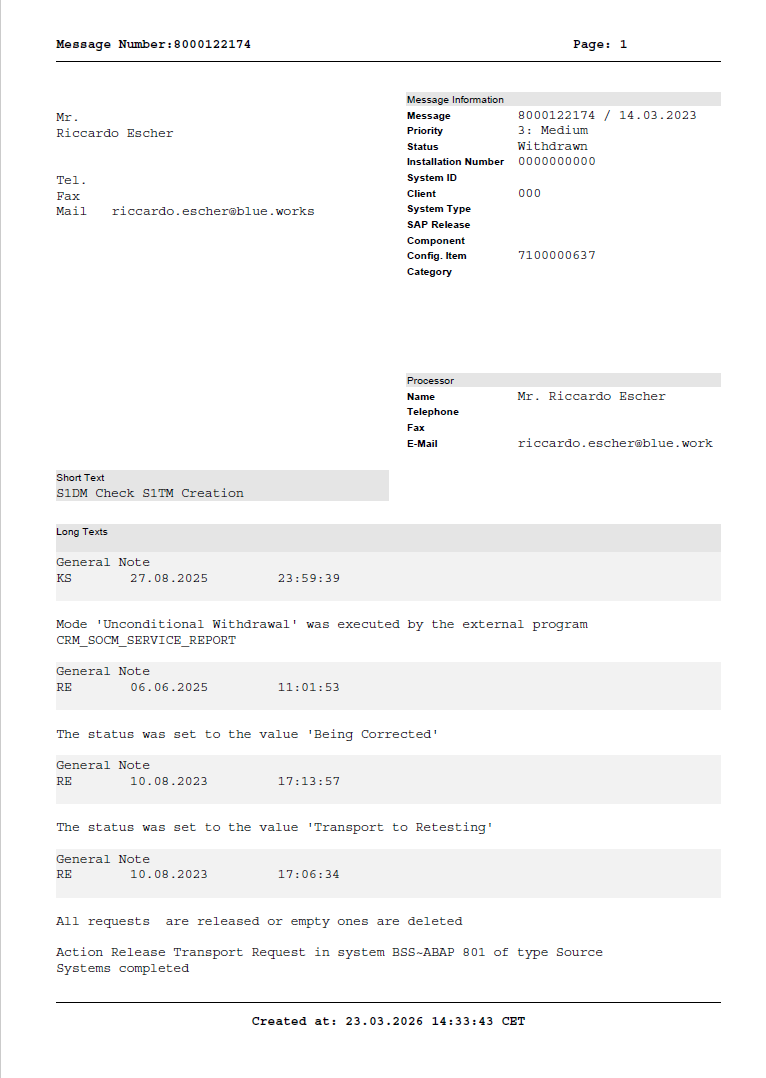
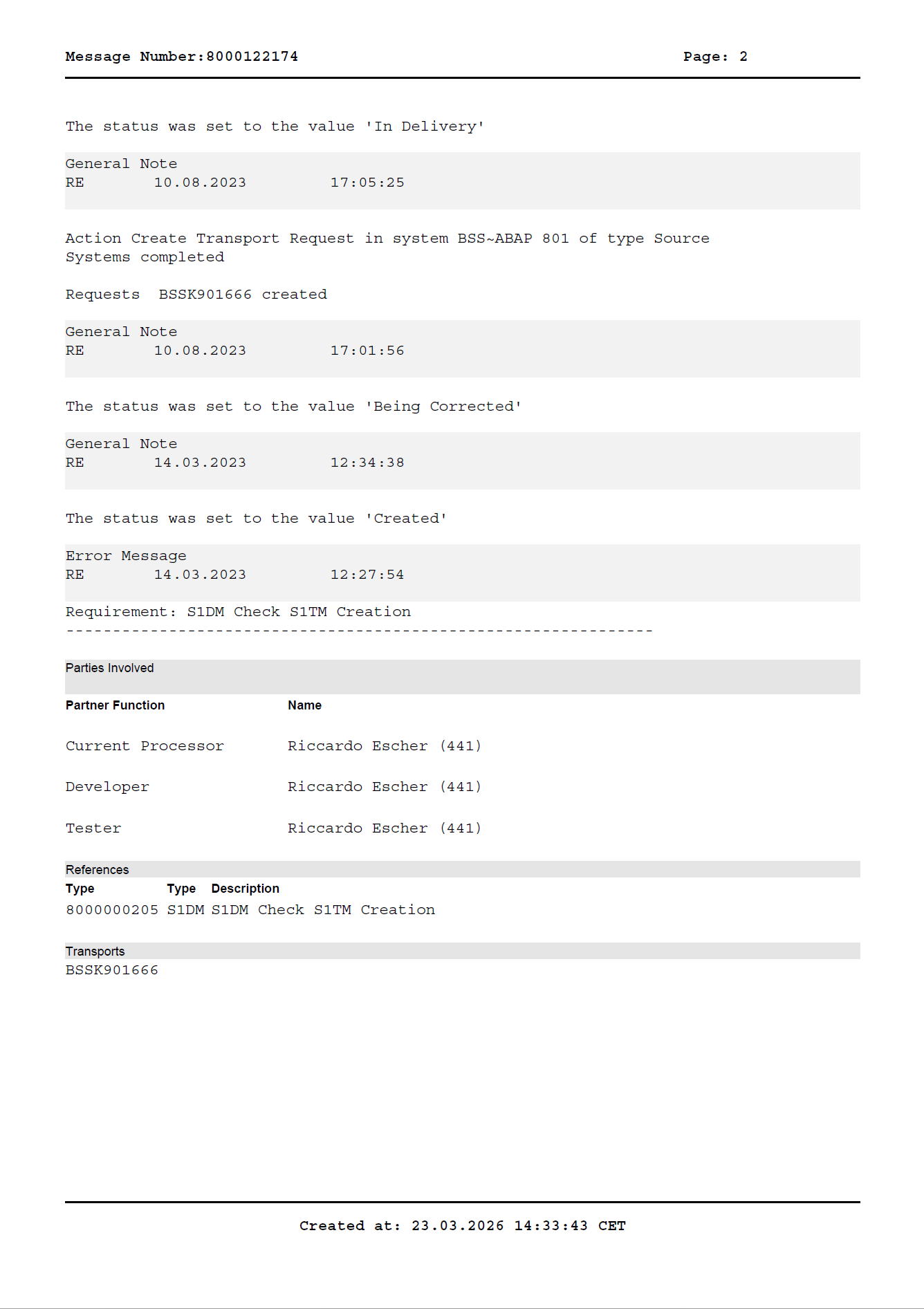
I’ll spare us the PDF of the sample defect; anyone who paid attention in German LIterature class already knows the content.
Thunderous Applause
We are confident that with /BLUWRKS/INCIDENT2EXCEL_ARCH, we have developed a practical and comprehensive archiving solution for SAP Solution Manager CRM Documents that meets all possible customer requirements.
All possible customer requests already taken into account… – why does this provoke a Homeric laugh?
The Way to The Exit
Anyone decommissioning their SAP Solution Manager should ask themselves one question before releasing the resources: What will I still need in three years?
/BLUWRKS/INCIDENT2EXCEL_ARCH provides a straightforward answer to that question. No add-on, no project timeline, no big budget—just an ABAP report that does its job quietly and thoroughly.