SAP Cloud ALM – What’s New in Week 16
SAP Cloud ALM continues to evolve with enhancements that improve transparency, control, and usability across the platform.
The week 16 release introduces updates across several areas. In the Service area, Issues and Actions Management gains a redesigned overview experience and PDF export capabilities. SAP Business Transformation Center enhances data management and scoping with more precise selections, new KPIs, and extended time-slice filtering options.
In Operations, Job & Automation Monitoring becomes easier to manage with clean-up functions and faster navigation to execution details. The Implementation area receives improvements in document versioning, process hierarchy governance, scope creation, and tighter integration between processes and libraries.
Together, these updates help teams in daily work, improve governance, and manage transformations and operations with greater efficiency.
SAP Business Transformation Center – Data Management, Scoping
Relevant Functional Area Selection in Manage Runs
The Manage Runs app is enhanced to simplify run configuration and improve usability.
Functional area selections are now limited to values that are relevant for the selected data assessment. This helps reduce unnecessary options, streamlines run setup and makes it easier to choose the correct scope for execution.
TL;DR:
Functional area selection in Manage Runs now shows only values relevant to the selected data assessment.
New KPIs for Inventory Management
Two new KPIs are now available in Data Management for the Inventory Management area.
The new KPIs help identify data inconsistencies related to:
- BUKRS entries missing in table T001
- MSEG entries orphaned from corresponding MKPF records
These additions strengthen data quality analysis and help detect structural inconsistencies in inventory-related data.
TL;DR:
Two new Inventory Management KPIs help detect missing company code mappings and orphaned material document records.
Time Slice Filters for Date Fields in Custom Tables
Scoping capabilities are enhanced with additional time slice filter support for date-related fields in custom tables.
The system scan can now identify fields using date-related domains such as DATS, DATUM, and SYDATS, and derive corresponding time slice filter assignments. This enables migration scoping based on the key date derived from the time slice.
When the time slice solution pattern is active, a fiscal year key date filter may be suggested for relevant fields. The filter remains inactive by default and can be manually activated for a selected field in the Select Scanned Tables app.
TL;DR:
System scans now detect date fields in custom tables and can derive time slice filters for more precise migration scoping.
Operations – Job & Automation Monitoring
Clean-Up Option in Landscape Management
A new clean-up option is now available for Job & Automation Monitoring in the Landscape Management app.
Administrators can remove configuration settings and collected monitoring data for a managed component directly from the Supported Use Cases tab in the Services & Systems area. After clean-up, the managed component returns to a Not Configured state.
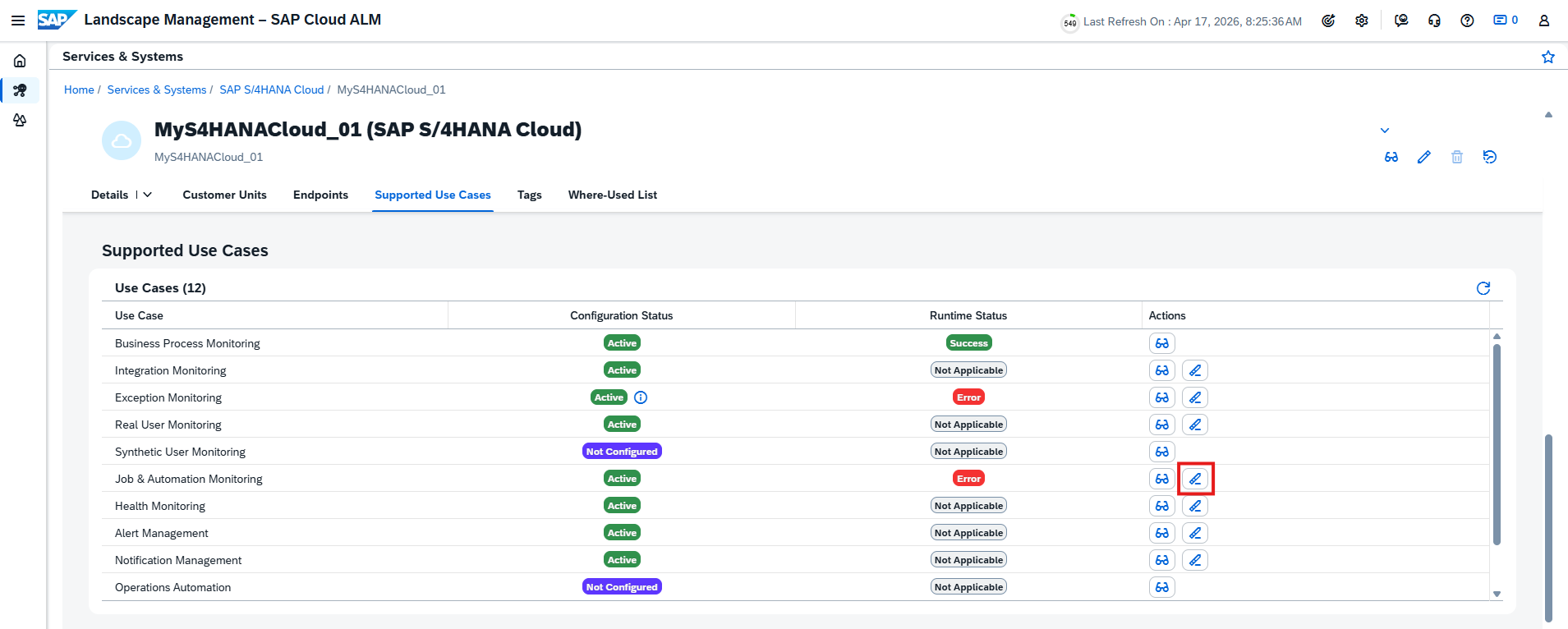
This enhancement helps remove obsolete setups and keeps monitoring configurations clean and maintainable.
TL;DR:
Job & Automation Monitoring configurations and data can now be cleaned up directly in Landscape Management.
Direct Navigation to Execution Details from Alerts
Alert handling is improved with direct access to execution details.
Users can now open an alert, navigate to Alert Details, and select Details to jump directly to the related job or automation run execution information.
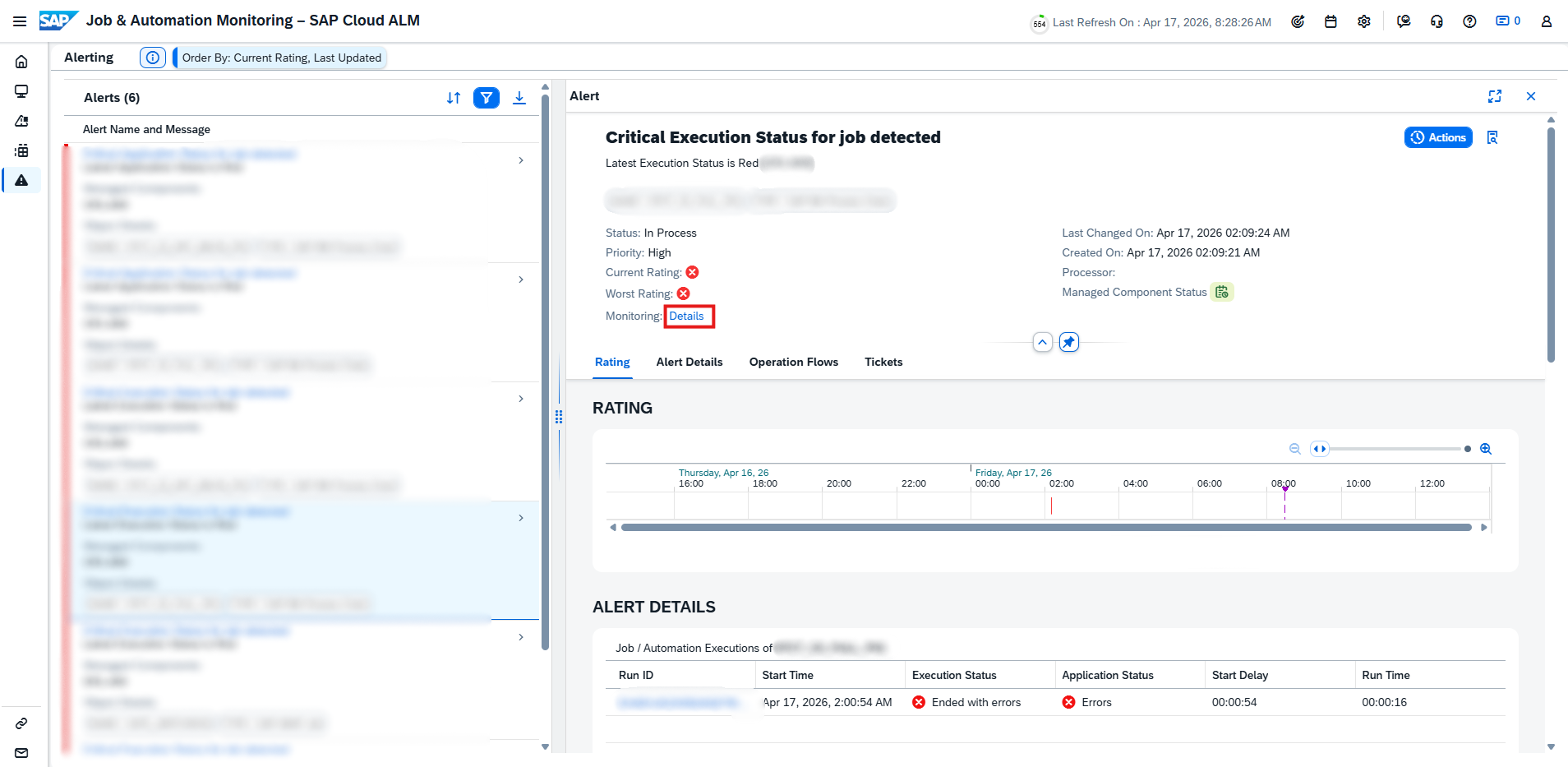
This makes troubleshooting faster by connecting alerts directly with runtime details.
TL;DR:
Alerts now provide direct navigation to the related job or automation execution details.
Navigation from Analysis Page to Executions
The Analysis page now supports direct navigation to job and automation runs.
Users can select Navigate to Monitoring next to a job or automation name to open the corresponding execution details immediately.
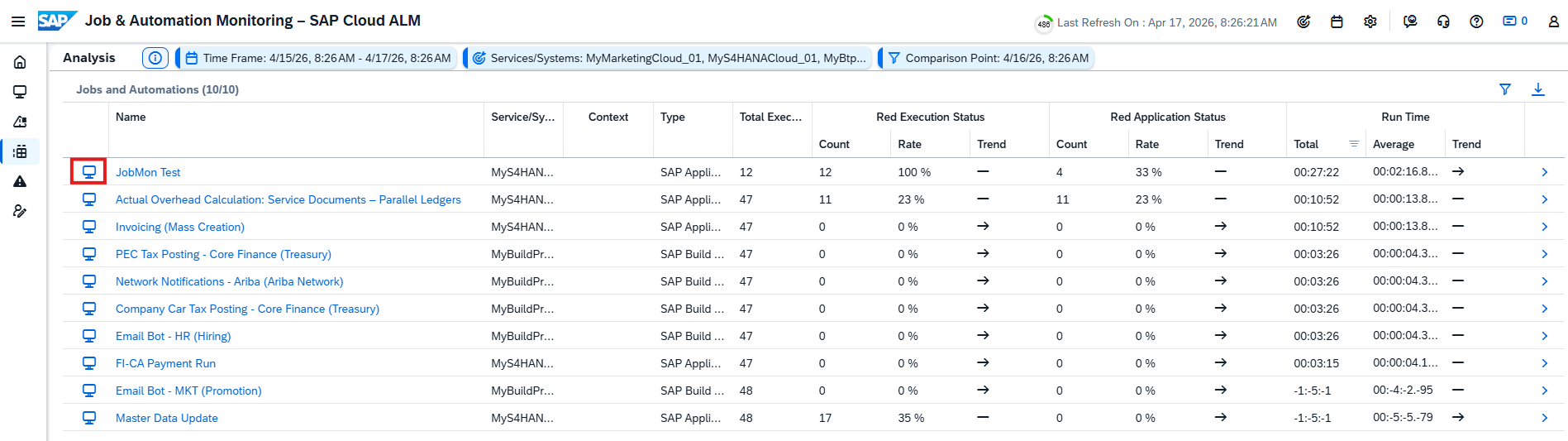
This improves usability by reducing navigation steps between analysis and operational execution data.
TL;DR:
The Analysis page now links directly to related job and automation executions for faster investigation.
Implementation – Documents, Libraries, Process Hierarchy, Processes
Create and Manage Document Versions
The Documents app now introduces versioning, enabling users to create and manage multiple versions of a document for better structure, governance, and traceability.
Each document now includes new attributes:
- Version – numeric version identifier
- Is Latest Version – indicates whether the version is the newest one
Users can filter and search for either latest versions only or all versions. When the Is Latest Version filter is active, search results return only the most recent versions.
Version management rules include:
- Older versions are read-only
- New versions can only be created from the latest version
- Deleting a document removes all versions
Relations are maintained at document level rather than per version, always pointing to the latest version. The document history also tracks all versions, while viewing an older version displays only the history up to that version.
For externally stored files, document versioning is linked with file versioning. When a new document version is created, the external file version resets to 1.0 for that new version, while previous file versions remain available in earlier document versions.
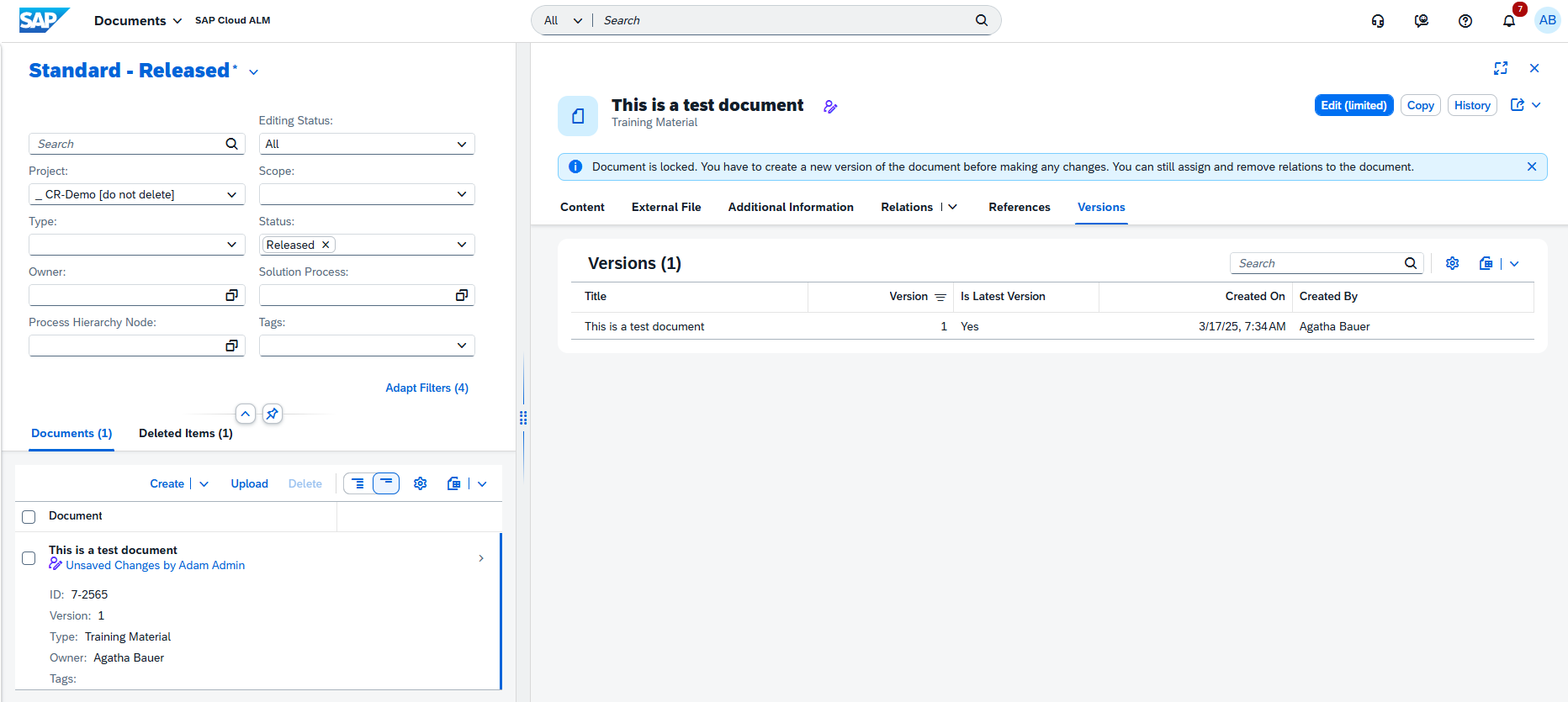
A Restore function is not yet available. A future update is planned to allow restoring an older version.
This enhancement improves document lifecycle management and supports more controlled collaboration.
TL;DR:
The Documents app now supports document versioning, including version history, latest-version filtering, read-only older versions, and structured lifecycle control.
Create Configurations and Interfaces in Processes
The Processes app is enhanced with the ability to create configurations and interfaces directly within the solution process viewer.
Newly created elements are automatically assigned to the corresponding solution processes, reducing manual maintenance steps and simplifying process documentation.
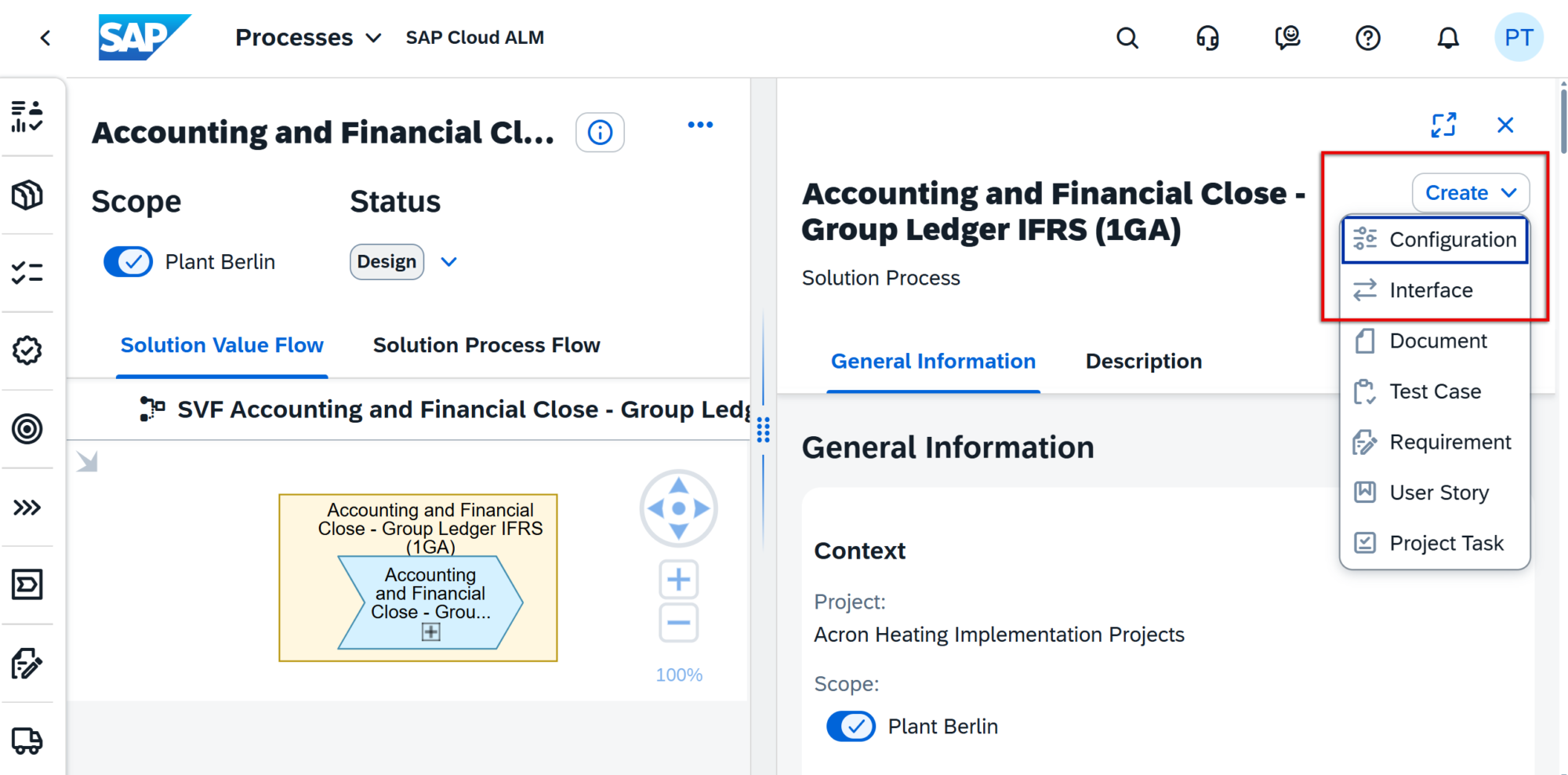
This improvement streamlines modeling and keeps related process content connected from the moment it is created.
TL;DR:
Configurations and interfaces can now be created directly in the Processes app and are automatically linked to the relevant solution processes.
Harmonized Two-Step Deletion for Hierarchy Nodes
The Process Hierarchy app now introduces a harmonized two-step deletion process to reduce the risk of accidental data loss and align the experience across SAP Cloud ALM.
Deleted nodes are first moved to a new Deleted Items tab, where they remain available for later restoration or permanent deletion. The tab provides detailed visibility, including the node title, ID, path, description, deleted by user, and exact deletion timestamp.
When a parent node is deleted, all related child nodes are also moved to Deleted Items. Restore and permanent deletion actions are available for selected top-level nodes.
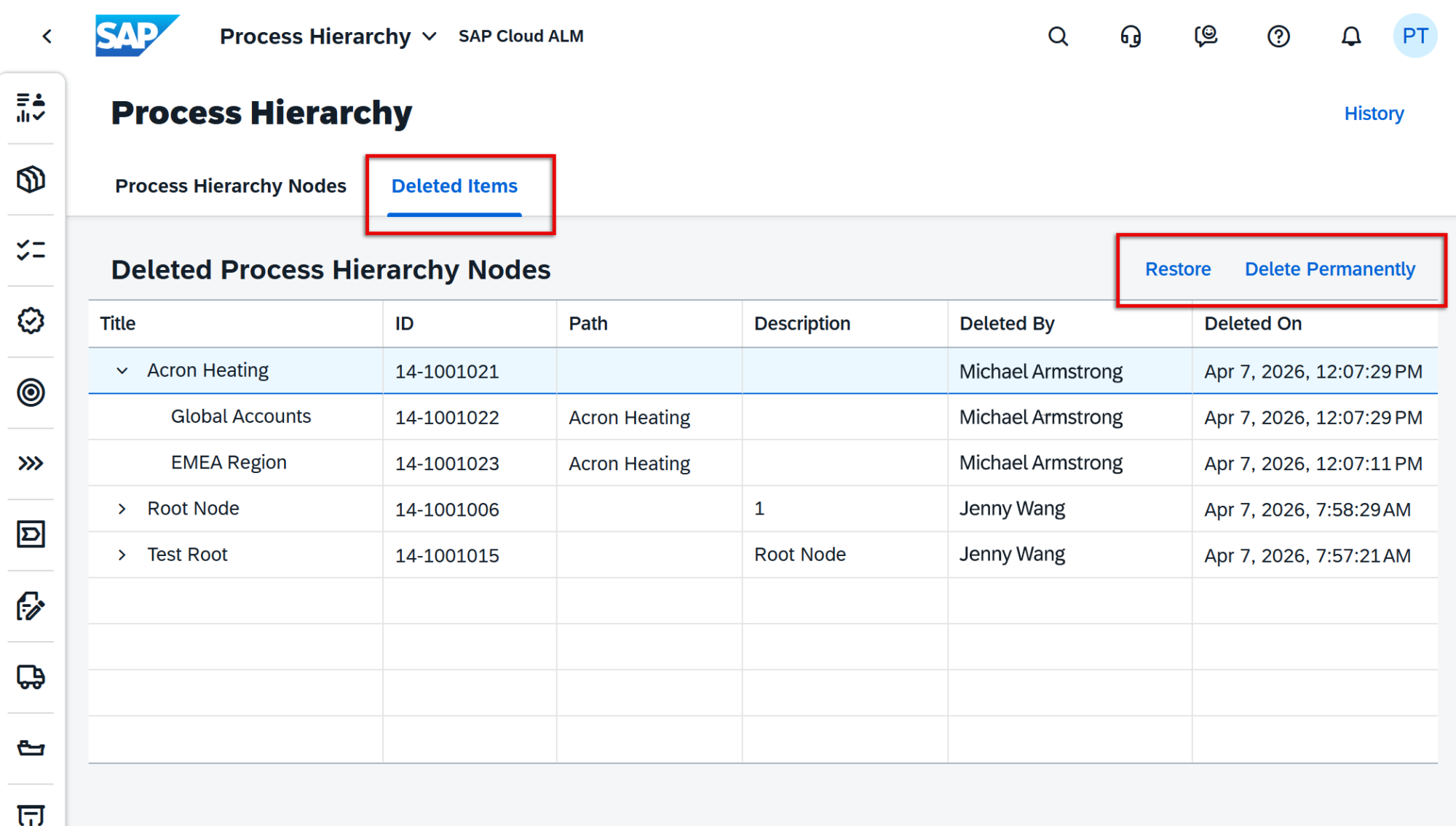
This enhancement provides safer hierarchy maintenance and greater transparency when managing structural changes.
TL;DR:
Process hierarchy nodes now use a two-step deletion process with a Deleted Items tab for safe deletion, audit visibility, and easy restoration.
Faster Scoping and Direct Entity Creation in Processes
The Processes area is enhanced with new capabilities that simplify scoping and streamline the creation of related process content.
A new option, Scope from Digital Discovery Assessment, is now available in the Manage Scopes app. This allows scopes to be created directly from a Digital Discovery Assessment (DDA) without relying on spreadsheet downloads and uploads. After selecting an available assessment, SAP Cloud ALM automatically retrieves the scoping entries and sets the relevant solution scenarios and solution processes into scope using the latest available content versions.
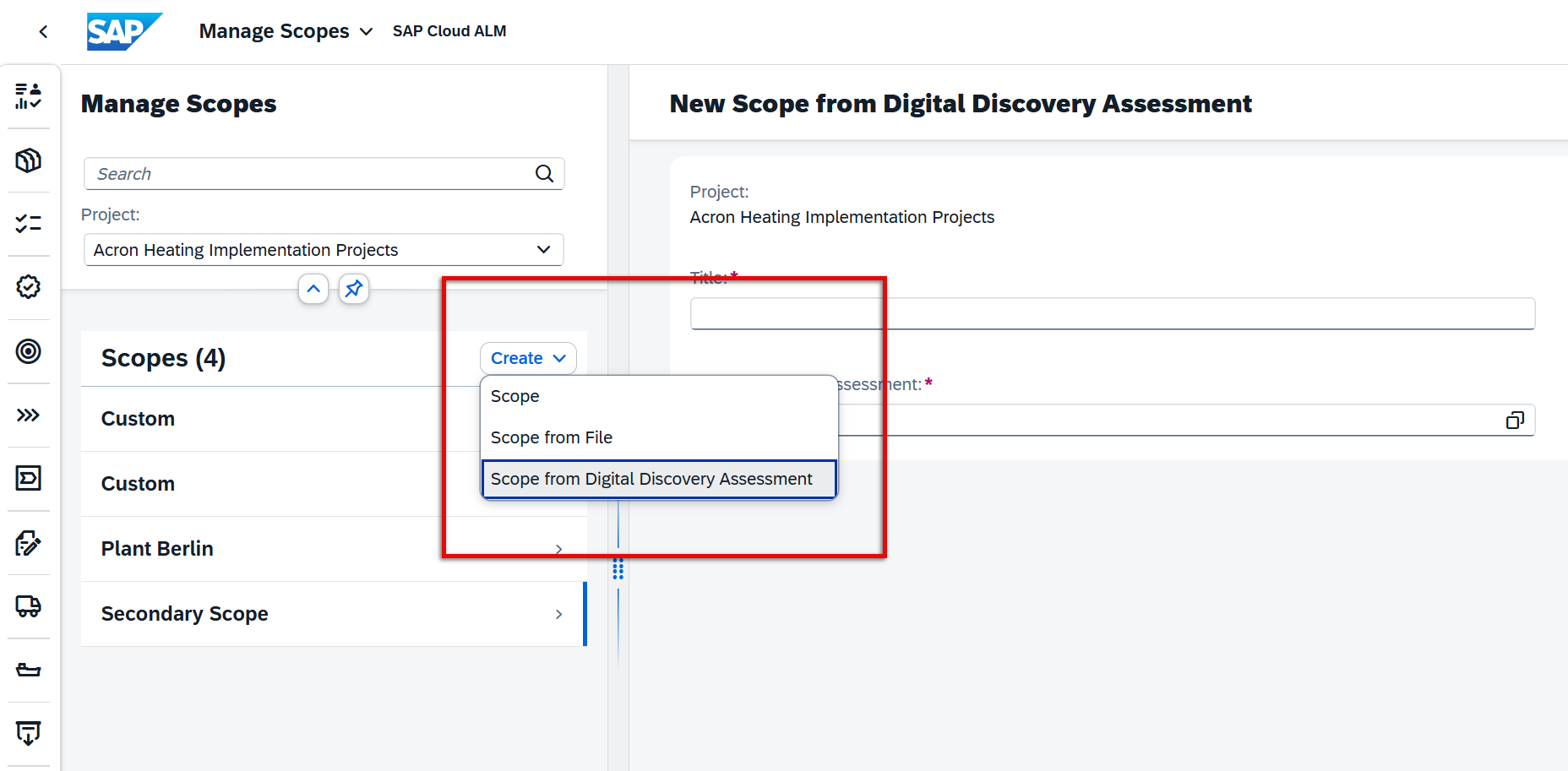
In addition, users can now create Configurations or Interfaces directly from the solution process viewer within the Processes app. Newly created entities are automatically linked to the corresponding solution process, reducing manual maintenance and simplifying process documentation.
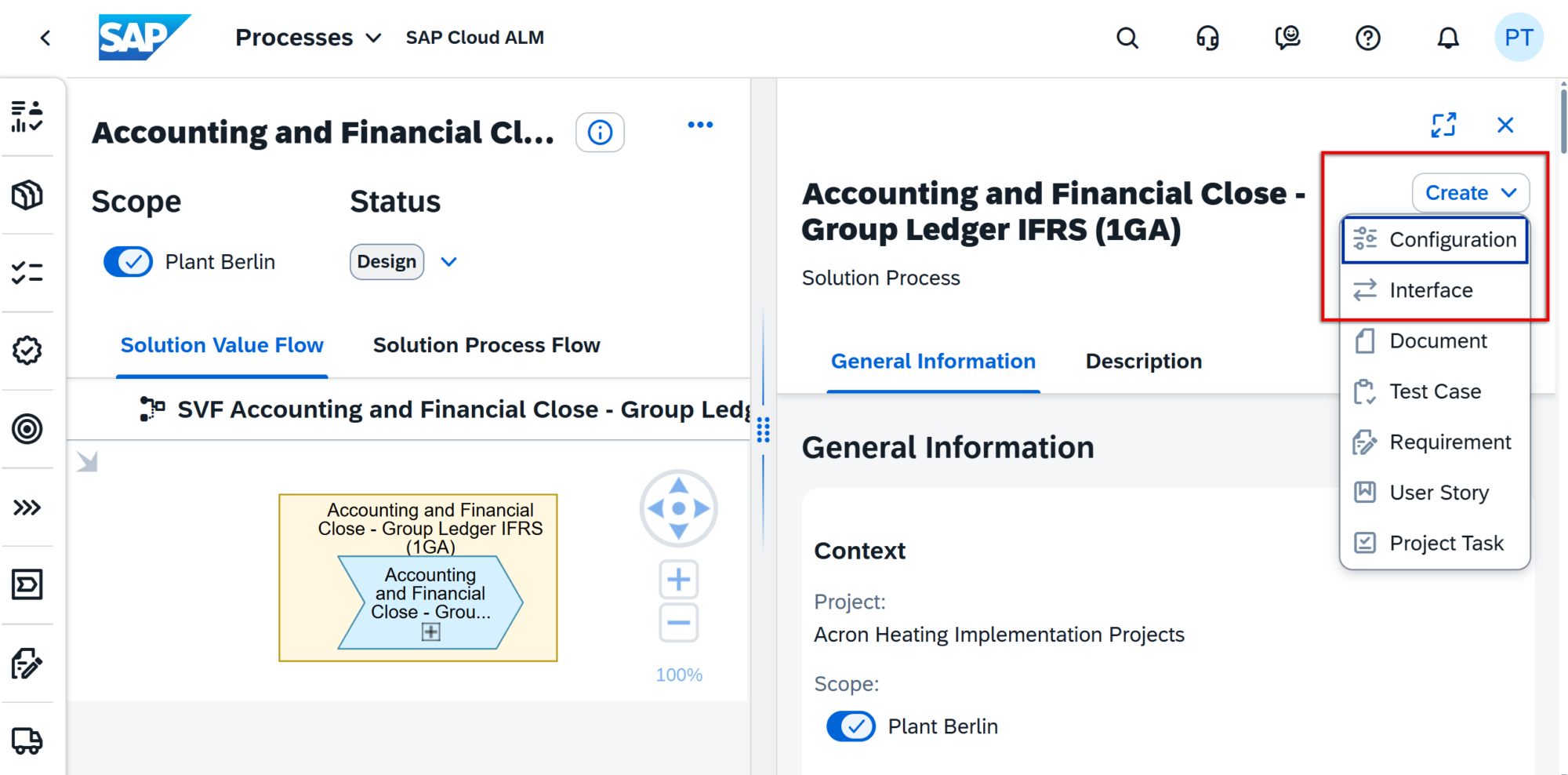
These enhancements improve efficiency, reduce manual effort, and make scope and process management more integrated.
TL;DR:
Processes now supports direct scoping from Digital Discovery Assessments and allows Configurations/Interfaces to be created directly from the process viewer.
Service – Issues and Actions Management
Export to PDF
Issues and Actions Management now supports exporting an issue or action to PDF.
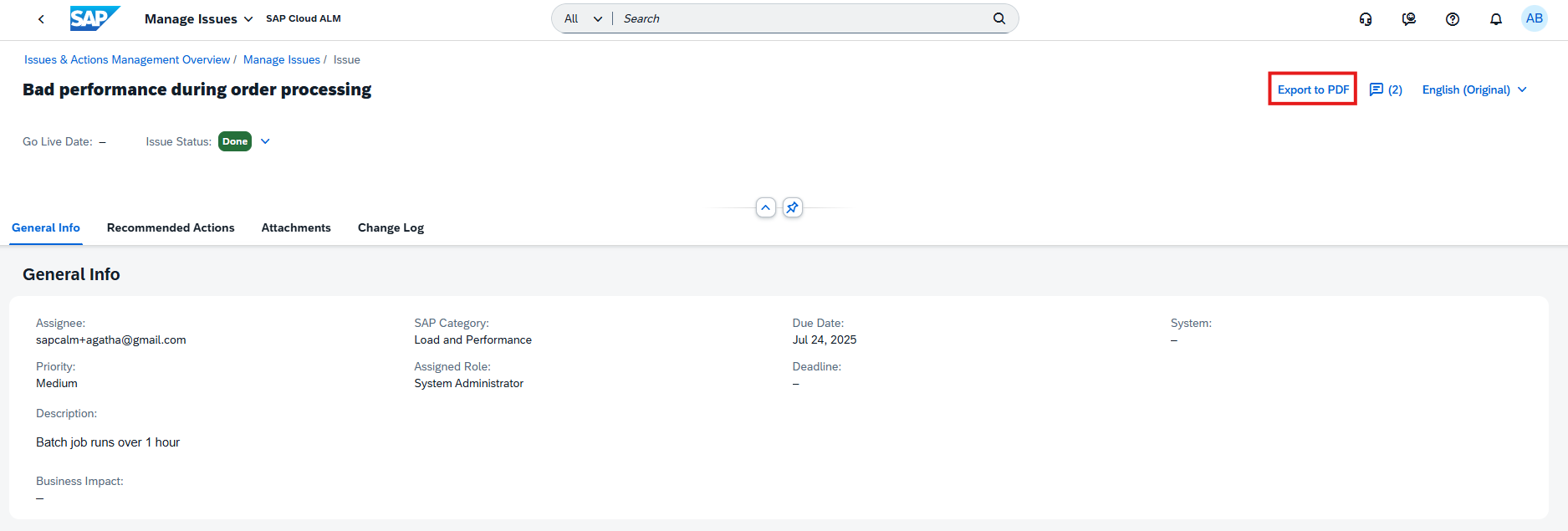
This enhancement makes it easier to share records, archive important information, or use issues and actions in offline review and reporting scenarios.
TL;DR:
Issues and actions can now be exported to PDF for easier sharing and documentation.
Redesigned Overview Screen
The Issues and Actions Overview screen has been redesigned to provide a more visual and actionable user experience.
The new overview includes KPI-based cards for issues and standalone actions, helping users quickly assess priorities, status, ownership, and due dates. Available cards include:
- Issues by Priority and Status
- Standalone Actions by Priority and Status
- Issues by Due Date
- Standalone Actions by Due Date
- Issues Assigned to You
Users can select sections within each card to drill down into detailed views in Manage Issues or Manage Actions. Quick links are also available for direct navigation to Manage Issues, Manage Standalone Actions, and the Service Delivery Center.
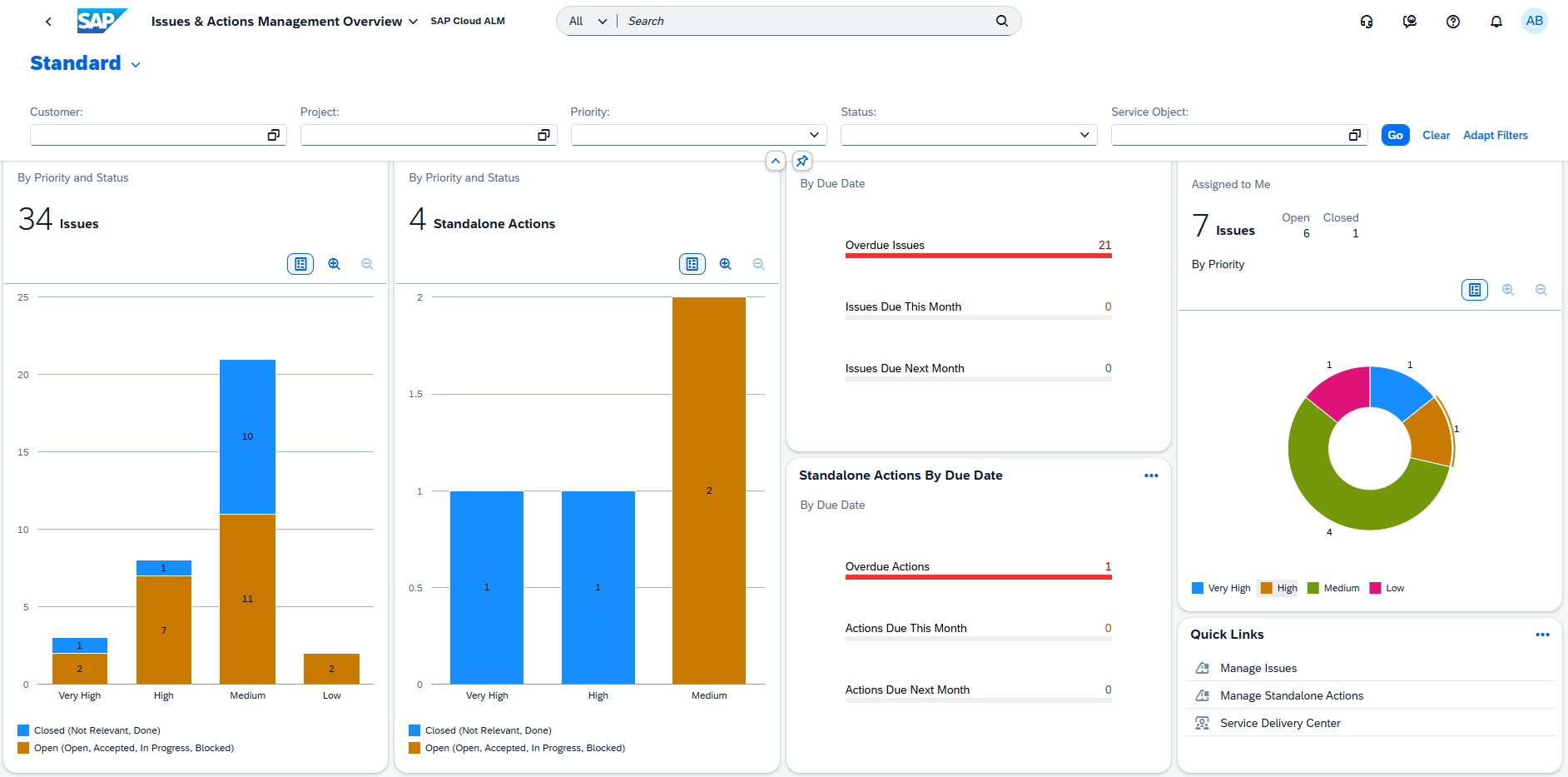
This redesign improves visibility, navigation, and day-to-day management of service activities.
TL;DR:
The redesigned overview screen introduces KPI cards, drill-down navigation, and quick links for easier management of issues and actions.