SAP Cloud ALM – What’s New in Week 22
SAP Cloud ALM continues to evolve with enhancements that improve visibility, governance, and operational efficiency across the platform.
The week 22 release introduces updates across multiple areas. In RISE with SAP Methodology, a new Data Volume Efficiency dashboard provides deeper insights into database growth, storage consumption, and optimization opportunities for SAP S/4HANA systems. The Implementation area enhances analytics, libraries, and retrofit capabilities with improved traceability, better draft and relation handling, and support for SAP S/4HANA conversion and upgrade retrofit scenarios.
In Operations, updates focus on stronger monitoring and usability through dynamic KPI filtering, expanded configuration and security analysis capabilities, enhanced Java monitoring metrics, bulk request tagging, and broader access control support across monitoring applications.
Together, these updates help teams gain clearer operational insights, strengthen governance, and manage implementation, monitoring, and transformation activities more effectively.
SAP Business Transformation Center – Data Volume Efficiency
New App Data Volume Efficiency
A new Data Volume Efficiency dashboard is now available under the RISE with SAP Methodology area in SAP Cloud ALM.
The dashboard provides detailed insights into the factors contributing to the Data Volume Efficiency score of productive SAP S/4HANA systems. It helps identify optimization opportunities related to:
- Database growth
- Memory consumption
- Storage utilization
- Custom table footprint
Using these insights, teams can define more targeted archiving and deletion strategies to improve system performance and manage data volume more efficiently.
Detailed analysis is available through dedicated tabs:
- SAP HANA Memory
- SAP HANA Disk
- Unused Data
- Redundant Data
- Outdated Data
- Custom Table Footprint
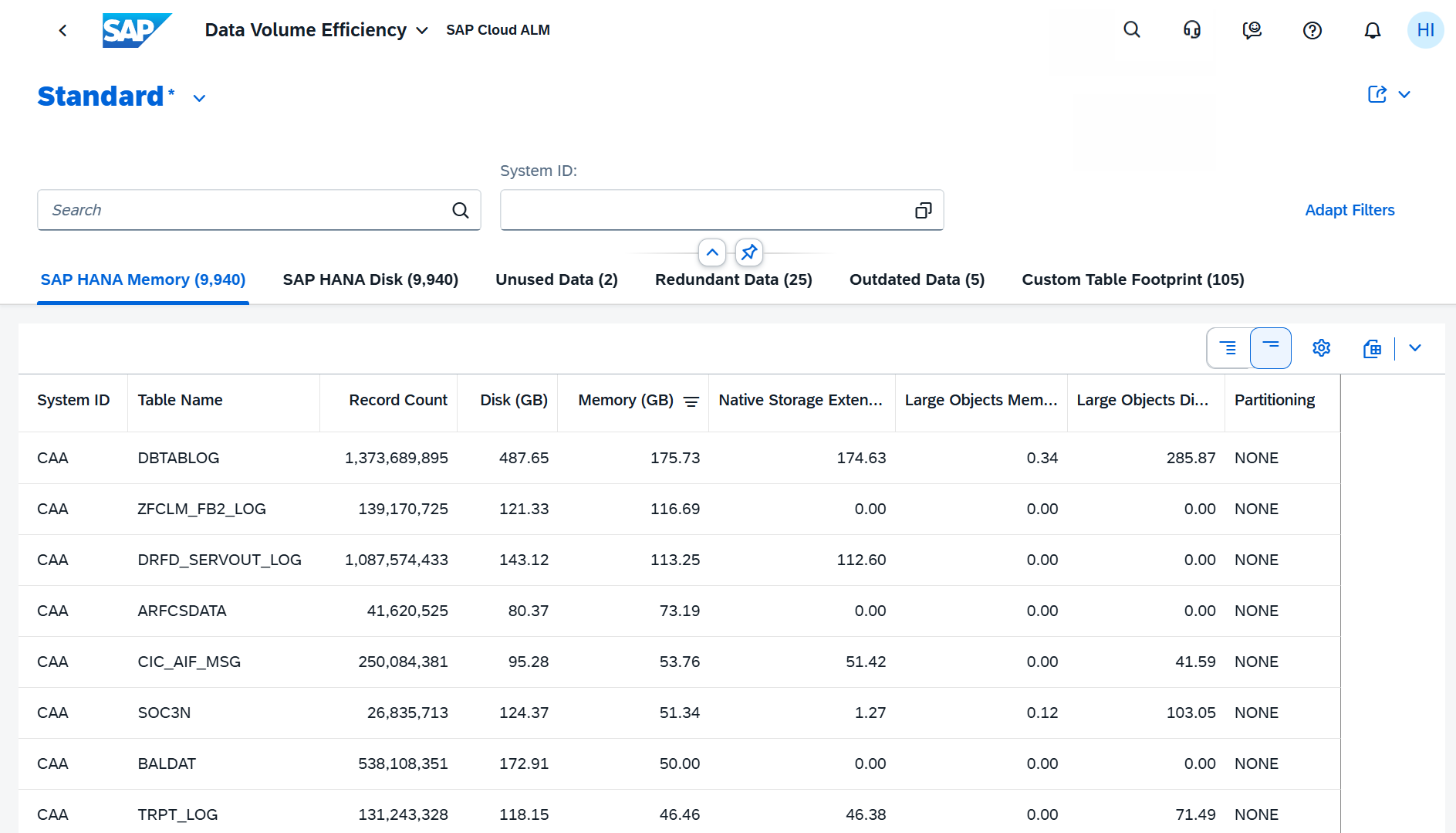
The dashboard can also be accessed directly from the System View, where data is automatically filtered for the selected system.
TL;DR:
A new Data Volume Efficiency dashboard provides detailed insights into memory, storage, and data footprint to support optimization and archiving strategies.
Implementation – Analytics, Libraries, Retrofit
Feature ID Display in Transport Analysis
The Transport Analysis app is enhanced with improved visibility of feature information.
Users can now see the Feature ID displayed directly below the Feature title, making it easier to identify and reference features during transport analysis activities.
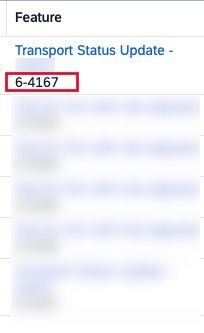
This enhancement improves traceability and helps users work more efficiently when analyzing transports linked to implementation features.
TL;DR:
The Transport Analysis app now displays the Feature ID directly below the feature title for improved traceability and identification.
Improved Draft Visibility, Relations, and Upload Flexibility in Libraries
The Libraries app is enhanced with several usability improvements that simplify content management and maintenance.
Draft handling is improved by making all saved draft elements visible directly in the elements list after selecting Keep Draft, making it easier to continue unfinished work.
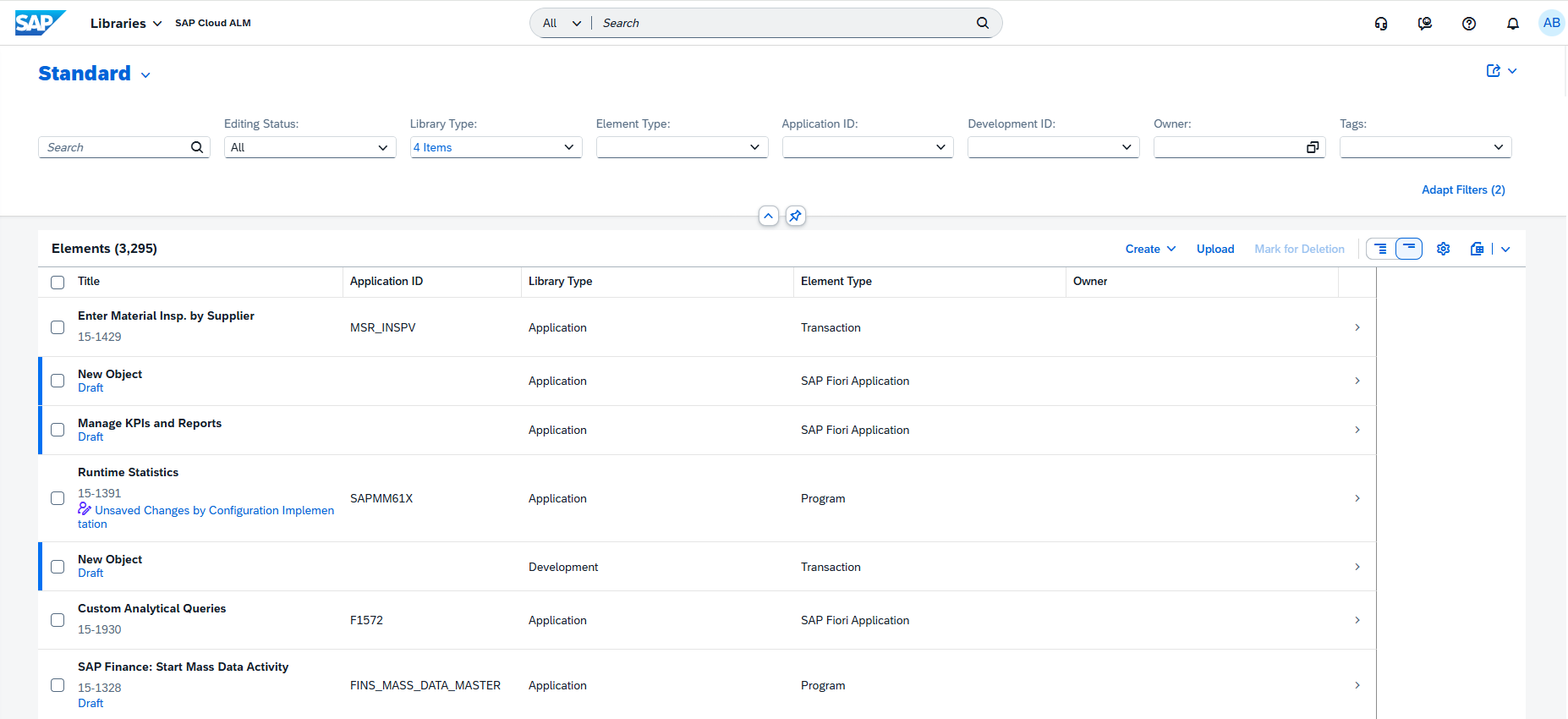
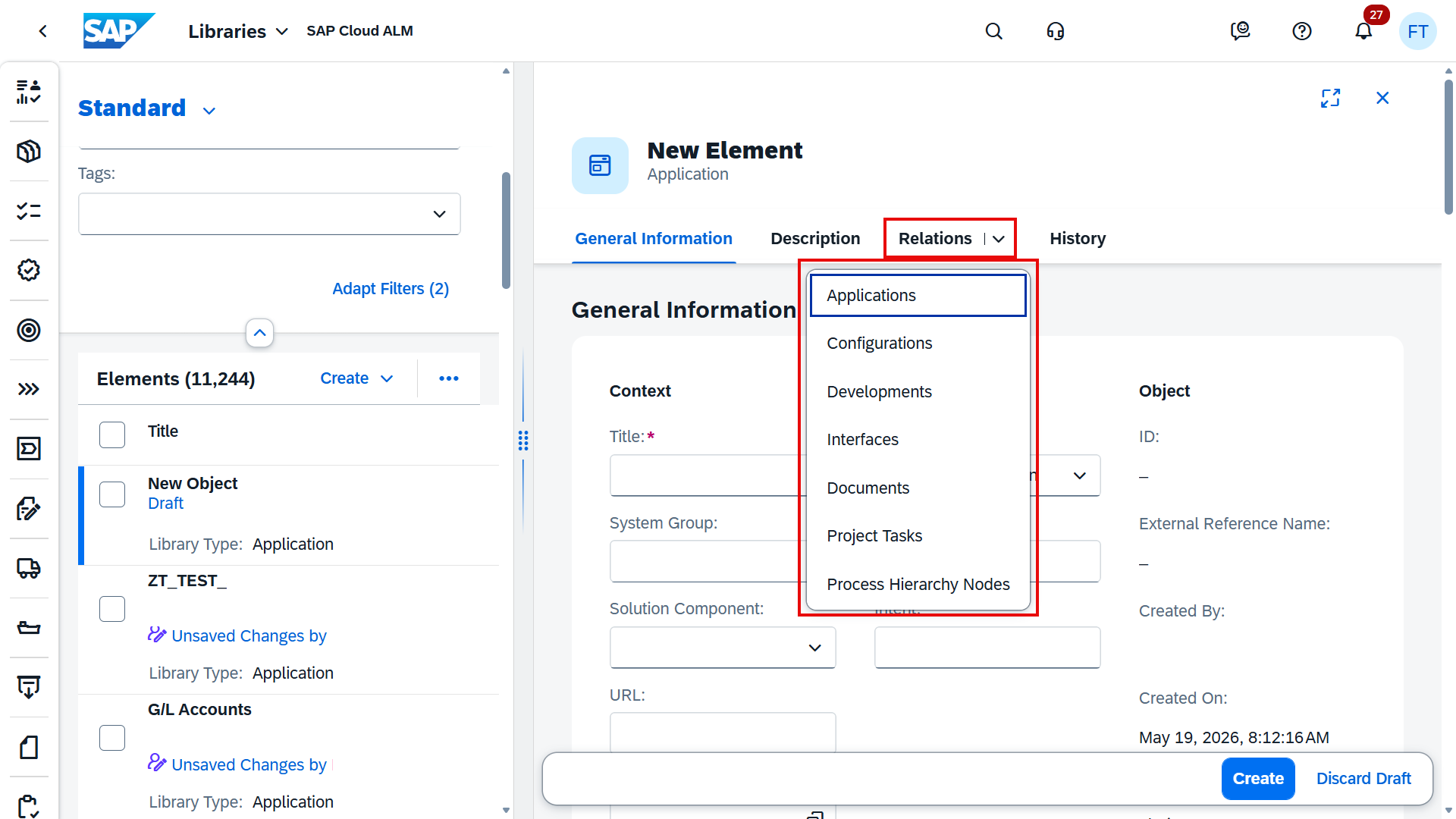
In the detail view, all relations are now consolidated into a single tab, providing a cleaner and more centralized overview of linked items.
Spreadsheet uploads are also more flexible. When importing elements with assigned owners from external sources, the system now accepts multiple column naming variations, including:
- Owner (Responsible)
- Owner
- Responsible Person ID
These enhancements improve consistency, simplify navigation, and make data imports more user-friendly.
TL;DR:
Libraries now provide better draft visibility, consolidated relations management, and more flexible owner handling during spreadsheet uploads.
Support for SAP S/4HANA Conversion and Upgrade Scenarios in Retrofit
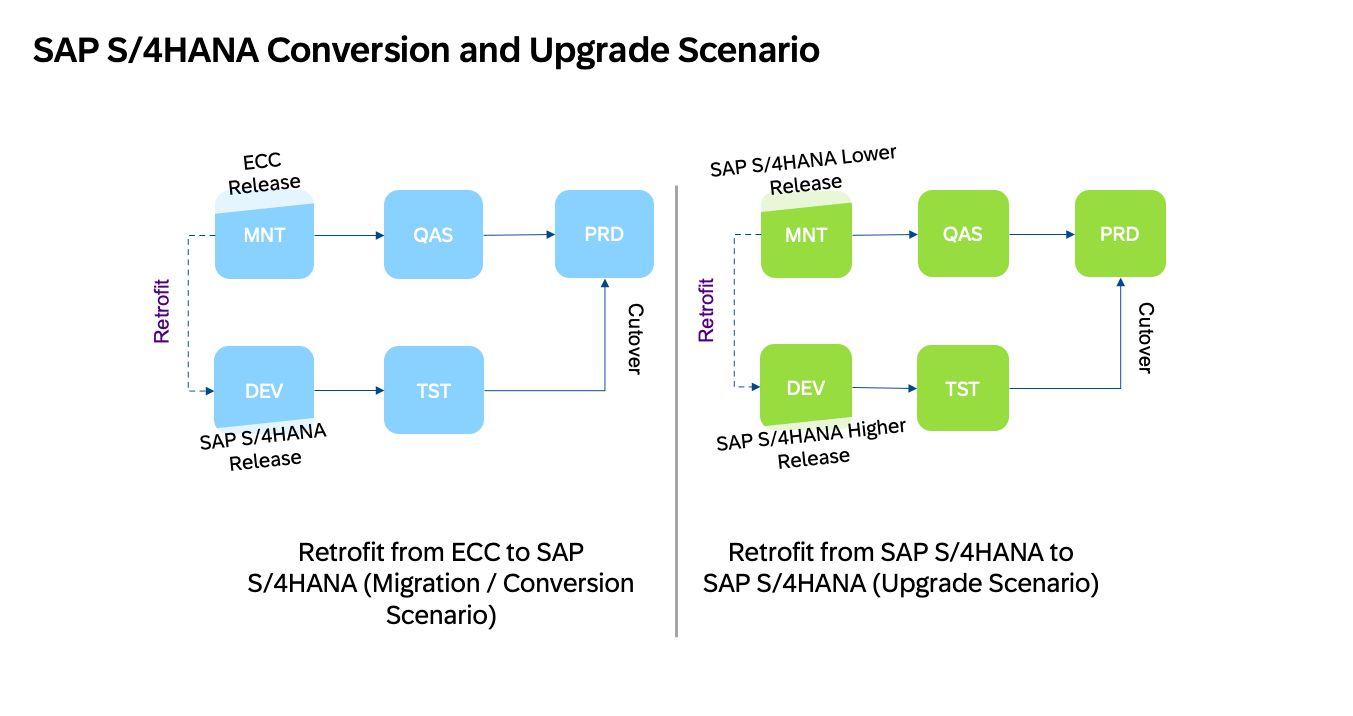
The Retrofit app now supports retrofit scenarios for:
- ECC to SAP S/4HANA conversions
- SAP S/4HANA upgrade scenarios from lower to higher releases
This enhancement expands retrofit capabilities for transformation and upgrade projects and introduces deeper integration with SAP S/4HANA readiness checks during retrofit categorization.
The solution now performs:
- Remote ATC (ABAP Test Cockpit) checks for custom code objects
- Simplification Database checks for customizing objects
These checks help determine whether transport objects are compatible with the target SAP S/4HANA system. Objects that fail validation are automatically flagged for manual review together with a categorization reason.
Supported retrofit handling includes:
- Customizing objects – automatic or manual retrofit with customizing checks
- Custom code objects – automatic or manual retrofit with ATC checks
- SAP Notes and SAP Objects – supported only through manual retrofit
This enhancement improves governance and transparency during SAP S/4HANA transition projects by helping teams identify compatibility issues earlier in the retrofit process.
TL;DR:
Retrofit now supports SAP S/4HANA conversion and upgrade scenarios with integrated ATC and simplification checks to validate retrofit compatibility and guide automatic or manual retrofit decisions.
Operations – Business Process Monitoring, Configuration & Security Analysis – Data Stores, Health Monitoring, Real User Monitoring, Business Service Management, Intelligent Event Processing
Dynamic Time Filters for KPI Monitoring in Business Process Monitoring
Business Process Monitoring is enhanced with dynamic time filtering capabilities on the Monitoring page.
Users can now define dynamic time ranges for KPIs that support the following time-based filters:
- Created On
- Created On (UTC)
- Creation Time
This enhancement makes it easier to analyze KPIs across flexible time periods without manually adjusting filter values each time.
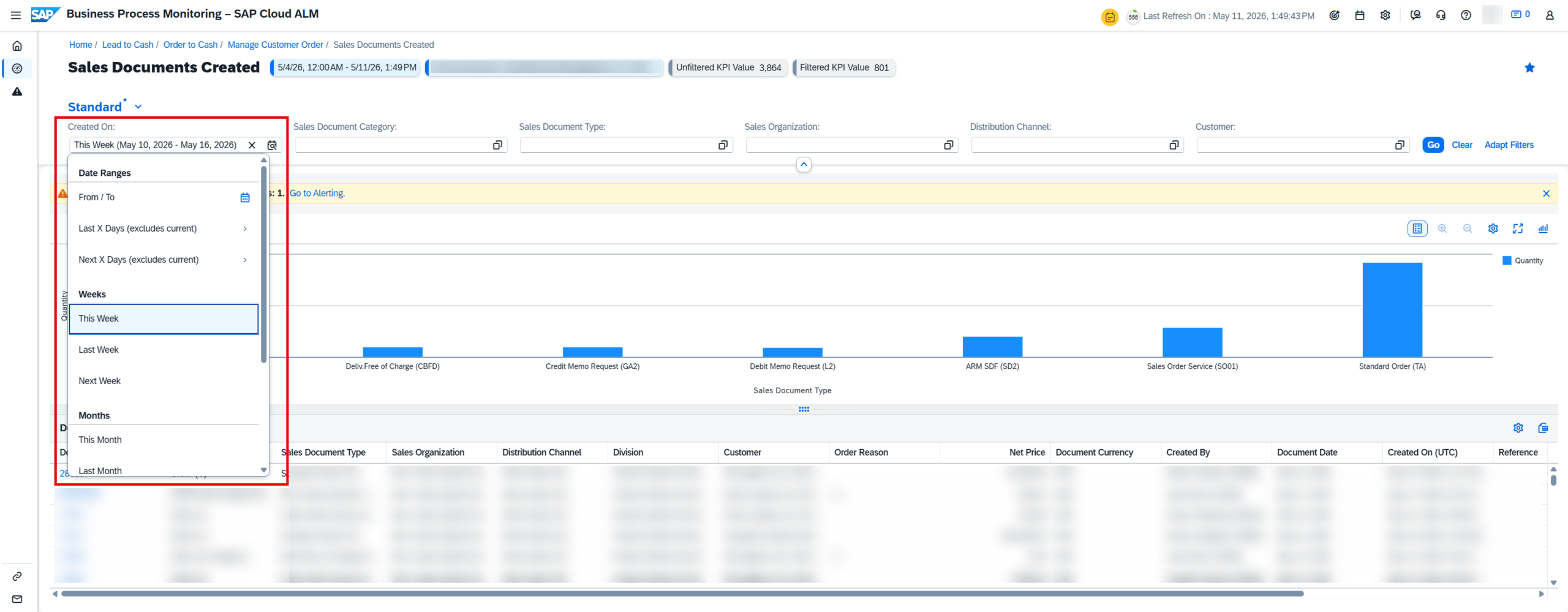
Filter configurations can also be saved as part of a custom view using Select View à Save As, allowing users to quickly reuse preferred monitoring setups.
TL;DR:
Business Process Monitoring now supports dynamic time filters for KPI analysis and allows saving them in reusable custom views.
New Data Store: ABAP_RECOMMENDED_NOTES in Configuration & Security Analysis
A new technical system data store, ABAP_RECOMMENDED_NOTES, is now available in Configuration & Security Analysis – Data Stores.
The content for this store is provided by the Landscapes – Design and Visualization app in SAP Cloud ALM and allows users to view recommended SAP Notes based on their system type. This helps organizations stay current with recommended corrections and improve compliance and security posture.
The data can be explored through the Store Browser page in the Data Stores app.
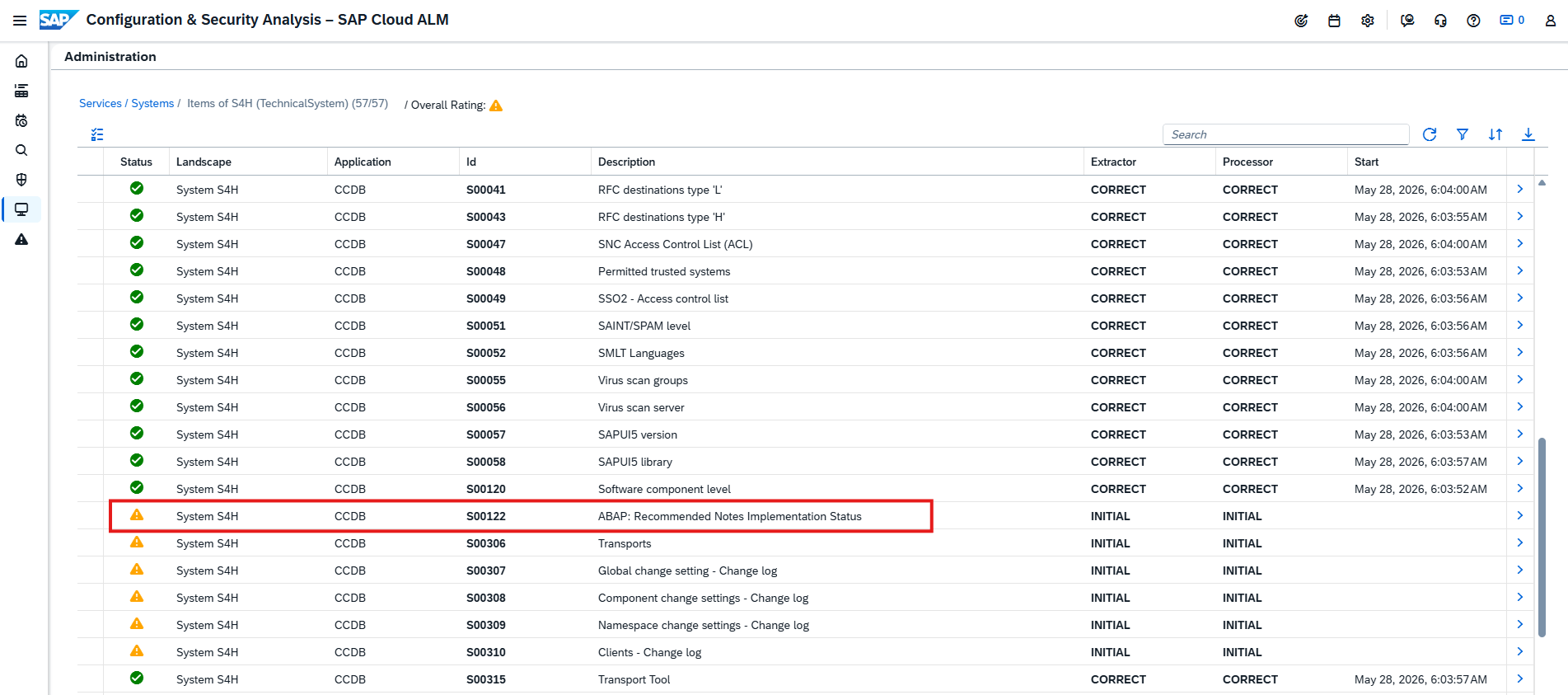
Before recommended security notes can be calculated and accessed, a technical S-user must be configured in SAP Cloud ALM.
This enhancement expands visibility into recommended SAP Notes and strengthens proactive system maintenance capabilities.
TL;DR:
A new ABAP_RECOMMENDED_NOTES data store provides visibility into recommended SAP Notes for technical systems to support compliance and maintenance.
New and Updated Metrics for Java Monitoring in Health Monitoring
Health Monitoring is enhanced with several new metrics and threshold adjustments to improve monitoring coverage for Java-based systems.
The following new Java monitoring metrics are now available:
- Garbage Collection Pause (Java) – monitors garbage collection overhead percentage
- CPU Entitlement Usage (Java) – tracks CPU entitlement consumption
- CPU Utilization (Java) – monitors CPU usage levels
- Old Generation – tracks old generation memory pool usage
- Database Client Connection Wait Time – measures wait times for database connections
- Database Client Connection Pending Requests – tracks pending database connection requests
- HTTP Server Request (Java) – monitors HTTP request metrics for Java applications
- JVM Metaspace Used – tracks JVM metaspace memory consumption
- JVM Memory Buffer Direct Used – monitors direct buffer memory usage
- JVM Memory Usage – provides overall JVM memory monitoring
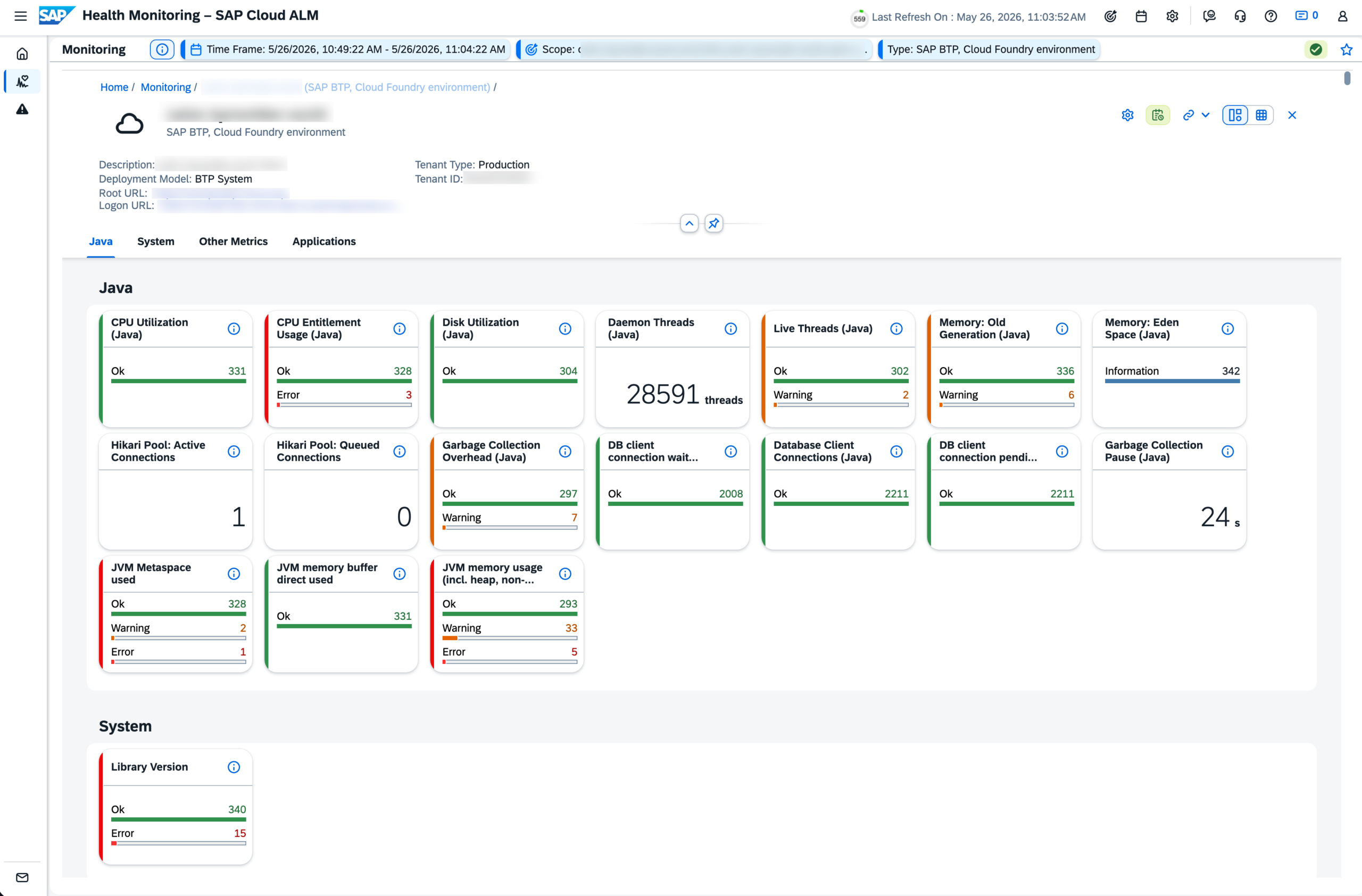
Several metrics now also include updated default warning and critical thresholds, aligned more closely with operational best practices.
These enhancements provide deeper visibility into Java application health, resource utilization, and database connectivity performance.
TL;DR:
Health Monitoring introduces multiple new Java monitoring metrics and updated thresholds for improved visibility into JVM, CPU, memory, and database performance.
Bulk Tagging for Requests in Real User Monitoring
Real User Monitoring is enhanced with bulk tagging capabilities for requests.
From the Request Overview page, users can now select multiple requests and assign or remove tags in a single action. This simplifies categorization and organization, especially when managing large numbers of requests.
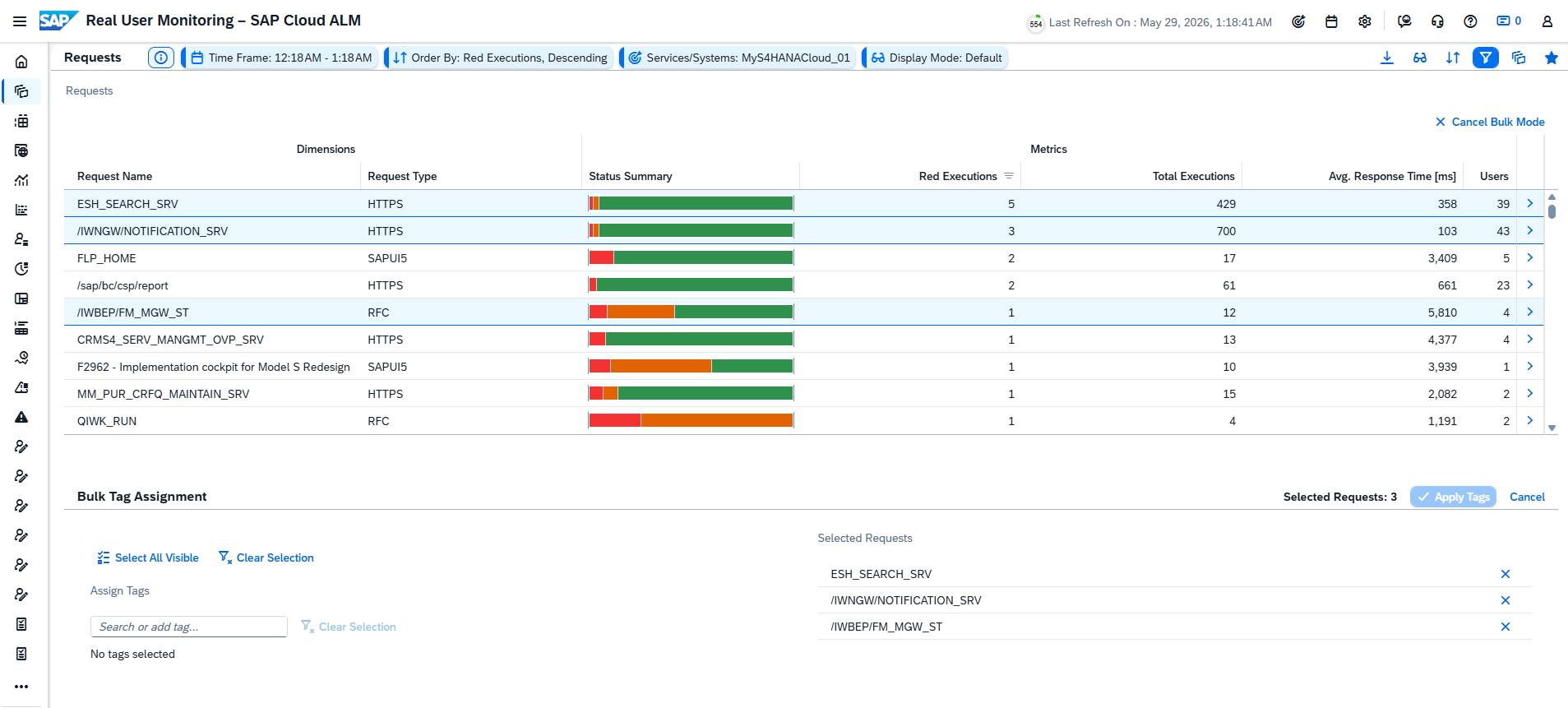
By eliminating the need to edit requests individually, bulk tagging reduces manual effort and improves efficiency in request management workflows.
TL;DR:
Real User Monitoring now supports bulk tagging, allowing tags to be assigned or removed for multiple requests at once.
Access Control Activated for Business Service Management & Intelligent Event Processing
Access Control is now activated for both the Business Service Management and Intelligent Event Processing apps.
Users can now only view data for landscape objects – such as services and systems – that are assigned to them through the Access Control List in the Landscape Management app.
This enhancement strengthens security and ensures that users only have visibility into the landscape objects relevant to their responsibilities.
TL;DR:
Access Control is now enabled for Business Service Management and Intelligent Event Processing, restricting visibility to assigned services and systems.