SAP Cloud ALM – What’s New in Week 40
SAP Cloud ALM continues to evolve with enhancements that improve AI-assisted workflows, operational visibility, governance, and usability across the platform.
The Week 40 release enhances SAP Business Transformation Center with reduced downtime during transformation cycles, while Service expands Joule capabilities for creating recommendations from innovation insights.
Operations introduces standardized roles, improved alert history, and enhanced monitoring workflows. Meanwhile, Implementation expands Joule support for requirements and user stories and improves test authorizations, transport analysis, deployment, and process ownership.
Together, these updates provide greater automation, transparency, and control across SAP Cloud ALM.
SAP Business Transformation Center – Cycle and Monitoring
Reduced System Downtime During Transformation Cycles
SAP Business Transformation Center improves cycle execution by moving an important data preparation step from system downtime to system uptime.
The process of determining the relevant source system data records is now performed before the transformation phase begins, while the source system is still available. Previously, this processing took place during the downtime phase and could add significantly to the overall period in which the system needed to remain offline.
By completing this work in advance, the actual downtime required during a transformation cycle is reduced, helping minimize the business impact of transformation activities. The process runs automatically in the background and does not require any additional user interaction or configuration.
TL;DR:
Relevant source system data records are now determined during system uptime instead of downtime, reducing the overall system downtime required during transformation cycles.
Implementation – Requirements, Several Apps*, Analytics, Deployment, Process Hierarchy
Joule Agent for Requirements and User Stories
SAP Cloud ALM expands Joule capabilities with the new ALM Requirements and User Stories Agent, bringing AI-assisted interaction to requirements and user story management.
Users can use Joule to list and filter requirements and user stories, search for requirements using keywords, and update assignment information. The agent can also update user story statuses and support planning activities such as maintaining story points and assigning user stories to sprints and releases.
This provides a more conversational way to find and maintain requirements and user stories and can reduce the manual effort involved in common project management activities.
SAP notes that there may be a delay before the agent becomes available through SAP for Me.
TL;DR:
The new ALM Requirements and User Stories Agent enables Joule to search, filter, and update requirements and user stories, including statuses, assignments, story points, sprints, and releases.
New Tester Role for Test Management
SAP Cloud ALM introduces a new predefined Tester role designed specifically for users involved in test management activities.
The role provides testing-specific access to applications including Test Preparation, Test Plans, Test Execution, Defects, and Analytics, together with display access to relevant project information.
Authorization checks are applied in both the user interface and backend services, providing a consistent authorization model for testing activities. Existing roles and their authorizations remain unchanged by the introduction of the new role.
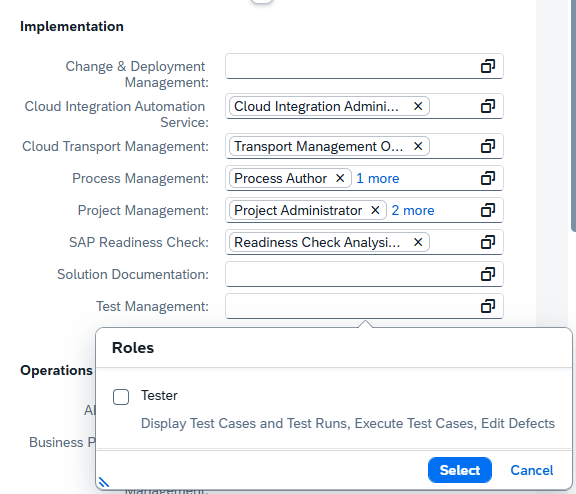
The dedicated role can simplify user administration by providing a predefined authorization profile for testers instead of requiring testing access to be assembled from broader roles.
TL;DR:
A new predefined Tester role provides dedicated access to SAP Cloud ALM test management applications while maintaining display access to relevant project information.
Retrofit Status in Transport Analysis
The Transport Analysis app expands its retrofit visibility by displaying the Retrofit Status of transport objects directly in the analysis results.
Retrofit status is now available as a table field and filter, allowing users to focus their analysis on transports with specific retrofit states. Results can also be grouped and sorted by Retrofit Status.
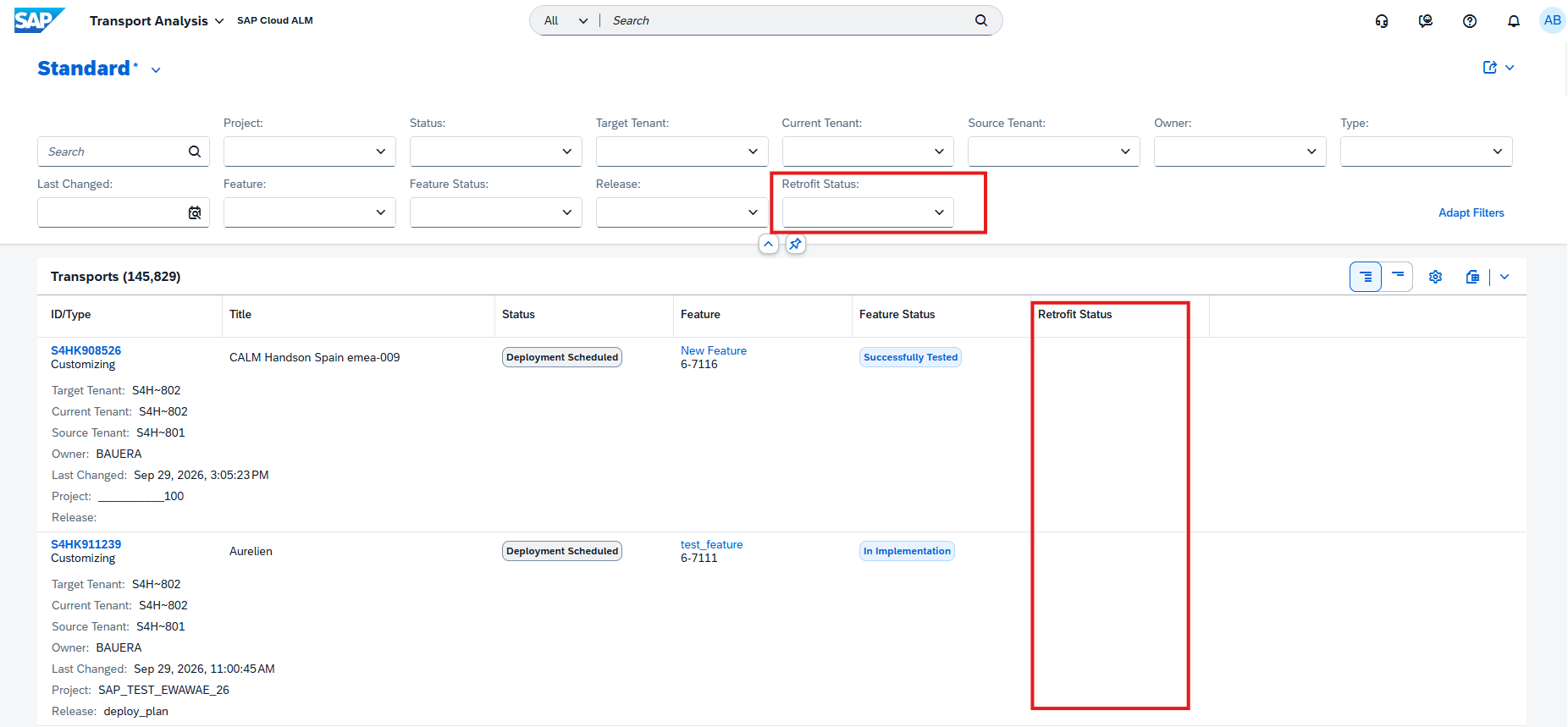
The information is additionally included in the Excel download, making the retrofit status available for offline analysis and reporting.
This provides a more complete view of transport and retrofit activities directly within Transport Analysis and makes it easier to identify transports that may require further attention.
TL;DR:
Retrofit Status is now available in Transport Analysis for filtering, grouping, sorting, and Excel export, providing greater visibility into retrofit activities.
System Role Information for Target Tenants
The Deployment app now displays the system role of target tenants when users select a target tenant.
Providing the system role directly during tenant selection gives users additional context about the target environment and helps distinguish between available systems before proceeding with deployment activities.
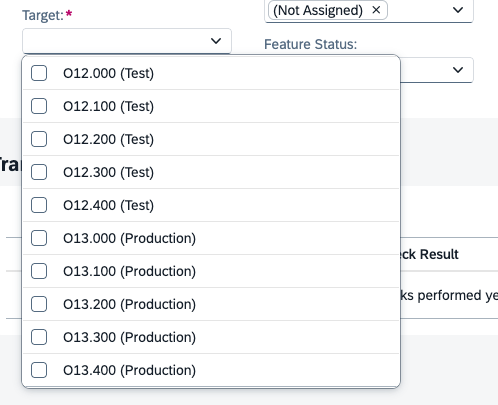
This small usability enhancement can help reduce ambiguity when landscapes contain multiple target tenants serving different purposes.
TL;DR:
Target tenant selection now displays the system role, making deployment targets easier to identify and distinguish.
Assign Owners to Process Hierarchy Nodes
Process Hierarchy introduces a new Node Owner capability, improving governance by making responsibility for individual process hierarchy nodes visible and maintainable.
A new Node Owner column is available in the Process Hierarchy Nodes list, while the node detail view displays the owner under General Information. The owner’s name is also clickable, providing access to additional information such as their email address.
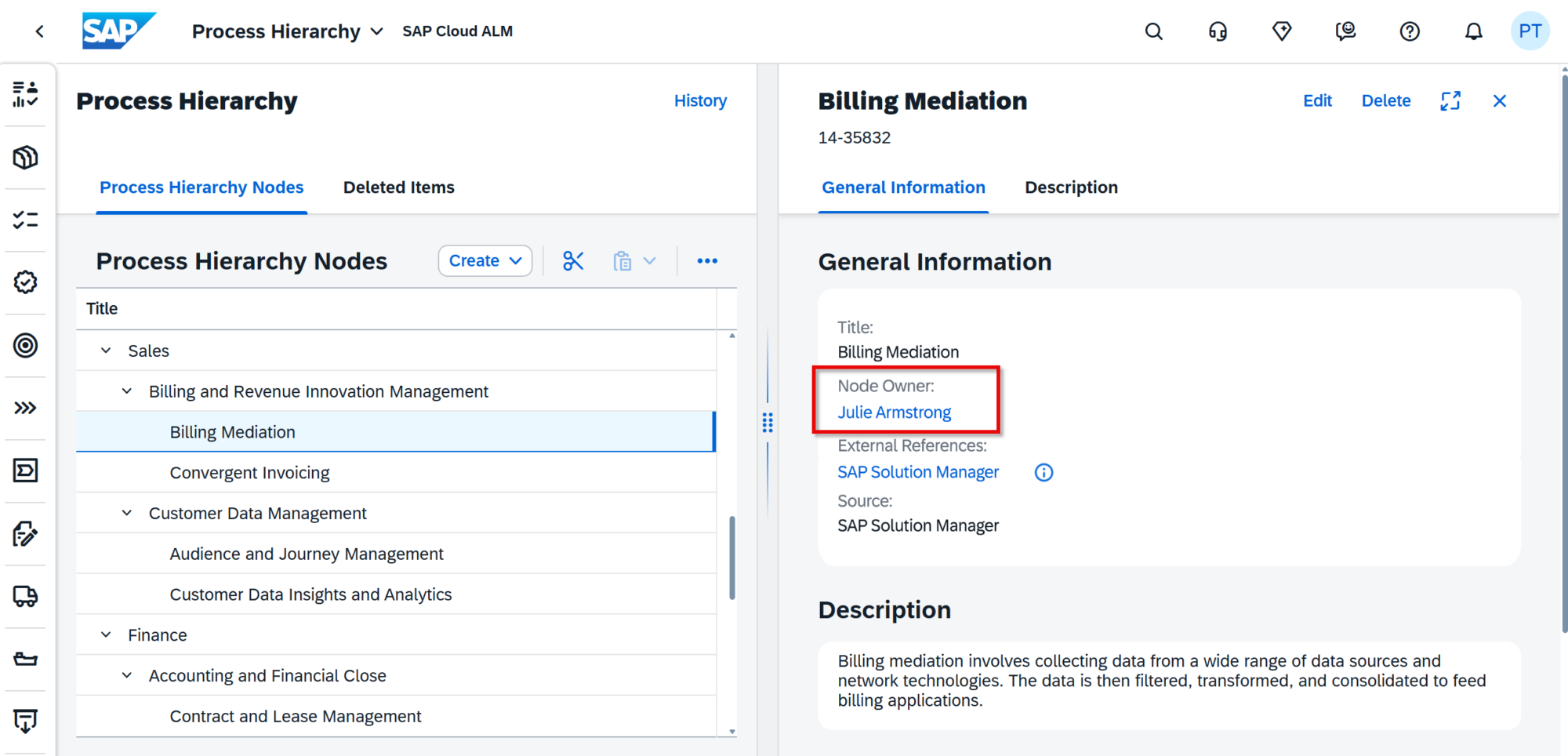
Users with the appropriate authorization can assign or change the owner by searching for a user by name or email address. Each process hierarchy node can have one owner, and changes to ownership are recorded in the node’s History, providing traceability when responsibilities change.
The Node Owner column is not displayed for items under the Deleted Items tab.
TL;DR:
Each Process Hierarchy Node can now have a designated owner, with ownership visible in the list and detail views and changes recorded in History for improved governance and accountability.
Operations – Several Apps*, Alert & Event Management, Business Process Monitoring
Standardized Roles Across SAP Cloud ALM for Operations
SAP has introduced revised and standardized user roles across SAP Cloud ALM for Operations and Landscape Management to provide a more consistent authorization model.
The new roles apply across Business Process Monitoring, Business Service Management, Configuration & Security Analysis, Health Monitoring, Integration & Exception Monitoring, Job & Automation Monitoring, Landscape Management, Operations Automation, Real User Monitoring, Synthetic User Monitoring.
The previous roles are now marked with [Deprecated] but remain active during a transition period. Organizations should use this period to reassign users to the corresponding new roles to ensure that required authorizations remain available once the deprecated roles are eventually retired.
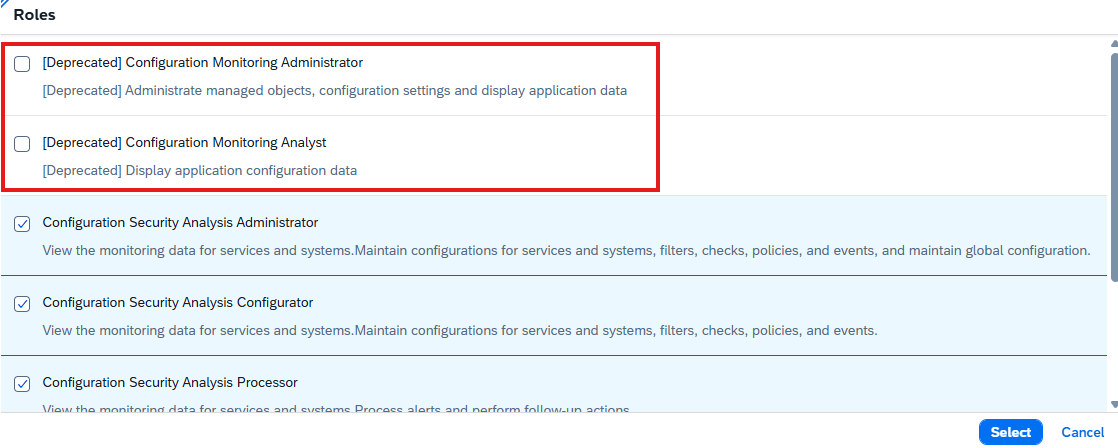
This is therefore an important change for SAP Cloud ALM administrators, as existing user and role assignments should be reviewed and migrated to the new role model in a timely manner.
TL;DR:
SAP introduces standardized roles across Operations and Landscape Management. Existing roles are deprecated but temporarily remain active, so users need to be reassigned to the new roles during the transition period.
Confirmed Alerts and Alert History
Alert & Event Management provides greater visibility into alerts that have already been processed by making Confirmed Alerts available in the Alert List.
Users can now review alerts after confirmation, including the confirmation comment that was entered when the alert was confirmed. This provides additional context about why an alert was closed or considered resolved.

For alerts that were confirmed and later reopened, the new Show Alert History option provides access to actions performed before confirmation. Users can further open the history to review the previous alert activities.
This improves traceability throughout the alert lifecycle and makes it easier to understand how an alert was previously handled when further investigation is required.
TL;DR:
Confirmed Alerts are now visible in the Alert List, including confirmation comments and historical actions for alerts that were later reopened.
Faster Access to KPI Event Configuration
Business Process Monitoring simplifies the process of adjusting event and threshold settings for monitored KPIs.
From a KPI card on the Monitoring page, users can now open the KPI information and select Edit Event Configuration to navigate directly to the corresponding Event Configuration section.
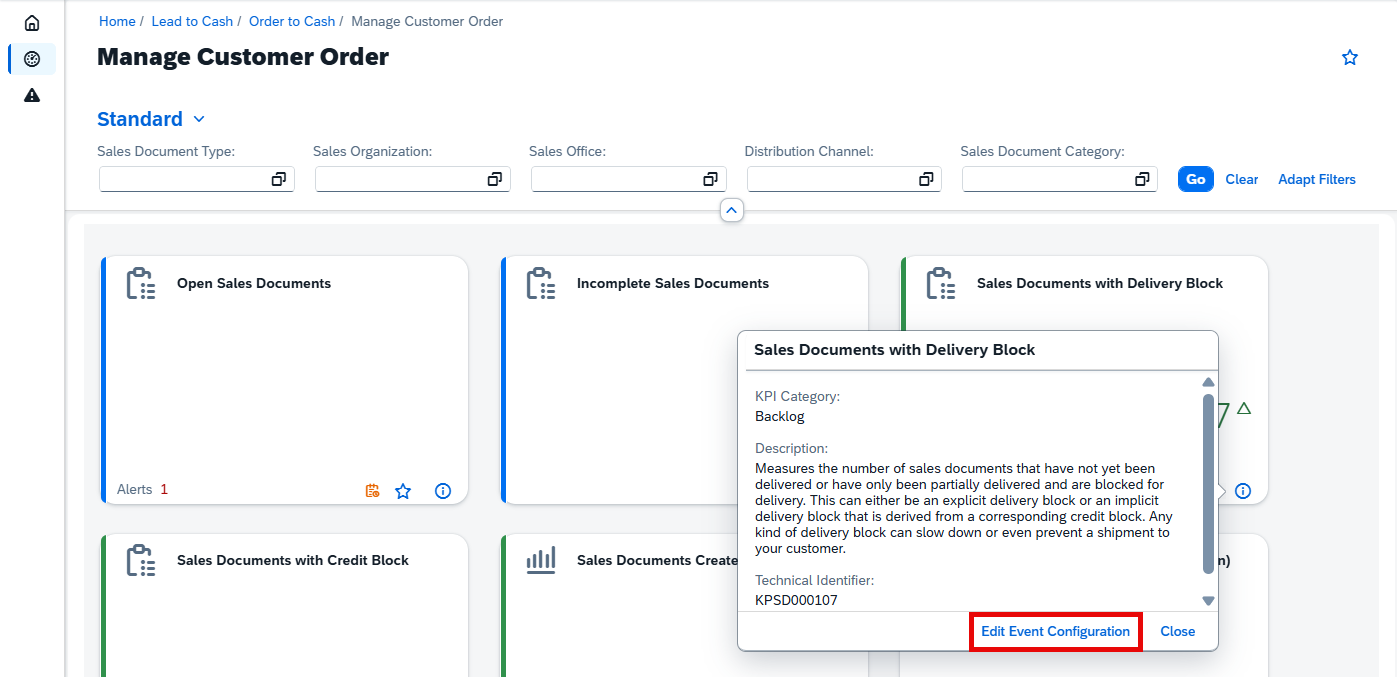
The direct link also provides faster access to the threshold recommendation functionality, reducing the number of navigation steps required when reviewing or adjusting KPI alert thresholds.
TL;DR:
KPI cards now provide direct access to Event Configuration and threshold recommendations, making monitoring configuration faster and easier.
Related Execution Steps for Jobs and Automations
Job & Automation Monitoring improves visibility into complex job executions with the new Show all related steps option.
For SAP Datasphere Chain and Unspecified HTTP Service jobs and automations, users can now view the related hierarchy of execution steps directly from the Monitoring page.
This provides greater visibility into nested tasks and individual execution steps, making it easier to understand the complete execution flow and identify where problems occurred within a multi-step job or automation.
TL;DR:
Job & Automation Monitoring can now display related and nested execution steps for SAP Datasphere Chain and Unspecified HTTP Service, providing a clearer view of the complete execution flow.
Service – AI Assistance for Innovation Adoption
Create Simplification Item Recommendations with Joule
The AI Assistance for Innovation Adoption app expands its Joule capabilities with AI-assisted recommendation creation directly from the Evolution Readiness dashboard.
Users can now use Joule to generate a draft recommendation for simplification items. Joule uses a predefined prompt to prepare the recommendation, reducing the manual effort required to formulate the initial content.
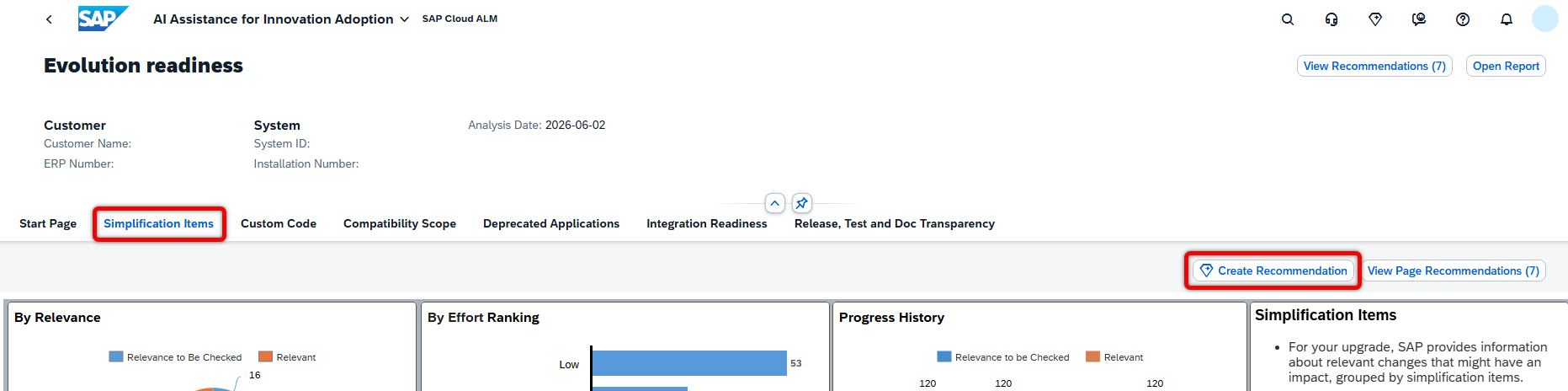
The generated recommendation remains under user control: it can be reviewed before being saved. Once confirmed, the recommendation is stored in Issues and Actions Management, connecting AI-assisted analysis with the existing process for tracking and managing follow-up activities.
TL;DR:
Joule can now generate draft recommendations for simplification items directly from the Evolution Readiness dashboard, which can be reviewed and saved to Issues and Actions Management.