SAP Cloud ALM – What’s New in Week 26
SAP Cloud ALM continues to evolve with enhancements that improve usability, governance, and collaboration across the platform.
The week 26 release focuses primarily on the Implementation area, introducing improvements to analytics, feature management, process hierarchy administration, and classification-based reporting. Together, these updates deliver more powerful filtering, stronger governance through role-based controls, improved traceability, and a more consistent analytics experience across implementation applications.
The Service area enhances Issues and Actions Management with more flexible comment handling and new visual filters that make it easier to organize and prioritize work. In addition, cross-application updates include revised IP address ranges for the Europe (Frankfurt) – cf-eu10 region, helping customers maintain secure and uninterrupted connectivity with SAP Cloud ALM.
Together, these enhancements simplify daily project execution, strengthen governance, and provide teams with more intuitive tools for managing implementation activities and collaborating across SAP Cloud ALM.
Implementation – Analytics, Features, Overview, Process Hierarchy, * Several apps
Enhanced Test Plan Selection in Traceability Apps – Analytics
The Solution Process Traceability and User Story Traceability apps now feature an enhanced Value Help dialog for selecting test plans.
The updated dialog introduces:
- A search field for quickly locating test plans
- A Define Conditions tab for creating advanced search rules and filters
This enhancement makes it easier to find the right test plans and apply more precise filtering. For example, users can exclude test cases assigned to the “None” test plan by defining a condition such as “not equal” in the first dropdown and type “None” in the input field.
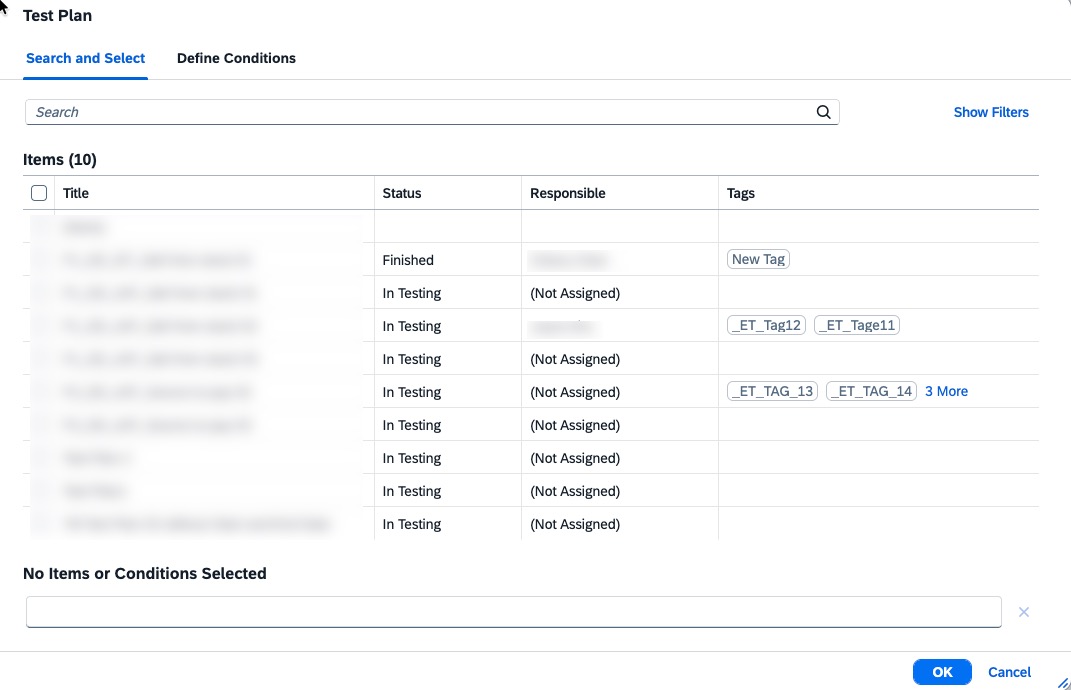
By providing more powerful search and filtering capabilities, the updated Value Help dialog improves usability and makes traceability analysis more efficient.
TL;DR:
The Solution Process Traceability and User Story Traceability apps now include an enhanced Value Help dialog with search and advanced filtering, making test plan selection faster and more flexible.
Enhanced Governance and Improved Relations Management in Features
The Features app is enhanced with updates that strengthen governance and simplify navigation between related project artifacts.
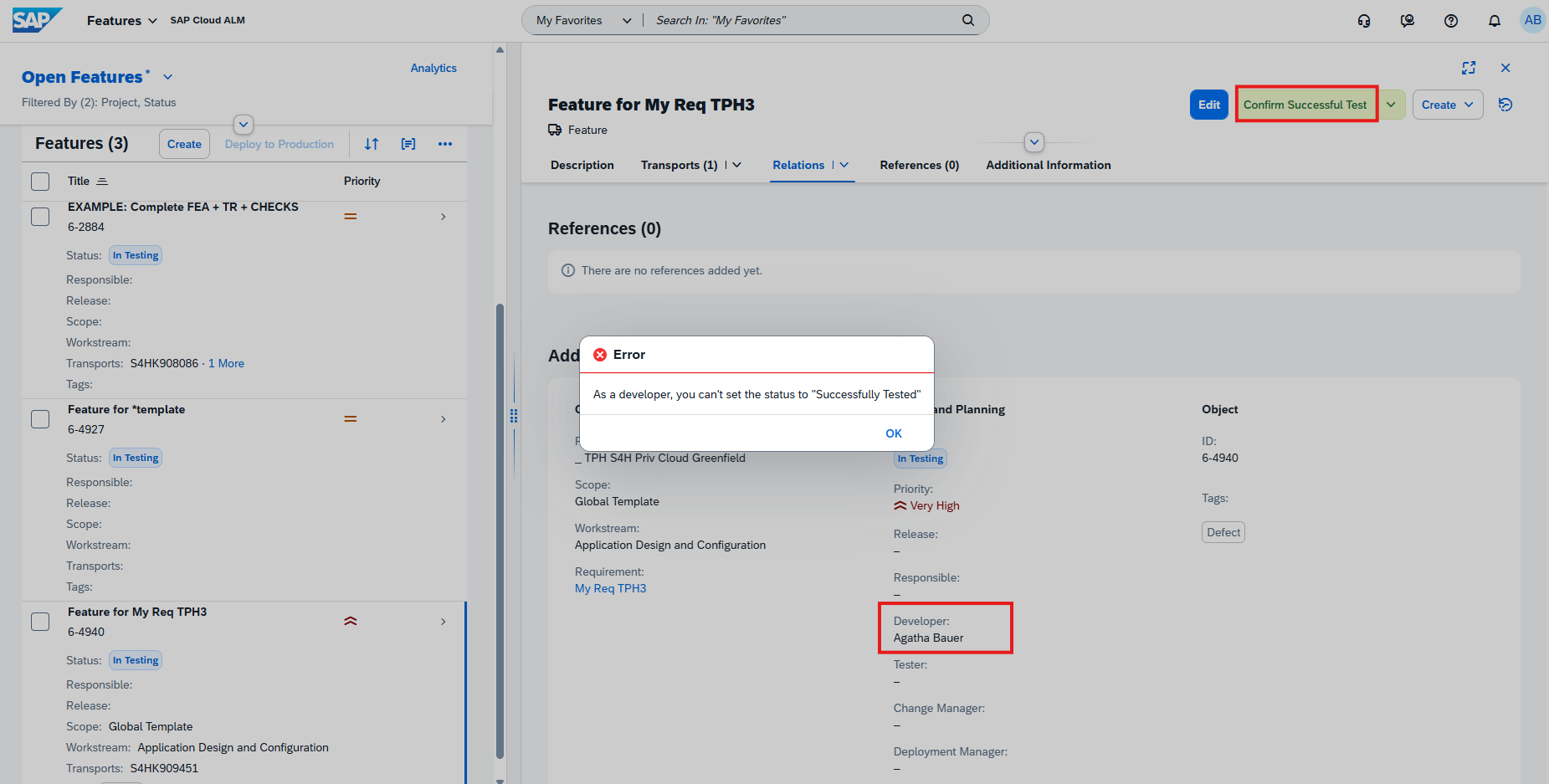
A new feature status switch check introduces additional control during the testing process. Users assigned as Developers to a feature can no longer confirm that the feature has been successfully tested, helping enforce separation of duties between development and validation. If no developer is assigned to the feature, this validation check is not applied.
In addition, related artifacts are now organized more consistently. User stories, project tasks, and other linked objects are grouped together under a dedicated Relations tab and section, providing a centralized view of all related work items.
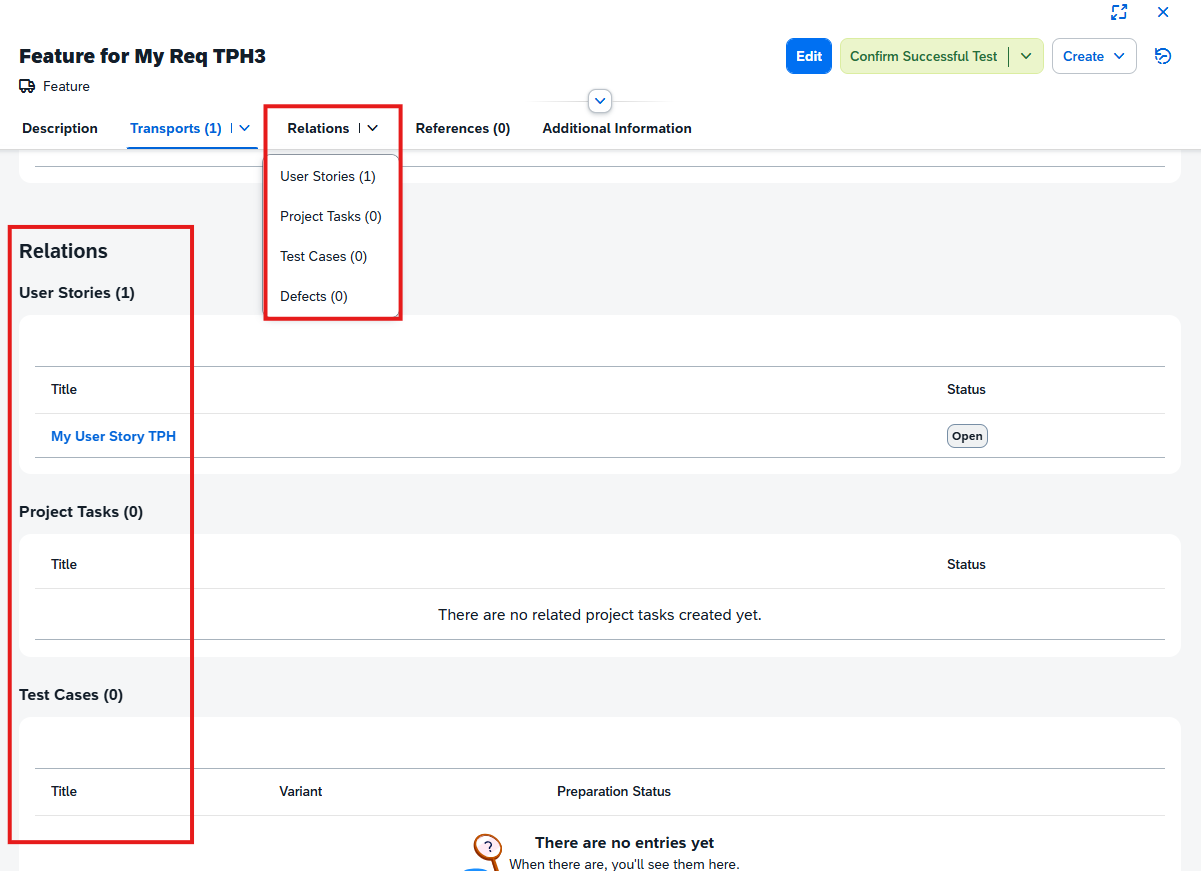
These enhancements improve governance, support clearer role separation, and make it easier to navigate relationships between implementation artifacts.
TL;DR:
The Features app now enforces developer-independent test confirmation and consolidates related artifacts into a dedicated Relations section for improved governance and usability.
Enhanced Test Plan Selection in Overview
The Overview app now includes an enhanced Value Help dialog for selecting test plans, making it easier to locate and filter relevant test data.
The updated dialog introduces:
- A search field for quickly finding test plans
- A Define Conditions tab for creating advanced search rules and filter criteria
This enables more precise filtering of test-related information. For example, users can exclude test cases assigned to the “None” test plan by defining the condition “not equal” in the first dropdown and type “None” in the input field.
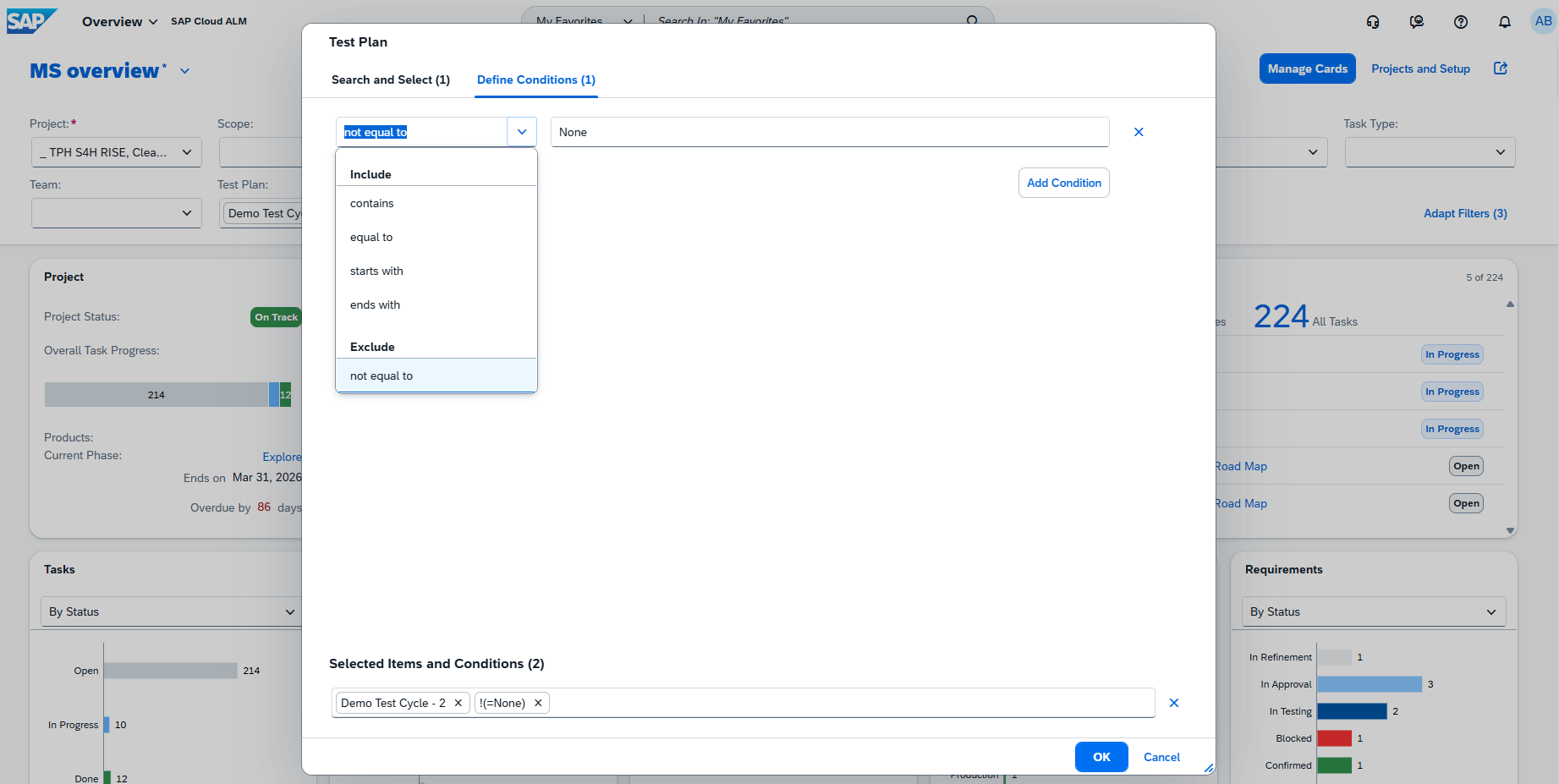
The enhancement improves usability and provides greater flexibility when working with test plan filters in the Overview app.
TL;DR:
The Overview app now features an enhanced Value Help dialog with search and advanced filtering capabilities, making test plan selection faster and more flexible.
Lock Visibility and Administrator Controls in Process Hierarchy
The Process Hierarchy app now provides improved visibility and administration of locked process hierarchy nodes.
When external applications, such as SAP Signavio, lock a root node (subtree) to prevent concurrent editing, a lock icon is now displayed next to the node title, making it easy to identify locked sections of the hierarchy. While a subtree is locked, editing is disabled for the root node and all its child nodes in SAP Cloud ALM, although the root node can still be reordered using Move Up and Move Down.
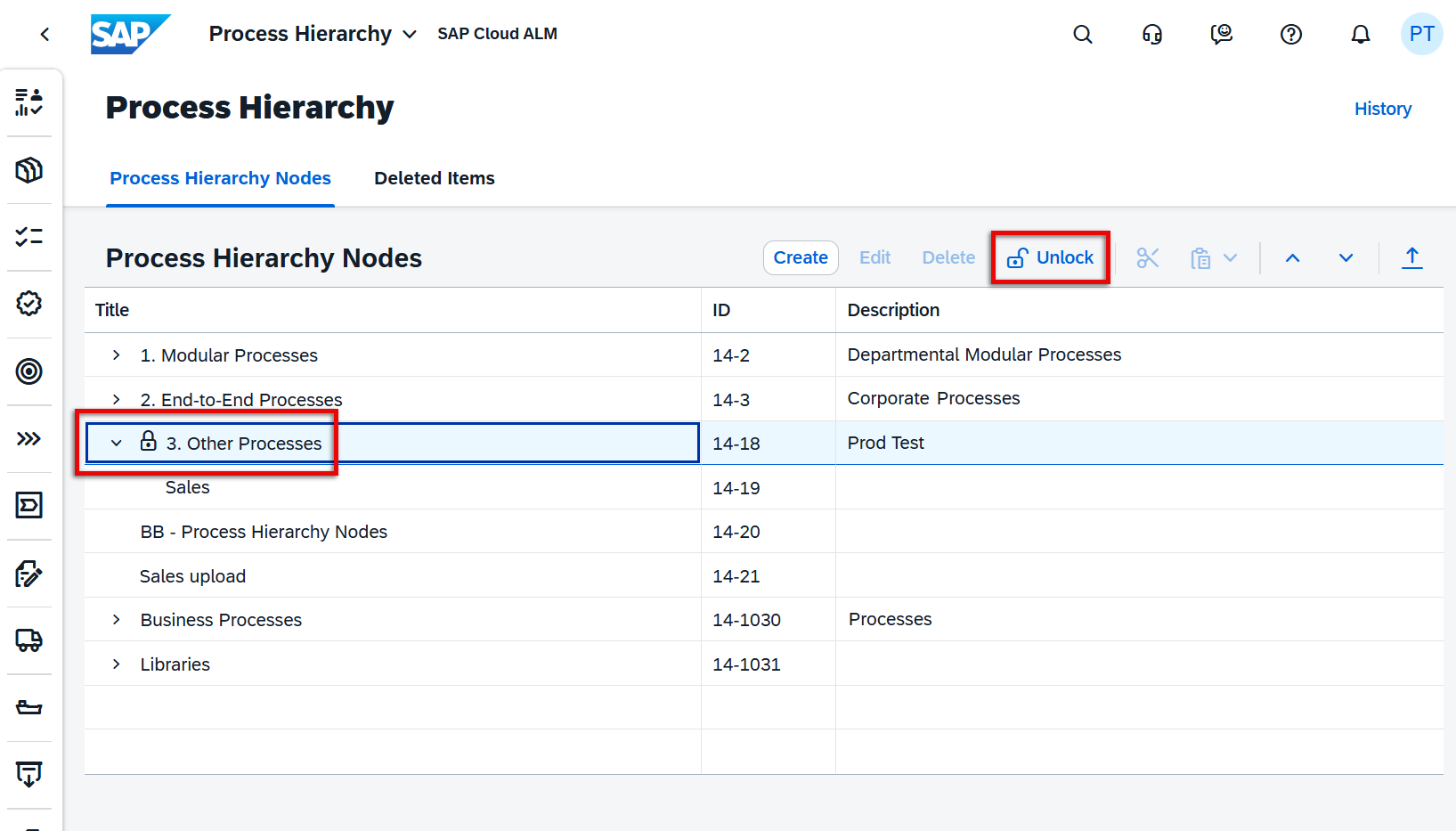
To support administrative scenarios, SAP Cloud ALM introduces a new Process Hierarchy Administrator role. This role includes all permissions of the existing Process Hierarchy Author role and adds the ability to unlock locked process hierarchy nodes when required. An Unlock button is available whenever locked nodes exist in the hierarchy and becomes active after selecting a locked root node, allowing administrators to resolve emergency situations without relying on external applications.
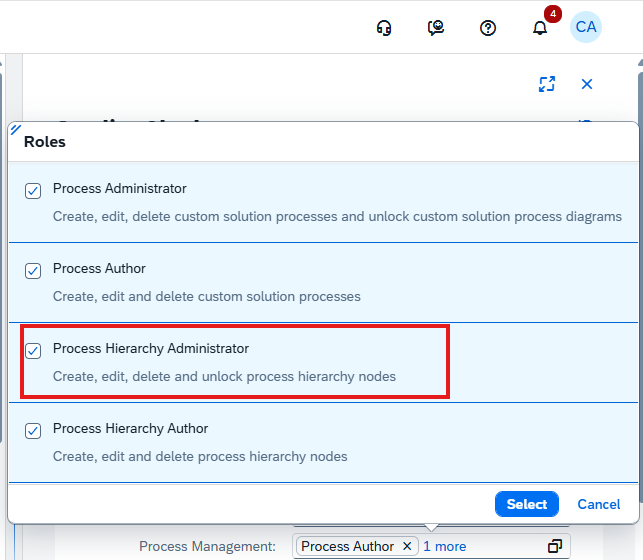
These enhancements improve transparency around externally locked content while providing controlled administrative capabilities for exceptional cases.
TL;DR:
The Process Hierarchy now displays locked nodes with visual indicators and introduces a new Process Hierarchy Administrator role that can unlock hierarchy nodes when necessary.
Enhanced Classification Analysis for Requirements and Defects
The analytics capabilities for requirements and defects are enhanced with improved support for classification and sub-classification analysis across the Overview and distribution apps.
The Requirement Distribution and Defect Distribution apps now support grouping, filtering, and analysis based on classification hierarchies. Users can switch between different views using the dropdown or apply filters to analyze data by Classification and Sub-classification, with improved table layouts and consistent navigation throughout the analytics experience.
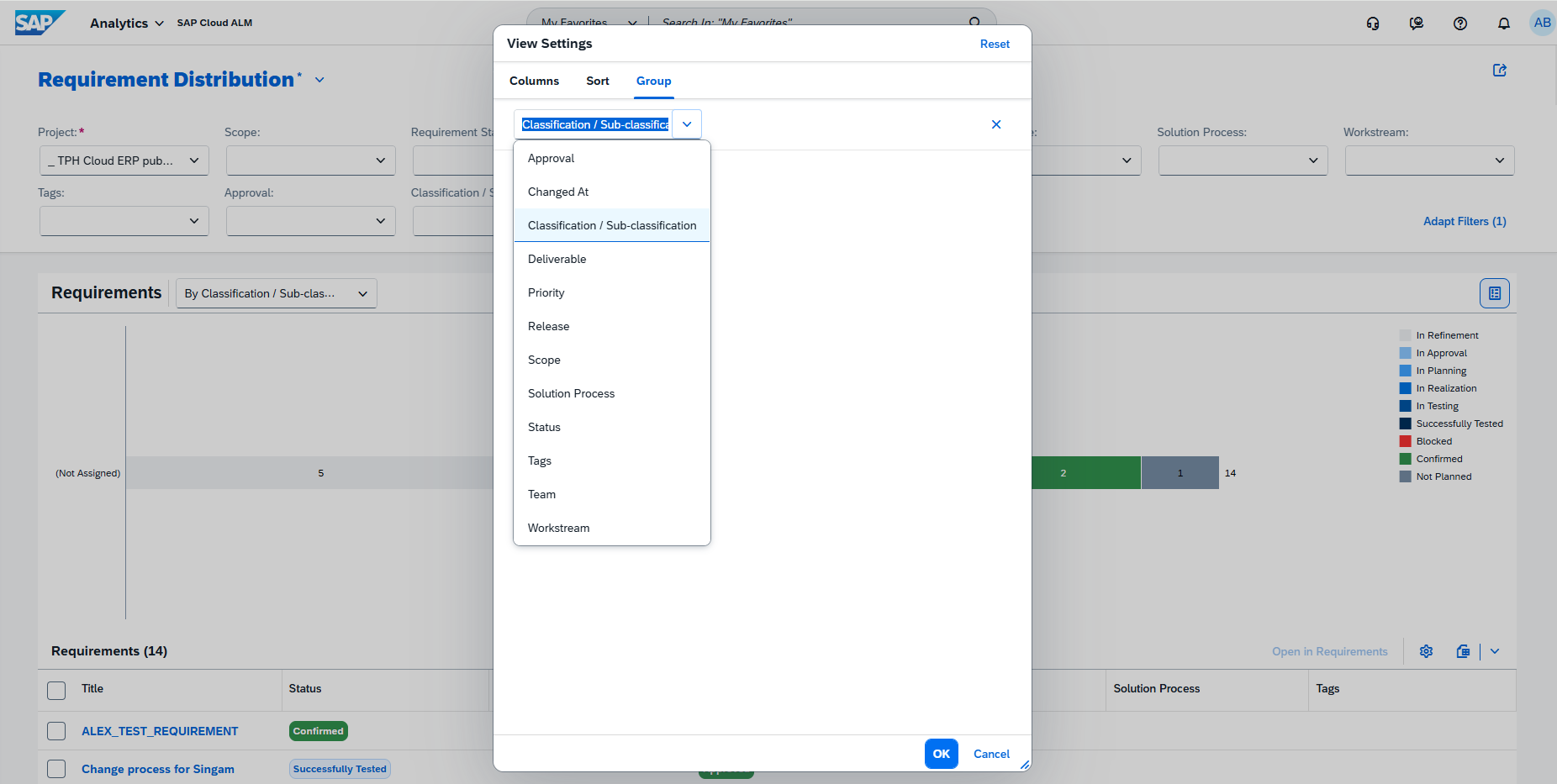
The Overview app is also enhanced with a new By Classification view for both the Requirement Distribution and Defect Distribution cards. Selecting this option updates the charts to group data by classification, and the selected view is preserved when navigating from the Overview card to the corresponding analytics application.
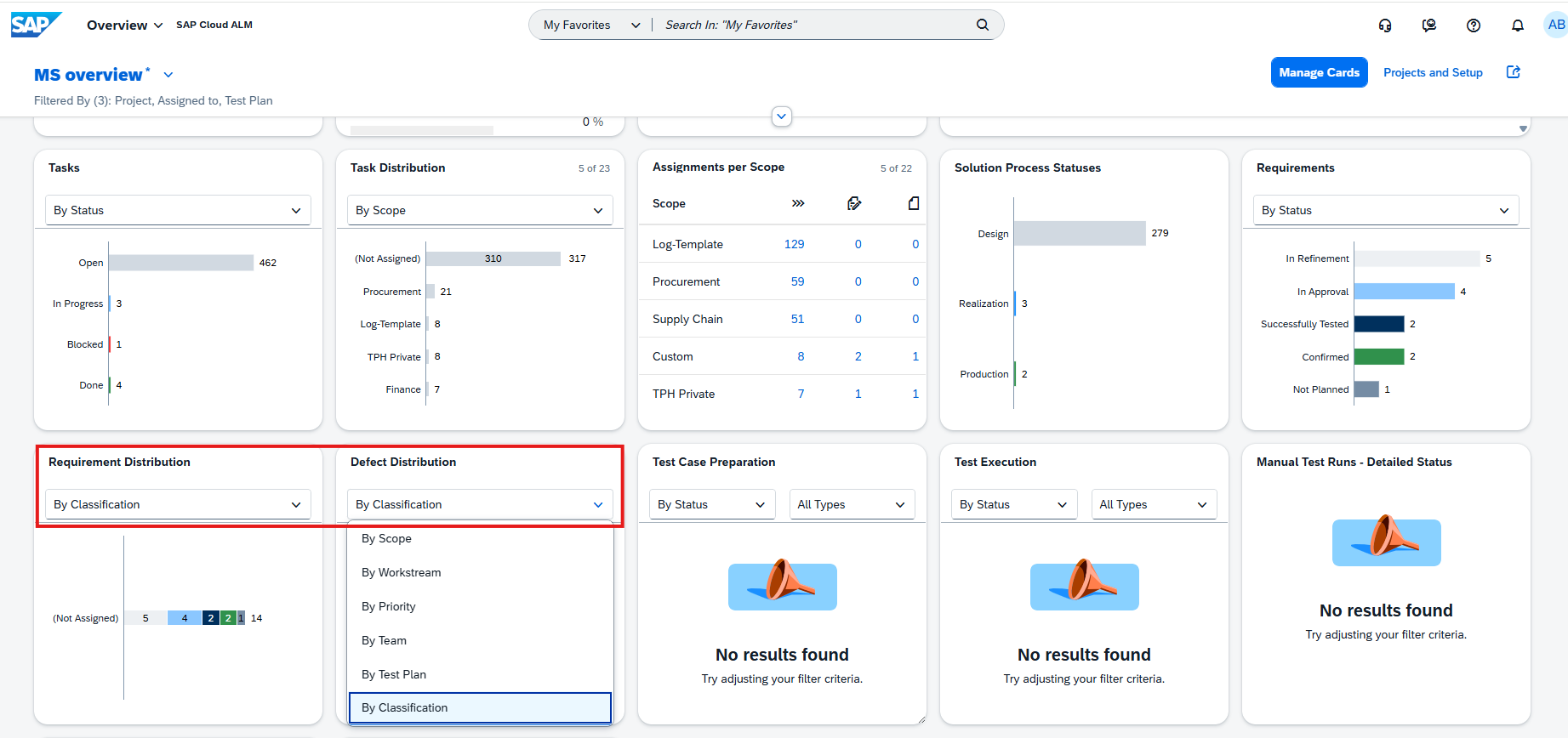
These enhancements make it easier to analyze trends, identify patterns, and explore implementation data using a consistent classification model.
TL;DR:
Requirement and Defect analytics now support classification and sub-classification grouping, filtering, and visualization, providing more powerful and consistent analysis across the Overview and analytics apps.
Service – Issues and Actions Management
Edit and Delete Comments
Issues and Actions Management now provides better flexibility for managing discussions around issues and standalone actions.
Users can now edit or delete comments directly from the Issues and Standalone Actions lists, making it easier to keep discussions accurate and up to date without navigating into individual objects.
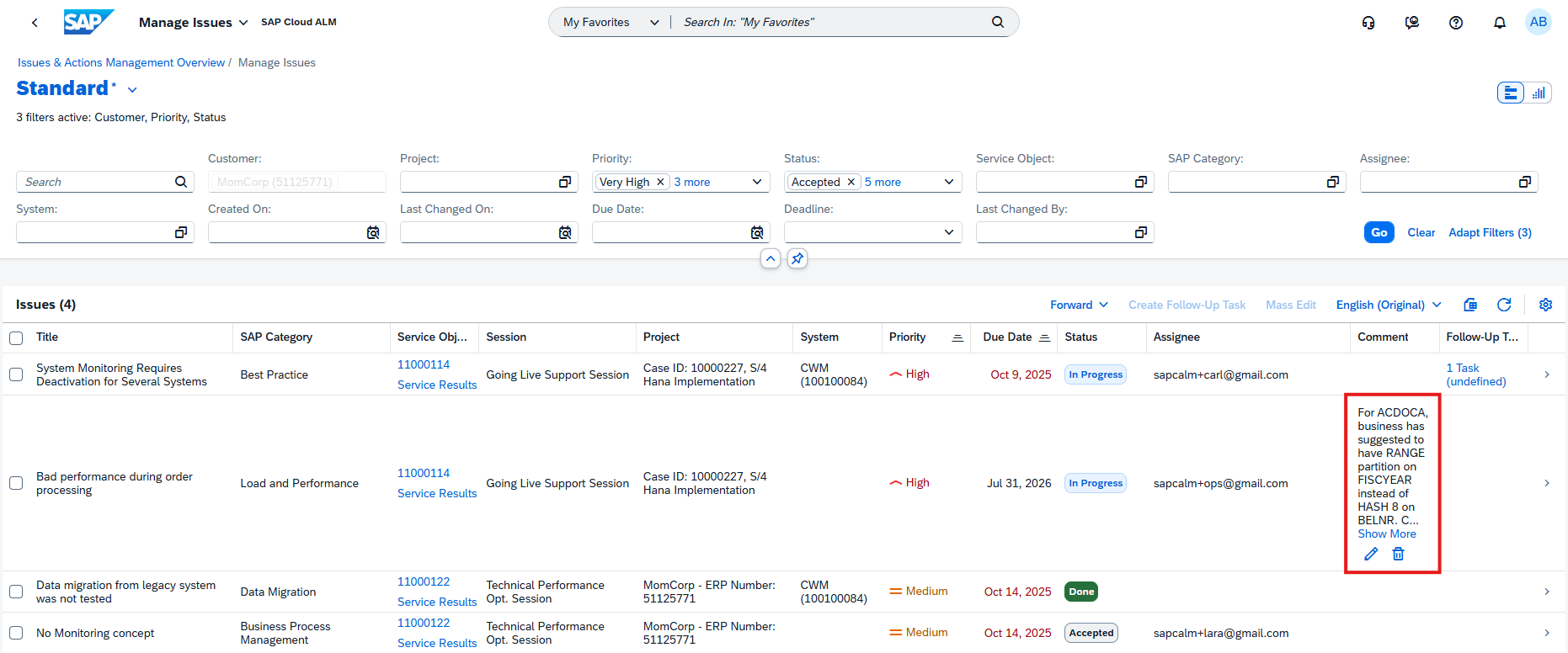
This enhancement simplifies collaboration and helps teams maintain clear and relevant communication throughout issue resolution.
TL;DR:
Comments on issues and standalone actions can now be edited or deleted directly from the list view, improving collaboration and usability.
New Visual Filters for Issues and Standalone Actions
The Manage Issues and Manage Standalone Actions pages are enhanced with two additional visual filters to simplify finding relevant work items.
Users can now filter issues and standalone actions by:
- Creation Date
- Upcoming Due Date
Like the existing visual filters, selecting a filter automatically updates the table below to display only the matching records, providing a faster and more intuitive way to focus on recently created items or work that is approaching its deadline.
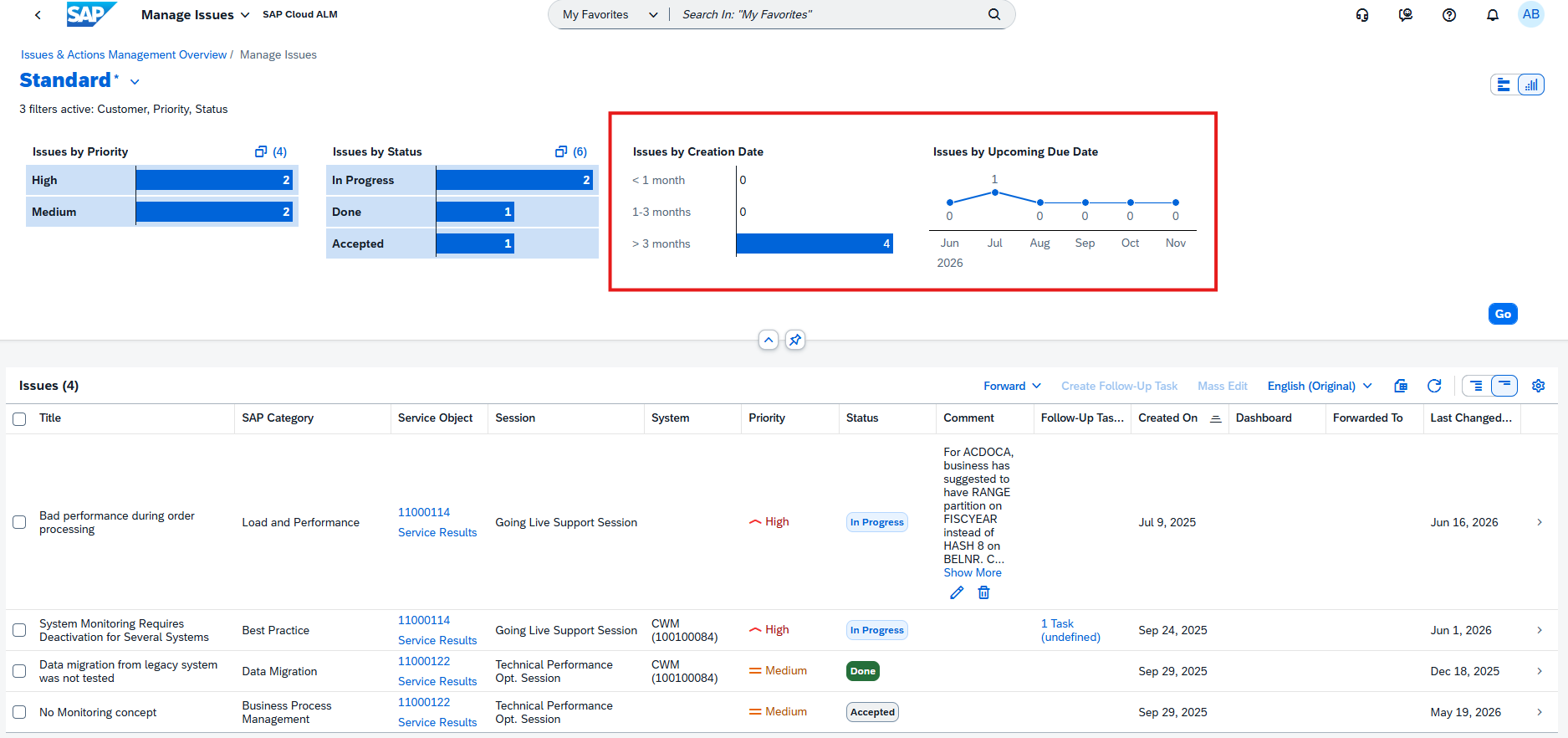
These enhancements improve navigation and help users prioritize activities more efficiently.
TL;DR:
New visual filters for Creation Date and Upcoming Due Date make it easier to identify and prioritize issues and standalone actions.
Cross-Application – Updated IP Addresses
SAP has updated the IP address ranges used by SAP Cloud ALM for the Europe (Frankfurt) – cf-eu10 region.
Customers using IP allowlists for firewalls, SAP Cloud Connector, or proxy configurations should review and update their network settings to ensure uninterrupted connectivity between SAP Cloud ALM and connected services and systems.
To maintain connectivity, network configurations should allow:
- The IP address ranges for SAP BTP Cloud Foundry applications
- The region-specific SAP Cloud ALM IP address ranges
We recommend subscribing to SAP BTP region notifications or cloud email notifications in SAP for Me to stay informed about future IP address changes. This helps to ensure reliable communication between SAP Cloud ALM and managed landscapes while minimizing the risk of connectivity issues after infrastructure changes.
TL;DR:
The Europe (Frankfurt) – cf-eu10 region has updated SAP Cloud ALM IP addresses. Customers using IP allowlists should update their network configurations to maintain uninterrupted connectivity