SAP Cloud ALM – What’s New in Week 28 and 30
SAP Cloud ALM continues to evolve with enhancements that improve automation, governance, analytics, and day-to-day usability across the platform.
Week 28 and Week 30 introduce significant updates in the Operations area, including more intelligent event processing, enhanced compliance validation, and expanded monitoring capabilities. Together, these improvements help organizations automate operational processes more effectively, strengthen compliance management, and gain better visibility into the health of their SAP landscapes.
The Implementation area delivers new analytics capabilities, stronger governance for process management, centralized program team administration, and several enhancements to Retrofit, making project execution, reporting, and landscape management more efficient.
In the Service area, Issues and Actions Management becomes more flexible with bulk comment creation, the new Awaiting Customer Action status, and additional filtering options that improve collaboration and work item management. AI Assistance for Innovation Adoption also expands with new analysis capabilities, while Service Results receives a refreshed user interface to improve usability.
Together, these enhancements simplify daily operations, strengthen governance, improve reporting and collaboration, and provide organizations with more intelligent tools for managing their SAP Cloud ALM landscape.
SAP Business Transformation Center – Data Management, Scoping
Enhanced Data Assessment and Correction Governance in Data Management
The Data Management capabilities in SAP Business Transformation Center have been enhanced with improvements that provide greater flexibility when managing data assessments and stronger governance for correction activities.
The Manage Data Assessments app now allows the destination (endpoint) to be managed independently of the source system. When creating or editing data assessments, users can select, view, and update the destination directly within the assessment itself, making it easier to adapt to changing system landscapes and maintain assessment configurations without modifying the associated source system.
In addition, Correction runs now include a new Correction Approval Flow that introduces an approval step before execution. Authorized users can review submitted correction runs and either approve or reject them using new workflow statuses and actions. Depending on the environment type, approval can be mandatory – for example, in productive environments – to ensure that data changes are properly reviewed before they are applied.
Together, these enhancements improve both the flexibility of landscape management and the governance of data correction processes, helping organizations maintain greater control over their data transformation activities.
TL;DR: Data Management now supports independent endpoint management for data assessments and introduces a Correction Approval Flow to strengthen governance and control over correction runs.
Improved Scoping Experience with ZIP Support and Scan Progress Tracking
The Scoping capabilities in SAP Business Transformation Center have been enhanced with improvements that simplify analysis file handling and provide greater visibility into system scan execution.
The Manage Analysis Files app now supports uploading SAP ERP Maintenance Readiness Check analysis files in ZIP format, in addition to the previously supported JSON format. This eliminates the need to manually extract or convert analysis files before uploading, making it easier to prepare data for transformation planning. The uploaded analysis is then used to provide transition guidance and generate a tailored scenario fit recommendation in the Find Transformation Approach app.
In addition, a new Scan Progress bar provides real-time visibility into system scans by displaying the exact percentage of completion. This allows users to monitor long-running scans more effectively, understand how much of the process has been completed, and better estimate the remaining execution time.

Together, these enhancements streamline the scoping process by simplifying analysis file management and improving transparency during system analysis.
TL;DR: Scoping now supports direct upload of ZIP-based Maintenance Readiness Check files and introduces a real-time scan progress bar, making transformation analysis easier and more transparent.
RISE with SAP Methodology – Business Modifications, Customer Objects, Operations View
New Business Modifications App
SAP Cloud ALM introduces a new Business Modifications dashboard within the RISE with SAP Methodology, providing a dedicated view for analyzing custom business modifications in SAP systems.
The dashboard helps organizations identify business modifications; a subset of ABAP Classic Extensions recorded in the SMODILOG table. Since these modifications are not clean core compliant and not upgrade-stable, they represent areas that should be reviewed and, where possible, reduced as part of a clean core transformation strategy.
The dashboard offers a detailed overview of each modification, including information such as the package, object name, object type, application component, and modification date, enabling teams to identify affected objects and prioritize remediation efforts.
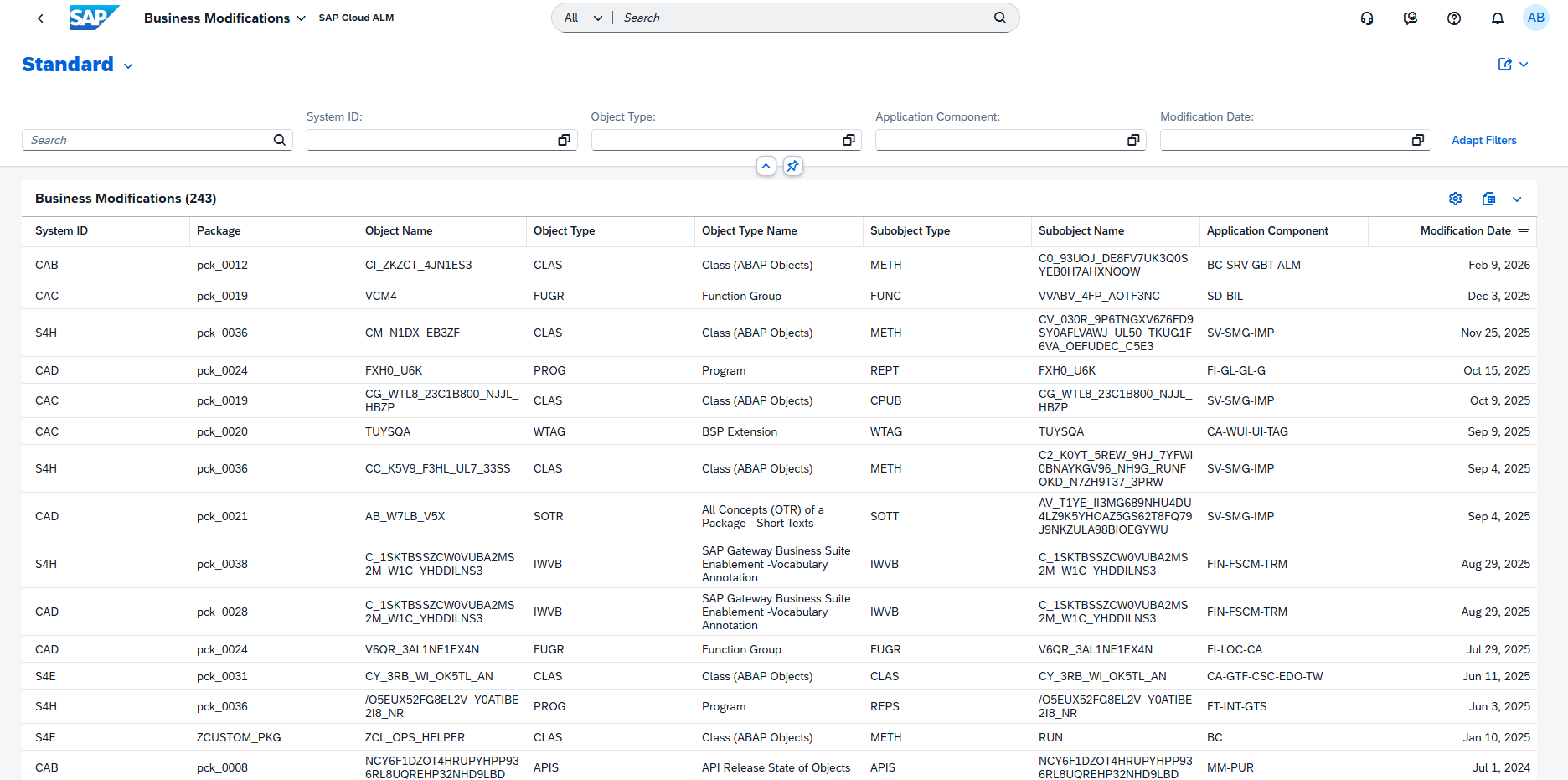
To improve navigation, the dashboard is available directly from the RISE with SAP Methodology launchpad and can also be accessed from the System View through the Extensibility tab.
When launched from the System View, the dashboard is automatically filtered for the selected system, allowing users to begin their analysis immediately.
These enhancements provide greater visibility into custom modifications and support organizations in preparing for a more maintainable, upgrade-friendly, and clean core SAP landscape.
TL;DR: A new Business Modifications dashboard helps identify and analyze non-clean-core ABAP business modifications and can be accessed directly from both the RISE with SAP Methodology launchpad and the System View.
New Unique Findings View for ATC Analysis in Customer Objects
The Customer Objects dashboard now includes a new Unique Findings table view that simplifies the analysis of ABAP Test Cockpit (ATC) check results.
Instead of displaying individual raw ATC findings, the new view consolidates related findings into a single entry by combining the check class, message code, and referenced SAP object. This provides a clearer overview of clean core compliance issues affecting each customer object and makes it easier to focus on the most relevant remediation activities.
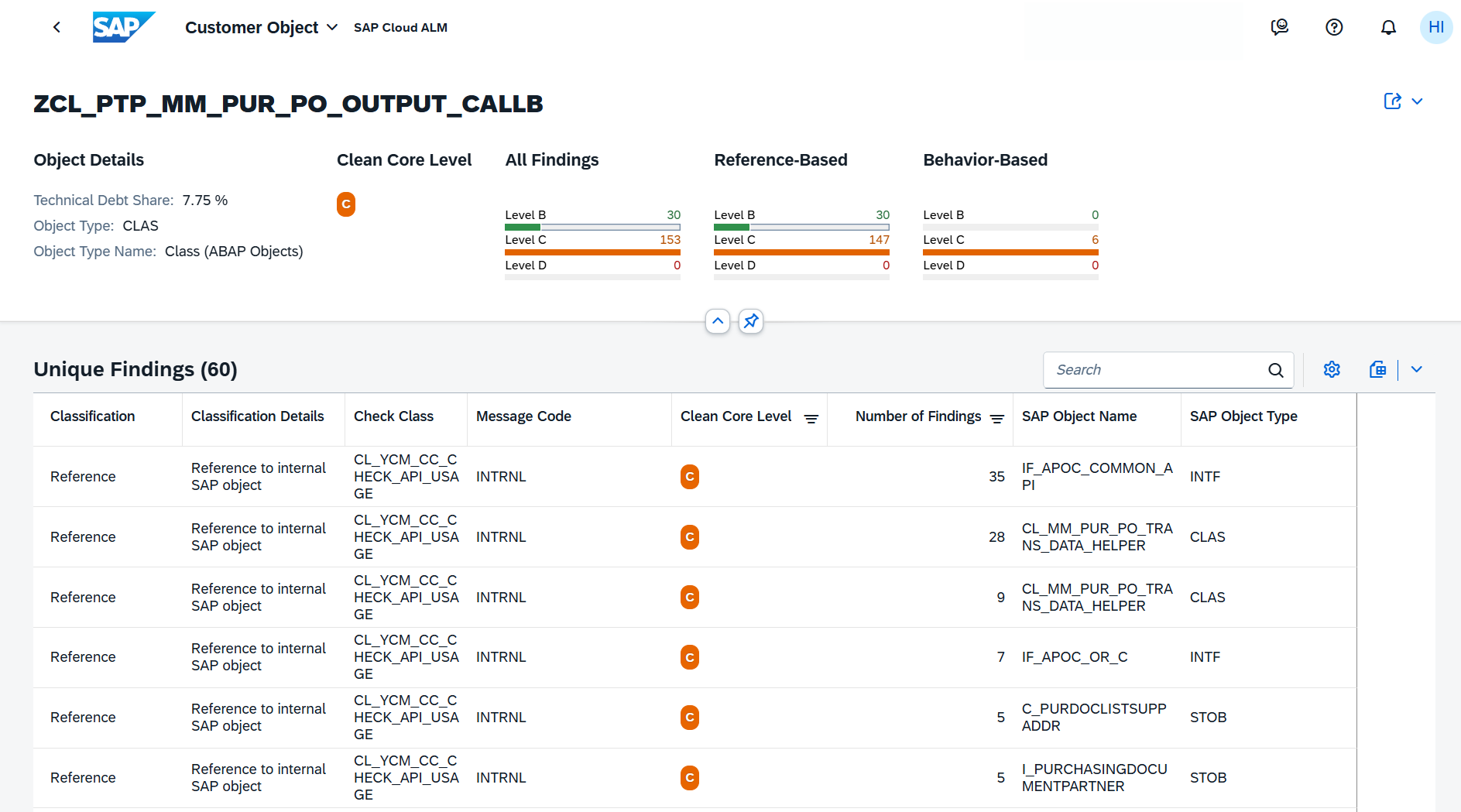
By reducing duplicate findings and presenting technical issues in a more structured way, the Unique Findings view helps development teams identify technical debt, prioritize corrective actions, and track progress toward a more clean core-compliant SAP landscape.
The view becomes available after importing a new ATC check result into the System View and can be accessed by selecting a customer object in the Customer Objects dashboard.
TL;DR: The new Unique Findings view consolidates ATC check results, making it easier to identify, prioritize, and remediate clean core compliance issues for customer objects.
AI-Assisted Operations Score Analysis in Operations View
The Operations View now includes AI-assisted analysis, helping organizations better understand their operational health scores and identify the improvements that will have the greatest impact.
Users can analyze both the overall Operations Score and individual Area Scores to see how the scores are calculated. The AI-assisted analysis identifies the top three KPIs and metrics influencing the selected score, explains how each contributes to the overall result, and provides prioritized recommendations with an estimated impact on the score. This enables teams to focus on the actions that deliver the most significant operational improvements.
The analysis is organized into four sections:
- Summary – An overview of the current score and its key drivers.
- Score Breakdown – A detailed explanation of how the score is calculated.
- All Issues – A consolidated list of findings affecting the score.
- Next Steps – Recommended actions to improve system health and increase the score.
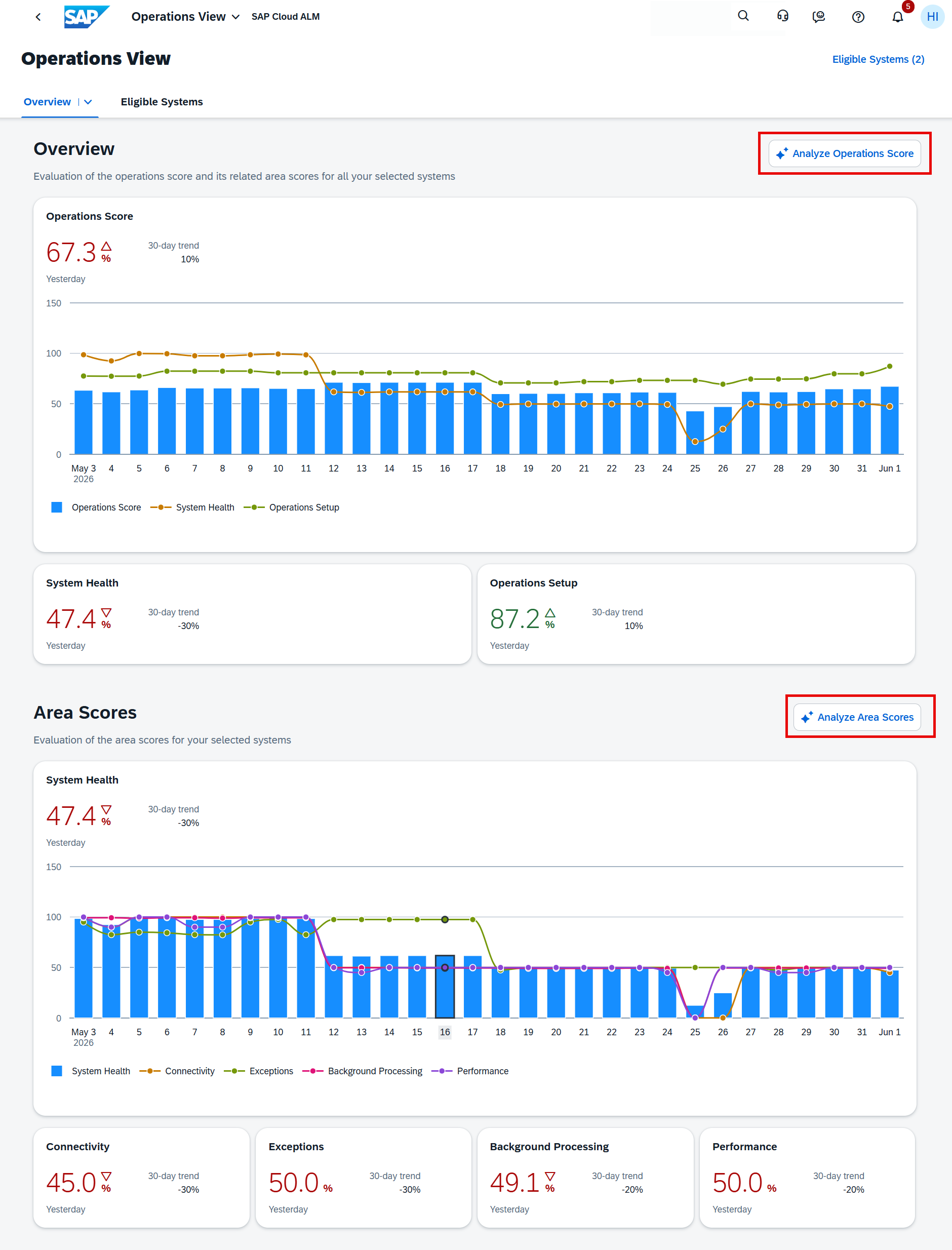
The analysis is generated based on the systems currently selected in the Operations View, allowing organizations to evaluate individual systems or groups of systems according to their operational priorities.
TL;DR: The Operations View now offers AI-assisted analysis that explains Operations and Area Scores, highlights the most impactful KPIs, and provides prioritized recommendations to improve operational health.
Implementation – Analytics, Process Management, Process Hierarchy, Projects and Setup, Retrofit
Enhanced Analytics and Reporting
SAP Cloud ALM continues to expand its analytics capabilities with new applications and reporting enhancements that provide greater flexibility for analyzing project progress, risks, and delivery quality.
A new Library Analytics Builder application is now available, allowing users to analyze and compare library elements across different library and element types. The application supports interactive charts, filtering, drill-down capabilities, and variant management, making it easier to explore and evaluate reusable content within libraries.
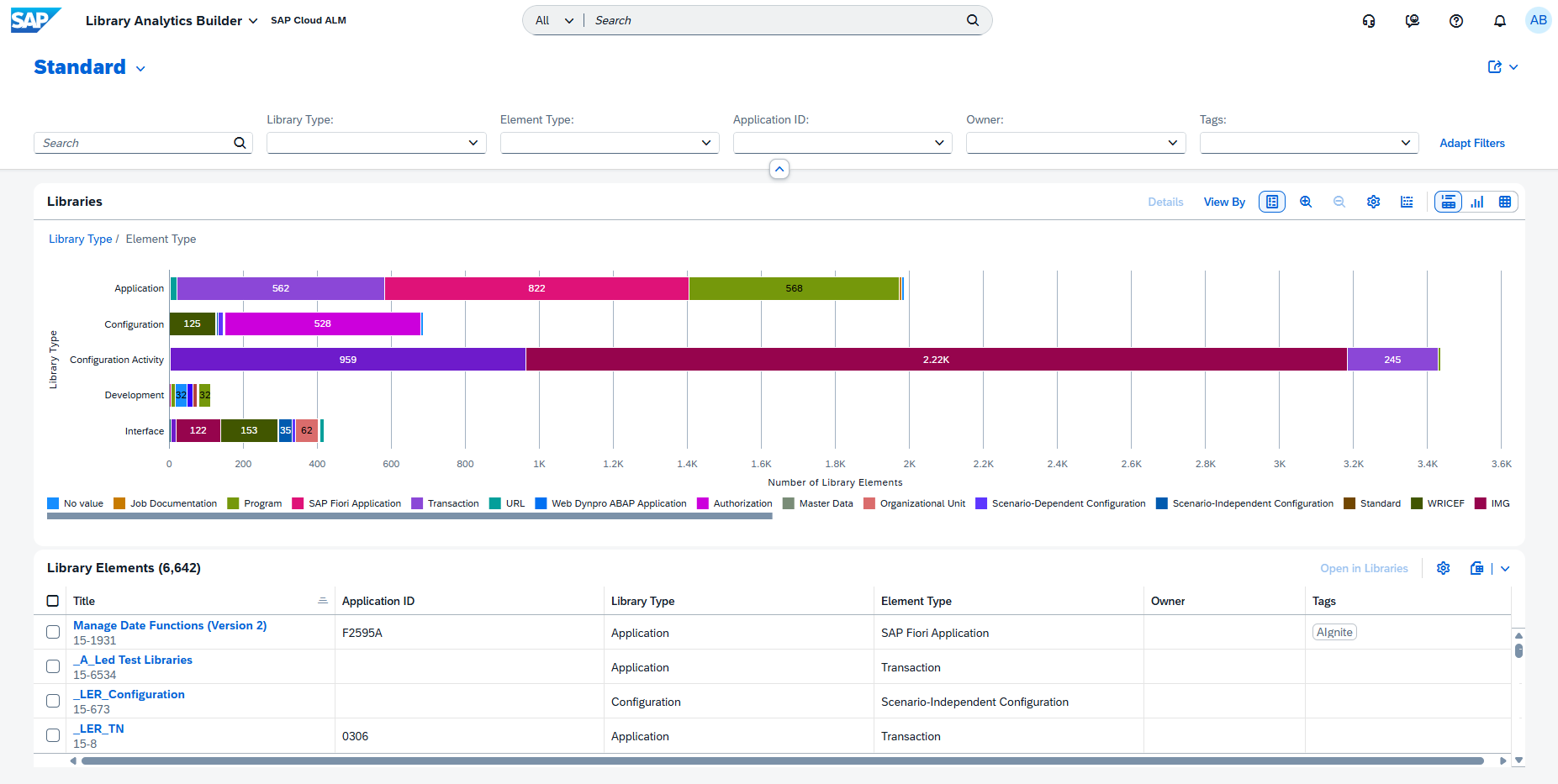
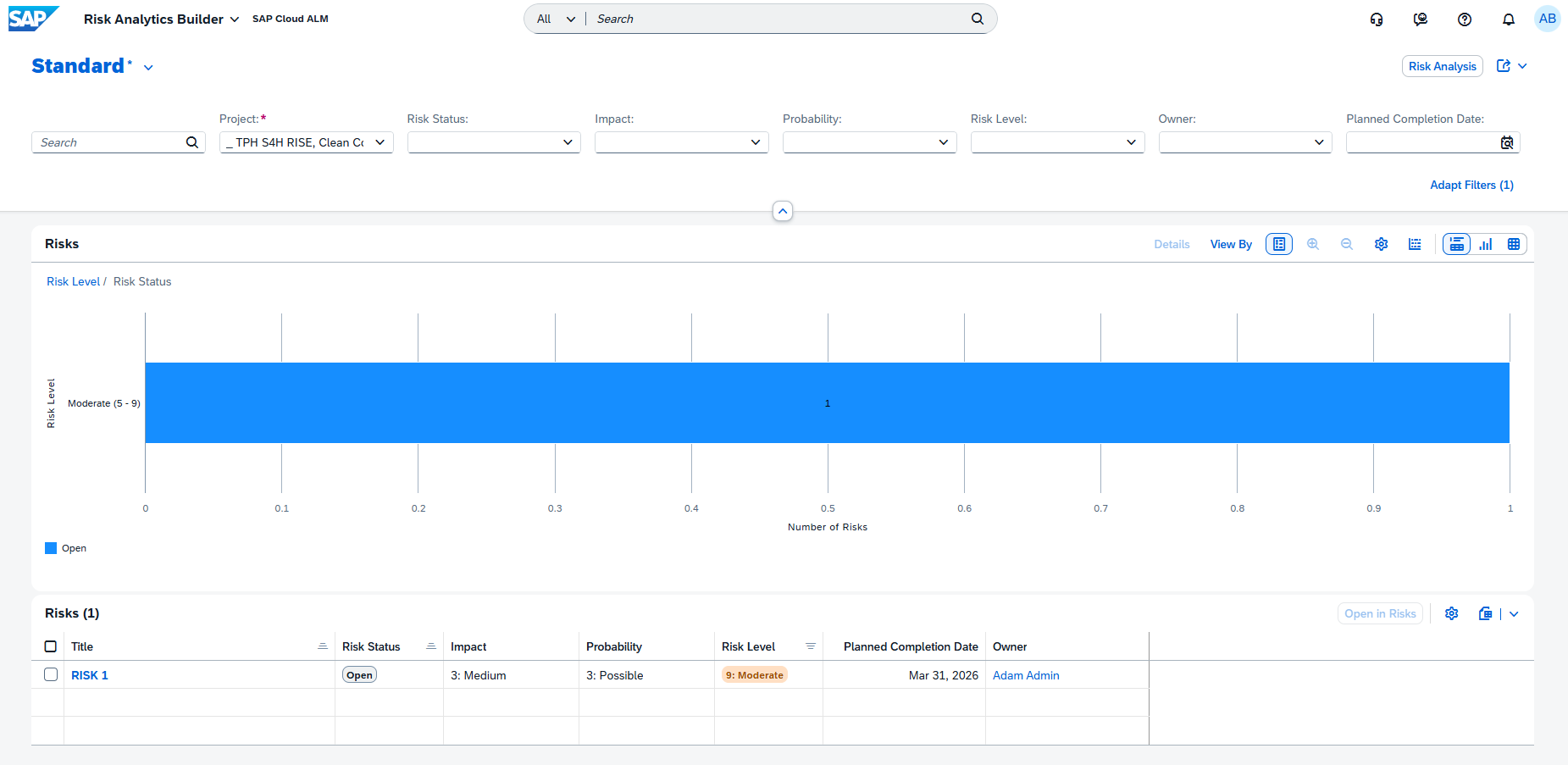
The former Risk Distribution application has been renamed to Risk Analytics Builder, reflecting its evolution into a more flexible analytics tool. Users can now configure chart types, dimensions, and measures to create customized views that better support project reporting and decision-making.
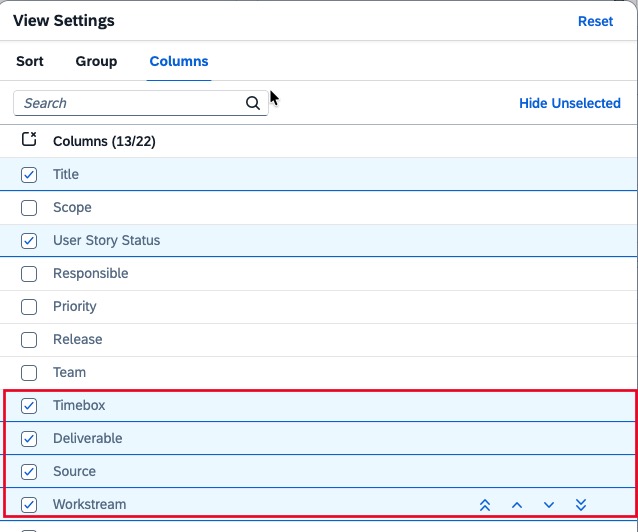
Reporting capabilities have also been enhanced across existing analytics applications. In User Story Traceability, the fields Timebox, Deliverable, Source, and Workstream can now be displayed as optional table columns and are also included when exporting data to Excel.
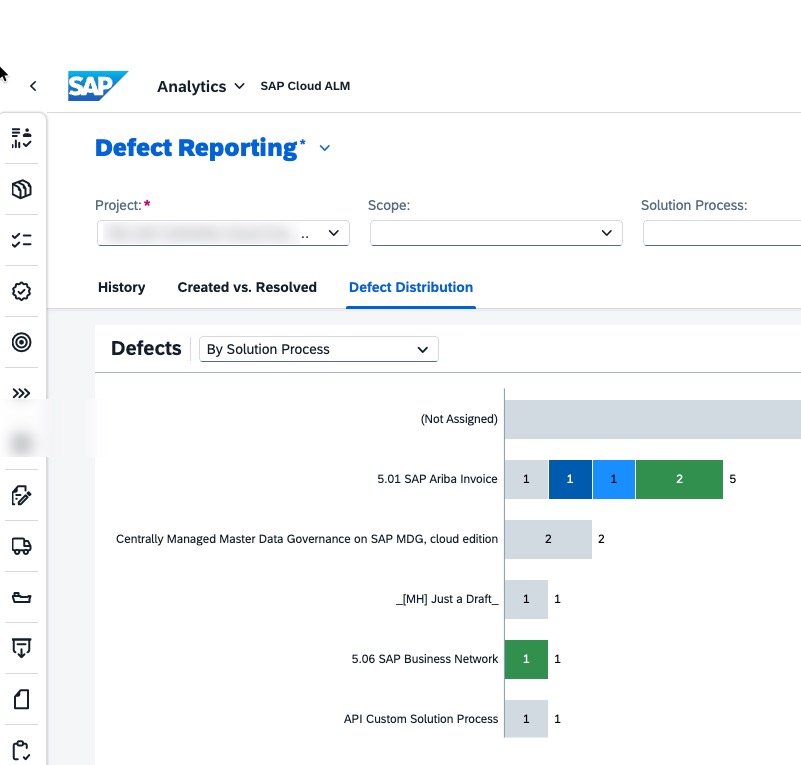
In addition, Defect Distribution and Defects Reporting introduces a new By Solution Process view, allowing defects to be analyzed and grouped according to the affected solution processes for improved visibility into quality trends.
Together, these enhancements provide better reporting capabilities and greater flexibility for analyzing project execution, delivery progress, and solution quality.
TL;DR: Analytics now includes the new Library Analytics Builder, an enhanced Risk Analytics Builder, expanded reporting in User Story Traceability, and a new By Solution Process view for defect analysis.
Stronger Process Governance and Management
SAP Cloud ALM strengthens governance capabilities with new authorization options and usability improvements for managing solution processes.
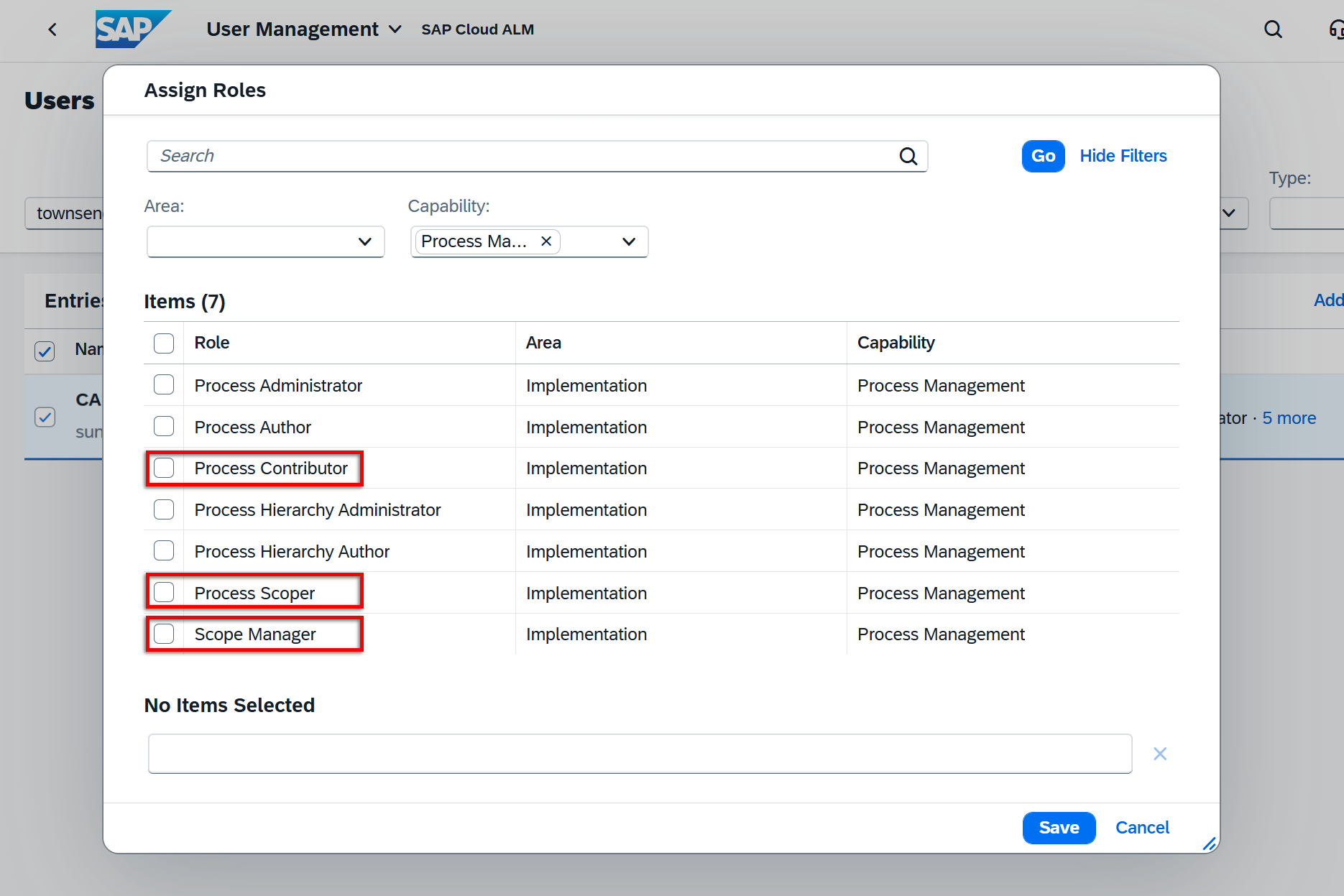
To provide better control over critical scoping activities, three new Process Management roles have been introduced: Process Contributor, Process Scoper, and Scope Manager. These roles allow organizations to restrict responsibilities such as maintaining process assignments, managing solution scopes, and updating process ownership, making it easier to separate duties and enforce governance within implementation projects.
The Process Hierarchy application has also been redesigned with a new two-column layout. Selecting a node now opens a dedicated detail view displaying additional attributes and information alongside the hierarchy. From this view, users can directly edit node details, while actions such as deleting or restoring nodes automatically update the displayed content, creating a more efficient and intuitive maintenance experience.
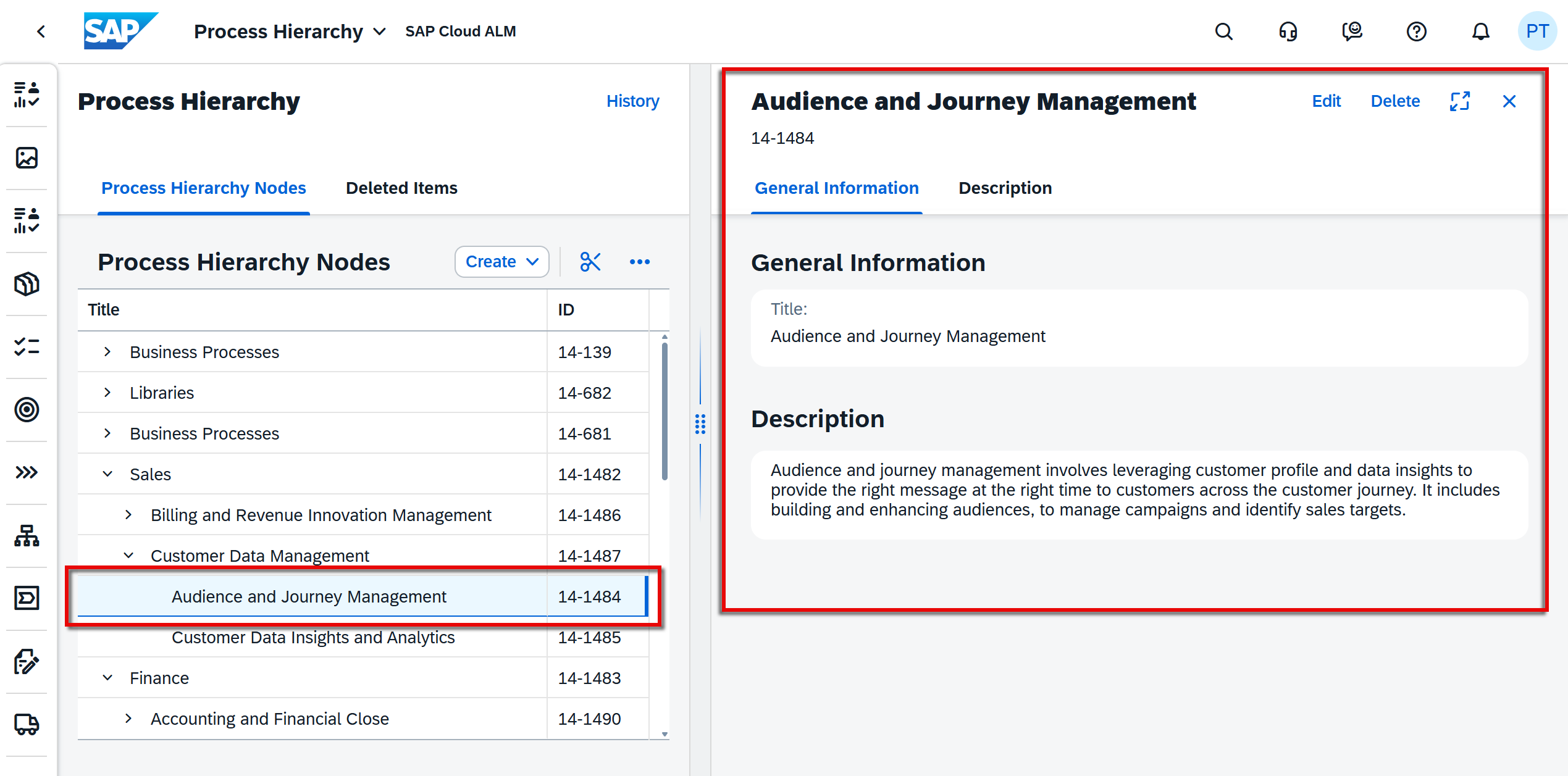
These enhancements improve both governance and usability, helping organizations maintain well-structured solution documentation while ensuring that critical changes remain under appropriate control.
TL;DR: New Process Management roles strengthen governance for scope management, while the redesigned Process Hierarchy improves the maintenance of solution documentation.
Introduction of program teams in Projects and Setup
Managing teams across multiple projects is now easier with the introduction of Program Teams.
A new Program Administrator role allows organizations to create and manage teams, members, and roles at the program level instead of maintaining them separately within individual projects. Program teams can also be copied between projects and programs, helping organizations standardize team structures and reduce repetitive administration.
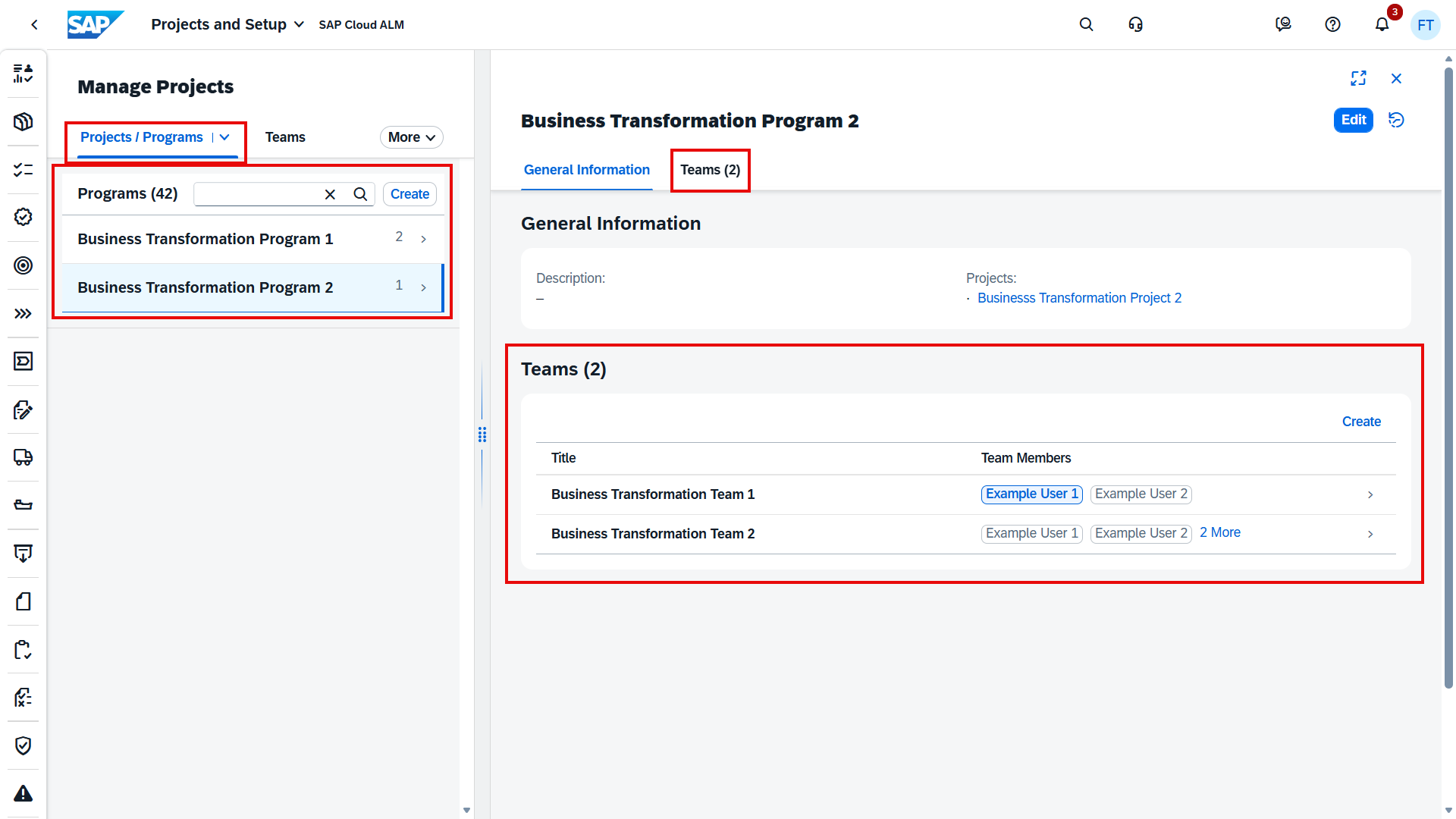
This enhancement simplifies resource management across larger implementation programs and promotes greater consistency when multiple projects are executed within the same program.
TL;DR: Program Teams introduce centralized team management at the program level, making it easier to reuse and manage teams across multiple projects.
Retrofit Improvements
The Retrofit application receives several enhancements that simplify conflict analysis and the management of retrofit items.
A new Display Conflicts function allows users to identify which objects are responsible for conflicts in source transports categorized as Manual or Manual and Automatic. This provides greater transparency during retrofit activities and helps teams resolve conflicts more efficiently.
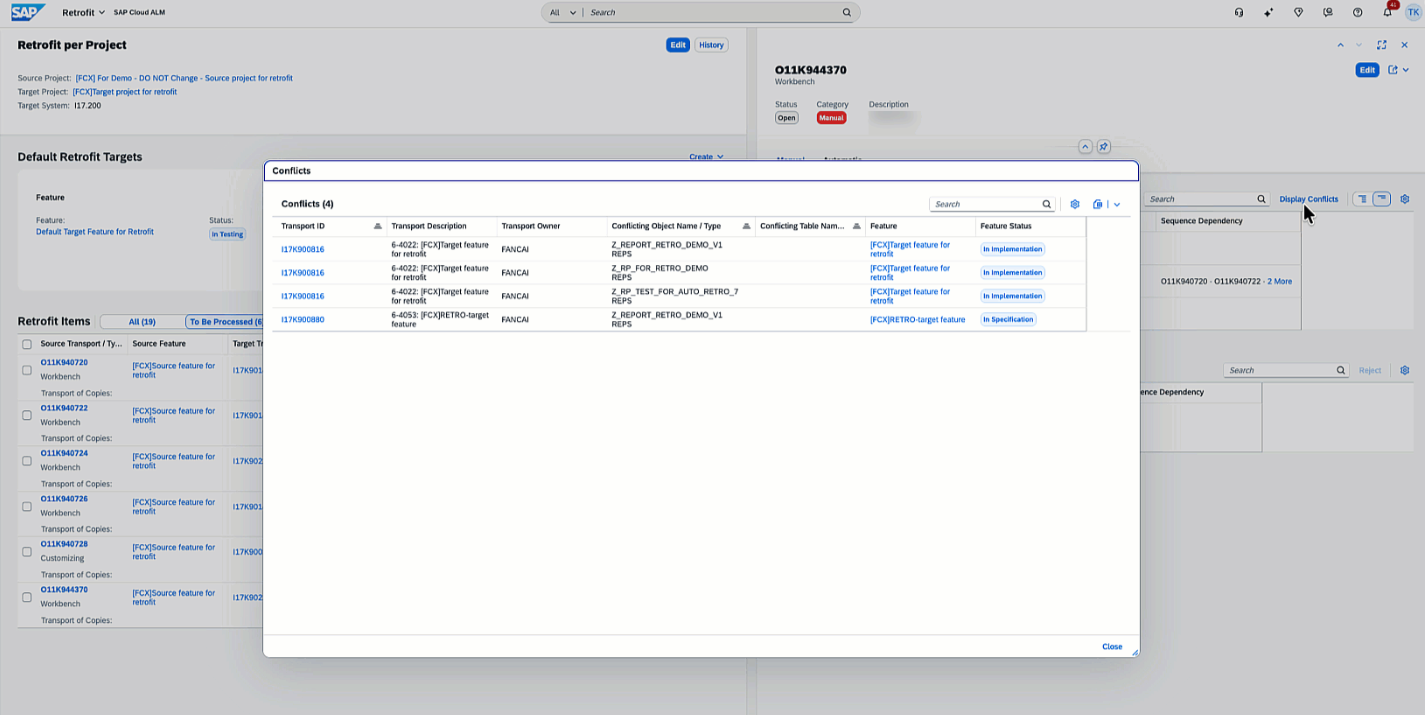
Managing manual retrofit objects has also become easier with the new Edit All functionality, enabling users to update the implementation status and target transport for multiple manual objects simultaneously.
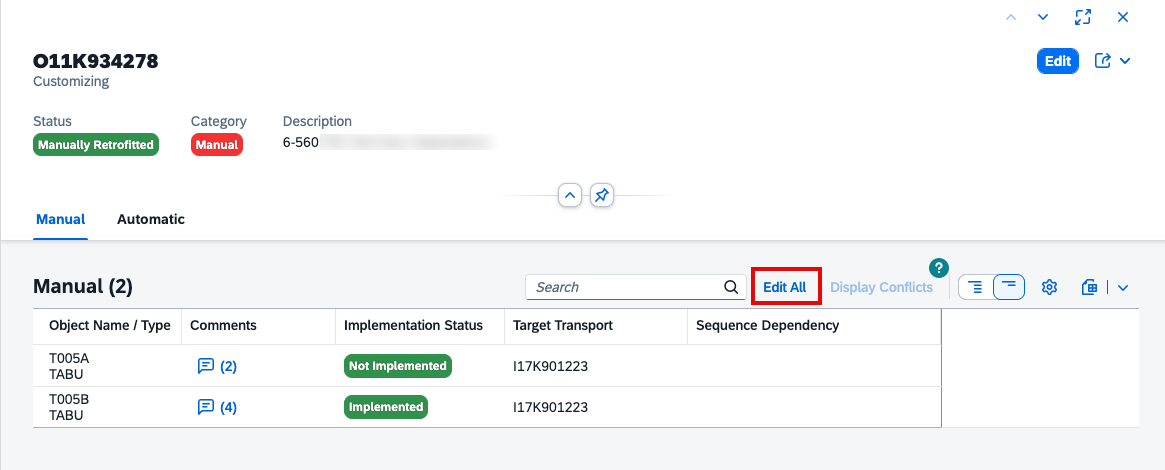
Additional usability improvements include the ability to export separate tables for manual and automatic objects, as well as recording ToC (Transport of Copies) removal in the retrofit history for improved traceability.
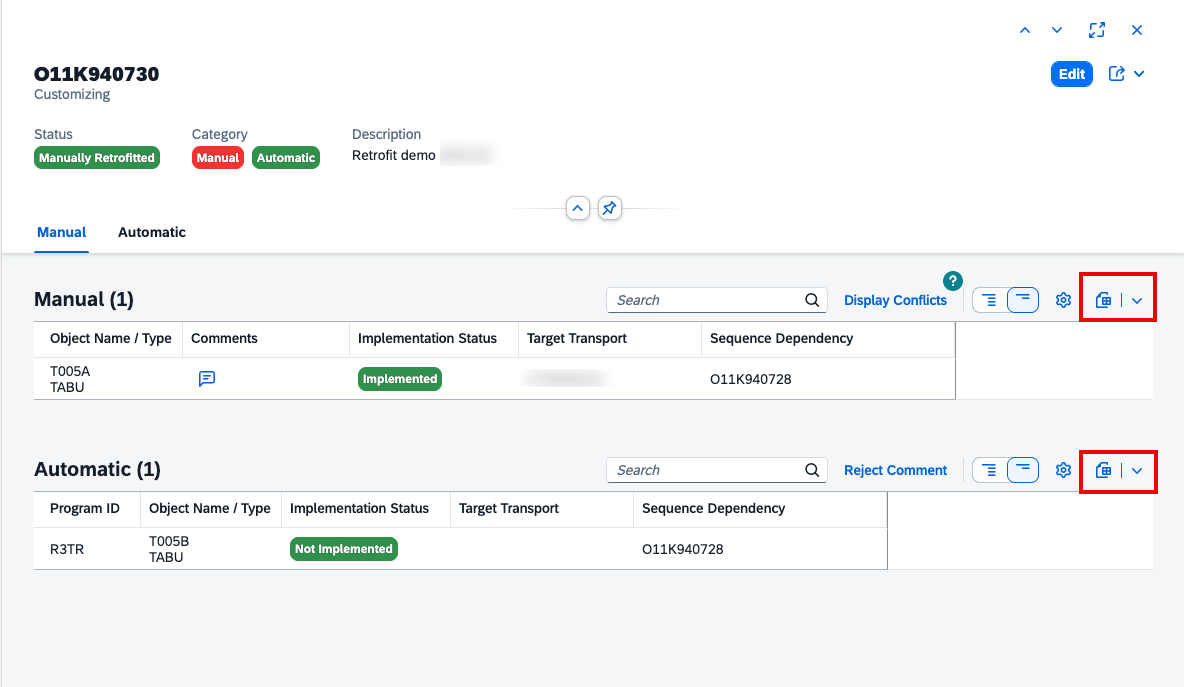
Together, these enhancements streamline retrofit processing, reduce manual effort, and improve visibility throughout the retrofit lifecycle.
TL;DR: Retrofit now provides Display Conflicts, Edit All for manual objects, improved export capabilities, and enhanced history tracking to simplify retrofit management.
Operations – Events, Integration & Exception Monitoring, Intelligent Event Processing, Configuration & Security Analysis – Validation
Enhanced Event Action Configuration Across Operations Applications
SAP Cloud ALM introduces several enhancements that make event actions more flexible, configurable, and efficient across multiple Operations applications.
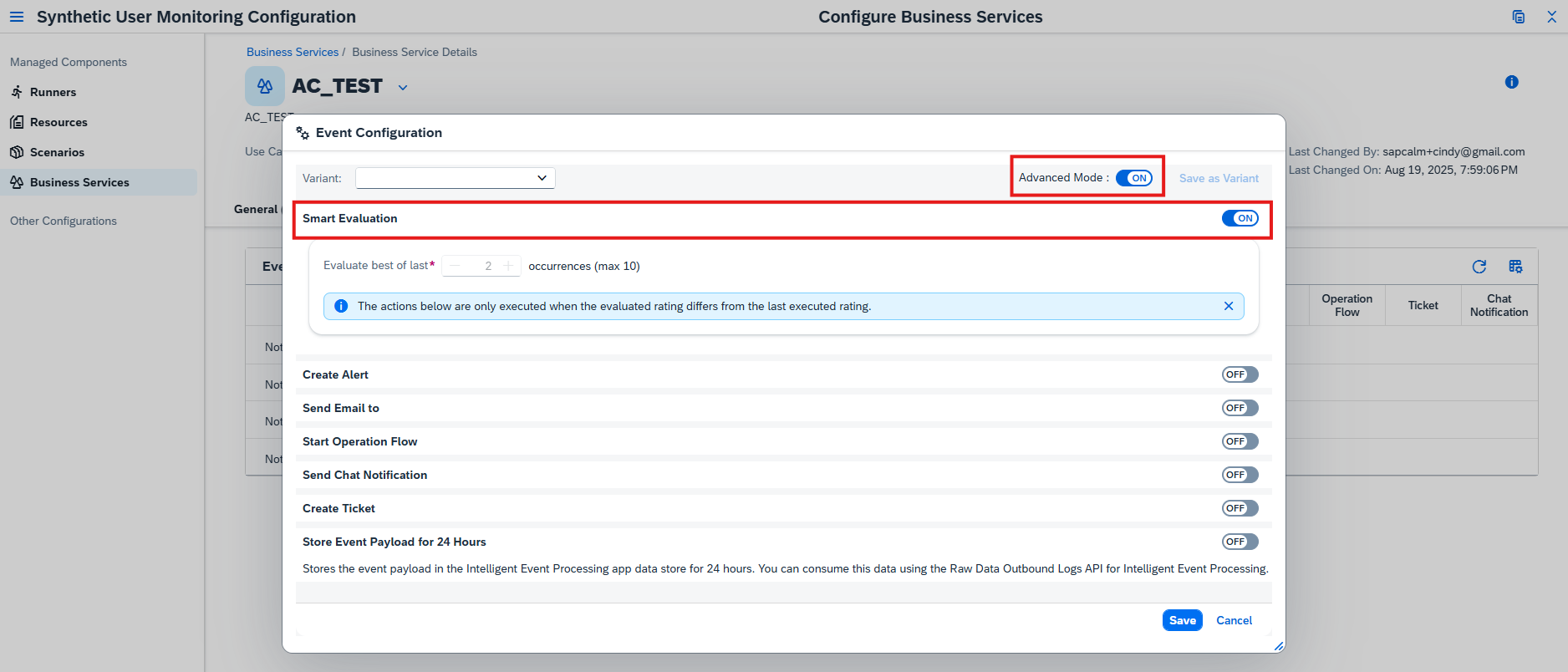
A new Advanced Mode provides greater control over event automation by allowing users to define multiple event actions with different start conditions. This makes it possible to create more sophisticated automation scenarios tailored to different operational events and workflows.
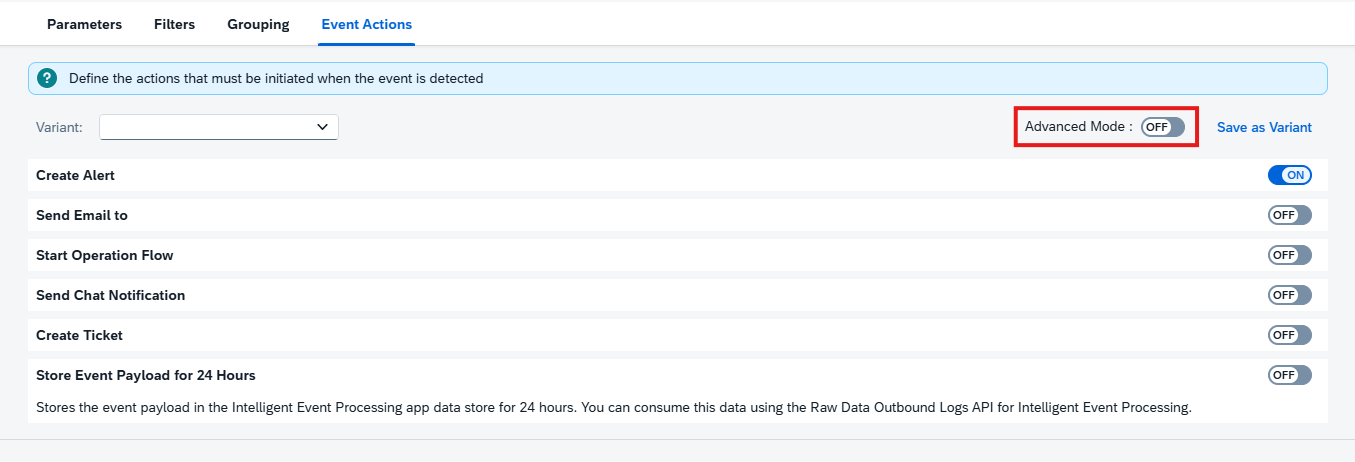
To reduce unnecessary notifications, Smart Evaluation has been added to event action configuration. Instead of repeatedly triggering actions for every occurrence of an ongoing event, Smart Evaluation waits until the event’s rating changes consistently over a configurable number of occurrences before initiating actions again. This helps minimize alert fatigue while ensuring that significant changes still receive attention.
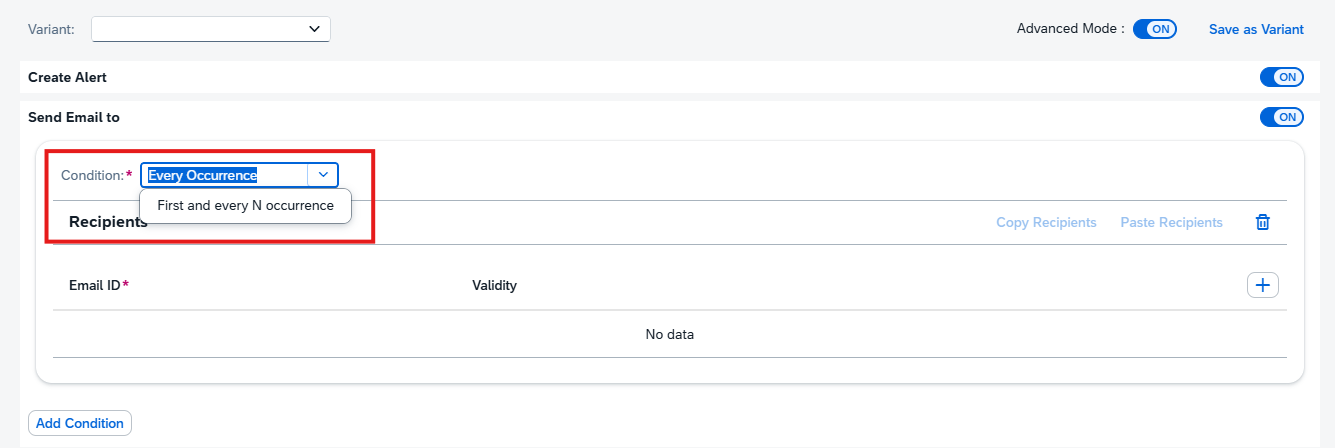
Another new option, First and Every N Occurrence, gives administrators finer control over recurring stateless events. Rather than executing an action every time an event occurs, actions can now be triggered only on the first occurrence and then after a specified number of subsequent occurrences, reducing repetitive processing for frequently recurring events.
Event action configuration has also been made more intuitive by displaying the associated Automation ID when configuring Operation Flows. This additional context helps administrators identify the correct automation and simplifies configuration in environments with multiple automation flows.
Together, these enhancements provide greater flexibility for event automation while reducing operational noise and simplifying configuration.
TL;DR: Event actions now support Advanced Mode, Smart Evaluation, First and Every N Occurrence, and visible Automation IDs, providing more flexible automation and reducing unnecessary event processing.
Improved Event Visibility and Troubleshooting
SAP Cloud ALM also improves how operational events can be analyzed and understood, making troubleshooting faster and more transparent.
Integration & Exception Monitoring now classifies events according to their lifecycle and event grouping, providing additional context for how different event types are processed. Combined with the new event action capabilities, this classification enables more precise monitoring behavior for different categories of events.

For Intelligent Event Processing, Action Logs have been enhanced to display the condition name that triggered an action alongside existing information such as the rule, action, execution status, and status details. This makes it significantly easier to understand why an action was executed and simplifies root cause analysis when troubleshooting automation.
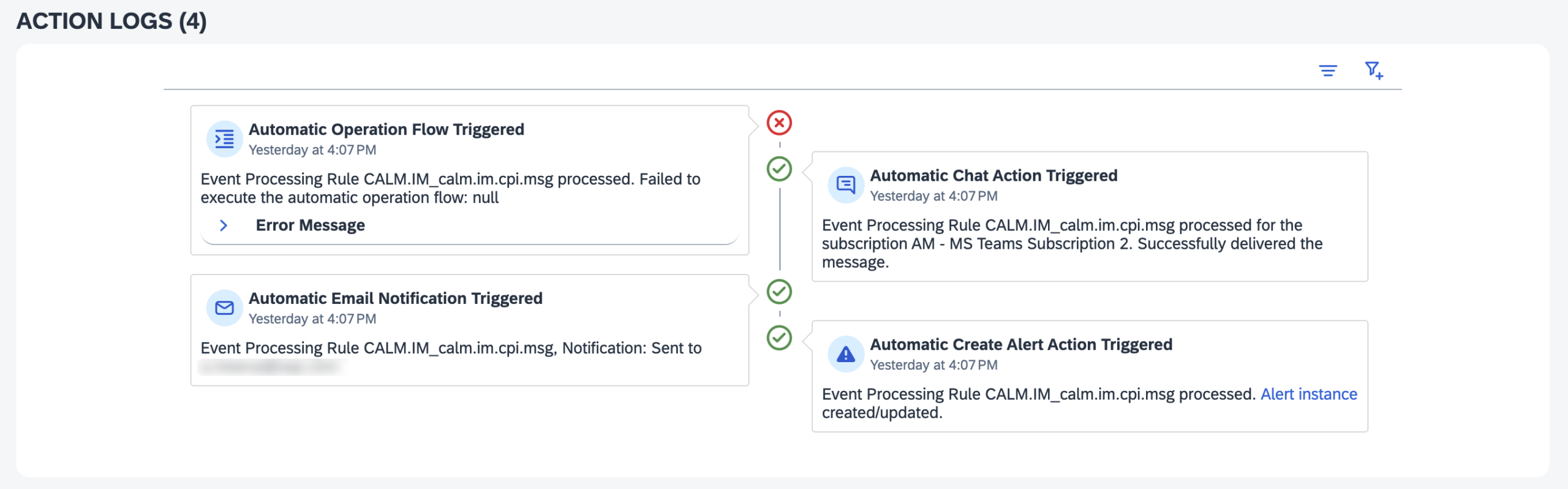
These improvements provide operations teams with better visibility into both event behavior and automation execution, helping reduce investigation time when incidents occur.
TL;DR: Event classification and enhanced Action Logs provide greater visibility into event processing, making operational troubleshooting faster and more transparent.
More Flexible Compliance Rules and Policies in Configuration & Security Analysis – Validation
Configuration & Security Analysis – Validation continues to expand its compliance capabilities with enhancements that make validation rules more powerful and adaptable to organizational requirements.
Organizations can now create custom policies, allowing multiple checks or existing policies to be grouped into a single compliance assessment. This provides a centralized way to evaluate services against organization-specific governance requirements while simplifying compliance management.
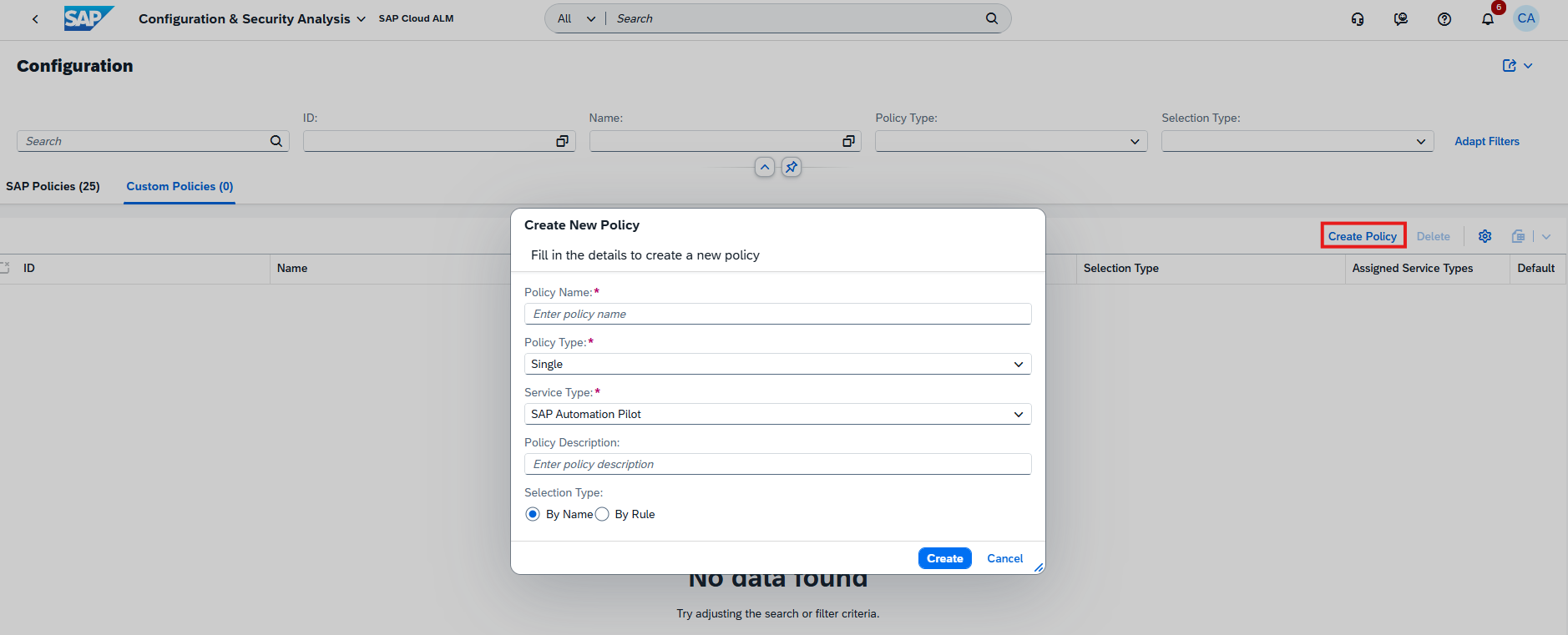
Custom checks have also become more flexible by supporting multiple compliance rules within a single check. Instead of creating separate checks for different validation scenarios, administrators can now define several rules that collectively evaluate compliance against multiple conditions.
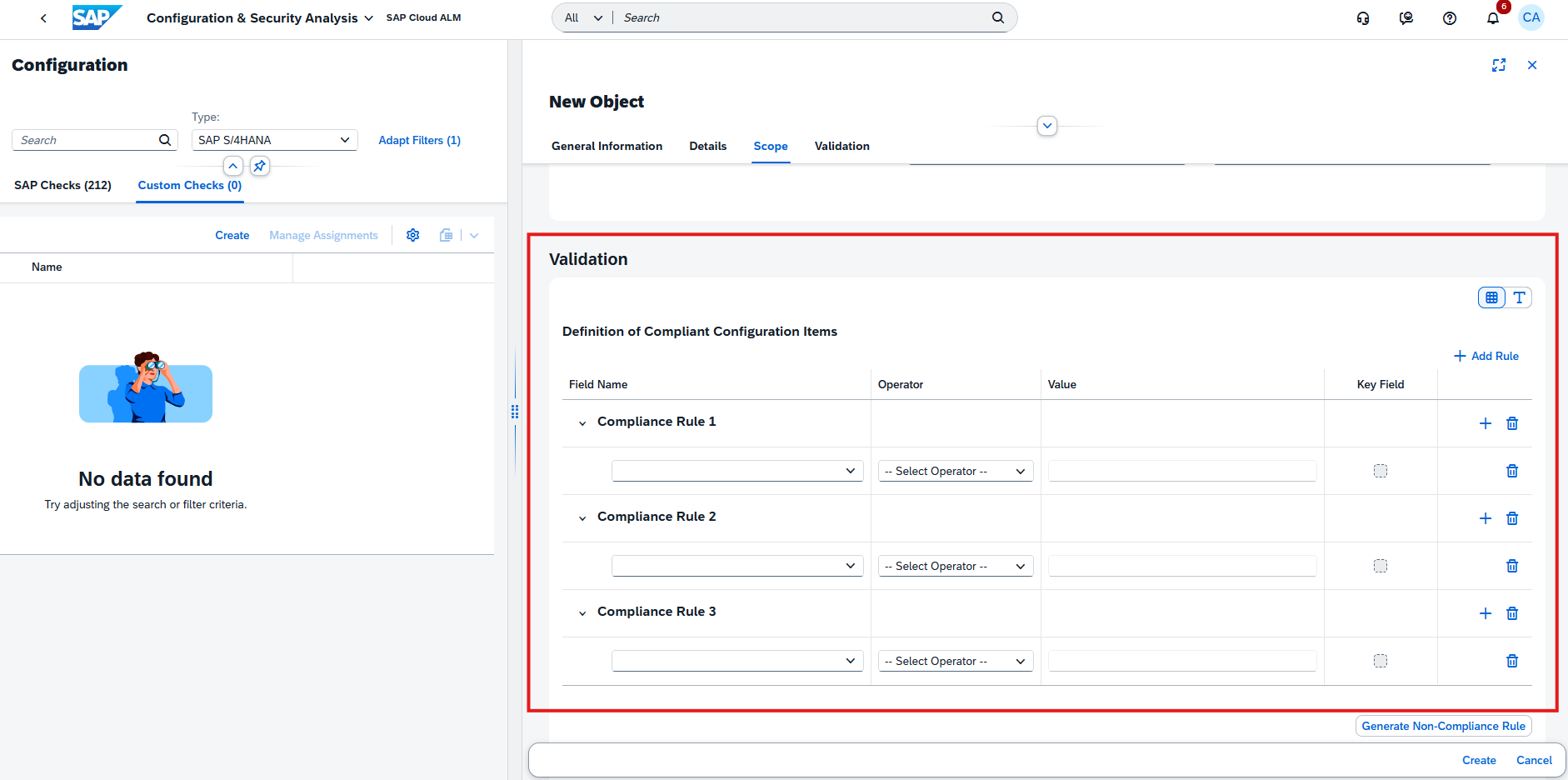
To further enhance rule definitions, two new operators – IN and NOT IN – have been introduced. These operators simplify the creation of rules that validate values against predefined lists, making complex compliance scenarios easier to configure and maintain.
Together, these enhancements enable organizations to build more comprehensive compliance frameworks that better reflect internal governance and security requirements.
TL;DR: Configuration & Security Analysis now supports custom policies, multiple compliance rules, and new IN/NOT IN operators, enabling more flexible and comprehensive compliance validation.
Administration – Landscape Management
Processing Logs for Landscape Changes
Landscape Management now includes Processing Logs, providing a comprehensive audit trail for changes made to managed landscape objects.
Each log entry records who performed a change, when it occurred, what was modified, and the corresponding old and new values. This gives administrators complete visibility into configuration changes, making it easier to review modifications, troubleshoot unexpected behavior, and maintain governance across the landscape.
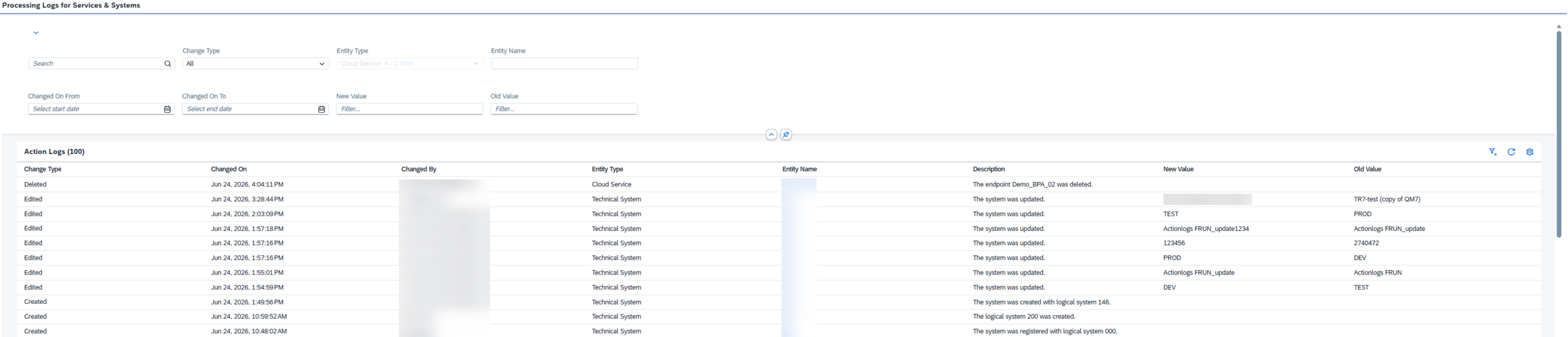
Processing Logs are available for services, systems, business services, and access control groups, helping organizations track configuration changes consistently across key landscape objects.
By increasing transparency and traceability, this enhancement supports stronger governance, simplifies auditing, and helps administrators better understand the history of landscape configuration changes.
TL;DR: Processing Logs provide a detailed audit trail of configuration changes across services, systems, business services, and access control groups, improving transparency and governance.
Service – AI Assistance for Innovation Adoption, Issues and Actions Management, Service Results
Enhanced and New Innovation Analysis Capabilities in AI Assistance for Innovation Adoption
The AI Assistance for Innovation Adoption app continues to expand with enhancements to existing capabilities and the introduction of two new areas of analysis.
The following existing capabilities have been enhanced:
- Adoption Potential now includes a new Automation Adoption dashboard page and a Financial Documents – Automation Rate tile on the start page, providing additional insights into automation opportunities and adoption progress.
- Enduring Cybersecurity introduces a new SAP HANA Database Security dashboard page. The Critical Authorizations view has been enhanced to show how many users can execute external operating system commands, while the Security Hardening page now also evaluates whether the client change option is configured appropriately.
- Evolution Readiness has been refined with minor dashboard improvements for a more streamlined user experience.
In addition, two new capabilities are now available:
- Clean Core Integration – Analyzes the SAP S/4HANA integration landscape to evaluate how well interfaces comply with SAP’s clean core principles. It classifies integration technologies by their compliance level, identifies interfaces that should be modernized, highlights unused or non-compliant integrations, and provides insights into integration monitoring coverage.
- The capability also evaluates the adoption of SAP integration technologies such as SAP Integration Suite, SAP BTP, SAP Datasphere, and SAP Cloud ALM, while identifying opportunities to introduce AI scenarios based on the current integration landscape.
- Analysis results are presented through a comprehensive dashboard and can automatically generate follow-up activities in Issues and Actions Management, enabling teams to track and manage required improvements.
- Data Quality – Analyzes SAP S/4HANA master and transactional data to assess its accuracy, completeness, and consistency across key business areas.
- It identifies data quality issues affecting SAP Business Partner, Enterprise Asset Management, and Finance General Ledger data, while also highlighting opportunities to use Business Data Validation (BDV) during SAP S/4HANA transformations and system consolidations.
- Findings are presented in a dedicated dashboard with actionable recommendations and are automatically integrated with Issues and Actions Management, allowing organizations to create follow-up tasks and systematically improve data quality over time.
To further improve usability, a new View Page Recommendations button is now available on the dashboard. The button displays the number of recommendations identified for the currently open dashboard page and provides direct access to those recommendations, allowing users to focus on the most relevant improvement opportunities without reviewing the entire dashboard.
Together, these enhancements expand the app’s ability to provide actionable insights into automation, cybersecurity, clean core adoption, integration governance, and data quality, while making it easier to identify and act on recommendations that accelerate SAP transformation.
TL;DR: AI Assistance for Innovation Adoption introduces Clean Core Integration and Data Quality capabilities, enhances Adoption Potential, Enduring Cybersecurity, and Evolution Readiness, and adds a View Page Recommendations feature for quicker access to relevant improvement recommendations.
Enhanced Collaboration and Workflow Management in Issues and Actions Management
Issues and Actions Management continues to improve collaboration and day-to-day work management with enhancements to comments, status tracking, and filtering capabilities.
Users can now add the same comment to one or more issues or actions simultaneously directly from the Manage Issues or Manage Actions list. After selecting the relevant items, choosing Create Comment applies the entered comment to each selected issue or action, eliminating the need to update them individually.
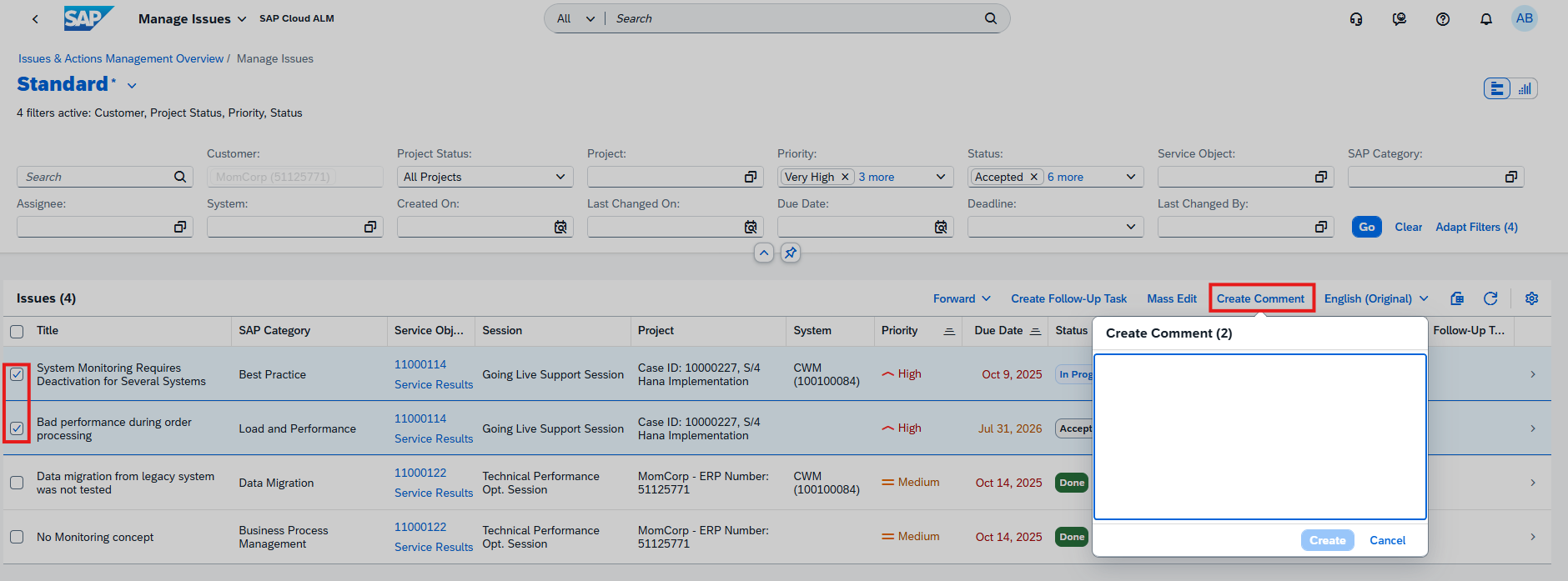
Comments can also be added when forwarding an issue or action to an external system or creating a follow-up task. In every case, the newly added comment is immediately visible in the Comment column, providing better transparency and making it easier to track recent updates.
To better reflect the progress of customer-related activities, a new Awaiting Customer Action status is now available. The new status can be assigned to issues and actions and is also available when filtering or reviewing work items, making it easier to identify activities that are waiting for customer feedback or action.
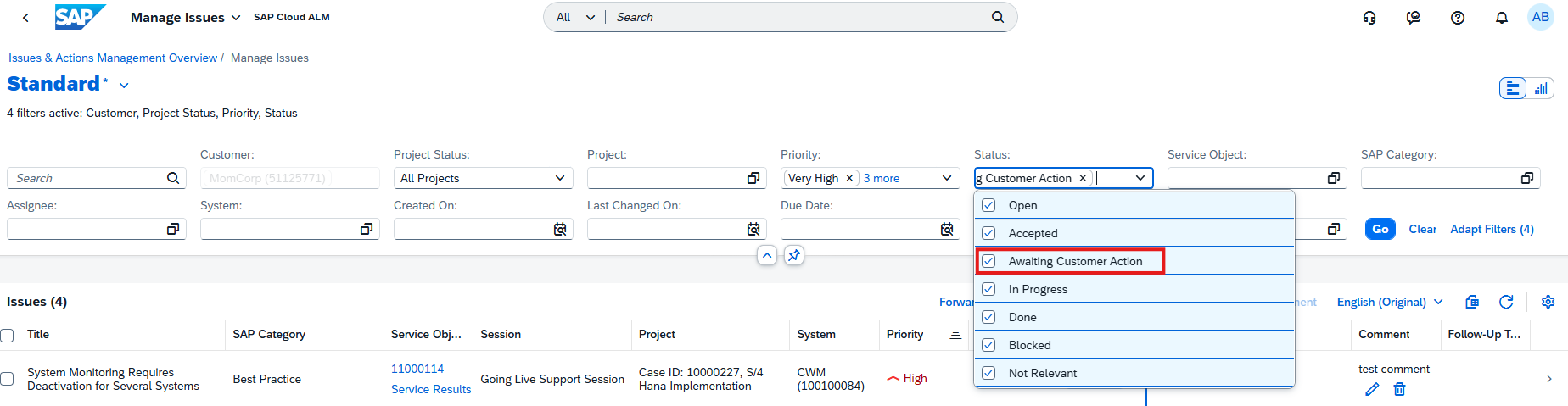
Filtering capabilities have also been expanded with a new Project Status filter available on both the Issues and Standalone Actions Overview page and the Manage Issues and Manage Standalone Actions pages. By default, the filter displays items from Active Projects, while users can switch to All Projects to include issues and actions belonging to closed projects.
Together, these enhancements streamline collaboration, improve workflow visibility, and provide more flexible ways to organize and manage issues and actions throughout their lifecycle.
TL;DR: Users can now create comments for multiple issues or actions at once, including during forwarding and follow-up task creation. The new Awaiting Customer Action status and Project Status filter further improve collaboration, tracking, and work item management.
Redesign of the Service Results app
The Service Results app has been redesigned to provide a more flexible and user-friendly workspace for reviewing service information.
As part of the redesign, the object header has been moved to the sidebar, creating more space for the main content area while keeping key object information readily accessible. In addition, the sidebar is now resizable, allowing users to adjust the layout according to their preferences and the amount of information they need to display.
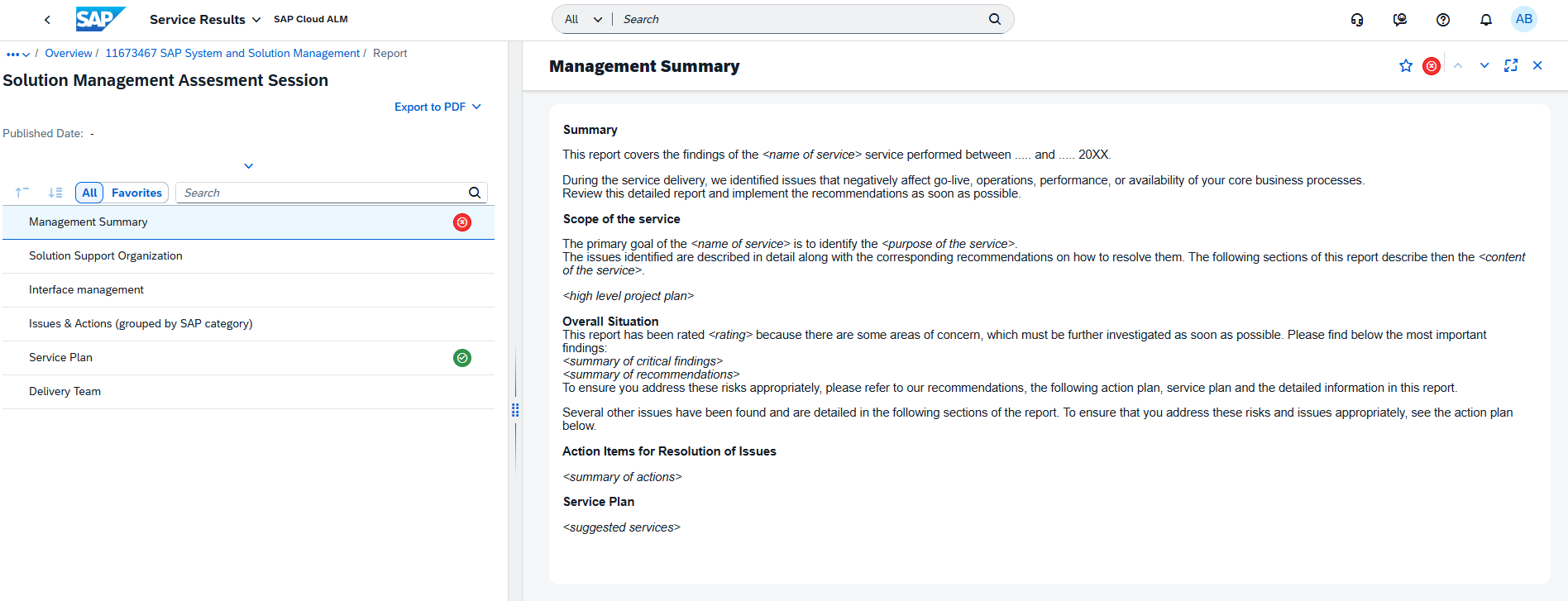
These interface improvements enhance navigation and make it easier to work with service results, particularly when reviewing larger datasets or using different screen sizes.
TL;DR: The Service Results app features a redesigned interface with a sidebar-based object header and a resizable sidebar, providing a more flexible and efficient user experience.