
SAP Cloud ALM – What’s New in Week 42
SAP Cloud ALM continues to evolve with enhancements that improve AI-assisted configuration, monitoring capabilities, project management, and usability across the platform.
The Week 42 release introduces several improvements to SAP Business Transformation Center, including more flexible data assessment management, enhanced transformation cycle tracking, and the ability to extend migration scope without modifying confirmed digital blueprints.
Operations expands monitoring capabilities with new business process KPIs, improved check management, and the new Joule-based Monitoring Configuration Agent, currently available through SAP Early Adopter Care.
Meanwhile, Implementation strengthens requirements management, introduces advanced quality gate capabilities, and improves system configuration, transport deployment, and authorization management.
Together, these updates provide greater flexibility, transparency, and efficiency across SAP Cloud ALM.
SAP Business Transformation Center – Data Management, Get Transformation Guidance, Modeling
Enhanced Run Management and Improved Data Assessment Efficiency
The Data Management area introduces several enhancements to the Manage Runs app, making data assessment runs easier to create, manage, and track.
Users can now copy existing runs and reuse AI-assisted scope recommendations, reducing the manual effort required to configure similar data assessments. This helps streamline repeated assessment activities while maintaining consistency across runs.
Additional improvements include activity logging, clearer run identification, and enhanced source report details that align more closely with the information stored in the source system. These changes make it easier to track activities and correlate runs across connected systems.
To prevent invalid executions, SAP Cloud ALM now also validates source endpoints and prevents the creation or execution of runs associated with deleted endpoints.
Run management is also improved with the ability to delete runs with Failed or Cancelled status. This allows users to remove obsolete or incomplete runs that are no longer required. Deleted runs are permanently removed and cannot be accessed again.
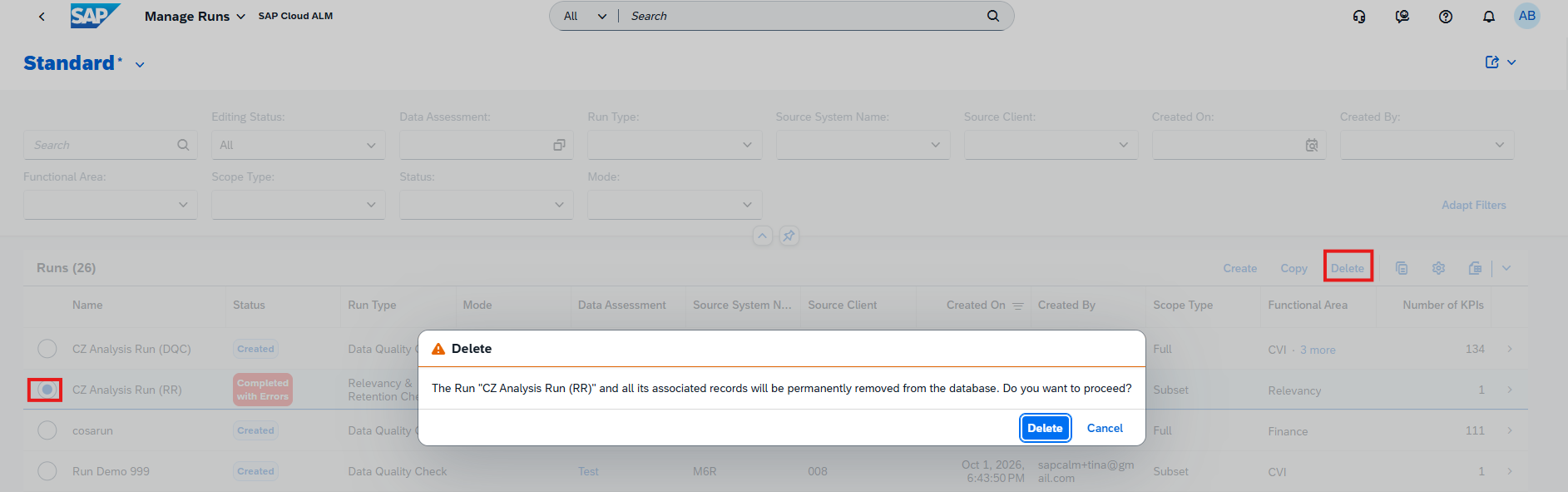
Together, these enhancements simplify data assessment management while improving transparency, consistency, and control throughout the process.
TL;DR:
Data Management now supports copying runs, reusing AI-assisted scope recommendations, and deleting failed or cancelled runs, alongside improved activity logging, run identification, and source endpoint validation.
Improved Cycle Visibility and Project Task Status Tracking
SAP Business Transformation Center introduces enhancements that improve cycle visibility and task status tracking across transformation projects.
In the Manage Transformation Projects app, users can now view all cycles associated with a specific transformation project through the new Associated Cycles tab. This provides a centralized overview of related cycles, making it easier to identify and track transformation activities within a project.
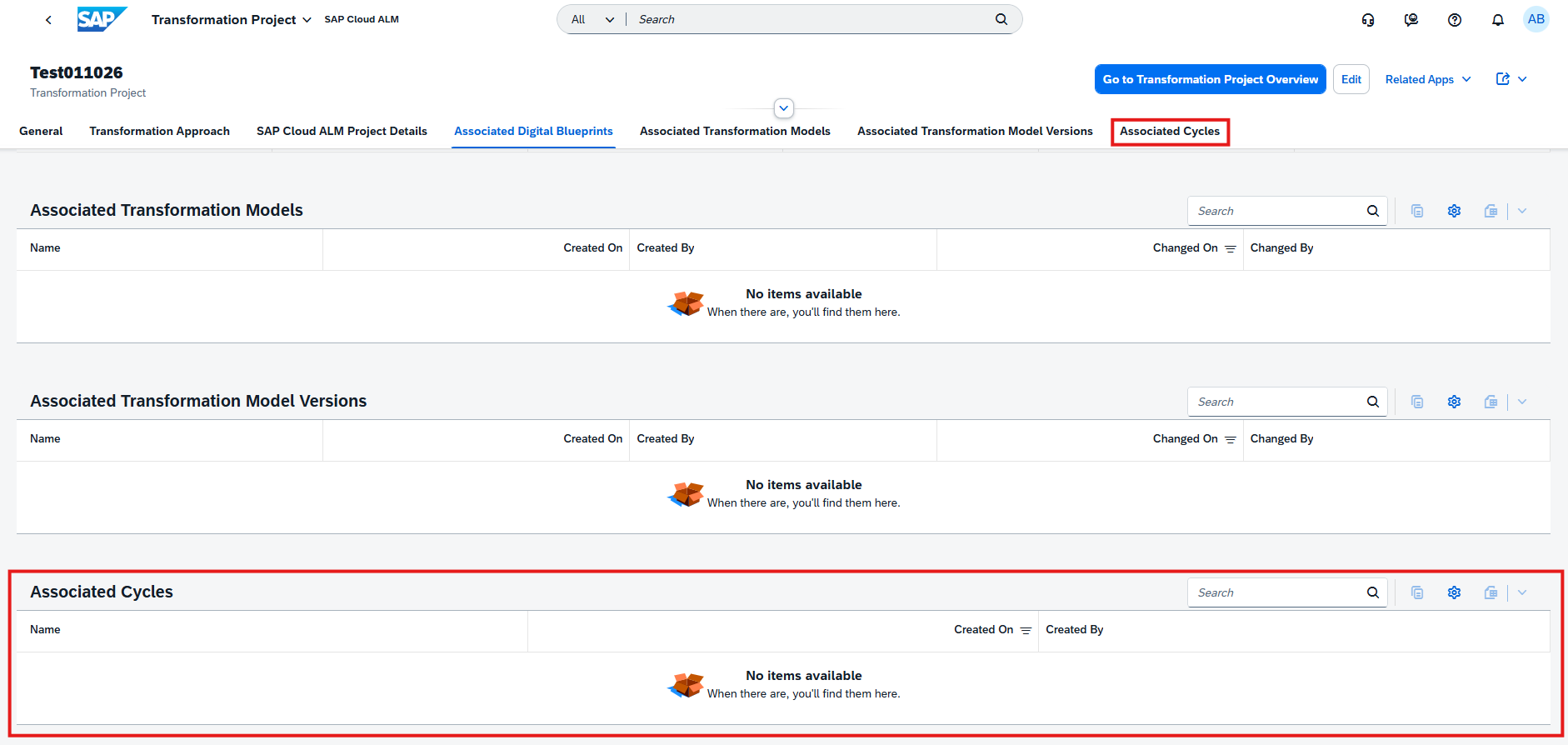
The Transformation Project Overview app also improves how cycle-related tasks are displayed in the Project Tasks dashboard. Task statuses now reflect the status of their associated cycles and transformation model version, providing a more accurate view of ongoing transformation activities.
When a cycle is cancelled, its related tasks are automatically marked as Not Relevant, helping prevent outdated or unnecessary tasks from appearing as active work.
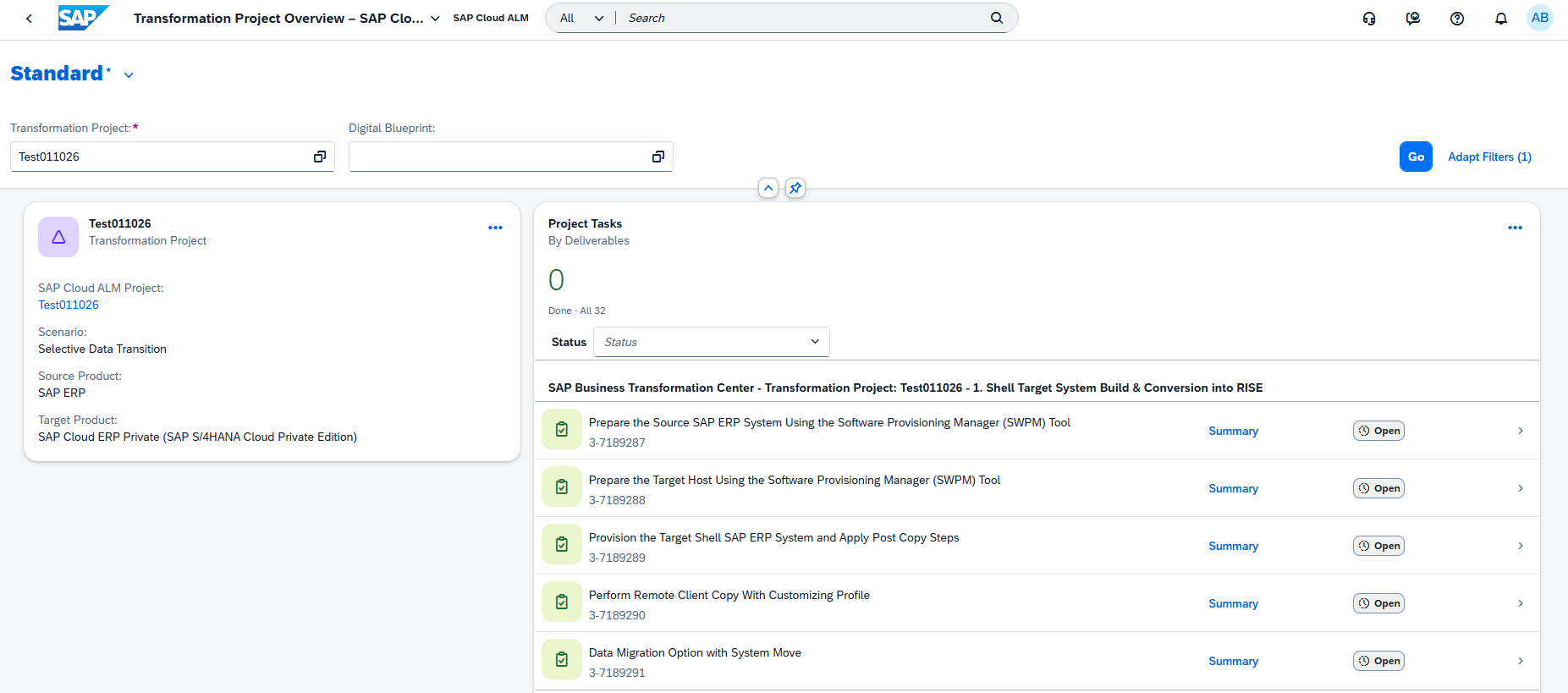
Together, these improvements provide greater transparency into the relationship between transformation projects, cycles, and their associated tasks.
TL;DR:
Transformation projects now provide an Associated Cycles overview, while cycle-related tasks automatically reflect cycle and transformation model statuses, including marking tasks as Not Relevant when a cycle is cancelled.
Add Tables Directly to Transformation Models
SAP Business Transformation Center introduces greater flexibility in managing migration scope by allowing users to add tables directly to an existing transformation model, without modifying the confirmed digital blueprint.
In the Manage Transformation Models app, users can now create a custom transformation object by selecting Add Table in the Transformation Objects tab. This allows additional tables to be included in the migration scope, even after the digital blueprint has been confirmed.
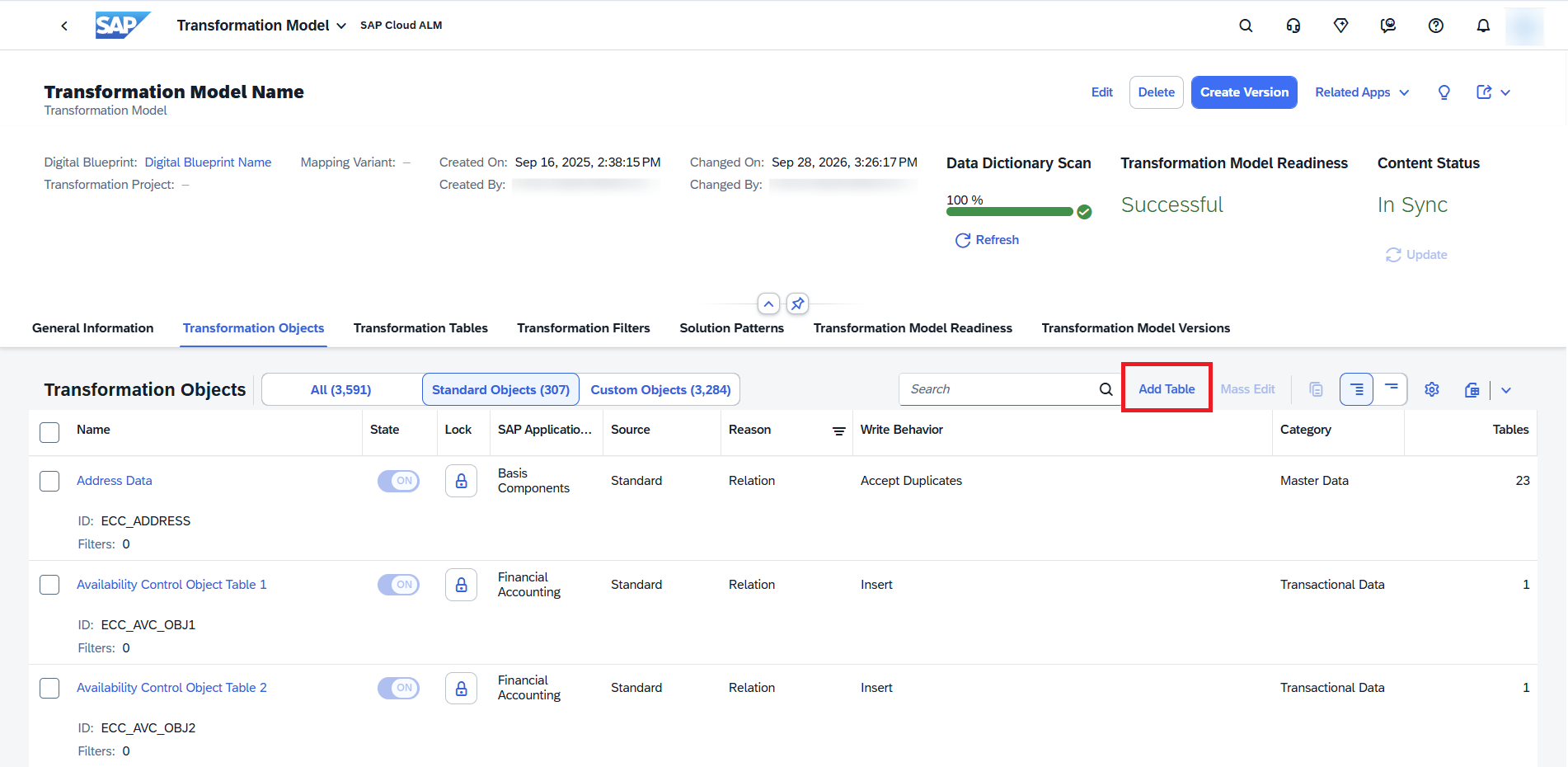
When adding a table, users can define its write behavior, which determines how the data is written to the target system, and optionally assign a data category. SAP Business Transformation Center then automatically creates an active custom transformation object and assigns the relevant transformation rules based on the model configuration.
The new object can be managed like any other custom transformation object, while the associated table is also visible in the Transformation Tables tab.
This enhancement makes it easier to extend and adjust migration scope as additional data requirements are identified, without having to revisit or modify the confirmed digital blueprint.
TL;DR:
Users can now add tables directly to transformation models by creating custom transformation objects, allowing migration scope to be extended without changing the confirmed digital blueprint.
Implementation – Requirements, Quality Gates, Projects and Setup, Features, Deployment
Assign Approvers to Individual Requirements
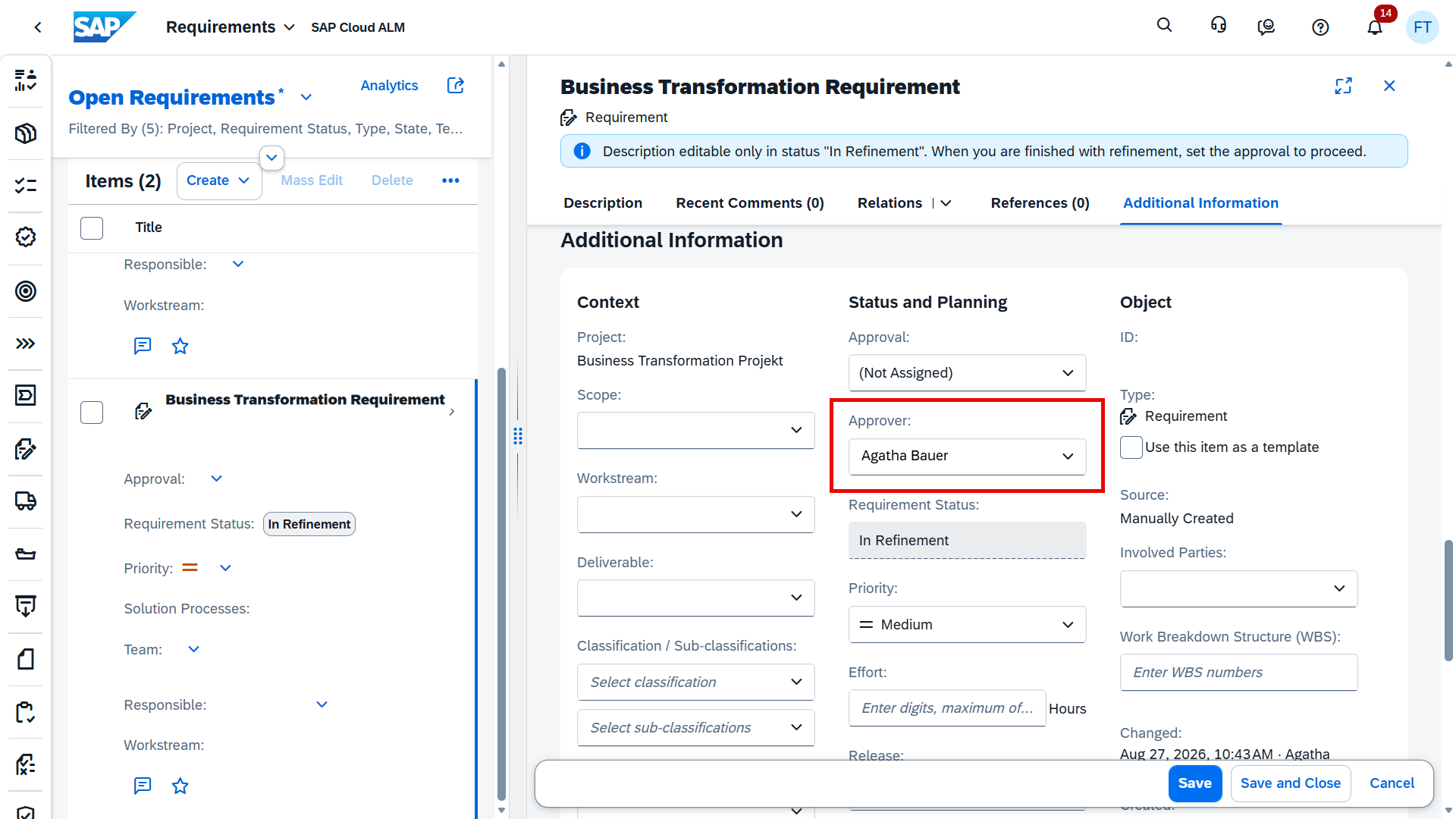
SAP Cloud ALM introduces more flexibility in the Requirements app by allowing users to assign approvers directly to individual requirements.
A new Approver field is now available in the requirement detail view, enabling users to define who is responsible for approving a specific requirement. This provides clearer ownership and supports more structured requirement approval processes.
Additionally, an information button has been added to the Approval field, allowing users to view the latest change to the approval status. This improves transparency by making recent approval updates easier to track.
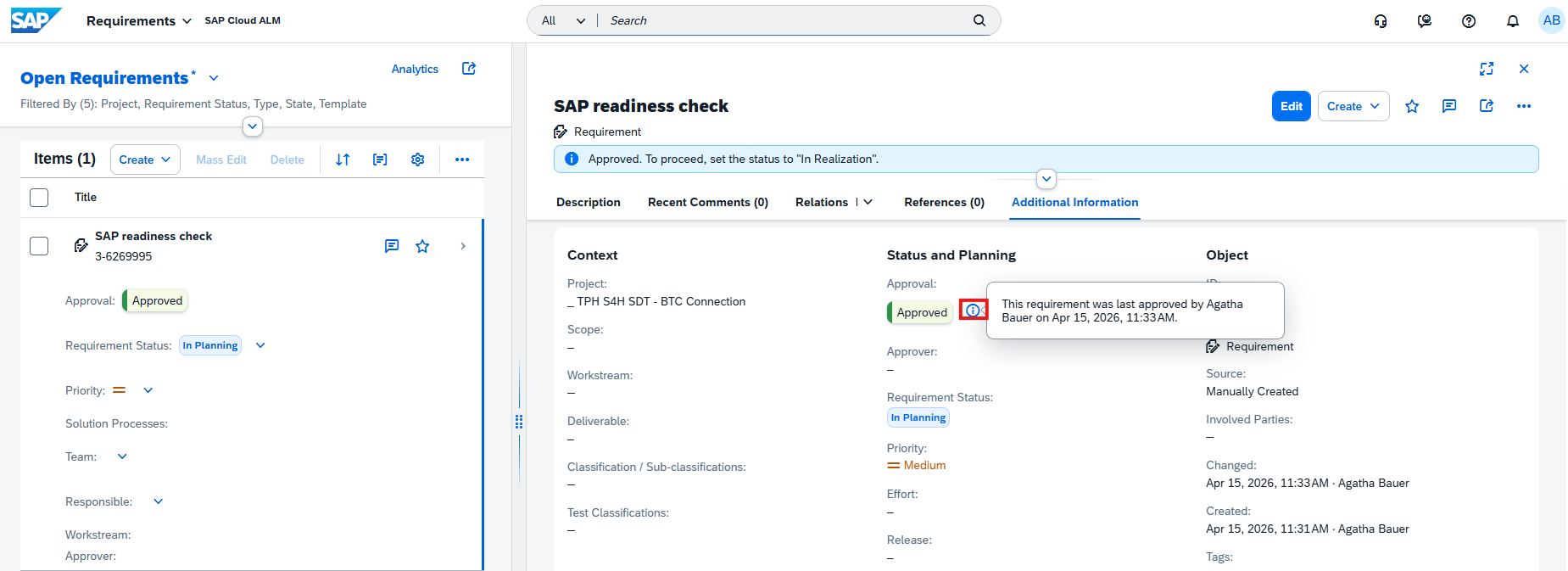
Together, these enhancements provide better visibility into approval responsibilities and status changes, supporting more effective requirement management.
TL;DR:
Requirements now support individual approver assignments and provide visibility into the latest approval status change, improving accountability and transparency in requirement management.
Advanced Checklists, Mass Editing, and Automated Quality Gate Assessments
SAP Cloud ALM introduces several enhancements to Quality Gates, providing more flexibility in managing project quality criteria, maintaining checklists, and assessing project readiness.
Users can now choose between standard and advanced checklists for their quality gates. Advanced checklists provide extended quality criteria that can be reviewed together with an Enterprise Architect, helping project teams evaluate whether the necessary requirements have been met before progressing to the next project phase.
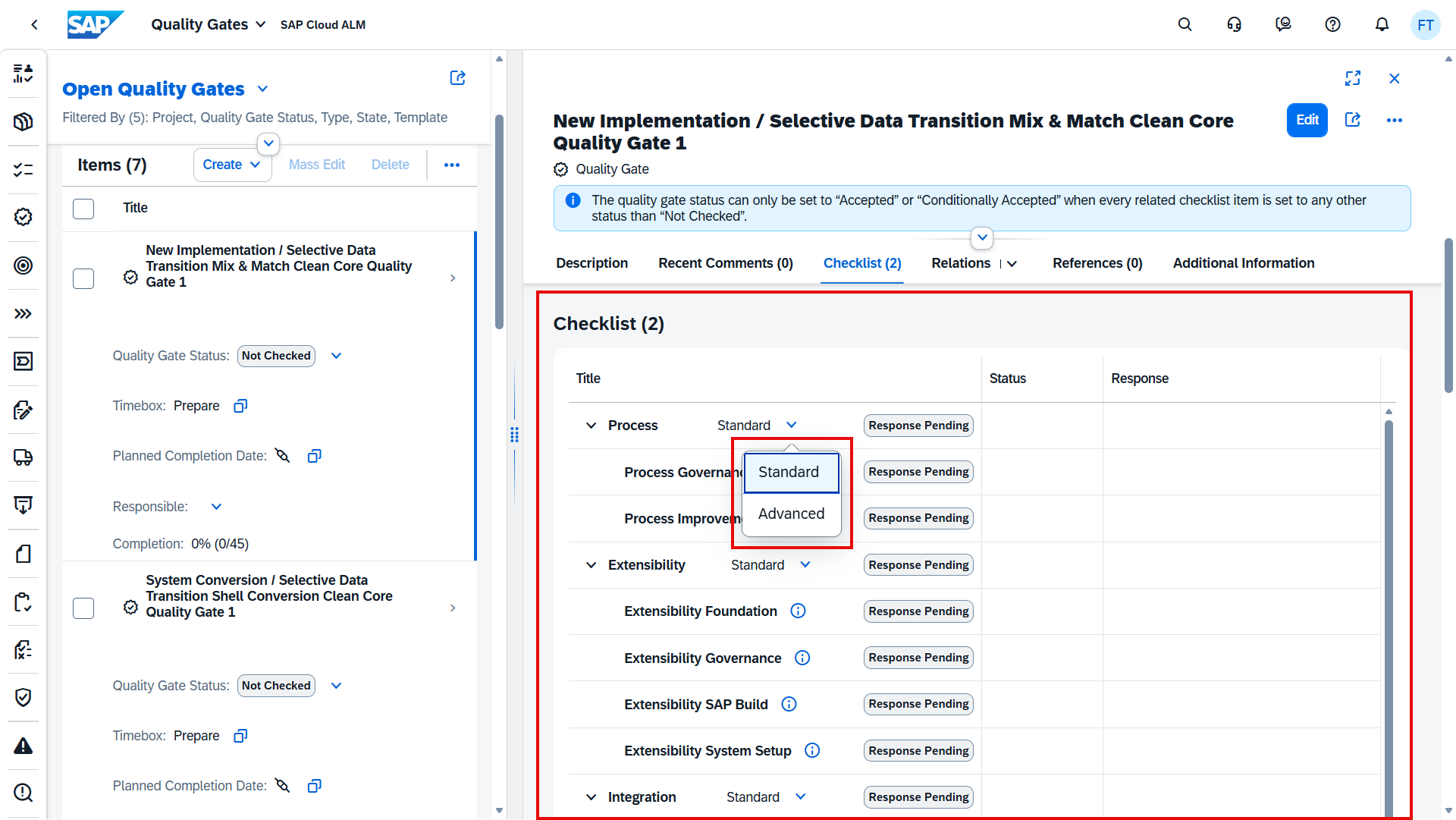
Managing advanced checklists is also more efficient with new download, upload, and mass-editing capabilities. Users can export checklist items to spreadsheets for analysis, update multiple items at once, and upload the modified files to create new checklist items or update existing ones. This reduces repetitive manual work and simplifies the maintenance of larger checklists.
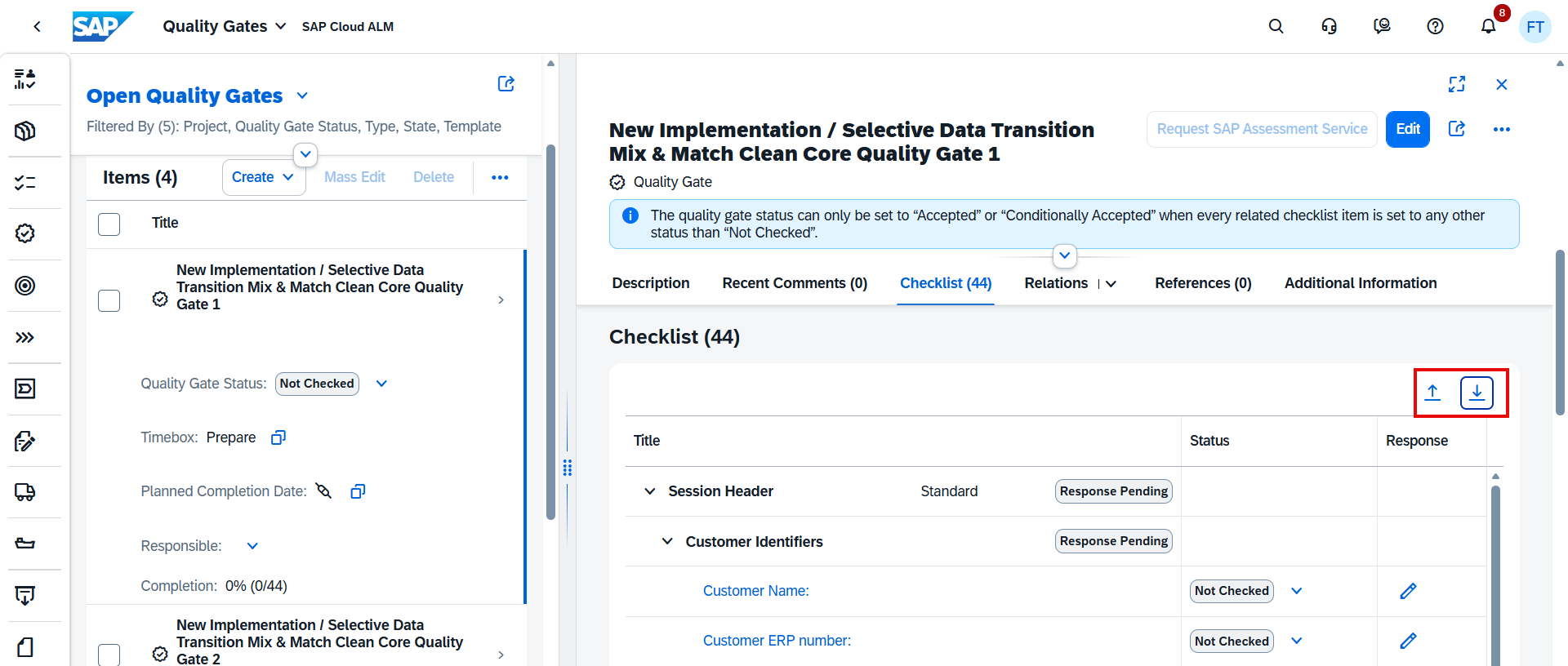
Additionally, project leads can now request a fully automated SAP Assessment Service for selected quality gates in the following SAP Activate roadmaps:
SAP S/4HANA Cloud Public Edition (3-system landscape) – Implementation: Prepare and Explore Quality Gate Checklists.
SAP SuccessFactors – Implementation: Prepare and Explore Quality Gate Checklists.
These automated assessments provide additional support for evaluating project readiness at key milestones.
Together, these enhancements improve quality gate management, checklist maintenance, and project readiness assessments, helping project teams manage quality criteria more consistently and efficiently.
TL;DR:
Quality Gates now support advanced checklists, spreadsheet-based mass editing, and automated SAP Assessment Services for selected SAP S/4HANA Cloud Public Edition and SAP SuccessFactors implementation roadmaps.
Improved System Group and Route Configuration
SAP Cloud ALM introduces additional guidance for configuring system groups in the Projects and Setup app, helping users define valid transport routes between assigned systems.
When maintaining system groups, SAP Cloud ALM now displays validation messages and route recommendations based on the systems assigned to the group. These recommendations help users identify suitable route configurations and avoid potential configuration errors.
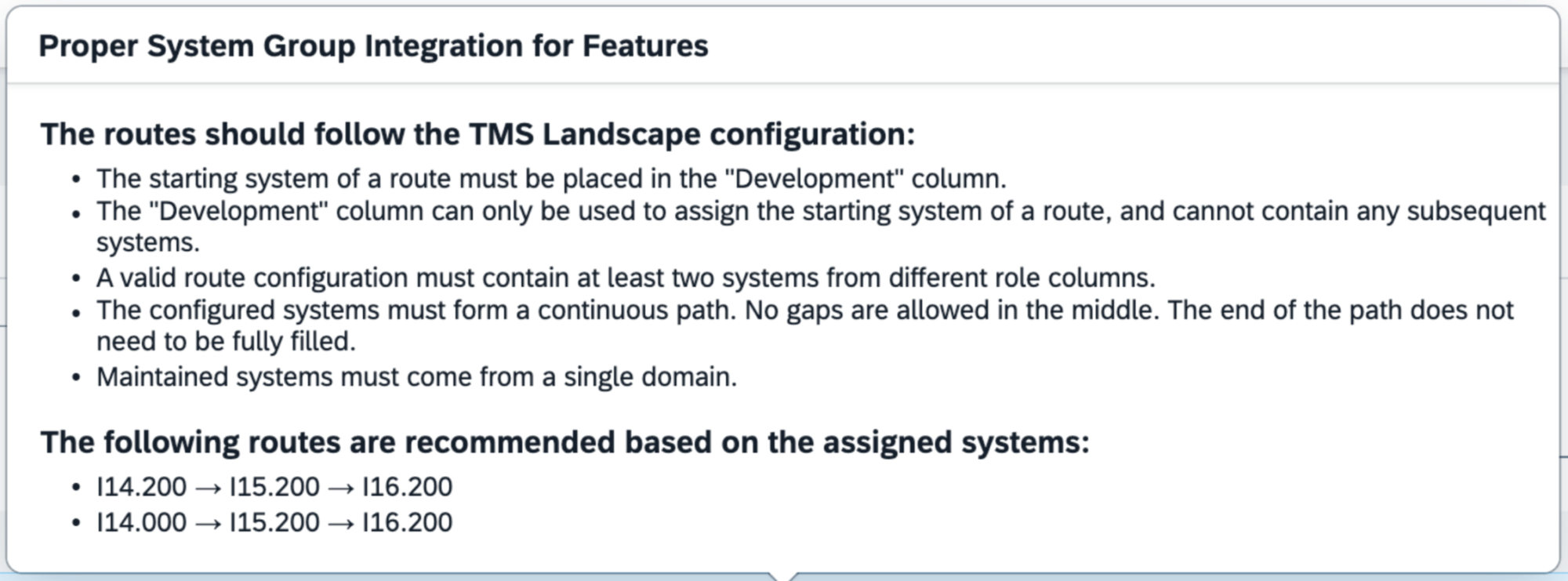
This enhancement simplifies system group maintenance by providing clearer guidance during configuration, reducing manual checks and helping ensure that system routes are defined correctly.
TL;DR:
Projects and Setup now provides validation messages and route recommendations for system groups, helping users configure valid routes between assigned systems.
ATO Transport Deployment and New Role Templates
SAP Cloud ALM introduces new capabilities in the Features app, extending transport deployment functionality and providing more granular control over user authorizations.
Users can now deploy ATO (Adaptation Transport Organizer) transports directly from the Features app. This extends the existing transport management capabilities and allows teams to manage additional deployment activities within SAP Cloud ALM.
SAP also introduces new Features-specific role templates, enabling administrators to create custom role collections with more precisely defined permissions. These templates cover different responsibilities throughout the feature lifecycle, including:
Development and feature management: Creating and editing features, managing transport assignments, and creating transports.
Testing and production deployment: Deploying transports to test or production systems, performing transport checks, and reviewing results.
Feature lifecycle management: Changing feature statuses, including In Implementation, In Testing, Successfully Tested, and Ready for Production.
Additional activities: Releasing transports, confirming deployments, managing tasks, and controlling access to individual feature functions.
The new role templates help organizations separate responsibilities between developers, testers, change managers, and deployment managers, while granting users access only to the functions required for their roles.
Some permissions depend on additional role templates. SAP also recommends including the Project Viewer role collection when creating custom role collections to ensure appropriate access to project information.
Together, these enhancements provide more flexibility in transport deployment and support more structured authorization management throughout the feature lifecycle.
TL;DR:
The Features app now supports ATO transport deployment and introduces granular role templates for feature management, transport activities, testing, and deployment, enabling more precise control over user permissions.
Tags for Deployment Schedules
SAP Cloud ALM introduces the ability to assign tags to deployment schedules, providing additional flexibility in organizing and managing deployment activities.
Users can now categorize deployment schedules using tags, making it easier to distinguish between different deployment activities, project phases, or organizational requirements.
This enhancement supports more structured deployment planning, particularly when managing multiple deployment schedules across projects.
TL;DR:
Deployment schedules now support tags, helping users categorize and organize deployment activities more effectively.
Operations – Business Process Monitoring, Configuration & Security Analysis – Validation, Several apps*
New KPIs for SAP Batch Release Hub for Life Sciences
SAP Cloud ALM expands its Business Process Monitoring capabilities with three new KPIs for SAP Batch Release Hub for Life Sciences, providing additional visibility into release decision activities.
The new KPIs include:
Completed Release Decision Items Awaiting Confirmation – Identifies completed release decision items that still require confirmation.
Release Decision Items with Open Manual Activities – Highlights release decision items with outstanding manual activities.
Release Decision Items Without Changes – Tracks release decision items where no changes have occurred.
These KPIs help users monitor release decision progress, identify outstanding activities, and gain better visibility into the batch release process.
The KPIs are activated automatically once the required setup steps in the SAP Cloud ALM Expert Portal have been completed. However, they are not included in the standard end-to-end processes. To use them in Business Process Monitoring, users must first create a custom process and assign the relevant KPIs.
This enhancement extends monitoring coverage for life sciences organizations and supports more transparent tracking of batch release activities.
TL;DR:
Business Process Monitoring introduces three new KPIs for SAP Batch Release Hub for Life Sciences, enabling better visibility into release decisions, pending confirmations, and open manual activities through custom process monitoring.
Copy Existing SAP and Custom Checks
SAP Cloud ALM introduces a new Copy option in Configuration & Security Analysis – Validation, making it easier to create checks based on existing configurations.
Users can now copy both SAP Checks and Custom Checks directly from the check details view. When copying a check, users only need to provide a new Check Name and a unique Check ID.
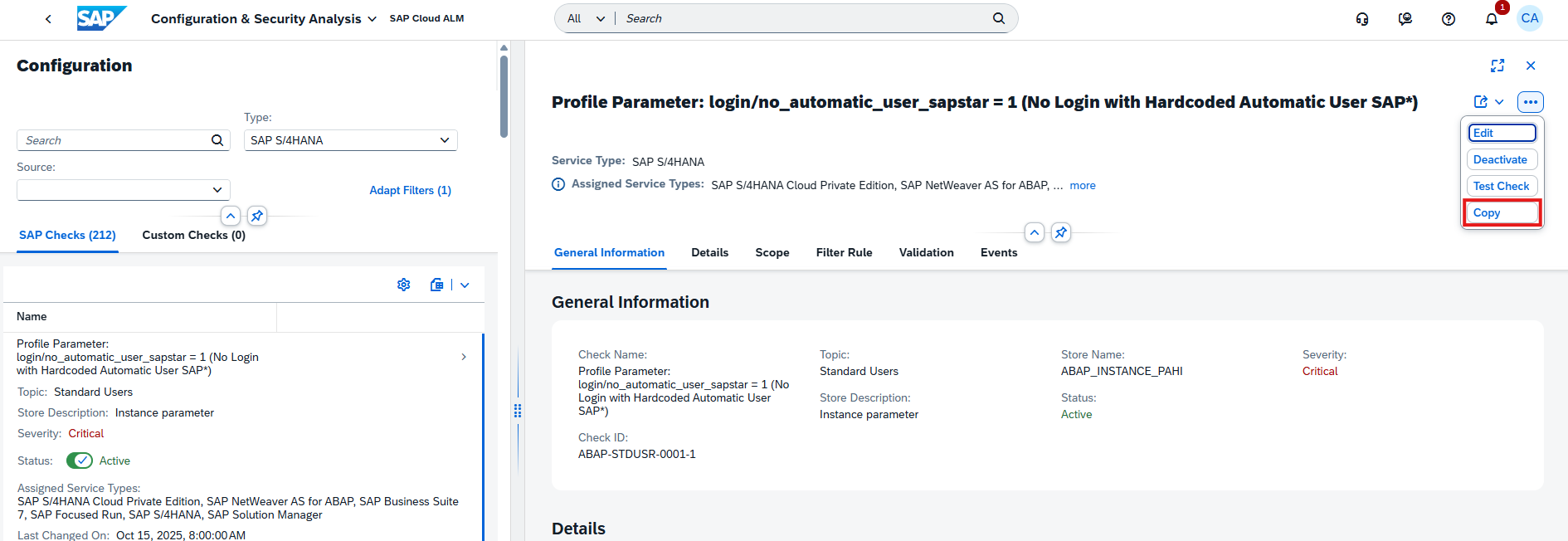
This enhancement simplifies the creation of similar checks by allowing users to reuse existing configurations instead of creating each check from scratch.
It is particularly useful when maintaining multiple checks with similar requirements, helping reduce repetitive configuration work and improve consistency.
TL;DR:
Configuration & Security Analysis – Validation now supports copying SAP Checks and Custom Checks, making it easier to create new checks based on existing configurations.
AI-Assisted Monitoring Configuration with Joule
SAP Cloud ALM introduces the new ALM Monitoring Configuration Agent, extending Joule capabilities to help users configure and maintain monitoring across their system landscape.
The agent can identify newly registered systems, detect monitoring configuration gaps and inconsistencies, and provide recommendations to improve monitoring coverage. Users can review these recommendations and ask Joule to apply monitoring configurations individually or in bulk, reducing manual setup effort.
The initial release supports monitoring configuration across several SAP Cloud ALM applications, including Integration & Exception Monitoring, Job & Automation Monitoring, Business Process Monitoring, Health Monitoring, Real User Monitoring, and Configuration & Security Analysis.
Depending on the monitoring application, Joule can help users:
Enable or disable data collection across supported monitoring applications.
Create custom business processes and assign supported KPIs in Business Process Monitoring.
Propose business service bundles and support filter adjustments for Integration Monitoring.
Enable change point detection in Real User Monitoring, where supported.
The agent also supports reviewing monitoring readiness and identifying configuration gaps before systems go live. However, the initial release has limitations: creating events and customizing thresholds are not yet supported.
Availability: The ALM Monitoring Configuration Agent is currently available only through SAP’s Early Adopter Care (EAC) program. It requires Joule and the agent to be activated, appropriate user roles, and systems configured in Landscape Management.
This enhancement introduces a more guided approach to monitoring configuration, helping users improve monitoring coverage and reduce repetitive configuration activities.
TL;DR:
The new ALM Monitoring Configuration Agent in Joule helps identify monitoring gaps, recommend configurations, and apply supported monitoring settings across multiple Operations applications. Currently available through SAP Early Adopter Care (EAC) only.