SAP Cloud ALM – What’s New in Week 34
SAP Cloud ALM continues to evolve with enhancements that improve transformation management, analytics, governance, and operational visibility across the platform.
The Week 34 release strengthens SAP Business Transformation Center with centralized cycle control, guided lifecycle actions, improved diagnostics, and enhanced data quality analysis. The Service area expands Issues and Actions Management with Joule-assisted analysis and more flexible filtering.
Operations introduces enhanced request analysis, more flexible security validation, and support for Product Package Solutions. Meanwhile, Implementation improves test analytics and traceability, feature testing, library management, and Retrofit processing.
Together, these updates provide greater control, visibility, and efficiency across transformation, implementation, service, and operational activities.
SAP Business Transformation Center – Cycle and Monitoring, Data Management
Manage Cycles as the Central Control Point for Cycle Execution
The Manage Cycles app is enhanced to become the single point of control for the complete cycle lifecycle, simplifying how transformation cycles are executed and monitored.
Users can now start each cycle phase directly from Manage Cycles, retry objects that encountered errors, and use a dedicated Sync Status option for each phase to retrieve the latest execution status. As a result, the Run Cycles and Postprocess Cycles apps are now focused on monitoring, while Transformation and Postprocessing phases are started centrally from Manage Cycles.
The app also provides more guidance throughout the cycle lifecycle. Recommended next actions are visually highlighted, while contextual tooltips help users understand which action should be performed based on the current cycle status.
Diagnostics handling has also been improved. When running diagnostics, users can select Refresh Status to retrieve the latest check status. Once diagnostics are completed, confirmation is displayed and detailed results can be reviewed in the Cycle Logs app.
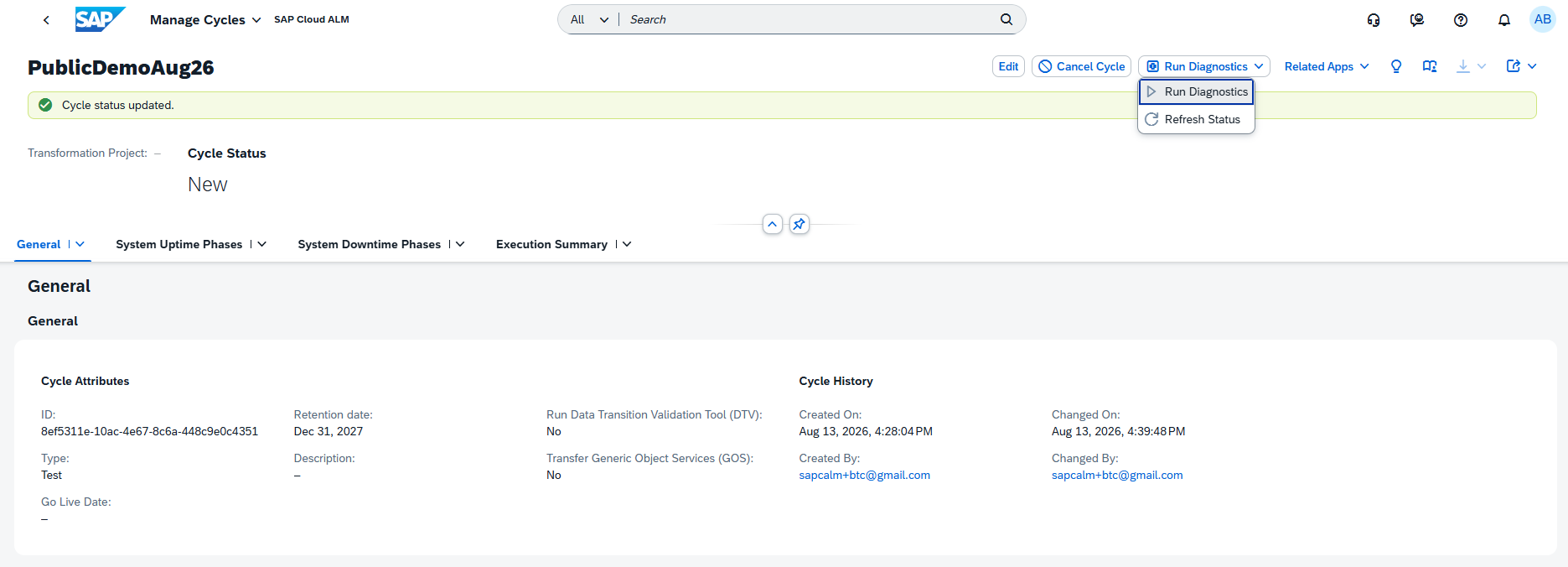
Together, these enhancements centralize cycle execution, provide clearer guidance, and improve visibility into phase and diagnostic status throughout the transformation lifecycle.
TL;DR:
The Manage Cycles app is now the central point for executing and controlling the full cycle lifecycle, with guided next actions, phase status synchronization, improved diagnostics, and easier retry handling.
New Error Distribution Analysis for Data Quality
The Analyze Data Quality app is enhanced with a new Error Distribution table, providing greater transparency into where data quality issues occur.
For Finance KPIs, users can now analyze how errors from the latest Data Quality Check run are distributed across company codes and fiscal years. This provides an additional level of detail beyond the overall KPI results and makes it easier to identify where data quality problems are concentrated.
By providing a structured breakdown of errors, the new table helps teams focus their analysis and remediation efforts on the organizational units and time periods with the greatest number of data quality issues.
TL;DR:
The new Error Distribution table provides a breakdown of Finance data quality errors by company code and fiscal year, making it easier to identify and prioritize areas requiring remediation.
Implementation – Analytics, Features, Libraries, Retrofit
Enhanced Test Analytics and Traceability
Analytics receives several enhancements that improve test visibility, detailed analysis, and navigation between analytics and operational applications.
The Feature Traceability app now provides greater insight into the test readiness of individual features with new Test Preparation and Test Execution columns. Micro bar charts show the number and status of associated test cases and test executions directly in the traceability matrix. Users can select individual chart segments to review further details in the side panel and filter the analysis by Test Preparation, Test Execution, Test Plan, and Test Case type.

The Test Execution Analysis app also introduces a new responsive table in the Test Execution Distribution view, replacing the previous popover-based interaction. The table provides improved data visualization with sorting, grouping, and Excel download capabilities, making detailed test execution analysis more flexible.
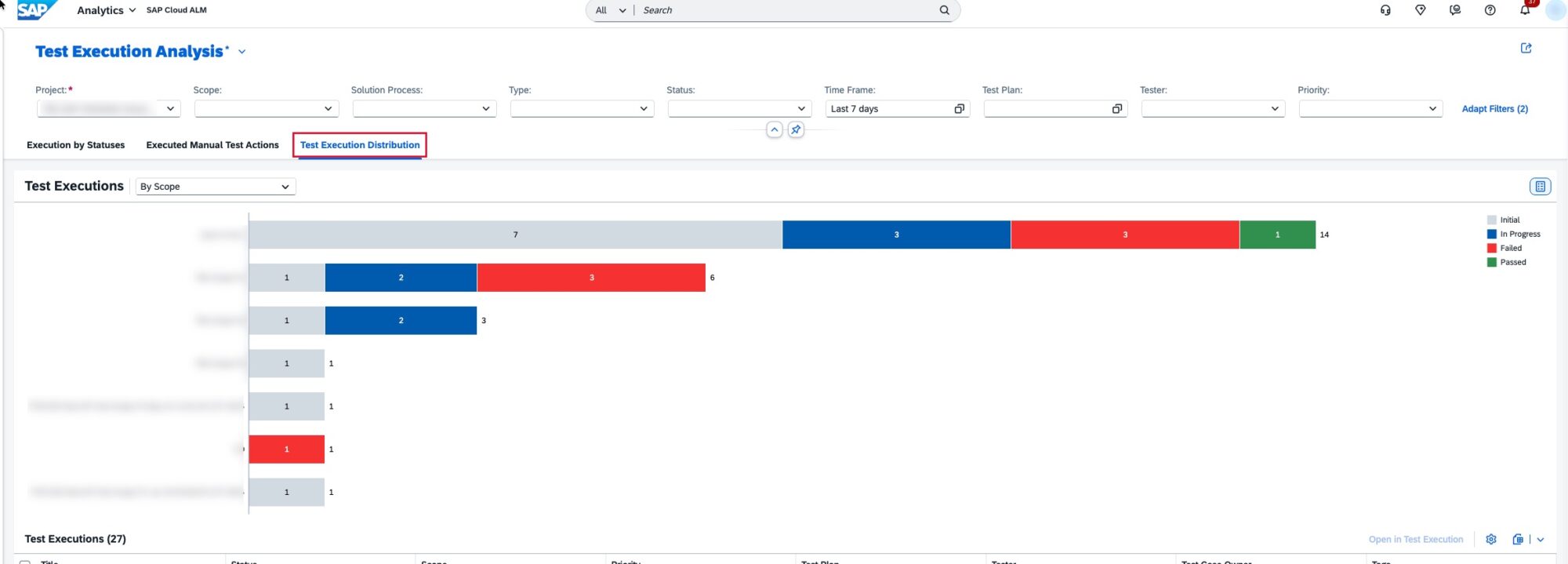
Quality Gate analytics are also more actionable. Users can now select one or multiple quality gates directly from the reporting table and open them in the Quality Gates app for further review and management.

Together, these enhancements provide greater visibility into test readiness and execution while making it easier to move from analytics insights to detailed project activities.
TL;DR:
Analytics now provides test readiness and execution insights directly in Feature Traceability, improved Test Execution Analysis tables, and direct navigation from reporting to Quality Gates for more efficient test and quality management.
Enhanced Test Case Assignment and Tester Authorizations
The Features app is enhanced with more flexible test case assignment and simplified authorization requirements for testers.
Test cases can now be assigned to features while they are in the In Specification, In Implementation, or In Testing status. This allows testing activities to be prepared earlier in the feature lifecycle and improves the connection between feature development and test planning.
The role collection recommendation for testers has also been simplified. The Tester role template (imp_cdm_Tester) now only needs to be combined with the Project Viewer role collection to allow users to change a feature’s status to Successfully Tested.
Together, these enhancements make test preparation more flexible and simplify the authorization setup required for testers working with features.
TL;DR:
Test cases can now be assigned to features earlier in their lifecycle, while simplified Tester role requirements make it easier to manage successful test confirmation.
New Priority, Readiness, and Package Information for Library Elements
The Libraries is enhanced with additional fields that provide more information for managing and organizing library elements.
For Interface, Application, and Configuration library elements, the new Priority and Readiness fields are now available. Development library elements additionally receive a Package Name field alongside Priority and Readiness.
These fields can also be used as filters in library element lists, making it easier to identify elements based on their importance, implementation readiness, or development package. They are also supported when uploading library elements via spreadsheet, enabling more structured bulk maintenance.
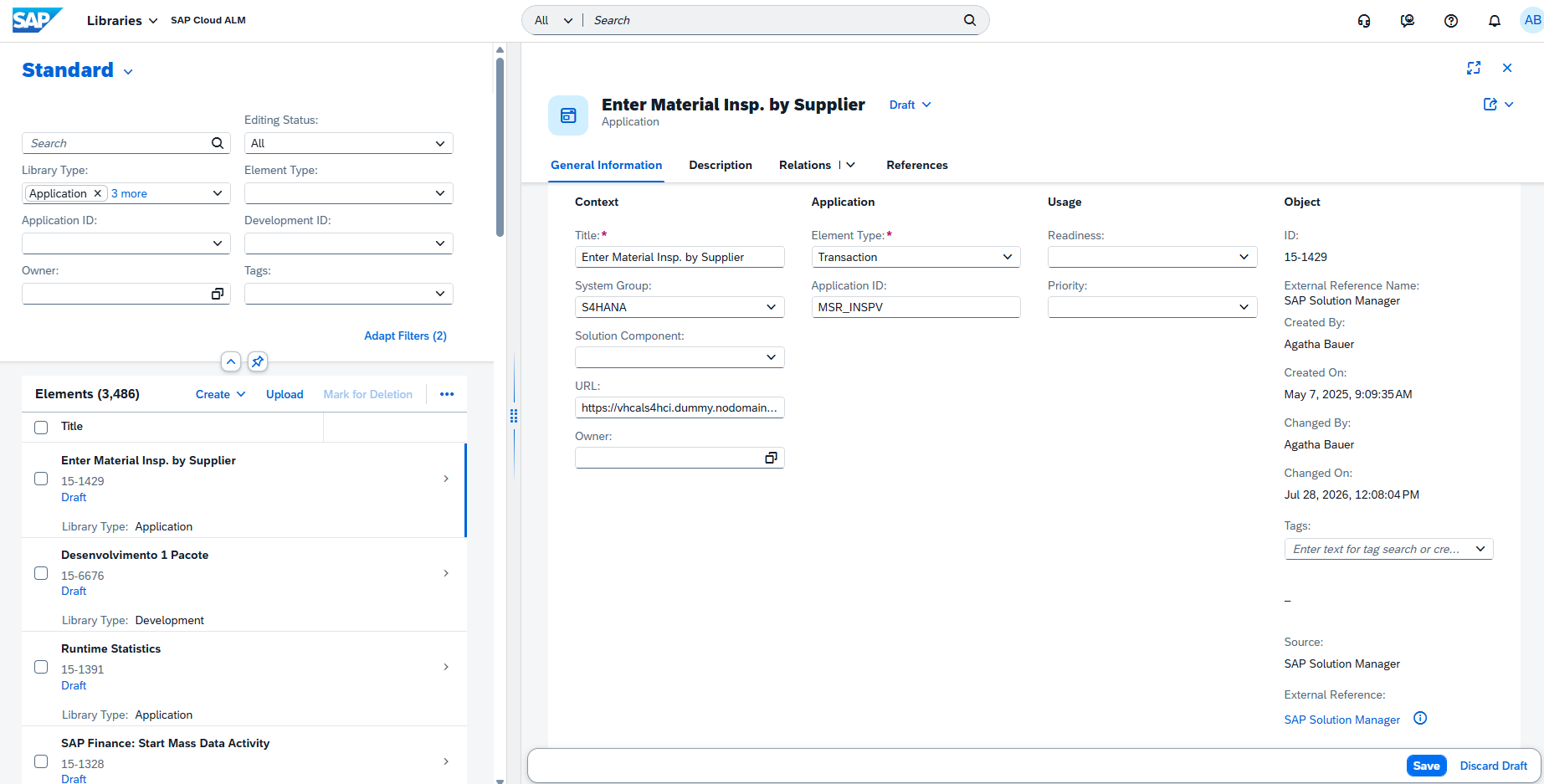
This enhancement provides greater flexibility for organizing and prioritizing library content while improving visibility into the readiness of implementation artifacts.
TL;DR:
Library elements now include new Priority and Readiness information, while Development elements also support Package Name, with the fields available for filtering and spreadsheet uploads.
Sequence Dependency Processing for Automatic Retrofit
The Retrofit app is enhanced with support for sequence dependency processing, improving the handling of automatic retrofits involving multiple source transports.
Users can now perform automatic retrofit for multiple source transports within a selected subset while considering dependencies between the transports. This helps ensure that objects are processed in the correct sequence and reduces the risk of inconsistencies or downgrades during retrofit activities.
To use the functionality and prevent potential downgrades, SAP Note 3778082 must be implemented with ST-PI 740 SP33/34/35 or ST-PI 758 SP01/02.
This enhancement makes automatic retrofit processing more reliable when working with related transports that need to be handled in a specific sequence.
TL;DR:
Retrofit now supports sequence dependency processing for multiple source transports, helping ensure the correct processing order and reduce downgrade risks during automatic retrofit.
Operations – Real User Monitoring, Configuration & Security Analysis – Validation, Integration & Exception Monitoring
Filter and Group Requests by Application Component
Real User Monitoring is enhanced with support for the Application Component Hierarchy (ACH), providing more flexibility when analyzing requests across the landscape.
In the Requests view, users can now use application components to filter requests or group them as a dimension. This makes it easier to focus on requests associated with a specific application component and analyze their behavior without manually identifying individual requests.
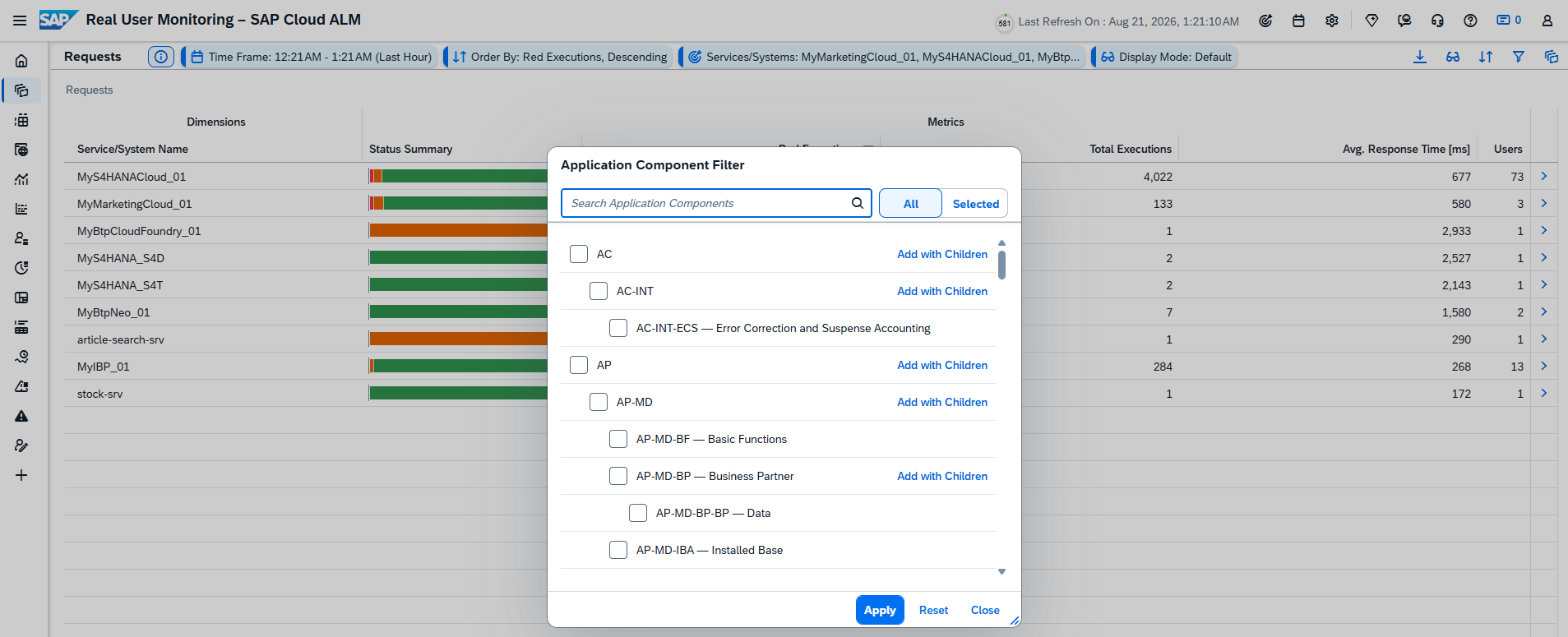
The enhancement provides additional context for request analysis and helps teams investigate performance and usage patterns at the application component level.
TL;DR:
Real User Monitoring now supports filtering and grouping requests by application component, making it easier to analyze requests for specific components in the landscape.
HANA SQL Expressions for Custom Checks
Configuration & Security Analysis – Validation expands the flexibility of Custom Checks with a new HANA SQL Expression operator.
The new operator allows users to define compliance and non-compliance rules using HANA SQL expressions, enabling more advanced validation scenarios that go beyond standard comparison operators.
This provides organizations with greater flexibility when creating Custom Checks and allows validation logic to be tailored more precisely to specific configuration, security, and compliance requirements.
TL;DR:
Custom Checks now support HANA SQL Expression rules, enabling more flexible and advanced compliance and non-compliance validation.
New Product Package Solution Support
SAP Cloud ALM expands its monitoring capabilities with support for a new managed component type: Product Package Solution.
A Product Package Solution represents a set of related solutions that are provisioned together. Instead of monitoring each solution individually, users can now select and monitor the complete package as a single managed entity.
Product Package Solutions can be selected through the Managed Components filter when defining the monitoring scope. The new component type is currently supported in:
- Integration & Exception Monitoring
- Intelligent Event Processing
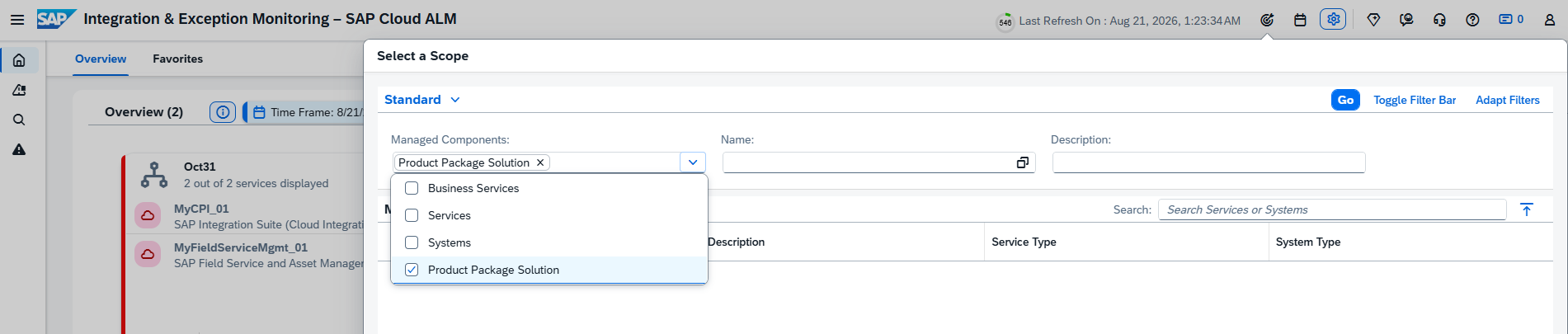
This enhancement simplifies monitoring for landscapes where multiple related solutions are delivered as a package and provides a more consolidated view of their operational status.
TL;DR:
Product Package Solution is now supported as a managed component type in Integration & Exception Monitoring and Intelligent Event Processing, allowing related solutions to be monitored and processed as a single entity.
Service – Issues and Actions Management
Filter Issues and Actions by Assigned Role
Issues and Actions Management introduces a new Assigned Role filter, providing more flexibility when identifying work items based on responsibilities.
Users can add the filter through Adapt Filters and select one or multiple standard roles to display only the relevant issues or standalone actions. The available roles are standard roles and are not specific to individual projects.

This enhancement makes it easier to focus on issues and actions associated with particular responsibilities, especially when working with larger lists of work items.
TL;DR:
A new Assigned Role filter allows users to filter issues and standalone actions by one or multiple standard roles, making it easier to focus on relevant responsibilities.
New Joule Capabilities for Issues and Actions
Joule with SAP Cloud ALM is now integrated with Issues and Actions Management, providing AI-assisted access to issue information directly through the Joule chat.
Users can ask Joule to generate summaries of issues by priority or status and refine the results using parameters such as Priority, Status, Creation Date, Due Date, Category, and Last Changed On. The generated summary can also be exported to a spreadsheet or opened directly in Issues and Actions Management for further analysis.
To use these capabilities, Joule with SAP Cloud ALM must first be activated through SAP for Me.
This enhancement provides a faster and more intuitive way to analyze issue data and identify relevant work items without manually configuring multiple filters and views.
TL;DR:
Joule with SAP Cloud ALM can now summarize and filter issues using natural language, with options to export the results or open them directly in Issues and Actions Management.
Enhanced Default Filters
The Manage Issues and Manage Standalone Actions pages now provide a cleaner starting view with fewer filters displayed by default.
Users can continue to customize their filtering experience through Adapt Filters, where additional filters can be added according to their needs. The sequence of columns in the table is also aligned with the order of the default filters, providing a more consistent layout.
This update simplifies the initial interface while retaining the flexibility to create more detailed filtering configurations when required.
TL;DR:
Manage Issues and Manage Standalone Actions now show fewer default filters, providing a cleaner interface while keeping additional filtering options available through Adapt Filters.