SAP Cloud ALM – What’s New in Week 36
SAP Cloud ALM continues to evolve with enhancements that improve data quality, Clean Core transparency, project management, and operational monitoring across the platform.
The Week 36 release introduces the new Data Management Assistant in SAP Business Transformation Center, bringing AI-assisted quality checks to transformation activities. RISE with SAP Methodology harmonizes Clean Core object classifications and updates related extensibility KPIs, while Administration simplifies user management.
Implementation expands Joule capabilities for project setup and enhances deployment planning, document version management, and Libraries. Operations improves Business Process Monitoring and introduces more efficient bulk management of Custom Checks.
Together, these updates provide stronger automation, transparency, and control across transformation, implementation, and operational activities.
SAP Business Transformation Center – Data Management
AI-Assisted Quality Checks with the Data Management Assistant
SAP Business Transformation Center introduces the new Data Management Assistant, currently available through SAP Early Adopter Care, to support AI-assisted quality checks within Data Management.
The assistant helps validate the completeness, correctness, and consistency of data and configurations before the transformation process continues. This allows potential quality issues to be identified earlier and reduces the manual effort required to analyze findings.
When activated, the Data Management Assistant uses three specialized agents that work together throughout the quality assessment:
- Scoping identifies the relevant data and configuration scope.
- Evaluation analyzes the findings and assesses potential quality issues.
- Prioritization evaluates identified issues based on their impact and urgency.
By combining these capabilities, the Data Management Assistant provides a more structured approach to identifying and prioritizing data quality issues before they affect subsequent transformation activities.
TL;DR:
The new Data Management Assistant uses specialized AI agents to assess data quality, identify findings, and prioritize issues before transformation processes continue.
Connectivity Status and Improved Validation for Data Assessments
Data assessments are enhanced with new connectivity information and validation capabilities that help ensure assessments are configured against valid and accessible source systems.
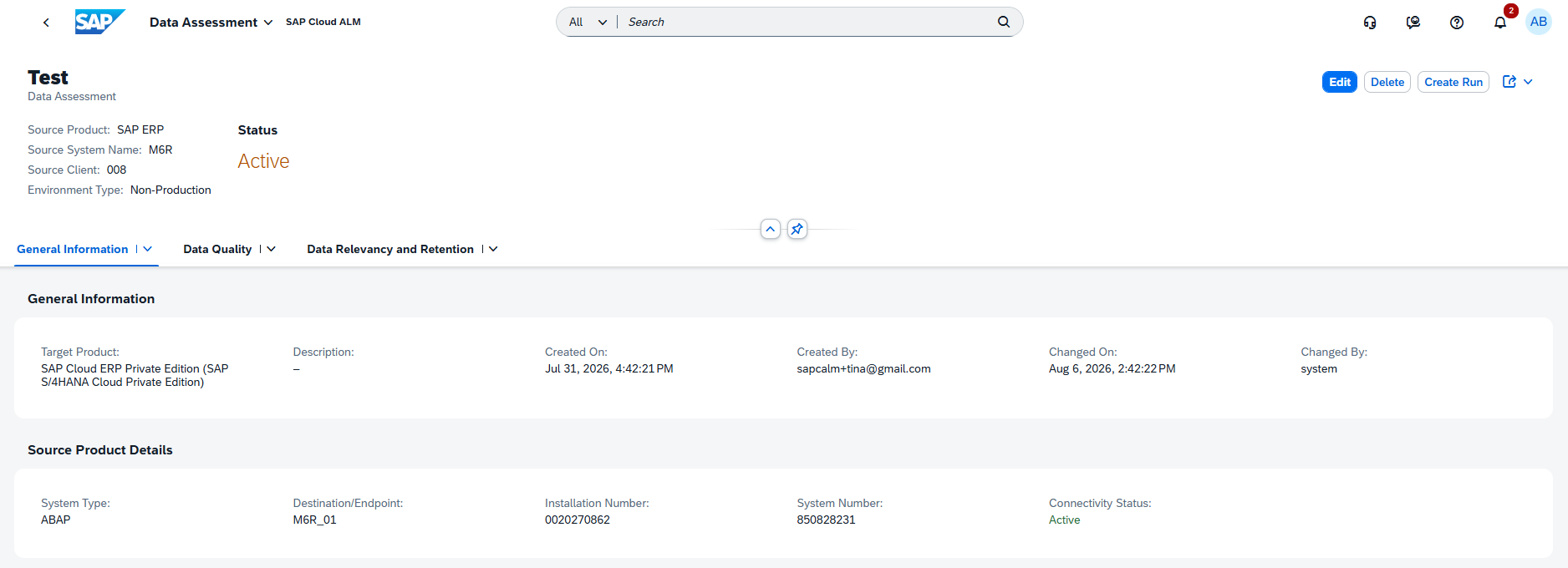
When creating, editing, or reviewing a data assessment, users can now see the Connectivity Status of the selected source endpoint. This provides immediate visibility into whether the required connection is available before proceeding with assessment activities.
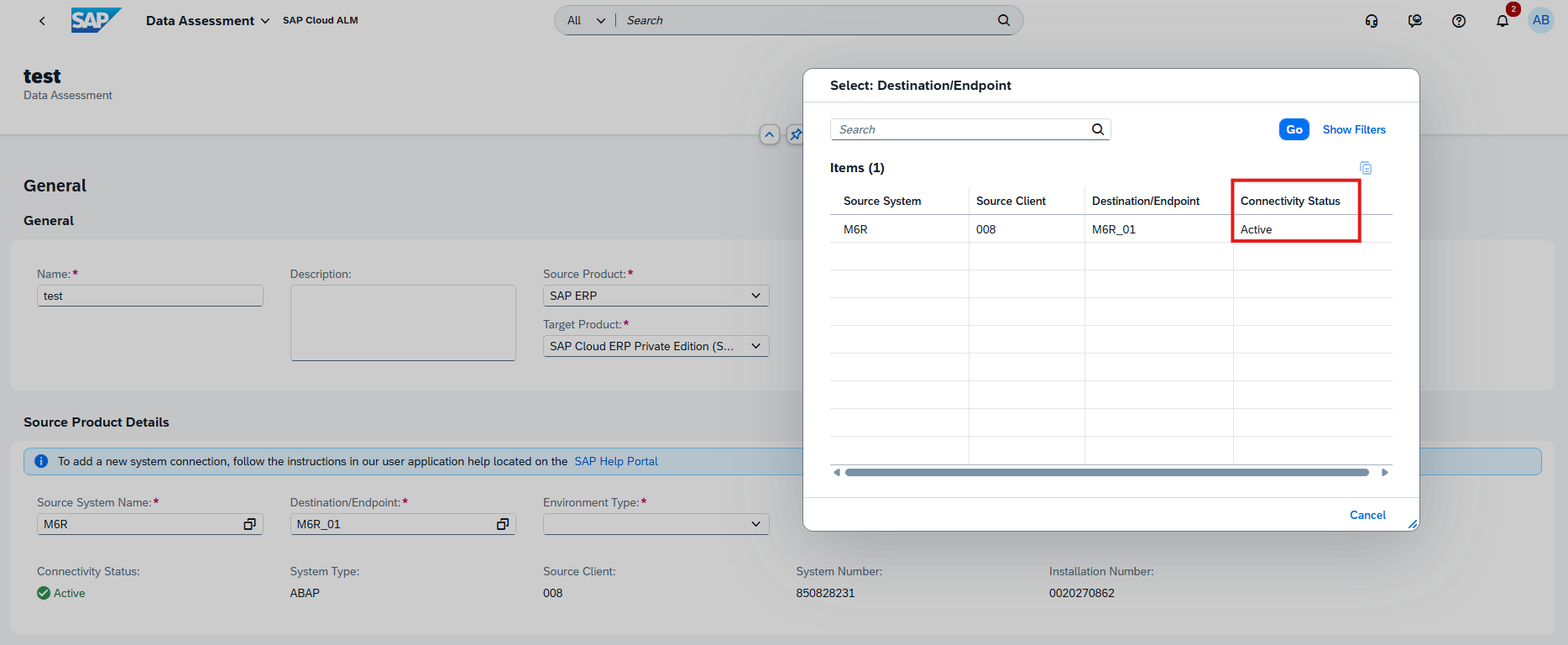
Additional validation also prevents users from saving data assessments that reference source systems or endpoints that have been deleted from Landscape Management Service (LMS), helping avoid invalid configurations and potential execution problems.
The Data Assessment detail page has also been reorganized to provide a clearer separation of general information and source-system details, making assessments easier to review and maintain.
TL;DR:
Data assessments now show the connectivity status of source endpoints and prevent invalid references to deleted systems or endpoints, improving assessment reliability and usability.
RISE with SAP Methodology – Customer Objects, System View
Harmonized Customer Object Classification
SAP has harmonized the types and number of customer objects classified as Clean Core relevant, providing more consistent object classifications and counts across the different data sources used by RISE with SAP Methodology.
The Customer Objects table has also been reorganized with three new tabs to make it easier to analyze the system’s custom developments:
- All – displays all customer objects.
- Clean Core Relevant – focuses specifically on objects included in Clean Core evaluation.
- With ATC Findings – shows customer objects for which associated ABAP Test Cockpit (ATC) findings exist.
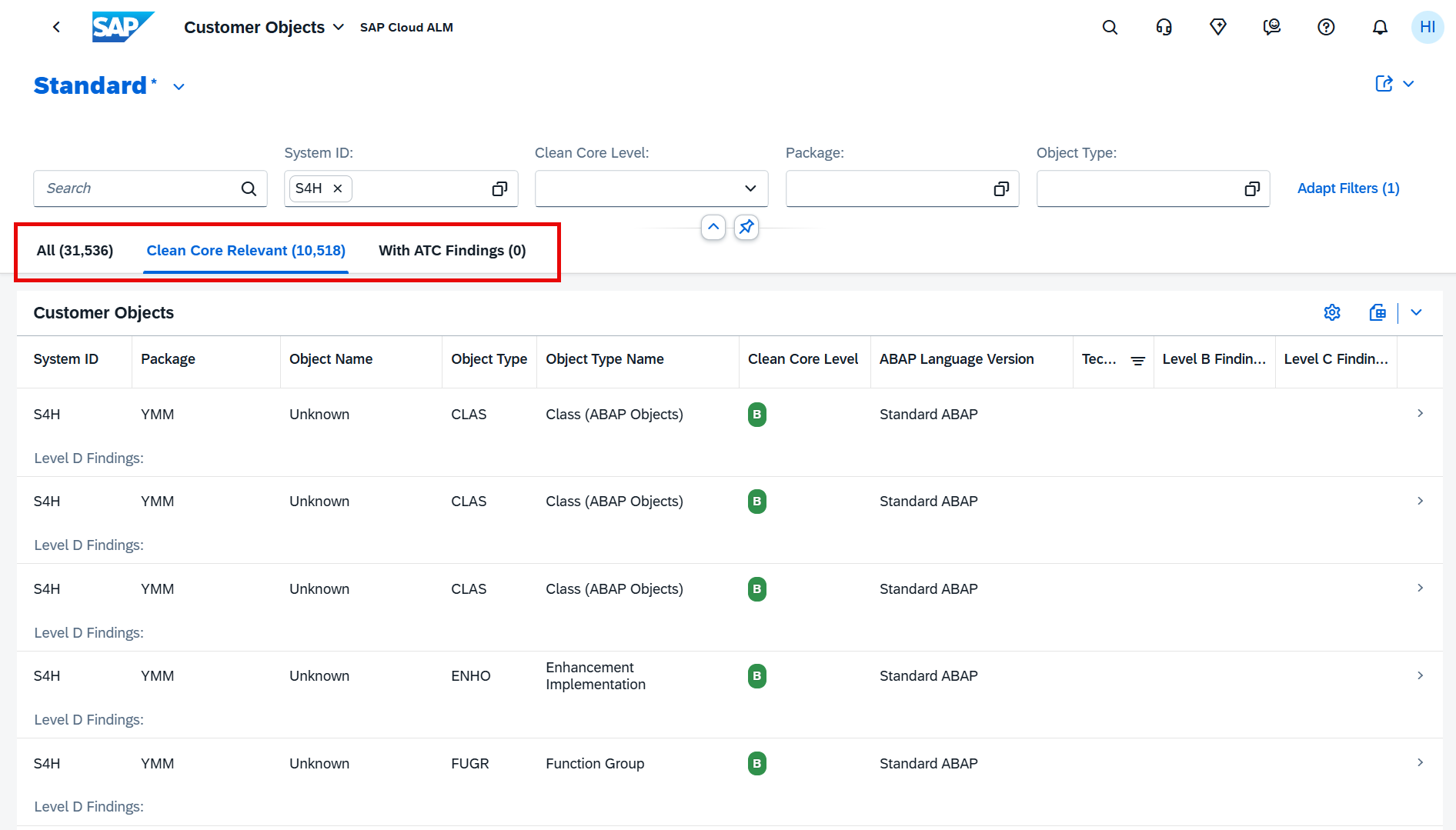
The harmonized classification is particularly important because the Clean Core relevant objects are also used for calculating extensibility-related KPIs in System View. As a result, customers may notice changes in their KPI values following this update.
TL;DR:
Customer object classifications have been harmonized across data sources, with new views for all objects, Clean Core relevant objects, and objects with ATC findings.
Updated Extensibility KPIs Following Object Type Harmonization
The harmonization of Clean Core relevant customer objects also changes how several extensibility KPIs are calculated in System View.
The adjustment affects the Technical Debt Score, Clean Core Share, and the individual Level A, B, C, and D Objects KPIs. Because the underlying object population and classifications have been standardized, the values displayed on these KPI cards may differ significantly from previously reported values.
This is important when comparing current Clean Core results with historical values. A substantial change after the release does not necessarily indicate that the system’s custom developments suddenly changed; it may instead result from the updated object classification and calculation basis.
For customers tracking Clean Core progress over time, this change should therefore be considered when interpreting KPI trends and comparing results before and after Week 36 release.
TL;DR:
The harmonized Clean Core object classification changes the calculation of key extensibility KPIs, meaning Technical Debt, Clean Core Share, and Level A–D object values may differ significantly from previous results.
Implementation – Deployment, Documents, Libraries, Projects and Setup
More Flexible Deployment Planning
The Deployment app introduces two enhancements that provide more flexibility when planning and managing deployment activities.
Deployment plans can now support multiple releases, allowing teams to associate more than one release with the same deployment plan. This is particularly useful when deployment activities span several releases or when related releases need to be coordinated within a common deployment plan.
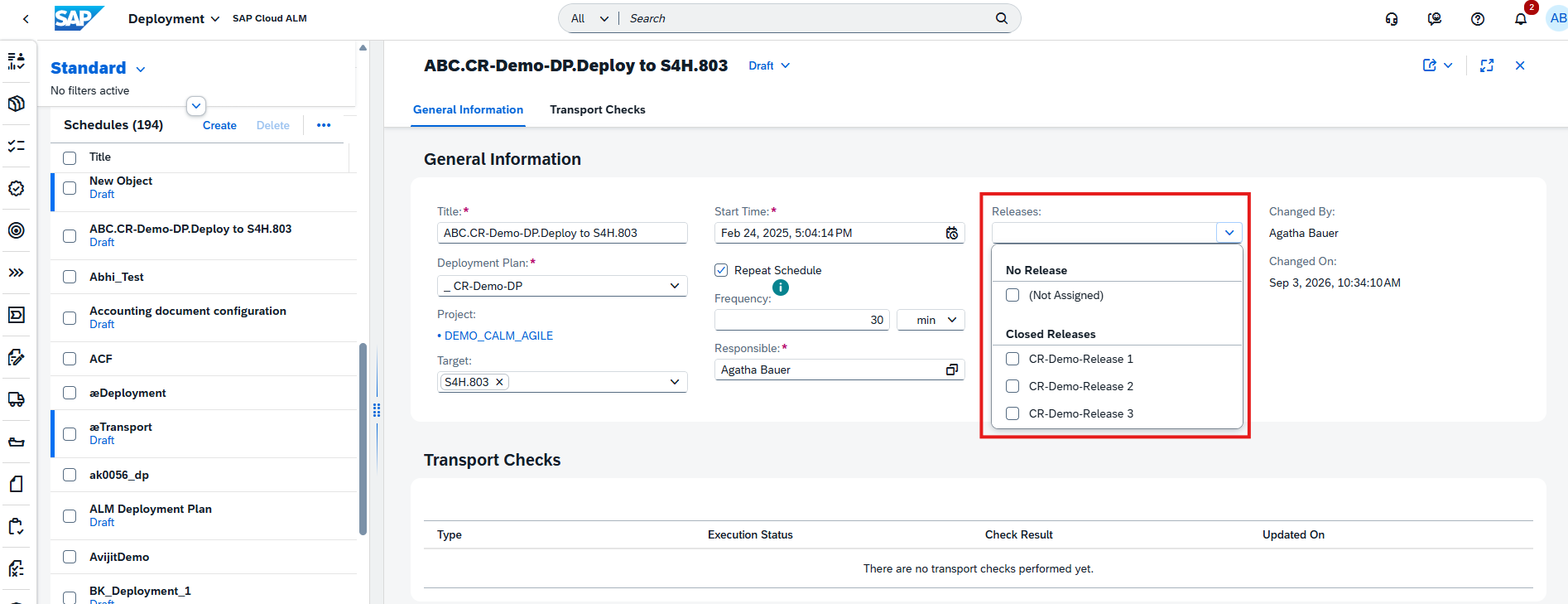
In addition, a new Responsible field is available for deployment schedules. Teams can assign ownership directly to a deployment schedule, making responsibilities clearer and helping ensure that deployment activities are properly coordinated.
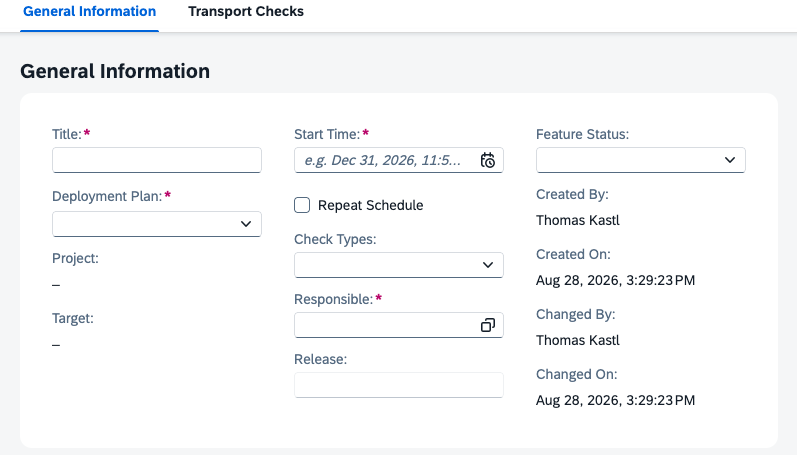
Together, these enhancements improve both the flexibility and accountability of deployment planning in SAP Cloud ALM.
TL;DR:
The Deployment app now supports multiple releases per deployment plan and allows a responsible person to be assigned to deployment schedules, improving planning flexibility and ownership.
Restore Previous Document Versions
The Documents app now makes it possible to restore the content of a previous document version directly from the version history. When viewing a historic version, users can select the new Restore Version action to revert the document to earlier content.
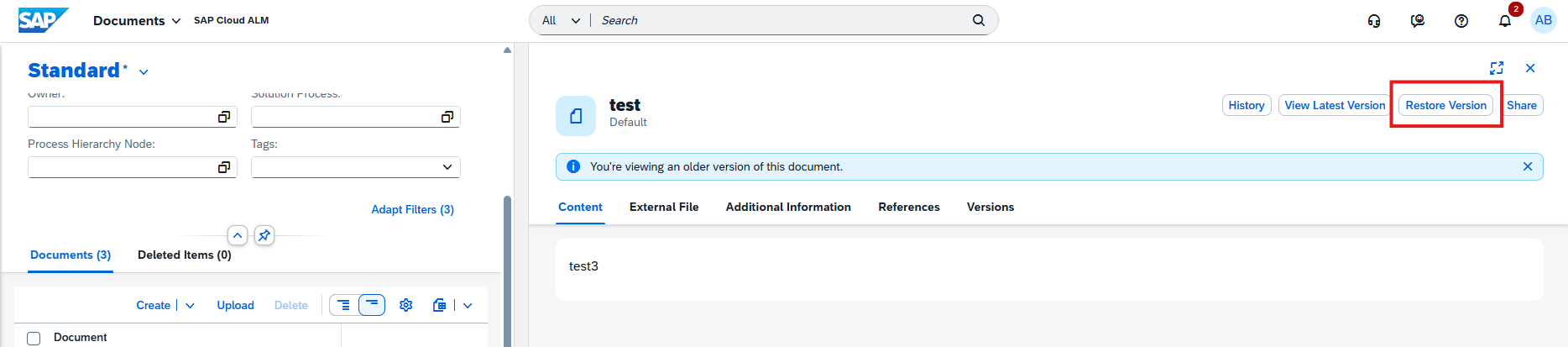
The restore applies specifically to the document’s Content and Summary. Other information, such as relations, references, administrative data, and external files, remains unchanged and continues to reflect the latest state.
If the document does not currently have an active version, for example because it is in Released status, SAP Cloud ALM automatically creates a new version containing the restored content and summary.
There are also safeguards around the restore process. Restoration is not available while the active version is In Review, and users are warned if restoring a version would overwrite unsaved changes in an existing draft.
This provides an undo-like capability for document content, making it easier to recover earlier information without manually recreating it.
TL;DR:
Documents can now be restored to the Content and Summary of a previous version directly from version history, providing a convenient way to recover earlier document content
New Usage, Upgrade Impact, and Clean Core Fields for Library Elements
The Libraries app introduces additional fields for Application, Development, and Interface library elements, providing more information about their usage, upgrade impact, and Clean Core classification.
The following fields are now available for all three library element types: Usage Status, Usage Number, Upgrade Impact, and Clean Core Level. Application library elements additionally receive a new Successor ID field, which can be used to identify a successor application.
These fields can also be used as filters in library lists, making it easier to identify elements based on their usage or Clean Core characteristics. They are also supported when uploading library elements through spreadsheet templates, enabling efficient bulk maintenance.
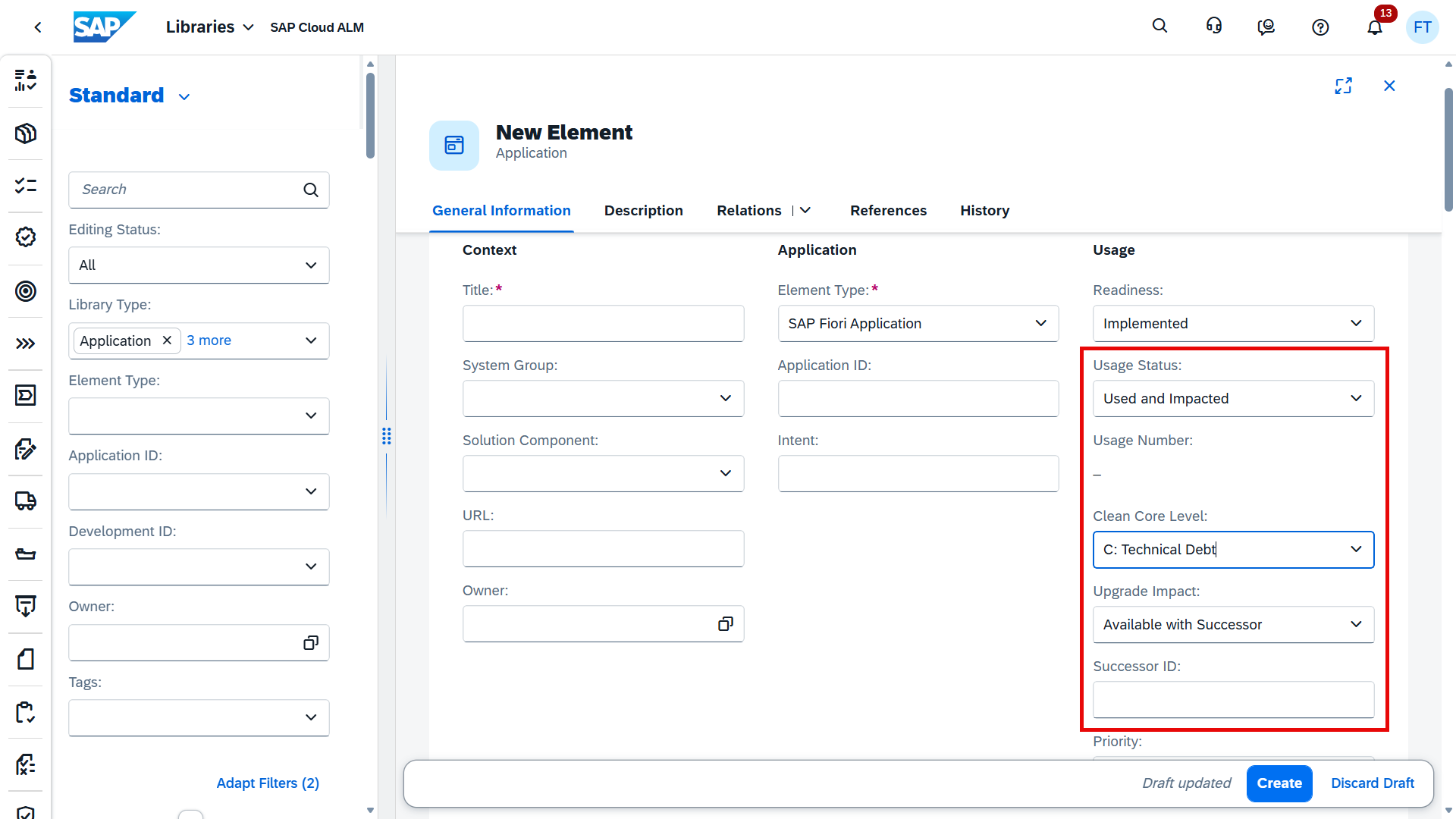
The enhancement provides additional context for assessing library elements, particularly when evaluating Clean Core alignment, upgrade impact, and application lifecycle considerations.
TL;DR:
Library elements now include new Usage Status, Usage Number, Upgrade Impact, and Clean Core Level fields, with additional Successor ID for applications, all available for filtering and spreadsheet uploads
Joule for Project Setup and Onboarding
SAP Cloud ALM expands Joule capabilities to support project setup and onboarding activities, allowing users to perform common project administration tasks through the AI-assisted experience.
Joule can now help create projects and manage important elements of the project structure, including project teams, project leads, phases, sprints, milestones, and deployment landscapes. It can also support assigning projects to programs and managing project deliverables.
In addition, users can use Joule to manage and update project statuses, further reducing the manual effort involved in maintaining project setup information.
This enhancement brings AI-assisted interaction into a broader range of project administration activities, helping teams set up and maintain SAP Cloud ALM projects more efficiently.
TL;DR:
Joule can now assist with project creation and setup, including teams, project leads, phases, sprints, milestones, deployment landscapes, deliverables, program assignments, and project statuses.
Operations – Configuration & Security Analysis – Validation, Business Process Monitoring
Bulk Upload for Custom Checks
The Configuration & Security Analysis – Validation app introduces a new upload capability that simplifies the creation of multiple Custom Checks.
Instead of creating checks individually, users can now create up to 50 custom checks at once using the provided spreadsheet template. The new Upload option is available under Configuration à Checks à Custom Checks.
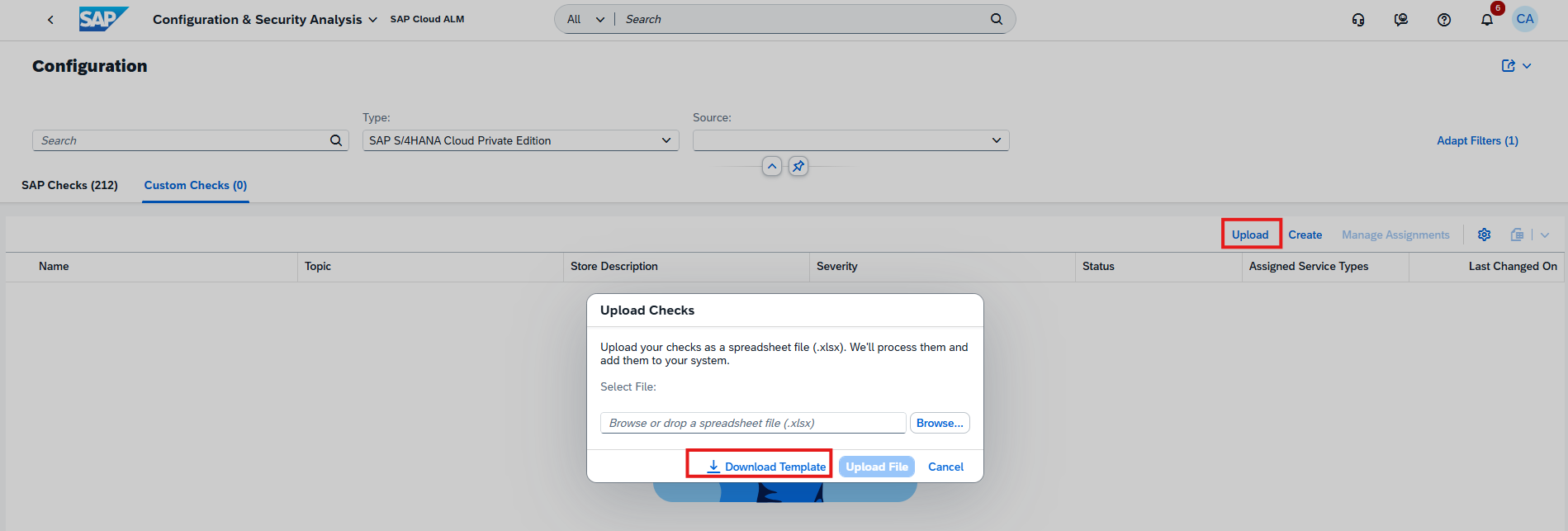
This is particularly useful when establishing or extending a larger set of organization-specific compliance checks, reducing manual configuration effort and making bulk maintenance more efficient.
TL;DR:
Up to 50 Custom Checks can now be created at once using a spreadsheet upload, simplifying bulk configuration and maintenance of validation checks.
Change Data Collection Status for Multiple KPIs
Business Process Monitoring makes it easier to manage KPI data collection for individual services and systems.
From the configuration settings, users can now select multiple KPIs for a specific service or system and enable or disable their data collection together. Previously, managing collection settings across several KPIs could require more individual configuration effort.
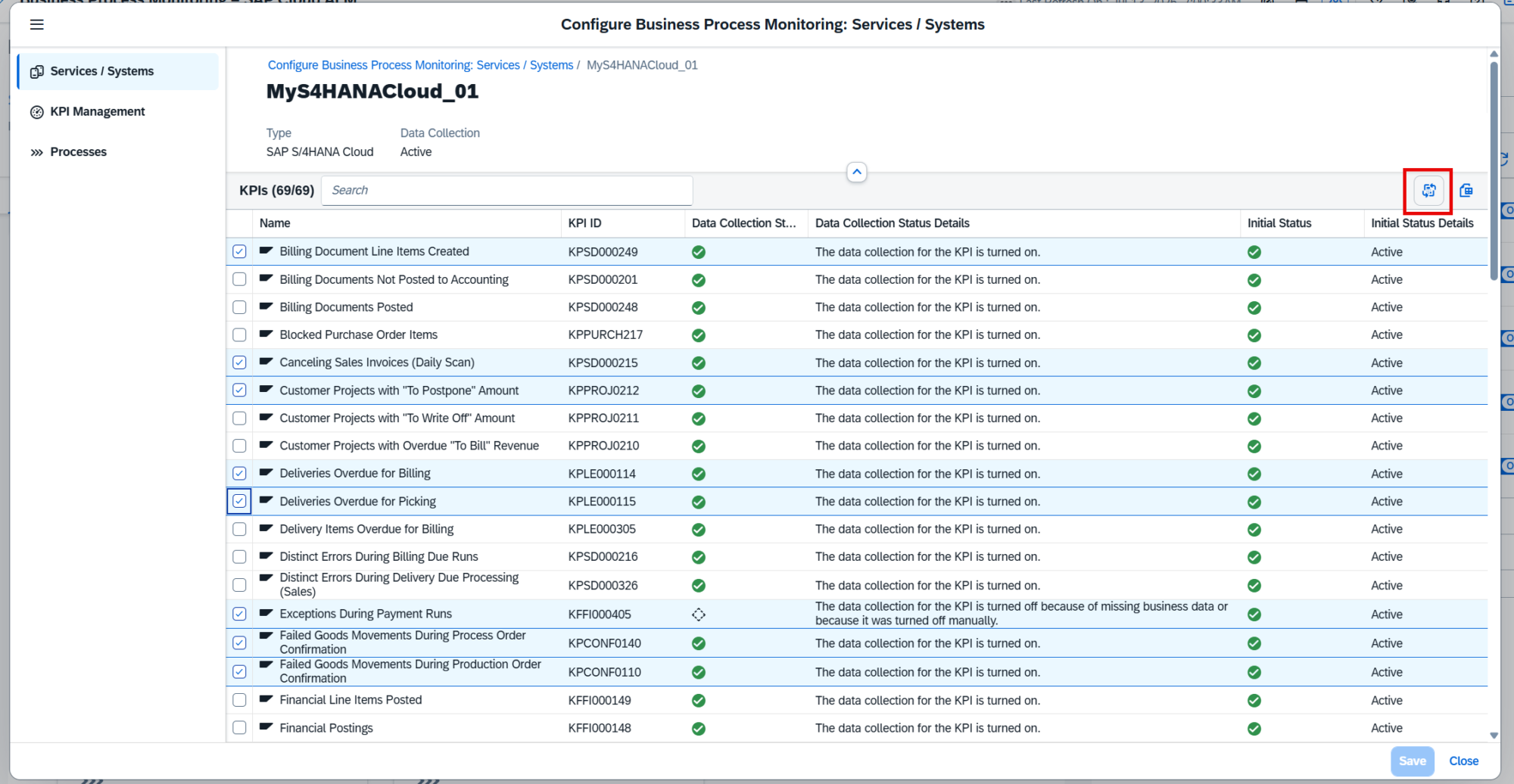
This provides greater flexibility when adjusting the monitoring scope, for example when certain KPIs are no longer required or when additional KPIs should be activated for an existing managed component.
TL;DR:
Data collection can now be enabled or disabled for multiple KPIs at once for a selected service or system, simplifying Business Process Monitoring configuration.
Direct Navigation from Alerts to Filtered KPI Views
Alert investigation in Business Process Monitoring is improved with direct navigation from the Alerting page to the corresponding KPI data.
When an open alert contains filters defined during event configuration, users can select the KPI name or KPI ID in the Alert Details. SAP Cloud ALM then opens the related KPI on the Monitoring page with the relevant filters already applied.
![Alert Filters section showing two filters: Filter 1 = Company Code is [redacted], Filter 2 = Plant is [redacted]](https://www.blue.works/wp-content/uploads/2026/09/Pic-10-3.png "Pic 10 3 → blue.works")
This provides better context when investigating an alert and reduces the need to manually locate the KPI and recreate the same filter criteria before analyzing the underlying monitoring data.
TL;DR:
Users can now navigate directly from an alert to the related filtered KPI view, making alert investigation faster and more contextual.
New KPIs for SAP Intelligent Clinical Supply Management
Business Process Monitoring expands its monitoring content for SAP Intelligent Clinical Supply Management with two new KPIs:
- Approval Items Pending
- Completed Studies with Overdue LSLV Date
The KPIs are activated automatically once the required setup described in the SAP Expert Portal has been completed.
These KPIs are not included in the standard end-to-end processes. To use them for monitoring, customers need to create a custom process and assign the new KPIs to it.
The additional monitoring content provides organizations using SAP Intelligent Clinical Supply Management with greater visibility into pending approval activities and completed studies with overdue Last Subject Last Visit (LSLV) dates.
TL;DR:
Business Process Monitoring adds two new KPIs for SAP Intelligent Clinical Supply Management, covering pending approval items and completed studies with overdue LSLV dates.
Administration – User Management
Table View Becomes the Standard for User Management
The Card View on the Users page of the User Management app has been discontinued. Going forward, users are managed exclusively through Table View.
The Table View provides a more structured overview, particularly for environments with a large number of users. It also supports updating role assignments for multiple users at once, making bulk user administration more efficient.
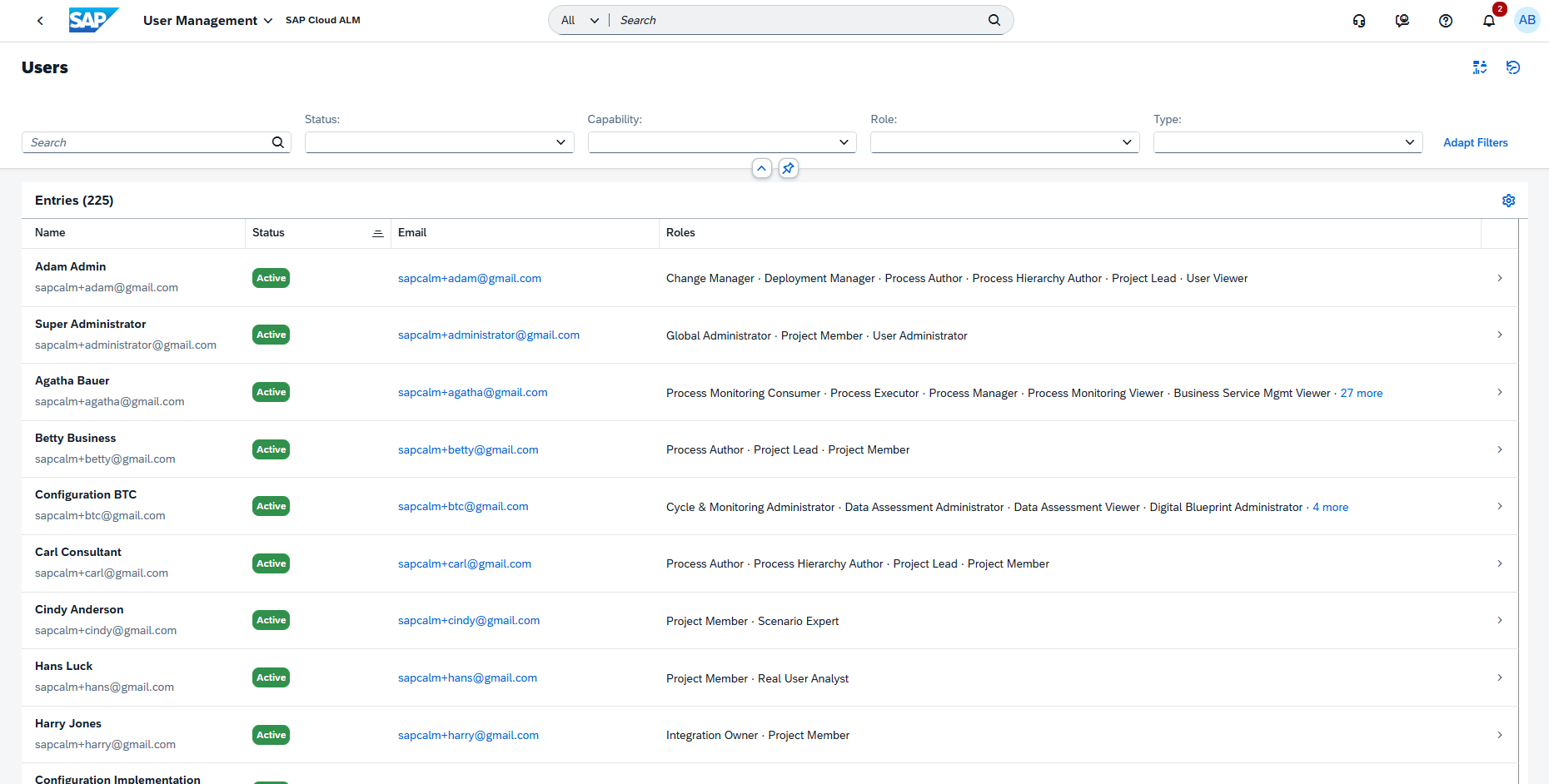
No configuration or migration is required. The Table View is already enabled and available automatically.
TL;DR:
The Card View has been discontinued, making Table View the standard for user management and providing more efficient bulk role assignment capabilities.