In the dynamic IT world, we often hear from our customers that agility has made release management obsolete. The trend towards immediately putting completed features into production seems to reinforce this belief. But is that really the case? Or is this a return to old habits? Old hands will remember how, in the old days, changes were simply shot into production on demand. So weren't the beginnings hyper-agile and why shouldn't they be today?
SAP released the latest Support Packages for Solution Manager 7.2 and Focused Build and Insights add-on (ST-OST) in the end of July. For SolMan it marks already the 15th SP and for ST-OST it’s the 10th. So small anniversaries, congratulations!In this post, we will highlight some of the changes coming with these new updates.
SAP held a Customer Connect last year, event where customers can give their input about the product – request new features, inform about old bugs or just give quality of life improvements. Which requests get the most votes in the SAP community, will be taken into development. This Customer Connect for SolMan (including Focused Build) featured this time areas for Process Management, Test Suite and Change and Release Management.
We have already installed the updates on our systems. The upgrade itself and following post-configuration did not cause any problems compared to some older updates. Of course this can vary from system-to-system based on the done modifications.
Operations and Focused Insights
Unfortunately there are no big news regarding Operations side as like already said, the update concentrated mostly on the Customer Connect and therefor the changes are for these functional areas. The only noteworthy additions come from the Focused Insights add-on.
First, SAP has provided the option to add you own OCC queries to the Tactical dashboard as a separate category. This opens up many possibilities to enrich the already good overview page of the Tactical dashboard.
Second news is regarding the ITSM data provider (DP_ITSM). SAP redesigned the data provider to use CRM data source, making the data more accurate. If you have created dashboards for ITSM, then you probably have also seen that the old DP_ITSM did not always give you the numbers as you would see in CRM. As a fallback, you had to use CRM saved searches (DP_CRM) to get the data. This change is a welcome improvement, although the metric selection is limited, so Saved Searches will still have their place on these dashboards.
Implementations
There are many smaller changes for implementations, which are really valuable. For example you will find new Fiori apps for quicker direct access from the launchpad and different new search fields for apps. Unified Business Partner search first introduced with SP09 for Test Management, has now been enabled to all the UIs in Focused Build.
There are too many to list them all, so we will concentrate on some of the highlights for us.
Test Suite
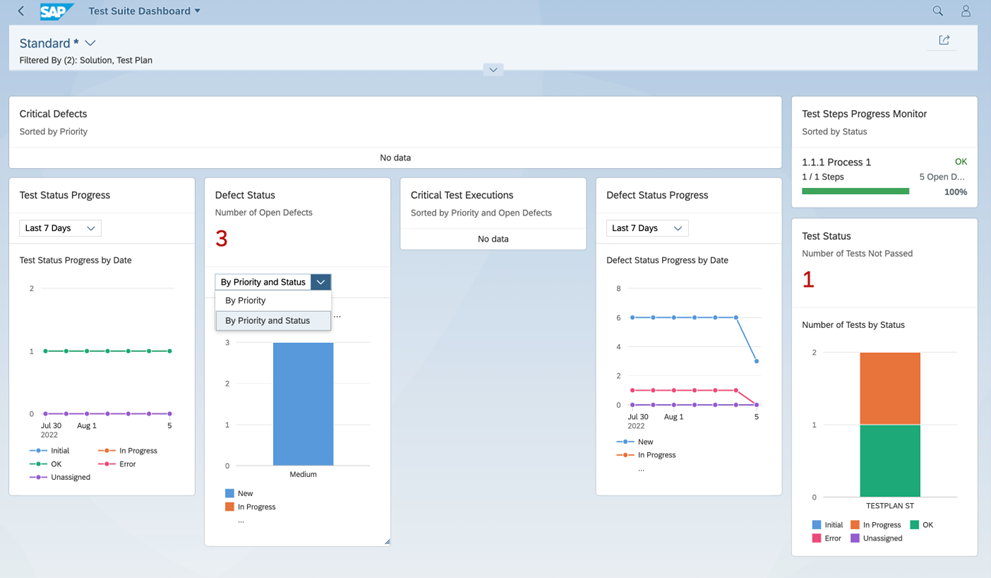
One of the biggest development pieces was the completely new designed Test Suite Dashboard. This was also one of the reasons why we are already productive with the new Support Package at the first of our customers. The new dashboard is very well done and reminds us of the great analytics features of SAP Cloud ALM – very well done SAP!
We are looking forward to using it productively in the next functional test phase of the S/4 implementation project.
Besides the new dashboard, it has quite a few new features in the testing section:
Test Suite sees many improvements. In a tester worklist, you can now directly change the execution status.
Create test package directly in test plan management.
New capability to execute test cases in parallel in a test sequence. A test package can be created directly from the Test Plan Management application by choosing Assign To Test Packages. Missing tests packages or sequences can be added to a new test plan with the new “add missing test cases” option to update the new test plan from the source plan.
Test plan preparation Completeness Report.
Change and Release Management
Multiple improvements have been made for ChaRM housekeeping. Fully imported transports (also the ToC) are now also removed from the queue by the Import feedback mechanism. Another option is to schedule the job SM:TMWFLOW_CMSSYSCOL with a retention period. This will then remove the import step logs and keep only the main import logs.
Some additional logging has been switched on. Now any changes to the CTS Status Switch will be logged and are visible in the tasklist under Display Application Log. Finally, it’s easy to find out who’s been bungling again! On change document level, now actions regarding critical objects or allow list objects are also logged in the text log. Both these improvements are welcome changes to increasing the transparency.
Handling of Transport of Copies sees also some changes. Normally, when a new ToC is created, it will blindly copy all objects of the source transport, even if they belong to subtasks which were already transported to the consolidation system by previous ToCs, which can be very cumbersome. A new parameter “AIC_TOC_DELTA_SWITCH” in table AGS_WORK_CUSTOM can be used to enable the feature to create a ToC only from new subtasks, which will for sure speed up the import. In the past, only ToCs created at status change were automatically imported into the consolidation system, now also ToCs created manually in the CRM UI Transport Management assignment blocks are automatically imported too.
Very nice is also the new functionality that filters the business partners to be assigned to a partner function by authorization role. For example if you customize that a Tester should own the role ZSAP_SOCM_TESTER, the “Search Employees” popup will filter the result list showing only BPs who own this role. Can be a huge speed-up in big companies with thousands of BPs.
There is also now a new Retrofit report – RETRO_SERVICE_CONFIG_CHECK. This will check the landscape configuration and will so help to troubleshoot any problems with Retrofit. There is also a new traceability report for FB Retrofit automation, /SALM/RETRO_AUTO_TRACEABILITY, that shows all the automatic retrofits that happened. As Retrofit is one of the most complex use cases in ChaRM. You will be happy that there is now.
For Cutover, there is now a additional user check “User check for Synchronize deployment” to help minimize the problems coming form missing users. When a post cutover action has canceled, it is now possible to continue where it left of and don’t have to start again every time.
Requirements Management
Mass change has now a Fiori based table layout, giving more flexibility to change different columns to better suite the user needs. Here we would like to refer to the Blogpost of Mohammed.
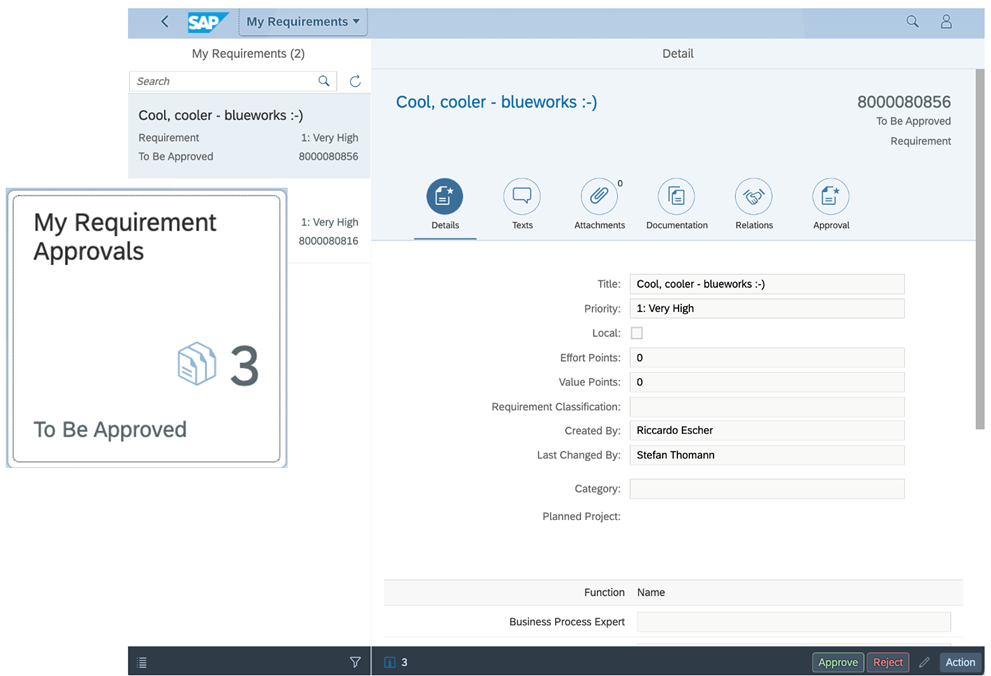
And also…there is now a new app – “My Requirement Approvals” that takes you directly to those Requirements that area waiting
The next SolMan update is scheduled for February 2023 – so stay tuned!
Operations or in short AppOps comprises all functions for monitoring alerting, analysis, and administration of SAP solutions, allowing to reduce overall costs for customer with predefined content and centralized tools for all aspects of SAP Solution Manager operations.
System copy is an option to do a system refresh or create another system so that all the developments and changes stay the same for both systems in the landscape. This also brings stability to the refreshed system if the system copy is done from productive system which will clean out all un-needed developments that have been piling up to development system.
A while back, SAP announced the general availability of SAP Cloud ALM for August 31st, 2020, and with it, introduced a third major tool to the SAP ALM portfolio. Now that the dust has settled, I’d like to address two common question I have received since: «So what exactly is the difference between Solution Manager and CloudALM?» and «Does this mean Solution Manager is dead?».
The SAP ALM Portfolio
To answer the first questions I want to take a look at the entire SAP ALM Portfolio and for good measure, throw Focused Run into the mix.
Focused what-now?
Focused Run. One of the three Focused Solutions that in itself is already the odd chicken in the pen, as it is a standalone tool, rather than an add-on to SolMan. While Focused Run is technically an ALM Tool, its customer targeting means, most of us mortals won’t ever be exposed to it in our SAP careers. Focused Run is designed for large scale operations, or scenarios that have more complex requirements, such as multi-tenancy concepts, and was introduced as an alternative to Solution Manager environments, where a typical SolMan setup simply can’t cope with the underlying environment.
For this reason, it deserves an honorable mention here, but really doesn’t fit into the comparison of SolMan and CloudALM.
Solution Manager
The Solution Manager, in its latest version 7.2, SPS11, is most likely known to us all. It’s the oldest tool in the comparison – one could say the original ALM tool and king of the portfolio.
Solution Manager has evolved over time to meet the requirements of the entire Application Lifecycle. It does so with four key value propositions: Portfolio-to-Project, Requirement-to-Deploy, Request-to-Fulfill and Detect-to-Correct. It introduces 10 functional areas to your SAP landscape that act as the landscape nervous system, serving as the single source of truth and central platform for day-to-day management. Notable areas of functionality are Process Management, Test Suite, Project Management, Business Process Operations, Application Operations, Data Volume Management, Change Control Management, IT Service Management, Custom Code Management and Landscape Management. Solution Manager is targeted to the “average” SAP ECC customer and can be deployed across all scenarios, including On-Prem, Hybrid and Cloud Solutions.
Focused Build is an add-on available through ST-OST that further enhances the Requirement-to-Deploy stream with agile project management, new UI5-Apps and other standalone enhancements. Focused Insights, also available through ST-OST, brings in-depth analytics and reporting to the entire landscape.
CloudALM
So, let’s take a look at CloudALM, the new kid on the block: CloudALM was announced by SAP at the Solution Manager Education Summit, SolEd, back in 2018, as an additional member of the ALM Portfolio. Public Cloud deployments have changed the way IT organizations need to maintain and manage their infrastructure. With many applications consumed rather as a service than a full-stack deployment, the needs toward monitoring and management changes. As an example, services such as HANA are increasingly managed centrally by SAP, keeping them up-to-date and secure, allowing consumers to focus solely on their business needs and not have to worry about those tedious support tasks.
CloudALM is SAP’s answer to the evolving changes – it comes as a brand new development, meaning that while it benefits from the experiences made with SolMan, they do not share a common code base. It is available for immediate consumption in the public cloud, as an always up-to-date cloud service that does not require basis administration for itself.
As a young product, general availability was announced for August 31st, 2020, it is still under development with many exciting features and functionalities to be added over the next few years. It focuses on two main modes of operation: Implementation, meaning implementing SAP solutions to your organization, and Operations, tasks evolving around keep your organizational needs up-and-running and continuously enhancing them. CloudALM is targeted toward customers looking to implement pure public-cloud based deployments, although hybrid landscape support has been announced in the near future.
I’m confused.
Aren’t we all. Maybe the following table makes it somewhat clearer to understand:
SAP Solution Manger
SAP Cloud ALM
On-Prem
X
Cloud
X
X
Hybrid
X
(X)*
Usage Rights
SAP Enterprise and Standard Support
SAP Enterprise Support, cloud editions
Development Status
Active, new features announced
Active, new features announced
Migration from SolMan
–
No, only greenfield projects
Functional Scope
Application Operations
X
(X)
Business Process Operations
X
(X)
Data Volume Management
X
No
Change Control management
X
(X)
Custom Code Management
X
No
IT Service Management
X
No
Landscape Management
X
No
Process Management
X
(X)
Project Management
X
(X)
Test Suite
X
(X)
Focused Build & Insights
X
No
Now that that is settled, it’s time to look at the second question.
So, is SolMan dead?
In short: In time, yes.**
Wait! Keep Calm and Read On!
Admittedly, the question is a hard one to answer and it’s not pure black-or-white. SAP has officially communicated that SolMan will stay an integer part of it ALM portfolio. The recent extension of support for Business Suite 7, as well as still active commitment to the customer connection program and development on SolMan, definitely give SolMan an additional lease on life. However, realistically, the trend to cloud is here to stay. And it won’t pass-by SAP. As more customers move to new deployment strategies, the requirements of an ALM tool also change. This will cause significant resource requirements for maintaining and on-going development of such a tool, let alone two. It will remain to be seen if/how soon SolMan will loose its seat on the throne to its new in-house challenger, CloudALM.
On top, I find the wording of SAPs answer on this question intriguing. They don’t answer it with a clear ‘No’, rather with
“SAP Cloud ALM is not a legal successor of SAP Solution Manager.”
Interesting, right?
So, is SolMan dead? – I personally believe it is not a question of if, but rather of when.
As for Focused Run, the advanced capabilities of the tool remain unmatched and nothing points to it being replaced. Therefore it is, at this time, very safe to assume that nothing will change here in the foreseeable future.
* Limited or Announced but not yet released ** Personal opinion of the author
Learn more about the ALM tools
[contact-form-7 id=”26123″ title=”Project quote”]
We use cookies and similar technologies to improve your experience on our website.