Leaving Solution Manager is not a question of whether, but how.
SAP has made it clear: SAP Solution Manager will not be further developed. For thousands of companies worldwide, this means the transition to SAP Cloud ALM is no longer a strategic option. It is a planned step that will come sooner or later.
But what sounds simple is complex in practice. Solution Manager has grown over years. It carries processes, governance structures, interfaces, and institutional knowledge. Anyone who replaces it without understanding what is really inside risks gaps, in control, in transparency, in operations.
This is exactly where the SAP Solution Manager Transition Service Partner Community comes in.
What the Community means
SAP built this partner community to help companies find experienced and qualified partners for the move from SAP Solution Manager to SAP Cloud ALM. The listed partners are rated as qualified by SAP and can be found and contacted directly through the official SAP portal.
We are pleased to share: blue.works is officially part of this community.
The listing confirms our expertise and sends a clear signal to our customers: when it comes to transitioning from Solution Manager, we are the right contact.
How we help: the alm360 Assessment
A successful transition does not start with the tool. It starts with clarity.
Where do we stand today? Which Solution Manager functions do we actually use productively? What of those will be covered in SAP Cloud ALM, and what will not? What gaps will arise, and how do we close them?
These are the questions that need answers before any migration. Our alm360 Assessment delivers exactly those answers, structured, practical, and within 2 to 3 weeks.
The three phases of the alm360 Assessment
Phase 1 – Discover: Understand, structure, define the target picture. Together with your stakeholders, we analyze your system landscape, your ALM processes, and your strategic goals. We show relevant SAP Cloud ALM use cases and build a shared understanding of where you are headed.
Phase 2 – Prepare: Evaluate what exists, measure maturity, identify gaps. We run a structured ALM readiness check, analyze your existing tools including Solution Manager, and assess your processes across the core ALM disciplines: Change, Test, Deploy, Monitoring, and more.
Phase 3 – Explore: Develop the target picture, plan the implementation, deliver the recommendation. The result is a prioritized roadmap: which SAP Cloud ALM functions are relevant for you, in what order you should proceed, and what the next concrete steps are.
What you receive
A clearly prioritized ALM roadmap
An assessment of your existing tools and processes
Recommendations on configuration, governance, and methodology
A complete final report as a basis for decisions and planning
Clarity before the go-live. Not after.
Many companies start with the tool and only realize later that the foundations are missing. Governance is unclear. Processes are not defined. The benefit does not materialize.
The alm360 Assessment deliberately reverses this order. Structure first. Tool after.
This has been our approach for years, across dozens of projects, with customers of different sizes and industries.
Get informed now
You are planning to replace your SAP Solution Manager, or you are already in the middle of preparation?
Full of enthusiasm, we ventured into the ALM Cloud and used Selective Data Transfer (SDT) to upload our Solution Documentation (SolDoc) to SAP Cloud ALM (CALM) and (rather laboriously) to our DMS.
Success stories often don’t start where you expect them to. In the case of blue.works and fenaco, it begins in 2018 at the SAP ALM Summit in Heidelberg, or rather at the SAP Solution Manager Education Summit 2018 (SolEd) (as the SAP ALM Summit was previously known) – not with a project assignment, but with a presentation.
We were on stage for the first time to present our implementation with SAP Focused Build to an international audience. Nervousness and pride went hand in hand. It was a big moment for us – not just because it was our premiere, but because we could feel it: We have built something that has substance.
The fenaco team was in the audience. They had also arrived with a clear mission: To strategically develop their test processes in SAP Solution Manager. What happened next was unplanned, but groundbreaking. Even in the first conversations between the presentations, it became clear that two teams were meeting here who had more in common than just their specialist area.
Shared values as a foundation for cooperation
What struck us immediately was the common approach to challenges: structured, reflective, with a deep understanding of sustainable IT processes. That same evening, we deepened our exchange – it was about more than just technical details. We discussed SAP architectures, methodology, project management and quality. It became clear that we not only speak the same language, we also share the same values.
These values – openness, pragmatism, transparency and reliability – are central to blue.works and were also practiced at fenaco. A technical discussion turned into getting to know each other. Getting to know each other developed into trust. And this trust became the basis of a long-term partnership.
You can find out more about the values that guide us every day at blue.works here: Our values at blue.works
The first joint step: Focused Build at fenaco
A few months later, the first collaboration began. We were able to support fenaco in setting up their Focused Build solution for SAP ALM. A project that was not only methodically exciting, but also deepened trust. The collaboration worked right from the start – both in terms of content and on a personal level.
We realized that this partnership would not be an isolated case. The way we communicated, the mutual understanding and the shared quality standards made us want more. And there was more.
The milestone: the “finaco” project
One project that was special for both sides was called “finaco“. The aim was to set up a central central finance (CFIN) solution for the entire fenaco Group – a complex, company-wide initiative with high demands on coordination, integration and operation.
Our task was quality assurance – especially in testing. At the same time, fenaco had two very experienced people in release management and operations, Tom and Carla, who had clear requirements and responsibilities. This constellation inevitably led to intensive coordination – and sometimes to friction.
But this is precisely where the quality of the partnership became apparent: the discussions were constructive, often passionate, but always goal-oriented. It was never about defending positions, but always about finding the best solution for the project and the company. Trust continued to grow – not despite the challenges, but precisely because of them.
Quality, responsibility and cooperation in a triad
One particular aspect of the project was the close cooperation between project management, operations and quality assurance. All three areas had clear requirements and responsibilities. The ability to combine these perspectives without losing sight of quality or the schedule was one of the project’s great strengths.
In testing in particular, it became clear how valuable it is to work together as partners. Quality is not a product that is controlled at the end – it is created through continuous dialog, careful planning and mutual trust.
What we have learned – and what remains
Technology is changing. Systems are replaced, processes are developed further. But what remains after a project is not just documentation or systems, but the relationships that have developed during this time.
In our collaboration with fenaco, colleagues have become partners, and in many cases even friends. Shared experiences – from go-lives to intensive workshops, from difficult moments to small successes – have shaped us.
Our most important findings from this period can be summarized as follows:
Trust is the basis of every successful IT collaboration.
Quality is created where people work together openly and respectfully.
Long-term success does not start with the best tool, but with the right people.
Conclusion: A partnership that lasts
Our shared history with fenaco is a prime example of what real partnerships in the SAP environment can look like. They often start quietly – with a conversation, an idea, an initial collaboration. But if they are based on shared values, they can result in solutions that go far beyond the technical.
Today, we are proud of what we have achieved together – and grateful for what it has become: a strong, respectful and sustainable partnership that will continue in the future.
Would you like to find out more about our projects with SAP ALM?
Then visit our project portfolio or contact us directly. We look forward to dialog – and to new partnerships based on trust.
SAP landscapes are rarely purely on-premise these days. Many companies are now juggling hybrid setups – a mixture of on-premise systems, cloud applications and externally hosted solutions. This puts IT teams under increasing pressure: updates, security, performance and compliance not only have to be guaranteed, but also constantly monitored. Our Stefan Thomann has already explained this problem in more detail HERE and also presented possible solutions. But who takes care of implementing and operating these solutions when the day-to-day business already ties up more than enough resources?
This is exactly where our approach comes in: With the alm360 operations packages from blue.works, we take the pressure off your internal teams and at the same time ensure that your SAP landscape remains stable, secure and performant – regardless of whether it is hosted internally, operated via a provider or as part of RISE with SAP.
The importance of SAP Cloud ALM in modern operations
SAP Cloud ALM (Application Lifecycle Management) is a cloud-based tool that supports companies in efficiently implementing and operating their SAP solutions. It offers functions such as monitoring, troubleshooting, performance optimisation and security management, which are essential for smooth operation. By integrating SAP Cloud ALM, companies can monitor the health of their SAP landscape in real time and respond proactively to potential problems.
SAP Cloud ALM is also the official successor to SAP Solution Manager, which will be phased out of maintenance at the end of 2027. Companies that are currently still using Solution Manager should switch to SAP Cloud ALM at an early stage to ensure that they continue to have a comprehensive and future-proof ALM solution.
Our offer: alm360 Operations – precisely tailored to your needs
With alm360 Operations, blue.works has developed a service offering that is specifically designed to support and optimise SAP environments with the help of SAP Cloud ALM. We have already described in more detail why we see this as added value HERE. Regardless of whether the systems are hosted internally, with an external hosting provider or as part of ‘Rise with SAP’, alm360 Operations ensures the stability, performance and scalability of the SAP landscape. Two packages are available: Basic and Advanced. Our Marko Laius has already described the two packages HERE and further details can be found on our website HERE.
alm360 Operations Basic
In this package, blue.works ensures that SAP Cloud ALM always runs smoothly – whether after fortnightly updates, interruptions or system copies.
The Basic package offers the essential services for maintaining and optimising the SAP landscape:
Configuration management: Ensuring correct configuration of SAP Cloud ALM and seamless integration of all systems.
Connection continuity: Ensuring a stable connection between the systems and SAP Cloud ALM, even when expanding the landscape.
Vulnerability monitoring: Continuous monitoring for potential security risks and proactive notification of new vulnerabilities (CVEs).
Expert Support: Specialist support for the elimination of identified weaknesses and general operational issues.
alm360 Operations Advanced
The Advanced package builds on the Basic package and offers additional services:
blue.works Health Check: A detailed health check based on best practices that goes beyond standard monitoring and provides deep insights into the system status.
Extended system maintenance: Comprehensive maintenance services, including the implementation of SAP notes and validation of backups.
Safety audits: Quarterly audits to ensure system compliance and preparation for external audits.
Configuration and security analysis: Setting up and monitoring analyses to ensure compliance with security standards.
Synthetic User Monitoring (SUM): The implementation of Synthetic User Monitoring makes it possible to continuously monitor business-critical processes by executing simulated user actions in real time. This helps companies to identify problems in the user experience at an early stage and react quickly. blue.works takes over the setup, hosting and ongoing maintenance of the SUM scripts to ensure that the monitoring always remains up-to-date and functional.
Advantages of the alm360 operations packages
Implementing the alm360 operations packages from blue.works offers companies numerous advantages:
Proactive monitoring: Continuous monitoring enables potential problems to be recognised and rectified at an early stage before they affect business operations.
Security management: Active monitoring and elimination of security gaps protects the integrity of systems and data.
Efficient system maintenance: Regular maintenance work and updates ensure optimum system performance and longevity.
Compliance and audit readiness: Thanks to regular audits and analyses, companies are always prepared for external audits and meet compliance requirements.
The added value that blue.works delivers
blue.works takes on numerous essential tasks to ensure the operation and efficiency of SAP Cloud ALM:
Ensuring that systems and services are added correctly in Cloud ALM.
Clean and clear grouping of systems and services.
Continuously check the connection status of all systems and services.
Ensuring a smooth data collection process without interruptions, including direct communication with SAP when required.
Checking and adjusting the system configuration after the regular fortnightly updates.
Restoring and ensuring the functionality of activated use cases after system copies.
Proactive notification of required updates (ST-PI) or notes in connection with Cloud ALM.
Monitoring of alerts with active contact to the customer or SAP, including direct processing.
Proactive support in solving recognised problems – in close cooperation with the customer, external partners or SAP.
Support for the operation of the entire SAP landscape that goes beyond pure cloud ALM.
Direct access and communication with SAP Cloud ALM product developers for the benefit of the customer.
Conclusion
With the alm360 Operations packages from blue.works, we offer a comprehensive solution for optimising your SAP operations with the help of efficient application lifecycle management. By combining SAP Cloud ALM with blue.works’ customised services, companies can make their SAP landscape efficient, secure and future-proof.
Another decisive advantage is the relief of internal teams. Instead of using valuable resources for time-consuming monitoring, internal employees can concentrate on more strategically important tasks. The implementation of alm360 Operations enables companies to deploy their IT and SAP experts specifically for innovation projects and business-relevant topics instead of reactively responding to system problems.
What sets us apart from other providers? We are not only SAP Cloud ALM experts, but are also closely involved in the further development of the tool – including a direct line to SAP product development. As a result, we often implement optimisations more quickly before they are officially published. Our packages grow flexibly with your system landscape – without rigid service boundaries. And we communicate clearly, without unnecessary escalation levels – because we know that every minute counts during operation.
For SAP departments that want to maximise the added value of their SAP investments, the alm360 Operations packages from blue.works are a worthwhile investment in the future of the company. You gain full control over your SAP landscape, reduce operational overheads and free up time for what really counts: focussing on innovation and added business value.
Is it the dawn of SAP Solution Manager or is it the rise of SAP Cloud ALM as this lone feathered Feature soars towards Production? It is both.
Since we are in a phase of transition, I will focus here on the question of how to use Features to bring transport requests of an OnPremise ABAP system from Development to Production.
This use case is also attractive for SAP customers who have previously given ChaRM and/or Focused Build a wide berth.
Here I focus on the so-called user experience and governance when using Features to handle OnPremise transports.
We will use our existing knowledge to contextualize these new Features. By the way, I’m talking about the state of the second half of October 2024 – this needs to be emphasized, as new functions are released every two weeks.
As we all know, SAP has a gigantic department that is constantly coming up with new names for one and the same function. Here, too, it was very successful: even at first glance, a Feature seems to be just a nice new name – who wants bugs – for the good old Change Document. There is also no longer any talk of transports in the Transport Assignment Block, but the latest buzzword is now “Deployment Orchestration of Transport Containers”.
At second glance, the Feature reminds us of the good old TMS Workflow.
Creating or referencing
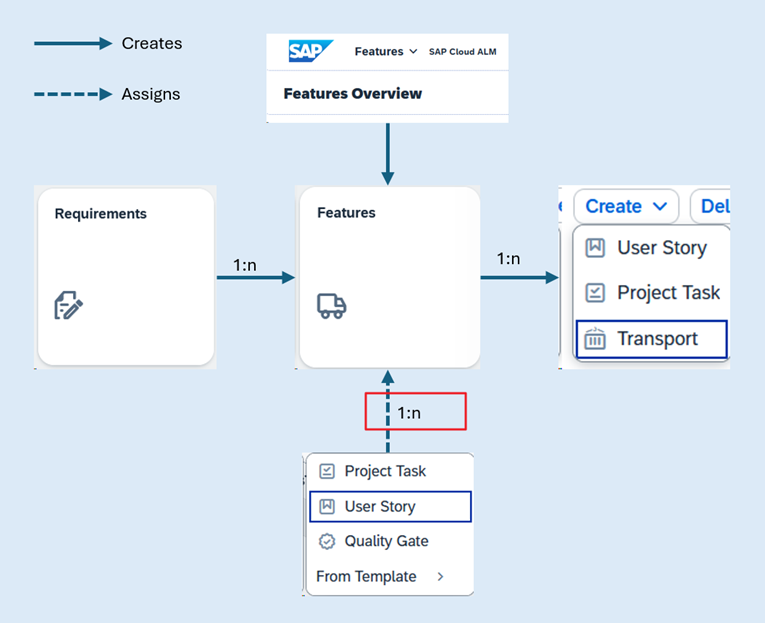
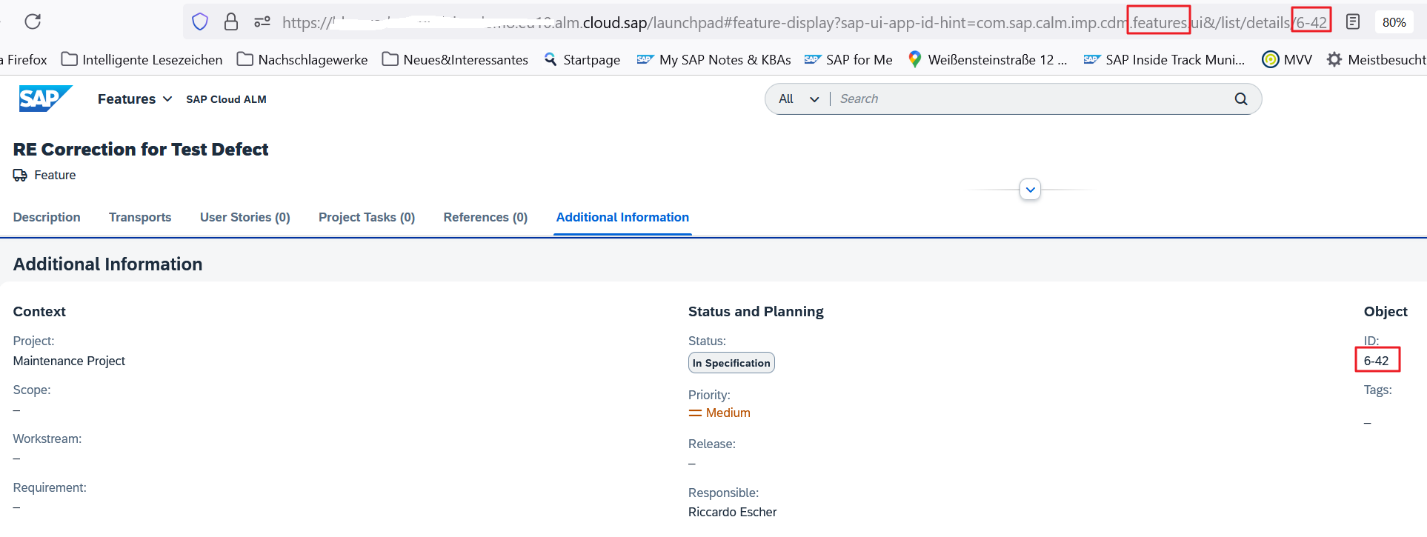
As of today, Features can only be created from the “Features Overview” or from a “Requirement”; in addition, you can reference exactly one Feature from a “User Story”, and only here.
In a Feature, you can not only create Transport Requests, but also User Stories and Project Tasks.
It was also possible to create Tasks (Transaction Type “1003”) as successor documents in ChaRM Change Documents.
I demonstrated to colleagues how this could be used to involve additional team members in a change process instead of contacting them by e-mail, which would establish a holistic concept of the Change Document, with which one could achieve very good documentation (traceability), but this was never accepted, it stayed with the informal e-mails.
I therefore fear that the option to create follow-up Tasks will also be left unused in the Feature.
Error correction during testing
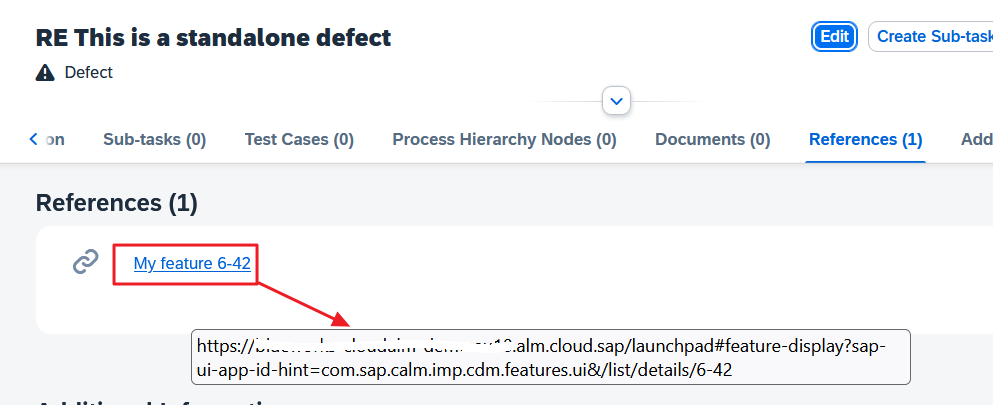
What really surprises me is that there is still no direct link between a test defect (technically a task type) and a Feature. You have to take a detour here.
First you have to create the Feature:
Only then can you add the URL of the new Feature in the Test Defect as a reference using copy&paste:
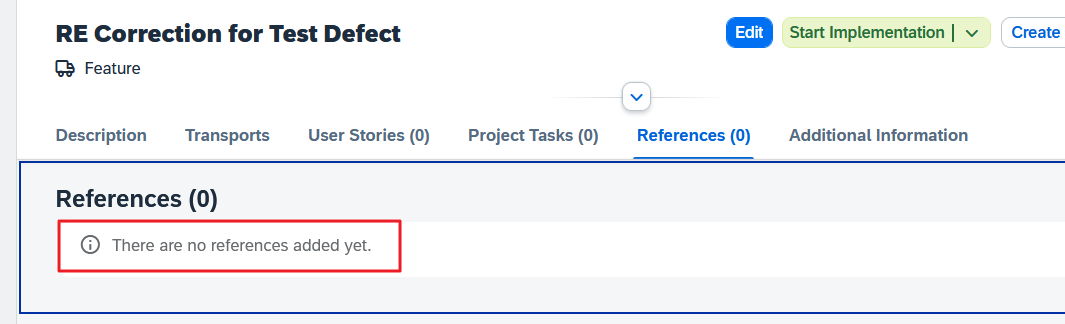
If you want to document in the Feature for which Defect you are working, you have to repeat this procedure for the other direction (URL of the Defect as a reference in the Feature), because there is no automation here yet:
I already anticipate that this cumbersome manual linking will not meet with much acceptance.
In contrast to ChaRM and more in line with Focused Build, Features are always linked to Cloud ALM Projects.
These Projects reference a “Deployment Plan”, which is similar to a ChaRM Change Control Landscape (CCL), and just like the latter, this “Landscape” contains one or more “System Groups”. Each “System Group” in turn contains a Track, which was previously called a Logical System Component. This means that, as before, several tracks can be used with one Change, oh, sorry, Feature.
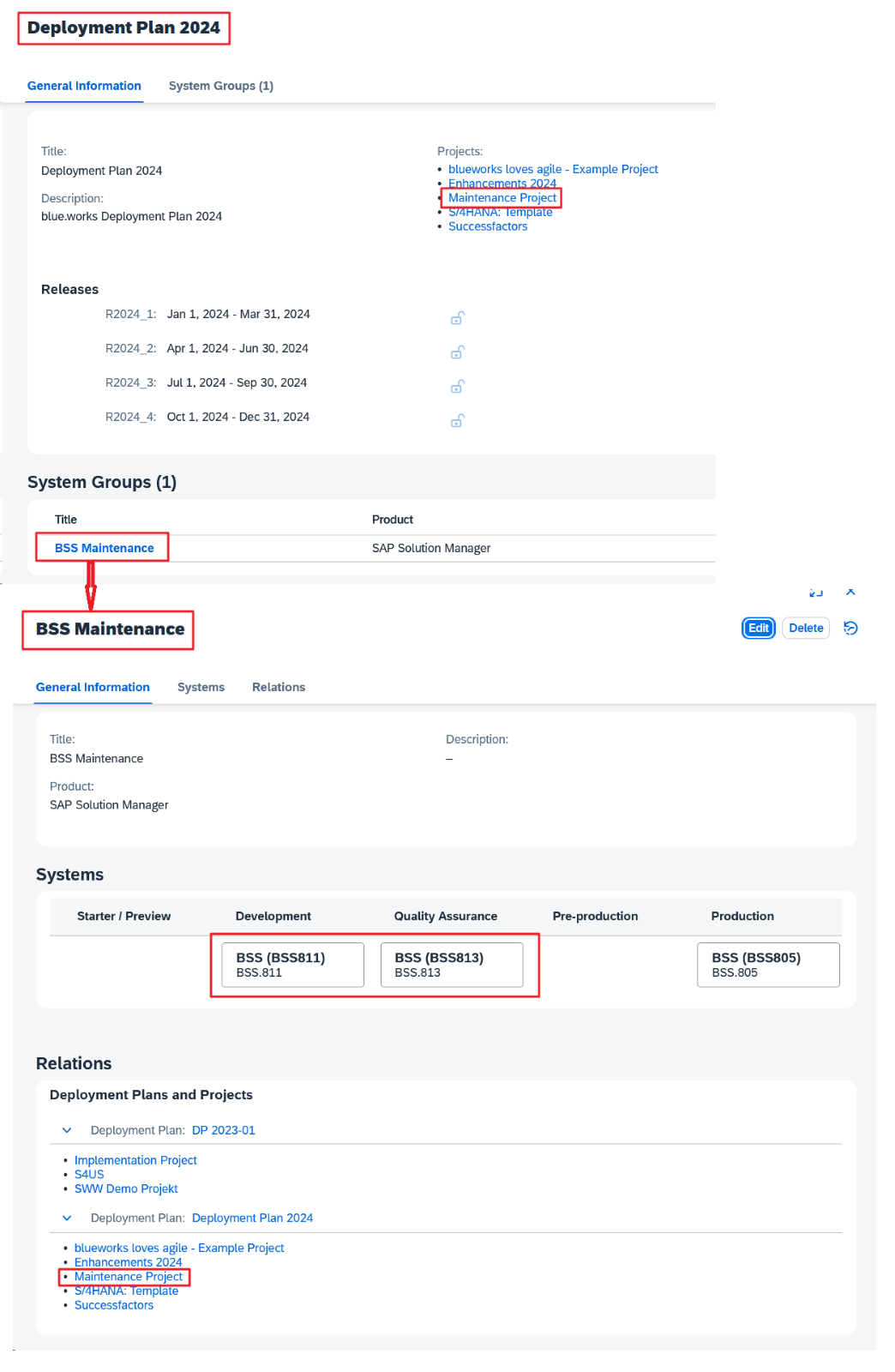
In our examples, we use a Project called “Maintenance Project”, which uses the creatively named Plan “Deployment Plan 2024”, which in turn only knows one System Group, namely the equally originally named “BSS Maintenance”.
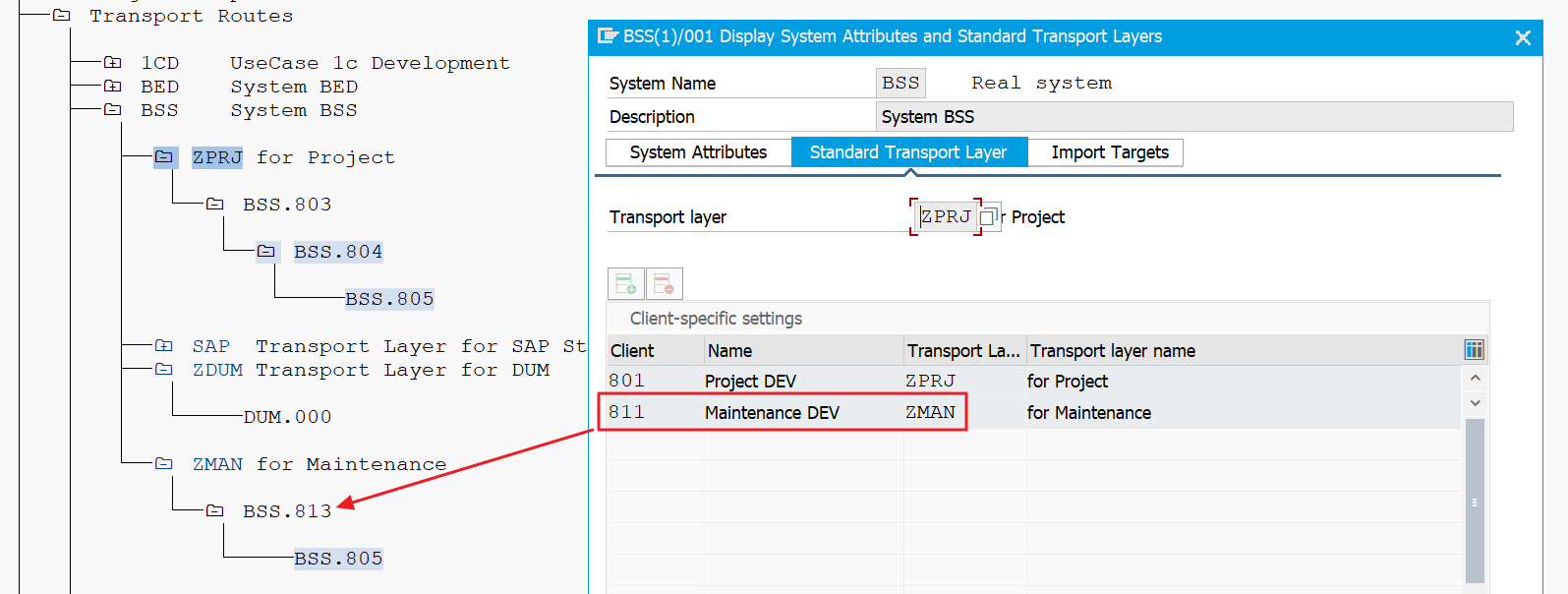
Our demo landscape on the OnPremise ABAP system has two tracks, a four-system track for projects (BSS.801 🡺 803 🡺 804 🡺 805) and a three-system track for maintenance (BSS.811 🡺 813 🡺 805).
The maintenance Project is also defined accordingly in Cloud ALM:
The counterpart would be “BSS Project”, but is not used in our examples.
We try out the creation of a transport request
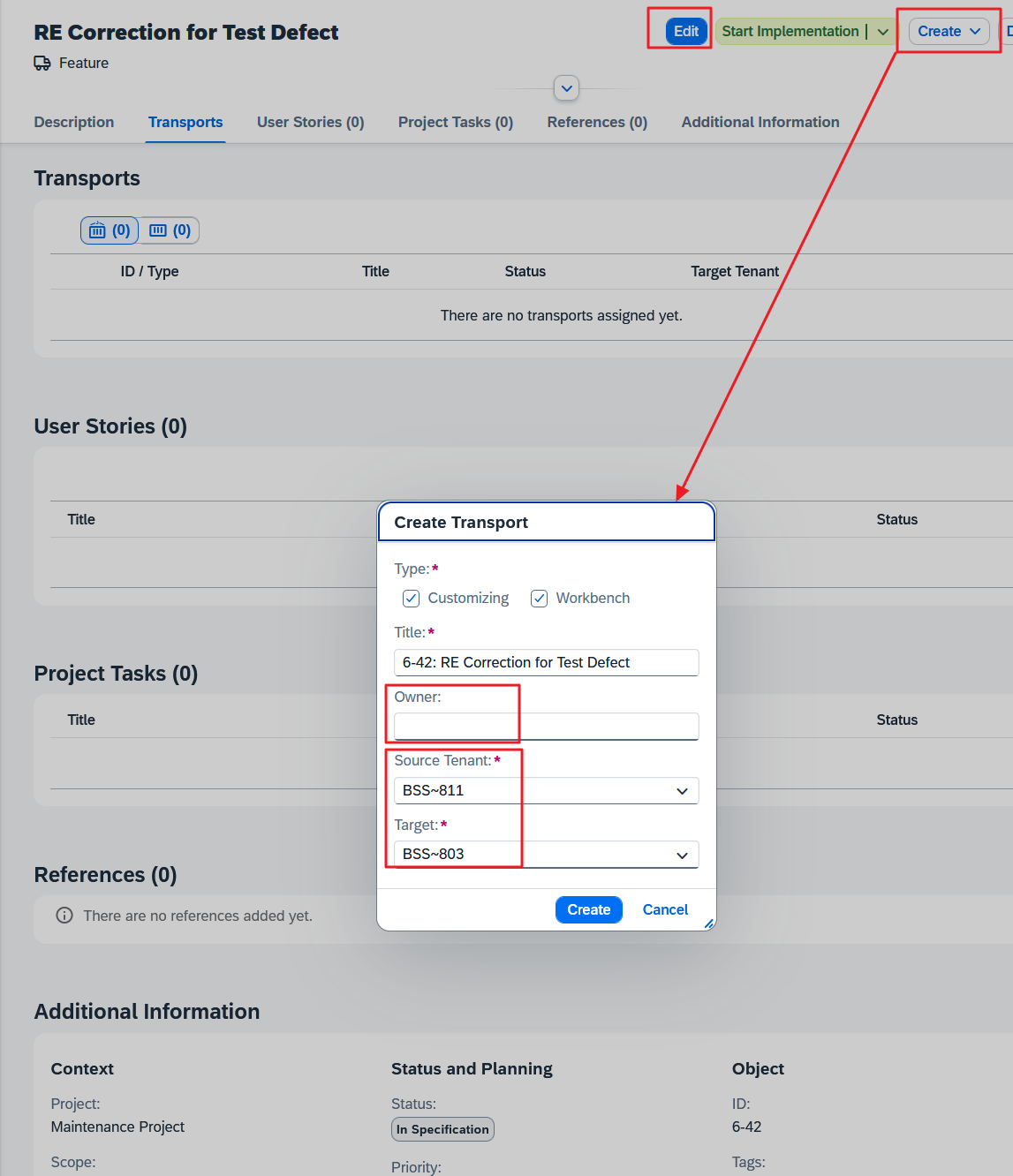
Our screenplay: We don’t want to draw anyone’s attention to our developments in order to avoid discussions, so we leave our Feature in the “In Specification” status and create transports straight away, because it is already possible in this initial status! To create transports, we need the powerful “Project Lead” role, which of course that is why it was granted to us.
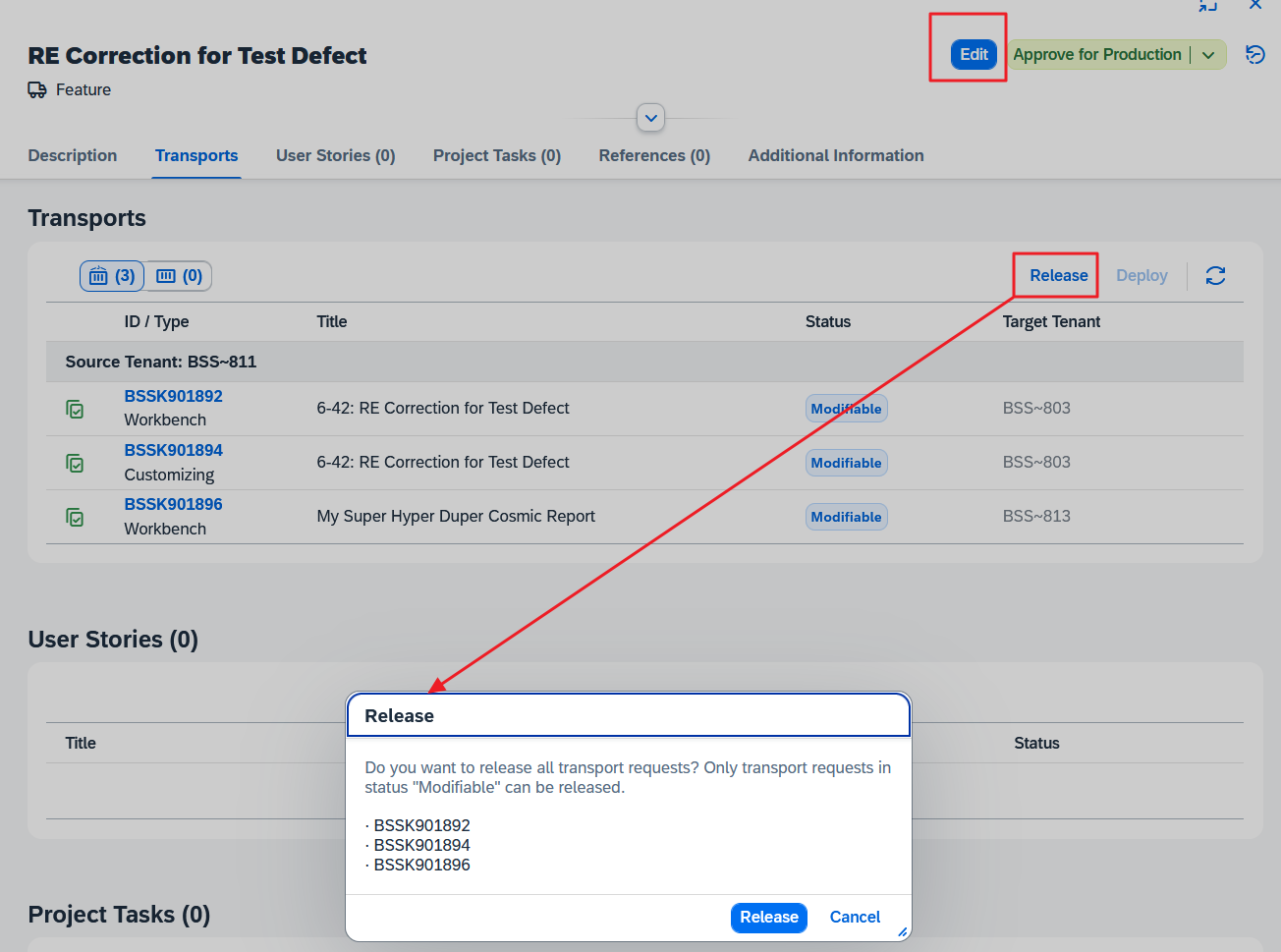
It is strange that – in contrast to ChaRM – you can only create transports if the Feature is not in change mode (see the active Edit button), and this Create button is in the Feature header, as if a transport were an entity on the same level as User Stories etc.
However, if you want to add an existing transport to the Feature, you must switch to Edit mode instead and then navigate to the “Transports” section.
You get used to it.
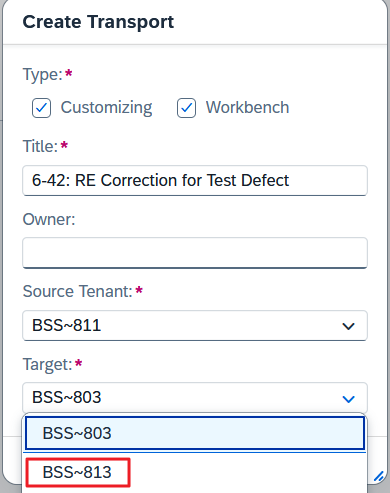
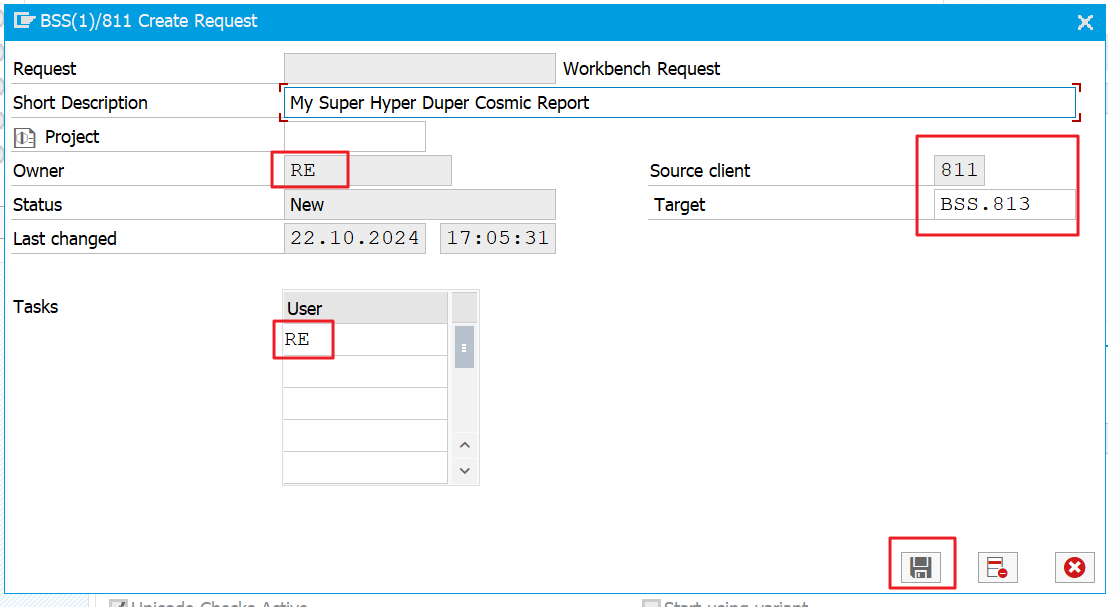
BSS~813 would actually be the right choice for the “Target” of the “Maintenace Project”, but its “Deployment Plan” is ignored and the extraneous consolidation system BSS.803 is offered first.
All right. I’ll pretend I’m as scatterbrained as I actually am when I’m in a hurry.
I overlook the fact that the wrong consolidation system is offered for the maintenance development system BSS.811 and wave the transport creation through.
I also overlooked the fact that there is an “Owner” field and left it empty. This input field was missing a value help for the possible User IDs from the development system anyway.
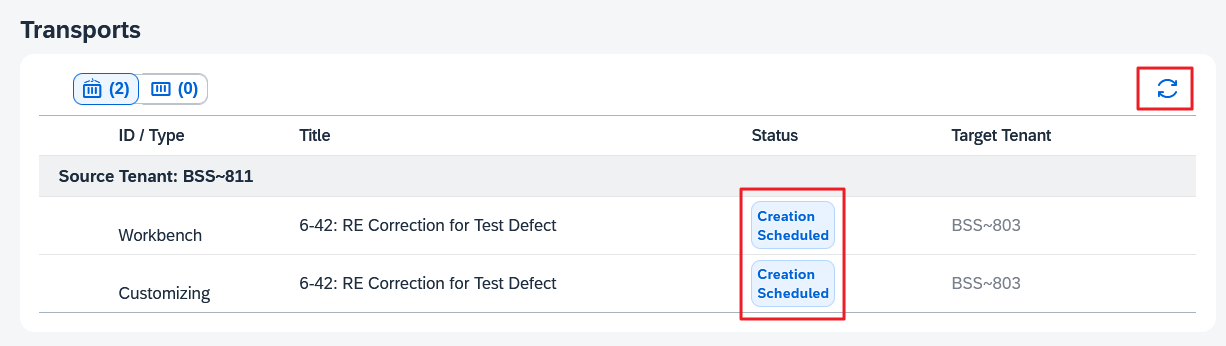
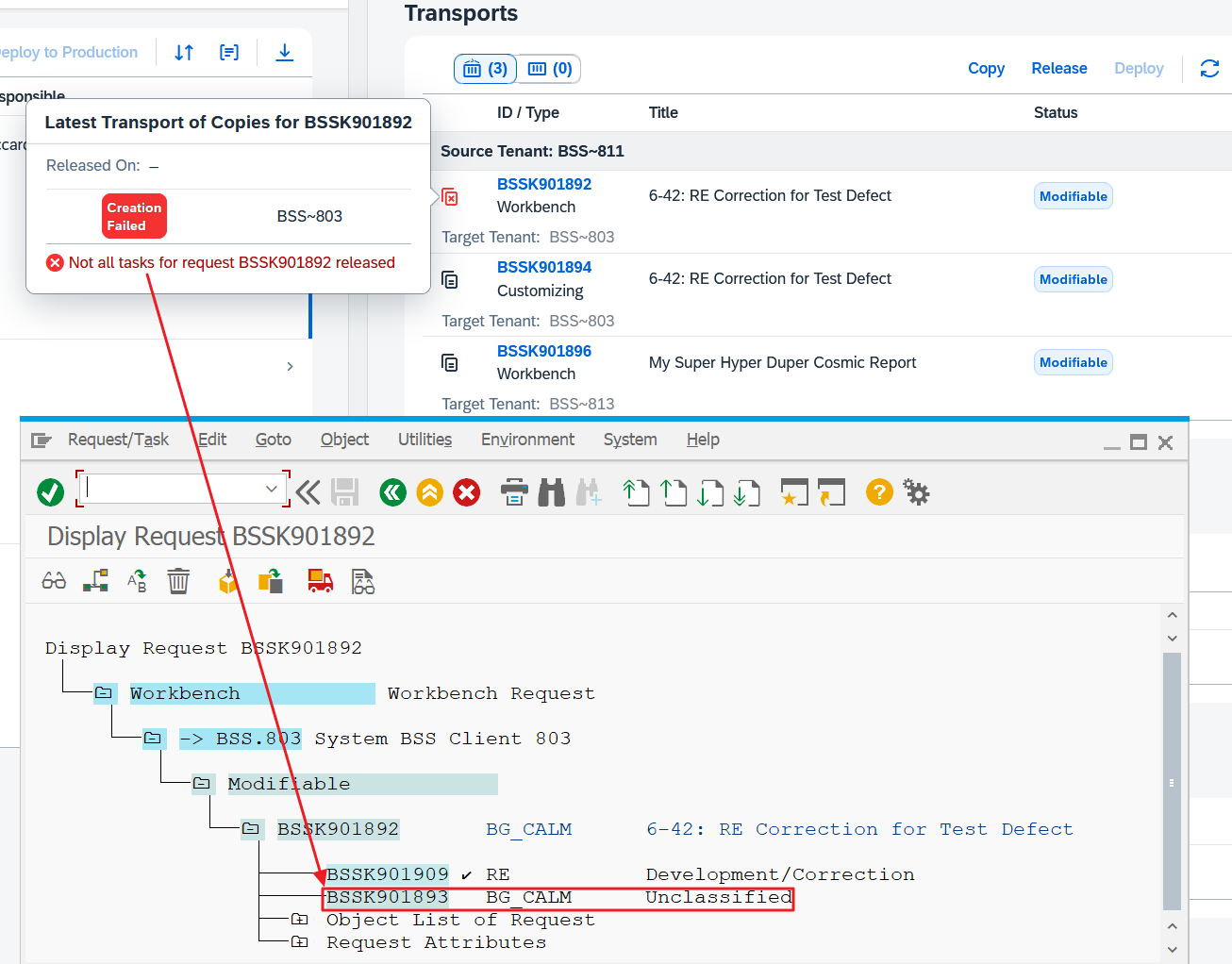
As only a flag for a transport creation is created in Cloud ALM, we now have to wait until the batch jobs finally start on the BSS.811 system and fetch the task from Cloud ALM, execute it and return the result. This means patiently pressing the refresh button repeatedly:
Soon we will have made it:
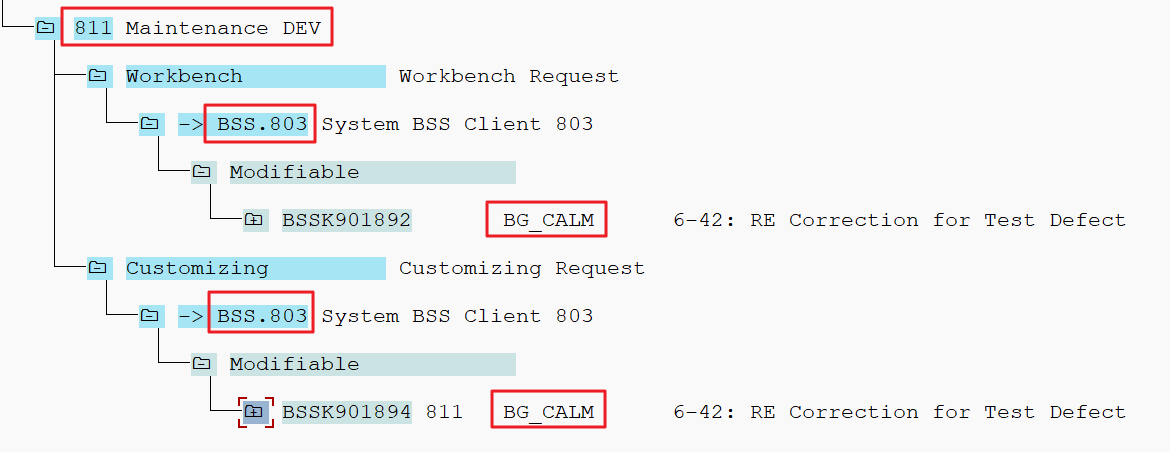
We log into the maintenance development system and initially do not find the transports in transaction SE09, because we have left the optional field “Owner” empty and thus the owner of the batch job has been used, in our case “BG_CALM”:
Not a big problem if we have the authorization in the development system to change the owner of a transport.
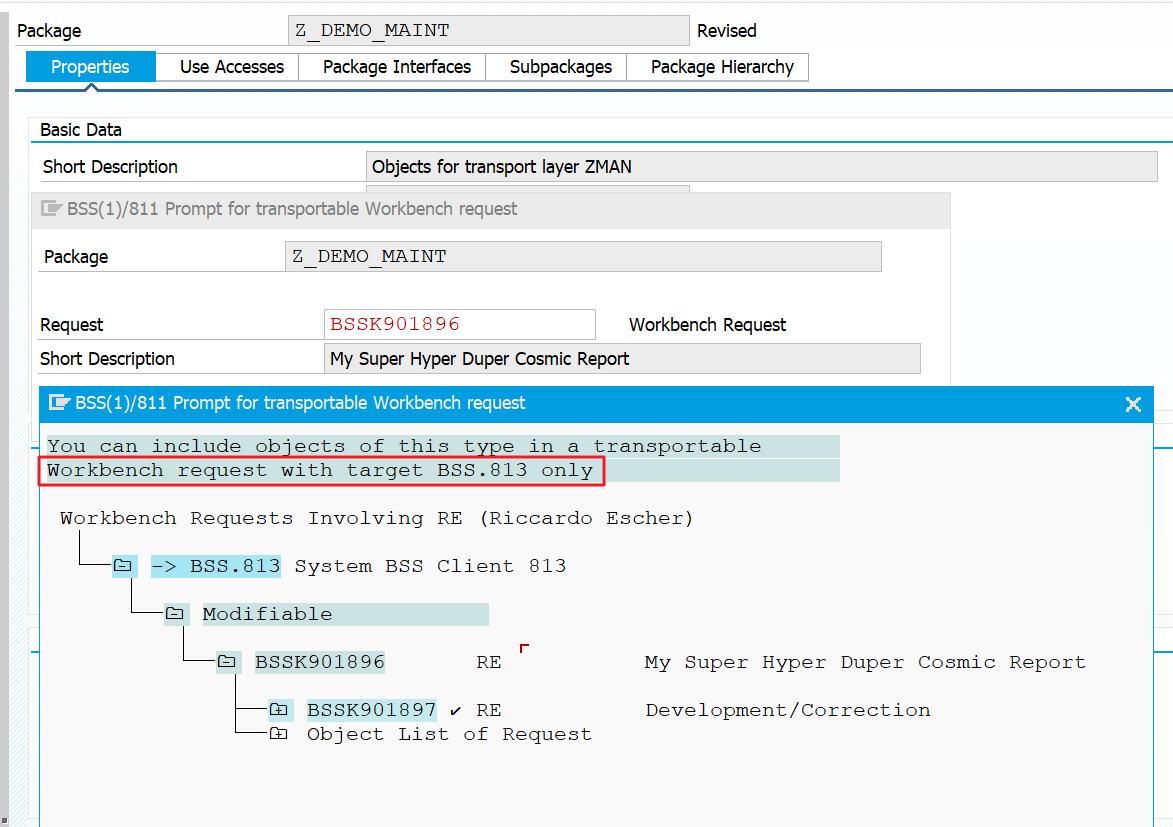
But if we want to work with the transports we have just created, we immediately encounter problems:
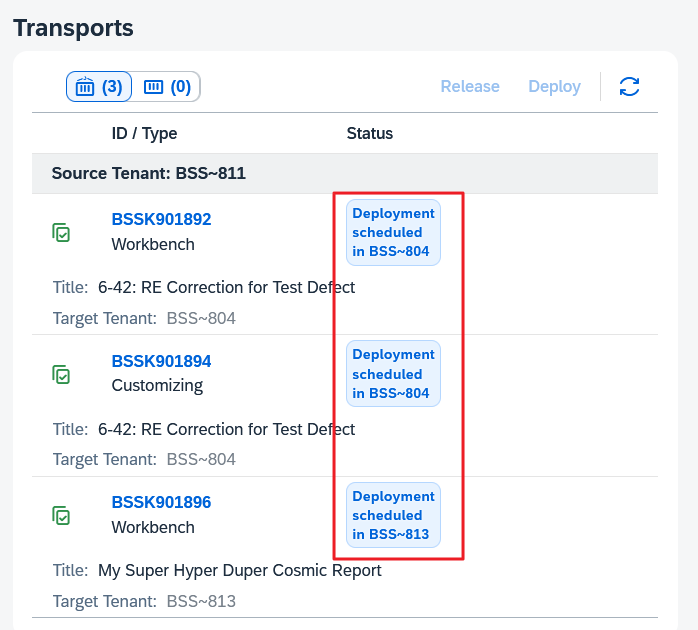
The transport BSSK901892 actually intended for development is not offered for selection, as it unfortunately has the wrong destination.
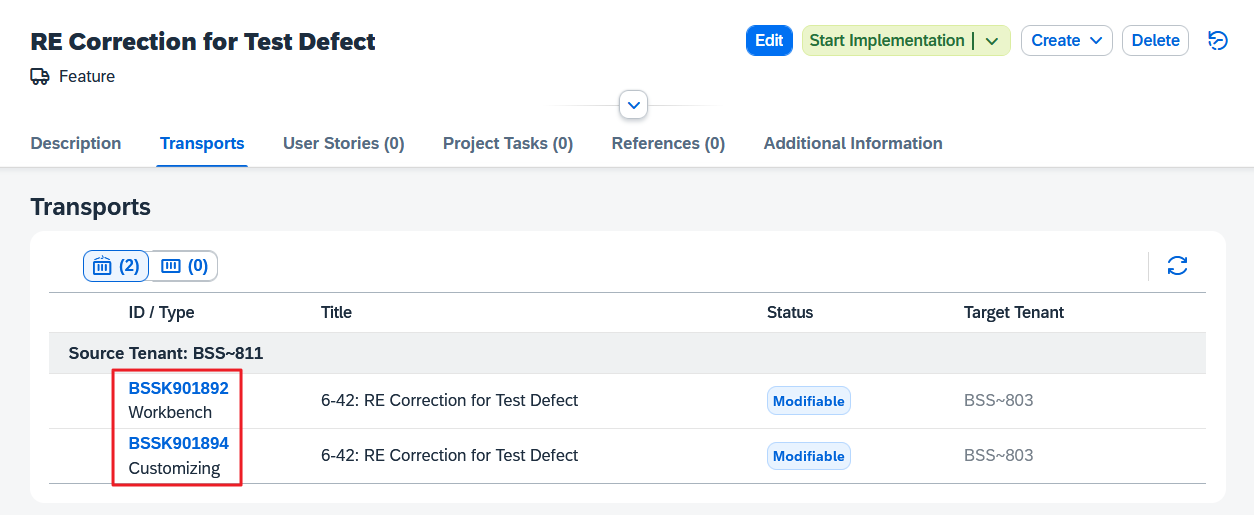
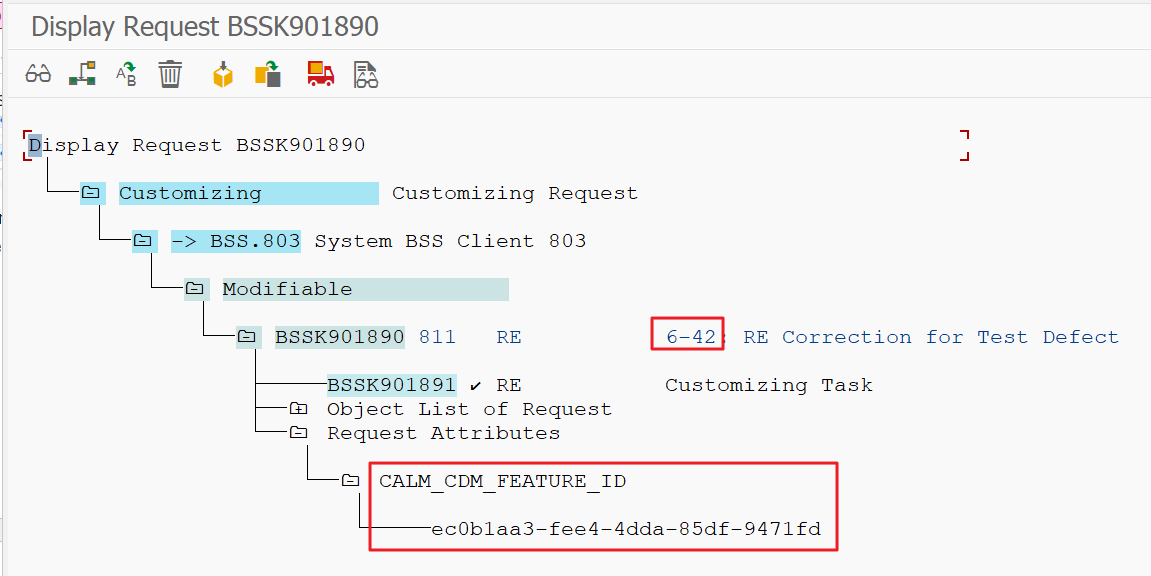
Despite existing pitfalls to be aware of, creating a transport from a Feature has the advantage that both the descriptive and the technical Feature ID are documented:
It is better to add transports
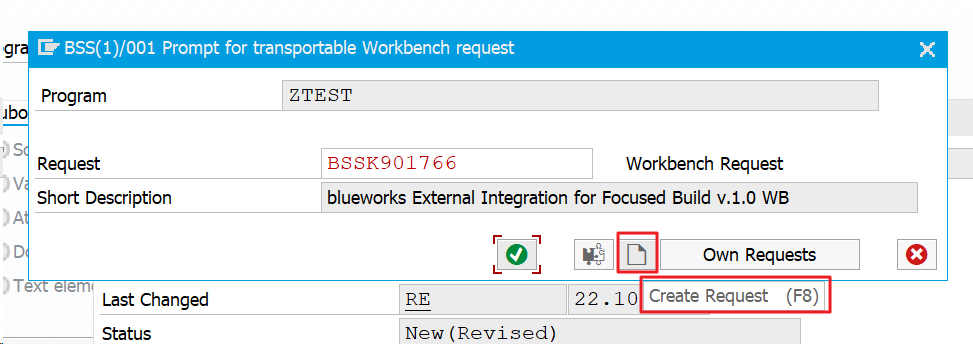
Because of this error-proneness, it is better in my opinion to create a new transport from the respective application during development and/or customizing – as in R/3 times:
You also do not need the same extensive authorizations as for creating transports (see above).
The advantage is that the Change and Transport System (CTS) automatically sets all values (Owner, Target) correctly:
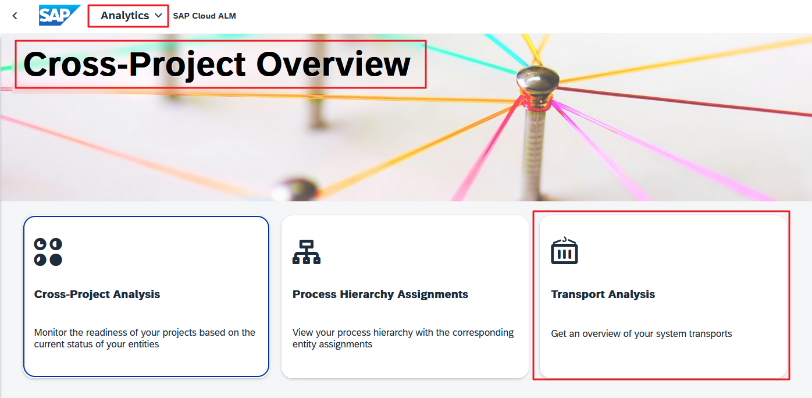
The high-frequency synchronization job sends this transport data to Cloud ALM so that it will soon be visible. This can be checked with the “Transport Analysis” app, for example:
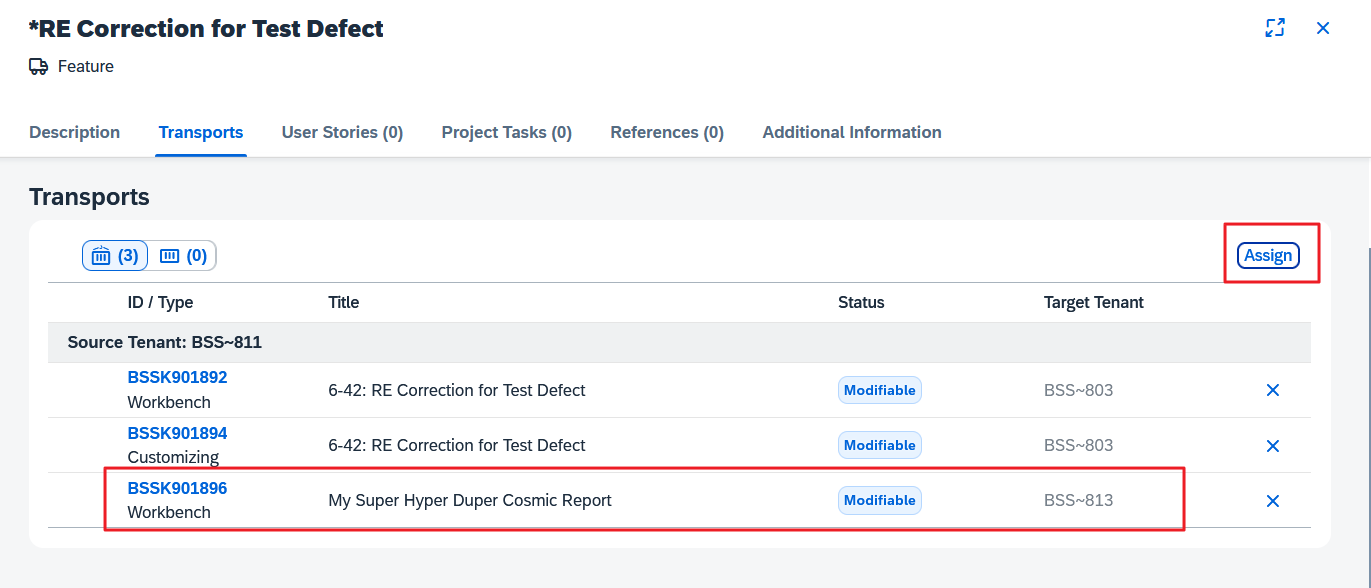
If the new transport is known in Cloud ALM, we can set the Feature to change mode and “Assign” the new transport:
Fortunately, the Assign dialog only offers transports that have the Source Tenant BSS~811.
The only disadvantage of this procedure is that the technical Feature ID is not documented as an attribute of the transport. But this has no consequences.
Difficult coexistence
Since the early days of ChaRM, we have had to turn on the CTS Project constraint when setting it up correctly so that the project switches for transport actions force only the ChaRM (or Focused Build) to be able to create, release and import transports.
However, Cloud ALM has been simplified here and therefore no longer knows any CTS projects. So you should use transaction SE03 🡺 “Display/Change Request Attributes” to remove again this obligation to enter the SAP_CTS_PROJECTS.
There is no “Selective Data Transfer” to Cloud ALM for ChaRM and Focused Build. You have to work through and finally complete their cycles and only create anything new by Feature in the meantime.
If you wanted to maintain the strict governance in ChaRM in this phase of coexistence, you would have to revoke the authorization to release transports (authorization object S_TRANSPRT, Activity 43) from all users in the development system in order to gently force the switch to cloud ALM Features, but who can do that on an established development system?
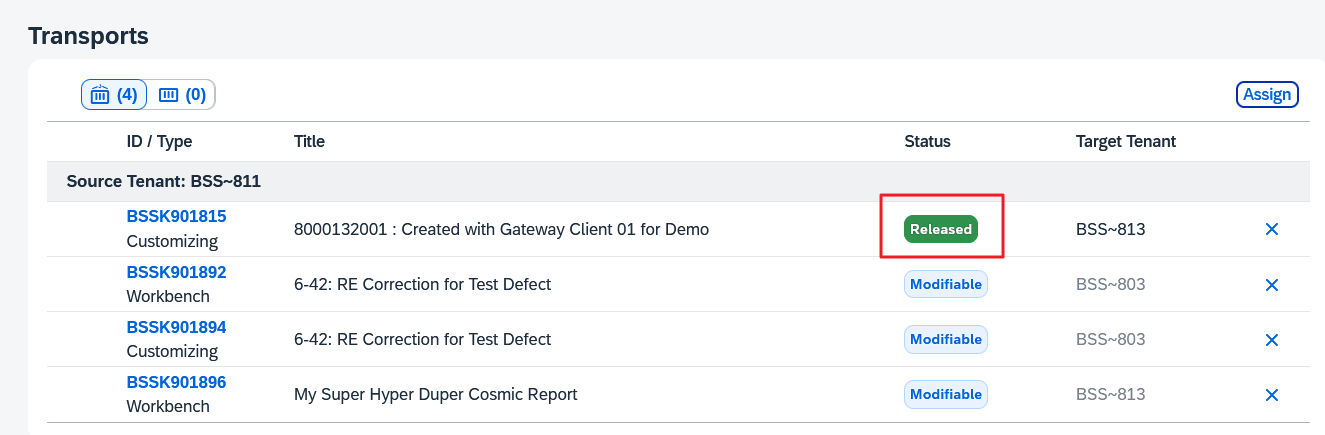
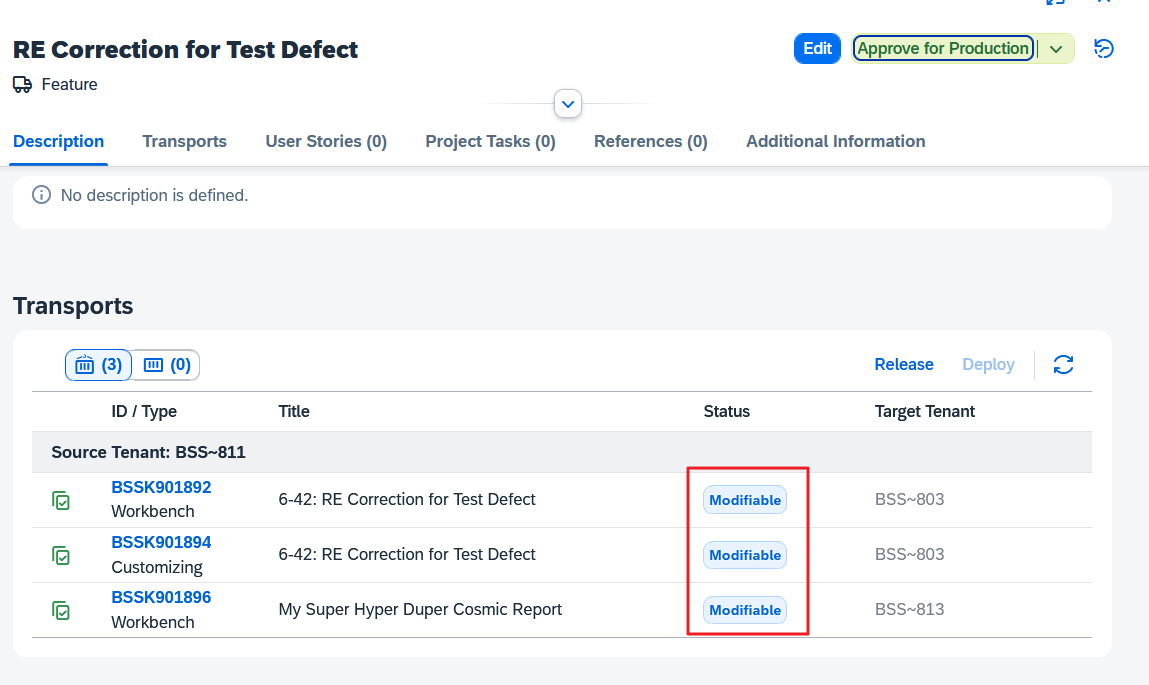
Ignoring the CTS Projects has one advantage: You can also add transports that have already been released to a Feature:
Testing with Transport of Copies (ToC)
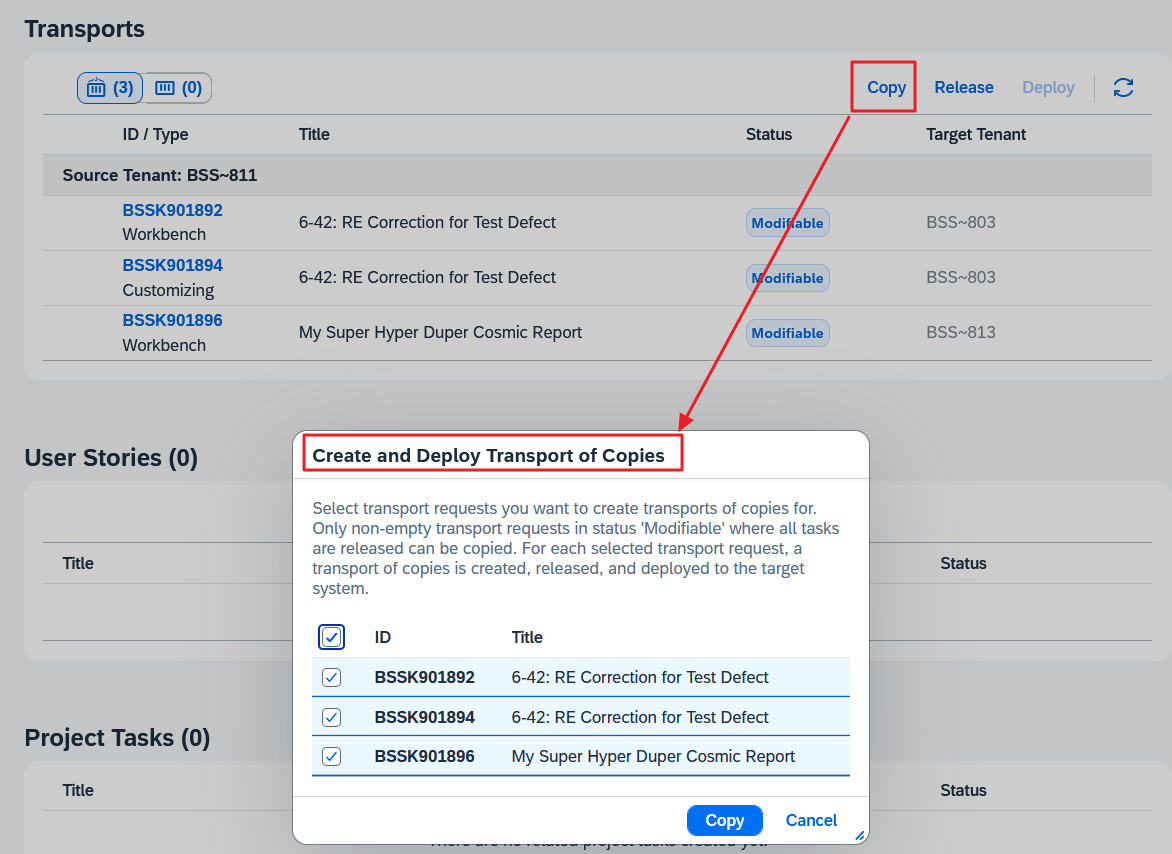
Unlike the Normal Change of ChaRM (and Focused Build), testing in the consolidation system with ToCs is voluntary. You must explicitly press the button and select the sources for the ToCs:
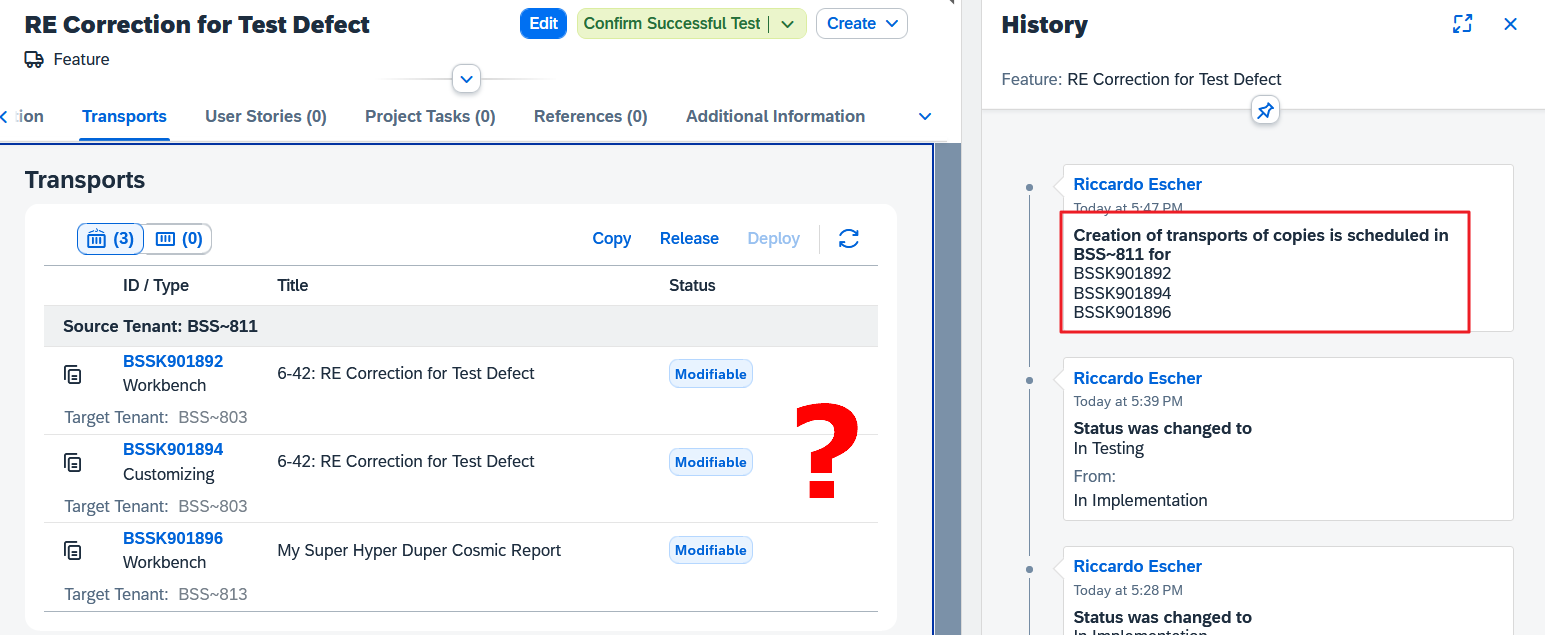
Unfortunately, there is no visible feedback that you have requested the creation of ToCs; you can only see this when you open the history:
The ToCs only become visible once the batch job has completed its work in the ABAP system.
We note that the friendly deletion of empty transport tasks as in ChaRM is now missing again:
Status dependency of transport activities
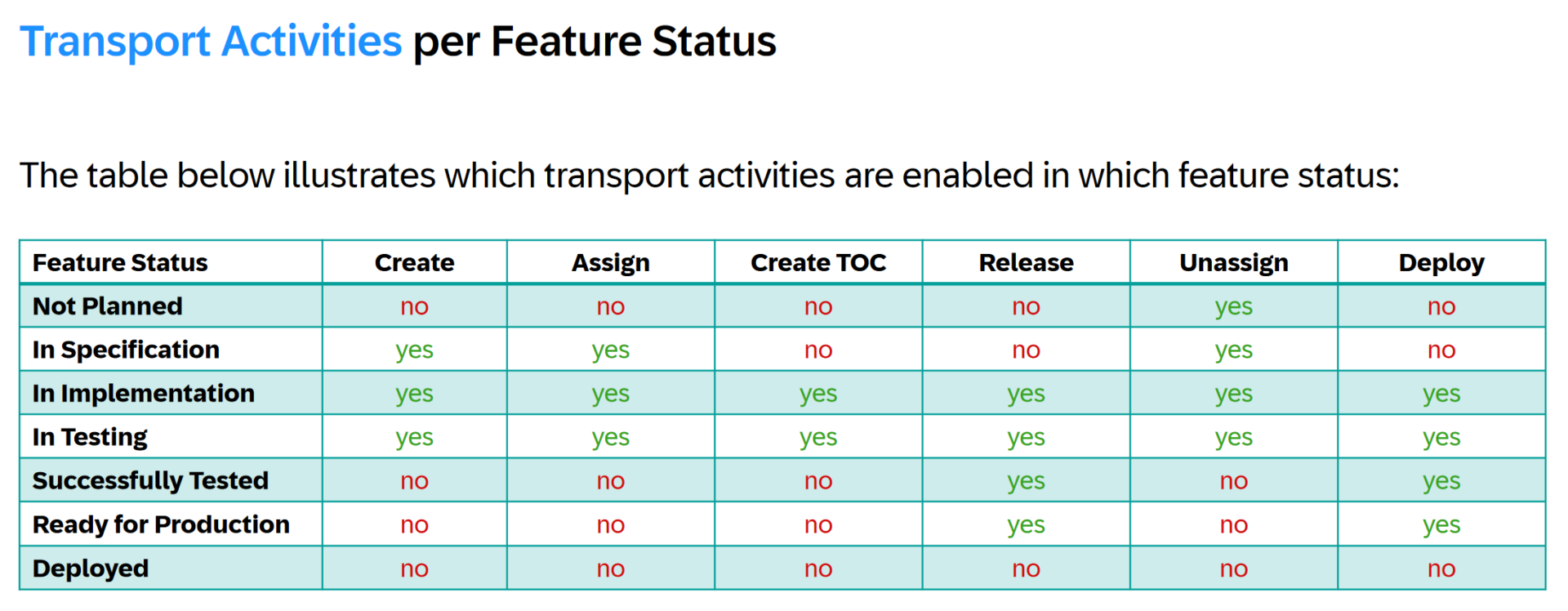
Depending on the status of the Feature, the following transport-related activities can be carried out in a Feature:
As you can see, everything is permitted not only in the “In Implementation” status, but also in the “In Testing” status. This is completely different from a ChaRM Change Document, where there is a strict separation between development and testing. The reason for this high degree of freedom is not clear to me.
Let’s assume that the tester has successfully tested the function in the ABAP QA system and then goes into the lunch break on the high of the success he has experienced. He wants to set the new status “Successfully Tested” after the break together with a cup of coffee.
In the meantime, the developer remembers that she had forgotten something; she quickly creates a transport, records the change and pushes the change into the QA system.
How is it ensured that the tester tests this subsequent change before setting the status?
I also wonder in which use case a tester confirms the successful test, although the transports can still be changed:
Ah, questions over questions….
Production
Here too, the Feature only allows transports to be released when it is not in change mode:
In contrast to the creation of ToCs, this action is immediately visible in the Feature.
The import into the subsequent systems is now called “Deployment”. Cloud ALM behaves very differently to ChaRM.
If you have a mixture of three- and four-system landscapes, as in the example, you have to get used to the fact that Cloud ALM calculates backwards from the Production system, which means that you can only import the transport of the three-system landscape into the Consolidation system (here BSS.813) when the transports in the four-system landscape have reached the Pre-Production system (here BSS.804), because both systems (BSS.804 and BSS.813) deliver to Production:
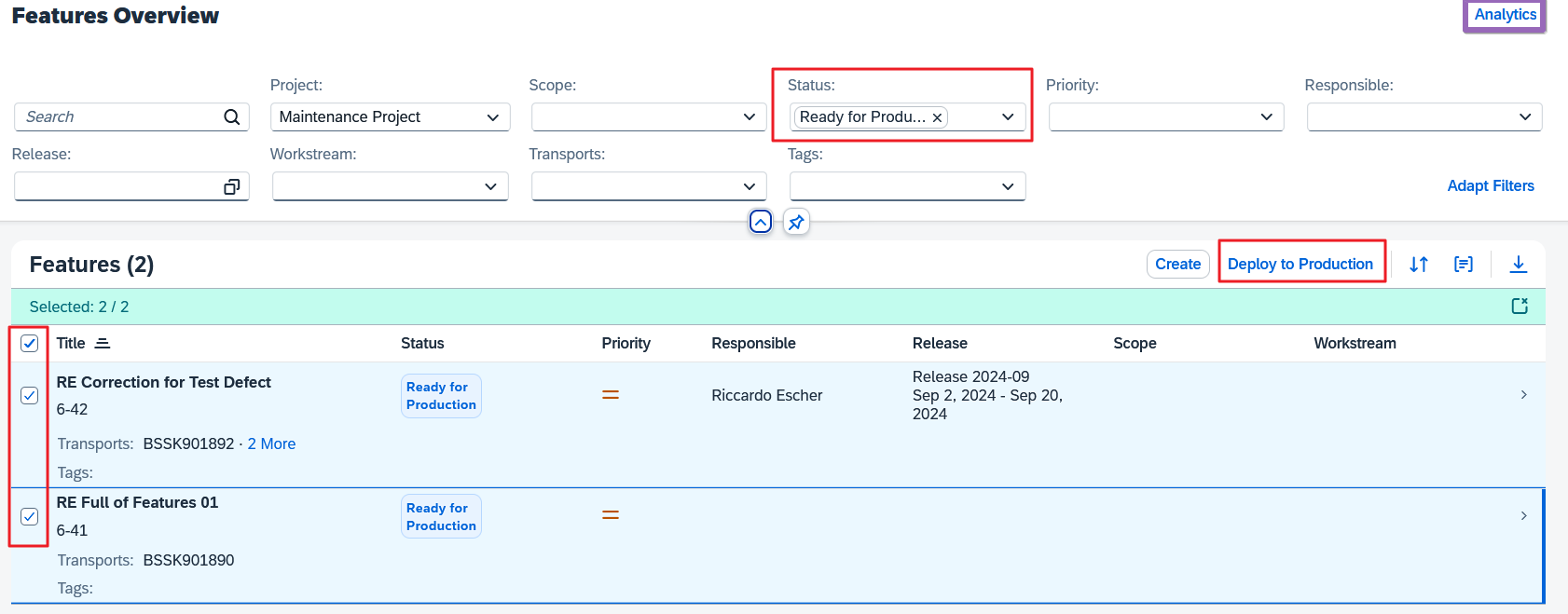
I think the final mass import from the Overview page is very nicely realized if you filter for the appropriate status:
This has the advantage that all transports selected here are imported into the production system at the same time with a tp IMPORT SUBSET.
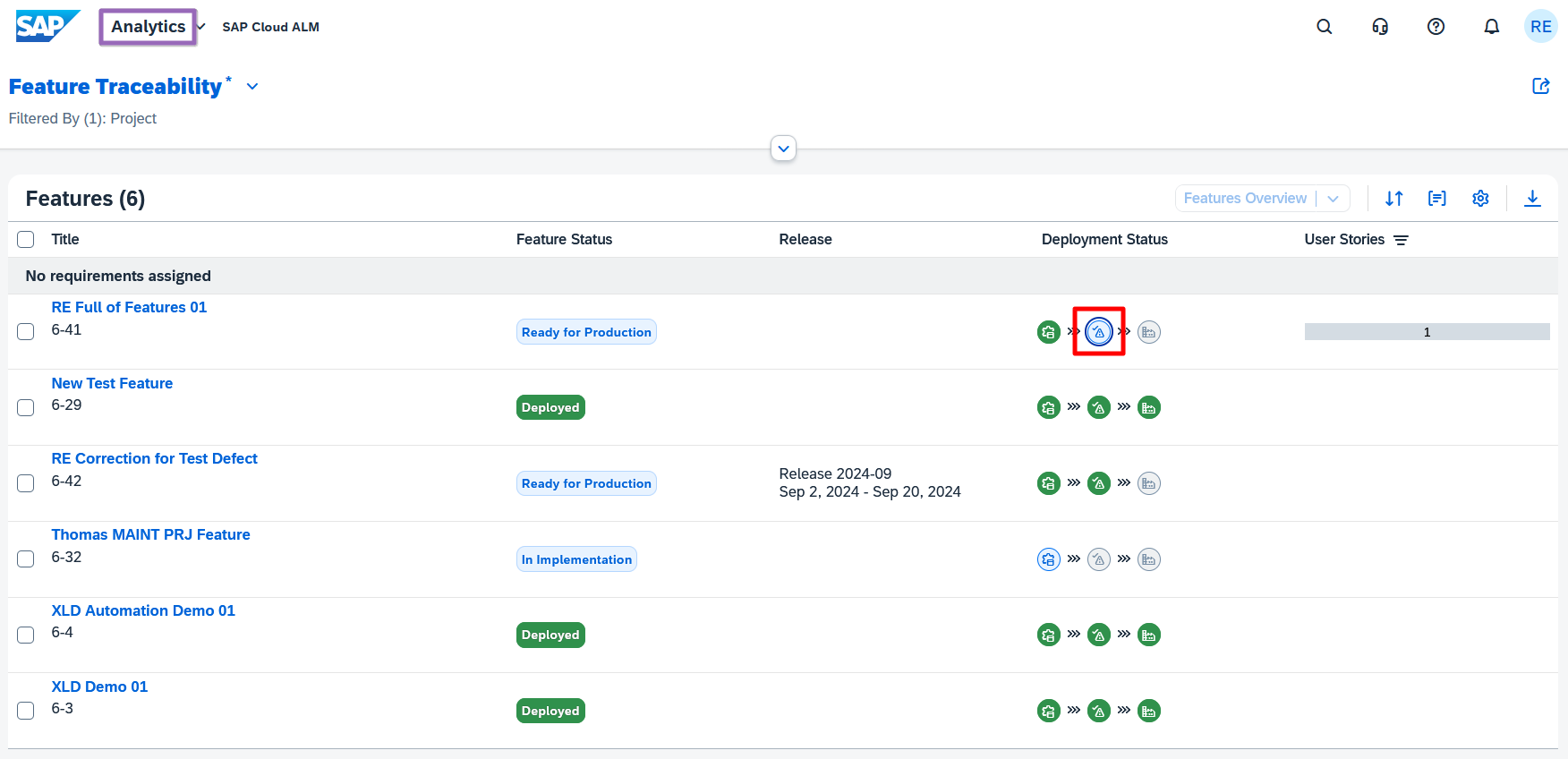
I also find the analytical “Feature Traceability” very appealing:
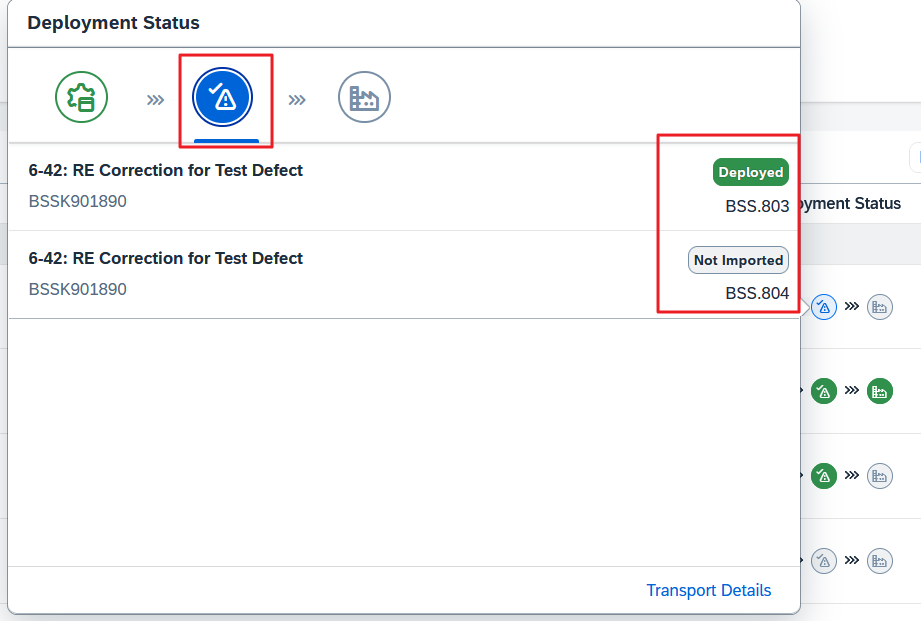
The only fly in the ointment is the combination of the QA and PreProd systems in one icon:
Technical handling of CTS transports
As of today, creating and/or releasing and importing an OnPremise transport request from the Feature is asynchronous.
Only a type of flag is created in Cloud ALM. A high-frequency job runs in the connected ABAP system, which retrieves the tasks from the cloud system, executes them and uploads the result to the cloud.
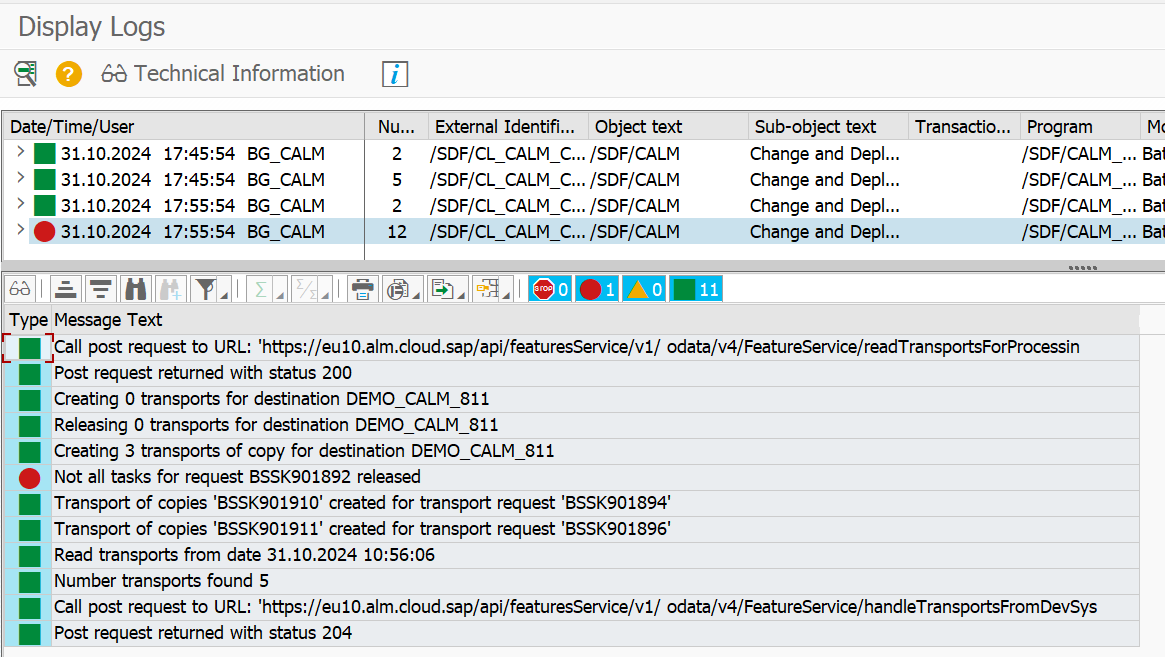
If, for example, you want to trace this process in the event of an error, you must log in to the appropriate client (for export in the development client, for import in client 000) and use transaction SLG1 with a filter for the batch process user to restrict the time period in question.
Here we are tracing the creation of the ToCs from before:
You cannot access these logs from within the Feature.
In conversations during the ALM Summit 2024 in Mannheim, I learned that a direct connection between the Features and the OnPremise ABAP system will be offered in future via the SAP Cloud Connector.
Summary
ChaRM and Focused Build have matured over twenty years to become the lighthouse application of the Solution Manager and of course Cloud ALM needs time to be able to compete with this giant:
The SAP team is working flat out to shoot up to ChaRM/FB, here I offer a short summary with an outlook:
Features can be used to create CTS transports and move them through the landscape; if you have a simple system landscape, you can already easily control ABAP transports with Features today
Cloud ALM is very easy to set up and the Features are seamlessly integrated into the Cloud ALM Implementation scenario
The look and feel of the UI is outstanding, the performance is amazingly good
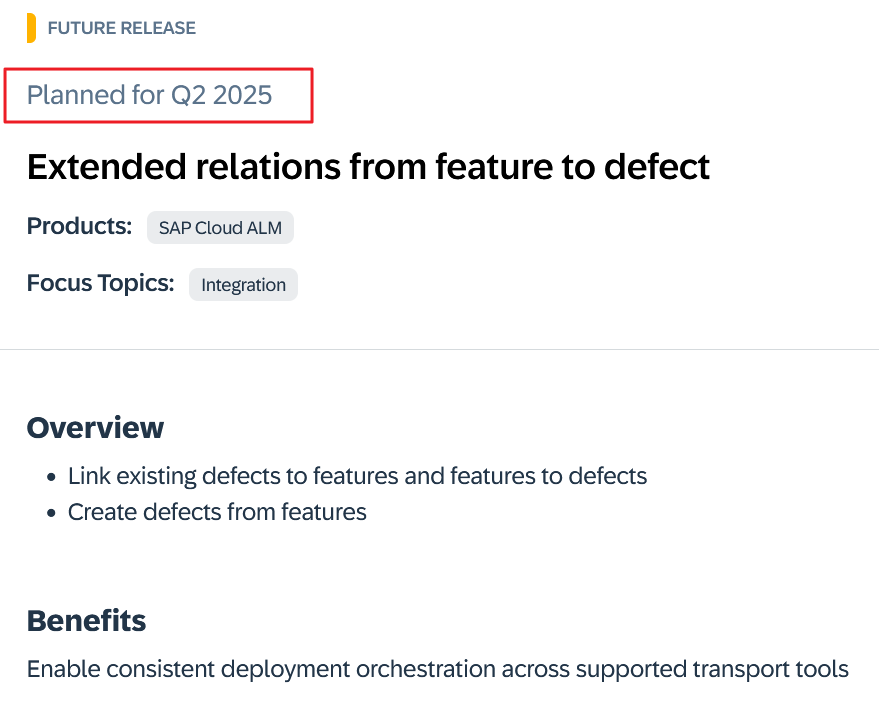
The scenario “Customizing/code correction due to incorrect test result” is not directly supported as of today, according to the roadmap it will not come until Q2 2025, but there is a somewhat cumbersome detour
Cloud ALM does not know CTS Projects, so coexistence with ChaRM/Focused Build in a transport landscape is not recommended
The creation of transports from the Feature allows too much freedom; it is better to create the required transports directly in the ABAP system and then assign them to the Feature.
The great freedom in status dependency and in defining the target systems is very reminiscent of the old TMS workflow
However, if you need a strict set of transport rules, you should wait; time is cyclical: just as ChaRM and then Focused Build emerged from the shortcomings of the TMW workflow twenty years ago, this cycle is now repeating itself – albeit with a much faster rotation – because SAP is already planning the leap to Focused Build-like checks; however, the planning is only partially fixed in the Roadmap:
An addition to ITSM
Cloud ALM is explicitly not intended to be an ITSM tool.
If, as I mentioned at the beginning, you have never used ChaRM or Focused Build before, but now finally want to introduce an audit-proof Change Management system that covers the entire process from the incident to the productive transport, then you might want to follow the path taken by the City Administration of Bern (CH).
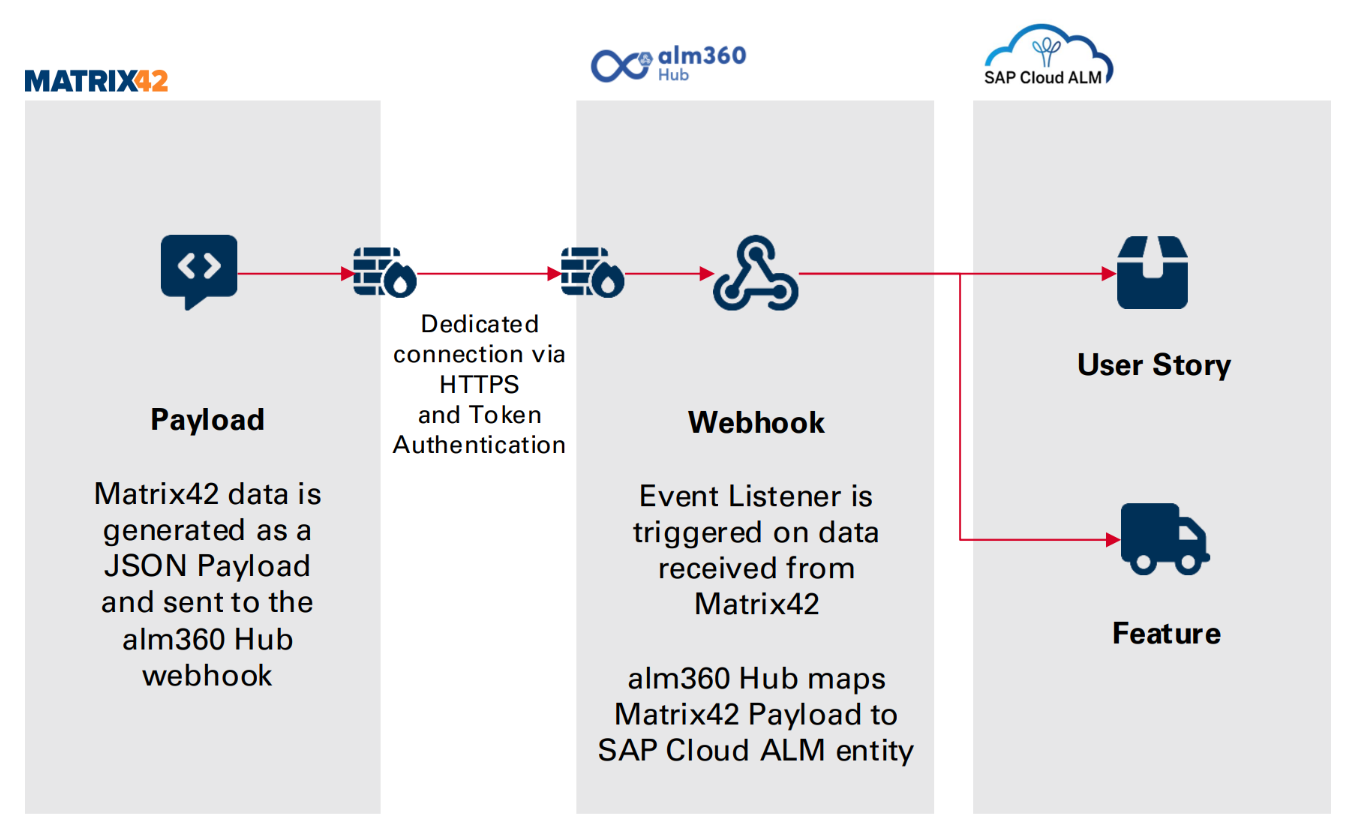
With the help of our alm360 Hub, an external ITSM tool was linked to Cloud ALM, thus ensuring traceability throughout the entire process: