SAP Cloud ALM – What’s New in Week 6
SAP Cloud ALM continues to evolve with focused updates that strengthen transparency and operational insight.
Week 6 release introduces enhanced monitoring and analysis in Operations, more efficient user and project management in Administration and Implementation, and practical usability improvements that simplify day-to-day work.
Together, these updates help teams manage complexity more effectively, reduce manual effort, and maintain better control across their SAP Cloud ALM landscape.
SAP Business Transformation Center – Scoping
The latest updates in SAP Business Transformation Center continue to strengthen transparency and control during transformation preparation. With clearer system scan insights and improved visibility into source data structures, teams can make more informed scoping decisions and reduce surprises later in the migration journey.
System scan results now includes client-dependent tables and client-independent custom tables
The latest update in the Scoping area of SAP Business Transformation Center improves transparency during system analysis by extending the scope of system scan results.
With this enhancement, system scans now include both client-dependent tables and client-independent custom tables in a single, consolidated view. This gives transformation teams a more complete picture of the SAP ERP source system early in the scoping phase, helping them better understand the overall data footprint.
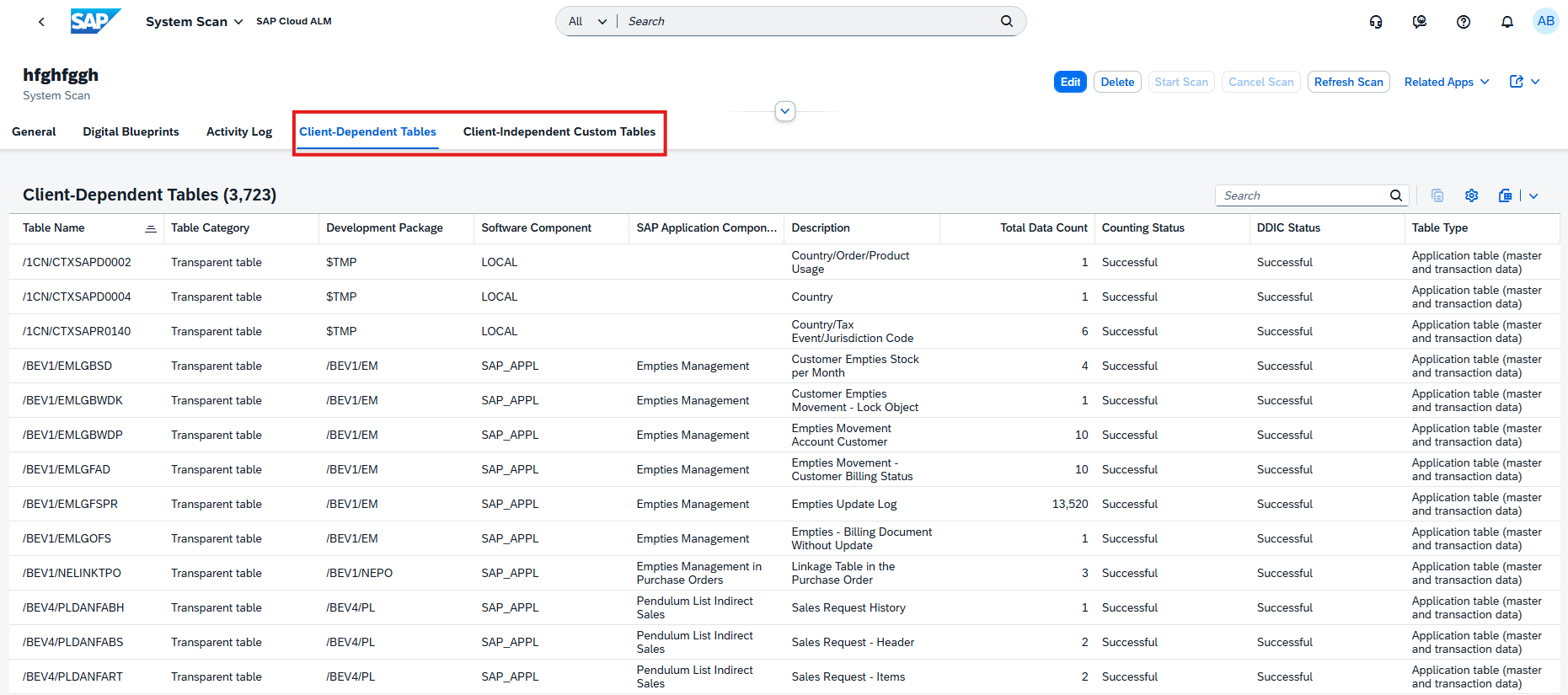
Client-dependent tables continue to support scoping decisions and can be reviewed and adjusted in the Select Scanned Tables app as before. In addition, a new tab now displays client-independent custom tables (for example, Z*, Y*, or custom namespaces). These tables are shown for informational purposes only and cannot be scoped, as they are currently not covered by the Lean Selective Data Transition scenario from SAP ERP to SAP S/4HANA.
By clearly separating client-dependent and client-independent tables, the system scan helps teams identify custom tables that may require special handling. While client-independent custom tables are not included in the standard migration scope, their visibility allows teams to proactively assess whether they are needed in the target system and plan alternative transfer approaches if required.
TL;DR:
System scans now show both client-dependent and client-independent custom tables, giving a complete overview of the source system while clearly indicating which tables are scoping-relevant and which are informational only.
Operations – Health Monitoring, Integration & Exception Monitoring, Business Process Monitoring
The latest updates in the Operations area focus on greater transparency, smarter monitoring, and better control of system resources. Enhancements across monitoring apps make it easier to understand what is being monitored, how systems and services are consuming resources, and where attention is needed – helping operations teams act faster and manage complex landscapes more efficiently.
New RFC metrics available in Health Monitoring
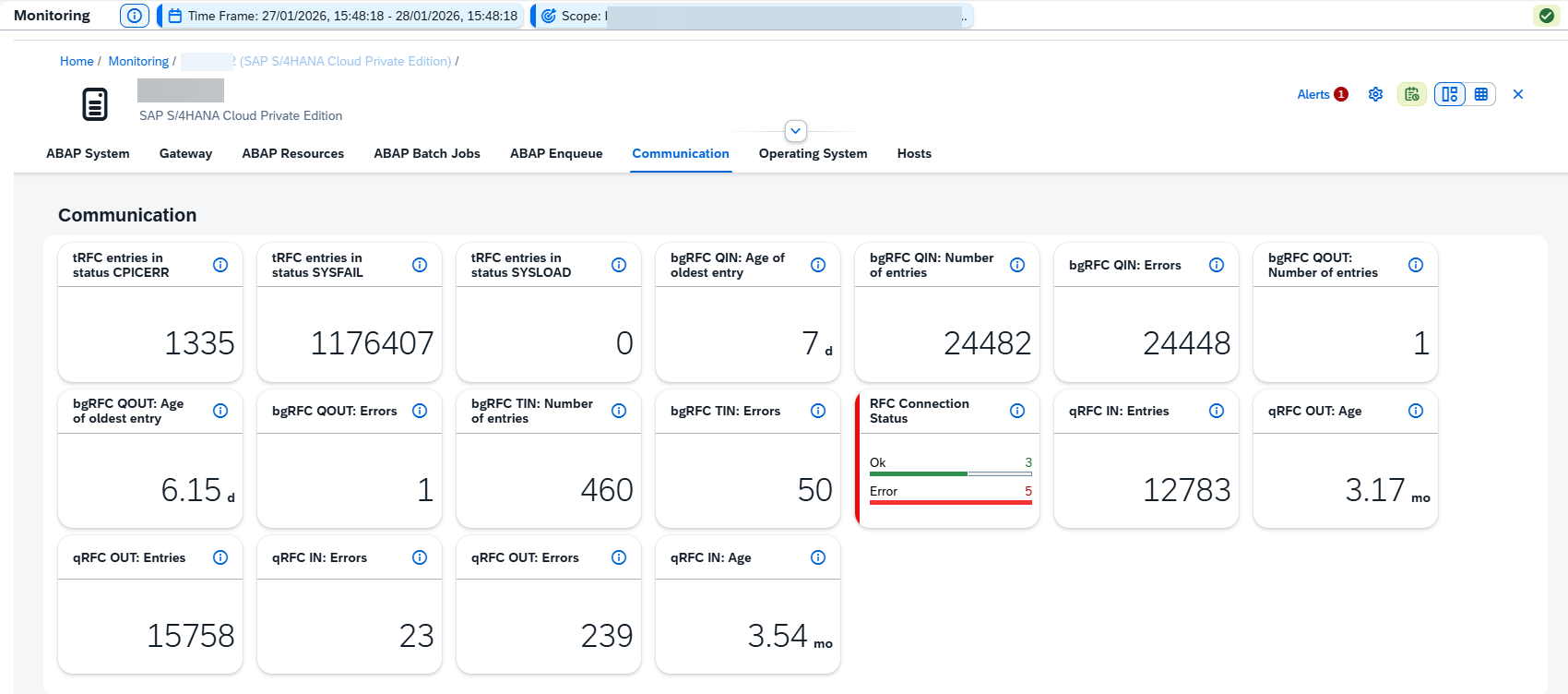
Health Monitoring has been extended with comprehensive RFC metrics, giving operations teams deeper insight into remote communication and background processing health.
The update introduces monitoring for tRFC, qRFC, and bgRFC, allowing teams to track transactional, queued, and background RFC calls more effectively.
In addition, a new RFC Connectivity Status metric provides visibility into the availability of RFC destinations, helping to quickly detect and troubleshoot communication issues between systems. The RFC connectivity metric also comes with configurable options, making it possible to tailor monitoring to specific operational requirements and critical connections.
RFC monitoring capabilities are available only when ST-PI 740 SP33 is installed.
TL;DR:
Health Monitoring now supports detailed RFC metrics (tRFC, qRFC, bgRFC) and RFC connectivity status, improving visibility into system communication and background processing.
Support for SAP Complaint Handling in Integration & Exception Monitoring
Integration & Exception Monitoring has been extended to support SAP Complaint Handling, giving operations teams full visibility into complaint-related message flows. With this update, incoming and outgoing messages can be monitored across the following message types:
- SAP Complaint Handling Configuration Messages
- SAP Complaint Handling Master Data Messages
- SAP Complaint Handling Transactional Messages
For each message type, a detailed status overview is available, allowing teams to quickly assess processing health. From the overview, it’s possible to drill down into individual messages to analyze errors, investigate delays, and review technical message details. As with other supported integrations, data collection is handled via SAP-Managed Connectivity, ensuring a consistent and low-effort setup.
This enhancement helps teams proactively detect integration issues in complaint handling scenarios and respond faster when business-critical messages fail or behave unexpectedly.
TL;DR:
Integration & Exception Monitoring now supports SAP Complaint Handling, providing end-to-end visibility into configuration, master data, and transactional messages with drill-down capabilities for faster issue analysis.
Improved KPI Transparency and Memory Insights in Business Process Monitoring
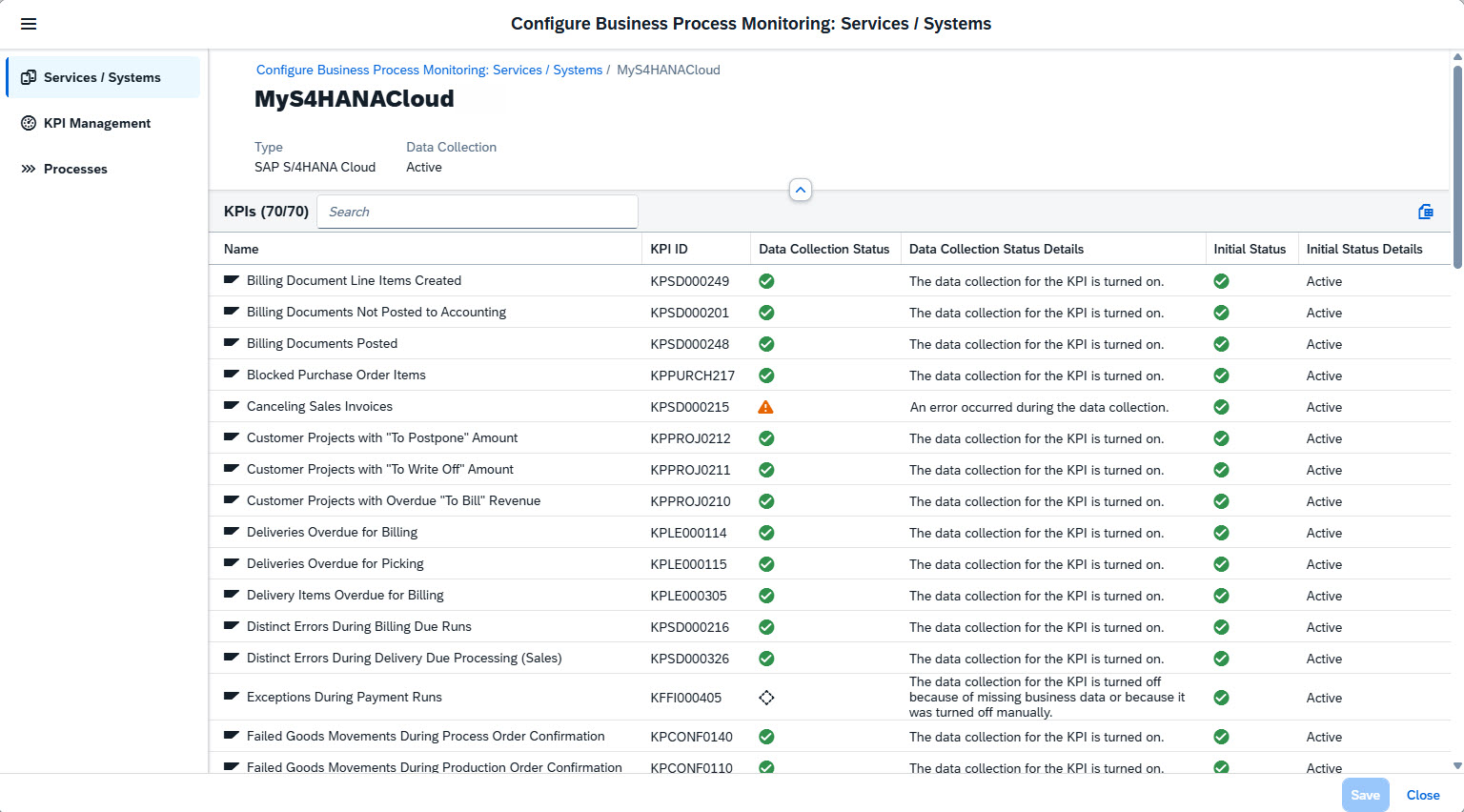
Business Process Monitoring now offers deeper transparency into how KPIs are configured and how system resources are consumed. In the configuration dialog, the Services / Systems page has been enhanced to show a complete list of all KPIs assigned to each service or system, including relevant context information and data collection details. This makes it easier to understand which KPIs are active where and why.
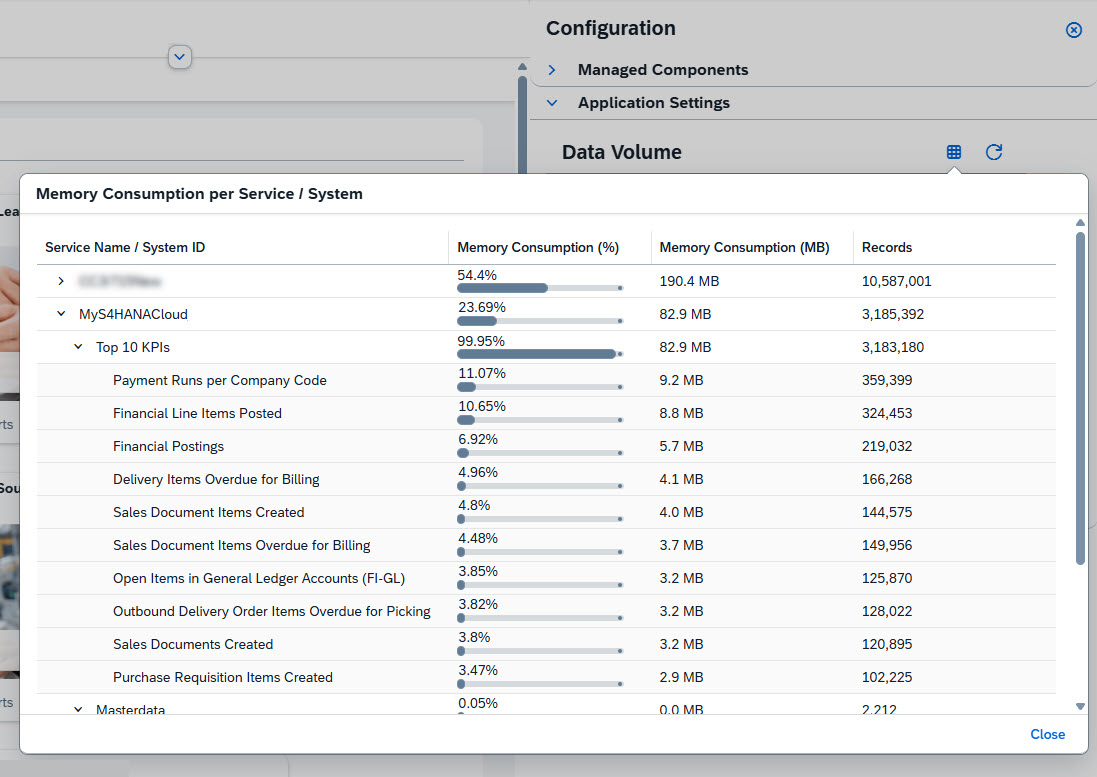
In addition, Process Monitoring Administrators can now analyze memory consumption per service or system. Using the Tabular Display per Service view in the Data Volume section, it’s possible to see how memory usage is distributed across services and systems, as well as their top 10 KPIs. This insight helps teams identify KPIs with high resource consumption and fine-tune monitoring configurations accordingly.
Together, these improvements support more informed decisions about KPI activation and data collection, helping to balance monitoring depth with efficient memory usage.
TL;DR:
Business Process Monitoring now shows KPIs per service/system and their memory consumption, making it easier to optimize KPI setups and manage resource usage effectively.
Implementation – Risks, Quality Gates, Features, Analytics
The latest updates in the Implementation area focus on giving teams more control, better insight, and greater efficiency throughout project execution. From improved analytics and reporting, to enhanced risk, quality gate, and transport handling, these enhancements reduce manual effort and make it easier to manage complex projects with confidence and transparency.
Enhanced Risk Management
Risk handling in SAP Cloud ALM is now more tightly integrated with project execution. The Risks app has been extended with new capabilities that help teams actively mitigate risks and work more efficiently at scale.
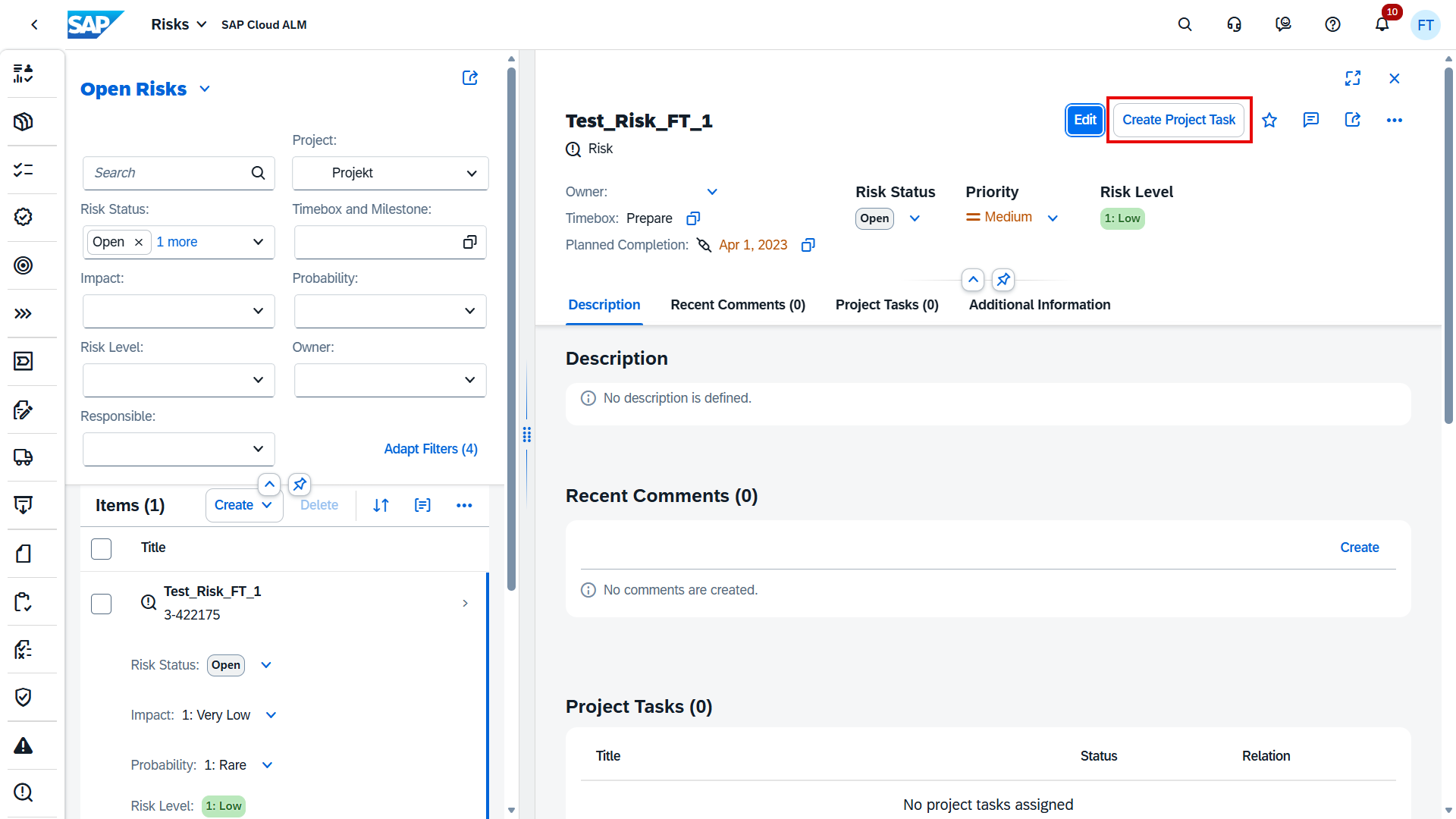
Project managers can now create new project tasks or assign existing ones directly from a risk, making it easier to translate identified risks into concrete actions and follow-ups without switching apps. This strengthens the link between risk identification and execution.
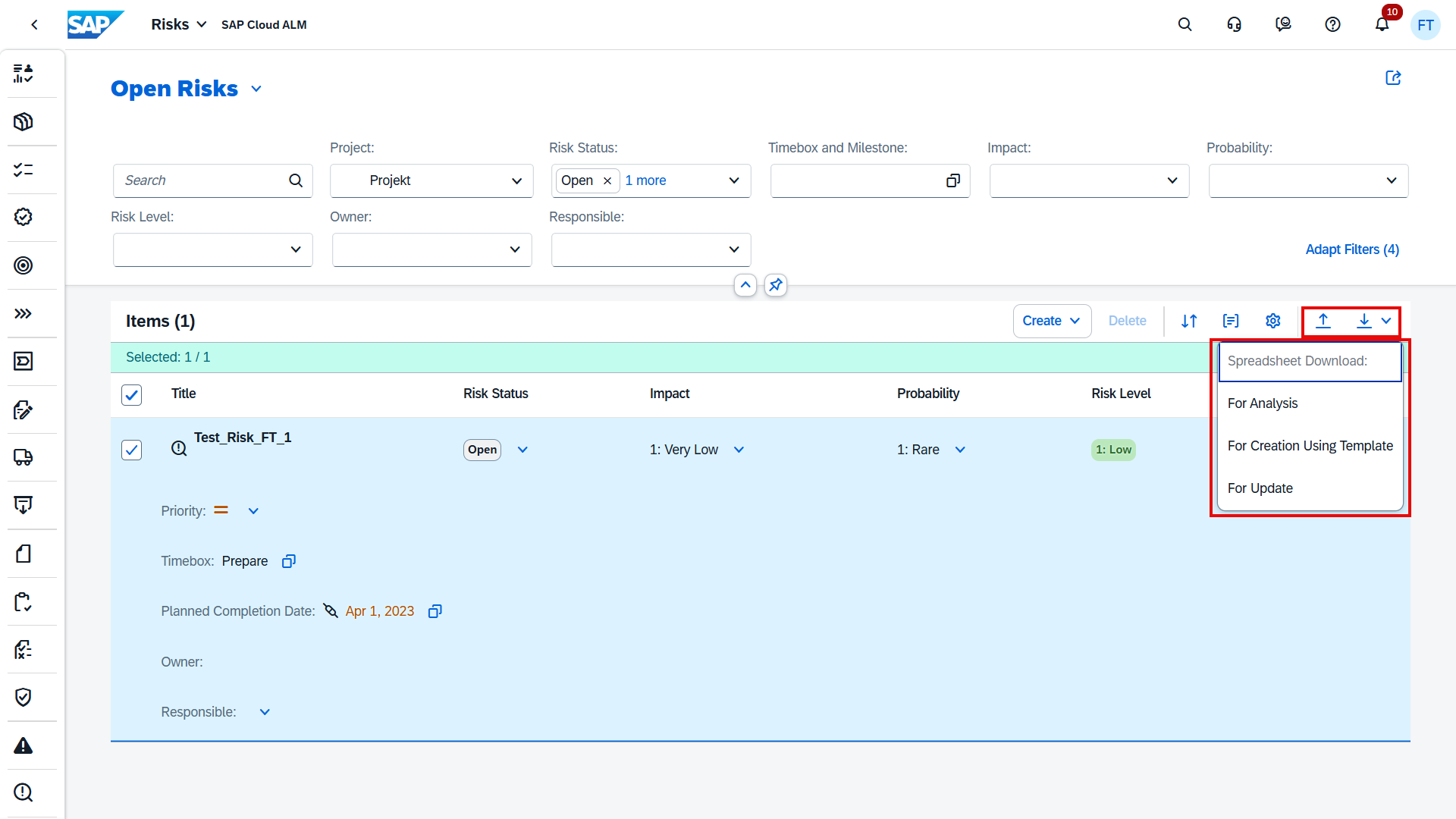
In addition, the Risks app now supports downloading and uploading spreadsheets. This enables mass editing, offline analysis, and easier collaboration when working with larger risk registers or during preparation and review phases.
TL;DR:
Create and assign project tasks directly from risks and manage risks at scale using spreadsheet download and upload for faster analysis and updates.
Quality Gates: Faster Analysis, Mass Editing, and Automated Assessments
The Quality Gates area has received several powerful enhancements that make managing checklists more efficient, scalable, and actionable – especially in larger or highly regulated projects.
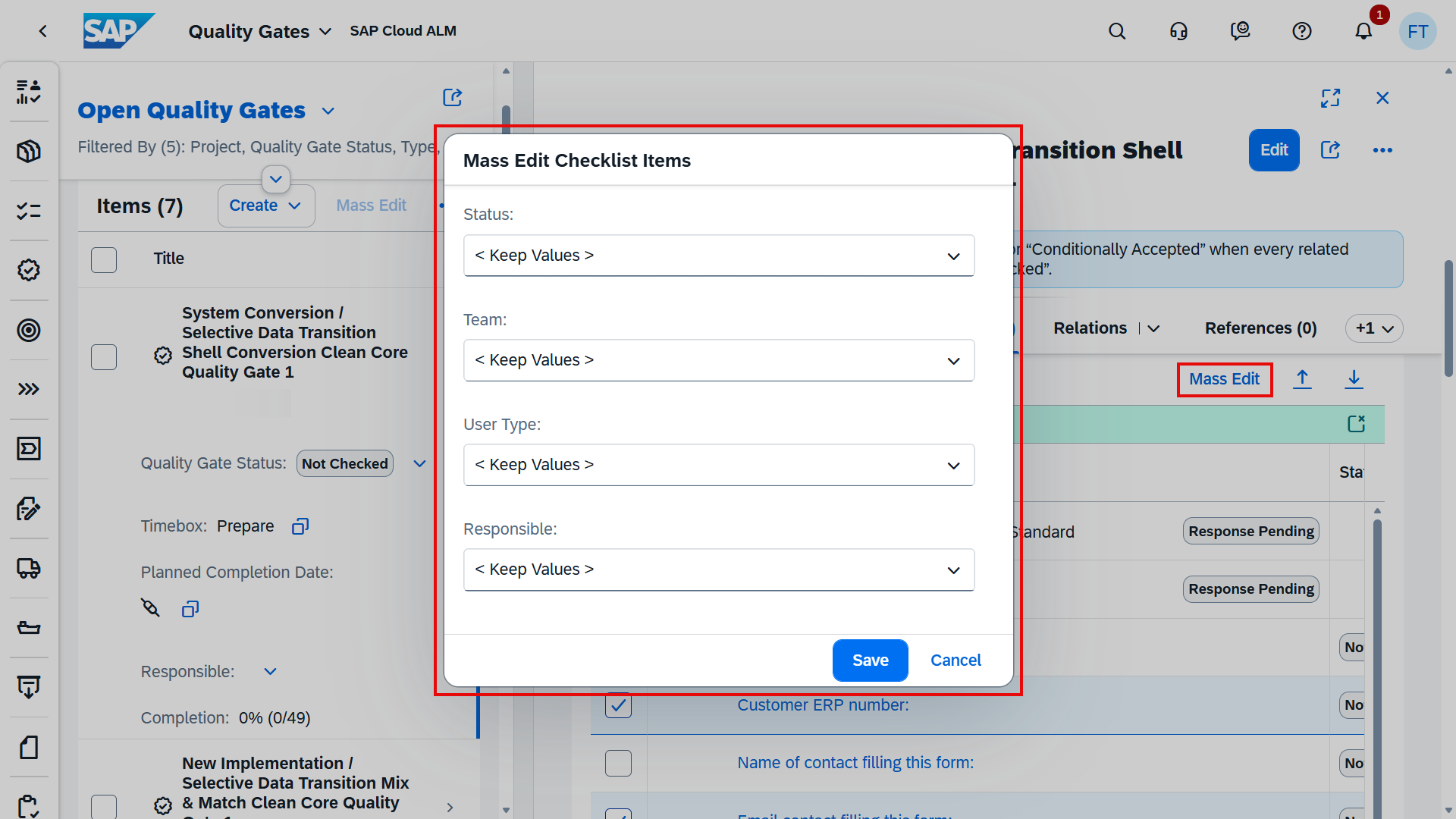
Teams can now download checklist items from dynamic quality gates into spreadsheets for offline analysis and mass editing. After updates are made, the spreadsheets can be uploaded again to create new checklist items or update existing ones. This is complemented by a new mass edit capability directly in the app, allowing multiple checklist items to be updated in one go without relying on external tools.
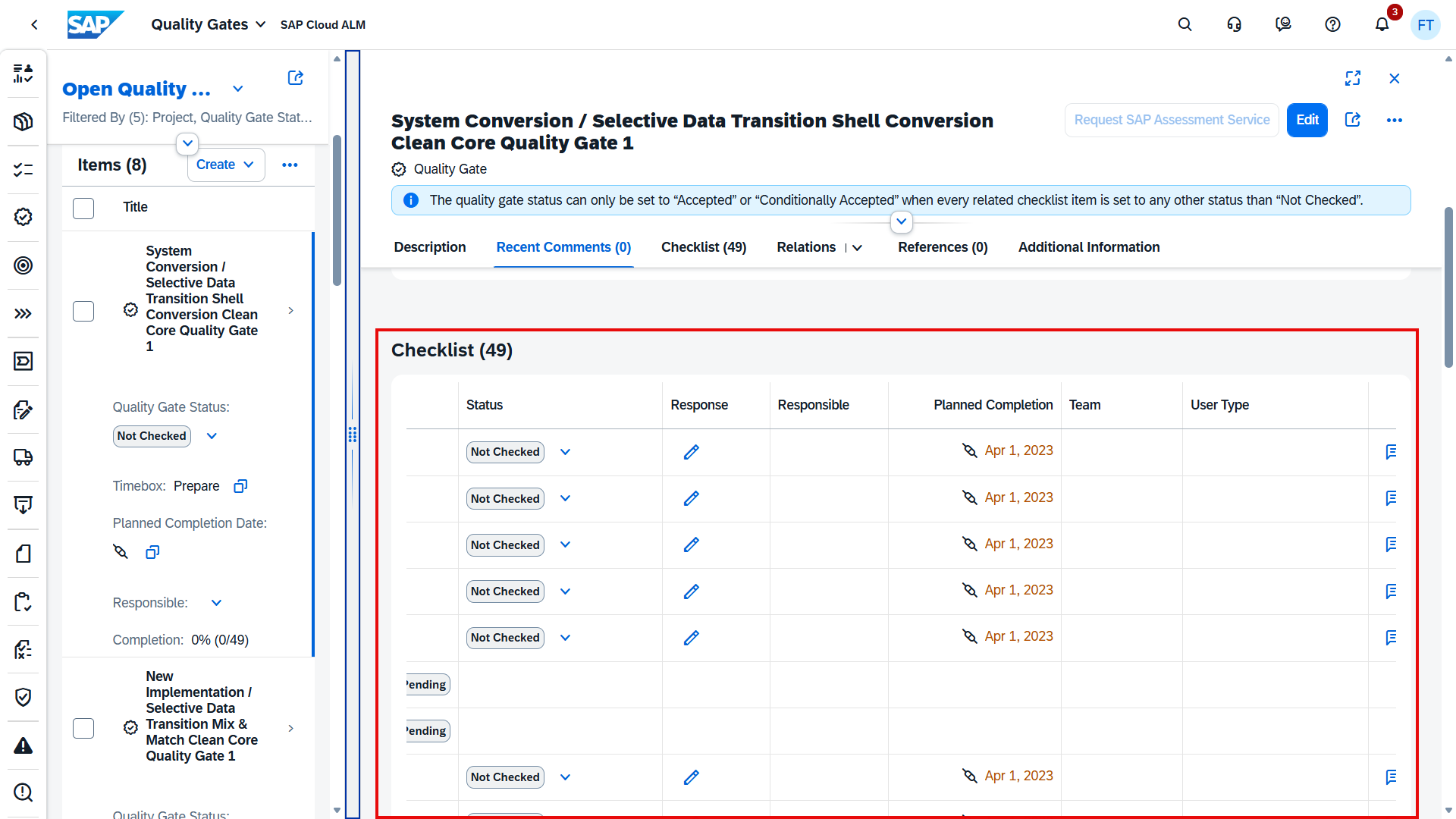
Visibility and control have also improved. In the hierarchical checklist view, project teams can now view and edit all existing checklist item attributes, including Responsible, Planned Completion, Team, User Type, and Comments. This makes it much easier to manage ownership, timelines, and accountability across quality gates.
In addition, project leads can now request a fully automated SAP Assessment Service for selected dynamic quality gates. This is available for:
- SAP Activate Roadmap – SAP S/4HANA Cloud Public Edition (Prepare & Explore)
- SAP Activate Roadmap – SAP SuccessFactors (Prepare & Explore)
This service helps accelerate assessments while ensuring consistency with SAP best practices.
TL;DR:
Quality Gates now support spreadsheet-based analysis and mass editing, full attribute maintenance in dynamic checklists, and automated SAP Assessment Services – making quality management faster, more transparent, and easier to scale.
Features: Better Transparency in Transport Handling
Transport handling in the Features area is now more transparent with two small but practical enhancements.
In the Transports section, the transport owner is now displayed directly. This makes it easier for project teams to quickly identify responsibility, clarify ownership, and coordinate follow-ups without switching tools or digging into transport details.

In addition, the Create Transport of Copies dialog has been enhanced to show both the transport type and the owner. Having this context available upfront helps avoid mistakes during transport creation and supports better decision-making when selecting or reusing transports.
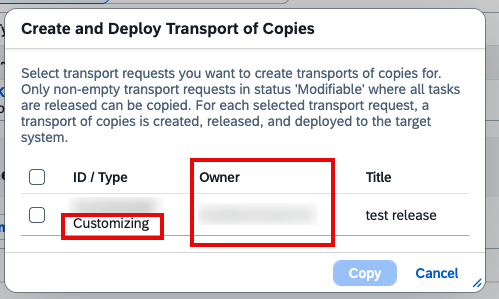
Together, these improvements reduce ambiguity and make day-to-day transport management clearer and more efficient.
TL;DR:
Transport owner and transport type are now visible in key places, improving transparency and responsibility in transport management.
Analytics: Smarter Search, Better Traceability, and Risk Insights
The Analytics area in SAP Cloud ALM continues to mature with updates that make it easier to find relevant data, understand relationships, and gain clearer project insights.
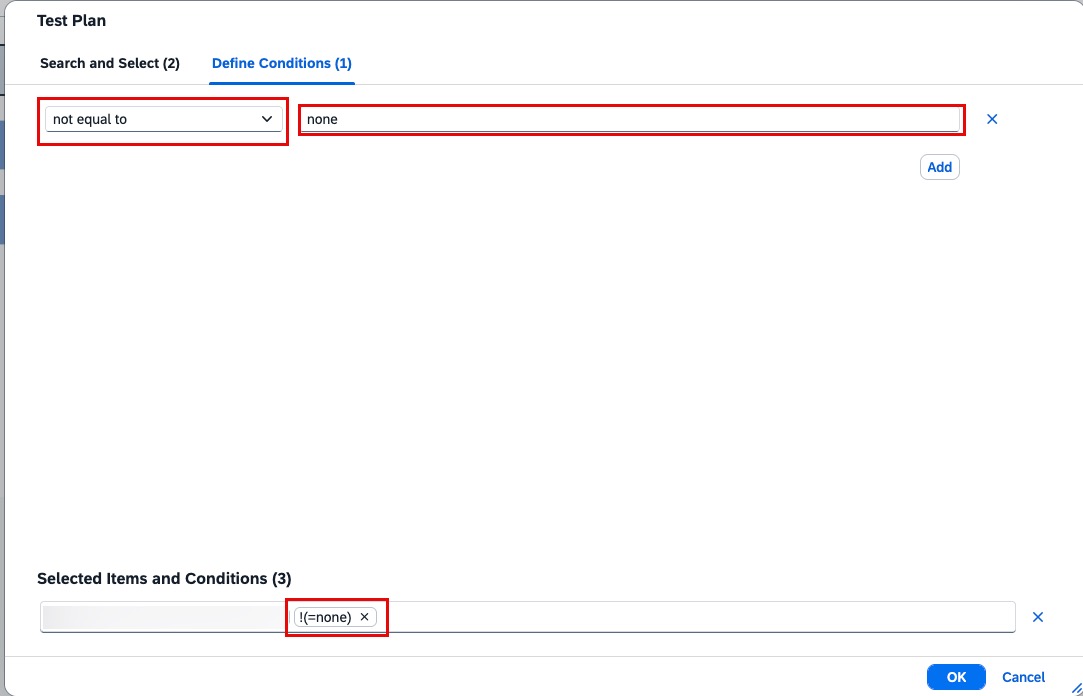
Enhanced test plan search and filtering is now available via a new Value Help dialog in the Defect Reporting app. The dialog includes a dedicated search field and a Define Conditions tab, allowing more precise filtering. For example, test cases assigned to the None test plan can be excluded by using a not equal condition. This makes defect reporting cleaner and ensures that only relevant test plans are considered during analysis.
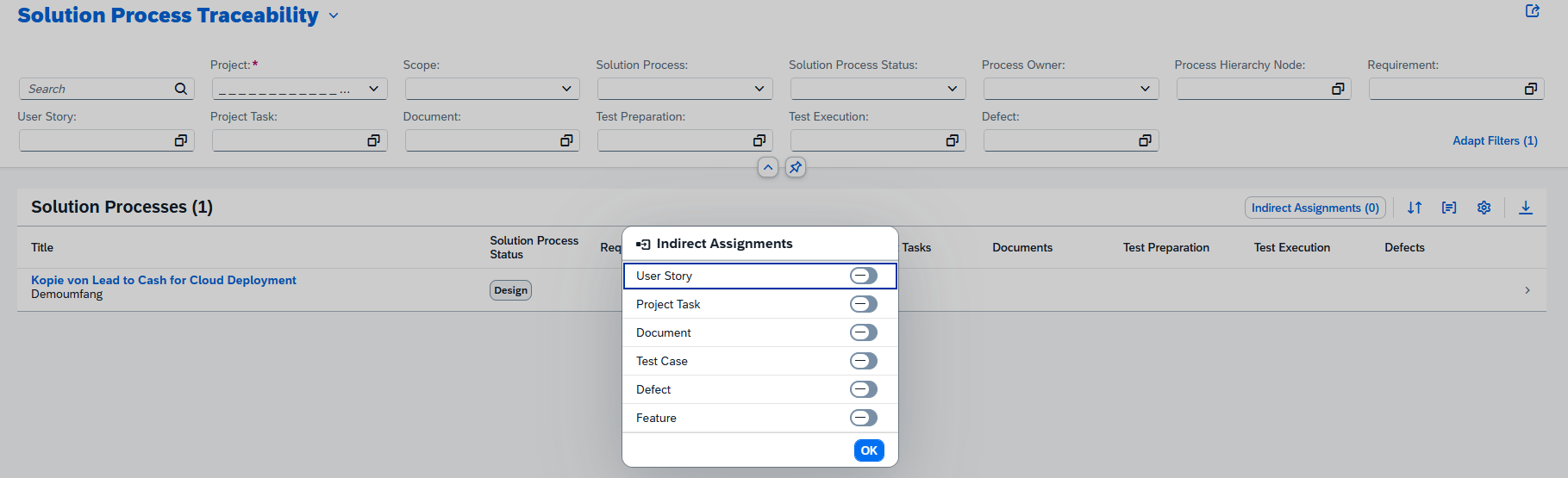
Indirect document assignments are now visible in the Solution Process Traceability app. Documents that are indirectly linked through Requirements, Tasks, Defects, or Library items can be displayed by enabling the Indirect Assignment option and switching on the Document toggle. Document counts, micro-bar charts, and direct access to document details are updated automatically, providing a more complete view of documentation coverage across processes.
TL;DR:
Analytics now offers improved test plan filtering, visibility of indirectly assigned documents in traceability views.
Administration – User Management
Mass Maintenance of Users
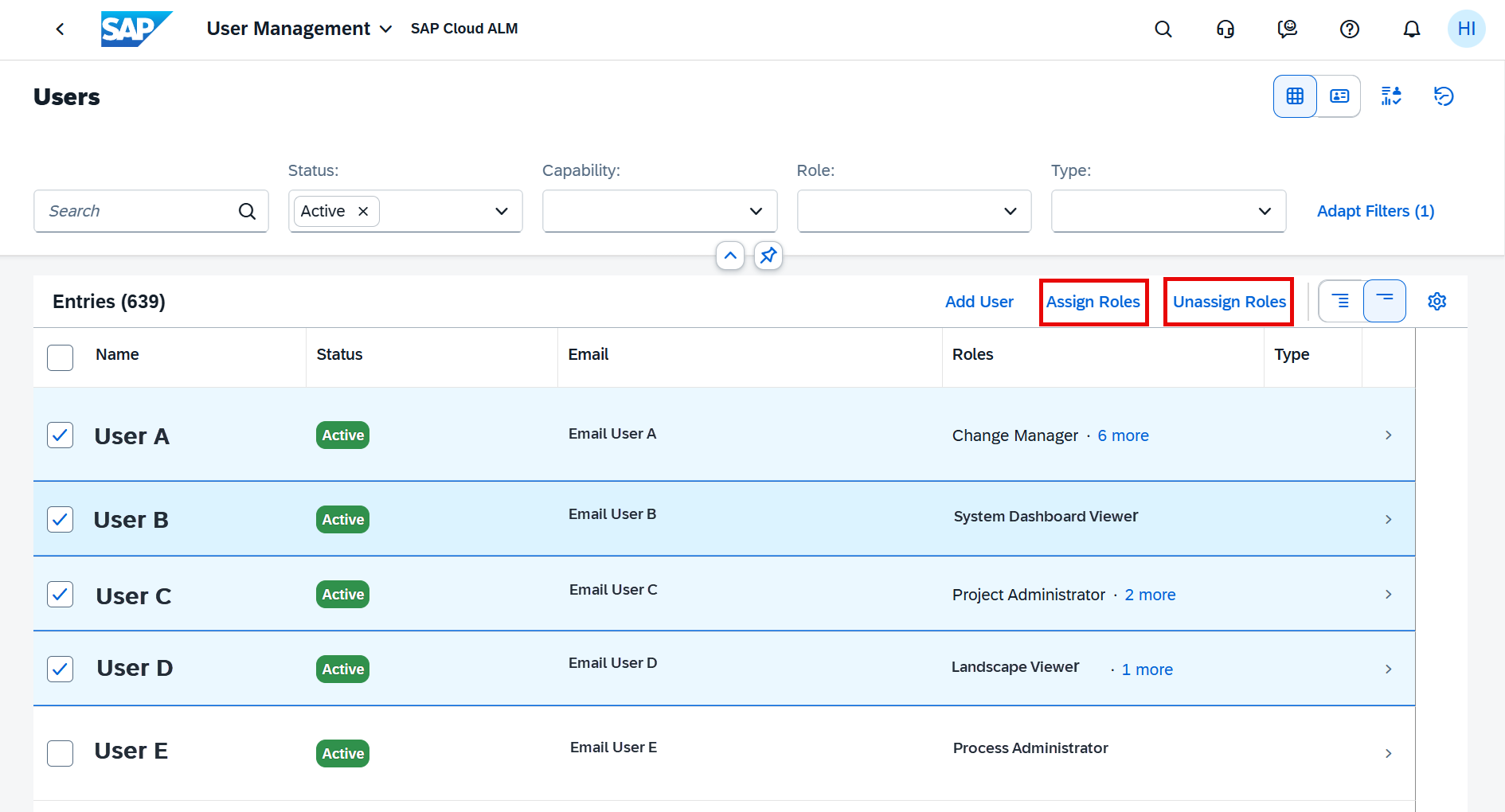
User administration becomes more efficient with mass maintenance for role assignments. Administrators can now assign or remove roles for multiple users in one step directly from the Table View in the User Management app.
This enhancement simplifies large-scale user updates and reduces repetitive manual effort when managing access across teams.
Key points:
- Assign or unassign roles for multiple users at once
- Up to 50 users can be edited in a single action
- Users with the following statuses can’t be edited:
- Deactivated
- Expiring Soon
- Waiting for Approval (and not maintained in SAP BTP Cockpit)
TL;DR:
Manage user roles faster by assigning or removing roles in bulk – ideal for keeping access aligned at scale.