SAP Cloud ALM – What’s New in Week 12
SAP Cloud ALM continues to evolve with enhancements that improve transparency, control, and usability across the platform.
The week 12 release brings stronger transformation capabilities in SAP Business Transformation Center, including improved data quality transparency, more flexible migration options, and enhanced tracking throughout the transformation lifecycle. In Operations, updates focus on better monitoring usability, expanded coverage, and improved visualization of execution status. The Implementation area introduces new analytical capabilities, improved traceability, enhanced document editing, and safer process management. Meanwhile, Administration gains improved visibility into identity provider configurations to help ensure a future-ready setup.
Together, these updates help teams better understand their systems, manage complexity more effectively, and execute transformations and operations with greater confidence and control.
SAP Business Transformation Center – Cycle and Monitoring, Data Management, Transition
The SAP Business Transformation Center continues to evolve with enhancements that improve data transparency, flexibility, and overall transformation reliability. Recent updates focus on strengthening data quality analysis, enabling more flexible migration scenarios, and improving tracking and guidance throughout the transformation lifecycle. Together, these improvements help ensure more consistent, efficient, and well-controlled data transformation processes while reducing complexity and increasing confidence in migration outcomes.
Transfer of Generic Object Services in Cycle and Monitoring
Cycle execution is enhanced with the ability to transfer generic object services alongside business data.
This includes objects such as attachments, notes, and related content, ensuring that important contextual information from source systems is preserved during migration. The transfer will occur during the Postprocessing phase. Keep in mind that once a cycle is created, it’s not possible to change selection regarding whether to transfer generic object services.
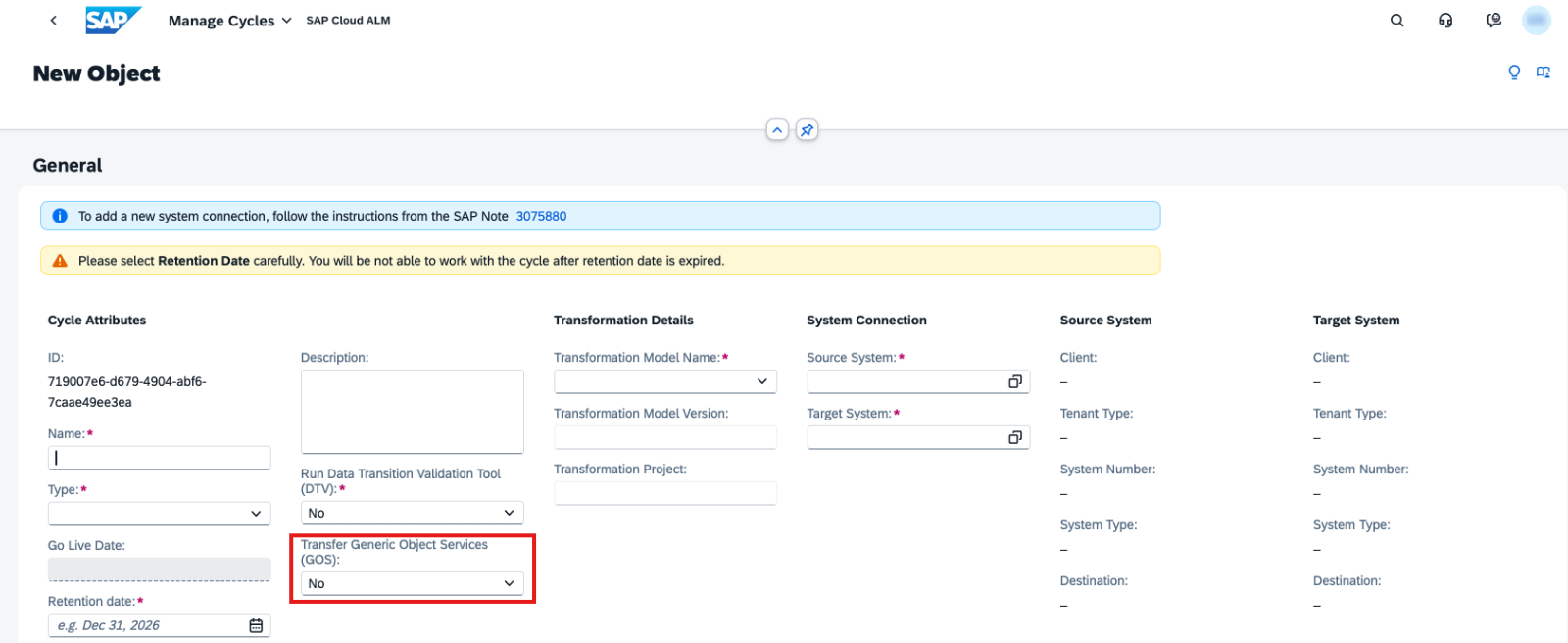
This improves data completeness and maintains business context in the target system.
TL;DR:
Generic object services like attachments and notes can now be transferred during cycles, preserving important business context.
Improved Transparency, Filtering, and Run Handling in Data Management
Data Management is enhanced with several improvements that increase transparency, usability, and control over data quality analysis.
A new Calculated On field is now available, allowing users to see the exact timestamp when KPI values were calculated in both Manage Runs and Analyze Data Quality apps.
Additional usability improvements include:
- Extraction Progress bar on the Quality Check Run page to track KPI calculation progress
- Display of the preselection table name in KPI views for better context
- New filters: Extracted On and Extracted By for more precise analysis
Data lifecycle management is also improved:
- Runs that have not been executed can now be deleted
- Related data assessments can also be removed, enabling clean reconfiguration when needed
These enhancements provide better control over data analysis processes and improve overall transparency of KPI calculations.
TL;DR:
Data Management has now timestamps, progress tracking, new filters, and deletion options, improving transparency and control over data quality analysis.
Enhanced Status Tracking and Dynamic Guidance in Transition
Transition capabilities are improved with more detailed tracking and smarter guidance.
Transformation approaches now support expanded status values, enabling more granular tracking of transformation progress and better visibility into different stages.
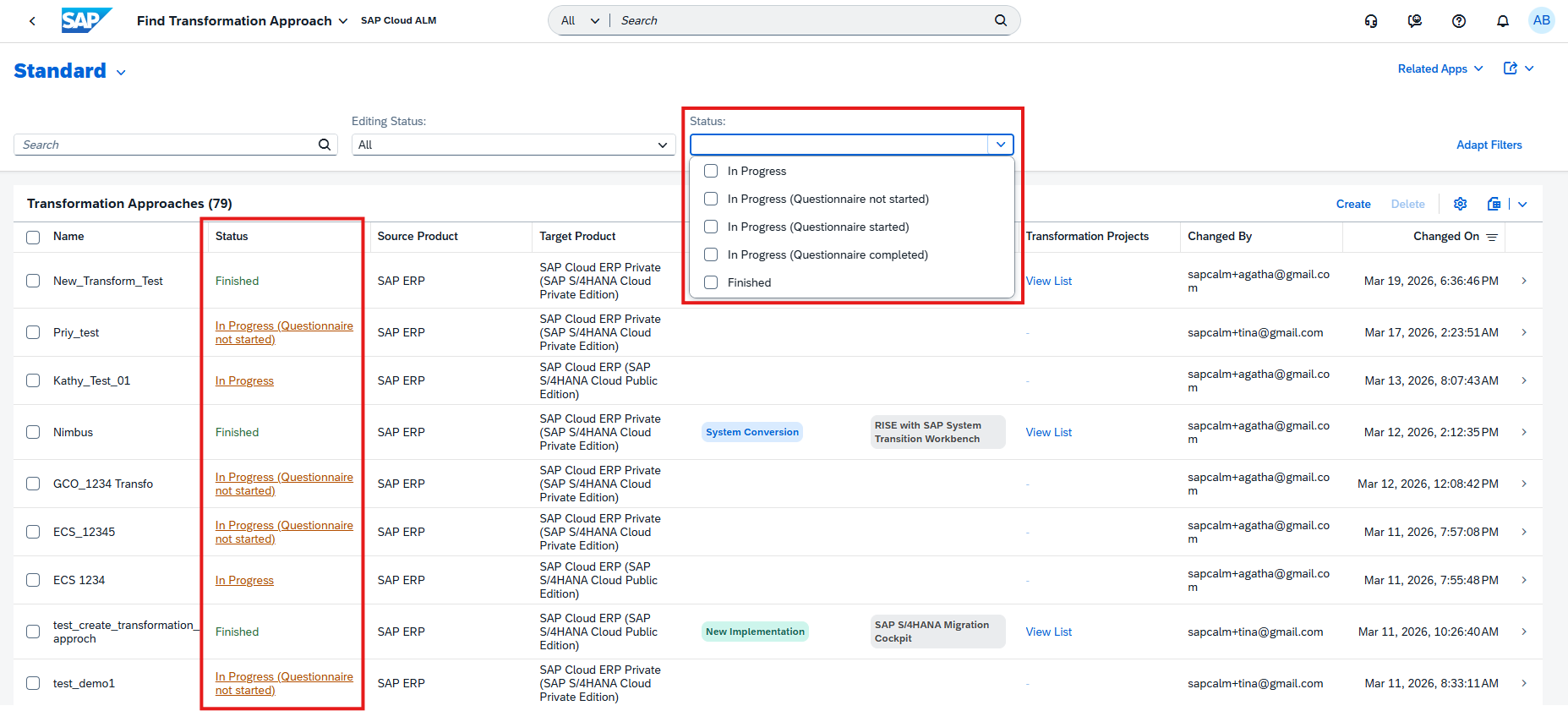
In addition, the Get Transformation Guidance questionnaire is now dynamic, adapting questions in real time based on user input. This reduces unnecessary steps and improves the overall experience by making data collection more relevant and efficient.
TL;DR:
Transition updates introduce more detailed status tracking and a dynamic questionnaire, improving visibility and user experience.
Client Mapping and Extended Source System Support
General capabilities are expanded to improve flexibility and compatibility in transformation scenarios.
A new client mapping solution pattern removes the requirement for identical client IDs between source and target systems. This allows data migration to different client IDs while automatically handling necessary mappings.
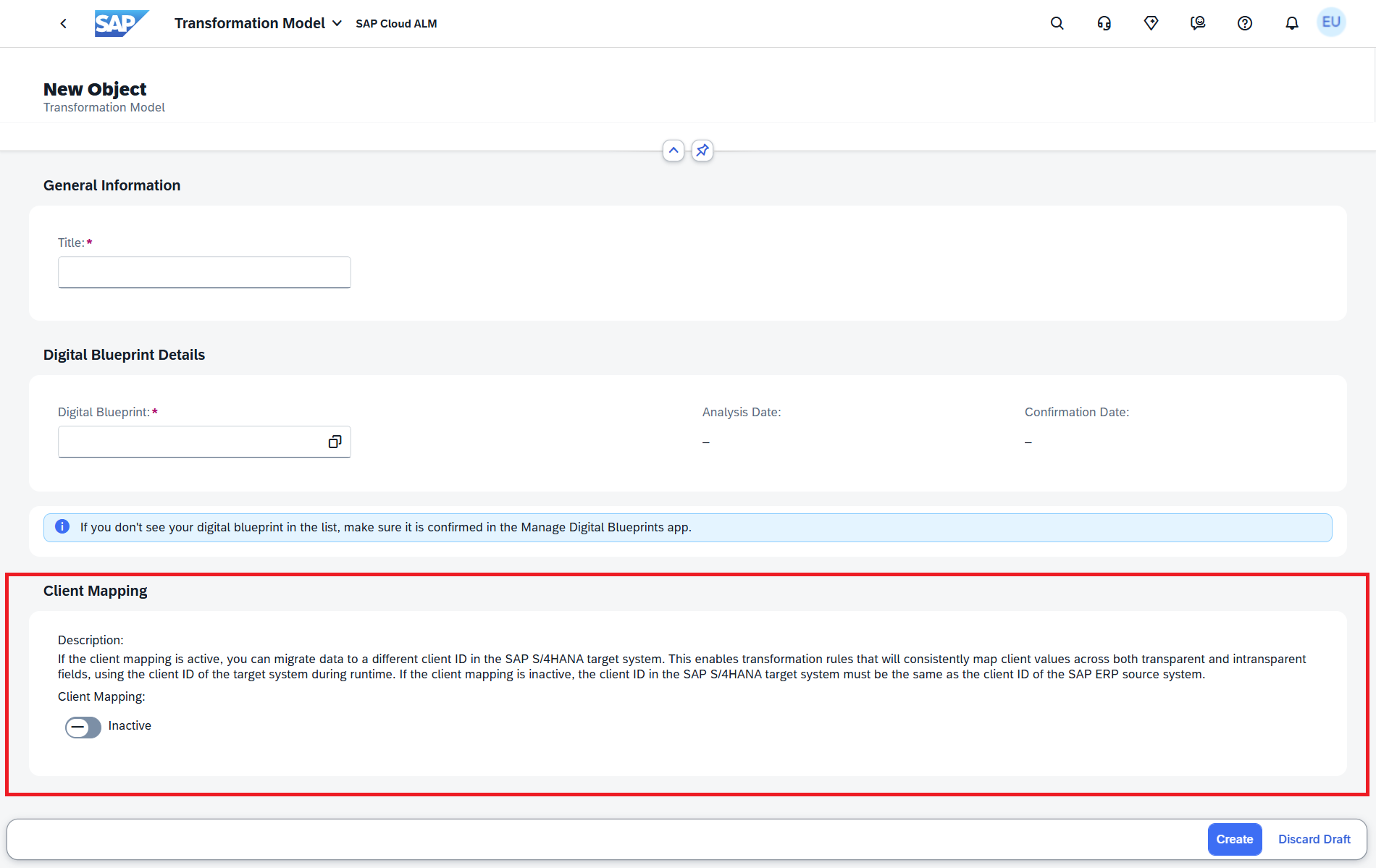
In addition, support is now extended to SAP ERP 6.0 Enhancement Package 7 (EHP7), enabling more source systems to be connected and used in transformation projects.
TL;DR:
New client mapping removes client ID restrictions, and support for SAP ERP EHP7 expands source system compatibility.
Operations – Business Process Monitoring, Integration & Exception Monitoring, Synthetic User Monitoring
The Operations area continues to evolve with enhancements that improve monitoring transparency, usability, and control across the landscape. The latest updates introduce more flexible monitoring views, stronger access control, expanded monitoring coverage, and improved visualization of execution status – helping teams better understand system behaviour and respond more effectively to operational events.
Custom Views, KPIs, and Improved Sorting in Business Process Monitoring
Business Process Monitoring is enhanced with new capabilities that improve usability, personalization, and monitoring coverage.
Users can now create and save custom views on the Monitoring page by storing table settings such as filters, columns, and layouts. Multiple views can be saved and managed, and a preferred view can be set as the default, allowing faster access to relevant monitoring data.
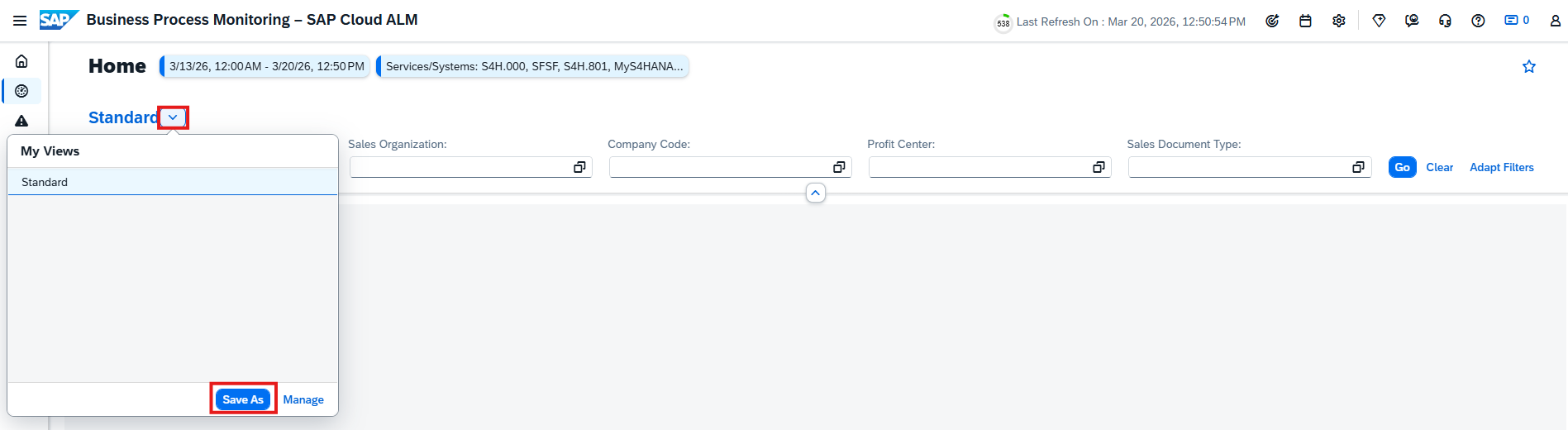
Monitoring coverage is extended with new KPIs for SAP Complaint Handling, including:
- Open Customer Complaints
- Open Supplier Complaints
- Total Open Complaints
These KPIs are automatically available once the required setup and data collection are in place and can be used within end-to-end processes such as Lead to Cash and Source to Pay.

In addition, users can now customize the sorting order of custom processes, their related nodes, and assigned KPIs. This configuration is reflected across the Home and Monitoring pages, enabling a more tailored and structured monitoring experience.
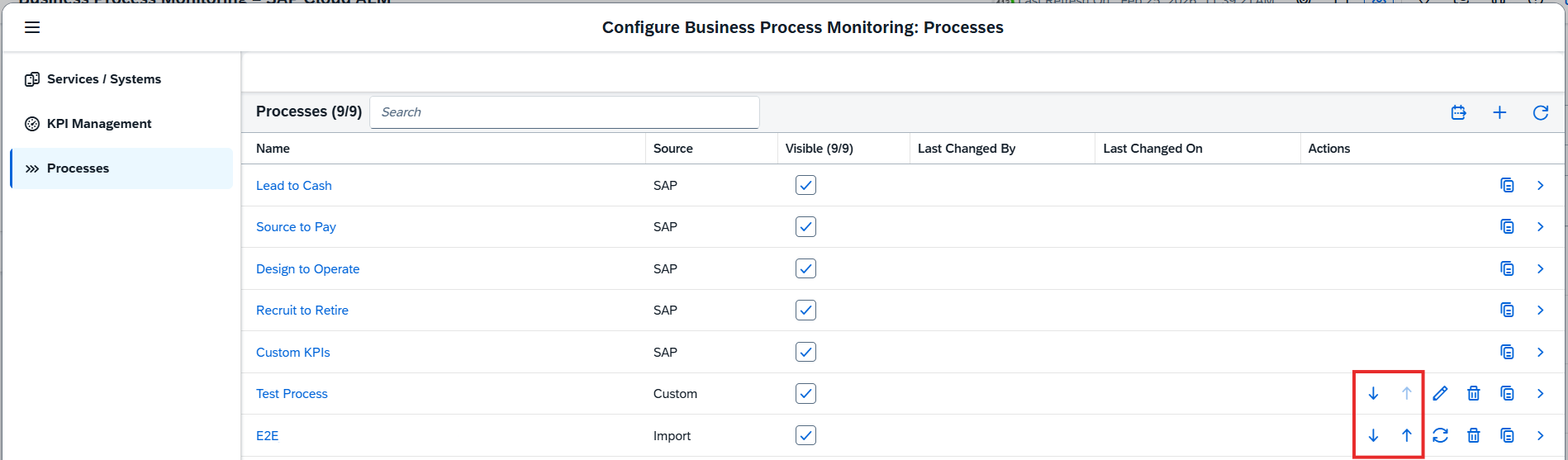
TL;DR:
Business Process Monitoring now supports custom views, introduces new SAP Complaint Handling KPIs, and allows configurable sorting of processes and KPIs for a more personalized monitoring experience.
Access Control, Search Enhancements, and Extended Monitoring Coverage in Integration & Exception Monitoring
Integration & Exception Monitoring is enhanced with improvements in security, usability, and monitoring capabilities.
Access control is now enabled for the app, ensuring that users can only view data for services and systems assigned to them via the Access Control List in the Landscape Management app. This strengthens data security and ensures users only access relevant landscape objects.
Usability is improved with a new search functionality in the Business Objects page. Users can now search for business objects using a Provider ID or Object ID, supporting both full and partial searches. Results are grouped by object type, allowing quick navigation to the relevant object details.
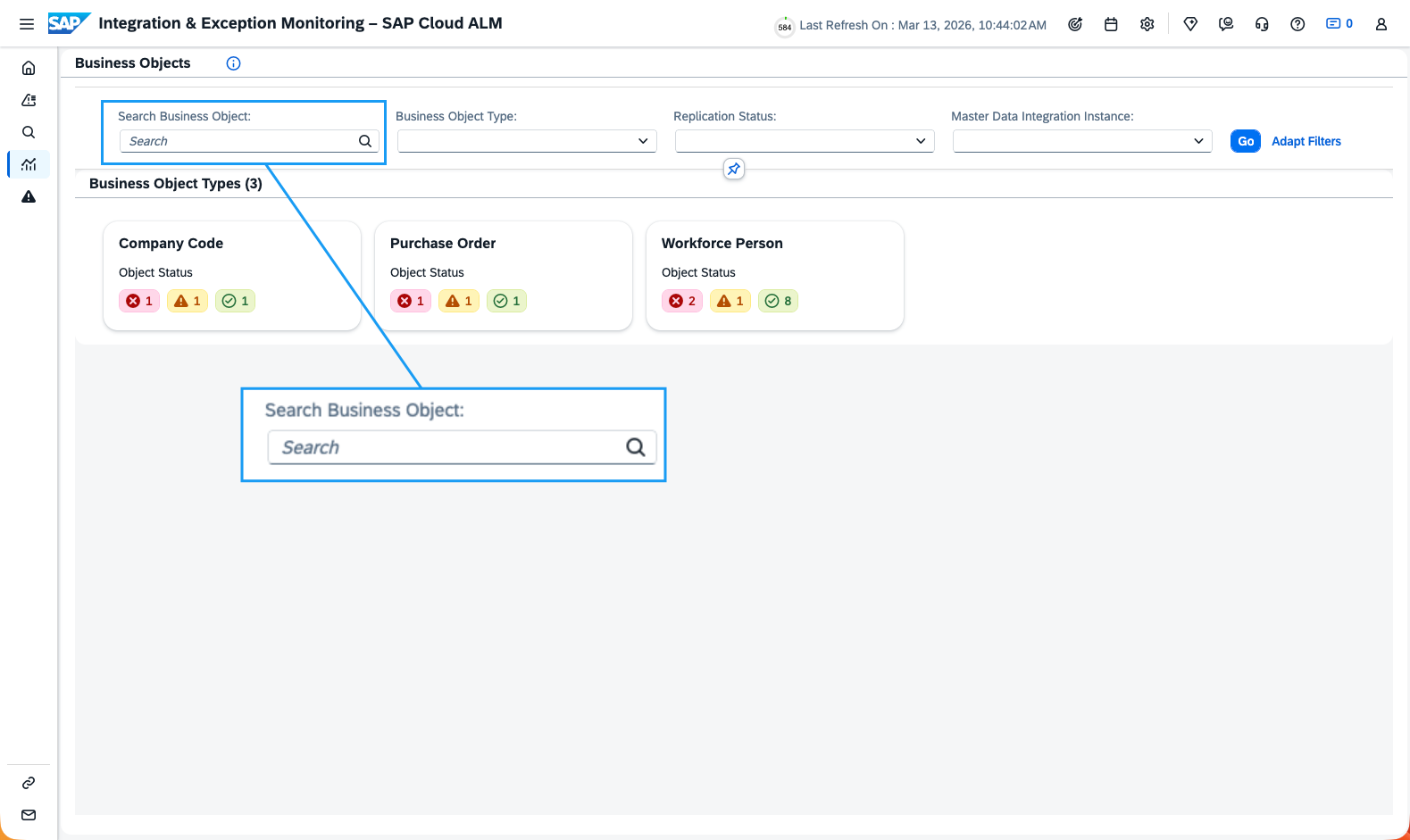
Monitoring coverage is also extended with support for SAP Integration Suite (Edge Integration Cell). Users can now monitor incoming and outgoing messages, access detailed status overviews, and drill down into individual messages to investigate issues more efficiently.
TL;DR:
Integration & Exception Monitoring now includes access control, enhanced search by object ID, and support for SAP Integration Suite (Edge Integration Cell) for improved security, usability, and monitoring coverage.
Visual Execution Status Indicators in Synthetic User Monitoring
Synthetic User Monitoring now introduces visual execution status indicators to improve transparency of scenario executions.
Active executions are displayed using progress bars in Gantt charts, providing a clear timeline view of ongoing activities. In addition, execution counters in tree views give a quick overview of execution status across monitored scenarios.
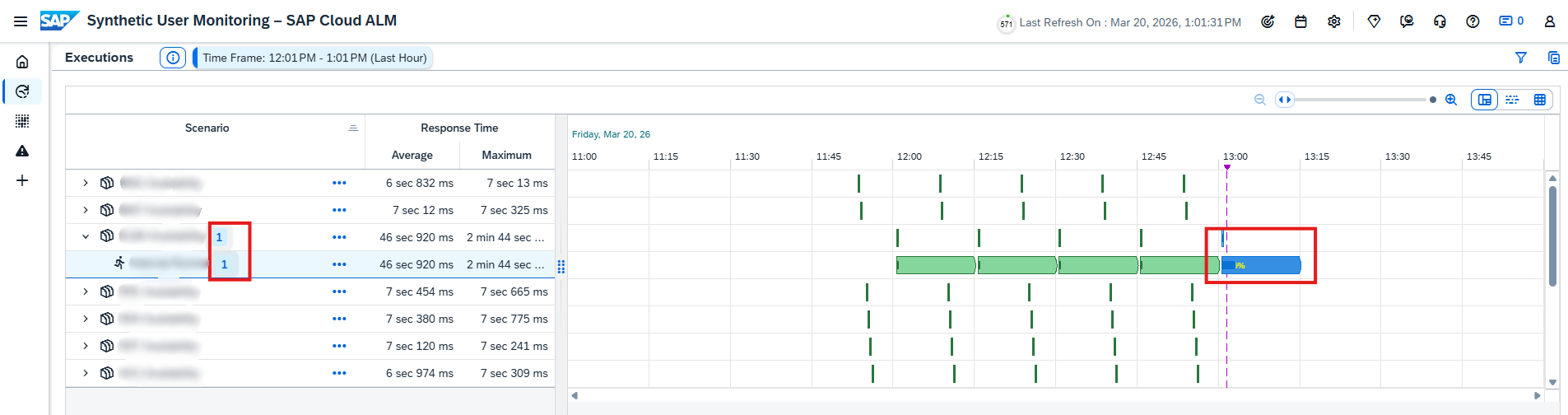
These visual enhancements make it easier to track execution progress and quickly understand the current state of synthetic monitoring scenarios.
TL;DR:
Synthetic User Monitoring now includes progress bars and execution counters for clearer, real-time visibility into scenario execution status.
Implementation – Analytics, Documents, Process Authoring
The Implementation area continues to evolve with updates that enhance transparency, usability, and control across project execution. The latest improvements introduce new analytical capabilities for risk evaluation, improved traceability and ownership visibility, richer document editing features, and safer process management through harmonized deletion handling – helping teams manage implementation work more efficiently and with greater confidence.
New Risk Distribution App in Analytics
A new Risk Distribution app is now available in the Analytics, providing enhanced capabilities for analyzing project risks.
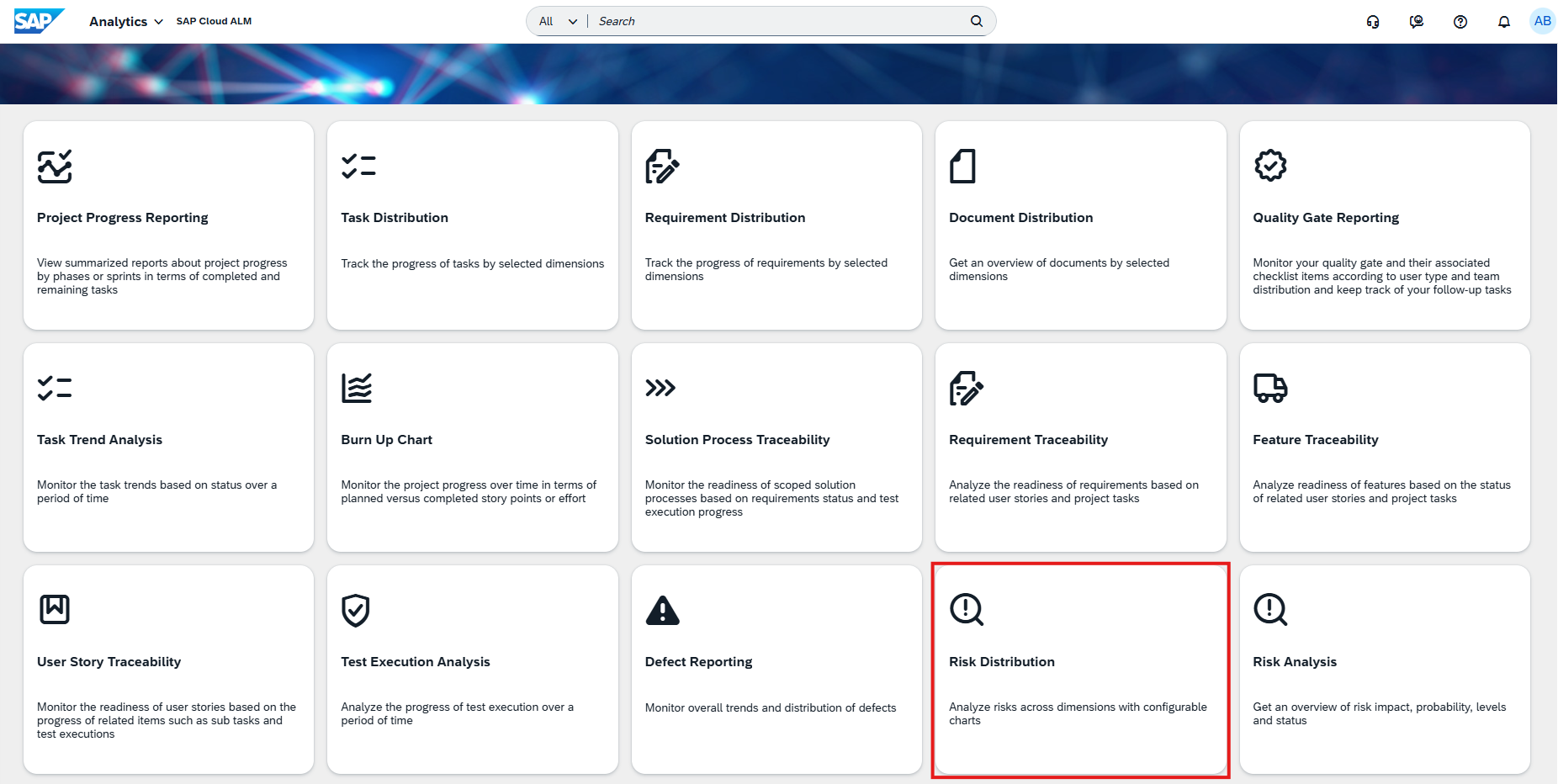
The app enables teams to analyze and compare risk patterns across different categories using interactive chart visualizations. With flexible chart options, it helps identify trends, concentrations, and high-risk areas, supporting more informed decision-making and prioritization.
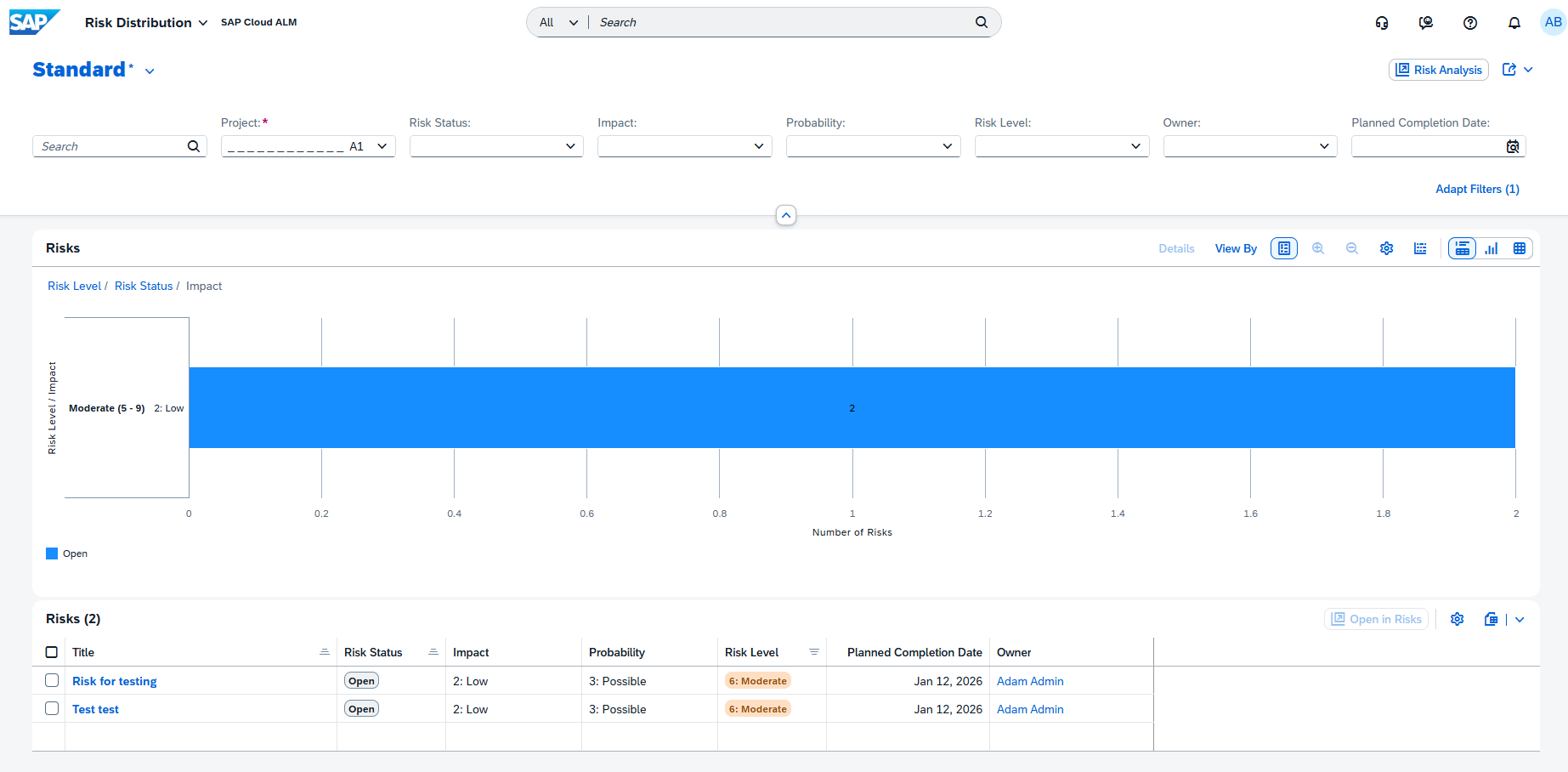
By visualizing risk distribution data, project teams gain a clearer understanding of how risks are spread across the project and where attention is most needed.
TL;DR:
The new Risk Distribution app provides interactive charts to analyze risk patterns and identify high-risk areas across projects.
Enhanced Traceability with Ownership and Status Details in Analytics
Traceability apps in the Analytics are enhanced to provide better visibility into ownership and more granular status tracking. New Owner and Responsible columns are now available in the following apps:
- Solution Process Traceability
- Requirement Traceability
- Feature Traceability
- User Story Traceability
These columns are hidden by default and can be enabled as needed, allowing teams to better understand who is accountable for each artifact.
In addition, the User Story Traceability app now separates previously combined status fields into four distinct columns:
- Requirement
- Requirement Status
- Feature
- Feature Status.
This change enables more precise filtering, sorting, and analysis across requirements and features.
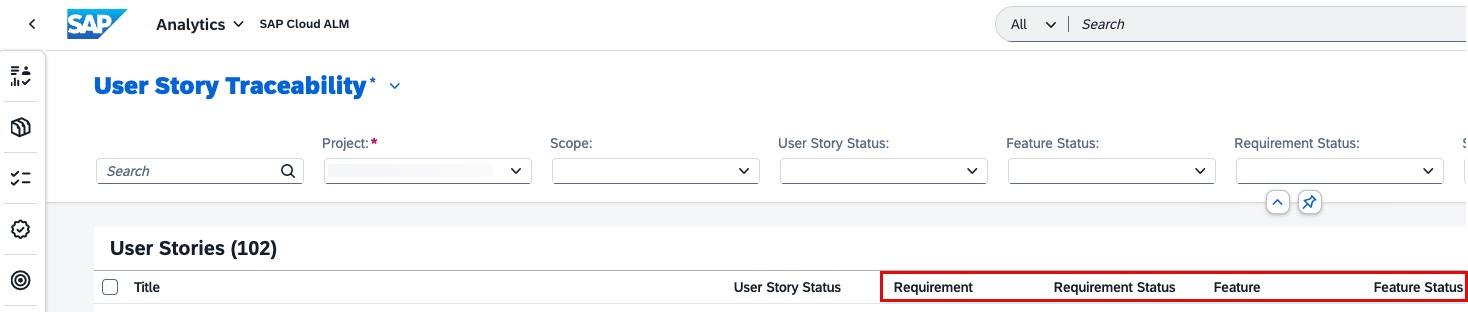
Together, these enhancements improve transparency and make it easier to track ownership and status across project elements.
TL;DR:
Traceability apps now include optional Owner/Responsible columns and more detailed status separation, improving visibility and analysis of project artifacts.
Enhanced Text Formatting in Documents
The Documents app now includes improved editing capabilities in its Rich Text Editor, making document creation and formatting more flexible.
New features include:
- Undo and redo functionality for easier editing
- Paragraph and heading formatting options for better content structure
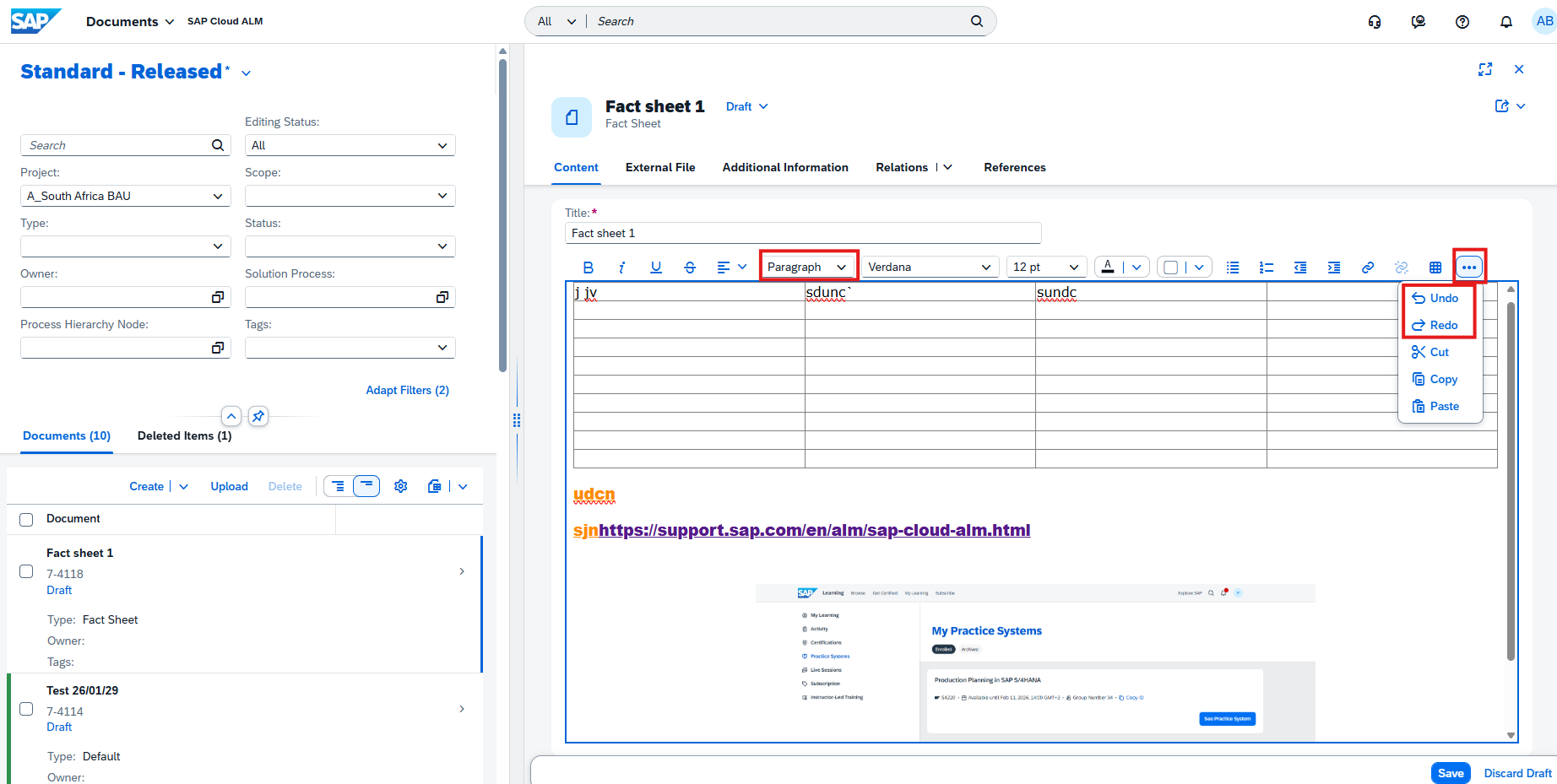
These enhancements provide greater control over document formatting and improve the overall editing experience.
TL;DR:
The Documents app now supports undo/redo and enhanced text formatting, making document editing more flexible and user-friendly.
Harmonized two-step deletion for custom solution processes in Process Authoring
The two-step deletion concept has been enhanced and harmonized for custom solution processes, improving data safety and consistency across SAP Cloud ALM. A new Deleted Items tab is now available, providing a clear overview of deleted solution processes. From there, processes can be restored or permanently deleted, reducing the risk of accidental data loss.
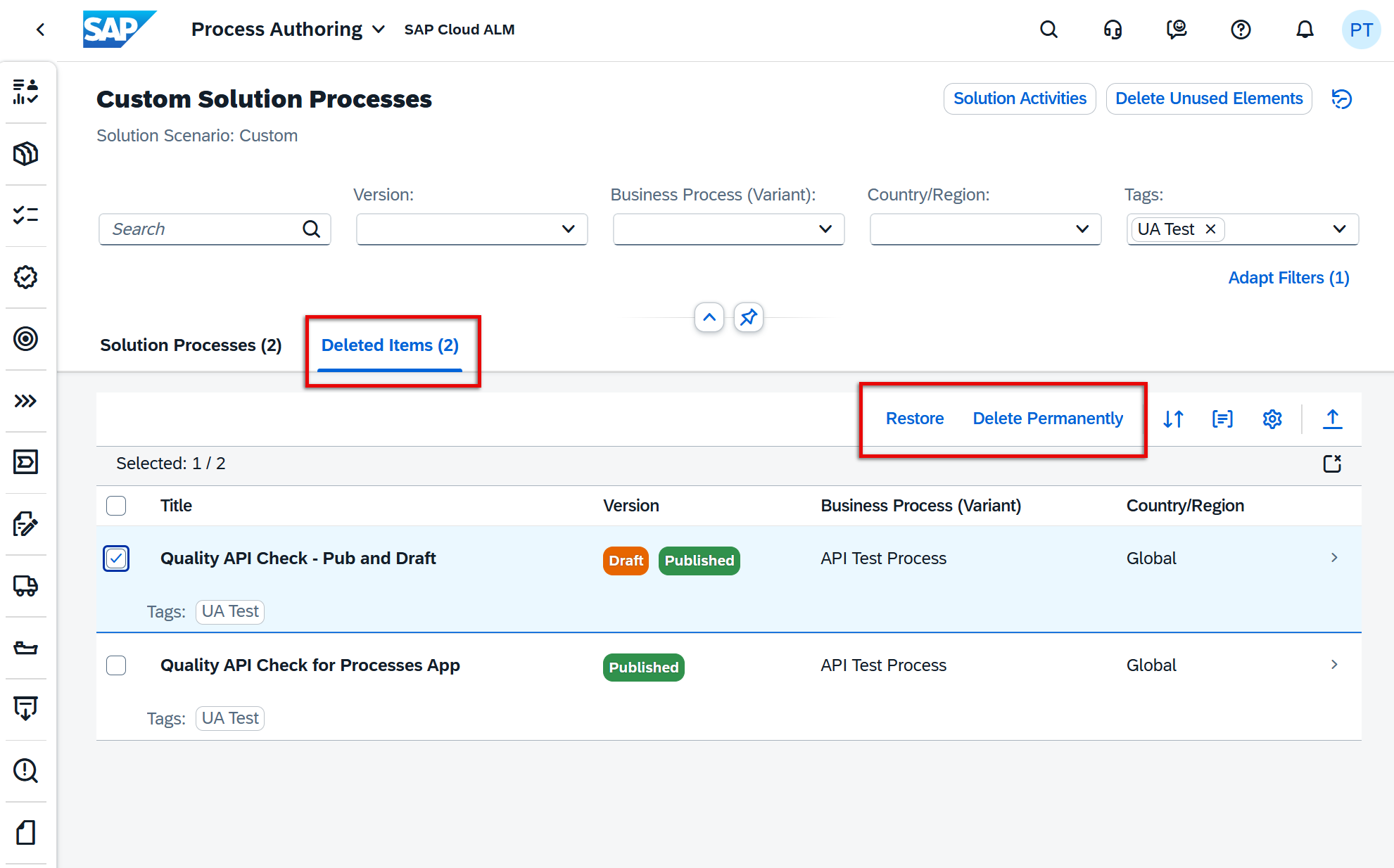
Deletion behavior has been aligned based on process versions:
- Processes with published (or both draft and published) versions are moved to Deleted Items
- Processes with draft-only versions are deleted permanently immediately
Deleted processes are clearly marked with a [Deleted] prefix and label, and cannot be edited, scoped, or modified unless restored.
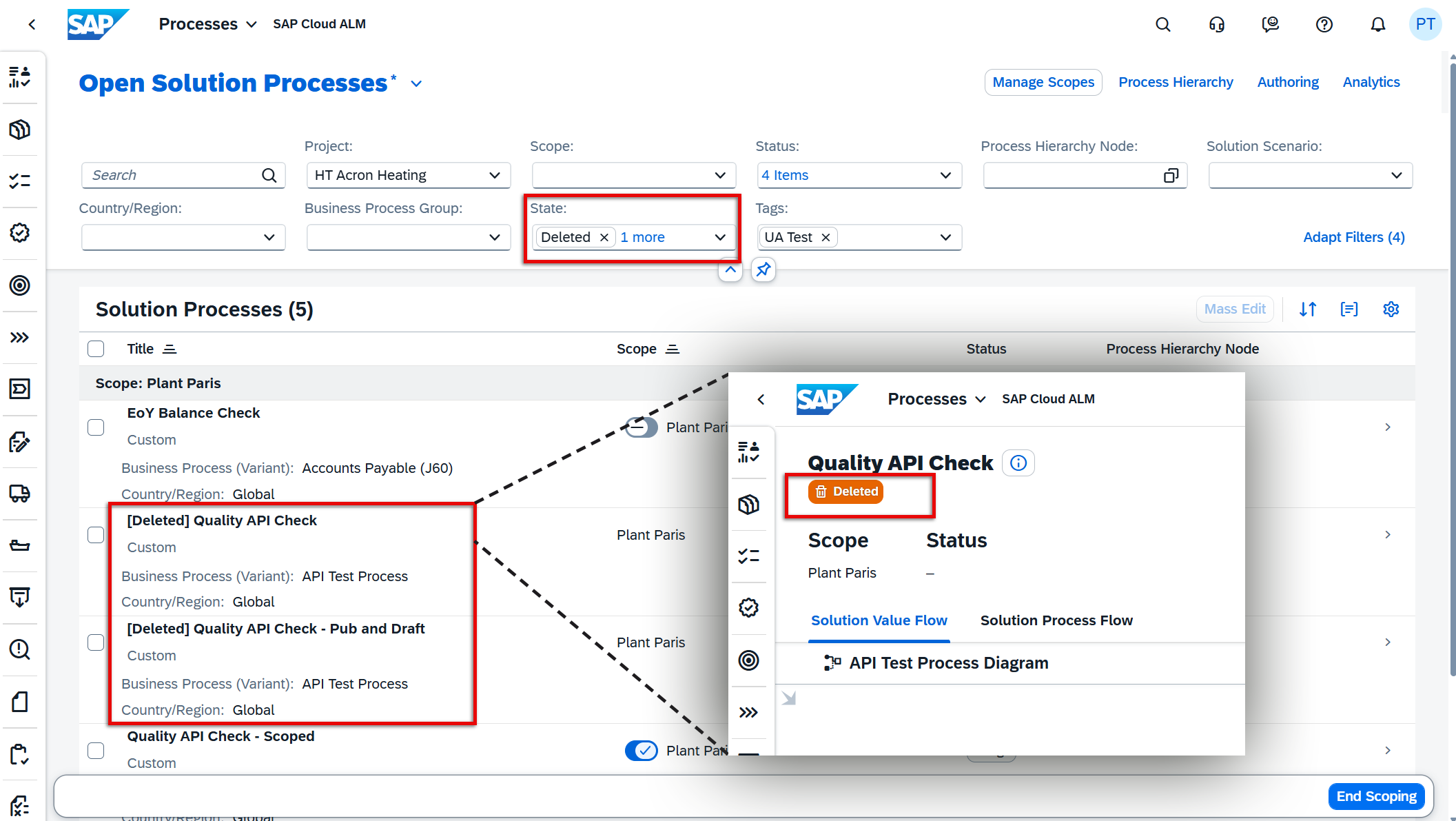
This enhancement ensures a safer and more transparent deletion process while maintaining consistency with similar concepts across the platform.
TL;DR:
Custom solution processes now follow a harmonized two-step deletion with a Deleted Items tab, allowing safe deletion, visibility, and easy restoration when needed.
Administration – User Management
Enhanced Connected Identity Provider Card
The Connected Identity Provider card in the User Management Overview has been enhanced to provide better visibility into identity configuration status.
The card is now displayed for all customers, regardless of their current identity provider setup. It shows whether the current configuration aligns with recommended SAP Cloud Identity infrastructure standards and highlights if changes are required.
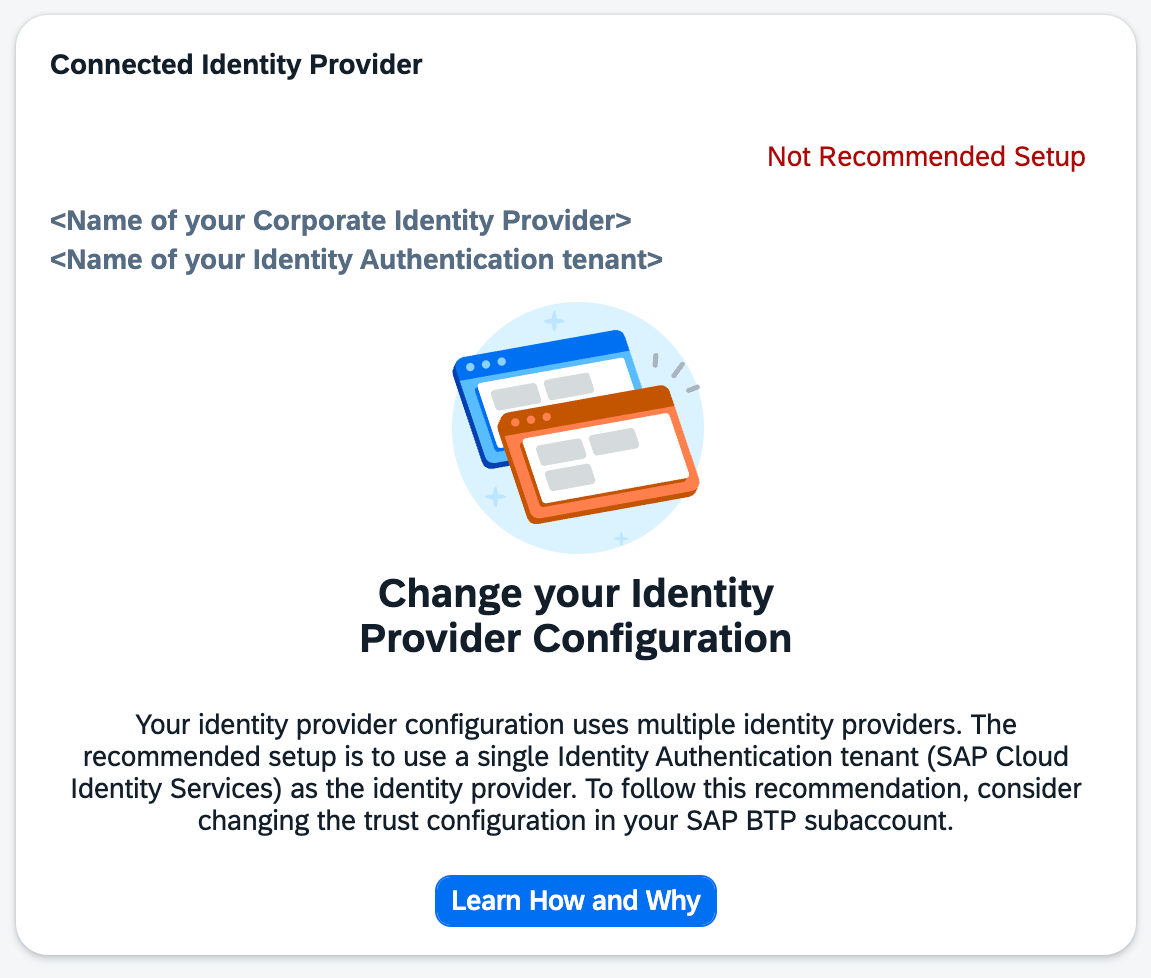
This enhancement helps administrators quickly assess the readiness of their identity setup and take action where needed. Keeping the identity provider configuration aligned with SAP recommendations is essential for enabling upcoming features such as the usage of Joule and ensuring a future-ready setup.
TL;DR:
The Connected Identity Provider card is now available for all customers and indicates whether the identity setup meets SAP recommendations and requires updates.