SAP Cloud ALM – What’s New in Week 10
SAP Cloud ALM continues to evolve with enhancements that improve automation, visibility, and data-driven insights across the platform.
The week 10 release introduces AI-powered innovation analysis in the Service area, enhanced automation and landscape setup in Administration, improved transformation validation and execution reliability in SAP Business Transformation Center, and expanded monitoring and event management capabilities in Operations. The Implementation area also receives updates that increase flexibility and transparency in process management, analytics, and API integrations.
Together, these enhancements simplify system setup, strengthen operational awareness, and provide teams with better tools to manage innovation adoption, transformations, and day-to-day operations across their SAP landscape.
SAP Business Transformation Center – Modeling, Cycle and Monitoring
Updates in the SAP Business Transformation Center focus on improving migration readiness, execution reliability, and overall transparency throughout the transformation lifecycle. The latest enhancements introduce smarter validations in transformation models and improved synchronization and diagnostics during migration cycles, helping ensure smoother and more predictable data transformations.
Validation of Inconsistent Filter Assignments in Modeling
SAP Business Transformation Center introduces an automated validation that improves the reliability of transformation model preparation.
The new Inconsistent Filter Assignments Check automatically identifies filter assignments that reference nonexistent SAP ERP table fields. When such inconsistencies are detected, the system excludes them from the scope of the transformation model version. This prevents potential issues during migration execution while keeping the transformation model version executable.
The check also improves transparency by clearly indicating which filter assignments were removed from the migration scope, helping teams better understand and control the configuration of their transformation models.
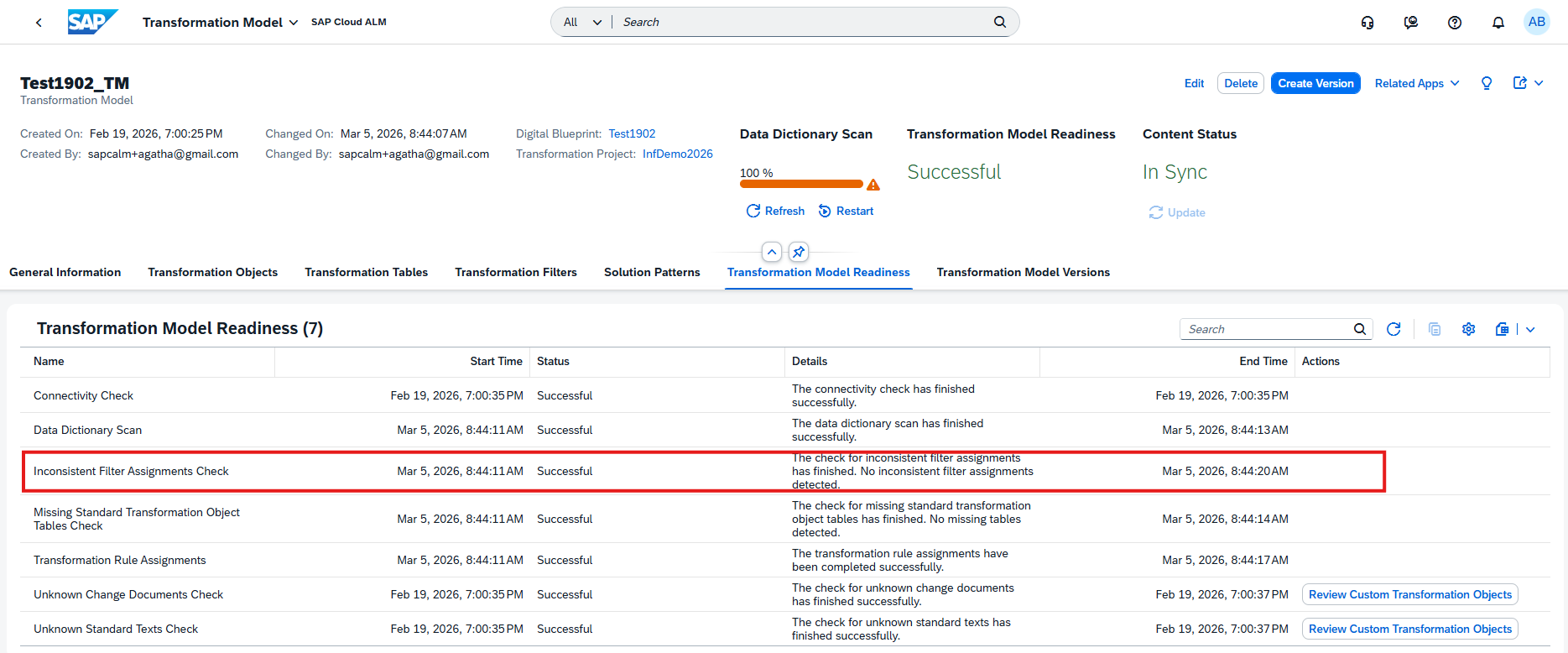
The validation is available in the Transformation Model Readiness tab within the Manage Transformation Models app.
TL;DR:
A new Inconsistent Filter Assignments Check automatically detects filter assignments referencing nonexistent table fields and excludes them from the transformation model version to prevent migration issues.
Improved Status Synchronization and Diagnostics in Cycle and Monitoring
Several enhancements have been introduced in the Cycle and Monitoring phase to improve transparency and reliability during migration execution.
Status synchronization has been enhanced so that phase execution states are automatically aligned, ensuring real-time accuracy across the transformation cycle. A new Ready to Restart status has also been introduced, indicating that phases are properly synchronized and prepared for restart operations when needed.
The Health Check capability has been renamed to Run Diagnostics, providing clearer terminology that better reflects its purpose of validating and analyzing the migration landscape.
In addition, the post-processing phase has been improved through a standardized execution mode. The application now uses an optimized uninterrupted execution flow, resulting in a more predictable and stable post-processing experience.
TL;DR:
Cycle and Monitoring improvements introduce synchronized phase statuses with a new Ready to Restart state, rename Health Check to Run Diagnostics, and standardize execution flow to improve post-processing reliability.
Operations – Real User Monitoring, Business Service Management
The Operations area receives updates that improve monitoring clarity and event management. The latest enhancements introduce additional context in Real User Monitoring and better classification and notifications for maintenance events in Business Service Management, helping operations teams stay informed and respond more effectively to system activities.
Add a custom description to a request name
In Real User Monitoring, it is now possible to add a custom description to request names in the Configuration screen. This enhancement helps provide additional context and improves clarity when analyzing monitored requests.
A description can be added by selecting a request name in the configuration view, entering the desired description, and saving the changes.
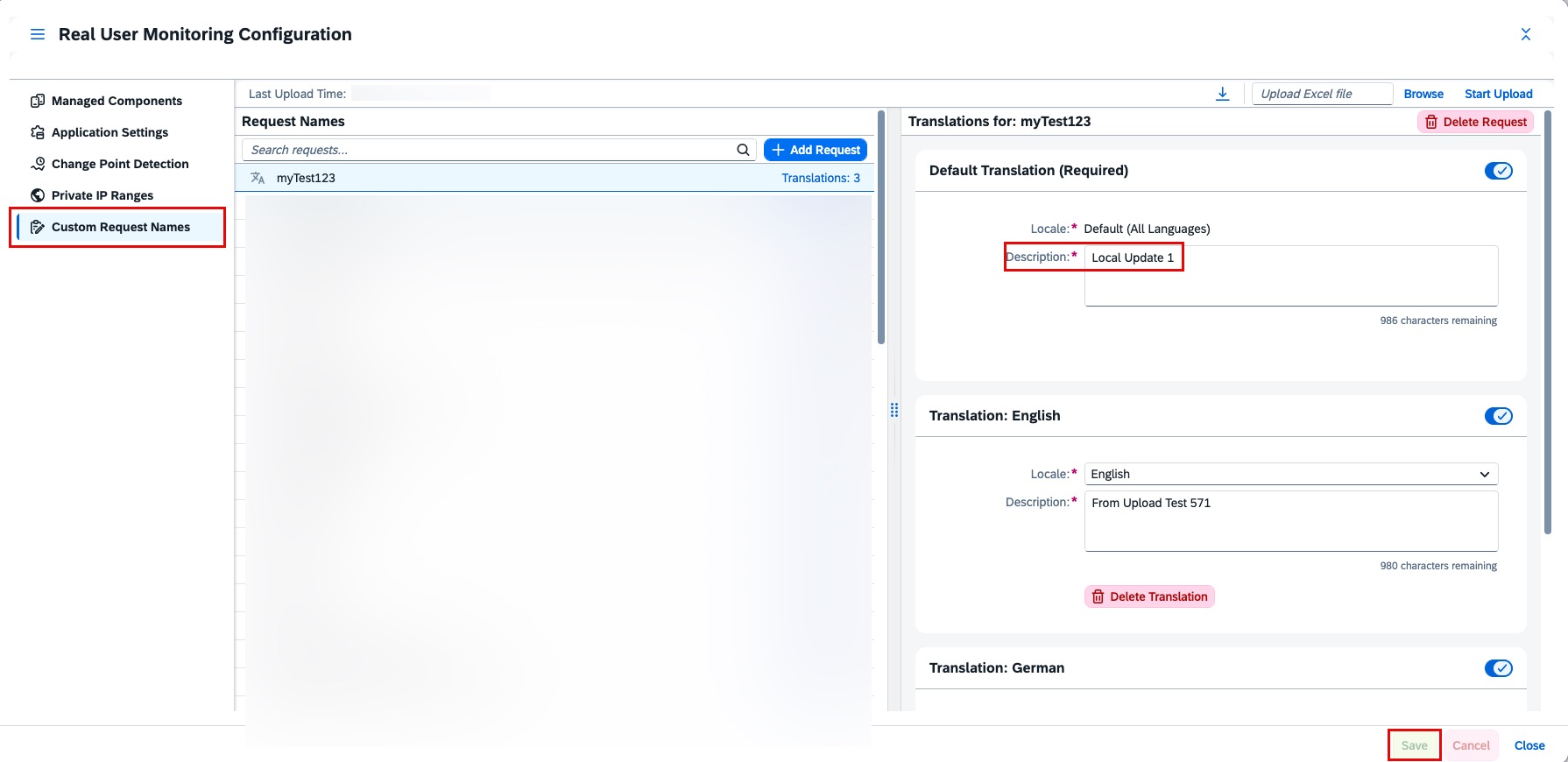
The description then becomes visible alongside the request, making it easier to understand the purpose or business context of specific requests during monitoring and analysis.
Keep in mind that custom descriptions can only be added by the Real User Analyst Administrator role.
TL;DR:
Custom descriptions can now be added to request names in Real User Monitoring, improving clarity and context when analyzing monitored requests.
New event category Maintenance Type and Reminders for Maintenance event
A new Maintenance Type event category is now available for maintenance events related to public cloud offerings in Business Service Management. This additional classification helps distinguish different kinds of maintenance activities and provides clearer context when reviewing events. The Maintenance Type can be viewed in the Event Details screen on the Event Calendar page and in the Type column of the Events table in Service Level Reporting.
In addition, maintenance event reminders are now recorded in the Action Log. Based on the configured event actions, notifications are triggered before and during maintenance windows for events created by SAP. These reminders help operations teams stay informed about upcoming or ongoing maintenance activities, ensuring better preparation and response during scheduled service events.
Together, these enhancements improve operational awareness and make it easier to track, categorize, and react to maintenance activities affecting cloud services.
TL;DR:
Maintenance events can now be categorized with a new Maintenance Type, and reminders are logged in the Action Log, improving visibility and readiness for scheduled maintenance activities.
Implementation – Processes, Process Authoring, Documents, Analytics
The Implementation area introduces enhancements that improve transparency, flexibility, and integration across project execution activities. The latest updates bring more granular process scoping, better traceability in process management, extended APIs for document integrations, and new analytical capabilities for risk evaluation – helping project teams manage implementation work with greater control and insight.
Granular Process Scoping and Change History in Processes
Processes in the Implementation area becomes more flexible and transparent with new capabilities for detailed scoping and change tracking.
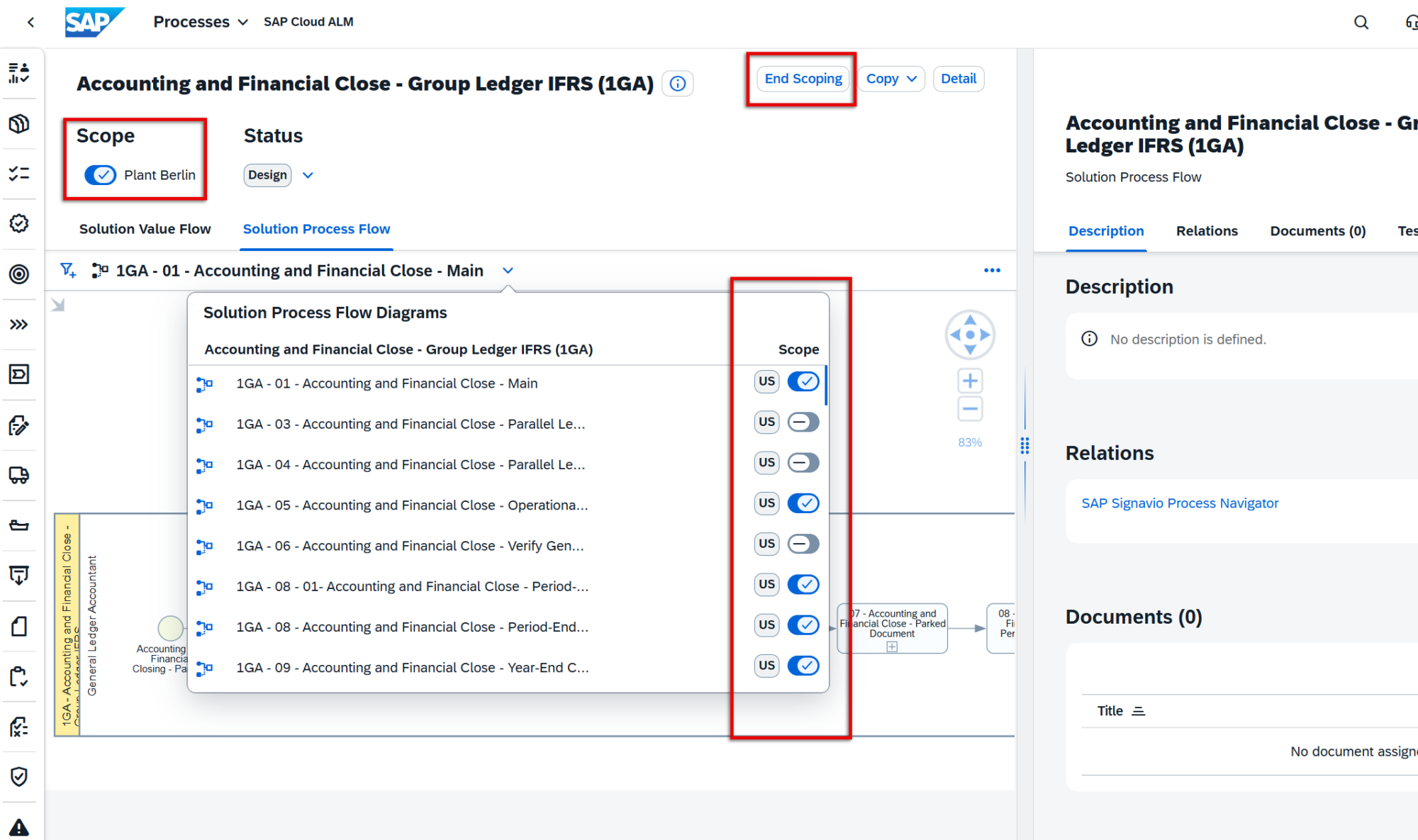
Projects can now scope individual solution process flow diagrams instead of scoping entire solution processes. This allows teams to focus only on the diagrams relevant to their implementation. The enhancement is particularly useful for large end-to-end scenarios such as Lead to Cash or Recruit to Retire, where multiple diagrams may exist due to localization or scenario variations. The previous process-level scoping method remains supported, while the new option provides more granular control over the implementation scope.
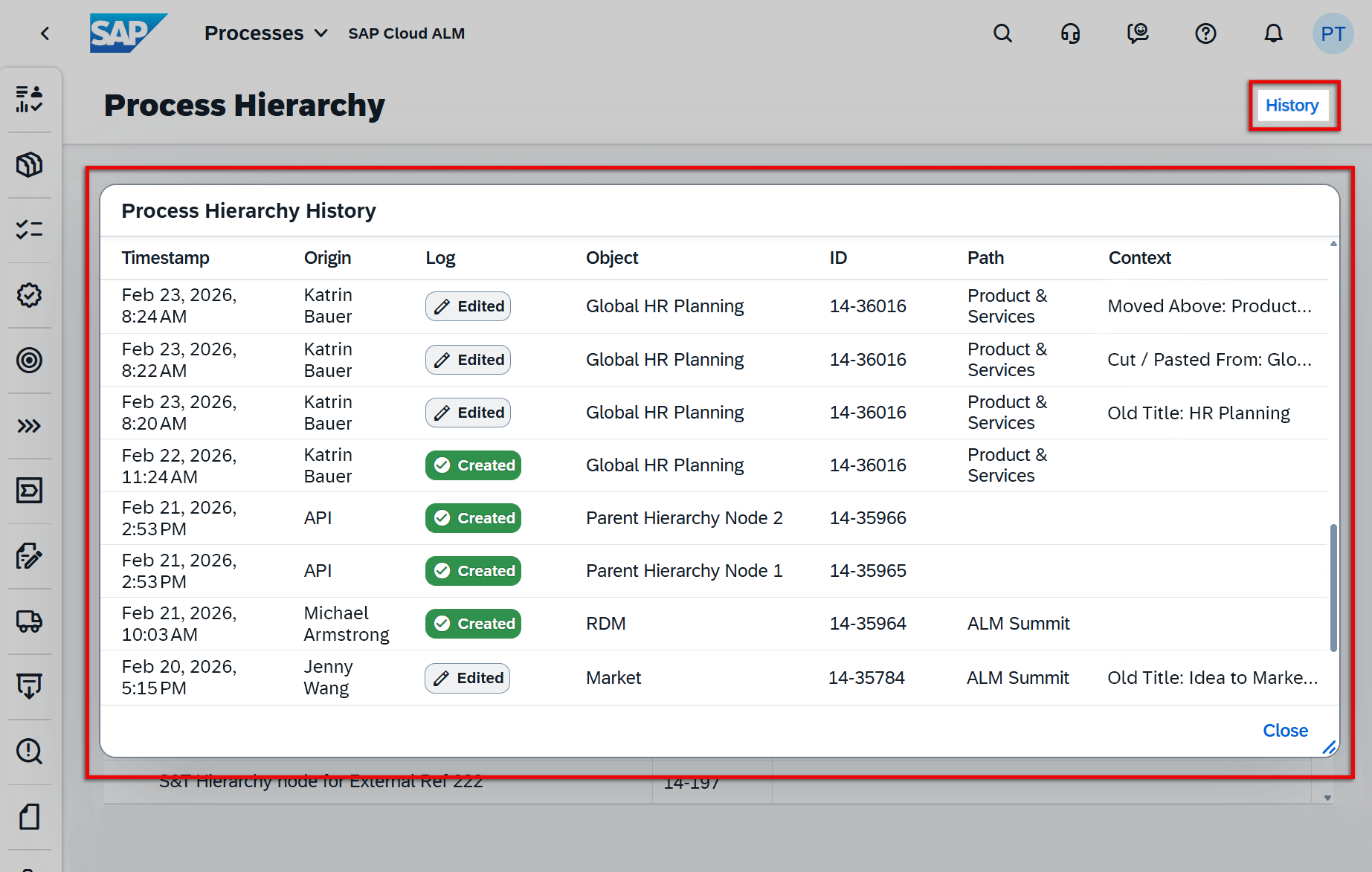
In addition, the Process Hierarchy app now includes a history function that records changes made to process hierarchy nodes. The history shows when a change occurred, what was modified, and who performed the change (unless executed via API). Changes made through the UI, public APIs, or spreadsheet uploads are all tracked, improving traceability and governance of process structure updates.
TL;DR:
Solution process flow diagrams can now be scoped individually for more precise implementation scoping, and the Process Hierarchy app introduces a change history to track modifications across the process structure.
Display External References for Process Diagrams in Process Authoring
Process Authoring now provides improved visibility of external references linked to solution process flow diagrams.
If a diagram contains an external reference, it is now displayed in the Properties section when the diagram is selected in Process Authoring. The external reference name appears as an active link, enabling direct navigation to the referenced source.
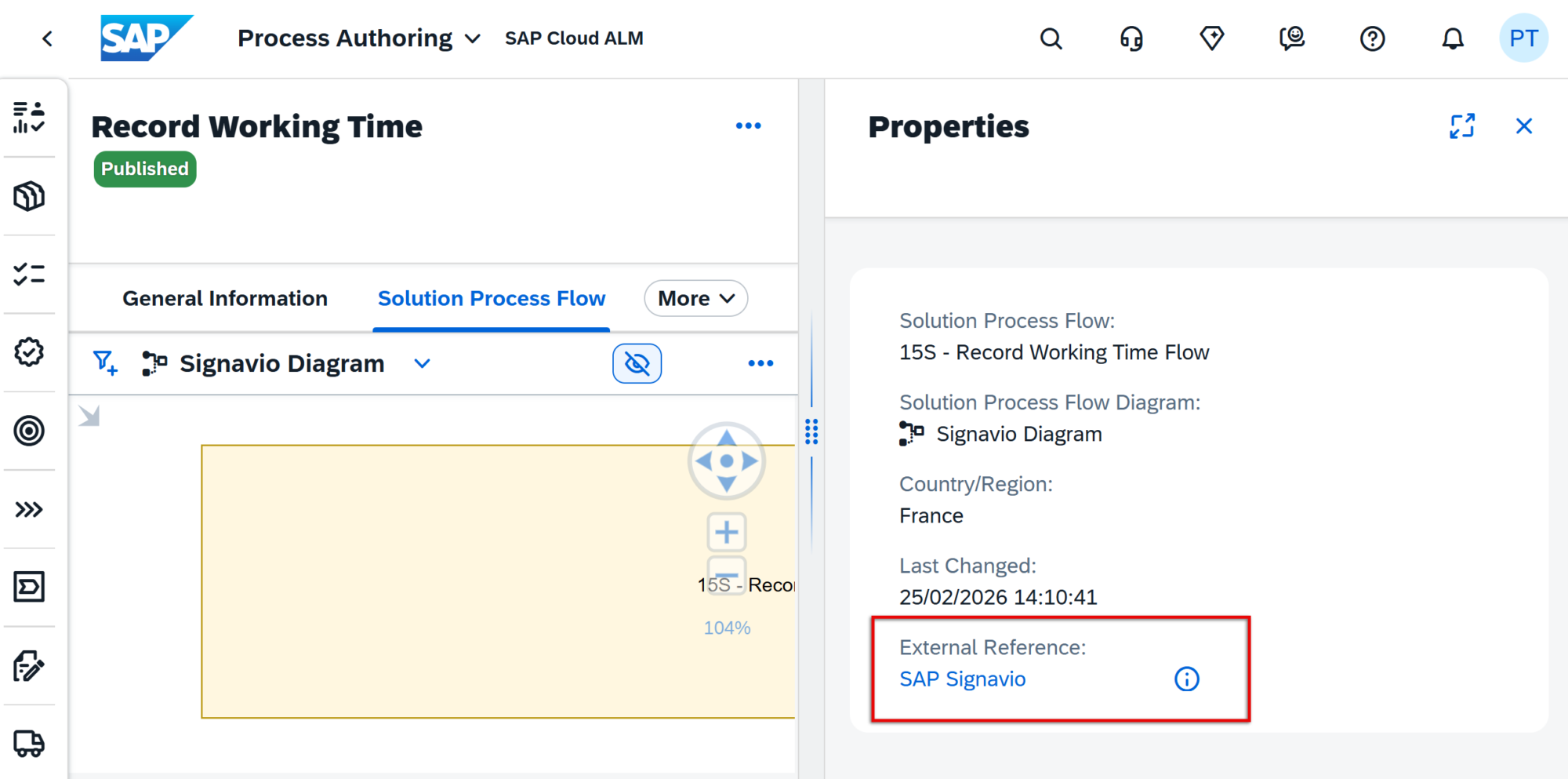
Additional context is available by hovering over the information icon, which reveals the ID of the external reference. If the section is not visible, it indicates that no external reference has been assigned to the selected diagram.
This enhancement helps users better understand diagram origins and quickly access related external content when working with process models.
TL;DR:
External references for solution process flow diagrams are now visible in Process Authoring, with direct navigation links and reference ID details for improved traceability.
Extended Documents API
The Documents API has been extended with additional fields to improve document integration and management capabilities.
The API now exposes the following fields: ownerId, responsibleId, approvalCode, stateCode, and isTemplate. These fields are available for read operations, allowing integrations to retrieve more detailed information about document ownership, responsibility, approval status, and template usage.
Depending on the applicable business logic, some of these fields can also be provided during create operations, enabling more flexible automation and integration scenarios.
TL;DR:
The Documents API now includes additional fields such as owner, responsible, approval, and state information, improving integration and automation options for document management.
New Risk Analysis App Released in Analytics
A new Risk Analysis app is now available, providing a visual and analytical overview of project risks to support better prioritization and decision-making.
The app uses a heatmap visualization that plots risks by impact (Y-axis) and probability (X-axis). Each cell is color-coded and includes a calculated score, making it easy to identify risk hotspots and areas that require immediate attention. This allows project teams to quickly assess where risks are concentrated and focus mitigation efforts accordingly.
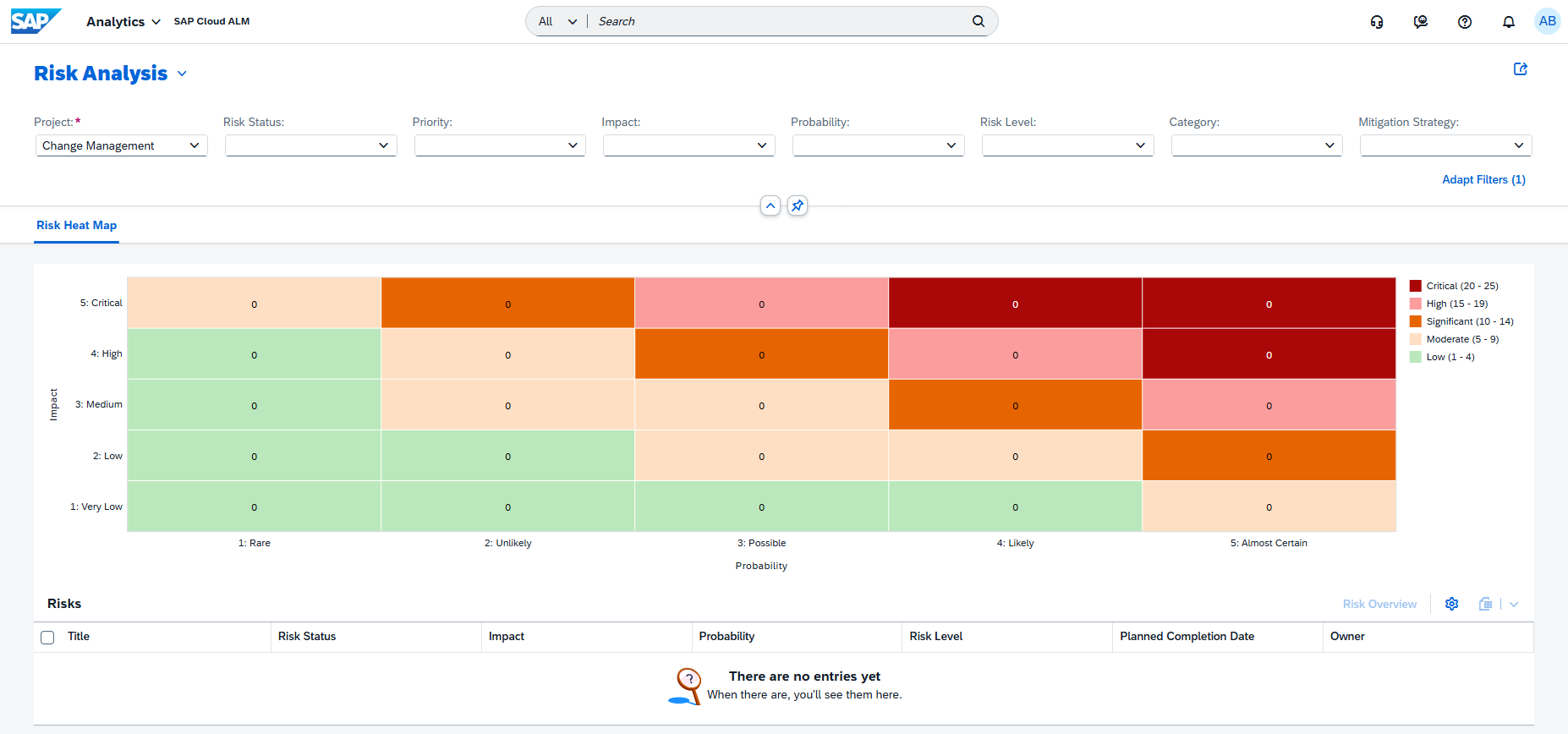
Users can refine the analysis using filters such as Project, Status, Risk Category, Risk Level, or Date Range, and easily drill down from the heatmap to detailed risk lists and full risk records. Views can also be customized by adjusting chart dimensions, sorting, and grouping.
To streamline analysis, users can save personalized views with selected filters and chart settings. These views can later be reused, managed, or – if permissions allow – shared with other users as public views, enabling consistent risk analysis across teams.
TL;DR:
The new Risk Analysis app introduces a heatmap-based visualization of project risks, helping teams identify risk hotspots, prioritize mitigation actions, and analyze risks through customizable and shareable views.
Administration – Landscape Management
S/4HANA Cloud Setup Automation
Setting up monitoring connectivity between SAP S/4HANA Cloud and SAP Cloud ALM previously required several manual configuration steps. Administrators had to create communication systems, configure OAuth authentication, and maintain multiple communication arrangements for monitoring scenarios such as Application Monitoring and Business Process Monitoring.
With the new S/4HANA Cloud Setup Automation feature in Landscape Management, these steps are now handled automatically through Unified Customer Landscape (UCL).
Once triggered, the automation performs the required configuration tasks in the background, including:
- Creating the required communication systems
- Managing and configuring communication arrangements
- Activating all supported monitoring use cases
- Establishing the secure connectivity between SAP S/4HANA Cloud and SAP Cloud ALM
By eliminating the need for manual configuration across multiple applications and settings, this enhancement significantly reduces setup complexity and time, while ensuring a consistent and error-free monitoring setup.
This improvement enhances the onboarding experience for S/4HANA Cloud systems and simplifies the activation of monitoring capabilities within SAP Cloud ALM.
TL;DR:
S/4HANA Cloud systems can now be onboarded automatically using UCL, streamlining connectivity setup and activating monitoring use cases with minimal manual effort.
Service – AI Assistance for Innovation Adoption
New App AI Assistance for Innovation Adoption
A new application, AI Assistance for Innovation Adoption, is now available in the Service area of SAP Cloud ALM. The app helps organizations monitor, analyze, and improve their SAP landscape using AI-driven insights, providing a data-driven approach to innovation adoption and system optimization.
The application collects and analyzes system data and presents the results through interactive dashboards with predefined KPIs. These dashboards highlight the health and performance of different areas of the SAP landscape. When a KPI falls outside its expected range, the app can automatically create issues and recommend actions, helping teams quickly identify improvement opportunities.
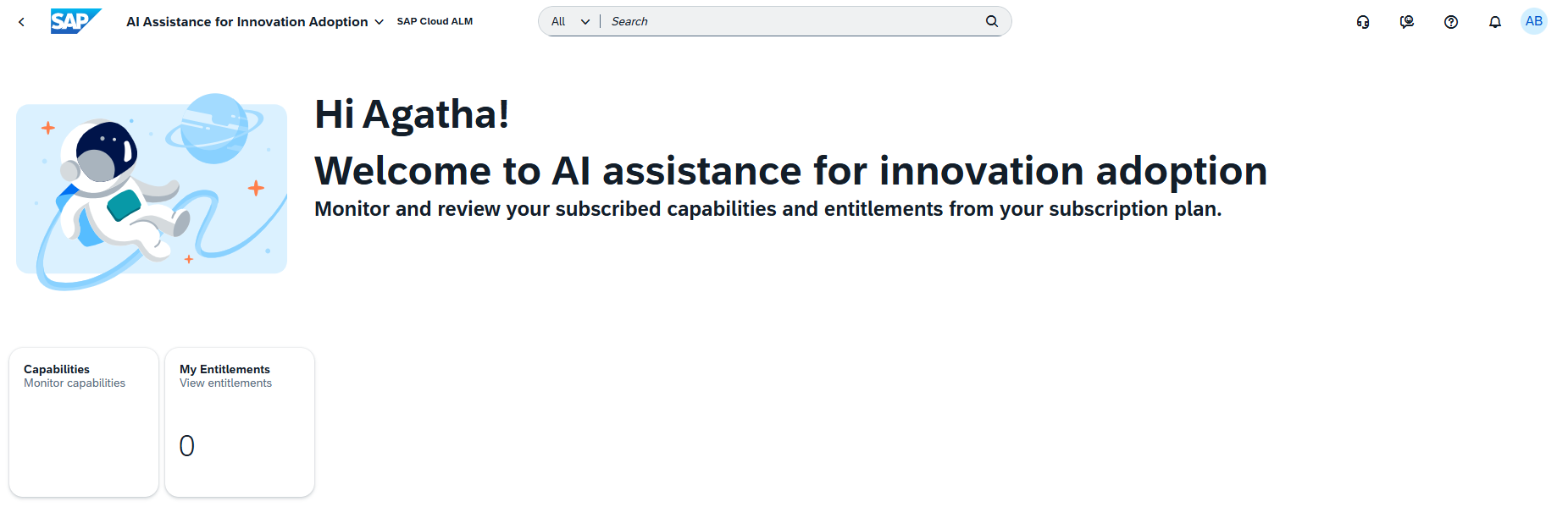
The analysis is structured around capabilities, which represent specific focus areas of the SAP landscape. Each capability includes a dedicated dashboard that visualizes system health and performance and supports deeper investigation of identified issues. Currently available capabilities include:
- Adoption potential for RISE with SAP
- Data capacity excellence
- Enduring cybersecurity
- Evolution readiness
- Extensibility intelligence
- Operational excellence of SAP BTP
When the app identifies potential issues, they are automatically created in Issues and Actions Management, where teams can review them and convert them into tasks or projects to manage follow-up activities directly within SAP Cloud ALM.
The app also includes a My Entitlements section, which provides visibility into the services and capabilities available according to the organization’s contract or subscription. This allows teams to quickly verify which innovation capabilities can be analyzed and monitored within the application.
Capabilities are configured using a reference identifier depending on the focus area being analyzed:
- Customer number – used for the Operational Excellence capability of SAP BTP
- System number – used for all other capabilities
This ensures that the analysis is correctly linked to the relevant systems or landscape context.
Overall, the application supports a continuous improvement cycle – collecting data, analyzing results, visualizing insights through dashboards, and enabling follow-up actions – helping organizations continuously improve their SAP landscape and adopt innovations more effectively.
TL;DR:
The new AI Assistance for Innovation Adoption app uses AI-powered dashboards and KPIs to analyze SAP landscape health, highlight improvement opportunities, and generate actionable issues and tasks to support continuous innovation adoption.