SAP Cloud ALM – What’s New in Week 8
SAP Cloud ALM continues to evolve with focused enhancements that deepen visibility and strengthen operational control.
The week 8 release brings expanded scoring and analytics in RISE with SAP Methodology, smarter readiness and data quality capabilities in SAP Business Transformation Center, and broader monitoring coverage and configuration transparency in Operations.
Together, these updates enhance insight, improve governance, and help teams manage transformation and operations with greater clarity and confidence.
SAP Business Transformation Center Transition, Scoping, Modeling, Data Management
The latest updates in SAP Business Transformation Center focus on strengthening transformation readiness, improving data quality transparency, and increasing automation across scoping, modeling, and data management. With enhanced system scans, smarter validation checks, and deeper analytical insights, teams can execute SAP ERP cloud transformations with greater confidence, control, and reduced manual effort.
Improvements in the Transformation Project Overview app
The Transformation Project Overview app has been enhanced to provide better visibility and control across all transformation phases.
The list of available tasks has been refined, and tasks can now be filtered by status, making it easier to focus on open or critical activities.
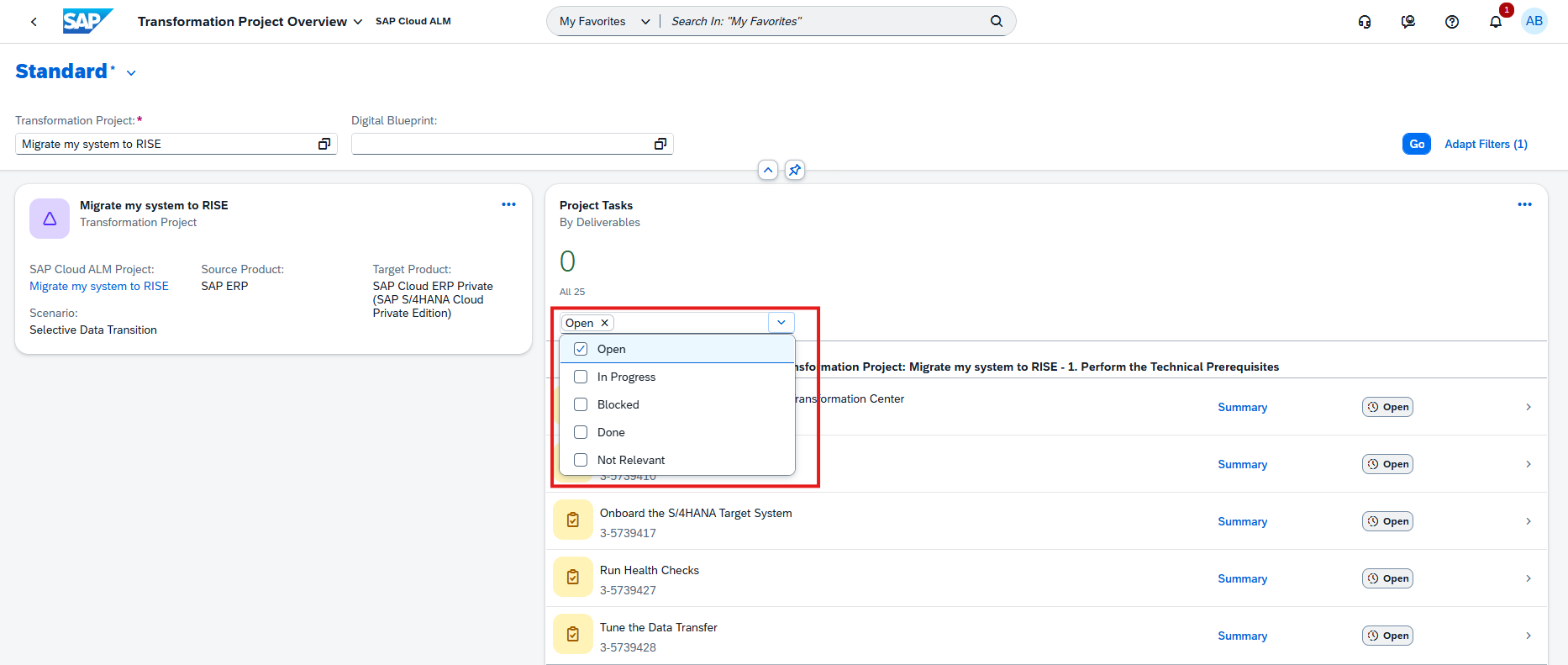
In addition, tasks related to Scoping, Modeling, and Cycle & Monitoring can now be tracked directly within the overview, including their execution progress and current status.
Each relevant task also includes direct navigation links to the corresponding apps, enabling seamless transitions between the Transformation Project Overview and the Scoping, Modeling, or Cycle & Monitoring apps.
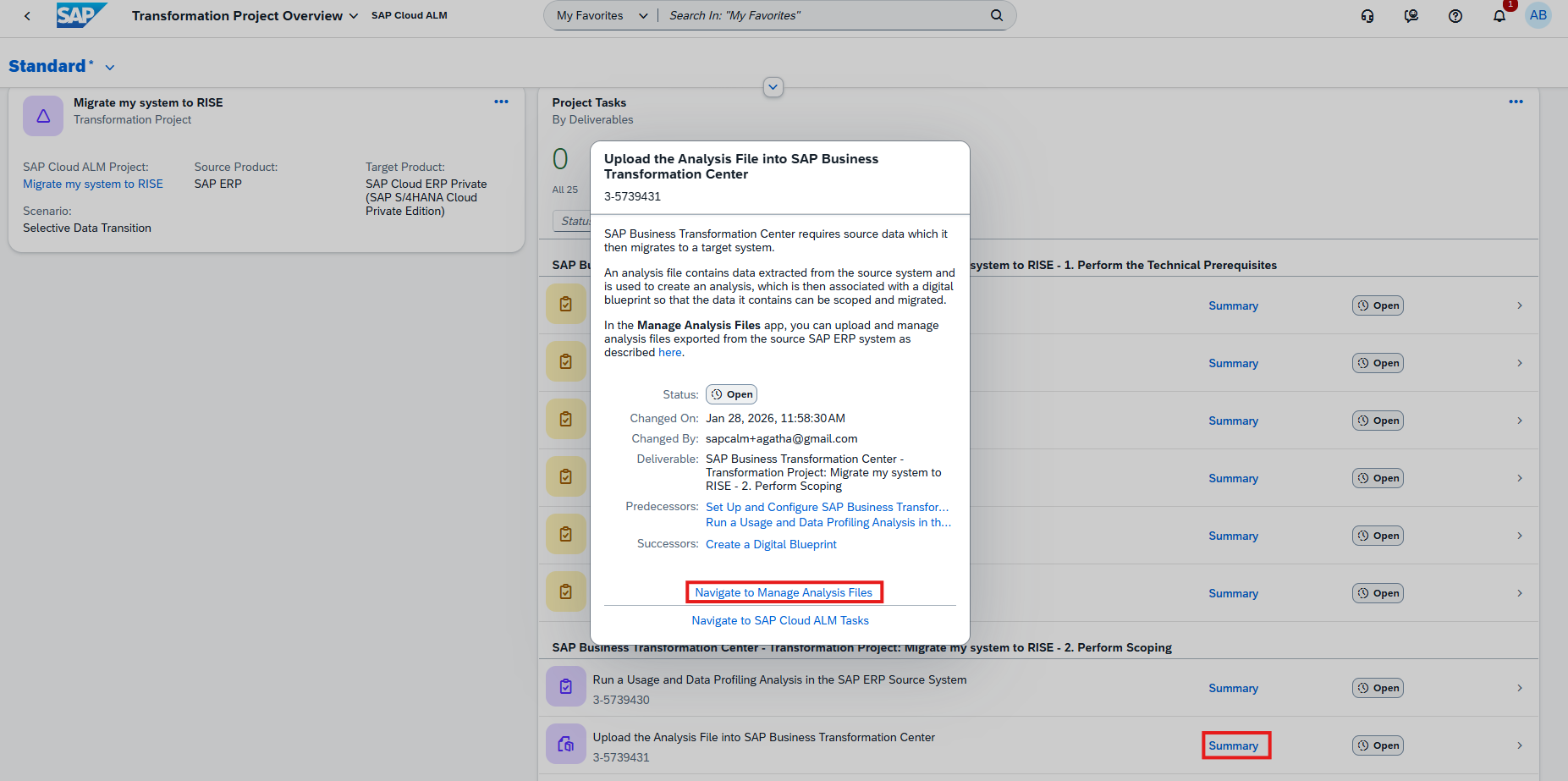
These improvements strengthen transparency, simplify navigation, and help teams manage transformation progress more efficiently from a central view.
TL;DR:
The Transformation Project Overview app now offers refined task lists, status filtering, phase tracking, and direct navigation to related apps for better end-to-end project visibility.
Enhanced Filter Assignments for Organizational Units and Time Slices in Scoping
Scoping capabilities have been extended to improve precision during system scans and data selection.
Filter assignments for organizational unit–related table fields now include the Financial Management Area domain (FIKRS). This ensures that relevant financial management structures are properly considered during scoping and migration preparation.
In addition, the system scan can now detect time-slice–relevant domains, specifically GJAHR (fiscal year), in custom database tables. Based on this detection, time slice filter assignments are automatically derived, enabling data migration according to the selected fiscal year.
When the time slice solution pattern is activated, the fiscal year filter is automatically enabled for one relevant field in the custom table. The filter can still be adjusted or deactivated in the Select Scanned Tables app if required.
These enhancements provide more granular scoping, better alignment with financial structures, and improved control over time-dependent data migration.
TL;DR:
Scoping now supports FIKRS-based filters for organizational units and automatically derives fiscal year (GJAHR) time-slice filters for custom tables, enabling more precise and flexible data migration.
Automatic Detection of Missing Standard Transformation Object Tables in Modeling
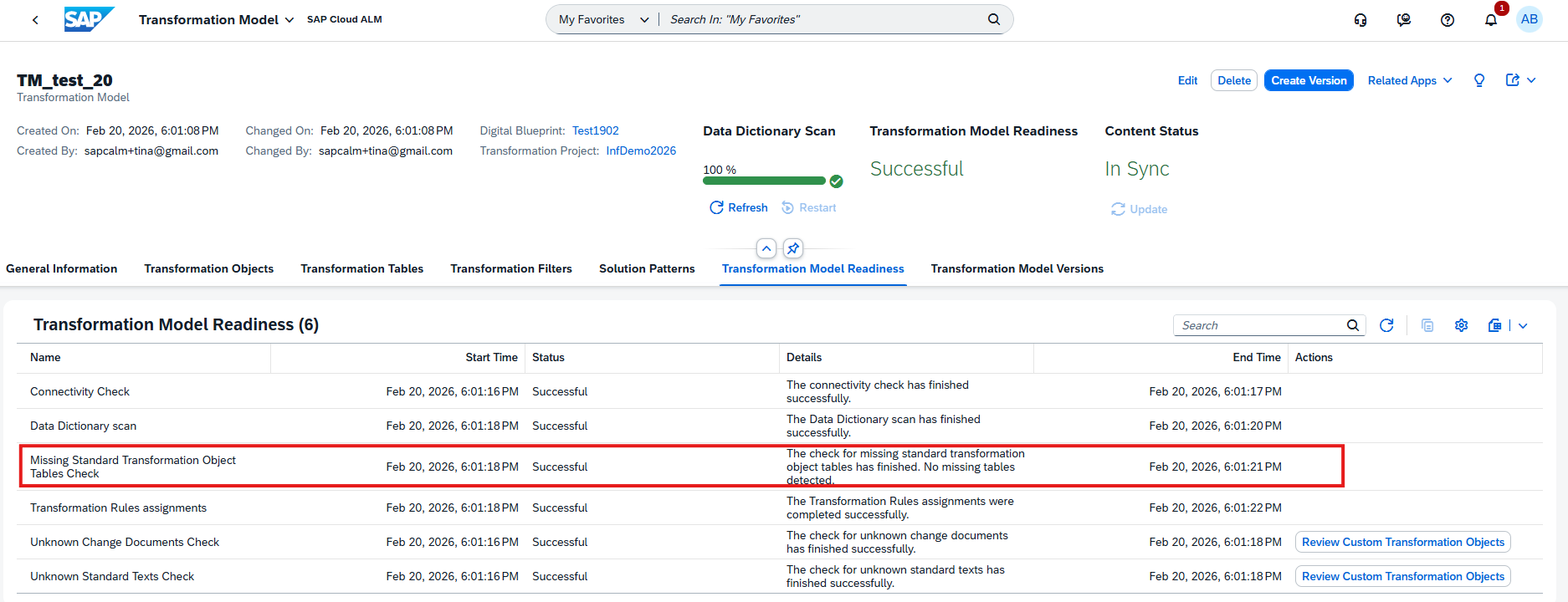
Modeling is further improved with automatic detection and handling of missing standard transformation object tables. If tables that belong to a standard transformation object are not present in the SAP ERP source system, they are now automatically identified and excluded from the transformation model version. This also applies to related child tables, object relations, rules, and filter assignments.
By automatically removing non-existing elements from the model, the system helps reduce potential errors and strengthens overall data integrity during transformation.
This functionality is managed through the new Missing Standard Transformation Object Tables Check, available in the Manage Transformation Models app as part of the Transformation Model Readiness checks.
TL;DR:
Missing standard transformation tables are now detected and automatically excluded from model versions, reducing errors and improving transformation reliability.
Trend Analysis and Improved Cross-App Navigation in Data Management
Data quality monitoring becomes more transparent and connected with two key enhancements in Data Management.
In the Analyze Data Quality app, a new trend chart is now available on the KPI Detail Page. It visualizes how the total number of errors for a selected KPI evolves across multiple successfully completed Quality Check Runs. This makes it easier to identify improvement or deterioration trends and base decisions on historical KPI development.
In addition, navigation between apps has been streamlined. From the Manage Runs app, it is now possible to jump directly from the Run Object Page to the corresponding KPI Object Page for deeper analysis. When creating a new run or viewing an existing one, the system also displays the required ST-PI version, ensuring that all technical prerequisites for execution are clearly visible.
TL;DR:
New KPI trend charts enable historical data quality analysis, while improved navigation and ST-PI version visibility simplify technical validation and cross-app analysis.
RISE with SAP Methodology – Operations View
New Operations Scores
The Operations View dashboard now includes two new scores that provide greater transparency into the operational clean core compliance of eligible systems.
The new Overall Operations Score represents the average clean core compliance across all eligible systems for the operations principle. The score is calculated as a weighted mean based on two area scores:
- System Health
- Operations Setup
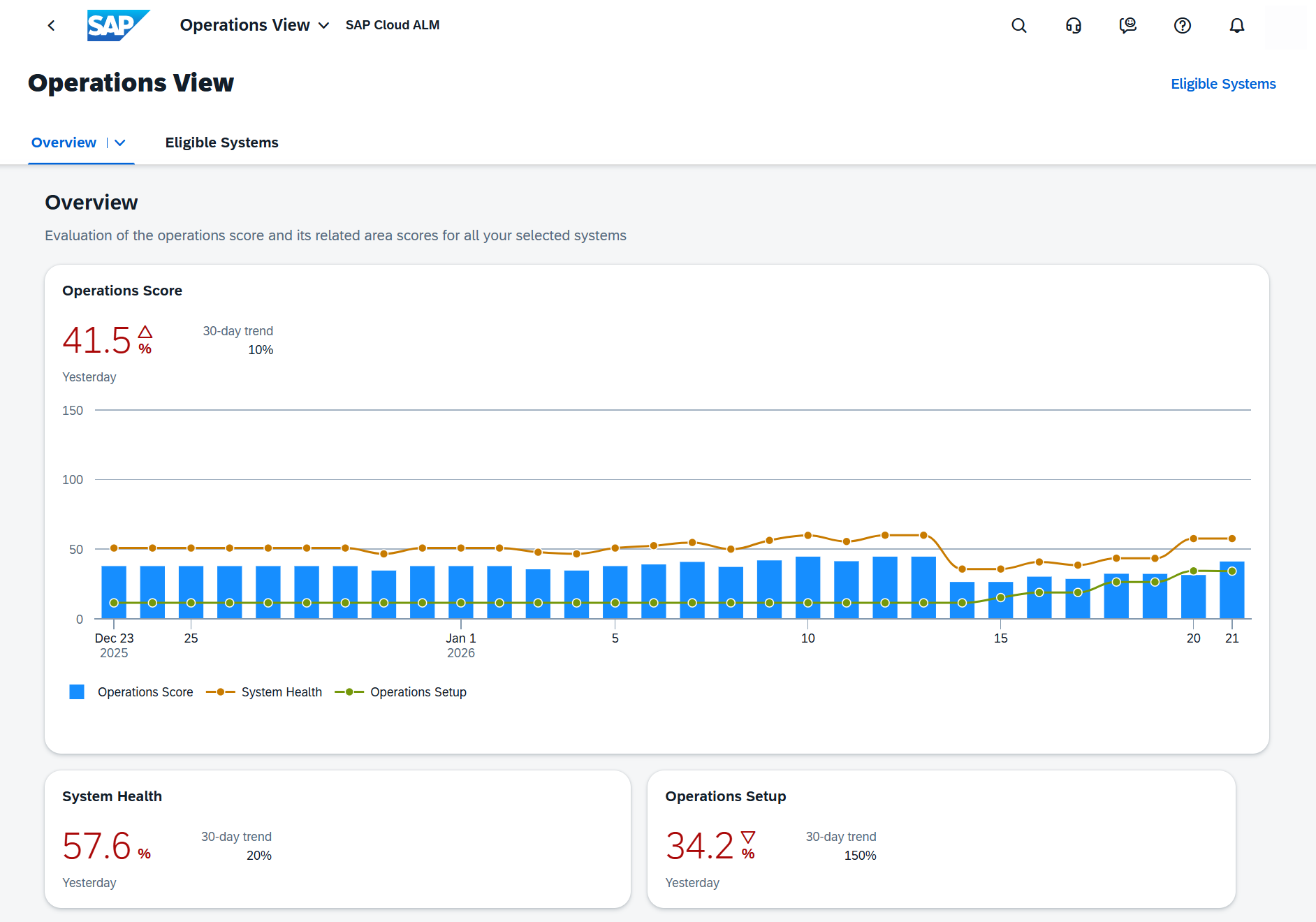
The newly introduced Operations Setup score evaluates how well systems are configured from an operational perspective. It is based on KPIs and metrics from:
- Health Monitoring
- Exception Monitoring
- Integration Monitoring
- Job & Automation Monitoring
- Configuration & Security Analysis
- Real User Monitoring
- Business Service Management
- Business Process Monitoring
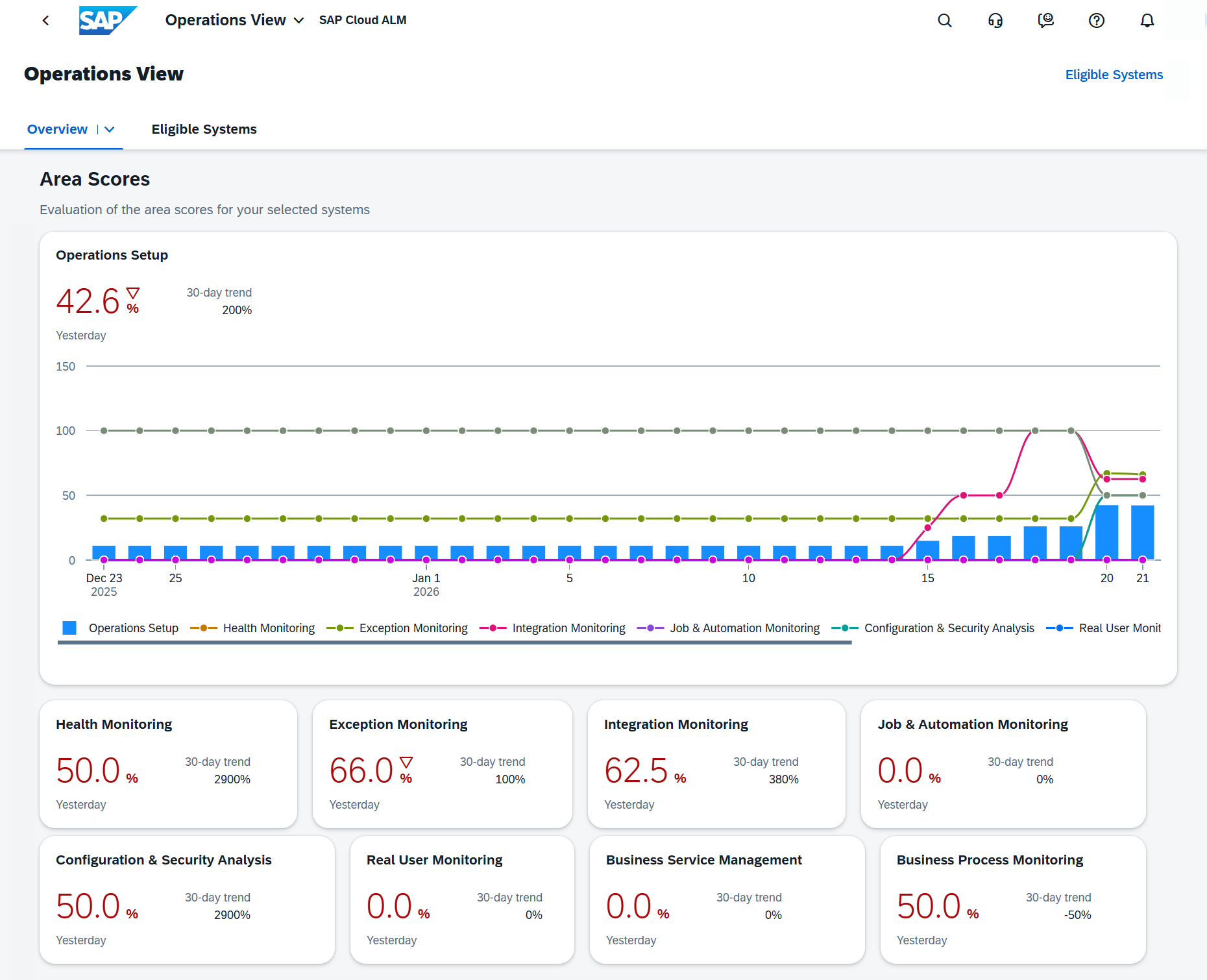
For a detailed breakdown, select a system under the Eligible Systems tab to open the Operation Details view and review the contributing metrics.
TL;DR:
The Operations View now includes an Overall Operations Score and a new Operations Setup score, providing clearer insight into clean core compliance and operational readiness across eligible systems.
Operations – Integration & Exception Monitoring, Job & Automation Monitoring, Operation Automation
The latest Operations updates enhance transparency across system integrations, automation, and monitoring. With improved connection insights, expanded message monitoring support, refined data management settings, and additional clean-up capabilities, teams gain better visibility, stronger control, and more efficient landscape governance across complex environments.
Flow Discovery and Extended Product Support in Integration & Exception Monitoring
Integration & Exception Monitoring continues to expand both transparency and product coverage.
With Flow Discovery, connections between managed services and systems can now be identified automatically. When enabled, the feature correlates messages across components, detects system-to-system relationships, and logs this information for reuse by other SAP solutions.
Currently, Flow Discovery is supported in combination with SAP LeanIX.
In addition, monitoring coverage has been extended with support for:
- Commodity Expense Management – Monitor SAP Expense Management messages with detailed status overviews and drill-down capabilities.
- SAP Digital Currency Hub – Gain visibility into incoming and outgoing messages, including detailed message-level insights.
These enhancements strengthen landscape transparency while expanding monitoring coverage for key business solutions.
TL;DR:
Flow Discovery reveals system connections across the landscape, while new monitoring support for Commodity Expense Management and SAP Digital Currency Hub extends integration visibility.
Enhanced Application Settings Transparency in Job & Automation Monitoring
The Application Settings in the Configuration menu have been enhanced to provide clearer visibility into data volume and retention settings.
In the Data Volume section, the app now displays:
- Raw Data size
- Aggregated Data (Hourly) size
Total Memory Size
In the Data Retention Time section, the following values are now shown:
- Retention Time for Raw Data
- Retention Time for Hourly Data
- Retention Time for Alerts
Please note that regardless of the configured retention time for raw data, 15 job instances (and up to 100 alerted job instances) are always stored.
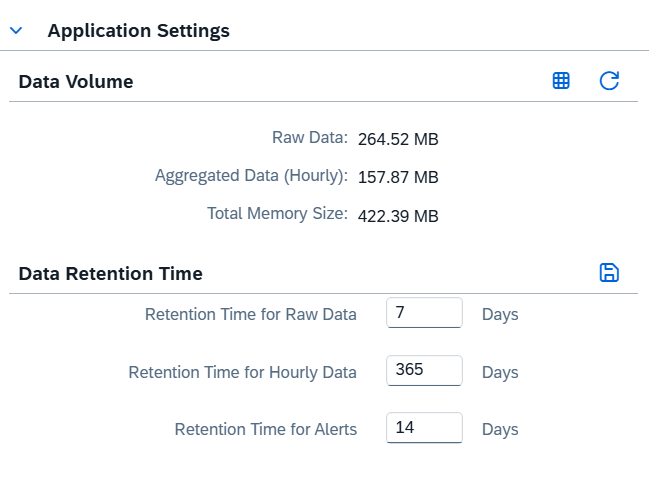
These updates improve transparency around storage usage and retention policies, helping administrators manage monitoring data more effectively.
TL;DR:
Application Settings now provide clearer insight into data volume and retention times, with defined minimum storage rules for job instances.
Clean-Up Option in Landscape Management
A new clean-up option is now available for Operations Automation in the Landscape Management app.
Using the Clean-Up option in the Actions column under Services/Systems – Supported Use Cases, administrators can delete the Operations Automation configuration and all related data for a selected service or system.
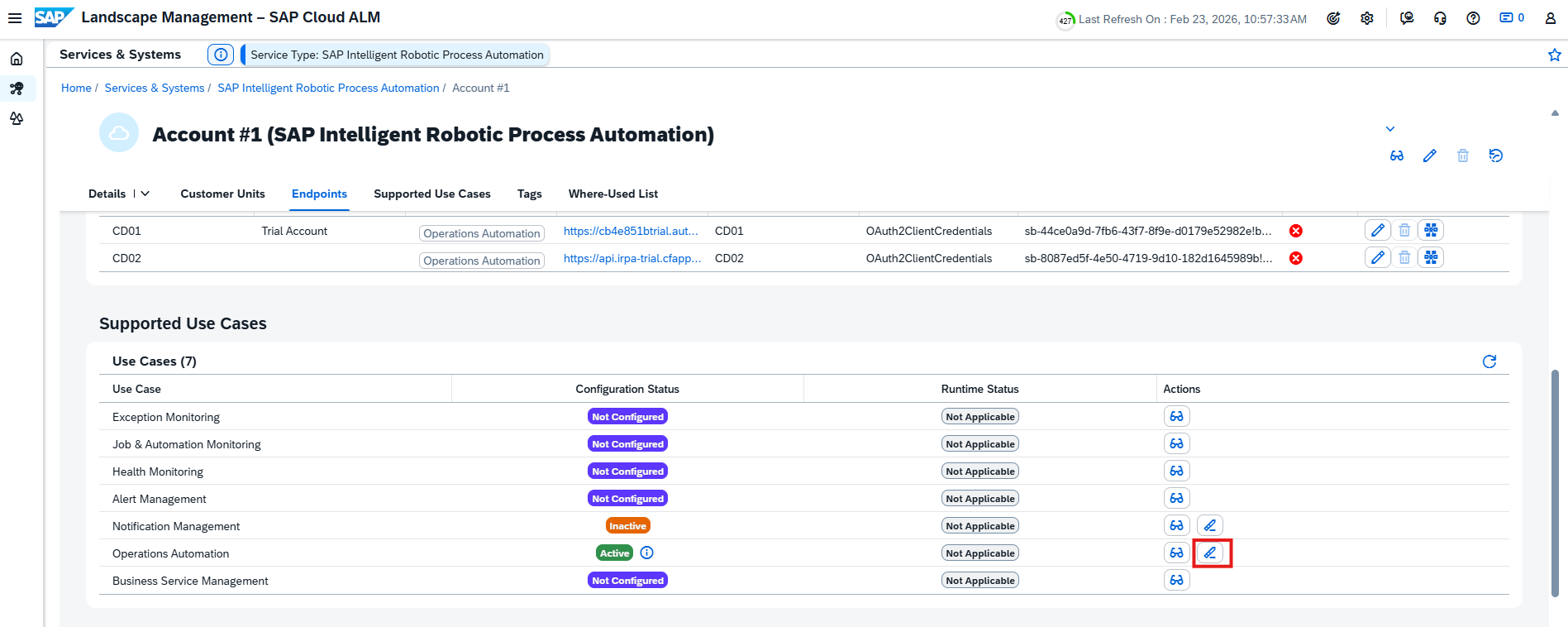
After clean-up:
- The Operations Automation configuration is removed
- Collected data is deleted
- The service or system moves to a Not Configured state
This helps maintain a lean monitoring setup and remove obsolete configurations when services or systems are no longer required.
TL;DR:
Operations Automation settings and data can now be cleaned up directly in Landscape Management to keep configurations streamlined.