Tag: SAP Cloud ALM

For posts relating to CALM

SAP Cloud ALM – What’s New in Week 42, 43 and 44

Welcome to the latest edition of our SAP Cloud ALM update series! Every two weeks, SAP releases a new set of updates to Cloud ALM, bringing a mix of powerful features, performance improvements, and smoother user interactions. In this post, we’re excited to walk you through the most recent updates for Weeks 42, 43, and 44. If you missed our article on the latest updates, you can read it here.

Let’s dive in to discover how these enhancements will elevate your Cloud ALM experience!

Services

Service Delivery Center recently introduced Language switch option, meaning it’s possible to view Service Results and Issues and Actions in the translated languages.
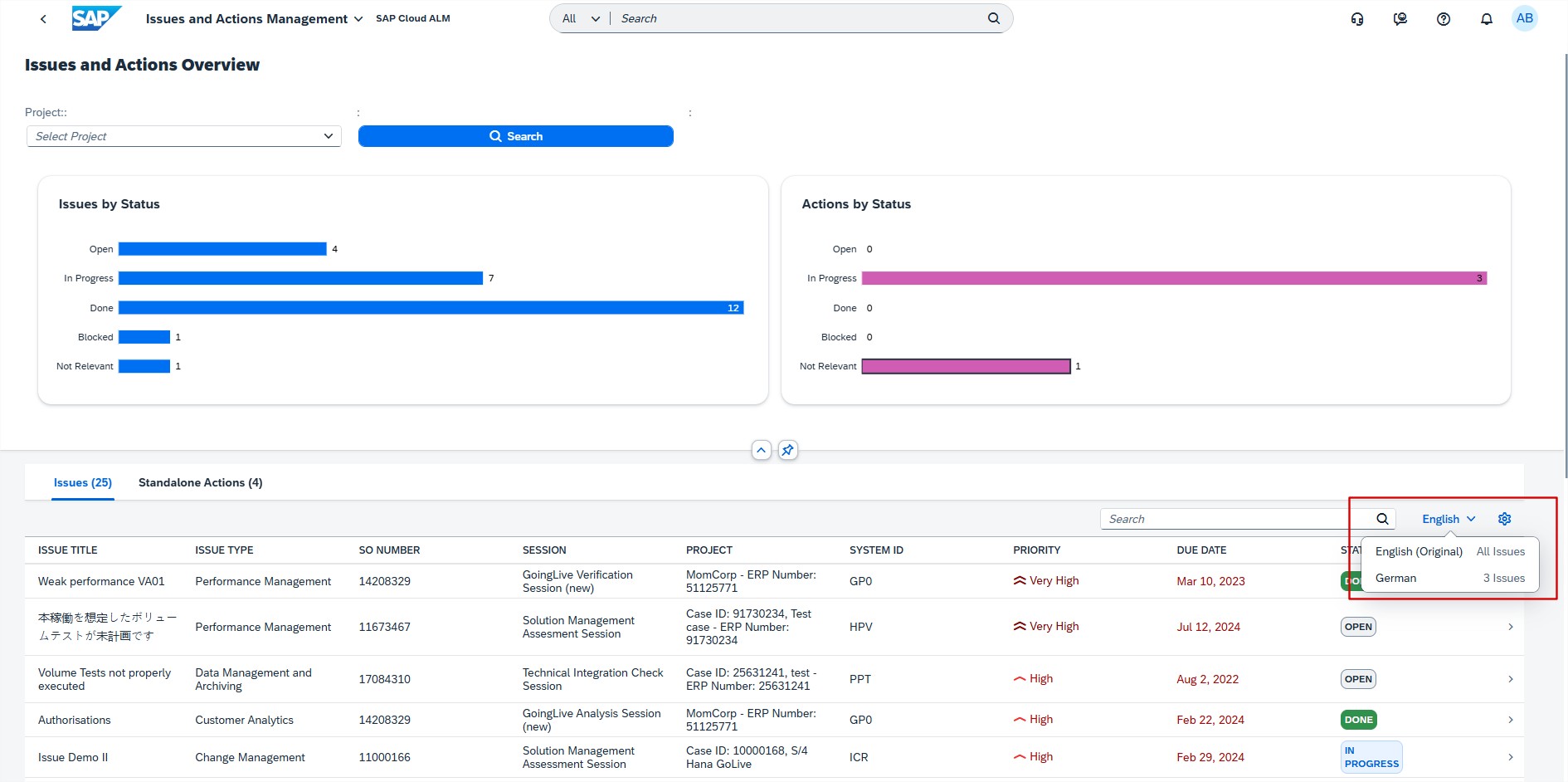
On week 42 this feature has been enhanced and if the Service Results or the Issues and Actions are available only in English, the language switch option is not displayed on the respective screens.
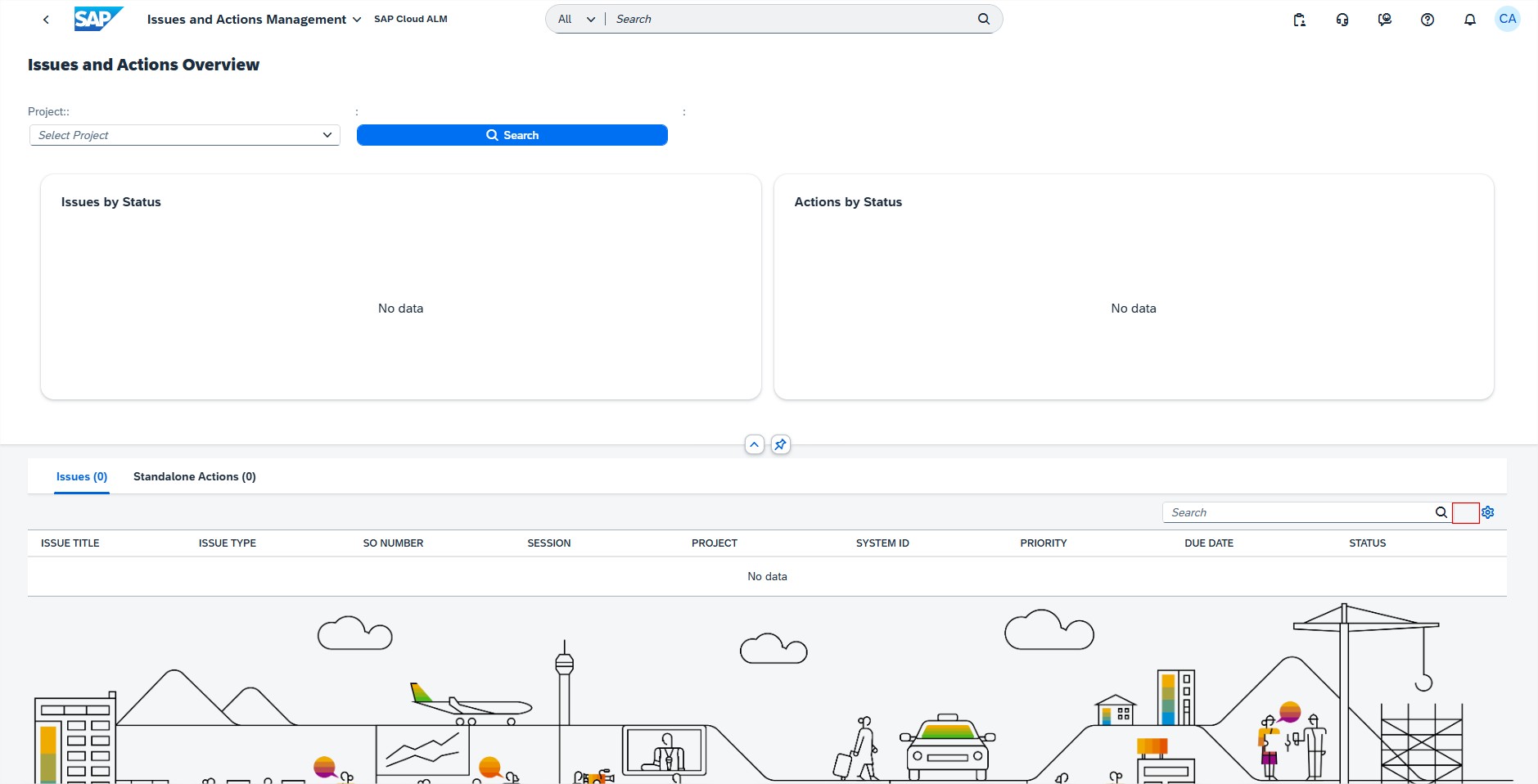
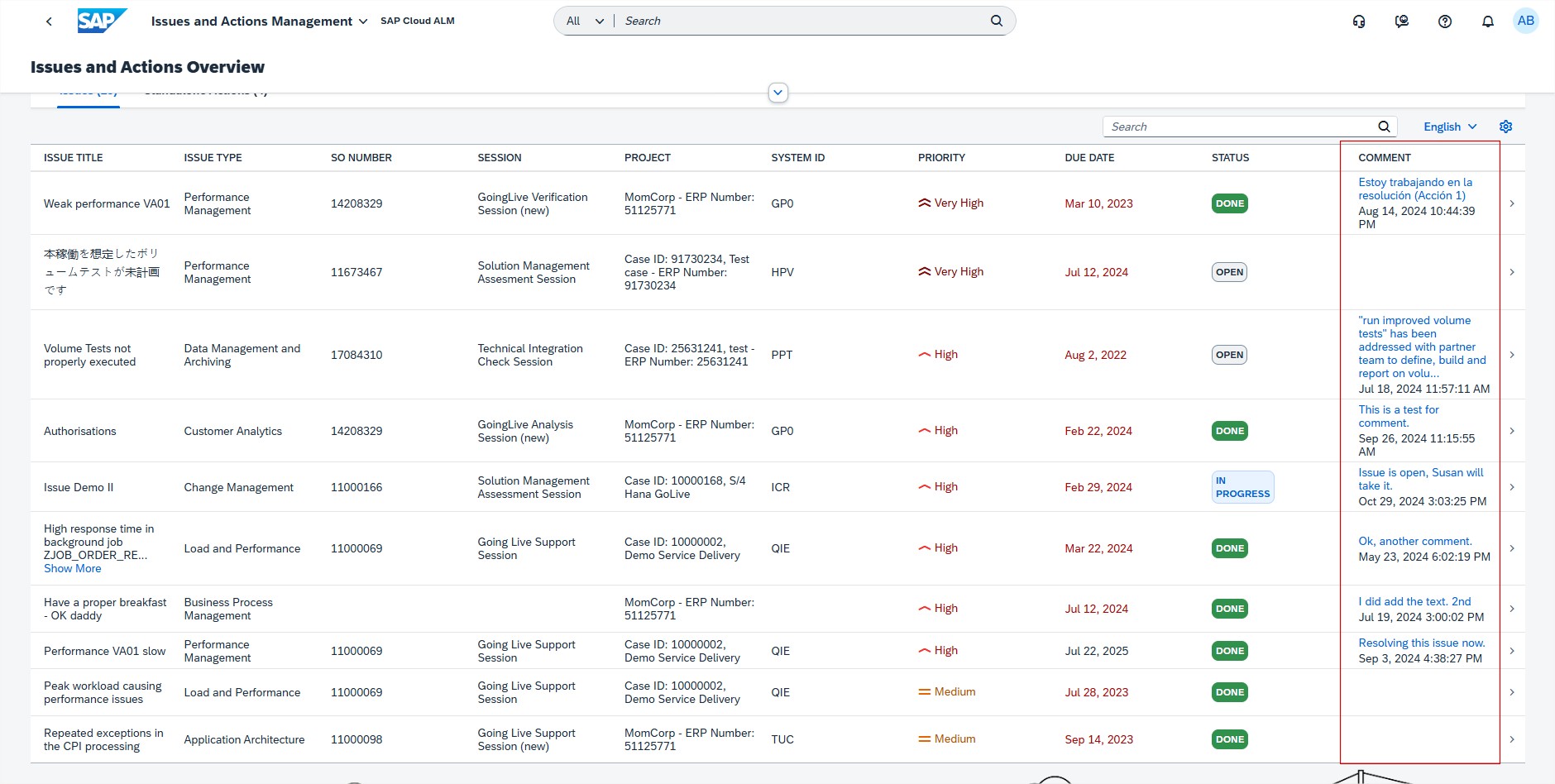
From this week it’s possible also to view latest comments for issues and standalone actions on Overview page of Issues and Actions Management, where is new column for Comment.
SAP Business Transformation Center

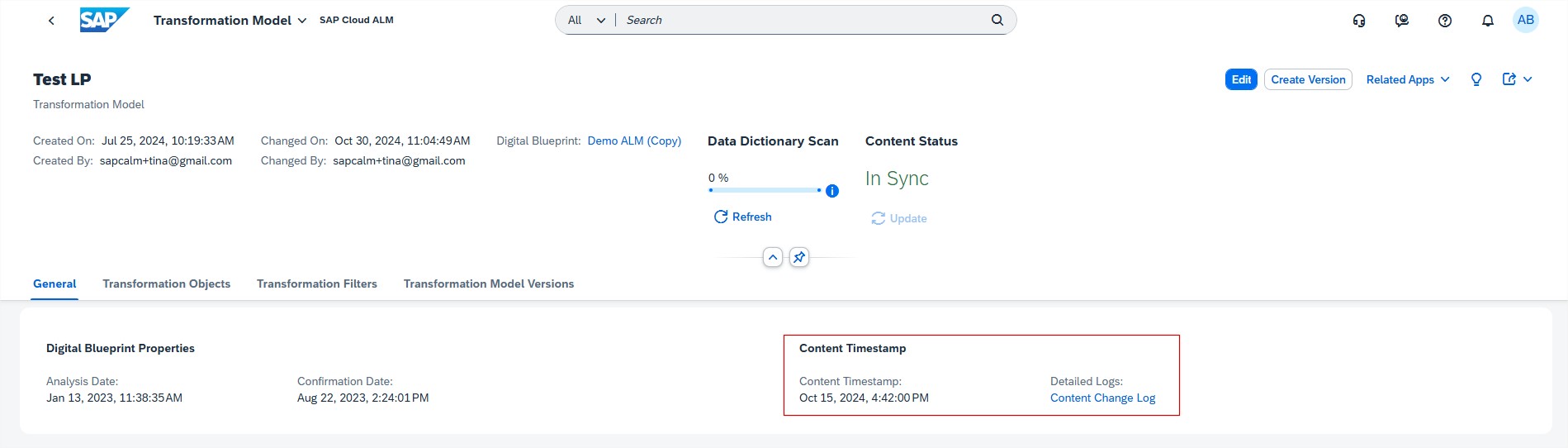
Modeling has now Content Timestamp information of a transformation model. In the Manage Transformation Models app, when in the General tab of the detail view of an individual transformation model, now the Content Timestamp information is displayed.
Implementation

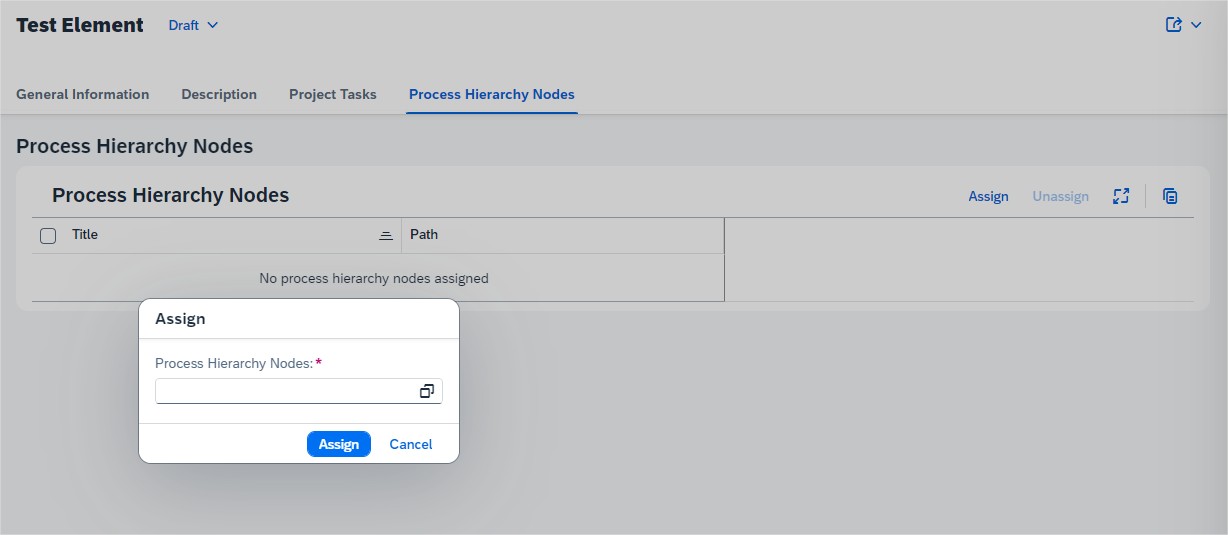
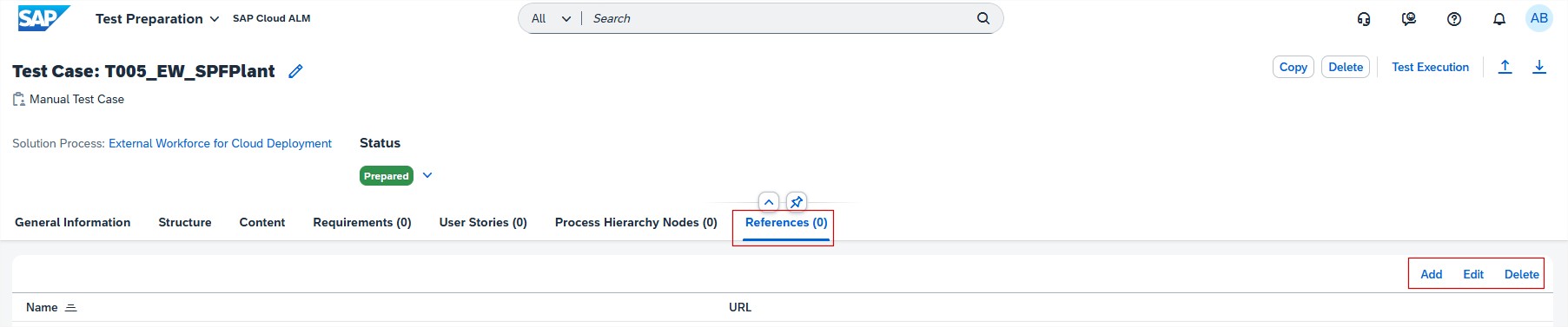
Test Preparation allows now to assign process hierarchy nodes to test cases. It helps to pinpoint the exact part of process structure to which the test case is related.

As from this week, when preparing manual and automated test cases, it’s now also possible add links to external documents and web pages as references. This allows testers to easily access them later, during the test execution. For instance, include links to process descriptions or learning material to support testers who may be unfamiliar with the test subject, or to test data sheets.
In Process Authoring it’s now possible to lock diagrams that are imported via public APIs from external sources such as Signavio, if the right parameter is used. This ensures that modelling is only done is one tool, stopping them from being edited or deleted in SAP Cloud ALM, at least initially, thereby avoiding multiple different edited versions potentially existing across customer landscapes.

Such diagrams can only be unlocked by users who have either the Global Administrator or newly introduced Process Administrator role. In particular, Process Administrator role is needed to unlock custom solution process flow diagrams that have been locked. However, users are still able to add other diagrams to the affected solution process. In addition, note that locking a diagram doesn’t prevent users being able to delete its entire solution process (including the locked diagram).

Keep in mind that:

  • The lock button is only displayed if the solution process is in a draft version.
  • If creating a new draft for a solution process after it has been published, a diagram that was locked in the previous version will still be locked.
  • The Unlock button is only shown for users who have one of the roles mentioned above.

Landscapes – Design and Visualization has new feature to access specific landscape objects, Landscapes app now automatically applies the Access Control Lists that are defined for the Landscape Management app.

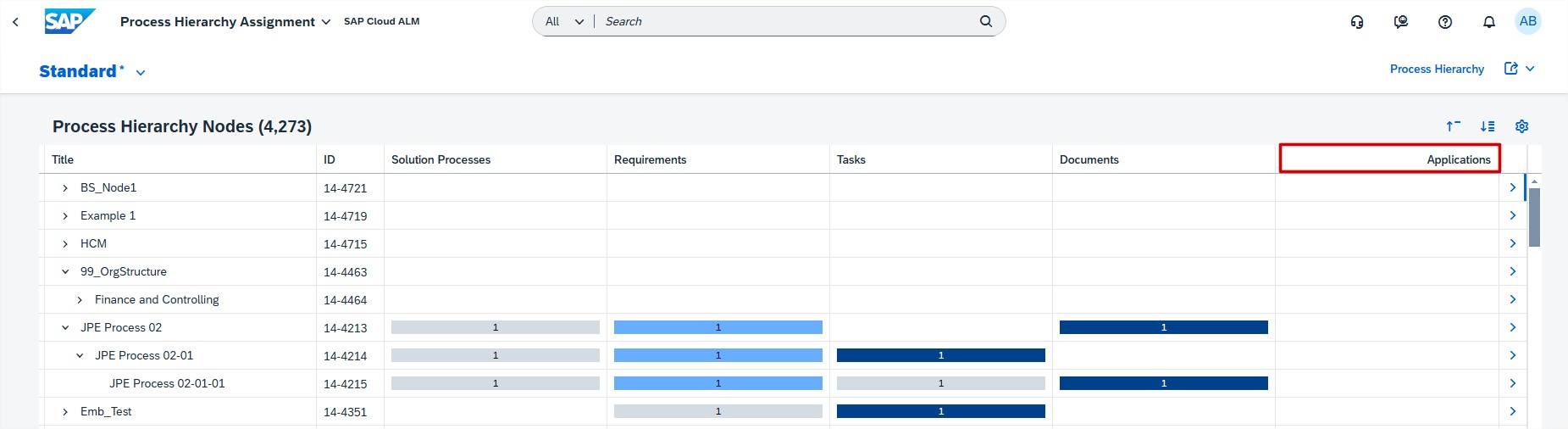
In Cross-Project Overview, the Process Hierarchy Assignment app now features a new Applications column.
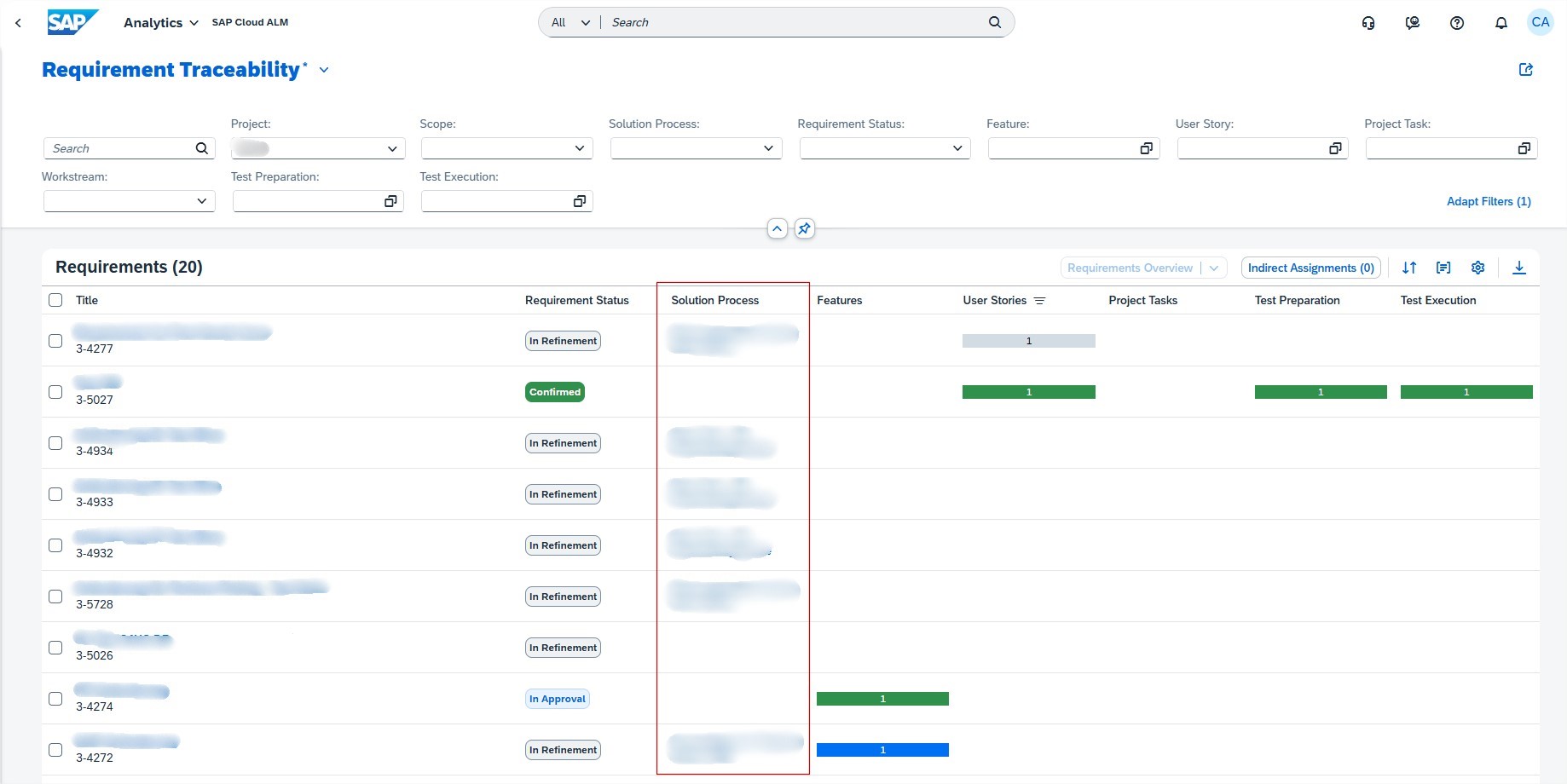
In Analytics, the Requirement Traceability app now features a Solution Process column.
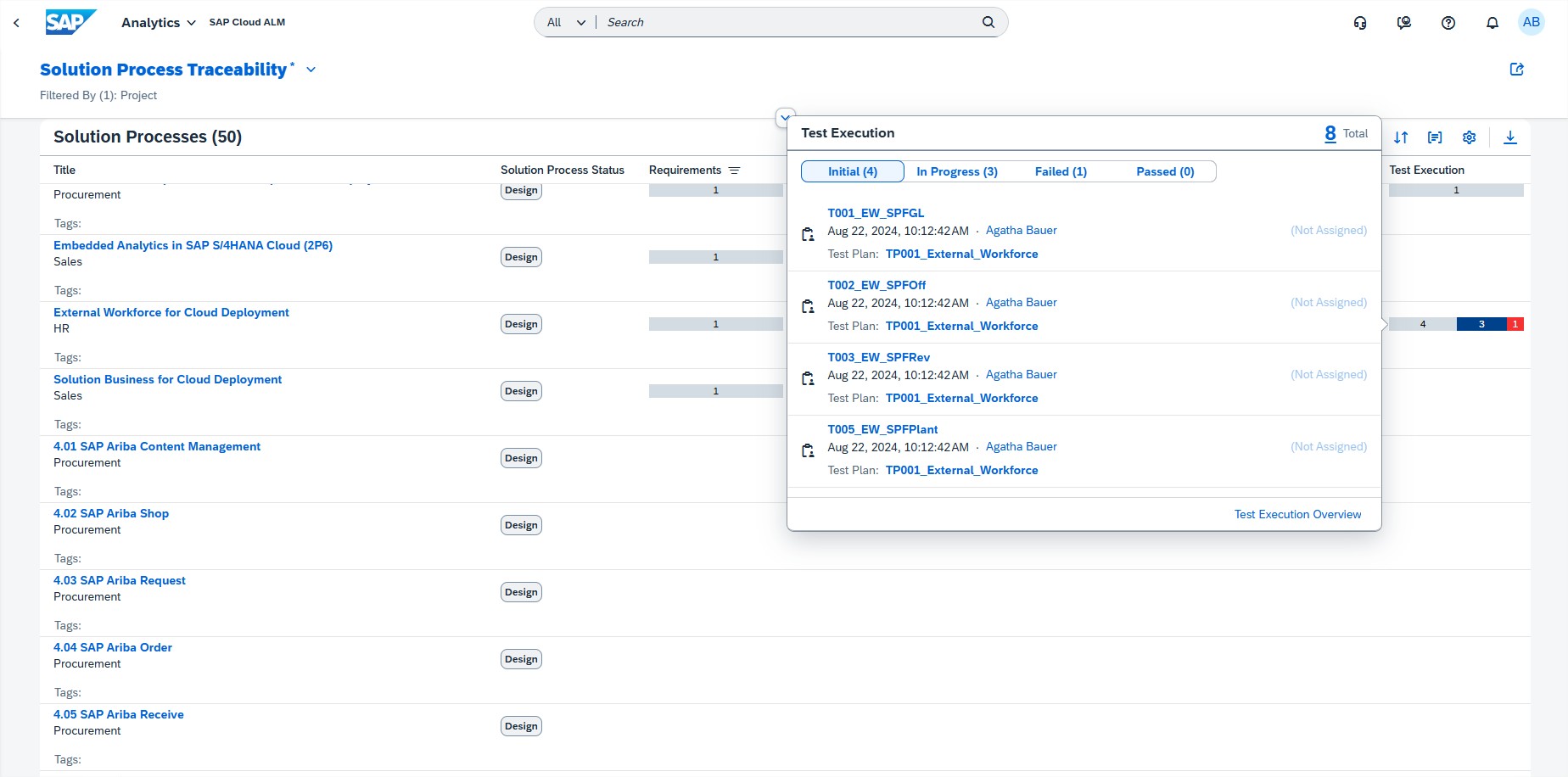
From this week, when a requirement is assigned to a test case, and vice versa, all test occurrences for a test case which are assigned in different test plans are shown in the test execution popover. Additionally, test plans are displayed.

The popover appears in the Solution Process Traceability (as indirect assignment), in the Requirement Traceability, and User Story Traceability apps.
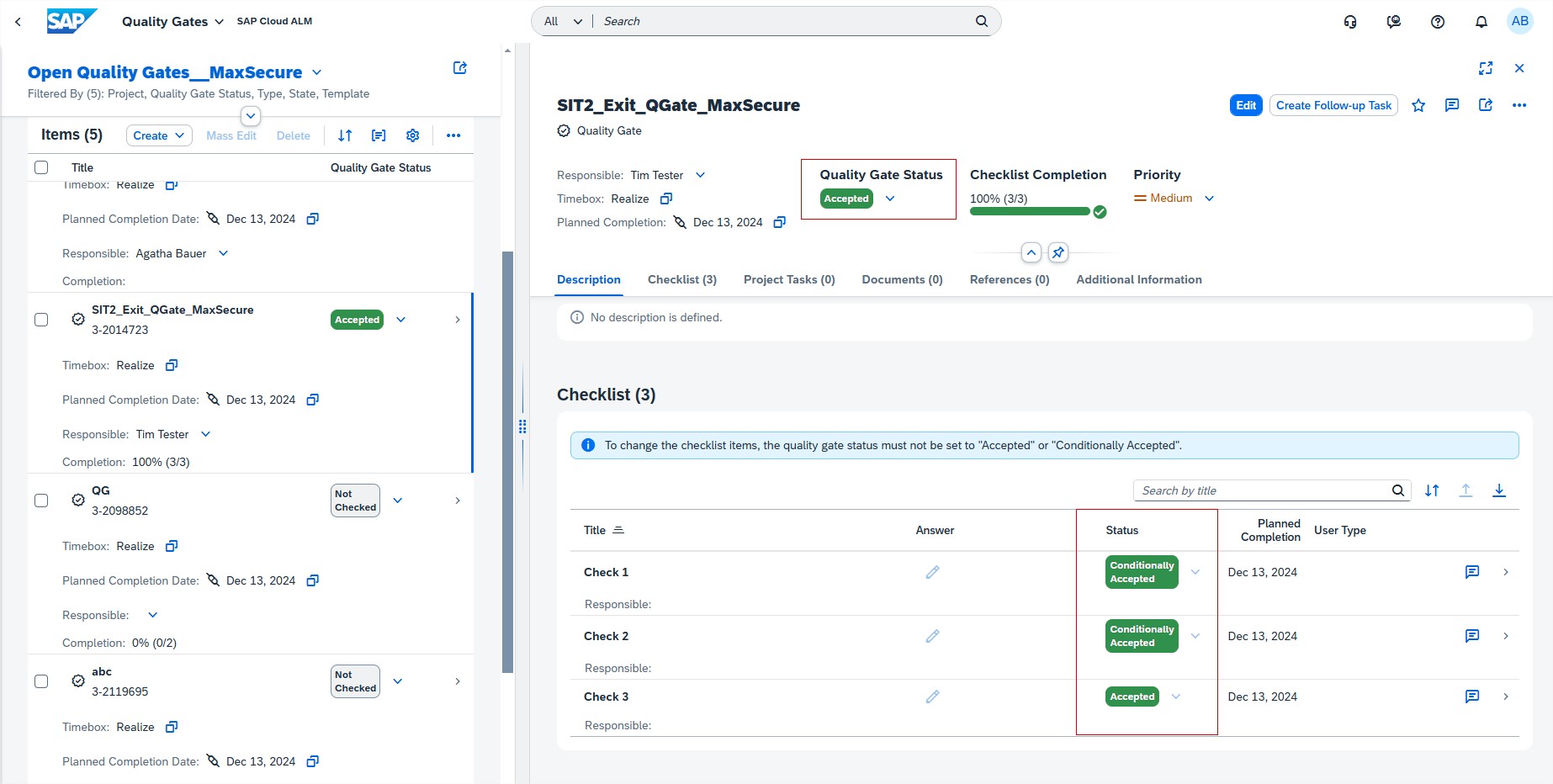
Few additional updates for Implementation area were introduced on week 43. In Tasks, Quality gate status changes are now restricted.

To make sure that all relevant checklist items for a quality gate have been checked, the quality gate status can now only be set to Accepted or Conditionally Accepted when the assigned checklist items have a valid status. If a quality gate status was set to Accepted or Conditionally Accepted, the statuses of the assigned checklist items can’t be changed.
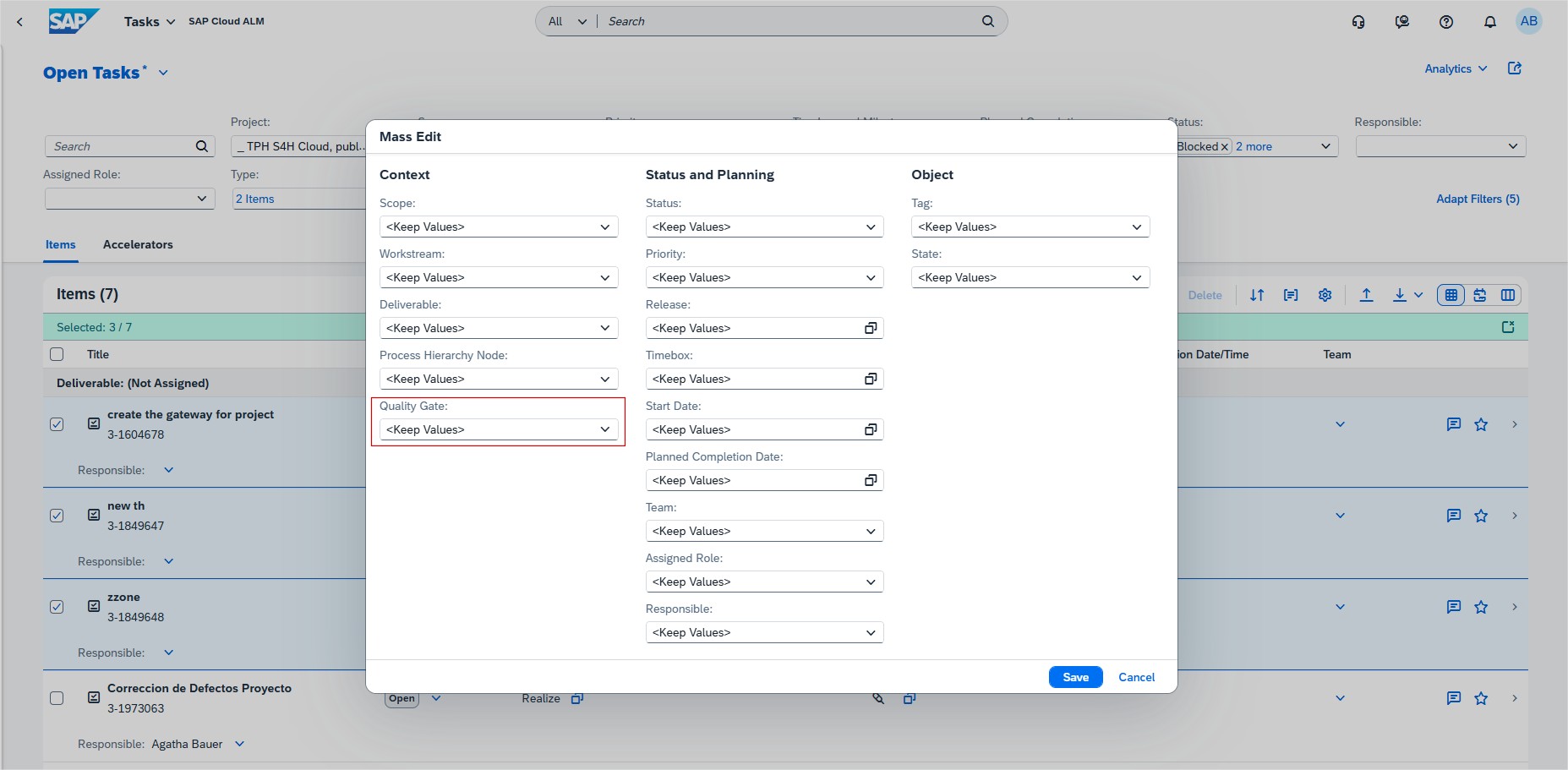
As of this week, the Tasks app also allows to mass assign project tasks to quality gates.
Requirements allows now to navigate directly from the test case section in the detail view of a requirement to the Requirement Traceability app where it’s possible to view the relevant test execution statuses.

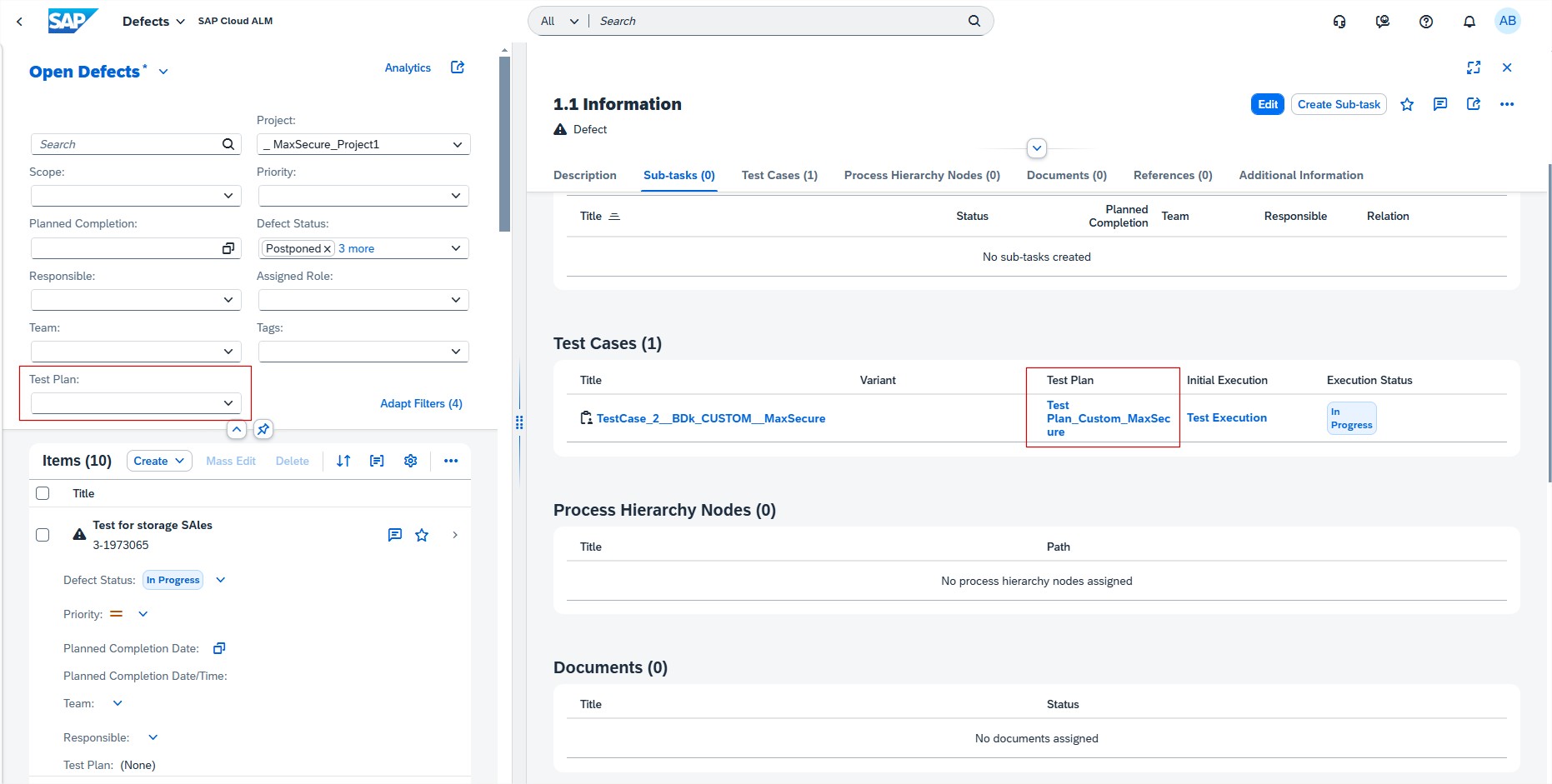
In Defects, when creating a defect from a test case, the related test plan is now displayed in the detail view of the defect. From there, it’s possible to navigate directly to the related test plan. For the defect list, a filter for test plans was added.
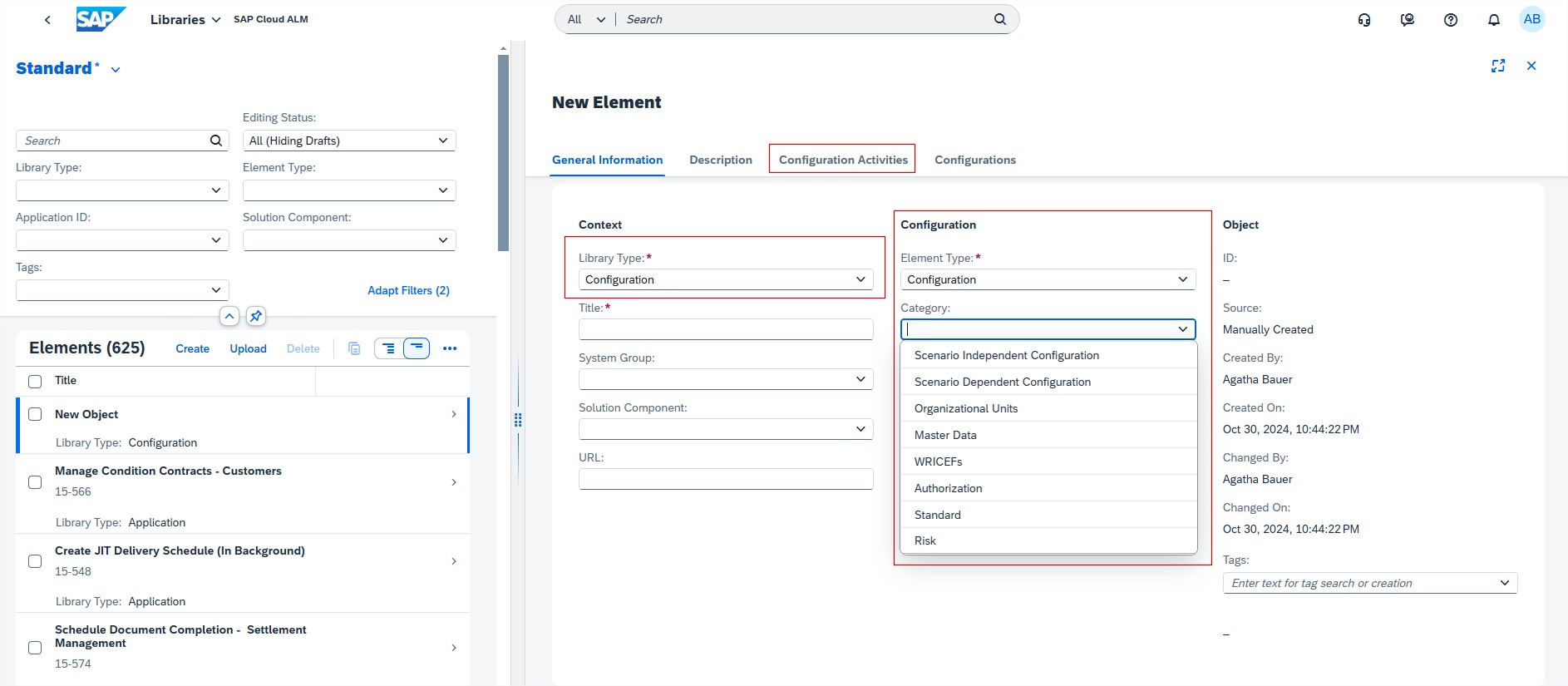
As of this week there’s new library type available in Libraries. It’s now possible create elements of the library type Configuration and Configuration Activities.
Operations

Intelligent Event Processing allows now to specify the time zone for email and chat notifications.

When configured, the reporting time stamps in the notifications for Send Email to and Send Chat Notification event actions are displayed in the configured time zone. It applies to Notifications from all different monitoring applications that have alerting capabilities.
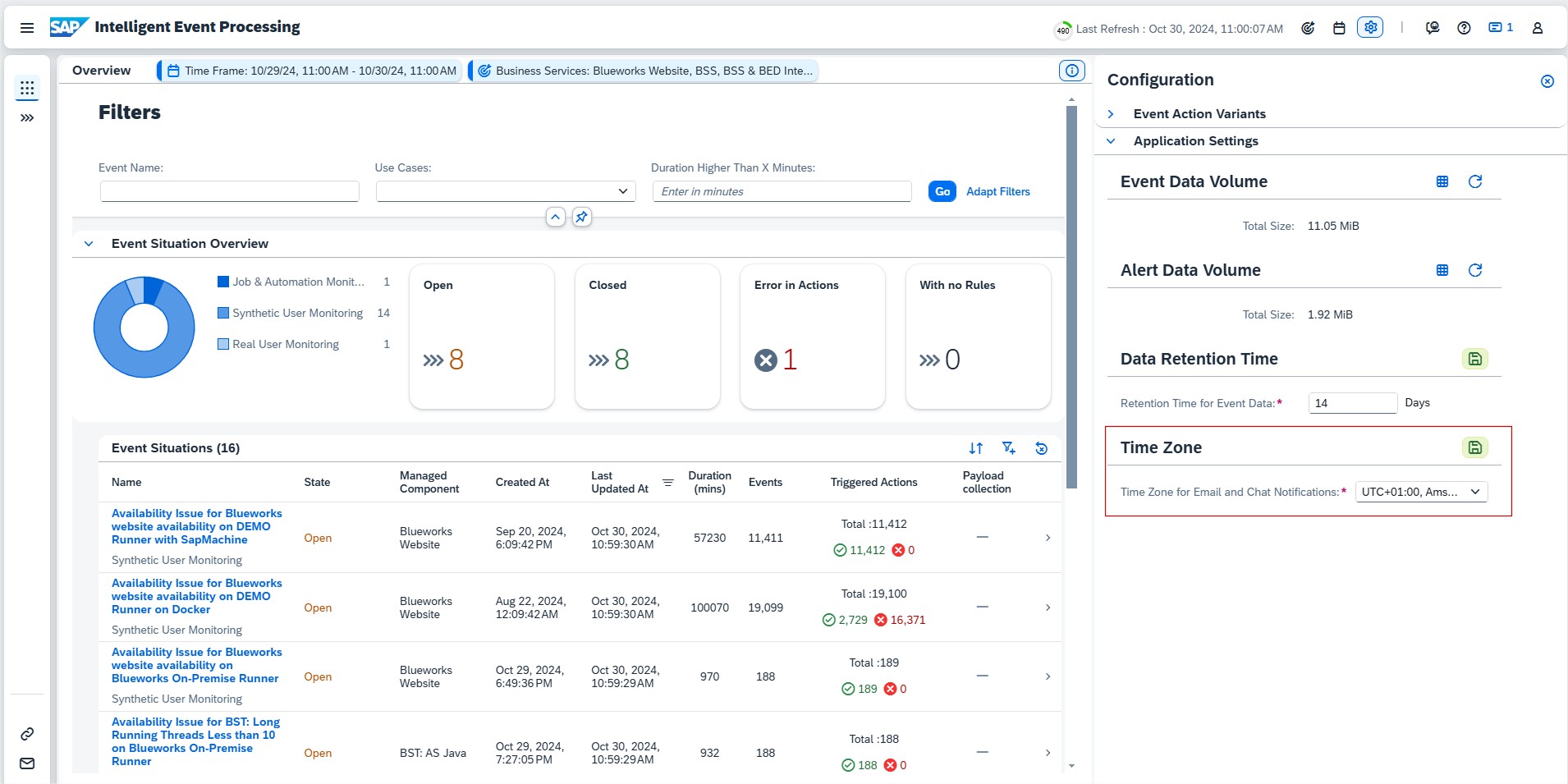
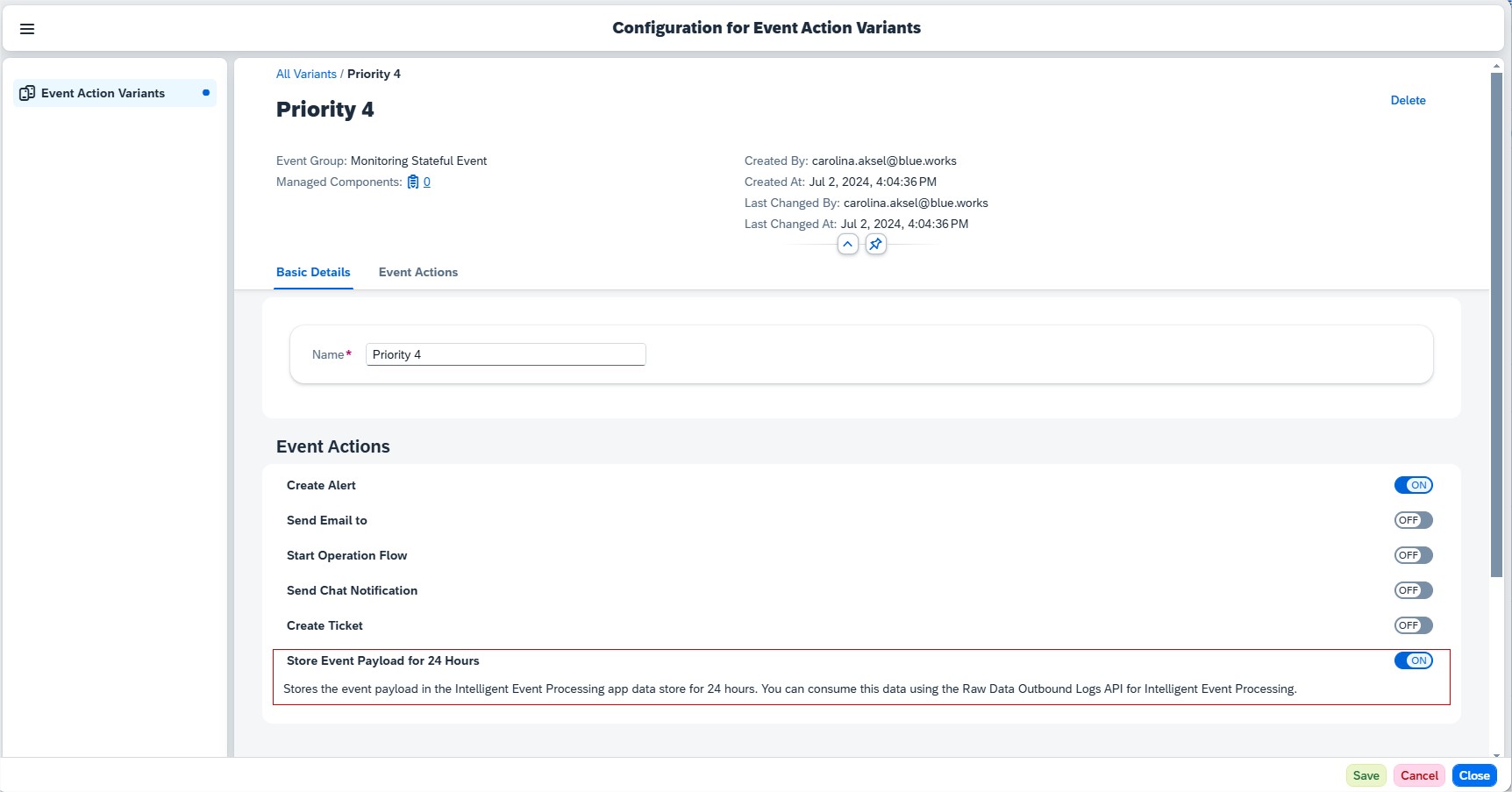
Addition to Time Zone for Email and Chat Notifications, there’s a new event action, Store Event Payload for 24 Hours. When enabled, the event payload is stored in the Intelligent Event Processing app data store. It’s then possible to access the data store and consume the event payloads using the Raw Data Outbound Logs API for Intelligent Event Processing.

This event action is available for events in the following apps:

  • Business Service Management
  • Integration & Exception Monitoring
  • Intelligent Event Processing
  • Job & Automation Monitoring
  • Synthetic User Monitoring

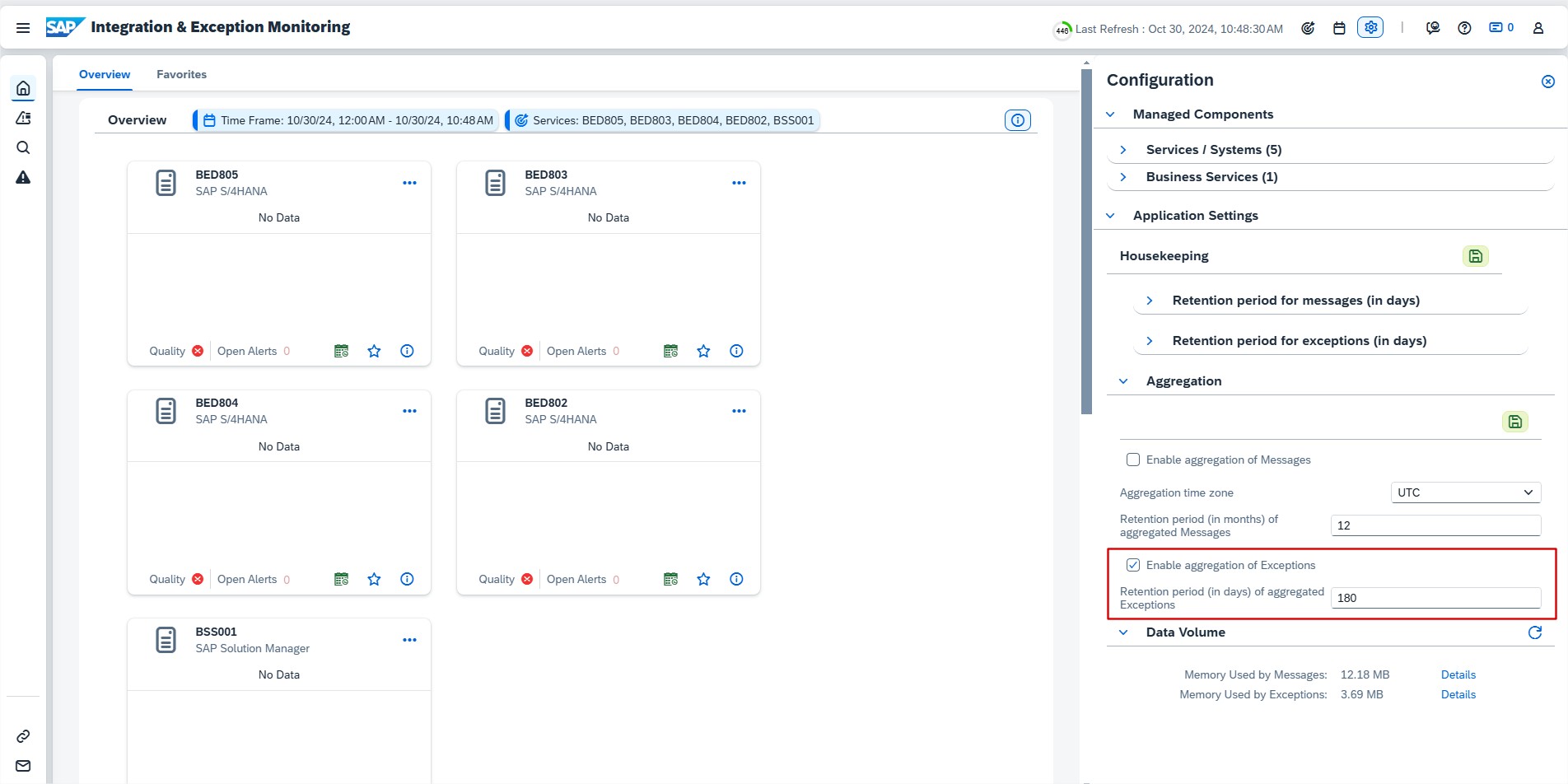
In Integration & Exception Monitoring it’s now possible to configure aggregation for Exceptions and edit the retention period for the aggregated data. Retention period of aggregated Exceptions has to be between 0 to 365 days.
Synthetic User Monitoring has new configuration feature called Threshold Sensitives.

If the quality of the Scenario Thresholds is Predictive, it’s now possible to adjust the sensitivity of the dynamic thresholds for every scenario runner.
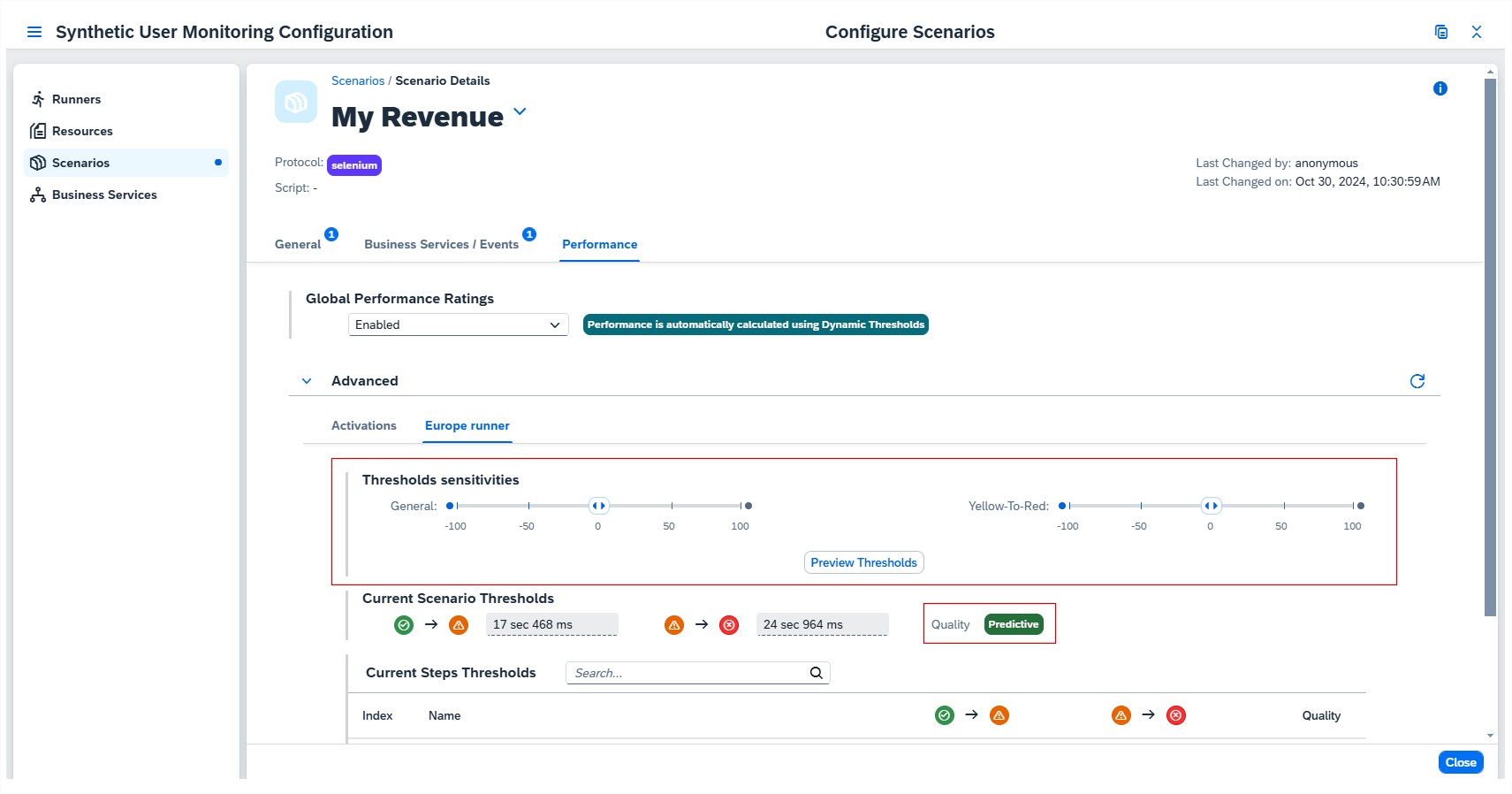
The way sensitivity is set determines how the rating responds to minor or major performance deterioration. There is option to adjust two different sensitivities:

  • General

Changing this sensitivity adjusts the threshold values for both poor and critical performance. It’s done using a single slider. The higher the sensitivity value, the more significant the performance deterioration needs to be before a threshold value is exceeded.

  • Yellow-to-Red

Changing this sensitivityn adjusts the threshold value for critical performance only. The higher the sensitivity value, the more significant the performance deterioration needs to be before the yellow-to-red threshold value is exceeded.

To better understand the impact of changing the sensitivity on the threshold values for poor and critical performance, select Preview Thresholds.
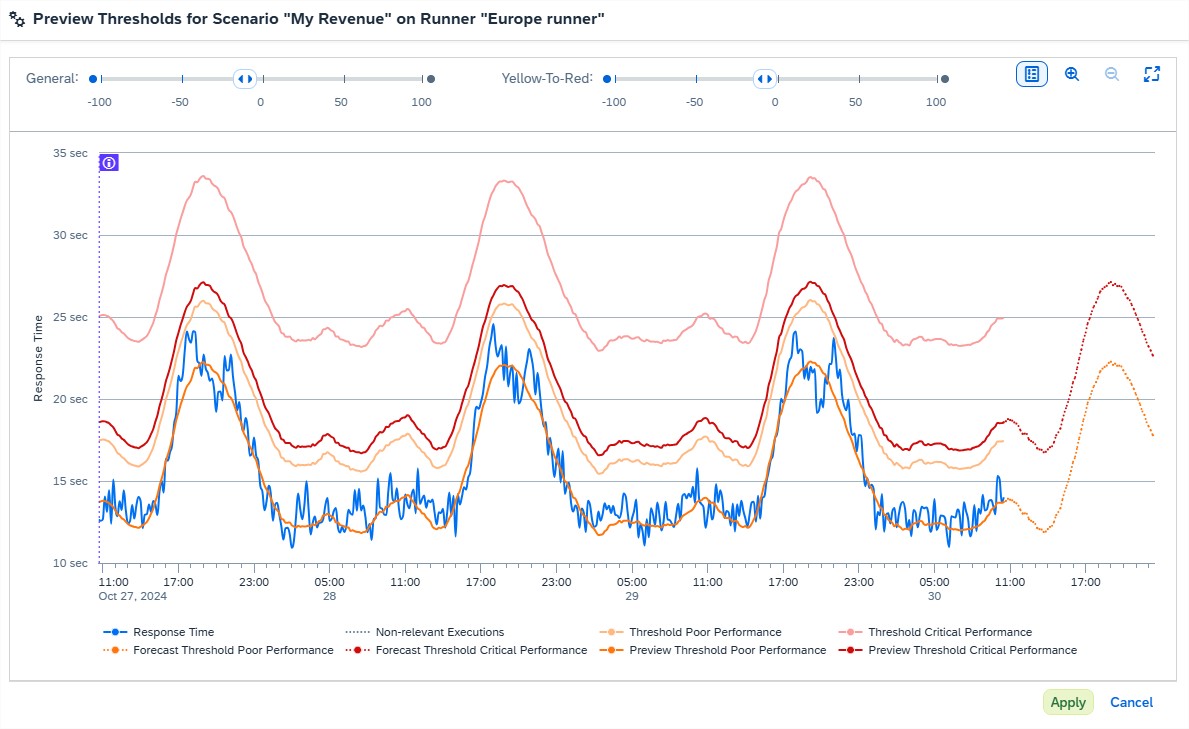
Here, is displayed both the graph for the development of current dynamic thresholds over time and the corresponding preview for the thresholds if sensitives have been adjusted. Selecting Apply,reports the changes in the configuration and closes the preview popup.

Now it’s possible to save or discard changes.

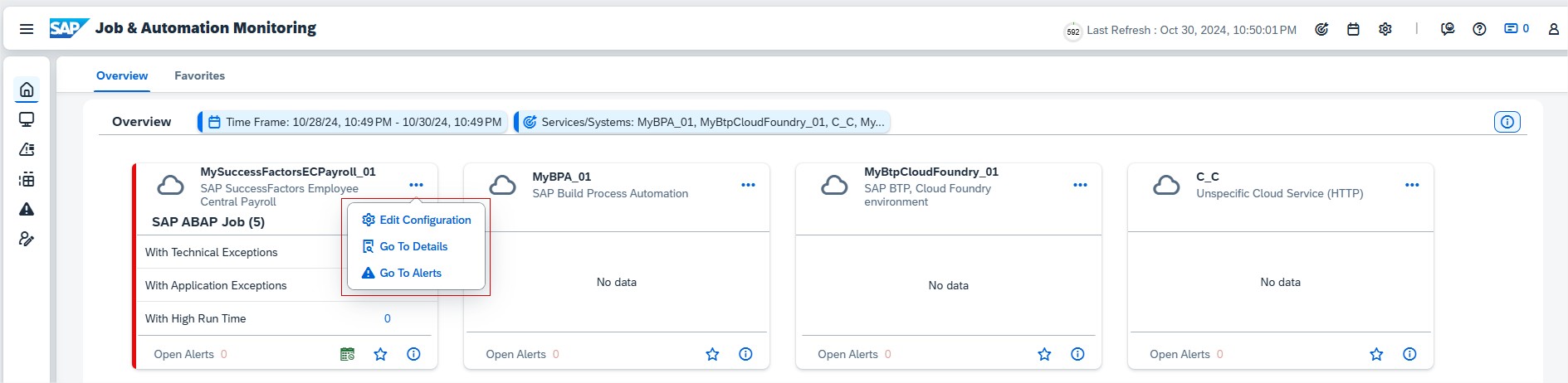
Job & Automation Monitoring has now more options in Overview cards. Selecting more displays following actions for that managed component:

  • Edit the configuration
  • Navigate to the monitoring details
  • Navigate to the alerting details

Administration

External API Management allows now to mark subscriptions as “Critical” to enable Self-Monitoring capability.

Test Orchestration with SAP Cloud ALM

Accelerated implementation that empowers modern businesses

Effective testing is crucial for smooth business operations, especially when it comes to SAP-Implementations and-Upgrades. SAP Cloud ALM (Application Lifecycle Management)is a cloud-based solution that provides an integrated platform for managing the entire lifecycle, from project planning to testing. In this blog, we’ll look at the key features of test orchestration in SAP Cloud ALM, as well as the benefits of using test automation, analysis, and planning capabilities.

Introduction to Test Orchestration in SAP Cloud ALM

SAP Cloud ALM offers a comprehensive orchestration platform for all types of functional tests that can be linked to solution processes, requirements, and user stories. This supports a consistent implementation process with complete traceability. It structures test cases across scopes and processes, and includes manual and automated functional tests, multiple test cycles via test plans, and traceability.

The testing concepts in SAP Cloud ALM are characterized by simplicity, speed, practicality, and process orientation. The lean concept focuses on keeping testing simple by avoiding unnecessary complexity and streamlining the process. The agile concept prioritizes testing as early as possible to enable rapid feedback and flexible responses during development cycles.

Flexible test levels ensure that testing is targeted and directly linked to processes, requirements, and user stories, guaranteeing complete traceability and clarity. The process-oriented concept derives the test structure from the process flows, making particular use of assets such as S/4 HANA, and includes test actions. Overall, these concepts ensure efficient, traceable, and well-integrated test management within SAP Cloud ALM.

Key components of test orchestration in SAP Cloud ALM

Test preparation

Test preparation involves creating manual or automated test cases based on business activities. The starting point is usually a solution process. If you are familiar with the standard processes, you can create test cases directly from the process flows within the SAP Best Practices content. This ensures that all critical processes are covered without having to start from scratch. Accelerators in the solution process help increase efficiency with test scripts, tutorials, and setup instructions. You can download the test script and then upload it to speed up test creation.

(Note: Accelerators are only available for SAP Best Practices processes.)

For more complex projects, you can customize the standard solution process once and then document the requirements—user stories.

Efficient regression tests can be performed using automated tests, which are also offered in SAP Cloud ALM—I will explain below which tool you can use.

Test planning

The test planning module allows you to manage test cycles across multiple organizations. An important difference to the Solution Manager is that there are no test packages here.

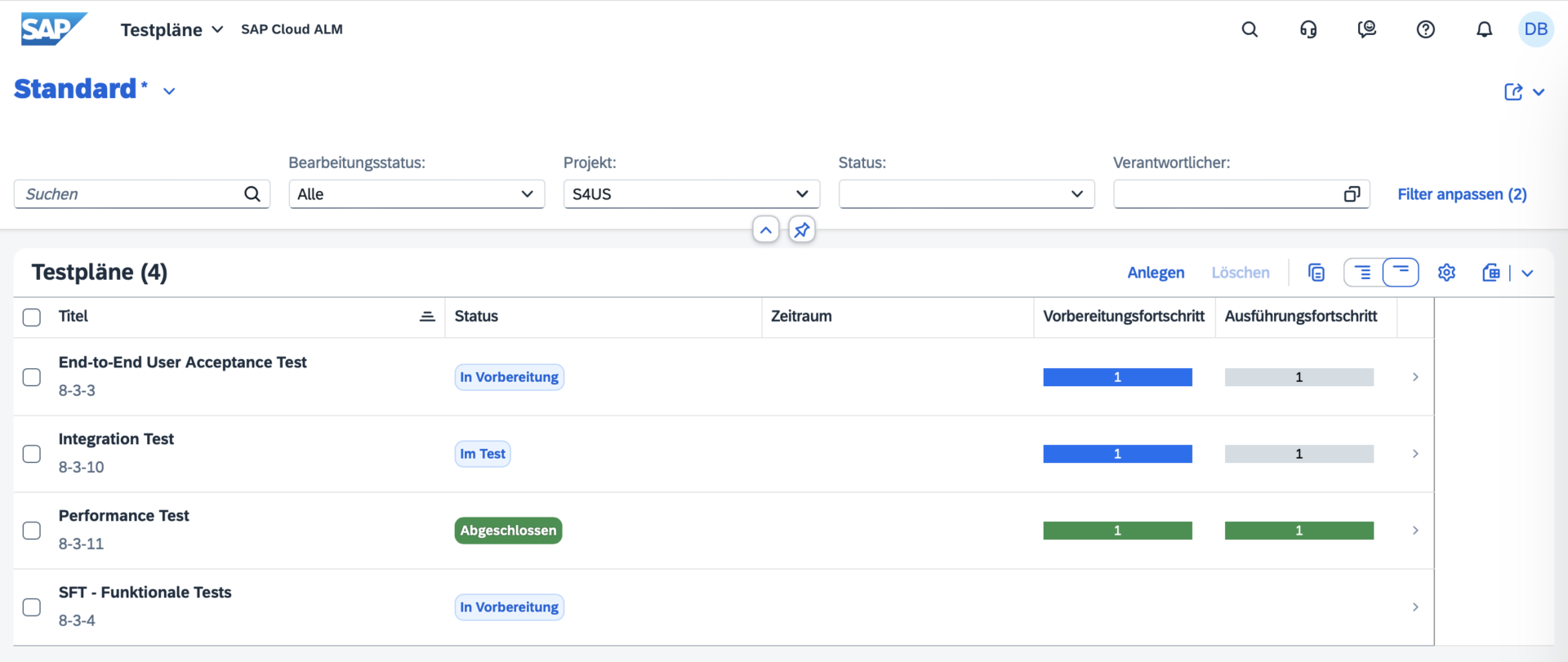
The advantages of SAP Cloud ALM’s testing capabilities include efficient test planning, the ability to support multiple test cycles or rollouts across multiple organizations, detailed management of test phases, and status tracking through preparation, execution, and completion. It enables the assignment of specific testers, dedicated execution contexts, start and end dates for plans, draft editing, and provides detailed reports per test plan.

Test execution

During test execution, test cases are run and their results are tracked. The advantages of test execution in SAP Cloud ALM include easy navigation through the overview, analysis, and tracking views, as well as the ability to search for relevant test cases and apply filters. Users can filter test cases by assigned tester, view test plans marked as “In Review” for execution, and view test cases grouped by test plans. Lean testing without the creation of test plans is still supported, and test managers or reviewers can use list views for reporting. In addition, filter settings can be saved as variants for later use.

Defect Management

Defect management is an important part of the testing process in SAP Cloud ALM. It ensures that all defects or problems discovered during testing are tracked, resolved, and linked to the corresponding test case or user story. Defects can be reported directly from test cases when a test step fails, and they are automatically linked to the corresponding process or requirement.

The most important functions of defect management in SAP Cloud ALM include:

– Real-time defect tracking: Defects can be created immediately during test execution, so that they are logged immediately after problems are identified.

– Defect reporting: Comprehensive reports show defect trends, including newly created, resolved, and open defects.

This helps teams prioritize defect fixes and prepare for the go-live phase.

– Defect assignment: Defects can be assigned to specific developers, testers, or teams to ensure accountability and speed up defect resolution.

– Traceability: Defekte werden mit den zugehörigen Testfällen, User Stories oder Anforderungen verknüpft, so dass Auditoren und Projektbeteiligten eine vollständige Rückverfolgbarkeit gewährleistet ist.

Test automation

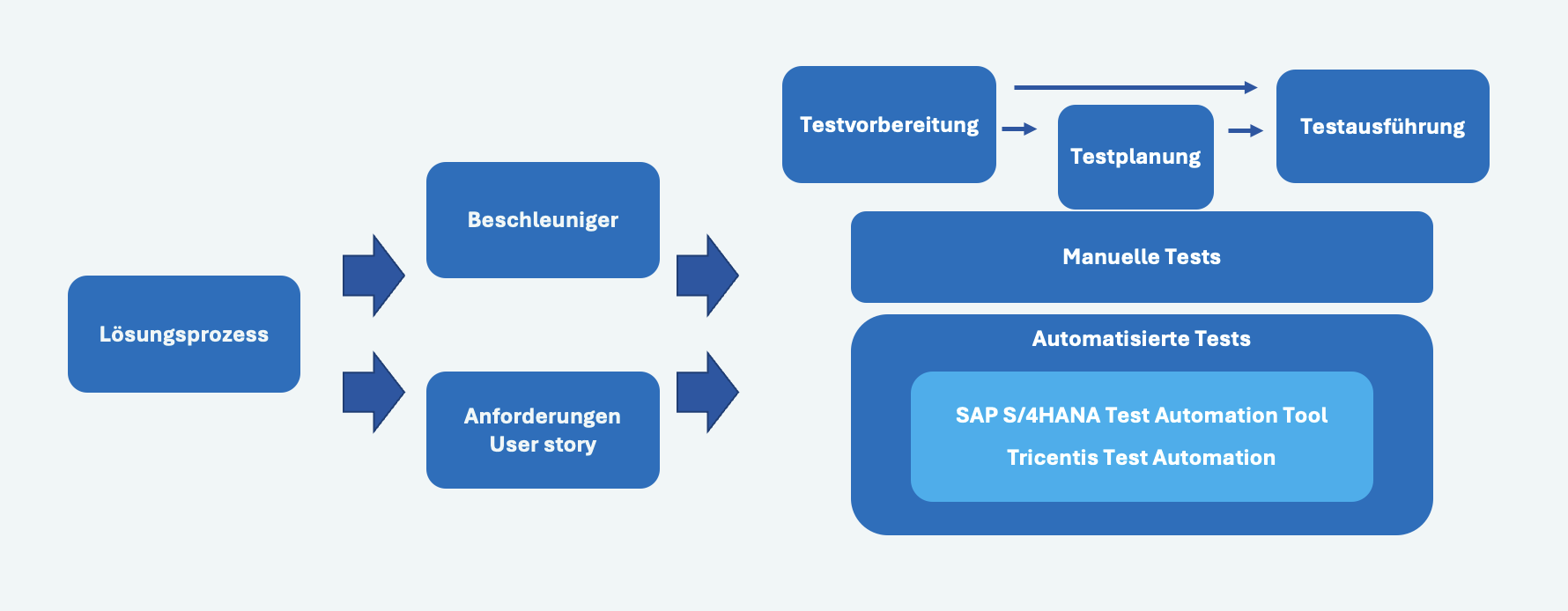
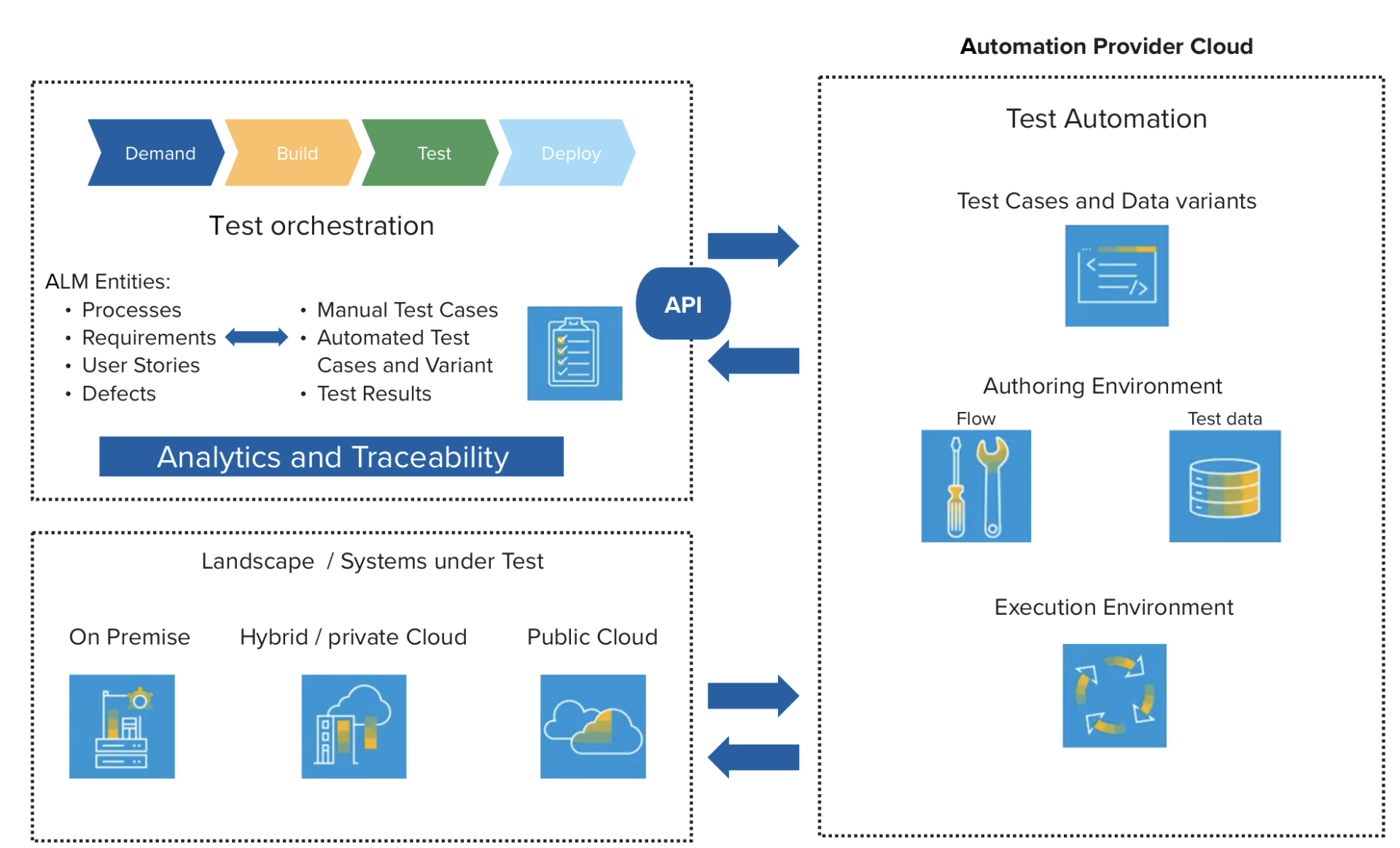
SAP Cloud ALM integrates with automation tools such as Tricentis Test Automation, which is available free of charge to Enterprise Support customers. Automated tests are linked to processes, requirements, and user stories to ensure complete traceability. Below is an overview of test orchestration with Tricentis.

Since integration is done via an API, other automation tools such as Worksoft, UiPath, Suxxesso, etc. can also be connected. The latter two are working on full integration with SAP Cloud ALM by the end of the year.

Analytics and reporting

Analytics plays an important role in SAP Cloud ALM test orchestration. Users can generate reports on test execution progress, defect trends, and readiness for production. This transparency ensures that issues are identified early on, allowing teams to focus on resolving problems before deployment.

Key analysis features:

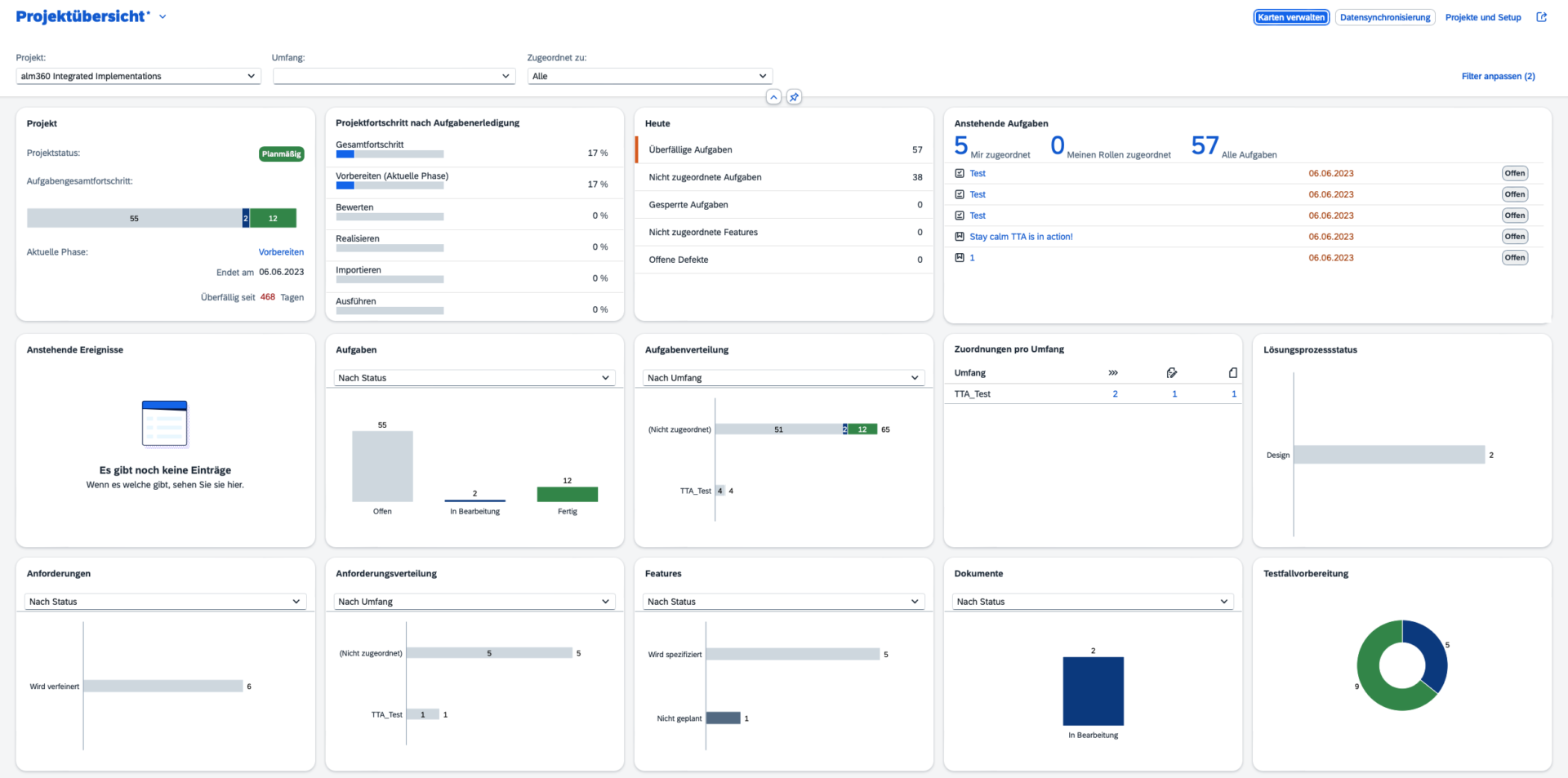
Project overview Centralized dashboards with custom filters for test status.

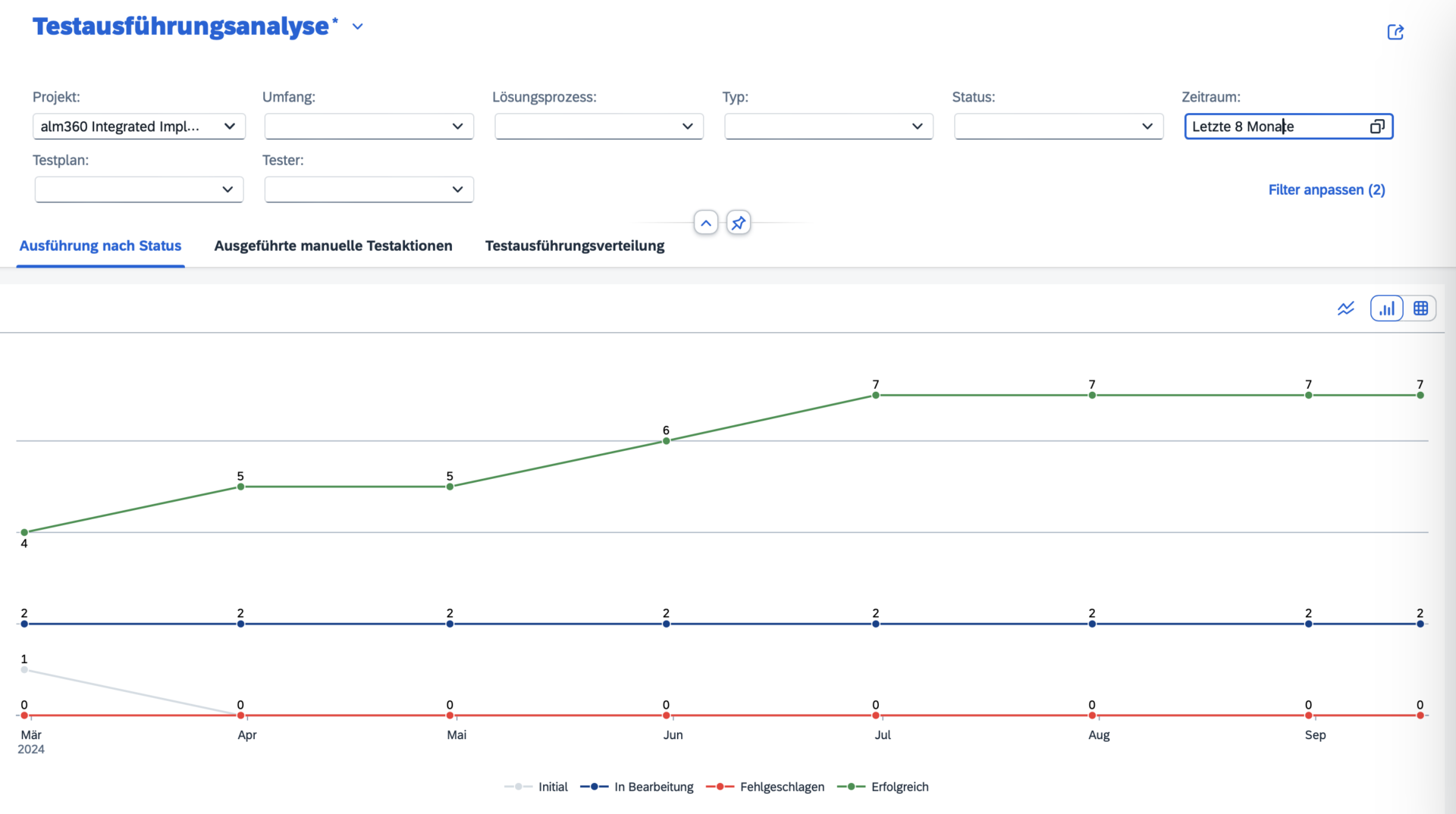
  • test execution analysis
  • Defect reporting: Detailed defect analysis for tracking defects and solution duration.
  • Traceability reports: Ensure that test results are linked to requirements and user stories.

Outlook

If you are not yet familiar with the SAP Roadmap, it is an excellent tool for checking what is planned. The SAP Cloud ALM functions for test orchestration are constantly being developed, and below you will find some of the planned enhancements:

  1. Mass upload: Mass upload of test cases is expected in Q4 2024, allowing multiple test cases to be uploaded in a single file. Creation of new test cases from the file upload.
  2. APIs for test cases: Upload of partner and customer-owned test cases and support for SAP standard upload formats is expected in Q1 2025.
  3. Link test plan to release: Linking test plans to the new task type to reflect the status, start and end dates, and creator in the project plan and Gantt chart is also expected by Q1 2025.
  4. Bulk editing of test cases: also by Q1 2025.

Fazit

Test orchestration in SAP Cloud ALM was developed to simplify and support the testing process in SAP ecosystems. From manual to automated testing, it offers integrated traceability, powerful analytics, and support for SAP and non-SAP environments. With a clear roadmap and continuous improvements, SAP Cloud ALM will become an indispensable tool for test management in SAP projects.

SAP Cloud ALM – What’s New in Week 20

Welcome back to our series about updates from SAP Cloud ALM! Every two weeks, SAP brings a wave of improvements to its Cloud ALM service, ensuring that all users enjoy the most up-to-date features, performance tweaks, and user interface enhancements. In this post, we’ll dive into the latest updates rolled out this week. This time, we have only a few updates to share. If you missed our article on the latest updates, you can read it here.

Administration

On Apr 17, SAP introduced new application for Administration area called Libraries.

The Libraries app helps to manage technical and business-related elements for various application types. Here’s a simple guide to what is available in application:

  • Display Elements: View all existing elements in library.
  • Create, Delete, and Search: Add new elements, remove unnecessary ones, and find specific items quickly.
  • Export Spreadsheets: Generate and download spreadsheets of library elements.
  • Edit and Archive: Update current elements or archive those we don’t actively use but need to keep.
  • Assign Project Tasks: Link tasks to specific library elements for better integration and tracking.

As of today, it’s possible to assign Process Hierarchy Nodes to library elements to view library elements in the overall hierarchy.

Implementation

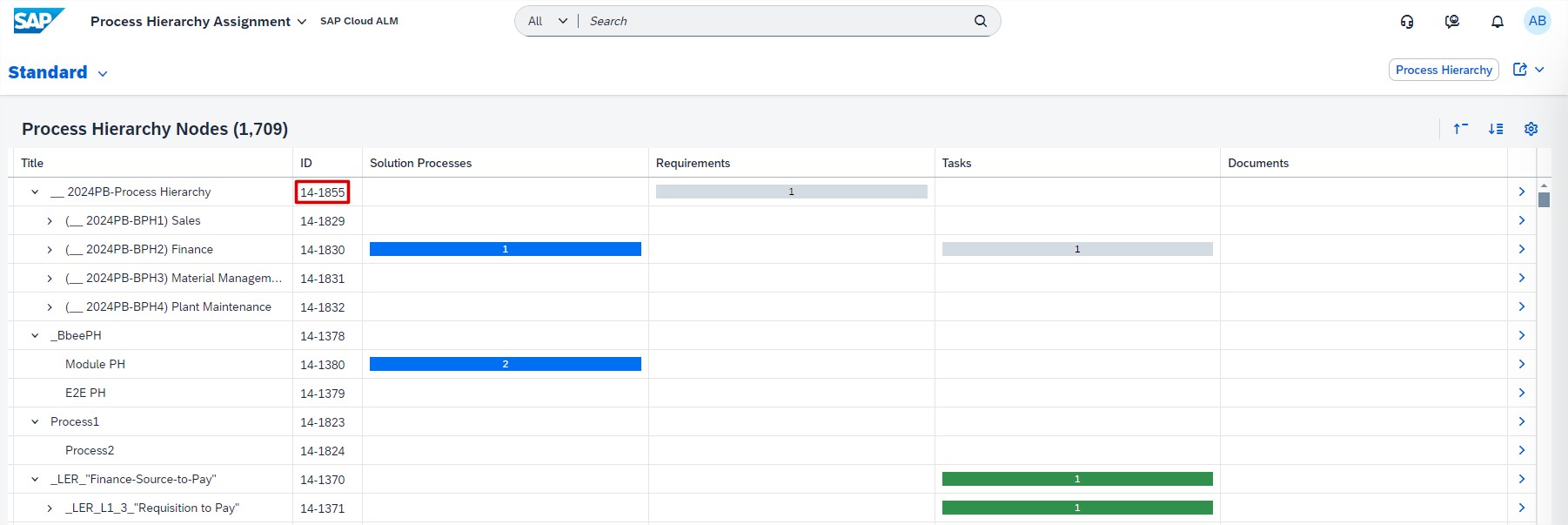
In Cross-Project Overview, the Process Hierarchy Assignments app now features an ID column.

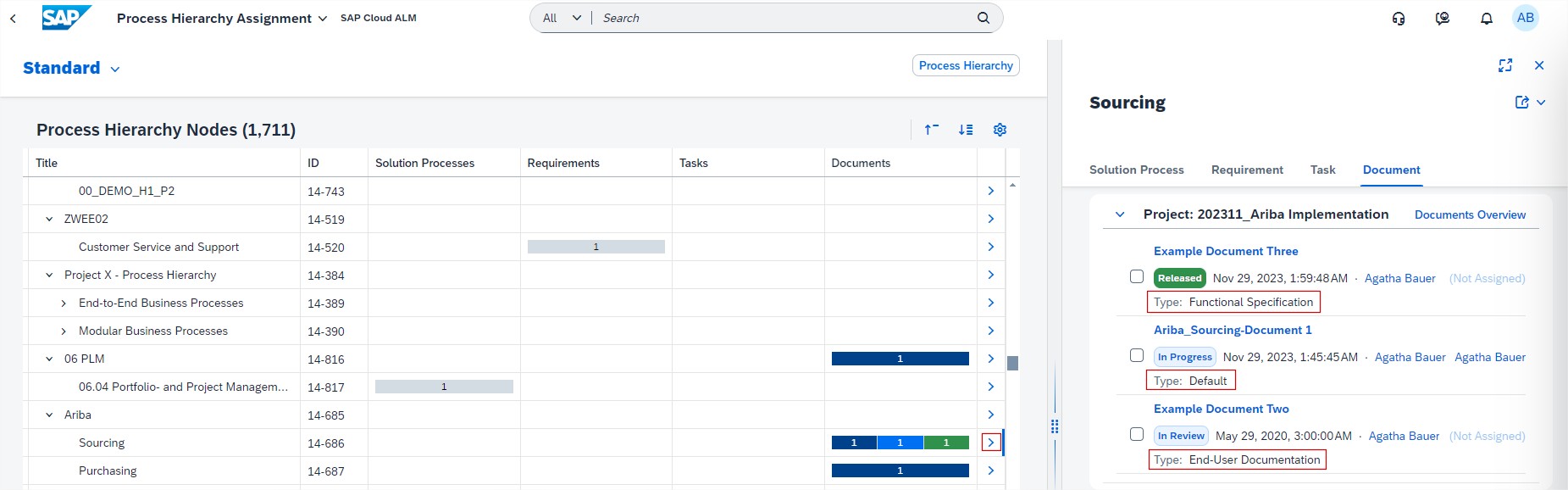
When opening Process Hierarchy Node, we can also see Document Type in Document tab.

Features now supports direct connection between SAP Cloud Transport Management service subscribed in SAP BTP Global Account to SAP Cloud ALM.

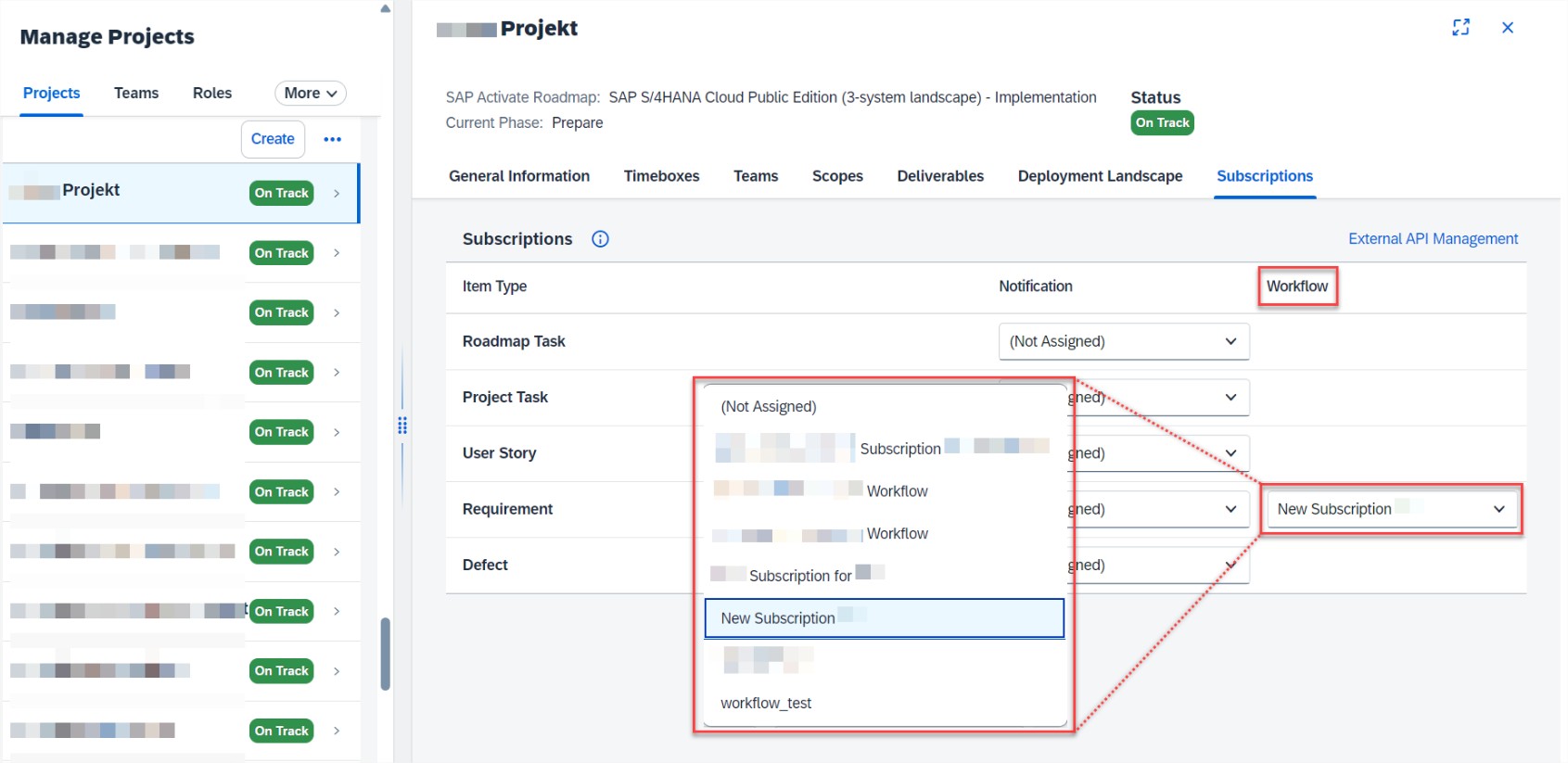
In Projects and Setup, it’s now possible to subscribe requirements to an externally controlled workflow management. This enhancement allows to integrate and synchronize requirements with external workflow tools, improving coordination and efficiency in managing project workflows.

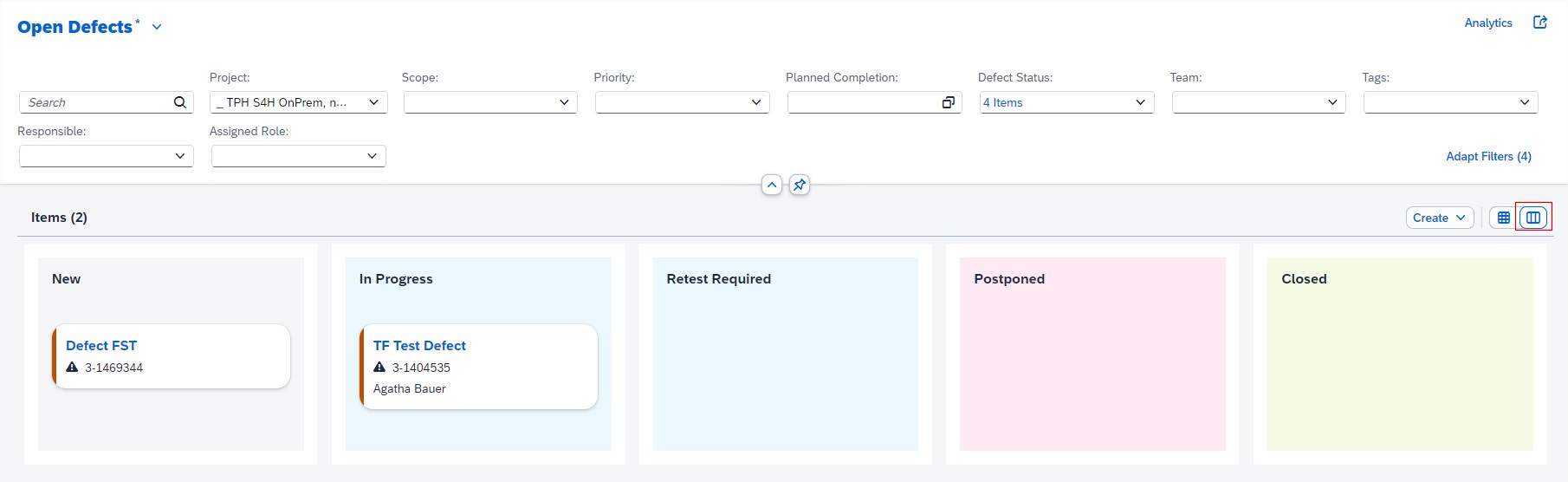
In the Defects and Requirements app, now have option to switch to a Card View for item lists. Feature allows to easily visualize and manage items by dragging the cards to different status lanes. This intuitive view helps streamline workflow and keeps project management efficient and organized.