SAP Cloud ALM continues to evolve with enhancements that improve AI-assisted workflows, operational visibility, governance, and usability across the platform.
The Week 40 release enhances SAP Business Transformation Center with reduced downtime during transformation cycles, while Service expands Joule capabilities for creating recommendations from innovation insights.
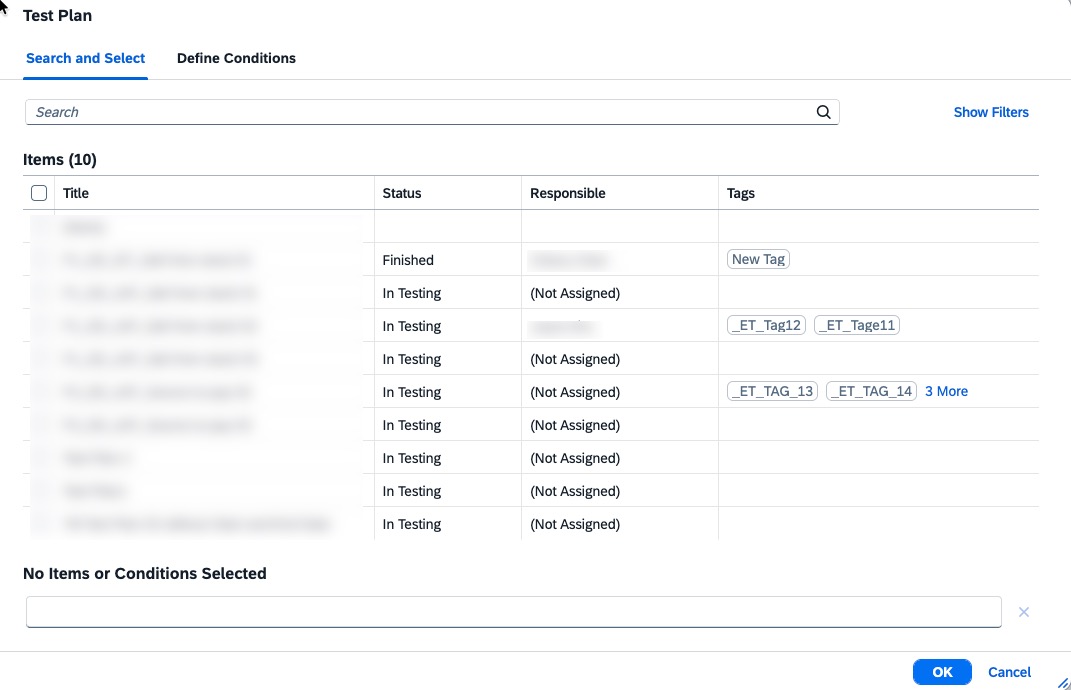
Operations introduces standardized roles, improved alert history, and enhanced monitoring workflows. Meanwhile, Implementation expands Joule support for requirements and user stories and improves test authorizations, transport analysis, deployment, and process ownership.
Together, these updates provide greater automation, transparency, and control across SAP Cloud ALM.
SAP Business Transformation Center – Cycle and Monitoring
Reduced System Downtime During Transformation Cycles
SAP Business Transformation Center improves cycle execution by moving an important data preparation step from system downtime to system uptime.
The process of determining the relevant source system data records is now performed before the transformation phase begins, while the source system is still available. Previously, this processing took place during the downtime phase and could add significantly to the overall period in which the system needed to remain offline.
By completing this work in advance, the actual downtime required during a transformation cycle is reduced, helping minimize the business impact of transformation activities. The process runs automatically in the background and does not require any additional user interaction or configuration.
TL;DR:
Relevant source system data records are now determined during system uptime instead of downtime, reducing the overall system downtime required during transformation cycles.
Implementation – Requirements, Several Apps*, Analytics, Deployment, Process Hierarchy
Joule Agent for Requirements and User Stories
SAP Cloud ALM expands Joule capabilities with the new ALM Requirements and User Stories Agent, bringing AI-assisted interaction to requirements and user story management.
Users can use Joule to list and filter requirements and user stories, search for requirements using keywords, and update assignment information. The agent can also update user story statuses and support planning activities such as maintaining story points and assigning user stories to sprints and releases.
This provides a more conversational way to find and maintain requirements and user stories and can reduce the manual effort involved in common project management activities.
SAP notes that there may be a delay before the agent becomes available through SAP for Me.
TL;DR:
The new ALM Requirements and User Stories Agent enables Joule to search, filter, and update requirements and user stories, including statuses, assignments, story points, sprints, and releases.
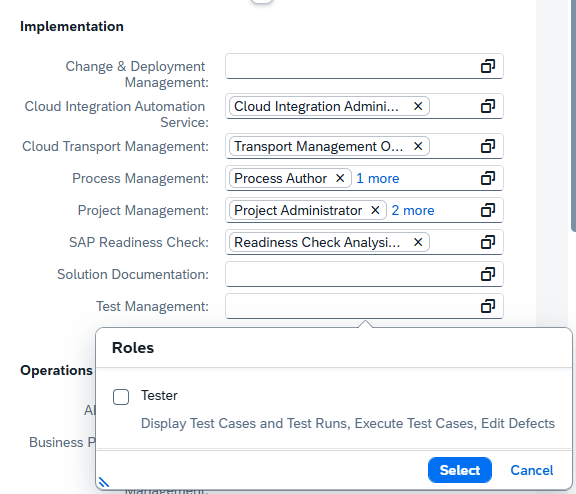
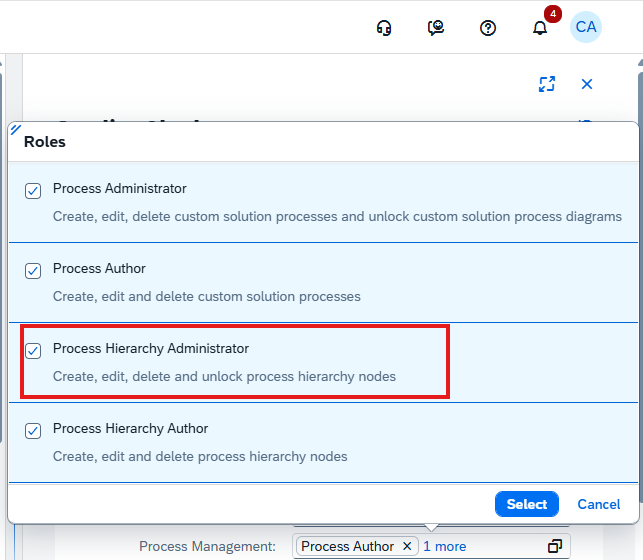
New Tester Role for Test Management
SAP Cloud ALM introduces a new predefined Tester role designed specifically for users involved in test management activities.
The role provides testing-specific access to applications including Test Preparation, Test Plans, Test Execution, Defects, and Analytics, together with display access to relevant project information.
Authorization checks are applied in both the user interface and backend services, providing a consistent authorization model for testing activities. Existing roles and their authorizations remain unchanged by the introduction of the new role.
The dedicated role can simplify user administration by providing a predefined authorization profile for testers instead of requiring testing access to be assembled from broader roles.
TL;DR:
A new predefined Tester role provides dedicated access to SAP Cloud ALM test management applications while maintaining display access to relevant project information.
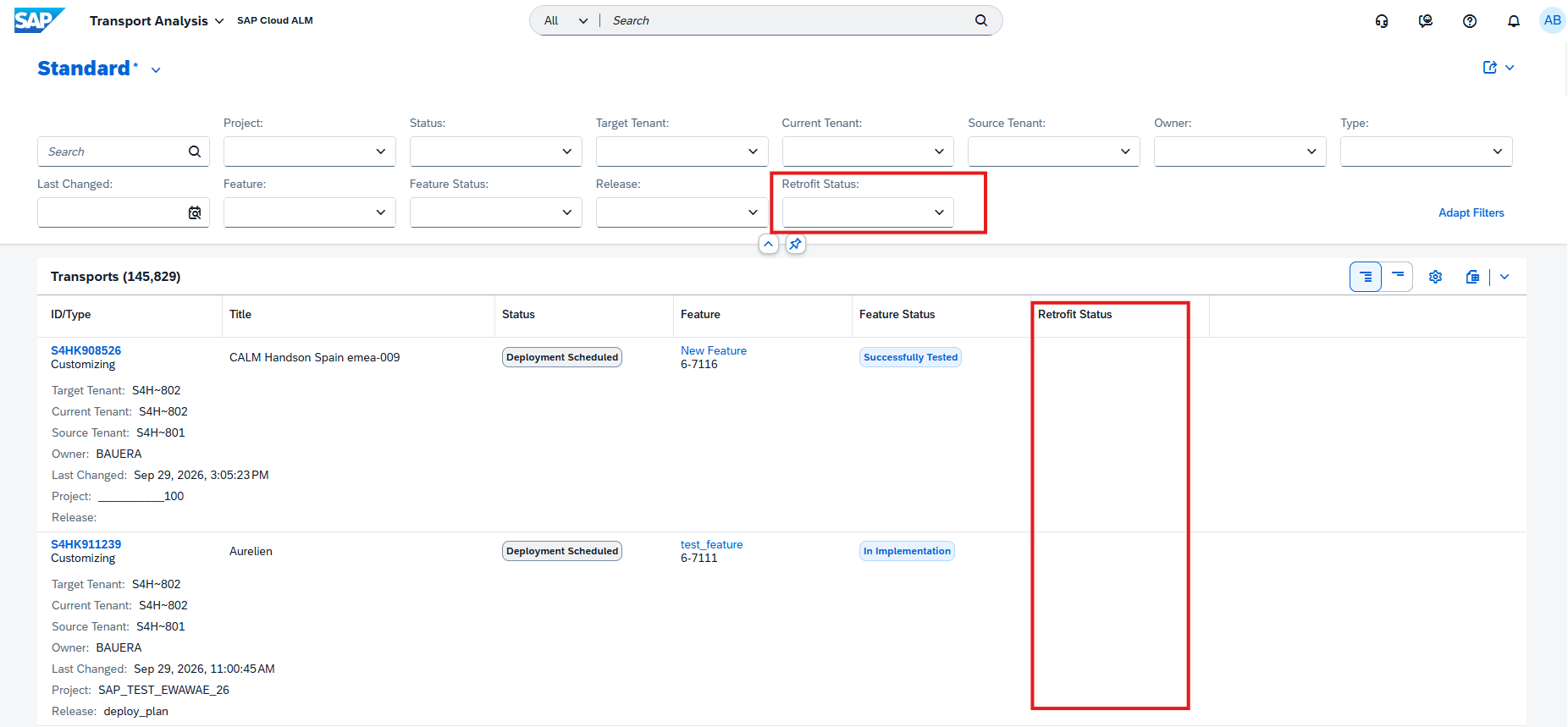
Retrofit Status in Transport Analysis
The Transport Analysis app expands its retrofit visibility by displaying the Retrofit Status of transport objects directly in the analysis results.
Retrofit status is now available as a table field and filter, allowing users to focus their analysis on transports with specific retrofit states. Results can also be grouped and sorted by Retrofit Status.
The information is additionally included in the Excel download, making the retrofit status available for offline analysis and reporting.
This provides a more complete view of transport and retrofit activities directly within Transport Analysis and makes it easier to identify transports that may require further attention.
TL;DR:
Retrofit Status is now available in Transport Analysis for filtering, grouping, sorting, and Excel export, providing greater visibility into retrofit activities.
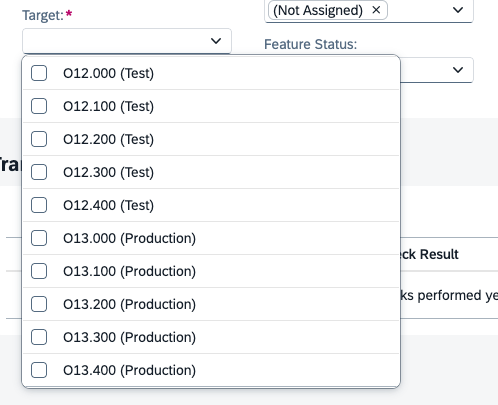
System Role Information for Target Tenants
The Deployment app now displays the system role of target tenants when users select a target tenant.
Providing the system role directly during tenant selection gives users additional context about the target environment and helps distinguish between available systems before proceeding with deployment activities.
This small usability enhancement can help reduce ambiguity when landscapes contain multiple target tenants serving different purposes.
TL;DR:
Target tenant selection now displays the system role, making deployment targets easier to identify and distinguish.
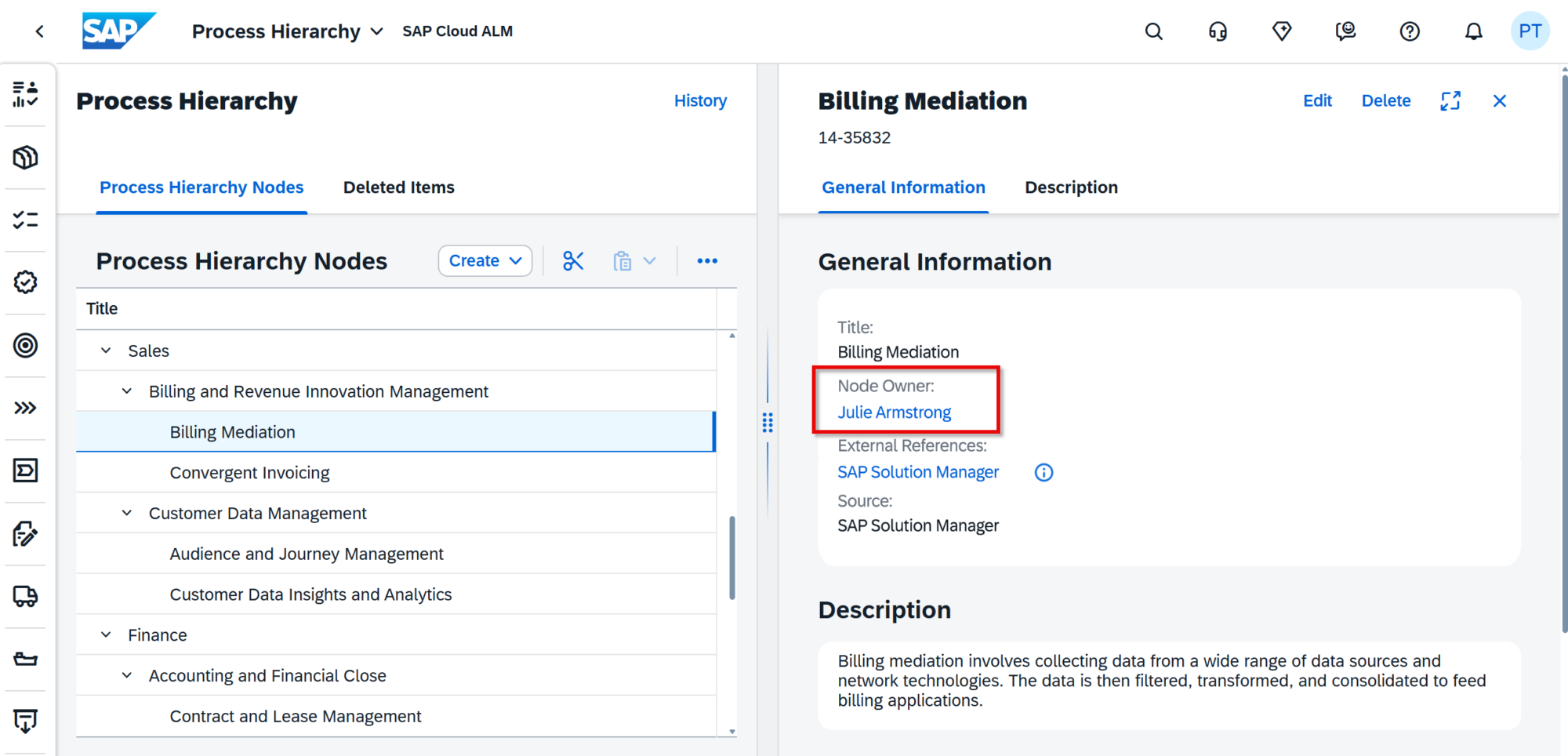
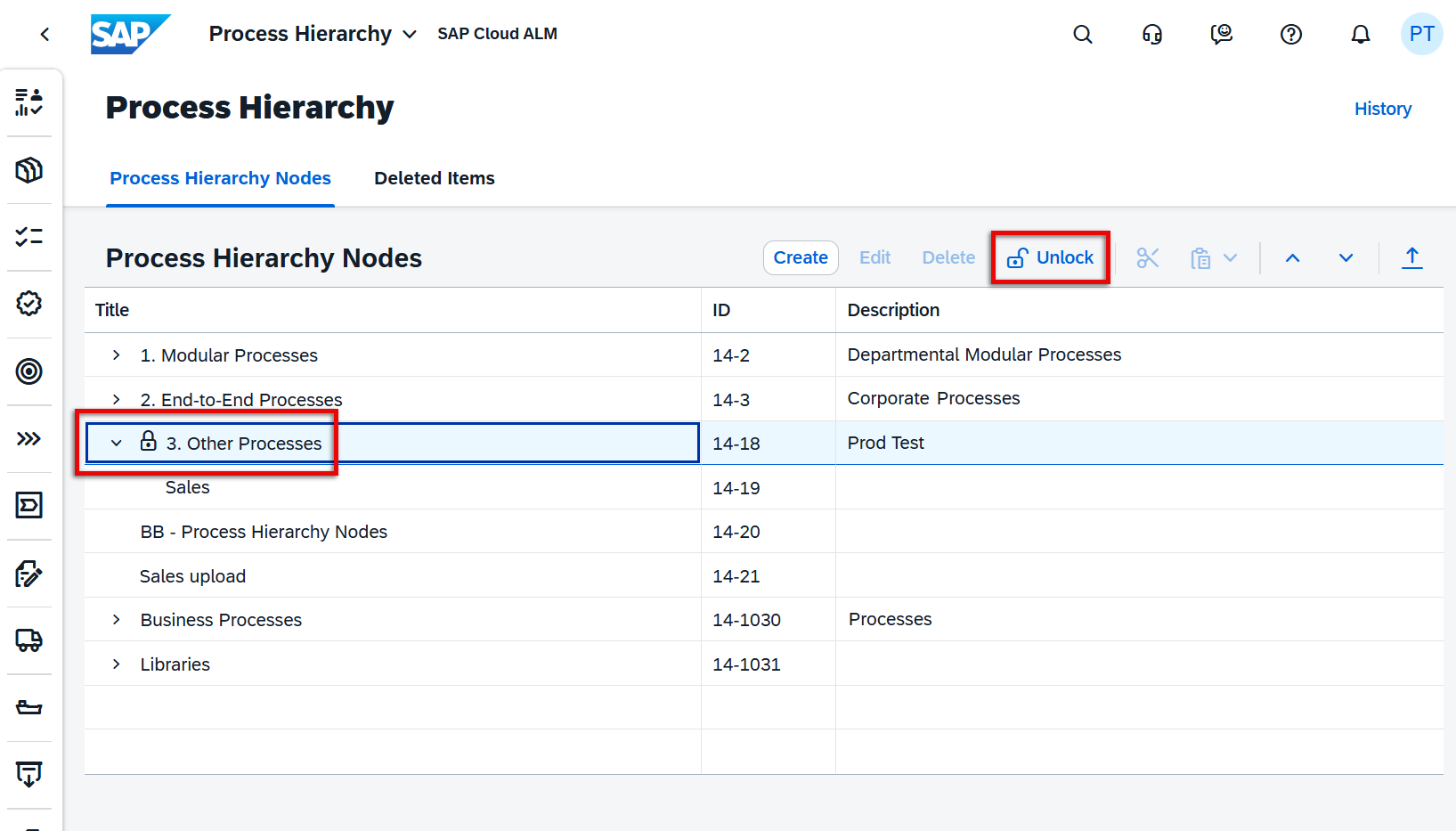
Assign Owners to Process Hierarchy Nodes
Process Hierarchy introduces a new Node Owner capability, improving governance by making responsibility for individual process hierarchy nodes visible and maintainable.
A new Node Owner column is available in the Process Hierarchy Nodes list, while the node detail view displays the owner under General Information. The owner’s name is also clickable, providing access to additional information such as their email address.
Users with the appropriate authorization can assign or change the owner by searching for a user by name or email address. Each process hierarchy node can have one owner, and changes to ownership are recorded in the node’s History, providing traceability when responsibilities change.
The Node Owner column is not displayed for items under the Deleted Items tab.
TL;DR:
Each Process Hierarchy Node can now have a designated owner, with ownership visible in the list and detail views and changes recorded in History for improved governance and accountability.
Operations – Several Apps*, Alert & Event Management, Business Process Monitoring
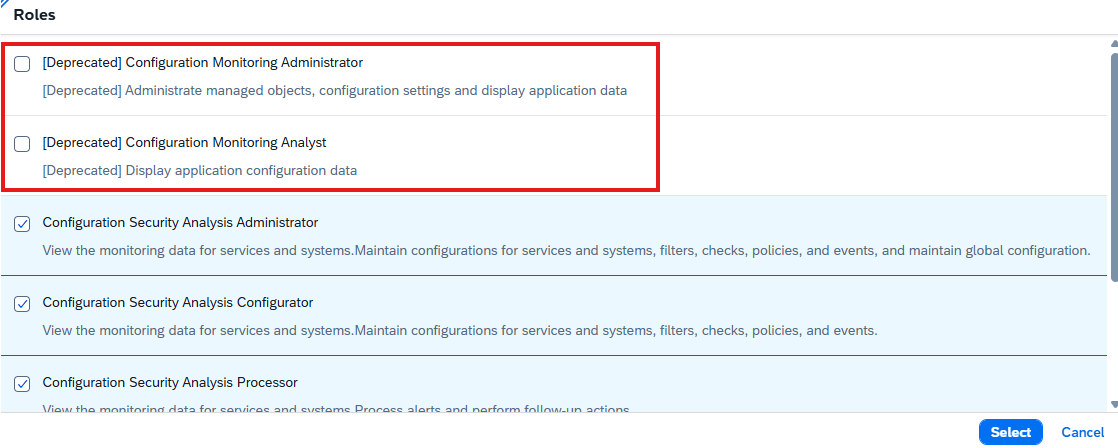
Standardized Roles Across SAP Cloud ALM for Operations
SAP has introduced revised and standardized user roles across SAP Cloud ALM for Operations and Landscape Management to provide a more consistent authorization model.
The new roles apply across Business Process Monitoring, Business Service Management, Configuration & Security Analysis, Health Monitoring, Integration & Exception Monitoring, Job & Automation Monitoring, Landscape Management, Operations Automation, Real User Monitoring, Synthetic User Monitoring.
The previous roles are now marked with [Deprecated] but remain active during a transition period. Organizations should use this period to reassign users to the corresponding new roles to ensure that required authorizations remain available once the deprecated roles are eventually retired.
This is therefore an important change for SAP Cloud ALM administrators, as existing user and role assignments should be reviewed and migrated to the new role model in a timely manner.
TL;DR:
SAP introduces standardized roles across Operations and Landscape Management. Existing roles are deprecated but temporarily remain active, so users need to be reassigned to the new roles during the transition period.
Confirmed Alerts and Alert History
Alert & Event Management provides greater visibility into alerts that have already been processed by making Confirmed Alerts available in the Alert List.
Users can now review alerts after confirmation, including the confirmation comment that was entered when the alert was confirmed. This provides additional context about why an alert was closed or considered resolved.
For alerts that were confirmed and later reopened, the new Show Alert History option provides access to actions performed before confirmation. Users can further open the history to review the previous alert activities.
This improves traceability throughout the alert lifecycle and makes it easier to understand how an alert was previously handled when further investigation is required.
TL;DR:
Confirmed Alerts are now visible in the Alert List, including confirmation comments and historical actions for alerts that were later reopened.
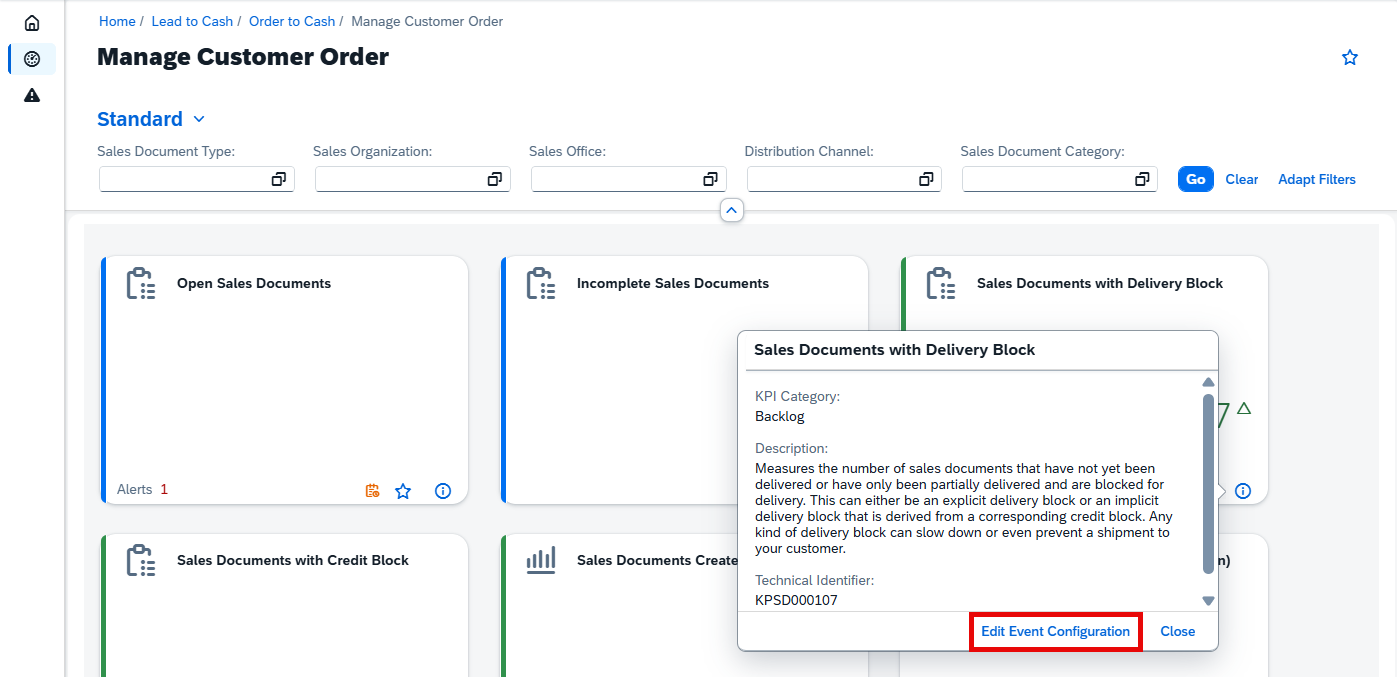
Faster Access to KPI Event Configuration
Business Process Monitoring simplifies the process of adjusting event and threshold settings for monitored KPIs.
From a KPI card on the Monitoring page, users can now open the KPI information and select Edit Event Configuration to navigate directly to the corresponding Event Configuration section.
The direct link also provides faster access to the threshold recommendation functionality, reducing the number of navigation steps required when reviewing or adjusting KPI alert thresholds.
TL;DR:
KPI cards now provide direct access to Event Configuration and threshold recommendations, making monitoring configuration faster and easier.
Related Execution Steps for Jobs and Automations
Job & Automation Monitoring improves visibility into complex job executions with the new Show all related steps option.
For SAP Datasphere Chain and Unspecified HTTP Service jobs and automations, users can now view the related hierarchy of execution steps directly from the Monitoring page.
This provides greater visibility into nested tasks and individual execution steps, making it easier to understand the complete execution flow and identify where problems occurred within a multi-step job or automation.
TL;DR:
Job & Automation Monitoring can now display related and nested execution steps for SAP Datasphere Chain and Unspecified HTTP Service, providing a clearer view of the complete execution flow.
Service – AI Assistance for Innovation Adoption
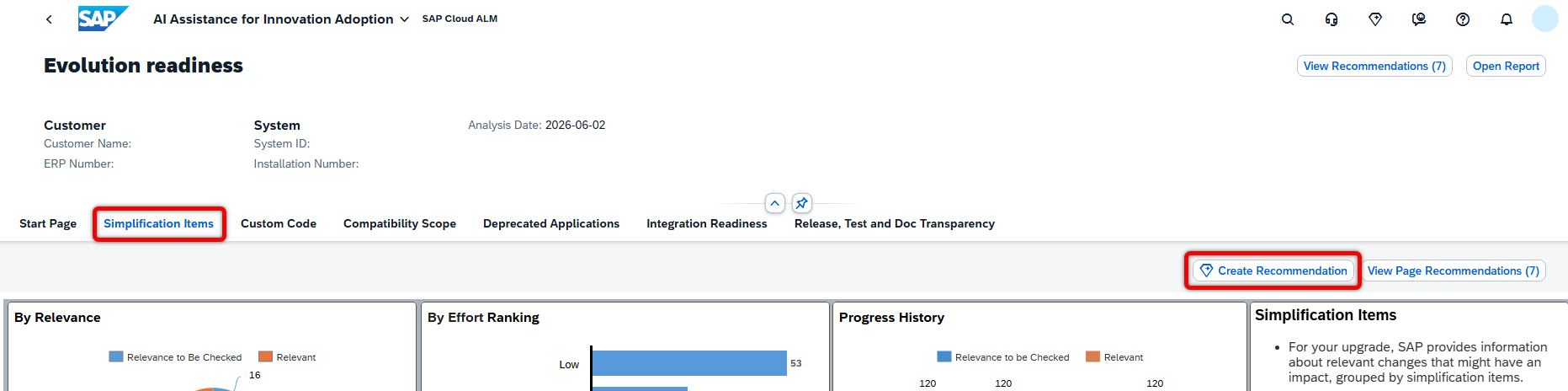
Create Simplification Item Recommendations with Joule
The AI Assistance for Innovation Adoption app expands its Joule capabilities with AI-assisted recommendation creation directly from the Evolution Readiness dashboard.
Users can now use Joule to generate a draft recommendation for simplification items. Joule uses a predefined prompt to prepare the recommendation, reducing the manual effort required to formulate the initial content.
The generated recommendation remains under user control: it can be reviewed before being saved. Once confirmed, the recommendation is stored in Issues and Actions Management, connecting AI-assisted analysis with the existing process for tracking and managing follow-up activities.
TL;DR:
Joule can now generate draft recommendations for simplification items directly from the Evolution Readiness dashboard, which can be reviewed and saved to Issues and Actions Management.
SAP Cloud ALM continues to evolve with enhancements that improve AI-assisted monitoring, operational visibility, traceability, and usability across the platform.
The Week 38 release expands RISE with SAP Methodology with the new AI Assistance for Innovation Adoption app, while SAP Business Transformation Center improves troubleshooting and transformation model management. Service enhances issue and action processing, and Administration introduces new visibility into data collection health.
Implementation strengthens test management, transport handling, and job documentation, while Operations adds AI-assisted thresholds, dynamic monitoring capabilities, improved compliance checks, and broader service visibility.
Together, these updates provide greater automation, transparency, and efficiency across SAP Cloud ALM.
SAP Business Transformation Center – Data Management, Modeling
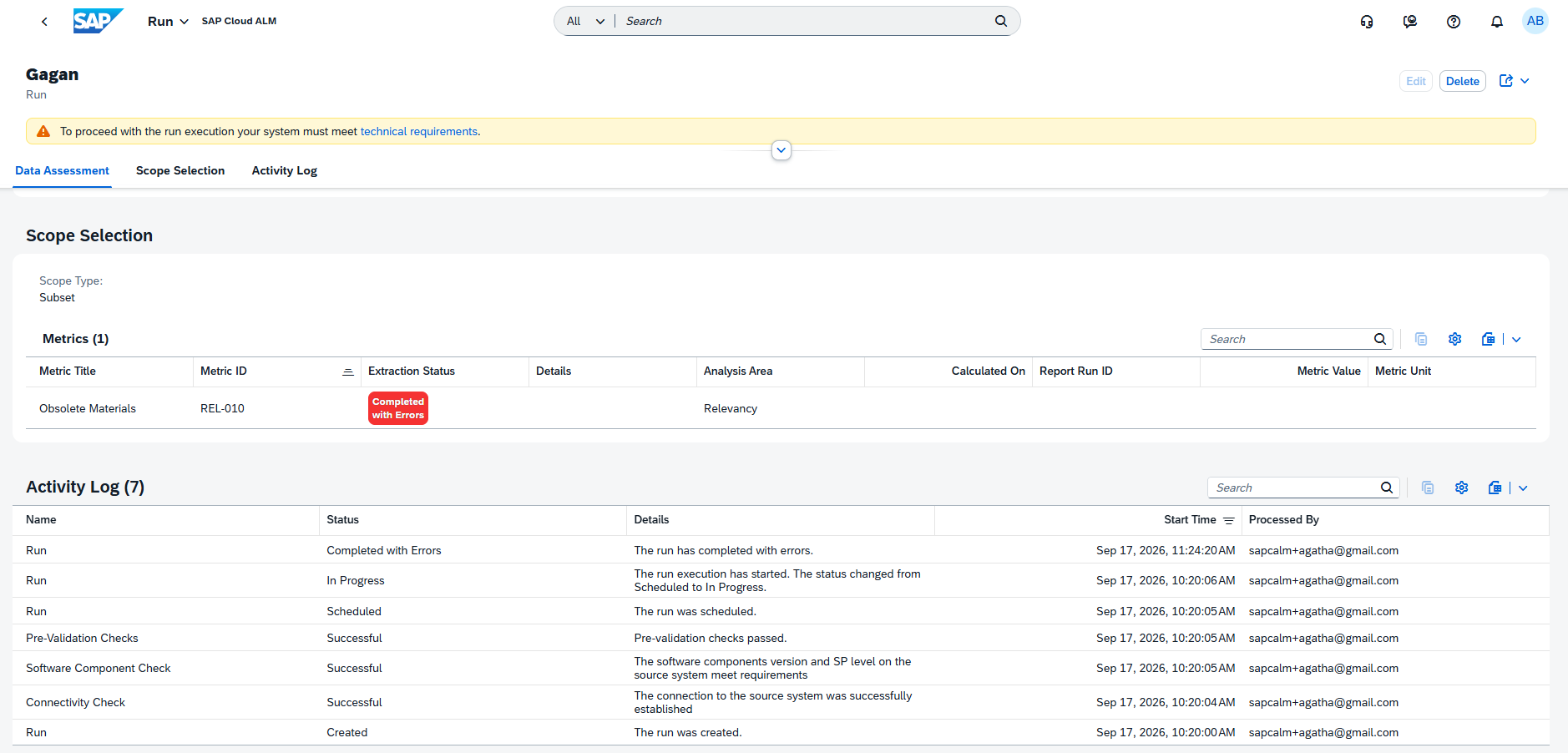
Enhanced Error Details for Failed Runs in Data Management
The Manage Runs app now provides more detailed error information when a run fails, making it easier to understand what caused an unsuccessful execution.
With the enhanced error handling, users can access additional error details directly for failed runs instead of relying only on the overall failure status. This provides more context for identifying the underlying problem and determining the appropriate corrective action.
The enhancement improves troubleshooting within Data Management and can help reduce the time required to analyze and resolve failed transformation activities.
TL;DR:
The Manage Runs app now provides enhanced error details for failed runs, making failure causes easier to identify and troubleshoot.
Restart All Transformation Model Activities at Once in Modeling
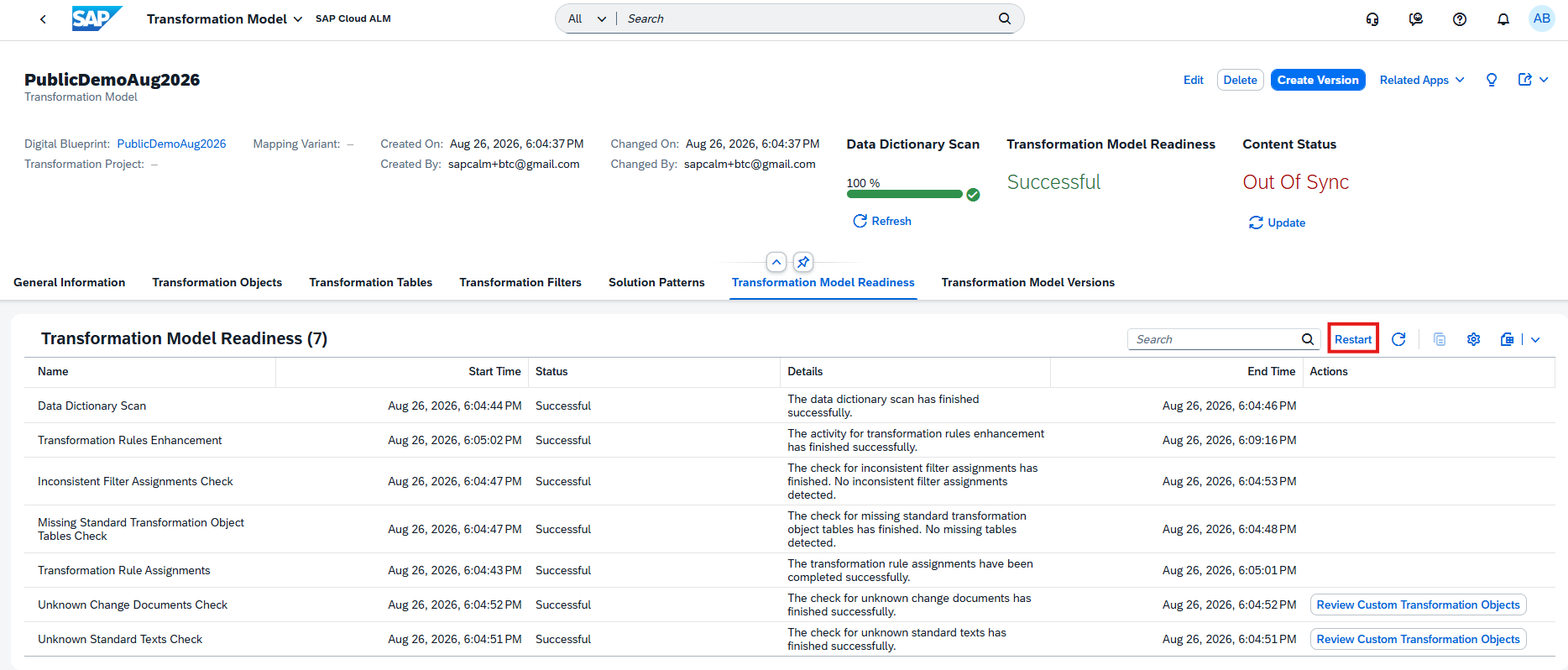
The Transformation Model Readiness tab introduces a new Restart button that simplifies restarting transformation model activities.
Instead of restarting activities individually, users can now use the new action to restart all transformation model activities at once. This provides a more efficient way to reprocess the model when activities need to be executed again.
The enhancement simplifies transformation model management, particularly when multiple readiness activities need to be restarted following changes or corrections.
TL;DR:
A new Restart button in Transformation Model Readiness allows users to restart all transformation model activities at once, simplifying reprocessing and model management.
RISE with SAP Methodology – Several Apps
New AI Assistance for Innovation Adoption App
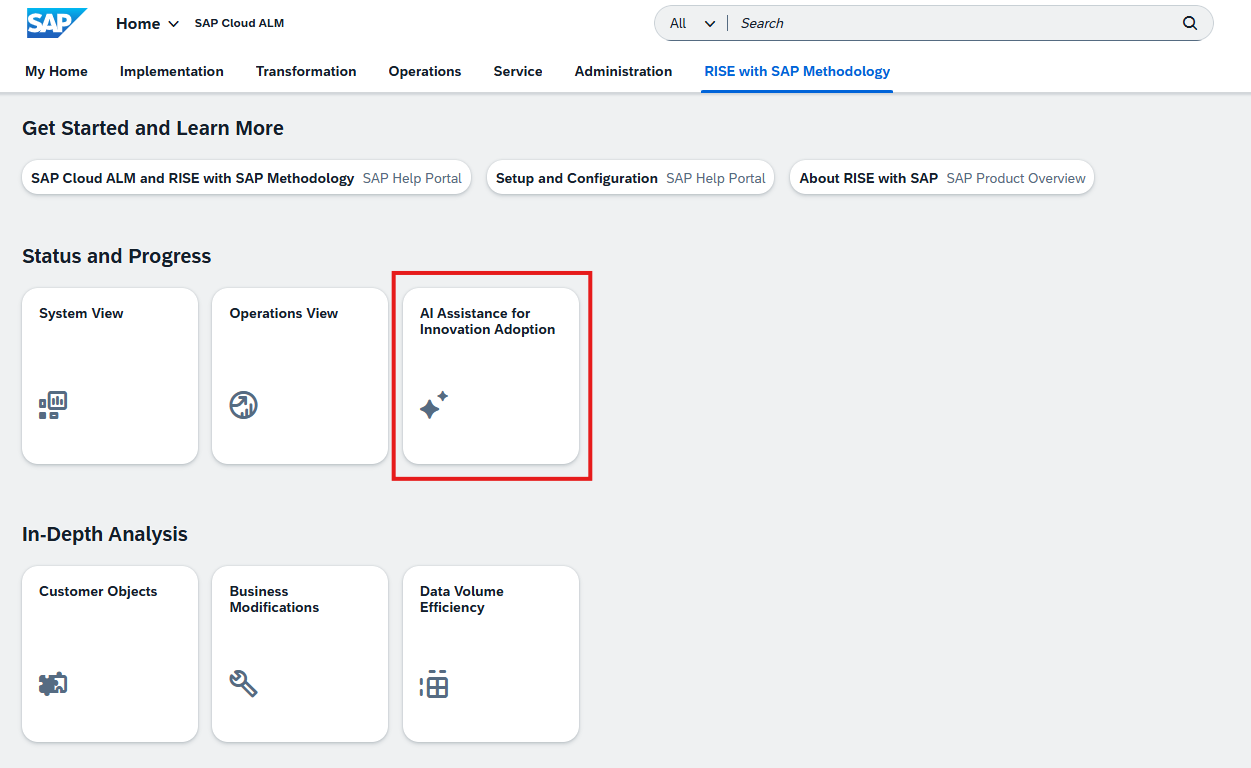
AI Assistance for Innovation Adoption app is now available under RISE with SAP Methodology on the SAP Cloud ALM launchpad.
The app uses AI-assisted analysis to help organizations monitor, analyze, and identify improvement opportunities across their SAP landscape. The generated insights are presented through interactive dashboards, providing visibility into key performance indicators (KPIs), system insights, identified issues, and potential areas for improvement.
The app requires additional setup prerequisites before it can be enabled and displayed. The required configuration enables SAP Cloud ALM to extract the relevant data, generate insights, and provide automated recommendations.
TL;DR:
The AI Assistance for Innovation Adoption app is now available under the RISE with SAP Methodology page on the SAP Cloud ALM launchpad.
Implementation – Analytics, Documents, Features, Libraries, Test Execution, Test Preparation
Enhanced Test Execution and Defect Analysis
Analytics provides additional visibility into both defects and tester activities, making it easier to analyze testing progress and trace issues back to related features.
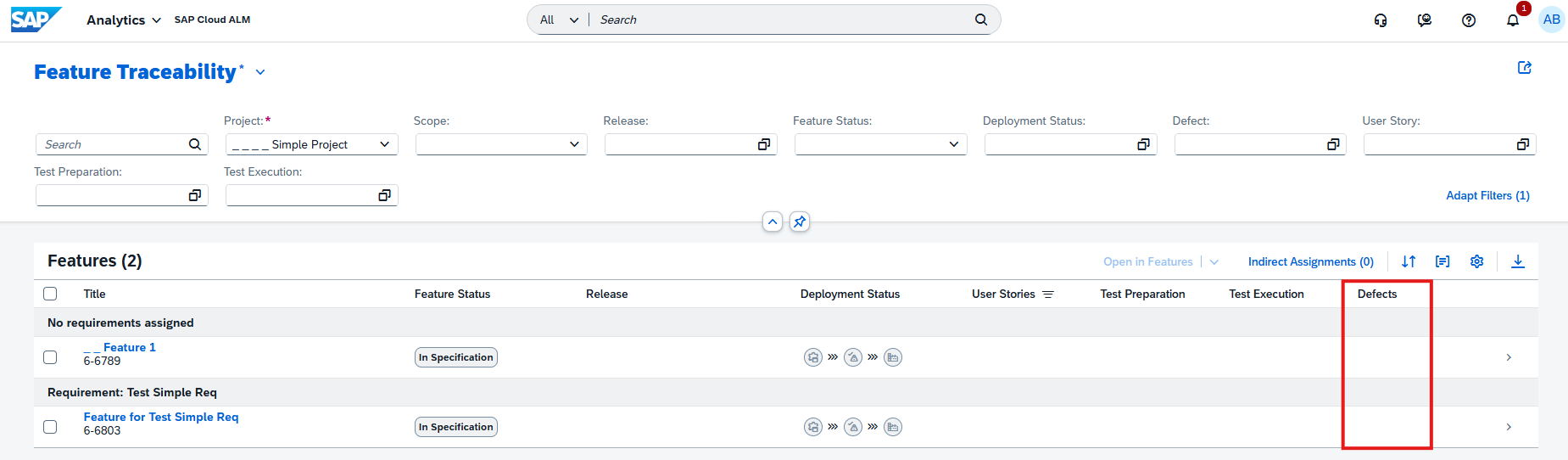
The Feature Traceability app now includes defects that are indirectly related to a feature through associated test executions and their test plans. Previously, the traceability view focused on direct relationships. Including these indirect relationships provides a more complete picture of defects connected to a feature and improves consistency across the Analytics apps.
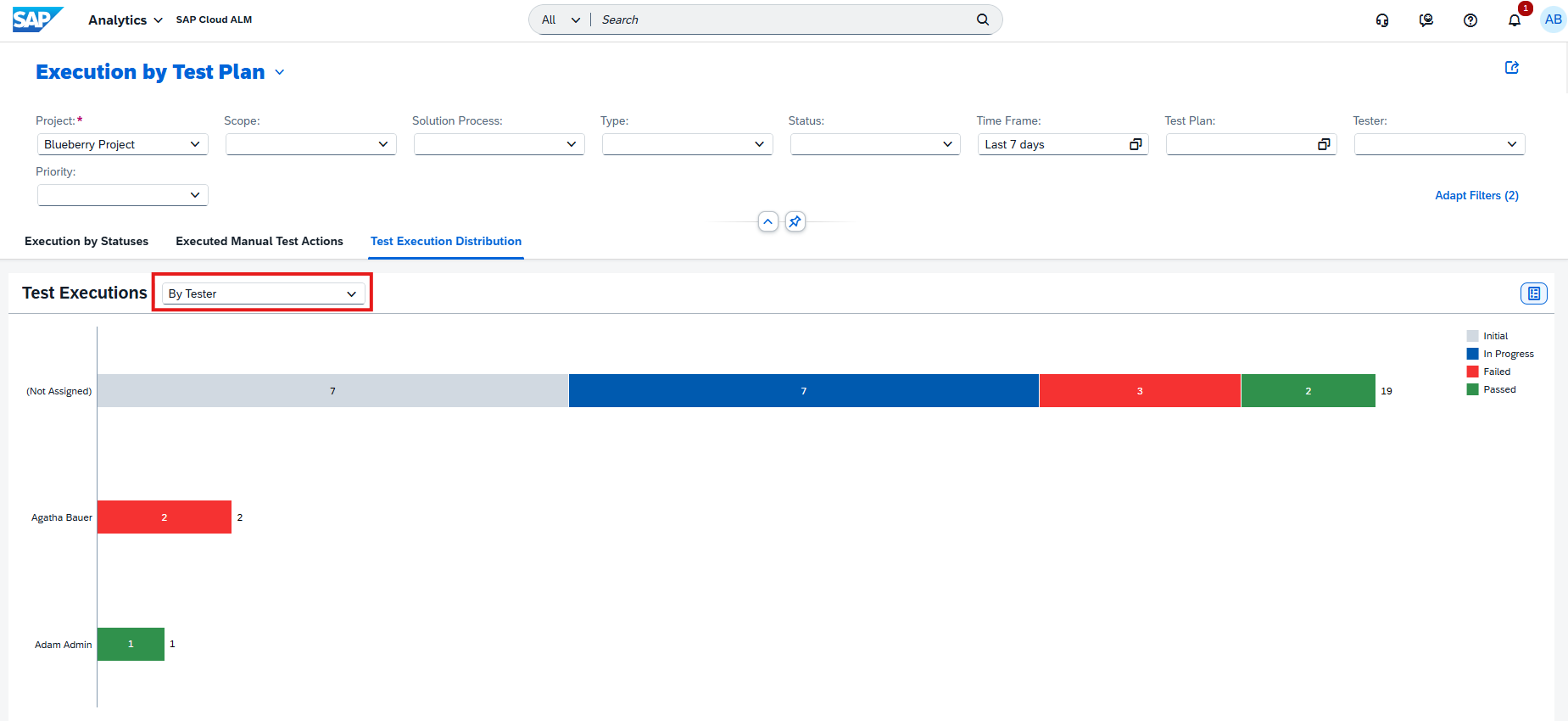
A new By Tester view is also available in both the Test Execution Analysis app and the Test Execution card in Project Overview. Test executions can therefore be grouped and analyzed according to the responsible tester, providing another perspective for tracking testing activities and progress.
TL;DR:
Analytics now provides more complete defect traceability through indirect assignments and a new By Tester view for analyzing test executions by tester.
Integration Between Job Documents and Job & Automation Monitoring
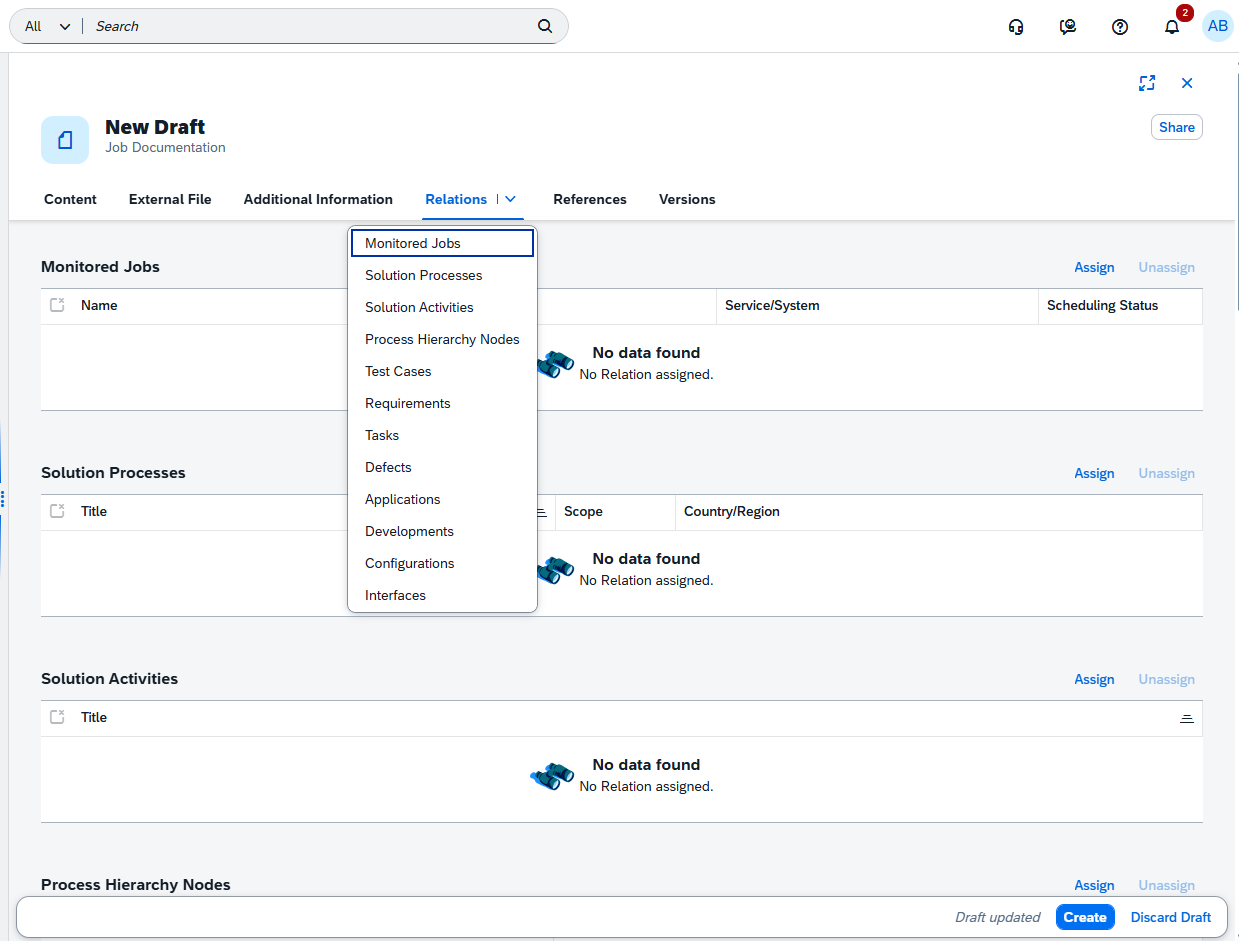
SAP Cloud ALM introduces a stronger connection between Job Documents and Job & Automation Monitoring, providing direct traceability between implementation documentation and monitored jobs.
A new Job Monitoring relation table is available for documents of type Job Document. It shows the assigned jobs together with information such as job name, job type, service, and status. Multiple Job Monitoring IDs can be associated with a single Job Document.
The integration also works directly from Job & Automation Monitoring, where users can create a new Job Document, assign an existing document, or remove an assignment. SAP Cloud ALM automatically maintains the relationship in both directions.
This makes it easier to connect operational job monitoring with the corresponding implementation documentation and maintain those relationships consistently.
TL;DR:
Job Documents can now be directly linked with jobs in Job & Automation Monitoring, with bidirectional relation management between the two applications.
Create and Assign ATO Transports
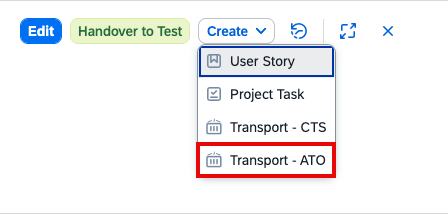
The Features app expands transport management capabilities for SAP S/4HANA Cloud Public Edition by supporting the creation and assignment of modifiable Adaptation Transport Organizer (ATO) transports.
Users can now create ATO transports and assign existing modifiable transports directly as part of feature management. If recently created or changed transports are not visible in the assignment dialog, the transport information can be synchronized using the Refresh function.
The functionality requires transport management for SAP S/4HANA Cloud Public Edition with ATO to be configured beforehand.
This enhancement strengthens the connection between feature implementation and transport management, allowing the related development changes and transports to be managed more closely together.
TL;DR:
The Features app now supports creating and assigning modifiable ATO transports for SAP S/4HANA Cloud Public Edition, improving integration between feature and transport management.
Deletion Status for Related Process Hierarchy Nodes
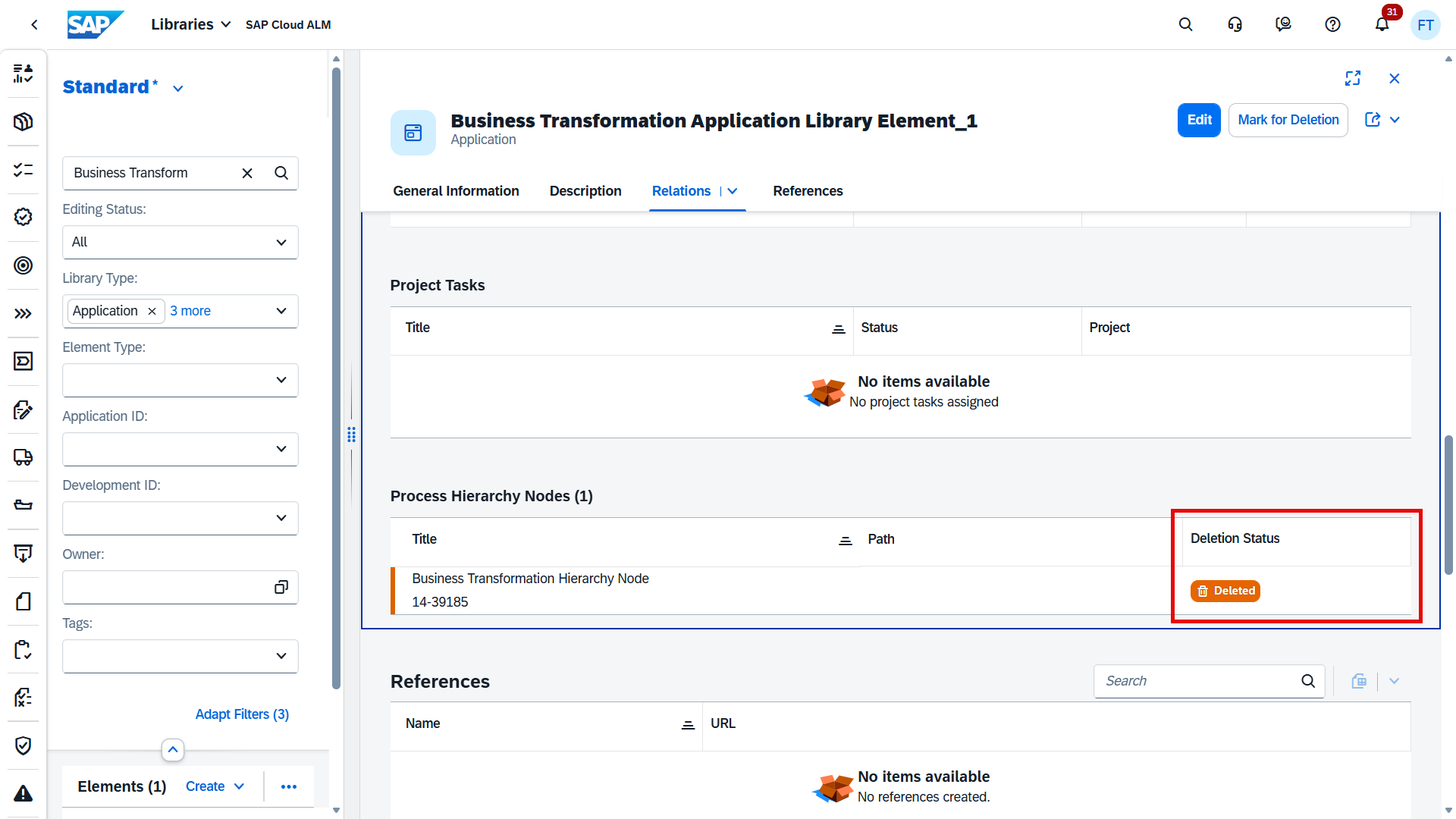
The Libraries app improves transparency for relations between library elements and Process Hierarchy Nodes.
A new Deletion Status column is available for Process Hierarchy Nodes in the Relations tab of library elements. When a related node has been deleted in the Process Hierarchy app, it is clearly marked with the status Deleted.
This makes it easier to identify obsolete relationships and prevents users from assuming that a referenced process hierarchy node is still active.
TL;DR:
Library elements now show the deletion status of related Process Hierarchy Nodes, making obsolete relationships easier to identify.
Improved Automated Test Synchronization and Manual Defect Handling
The Test Execution app introduces changes to both automated test synchronization and defect handling for manual tests.
Open automated test runs are now synchronized automatically with connected test automation providers. SAP Cloud ALM periodically retrieves updated execution statuses and test results, reducing the need for users to manually refresh test runs. Manual refresh remains available when an immediate update is required.
For manual test cases, defect actions have been removed from the Test Execution overview. Defects for manual tests are now managed from the corresponding test run, keeping defect handling within the context of the actual manual execution. Defect actions in the overview remain available for automated test cases.
Together, these changes streamline test execution by reducing manual synchronization effort and providing clearer handling of defects for manual and automated testing.
TL;DR:
Automated test runs now synchronize their status and results automatically, while defects for manual test cases are managed directly within the corresponding test run.
Select All for Automated Test Case Imports in Test Preparation
Importing automated test cases into SAP Cloud ALM is simplified with a new Select All option in the automated test case import list. After applying the required filters, users can select all test cases returned by the current filter criteria in a single step, rather than selecting each test case individually.
The option is available when the filtered result contains 100 or fewer test cases, making bulk imports of smaller and targeted test case sets considerably easier.
TL;DR:
A new Select All option allows users to select up to 100 filtered automated test cases at once when importing test cases.
Operations – Business Process Monitoring, Business Service Management, Configuration & Security Analysis – Validation, Health Monitoring, Job & Automation Monitoring, Real User Monitoring
Enhanced KPI Analysis, Navigation, and AI-Assisted Thresholds
Business Process Monitoring introduces several enhancements that make KPI configuration, analysis, and navigation more flexible and efficient.
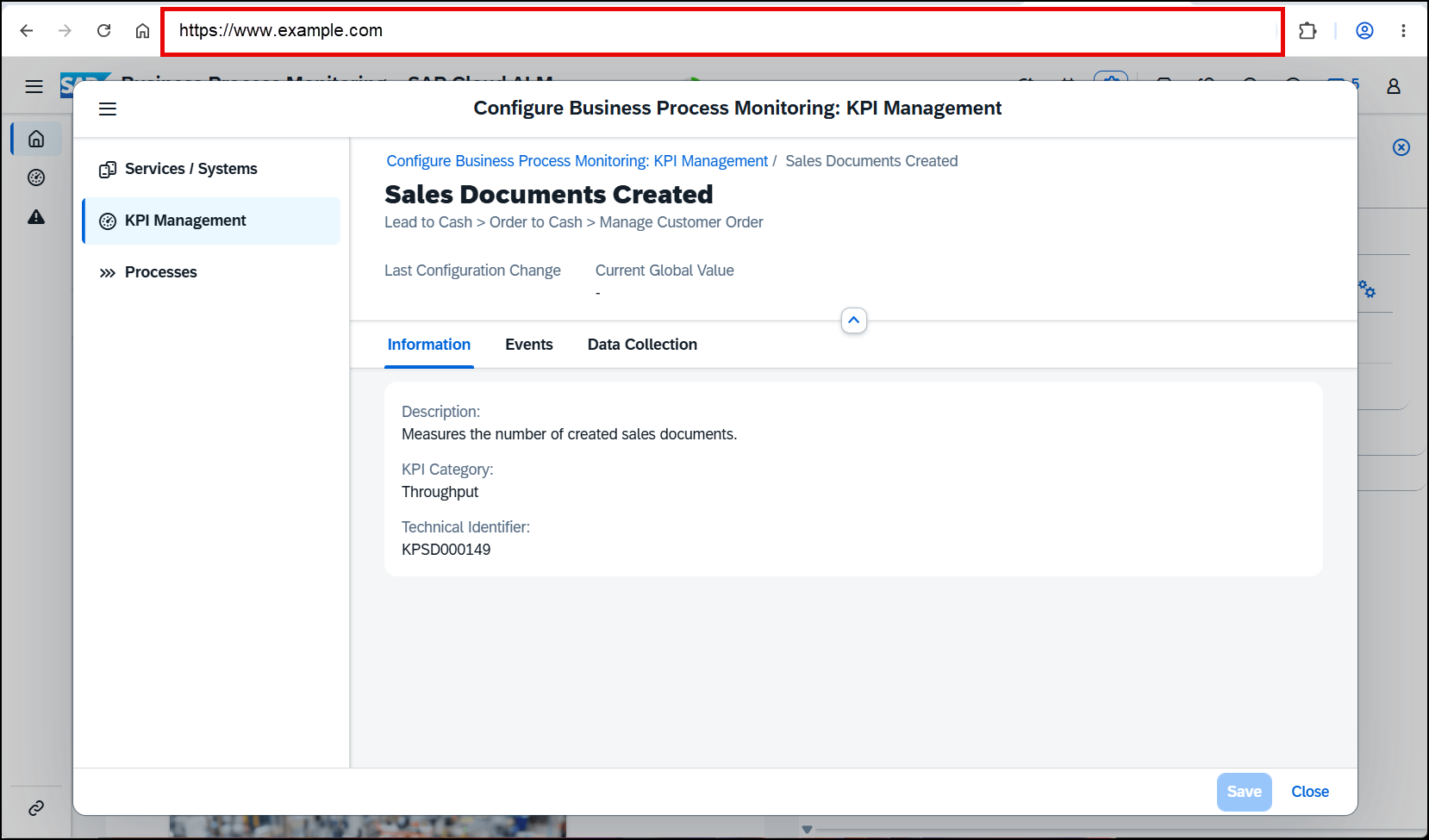
Navigation within the configuration area has been improved with support for direct links to specific subpages and subsections across Services / Systems, KPI Management, and Processes. Users can reuse the browser URL to return directly to a particular configuration location, making frequently used settings easier to access.
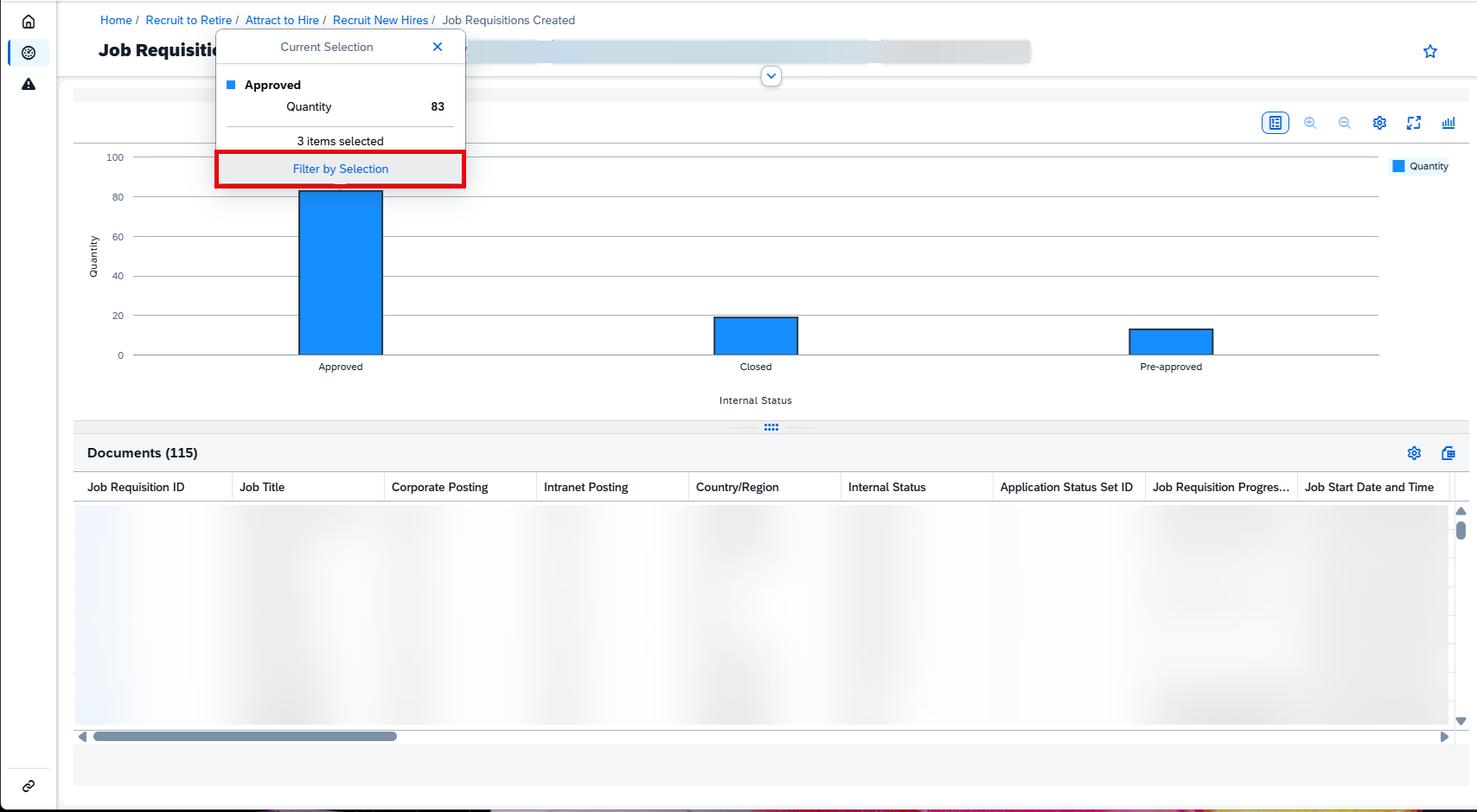
On the Monitoring page, users can now select one or multiple data points in a chart and choose Filter by Selection. The selected values are then used to filter both the chart and the related Documents table, providing a faster way to focus on specific monitoring data.
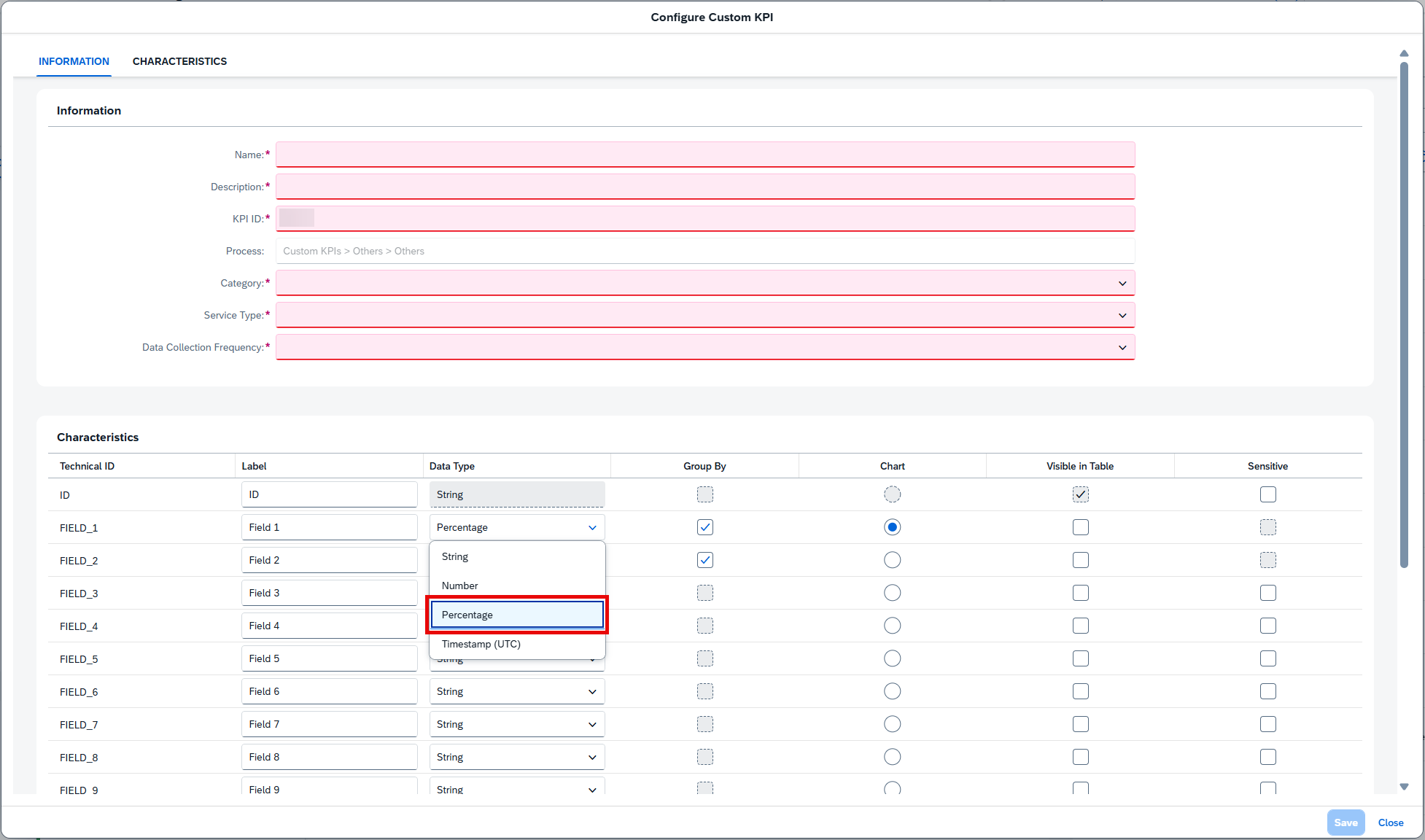
KPI visualization has also been expanded with percentage-based data. Custom KPIs can use Percentage as a data type, while KPI results can be displayed as pie charts with percentages, providing a more intuitive view of proportional monitoring data.
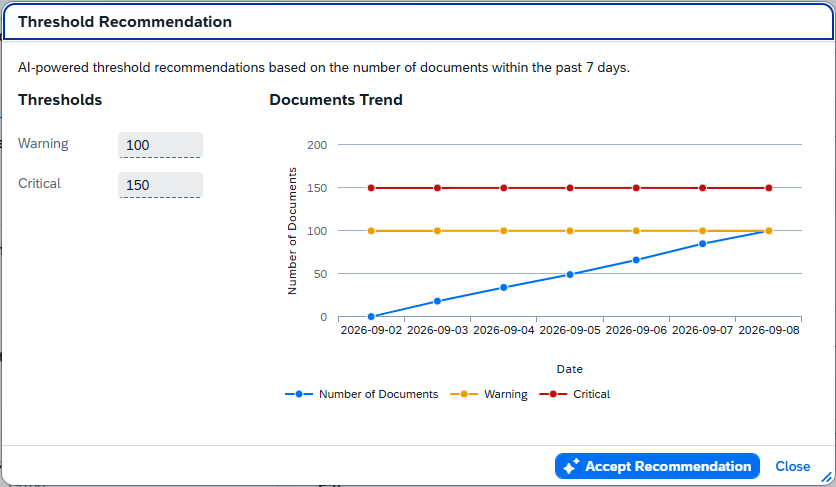
A significant addition is the introduction of AI-powered threshold recommendations. SAP Cloud ALM can analyze document volumes from the past seven days and recommend threshold values for KPI events. Recommendations can be reviewed before being accepted and are available when sufficient monitoring data exists. When filters are used, only fields configured as Group By influence the recommendation calculation.
Together, these improvements make Business Process Monitoring easier to navigate and analyze while introducing AI assistance for defining more data-informed monitoring thresholds.
TL;DR:
Business Process Monitoring adds direct configuration links, chart-based filtering, percentage KPIs and pie charts, and AI-powered threshold recommendations, improving both KPI analysis and monitoring configuration.
Expanded SAP Cloud ERP Public Service and Event Visibility
Business Service Management expands its integration with SAP Cloud ERP public, providing additional visibility into both business services and service degradation events.
Degradation Events detected by SAP for SAP Cloud ERP public are now displayed in the Event Calendar. Event Actions such as email notifications, chat notifications, and tickers can be configured for these events, allowing teams to be proactively informed about service degradation. Service Level Reporting and Service Level Objectives do not apply to these events.
In addition, Workforce Management integrations created as part of SAP Cloud ERP public are now represented as Business Services in Business Service Management. These services can be added to the monitoring scope and their events displayed in the Event Calendar. SAP-managed Status Events and SPC Events are supported, while Custom Events are not available.
TL;DR:
Business Service Management expands SAP Cloud ERP public visibility with Degradation Events in the Event Calendar and support for Workforce Management integrations as Business Services.
More Flexible Scoping and Date-Based Rules for Custom Checks
Configuration & Security Analysis introduces additional flexibility for defining Custom Checks, both in determining which service instances should be evaluated and in creating date-based validation logic.
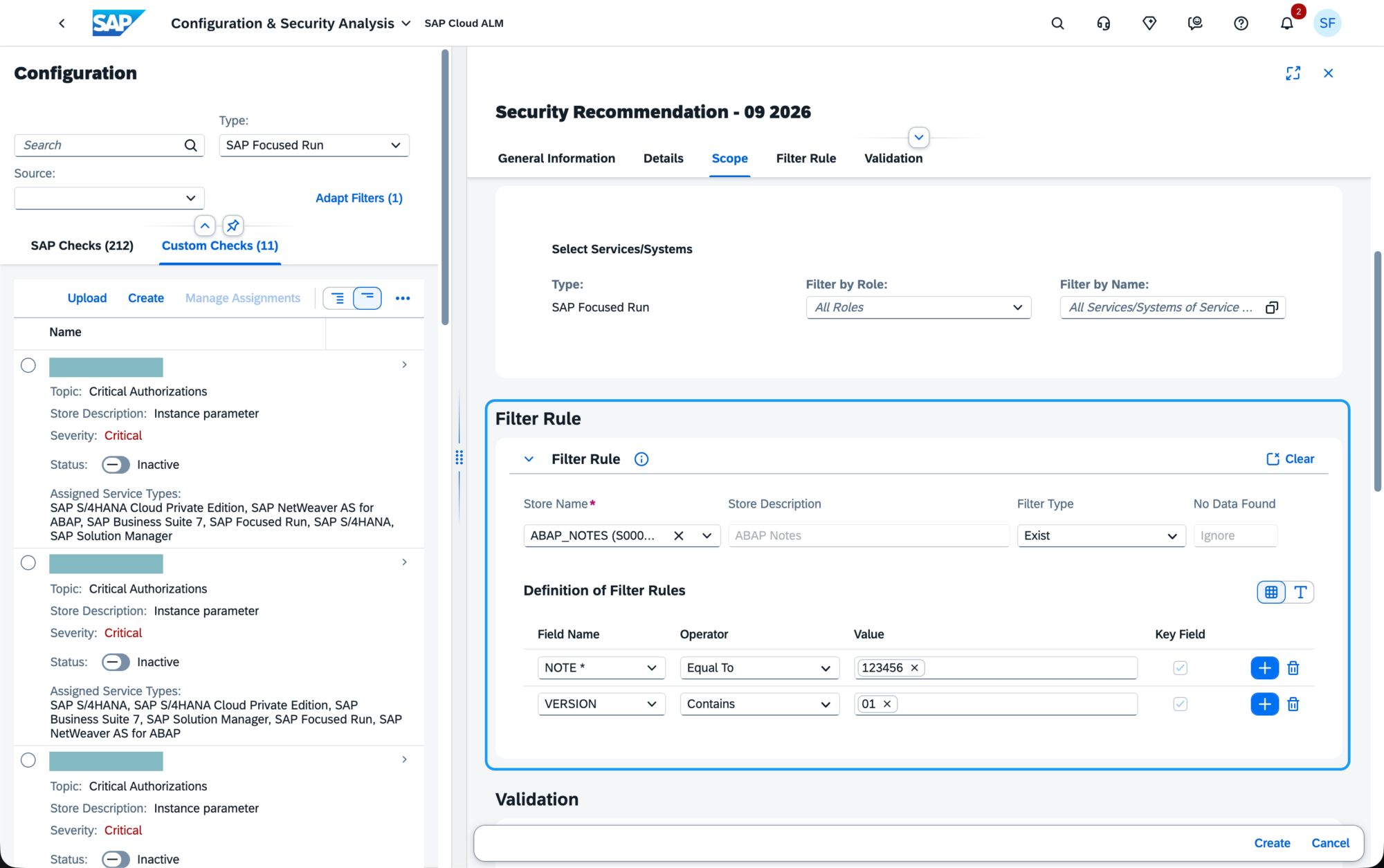
A new Filter Rules section allows users to control which service instances are included in a Custom Check. A filter rule combines a data store, filter type, and filter values. Only service instances matching the configured criteria are validated, while the remaining instances are excluded from the check scope.
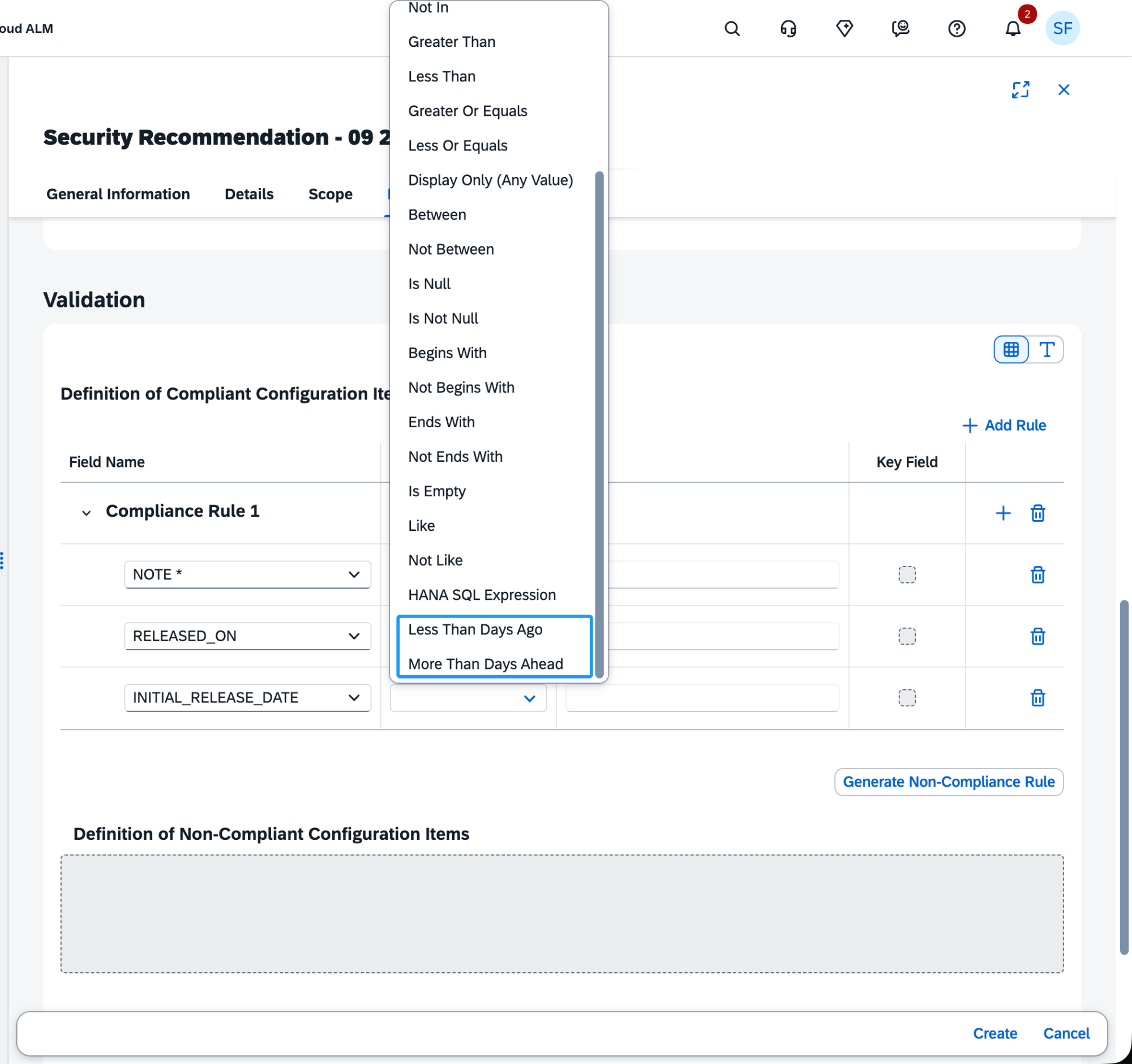
Validation rules also gain two new date-oriented operators: Less Than Days Ago and More Than Days Ahead. These can be used in compliance and non-compliance rules for date fields such as RELEASE_DATE and INITIAL_RELEASE_DATE.
Together, these enhancements allow Custom Checks to be targeted more precisely and make it easier to define compliance requirements based on the age of or time remaining until configuration-related dates.
TL;DR:
Custom Checks now support service-instance Filter Rules and new date-based validation operators, enabling more targeted and flexible compliance checks.
Dynamic Thresholds and New Document Management Service Metrics
Health Monitoring introduces enhancements that improve both adaptive performance monitoring and visibility into SAP Document Management Service (DMS) instances.
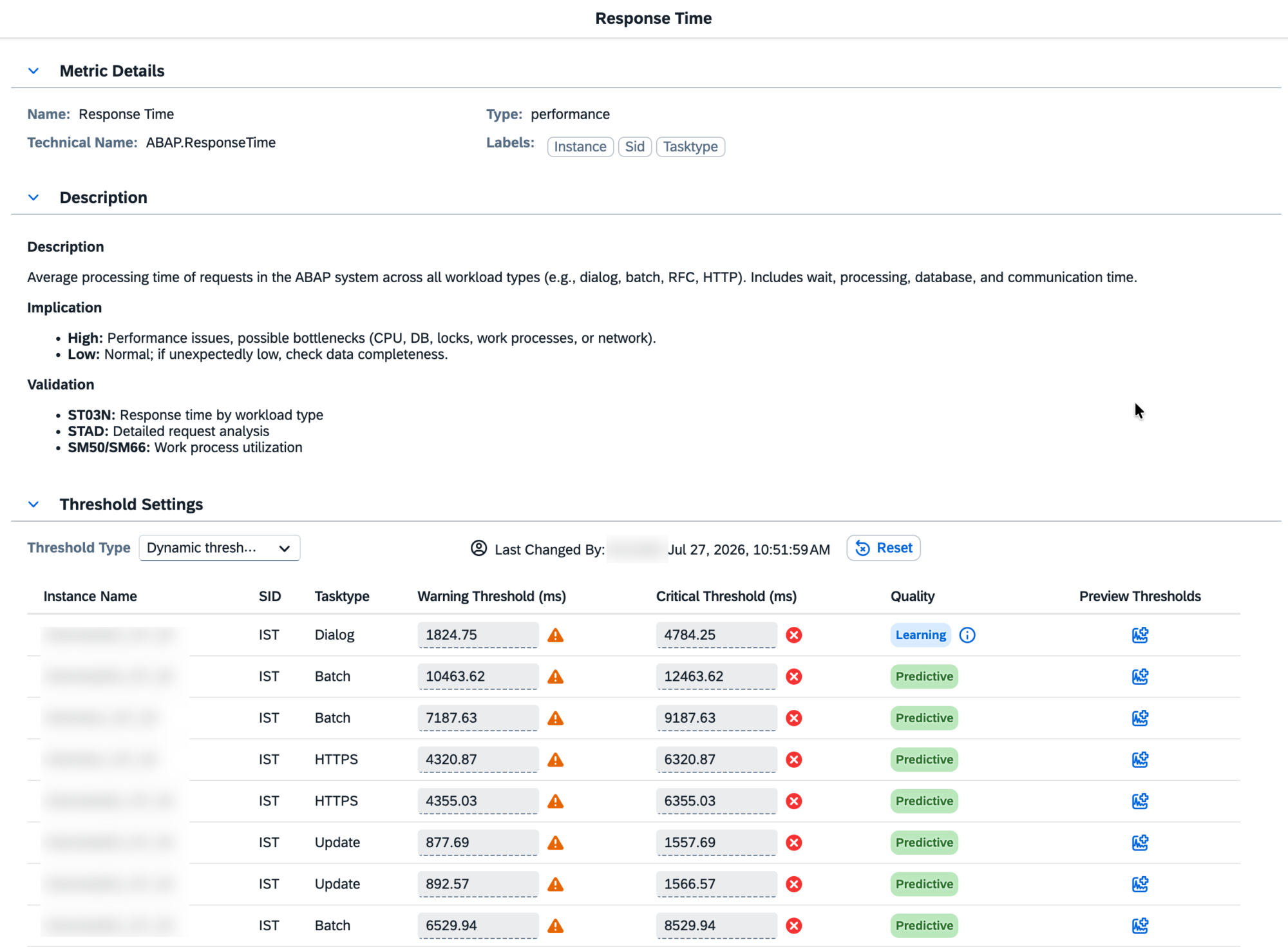
A major addition is Dynamic Thresholds, which automatically calculate performance thresholds based on historical data and trend analysis. Instead of relying only on manually configured static limits, Health Monitoring learns the normal behavior of a metric and can identify deviations that may indicate emerging performance issues. This can help reduce manual configuration and unnecessary alerts while making monitoring more responsive to actual system behavior.
Dynamic Thresholds require sufficient historical data for learning. The Quality column indicates the current state using four classifications:
Predictive when the model is actively generating thresholds
Static when metric behavior is too constant for reliable prediction
Learning while additional data is being collected
Insufficient when there is not enough suitable data for predictive modeling
Health Monitoring also expands coverage for Document Management Service with three new metrics: Active Repositories, Repositories Pending Permanent Deletion, and Total Storage Used. These provide visibility into repository availability, repositories awaiting permanent removal, and overall storage consumption within a DMS service instance.
Together, these enhancements provide more adaptive performance monitoring while expanding the range of SAP services that can be observed through Health Monitoring.
TL;DR:
Health Monitoring introduces Dynamic Thresholds based on historical metric behavior and new DMS metrics for active repositories, pending deletions, and storage usage, improving both proactive monitoring and service visibility.
Map Monitored Jobs and Automations to Job Documents
Job & Automation Monitoring introduces direct integration with Job Documents, strengthening the connection between operational monitoring and implementation documentation.
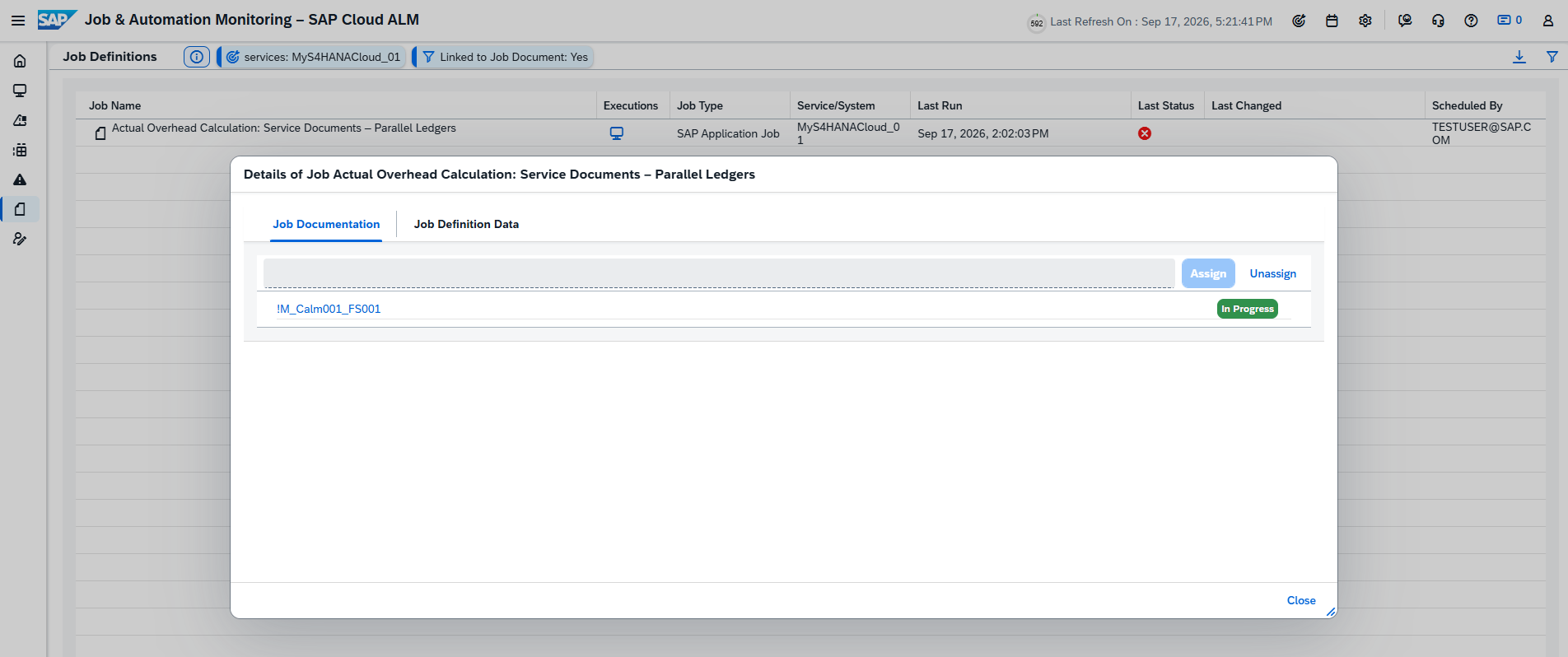
From the Job Definitions page, users can now assign or unassign a Job Document for a monitored job or automation. This allows the relevant job documentation to be accessed and managed directly in the context of the monitored object.
This complements the new Implementation Documents functionality introduced in the same release, where Job Documents display their associated monitored jobs and maintain the relationship in both directions.
TL;DR:
Monitored jobs and automations can now be mapped directly to Job Documents, providing better traceability between operational monitoring and job documentation.
Suppress Alerts for Predictable Seasonal Change Points
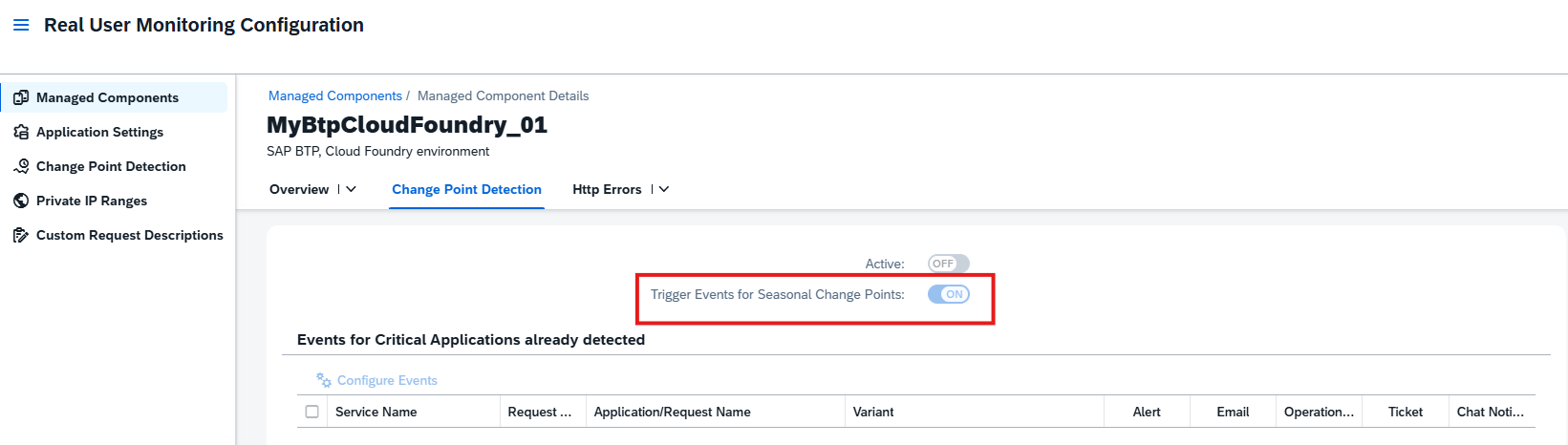
Real User Monitoring improves anomaly alerting by allowing users to suppress alerts for change points caused by predictable seasonal patterns.
Patterns such as weekly usage peaks or quarter-end spikes can naturally produce significant changes in monitored behavior without necessarily representing a problem. These known seasonal changes can now be suppressed so that they do not continuously generate unnecessary alerts.
This helps reduce alert noise and allows monitoring teams to focus more attention on unexpected deviations and anomalies that may require investigation.
TL;DR:
Real User Monitoring can now suppress alerts for predictable seasonal change points, reducing alert noise and keeping attention on unexpected anomalies.
Service – Issues and Actions Management
Enhanced Issue and Action Details Pages
The Issue and Action details pages receive several usability and workflow enhancements, allowing users to manage issues and standalone actions more efficiently from a single place.
Users can now navigate directly to the previous or next issue or standalone action from the details page. This makes it easier to review multiple items in sequence without returning to the Manage Issues or Manage Standalone Actions lists after each item.
Additional actions are also available directly from the details pages. Users can now create follow-up tasks or forward an issue or standalone action to an external system, such as Jira or ServiceNow, without navigating back to the corresponding list page.
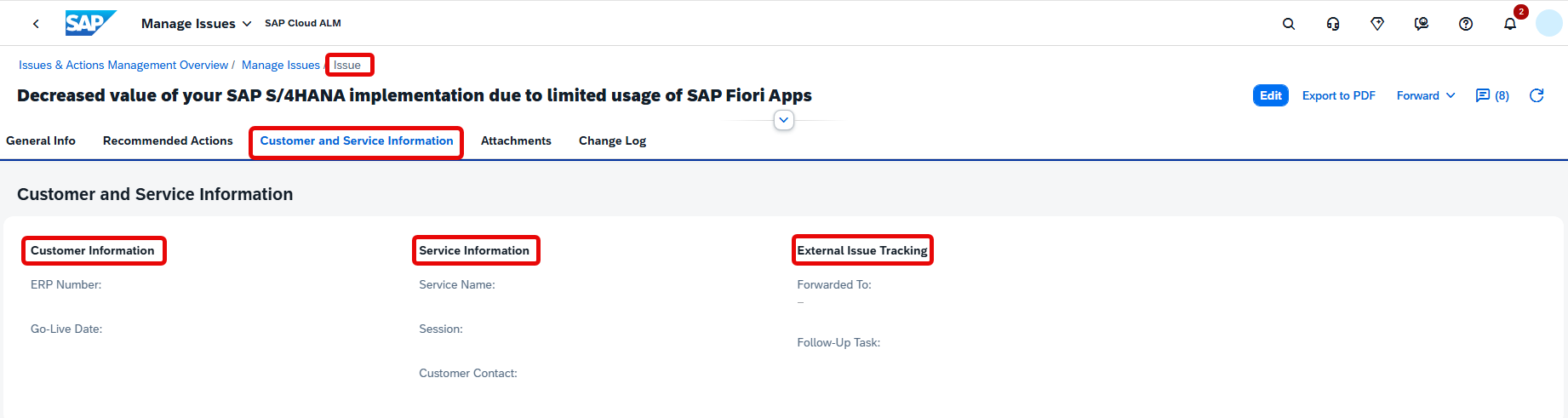
A new Customer and Service Information tab provides additional context, including the customer’s go-live date and, where applicable, information about the assigned Service, Session, and Customer Contact. The tab also provides External Issue Tracking information, including links to the external system an item was forwarded to and associated follow-up tasks when available.
Together, these improvements make the details pages a more complete workspace for reviewing, navigating, and processing issues and actions.
TL;DR:
Issue and Action details pages now support previous/next navigation, follow-up task creation, forwarding to external systems, and additional customer, service, and external tracking information.
Administration – Self-Monitoring
New Data Collection Metric
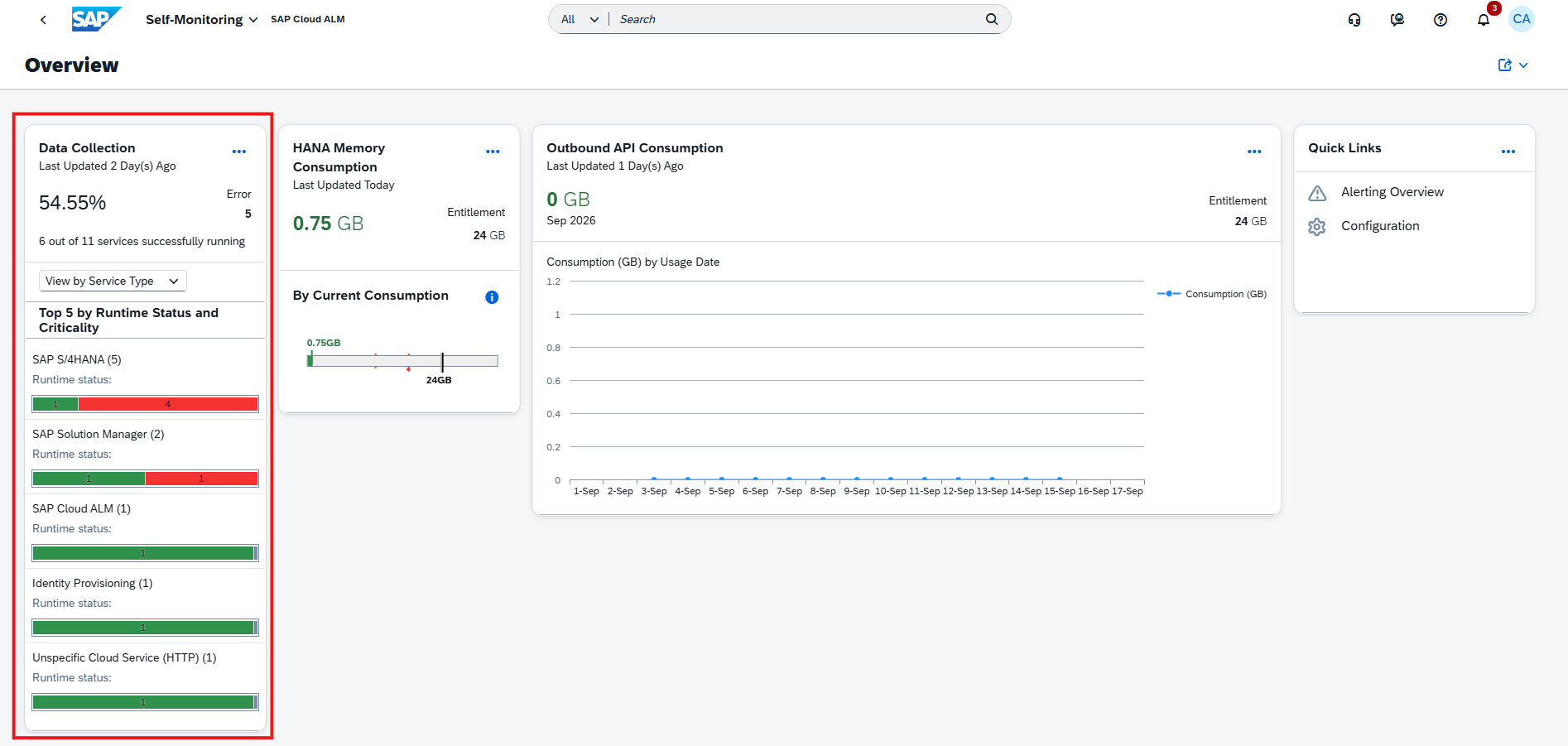
The Self-Monitoring app introduces a new Data Collection metric, providing administrators with centralized visibility into the runtime data collection status of managed components across SAP Cloud ALM applications.
The new Data Collection card shows the overall data collection health of the tenant as a percentage, calculated based on the number of services with active data collection compared with all configured services. It also shows the number of services in Active and Error states and highlights the top five services based on runtime status and criticality. The view can be categorized by Service Type or Application.
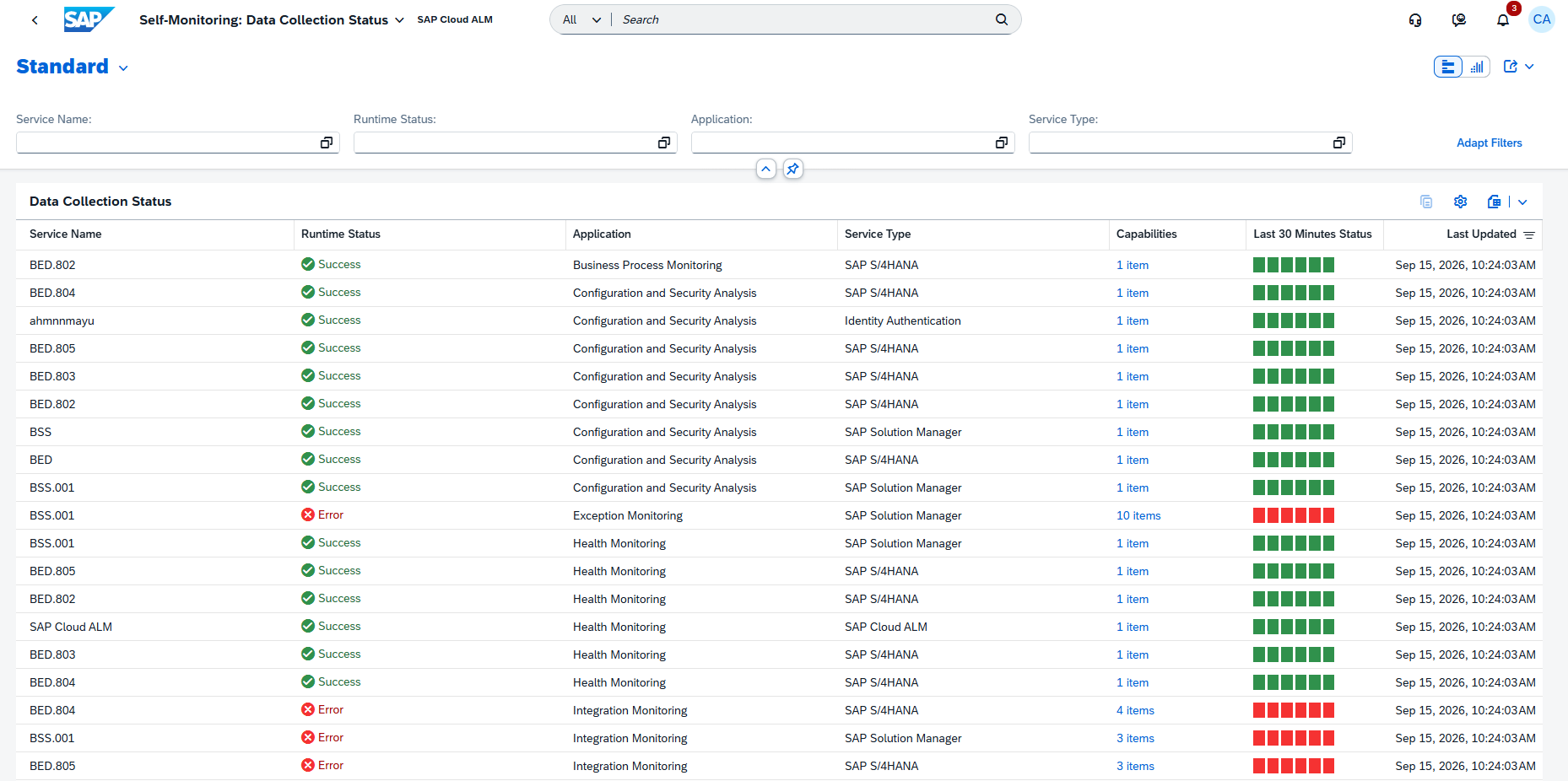
For more detailed analysis, administrators can open the Data Collection Details view to see all configured services and their current collection status. The information includes the associated SAP Cloud ALM application, runtime status, monitored capabilities, and the service’s status over the last 30 minutes. Data collection history is available for the last three hours, helping determine whether collection problems are temporary or recurring.
The details view also provides Classic and Visual filters, with filtering options such as Service Name, Runtime Status, Application, and Service Type. This makes it easier to narrow down collection problems to a specific application, service, or type of managed component.
Overall, the new metric provides a dedicated starting point for identifying and investigating data collection issues before they affect monitoring visibility in SAP Cloud ALM.
TL;DR:
The new Data Collection metric provides an overview of data collection health and allows administrators to analyze individual collection instances and their status history.
SAP Cloud ALM continues to evolve with enhancements that improve data quality, Clean Core transparency, project management, and operational monitoring across the platform.
The Week 36 release introduces the new Data Management Assistant in SAP Business Transformation Center, bringing AI-assisted quality checks to transformation activities. RISE with SAP Methodology harmonizes Clean Core object classifications and updates related extensibility KPIs, while Administration simplifies user management.
Implementation expands Joule capabilities for project setup and enhances deployment planning, document version management, and Libraries. Operations improves Business Process Monitoring and introduces more efficient bulk management of Custom Checks.
Together, these updates provide stronger automation, transparency, and control across transformation, implementation, and operational activities.
SAP Business Transformation Center – Data Management
AI-Assisted Quality Checks with the Data Management Assistant
SAP Business Transformation Center introduces the new Data Management Assistant, currently available through SAP Early Adopter Care, to support AI-assisted quality checks within Data Management.
The assistant helps validate the completeness, correctness, and consistency of data and configurations before the transformation process continues. This allows potential quality issues to be identified earlier and reduces the manual effort required to analyze findings.
When activated, the Data Management Assistant uses three specialized agents that work together throughout the quality assessment:
Scoping identifies the relevant data and configuration scope.
Evaluation analyzes the findings and assesses potential quality issues.
Prioritization evaluates identified issues based on their impact and urgency.
By combining these capabilities, the Data Management Assistant provides a more structured approach to identifying and prioritizing data quality issues before they affect subsequent transformation activities.
TL;DR:
The new Data Management Assistant uses specialized AI agents to assess data quality, identify findings, and prioritize issues before transformation processes continue.
Connectivity Status and Improved Validation for Data Assessments
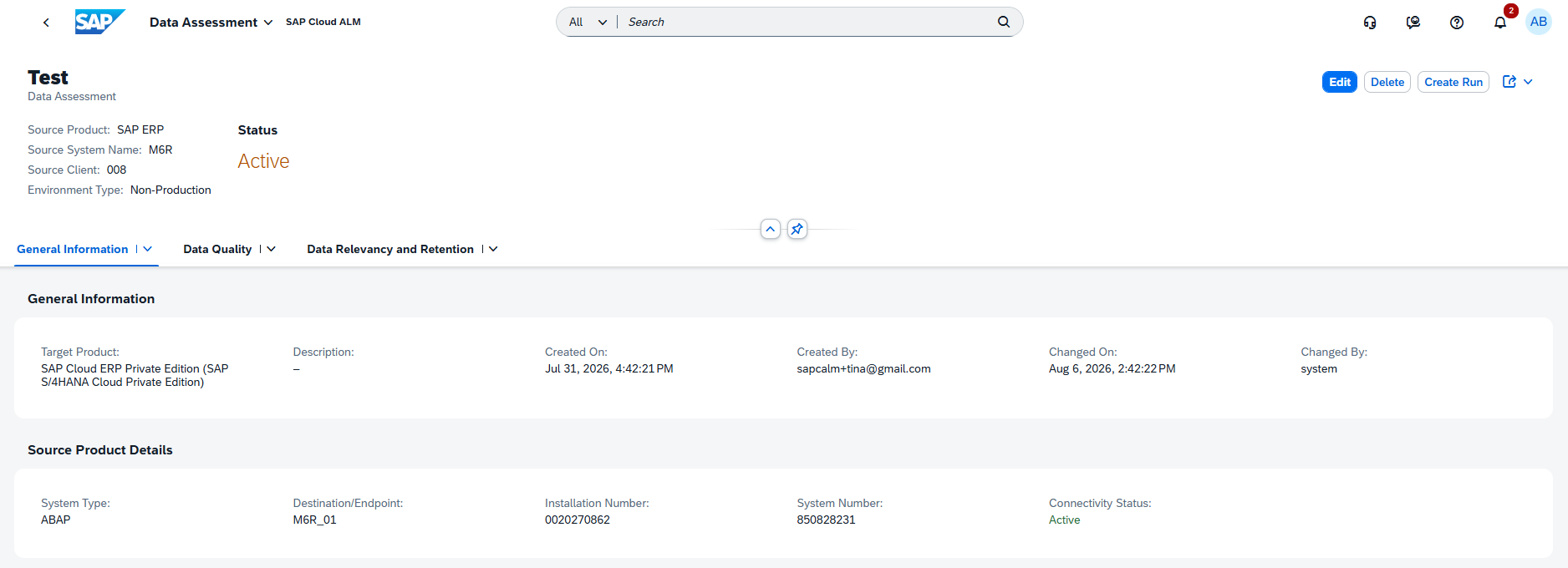
Data assessments are enhanced with new connectivity information and validation capabilities that help ensure assessments are configured against valid and accessible source systems.
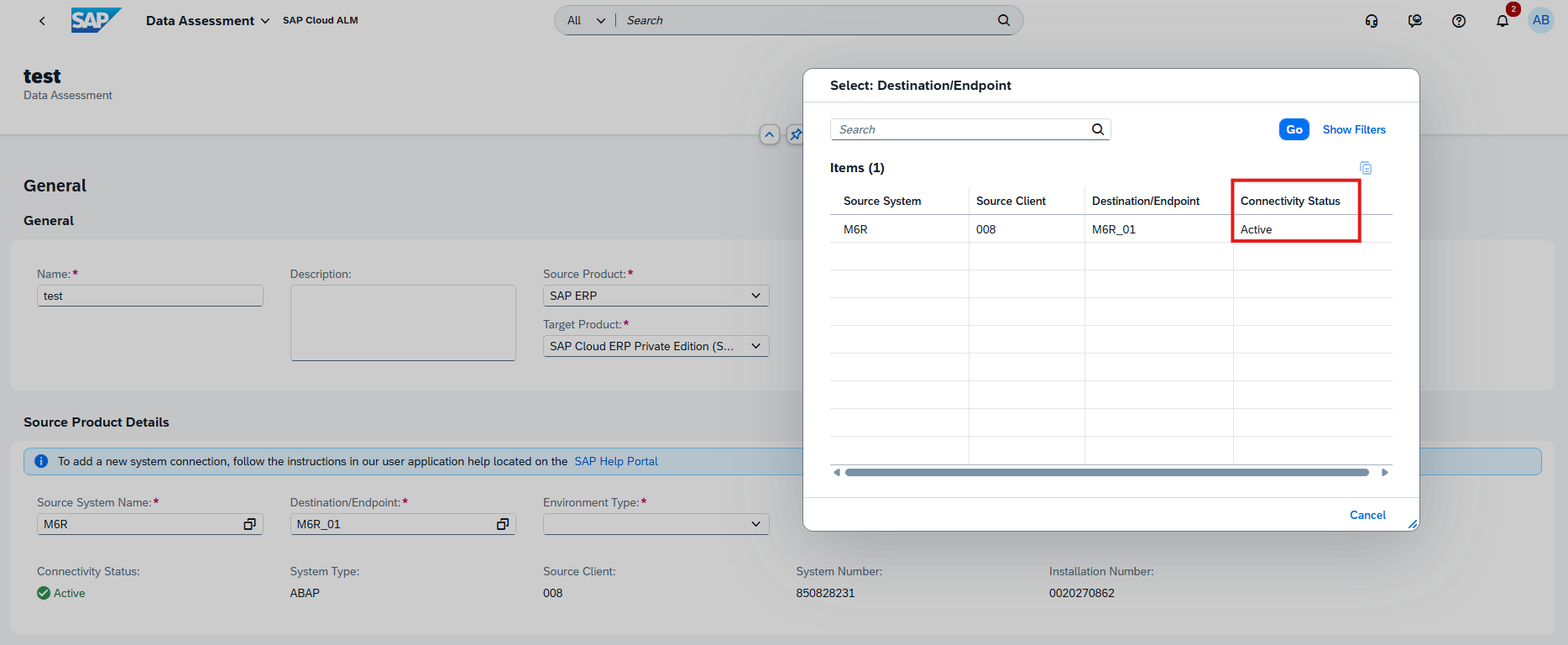
When creating, editing, or reviewing a data assessment, users can now see the Connectivity Status of the selected source endpoint. This provides immediate visibility into whether the required connection is available before proceeding with assessment activities.
Additional validation also prevents users from saving data assessments that reference source systems or endpoints that have been deleted from Landscape Management Service (LMS), helping avoid invalid configurations and potential execution problems.
The Data Assessment detail page has also been reorganized to provide a clearer separation of general information and source-system details, making assessments easier to review and maintain.
TL;DR:
Data assessments now show the connectivity status of source endpoints and prevent invalid references to deleted systems or endpoints, improving assessment reliability and usability.
RISE with SAP Methodology – Customer Objects, System View
Harmonized Customer Object Classification
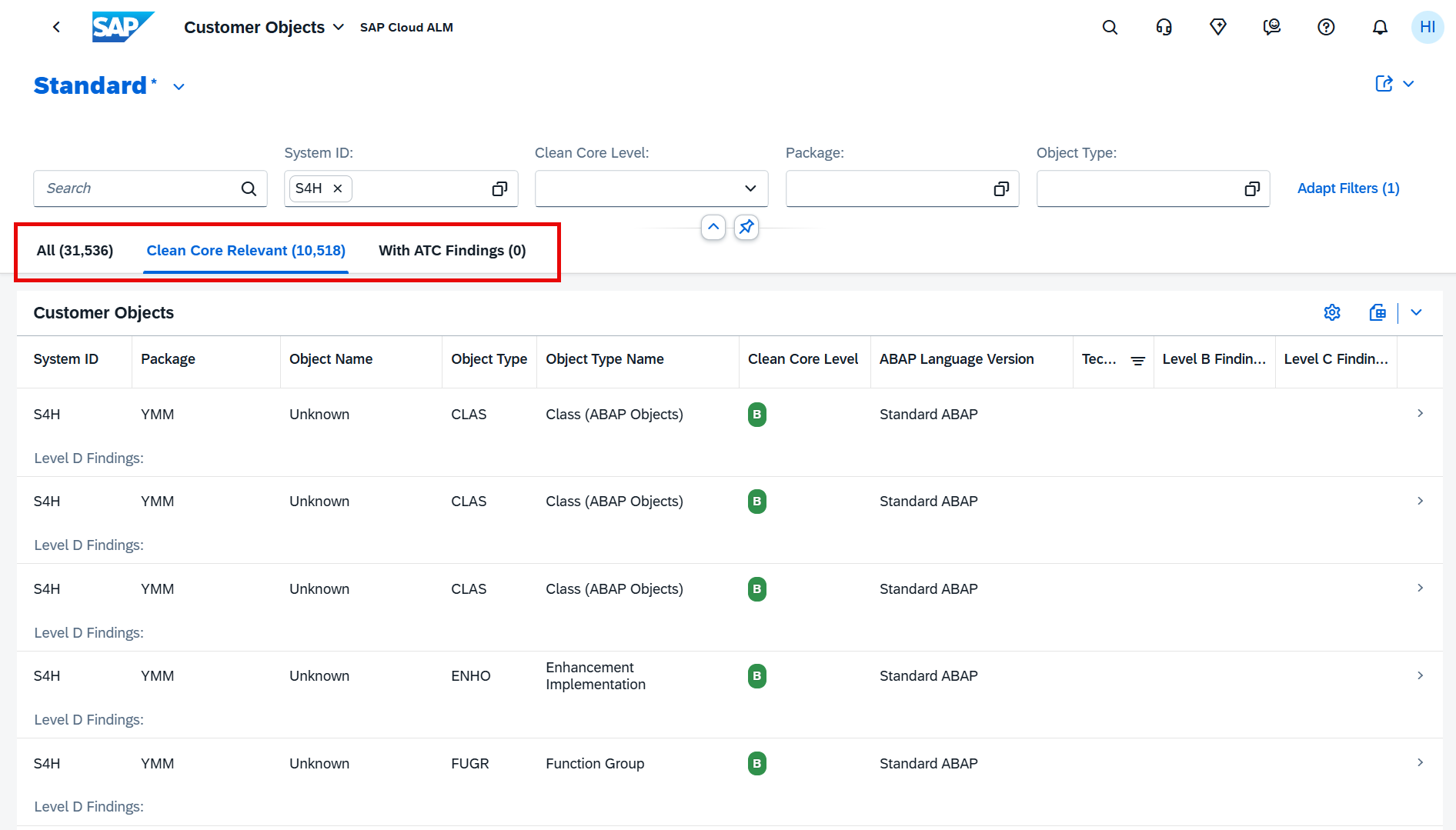
SAP has harmonized the types and number of customer objects classified as Clean Core relevant, providing more consistent object classifications and counts across the different data sources used by RISE with SAP Methodology.
The Customer Objects table has also been reorganized with three new tabs to make it easier to analyze the system’s custom developments:
All – displays all customer objects.
Clean Core Relevant – focuses specifically on objects included in Clean Core evaluation.
With ATC Findings – shows customer objects for which associated ABAP Test Cockpit (ATC) findings exist.
The harmonized classification is particularly important because the Clean Core relevant objects are also used for calculating extensibility-related KPIs in System View. As a result, customers may notice changes in their KPI values following this update.
TL;DR:
Customer object classifications have been harmonized across data sources, with new views for all objects, Clean Core relevant objects, and objects with ATC findings.
Updated Extensibility KPIs Following Object Type Harmonization
The harmonization of Clean Core relevant customer objects also changes how several extensibility KPIs are calculated in System View.
The adjustment affects the Technical Debt Score, Clean Core Share, and the individual Level A, B, C, and D Objects KPIs. Because the underlying object population and classifications have been standardized, the values displayed on these KPI cards may differ significantly from previously reported values.
This is important when comparing current Clean Core results with historical values. A substantial change after the release does not necessarily indicate that the system’s custom developments suddenly changed; it may instead result from the updated object classification and calculation basis.
For customers tracking Clean Core progress over time, this change should therefore be considered when interpreting KPI trends and comparing results before and after Week 36 release.
TL;DR:
The harmonized Clean Core object classification changes the calculation of key extensibility KPIs, meaning Technical Debt, Clean Core Share, and Level A–D object values may differ significantly from previous results.
Implementation – Deployment, Documents, Libraries, Projects and Setup
More Flexible Deployment Planning
The Deployment app introduces two enhancements that provide more flexibility when planning and managing deployment activities.
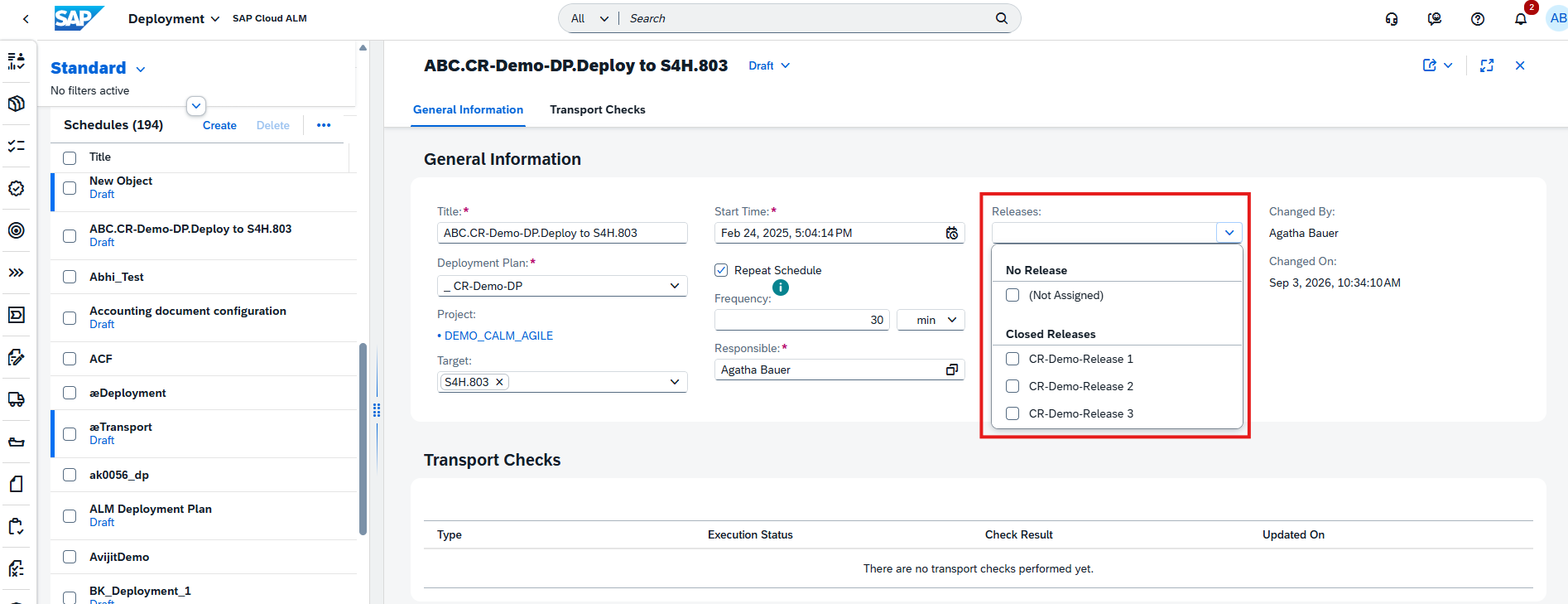
Deployment plans can now support multiple releases, allowing teams to associate more than one release with the same deployment plan. This is particularly useful when deployment activities span several releases or when related releases need to be coordinated within a common deployment plan.
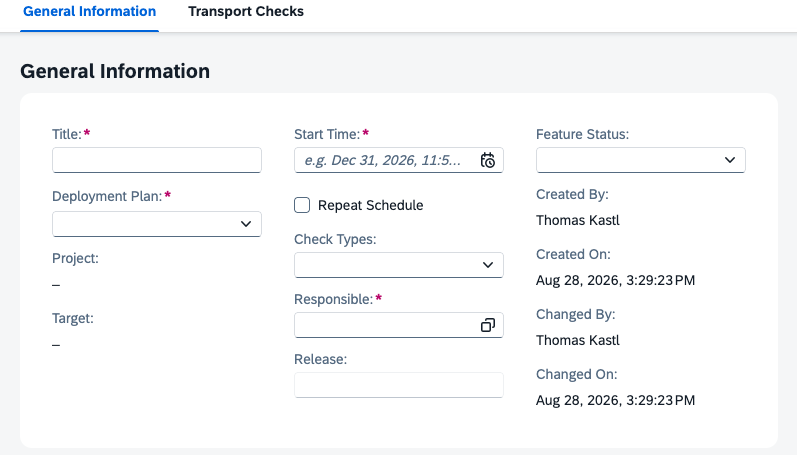
In addition, a new Responsible field is available for deployment schedules. Teams can assign ownership directly to a deployment schedule, making responsibilities clearer and helping ensure that deployment activities are properly coordinated.
Together, these enhancements improve both the flexibility and accountability of deployment planning in SAP Cloud ALM.
TL;DR:
The Deployment app now supports multiple releases per deployment plan and allows a responsible person to be assigned to deployment schedules, improving planning flexibility and ownership.
Restore Previous Document Versions
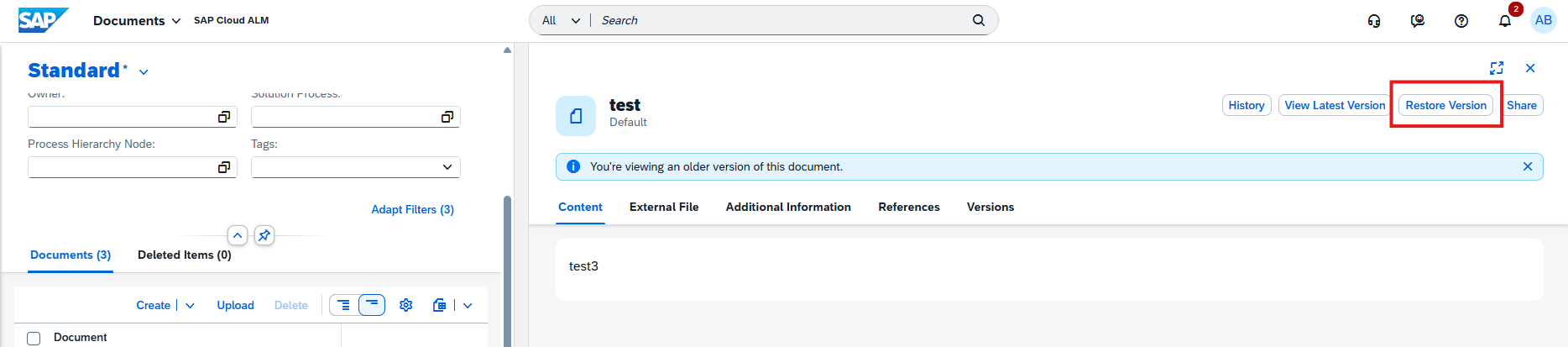
The Documents app now makes it possible to restore the content of a previous document version directly from the version history. When viewing a historic version, users can select the new Restore Version action to revert the document to earlier content.
The restore applies specifically to the document’s Content and Summary. Other information, such as relations, references, administrative data, and external files, remains unchanged and continues to reflect the latest state.
If the document does not currently have an active version, for example because it is in Released status, SAP Cloud ALM automatically creates a new version containing the restored content and summary.
There are also safeguards around the restore process. Restoration is not available while the active version is In Review, and users are warned if restoring a version would overwrite unsaved changes in an existing draft.
This provides an undo-like capability for document content, making it easier to recover earlier information without manually recreating it.
TL;DR:
Documents can now be restored to the Content and Summary of a previous version directly from version history, providing a convenient way to recover earlier document content
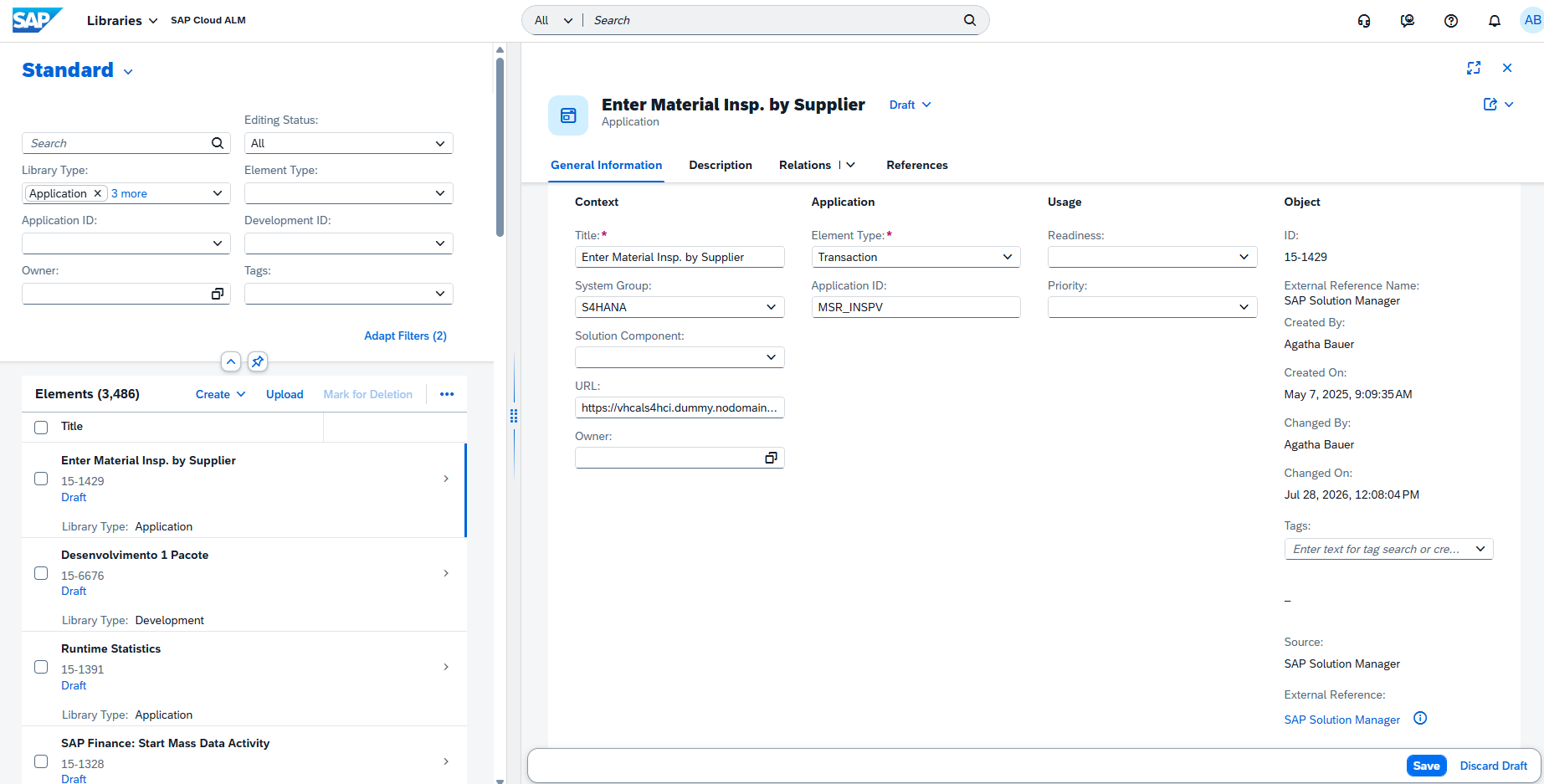
New Usage, Upgrade Impact, and Clean Core Fields for Library Elements
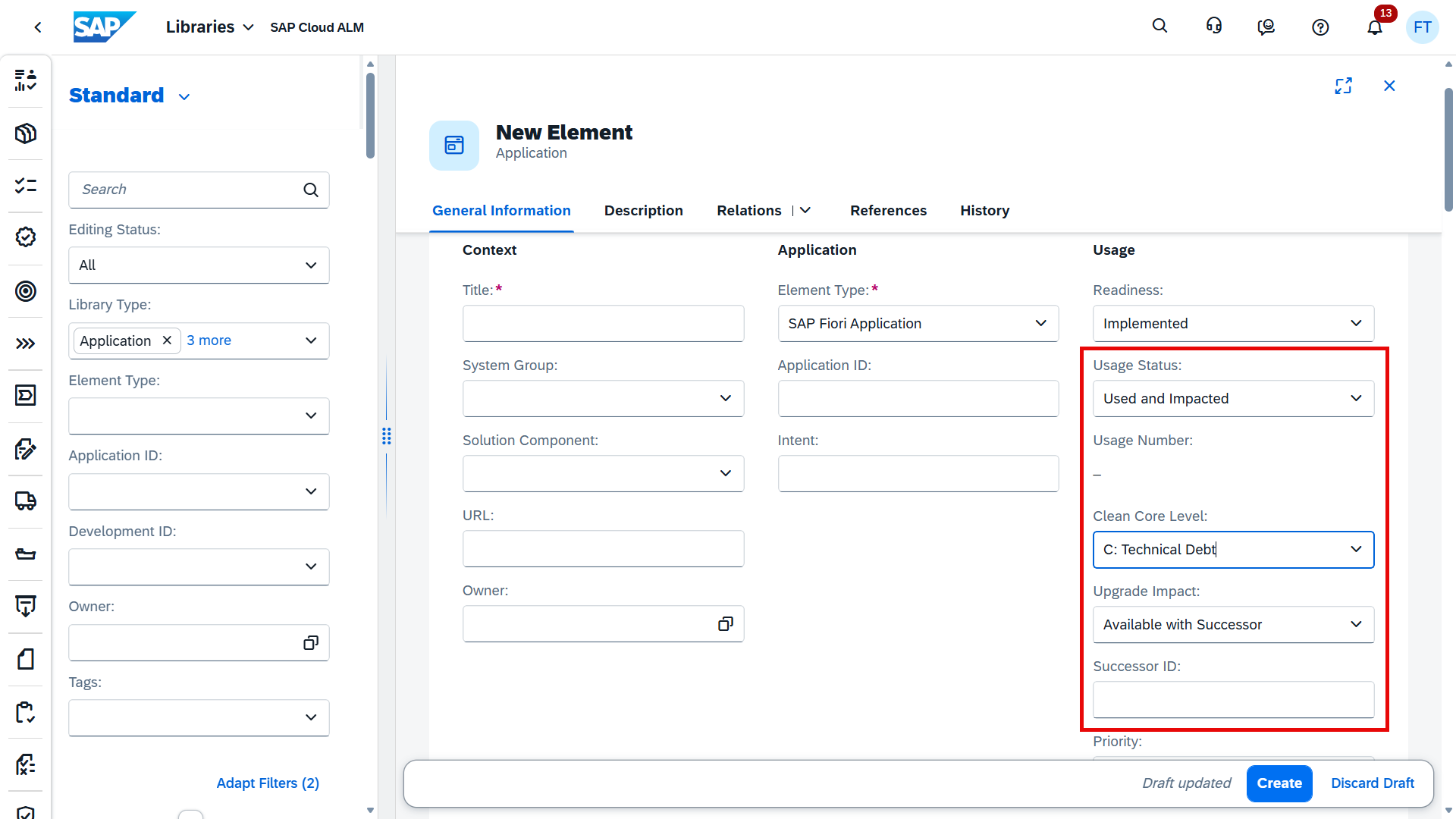
The Libraries app introduces additional fields for Application, Development, and Interface library elements, providing more information about their usage, upgrade impact, and Clean Core classification.
The following fields are now available for all three library element types: Usage Status, Usage Number, Upgrade Impact, and Clean Core Level. Application library elements additionally receive a new Successor ID field, which can be used to identify a successor application.
These fields can also be used as filters in library lists, making it easier to identify elements based on their usage or Clean Core characteristics. They are also supported when uploading library elements through spreadsheet templates, enabling efficient bulk maintenance.
The enhancement provides additional context for assessing library elements, particularly when evaluating Clean Core alignment, upgrade impact, and application lifecycle considerations.
TL;DR:
Library elements now include new Usage Status, Usage Number, Upgrade Impact, and Clean Core Level fields, with additional Successor ID for applications, all available for filtering and spreadsheet uploads
Joule for Project Setup and Onboarding
SAP Cloud ALM expands Joule capabilities to support project setup and onboarding activities, allowing users to perform common project administration tasks through the AI-assisted experience.
Joule can now help create projects and manage important elements of the project structure, including project teams, project leads, phases, sprints, milestones, and deployment landscapes. It can also support assigning projects to programs and managing project deliverables.
In addition, users can use Joule to manage and update project statuses, further reducing the manual effort involved in maintaining project setup information.
This enhancement brings AI-assisted interaction into a broader range of project administration activities, helping teams set up and maintain SAP Cloud ALM projects more efficiently.
TL;DR:
Joule can now assist with project creation and setup, including teams, project leads, phases, sprints, milestones, deployment landscapes, deliverables, program assignments, and project statuses.
Operations – Configuration & Security Analysis – Validation, Business Process Monitoring
Bulk Upload for Custom Checks
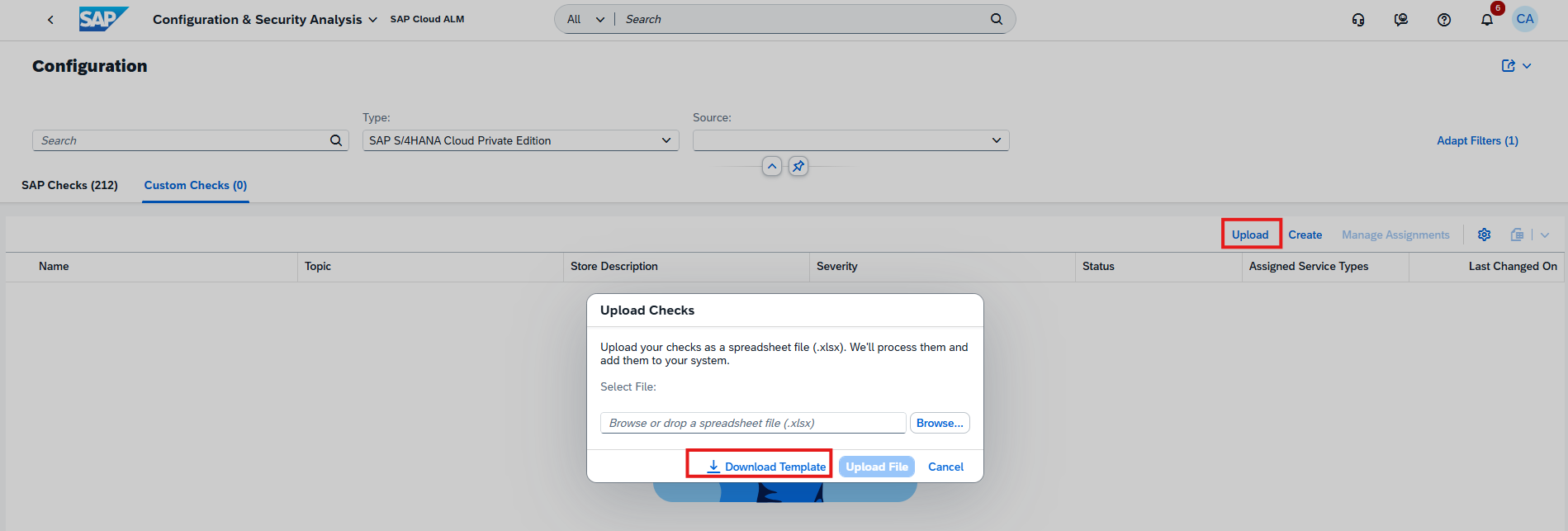
The Configuration & Security Analysis – Validation app introduces a new upload capability that simplifies the creation of multiple Custom Checks.
Instead of creating checks individually, users can now create up to 50 custom checks at once using the provided spreadsheet template. The new Upload option is available under Configuration à Checks à Custom Checks.
This is particularly useful when establishing or extending a larger set of organization-specific compliance checks, reducing manual configuration effort and making bulk maintenance more efficient.
TL;DR:
Up to 50 Custom Checks can now be created at once using a spreadsheet upload, simplifying bulk configuration and maintenance of validation checks.
Change Data Collection Status for Multiple KPIs
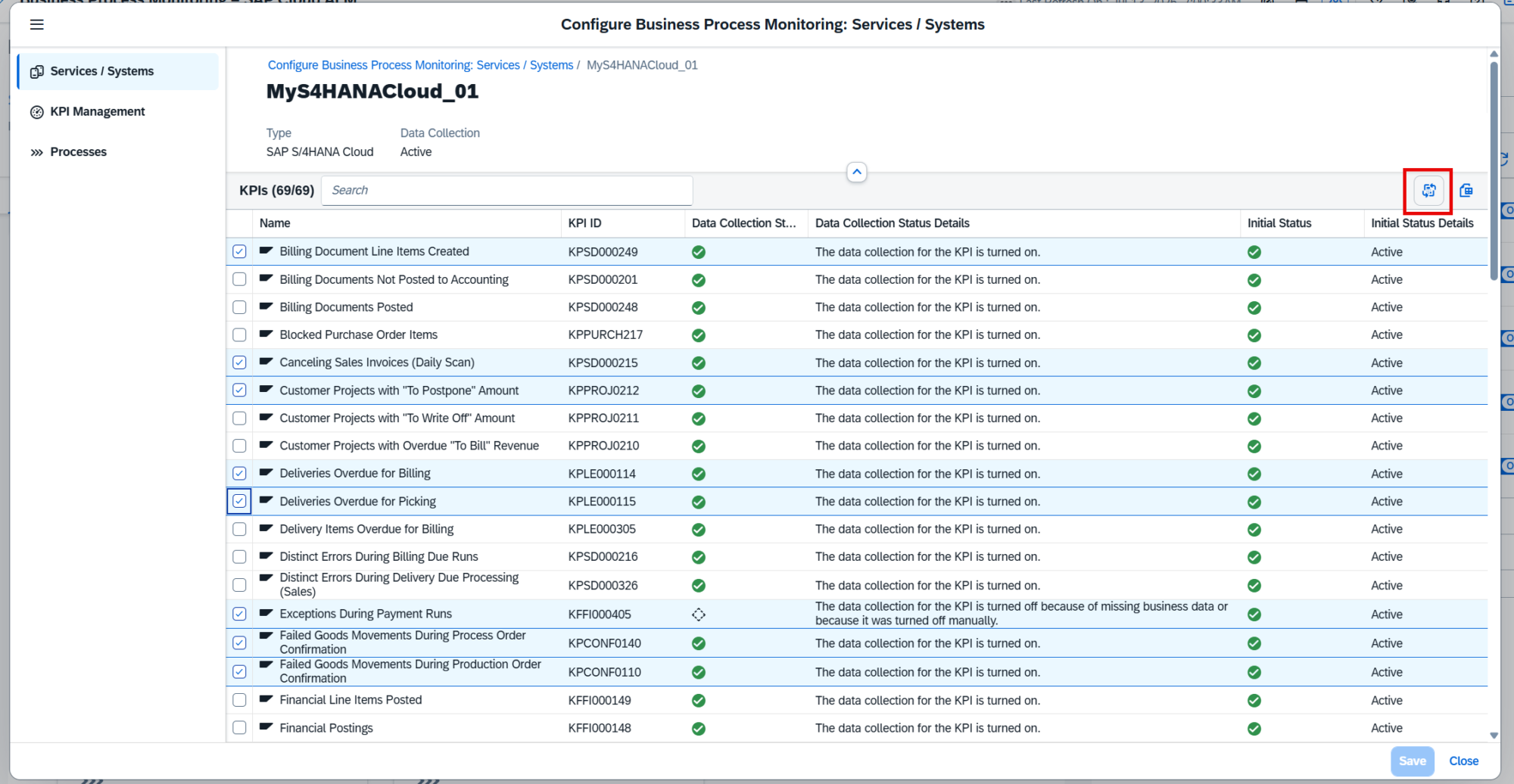
Business Process Monitoring makes it easier to manage KPI data collection for individual services and systems.
From the configuration settings, users can now select multiple KPIs for a specific service or system and enable or disable their data collection together. Previously, managing collection settings across several KPIs could require more individual configuration effort.
This provides greater flexibility when adjusting the monitoring scope, for example when certain KPIs are no longer required or when additional KPIs should be activated for an existing managed component.
TL;DR:
Data collection can now be enabled or disabled for multiple KPIs at once for a selected service or system, simplifying Business Process Monitoring configuration.
Direct Navigation from Alerts to Filtered KPI Views
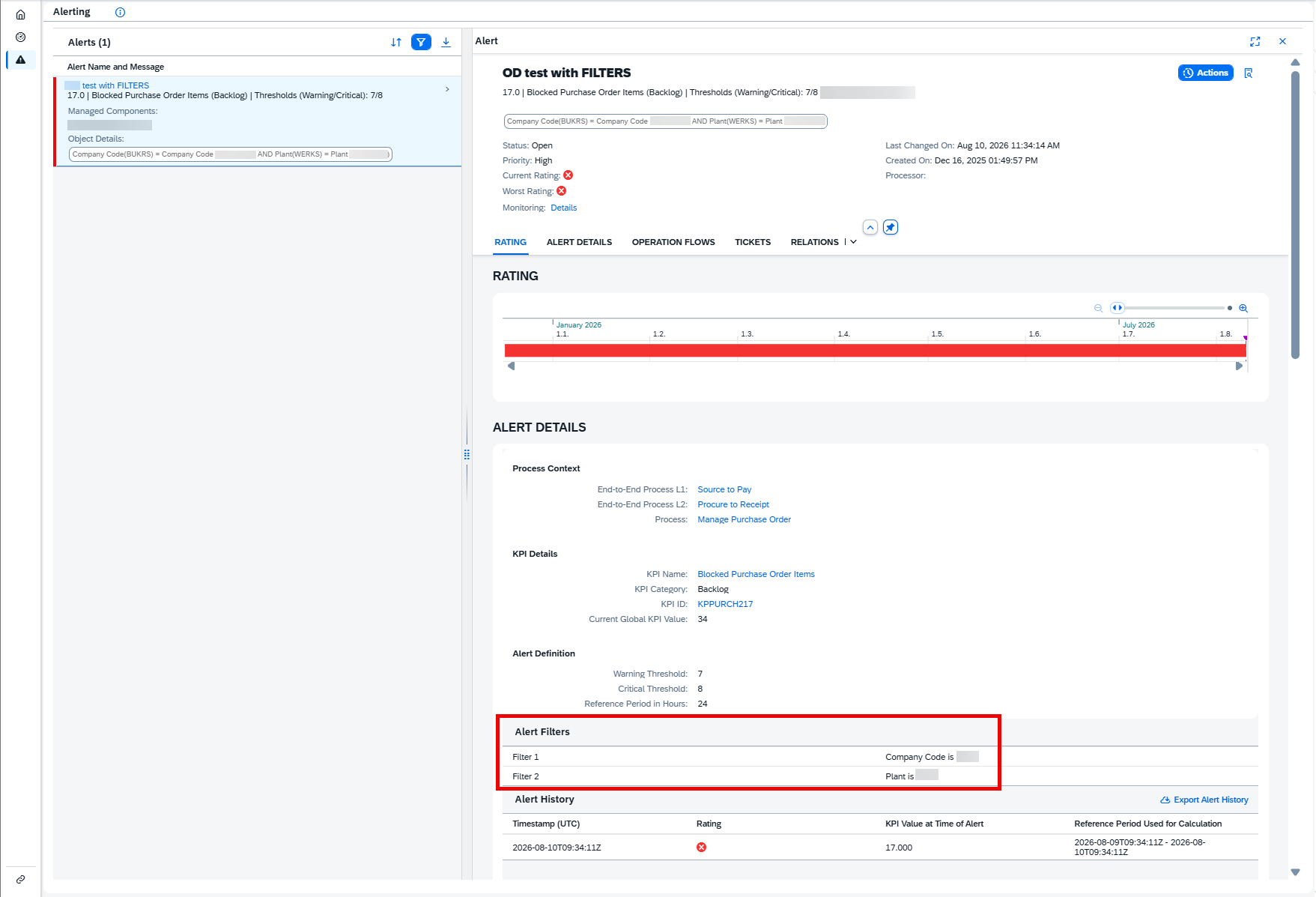
Alert investigation in Business Process Monitoring is improved with direct navigation from the Alerting page to the corresponding KPI data.
When an open alert contains filters defined during event configuration, users can select the KPI name or KPI ID in the Alert Details. SAP Cloud ALM then opens the related KPI on the Monitoring page with the relevant filters already applied.
This provides better context when investigating an alert and reduces the need to manually locate the KPI and recreate the same filter criteria before analyzing the underlying monitoring data.
TL;DR:
Users can now navigate directly from an alert to the related filtered KPI view, making alert investigation faster and more contextual.
New KPIs for SAP Intelligent Clinical Supply Management
Business Process Monitoring expands its monitoring content for SAP Intelligent Clinical Supply Management with two new KPIs:
Approval Items Pending
Completed Studies with Overdue LSLV Date
The KPIs are activated automatically once the required setup described in the SAP Expert Portal has been completed.
These KPIs are not included in the standard end-to-end processes. To use them for monitoring, customers need to create a custom process and assign the new KPIs to it.
The additional monitoring content provides organizations using SAP Intelligent Clinical Supply Management with greater visibility into pending approval activities and completed studies with overdue Last Subject Last Visit (LSLV) dates.
TL;DR:
Business Process Monitoring adds two new KPIs for SAP Intelligent Clinical Supply Management, covering pending approval items and completed studies with overdue LSLV dates.
Administration – User Management
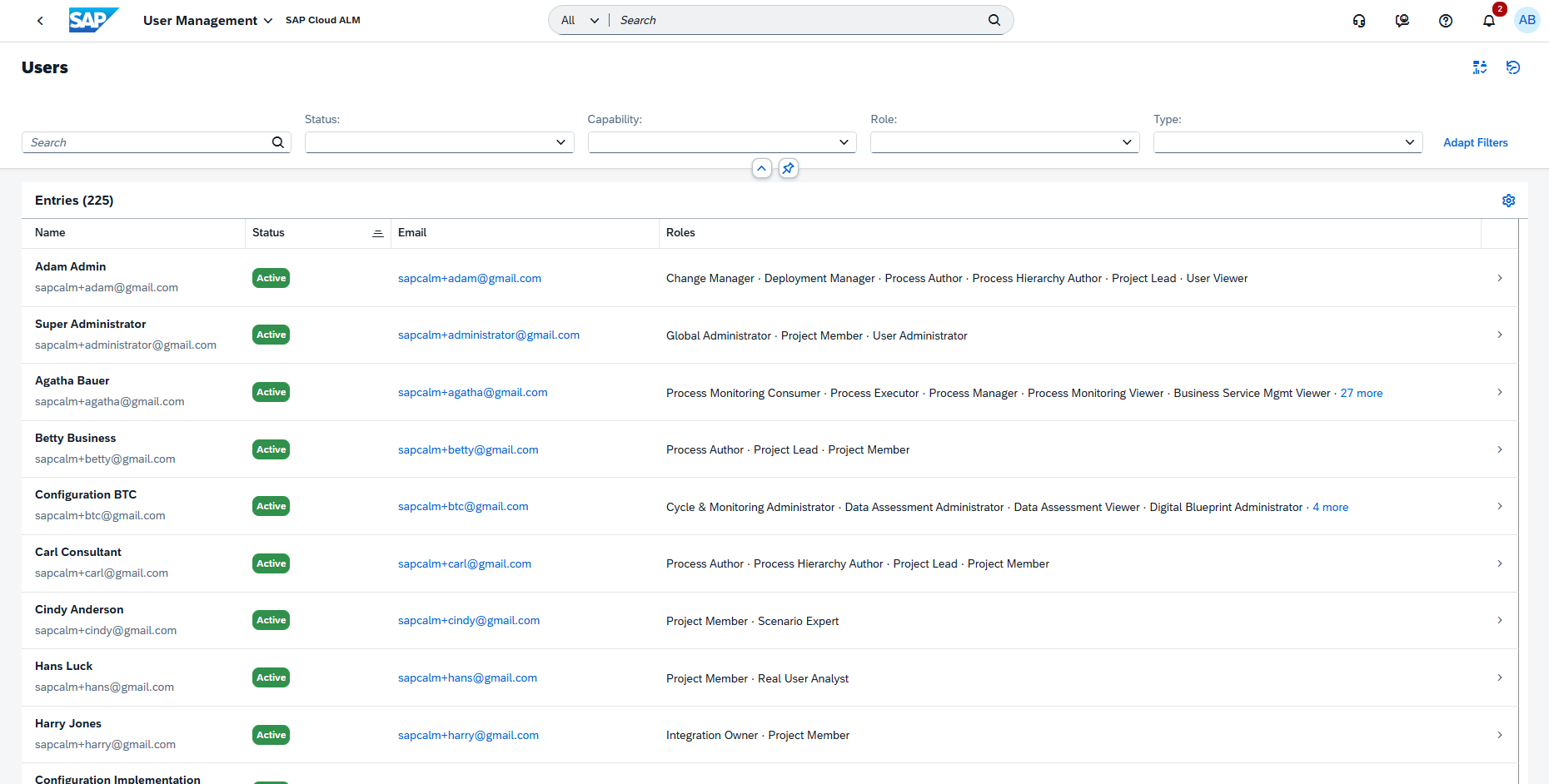
Table View Becomes the Standard for User Management
The Card View on the Users page of the User Management app has been discontinued. Going forward, users are managed exclusively through Table View.
The Table View provides a more structured overview, particularly for environments with a large number of users. It also supports updating role assignments for multiple users at once, making bulk user administration more efficient.
No configuration or migration is required. The Table View is already enabled and available automatically.
TL;DR:
The Card View has been discontinued, making Table View the standard for user management and providing more efficient bulk role assignment capabilities.
SAP Cloud ALM continues to evolve with enhancements that improve transformation management, analytics, governance, and operational visibility across the platform.
The Week 34 release strengthens SAP Business Transformation Center with centralized cycle control, guided lifecycle actions, improved diagnostics, and enhanced data quality analysis. The Service area expands Issues and Actions Management with Joule-assisted analysis and more flexible filtering.
Operations introduces enhanced request analysis, more flexible security validation, and support for Product Package Solutions. Meanwhile, Implementation improves test analytics and traceability, feature testing, library management, and Retrofit processing.
Together, these updates provide greater control, visibility, and efficiency across transformation, implementation, service, and operational activities.
SAP Business Transformation Center – Cycle and Monitoring, Data Management
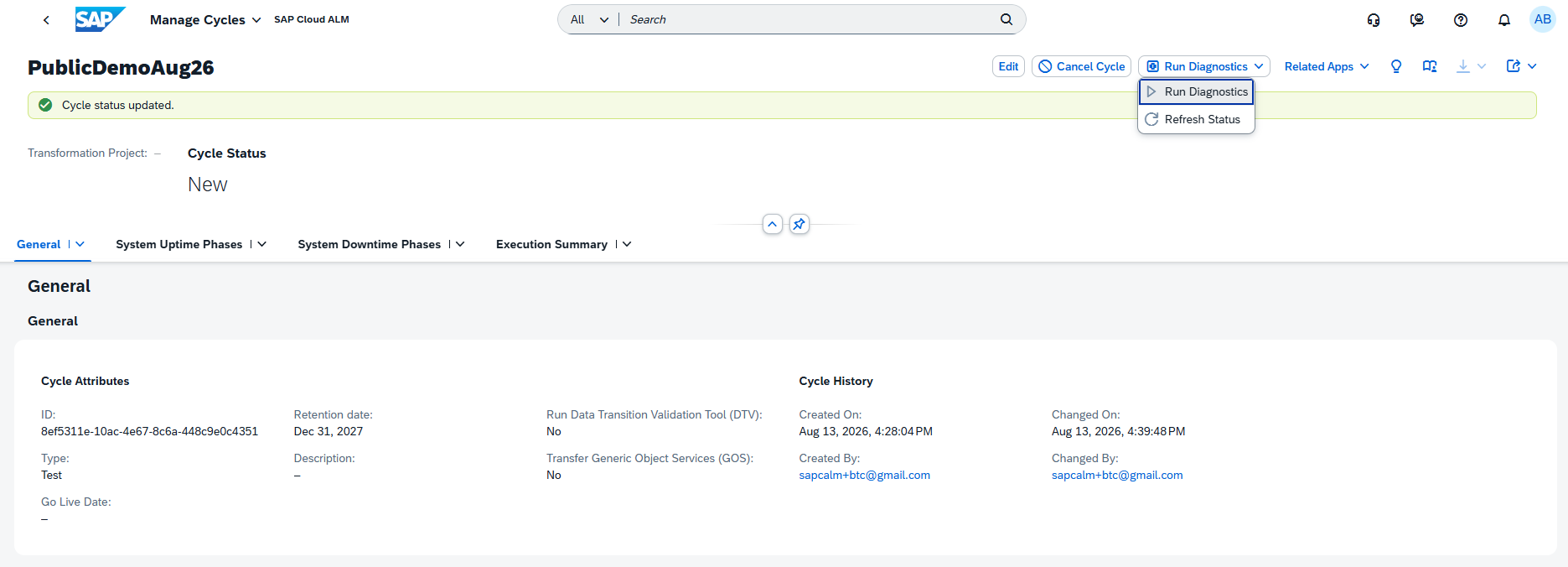
Manage Cycles as the Central Control Point for Cycle Execution
The Manage Cycles app is enhanced to become the single point of control for the complete cycle lifecycle, simplifying how transformation cycles are executed and monitored.
Users can now start each cycle phase directly from Manage Cycles, retry objects that encountered errors, and use a dedicated Sync Status option for each phase to retrieve the latest execution status. As a result, the Run Cycles and Postprocess Cycles apps are now focused on monitoring, while Transformation and Postprocessing phases are started centrally from Manage Cycles.
The app also provides more guidance throughout the cycle lifecycle. Recommended next actions are visually highlighted, while contextual tooltips help users understand which action should be performed based on the current cycle status.
Diagnostics handling has also been improved. When running diagnostics, users can select Refresh Status to retrieve the latest check status. Once diagnostics are completed, confirmation is displayed and detailed results can be reviewed in the Cycle Logs app.
Together, these enhancements centralize cycle execution, provide clearer guidance, and improve visibility into phase and diagnostic status throughout the transformation lifecycle.
TL;DR:
The Manage Cycles app is now the central point for executing and controlling the full cycle lifecycle, with guided next actions, phase status synchronization, improved diagnostics, and easier retry handling.
New Error Distribution Analysis for Data Quality
The Analyze Data Quality app is enhanced with a new Error Distribution table, providing greater transparency into where data quality issues occur.
For Finance KPIs, users can now analyze how errors from the latest Data Quality Check run are distributed across company codes and fiscal years. This provides an additional level of detail beyond the overall KPI results and makes it easier to identify where data quality problems are concentrated.
By providing a structured breakdown of errors, the new table helps teams focus their analysis and remediation efforts on the organizational units and time periods with the greatest number of data quality issues.
TL;DR:
The new Error Distribution table provides a breakdown of Finance data quality errors by company code and fiscal year, making it easier to identify and prioritize areas requiring remediation.
Analytics receives several enhancements that improve test visibility, detailed analysis, and navigation between analytics and operational applications.
The Feature Traceability app now provides greater insight into the test readiness of individual features with new Test Preparation and Test Execution columns. Micro bar charts show the number and status of associated test cases and test executions directly in the traceability matrix. Users can select individual chart segments to review further details in the side panel and filter the analysis by Test Preparation, Test Execution, Test Plan, and Test Case type.
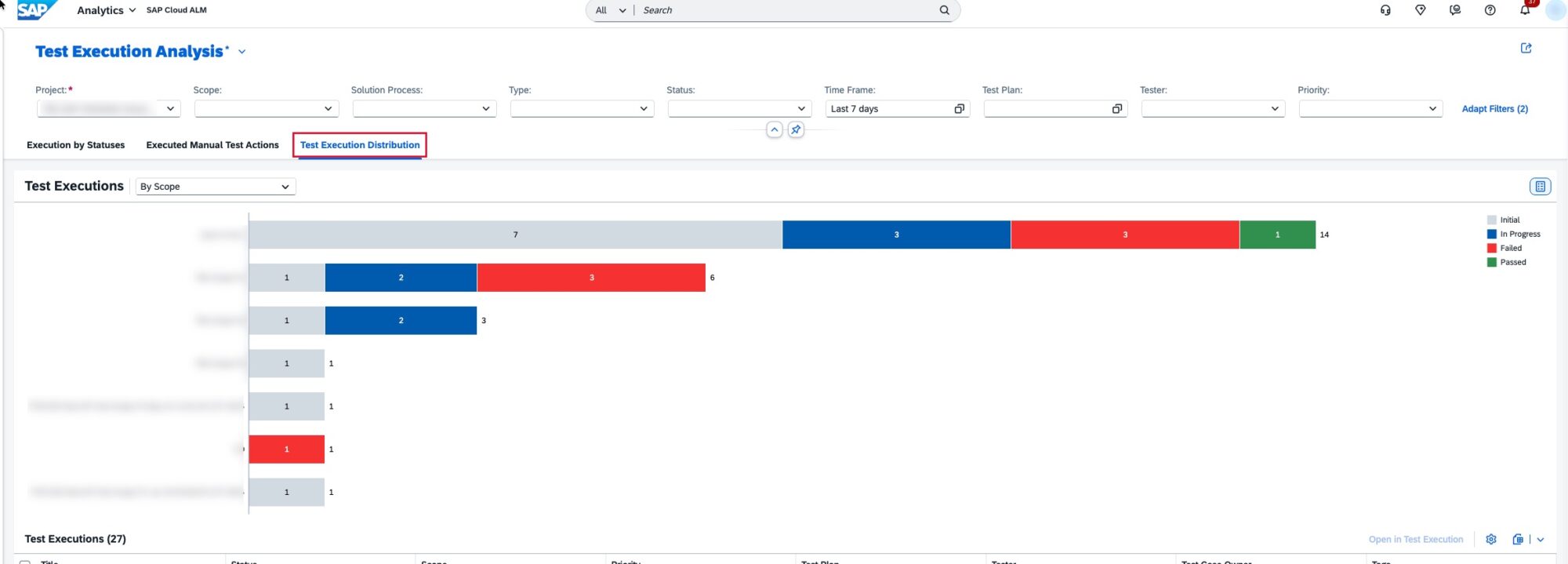
The Test Execution Analysis app also introduces a new responsive table in the Test Execution Distribution view, replacing the previous popover-based interaction. The table provides improved data visualization with sorting, grouping, and Excel download capabilities, making detailed test execution analysis more flexible.
Quality Gate analytics are also more actionable. Users can now select one or multiple quality gates directly from the reporting table and open them in the Quality Gates app for further review and management.
Together, these enhancements provide greater visibility into test readiness and execution while making it easier to move from analytics insights to detailed project activities.
TL;DR:
Analytics now provides test readiness and execution insights directly in Feature Traceability, improved Test Execution Analysis tables, and direct navigation from reporting to Quality Gates for more efficient test and quality management.
Enhanced Test Case Assignment and Tester Authorizations
The Features app is enhanced with more flexible test case assignment and simplified authorization requirements for testers.
Test cases can now be assigned to features while they are in the In Specification, In Implementation, or In Testing status. This allows testing activities to be prepared earlier in the feature lifecycle and improves the connection between feature development and test planning.
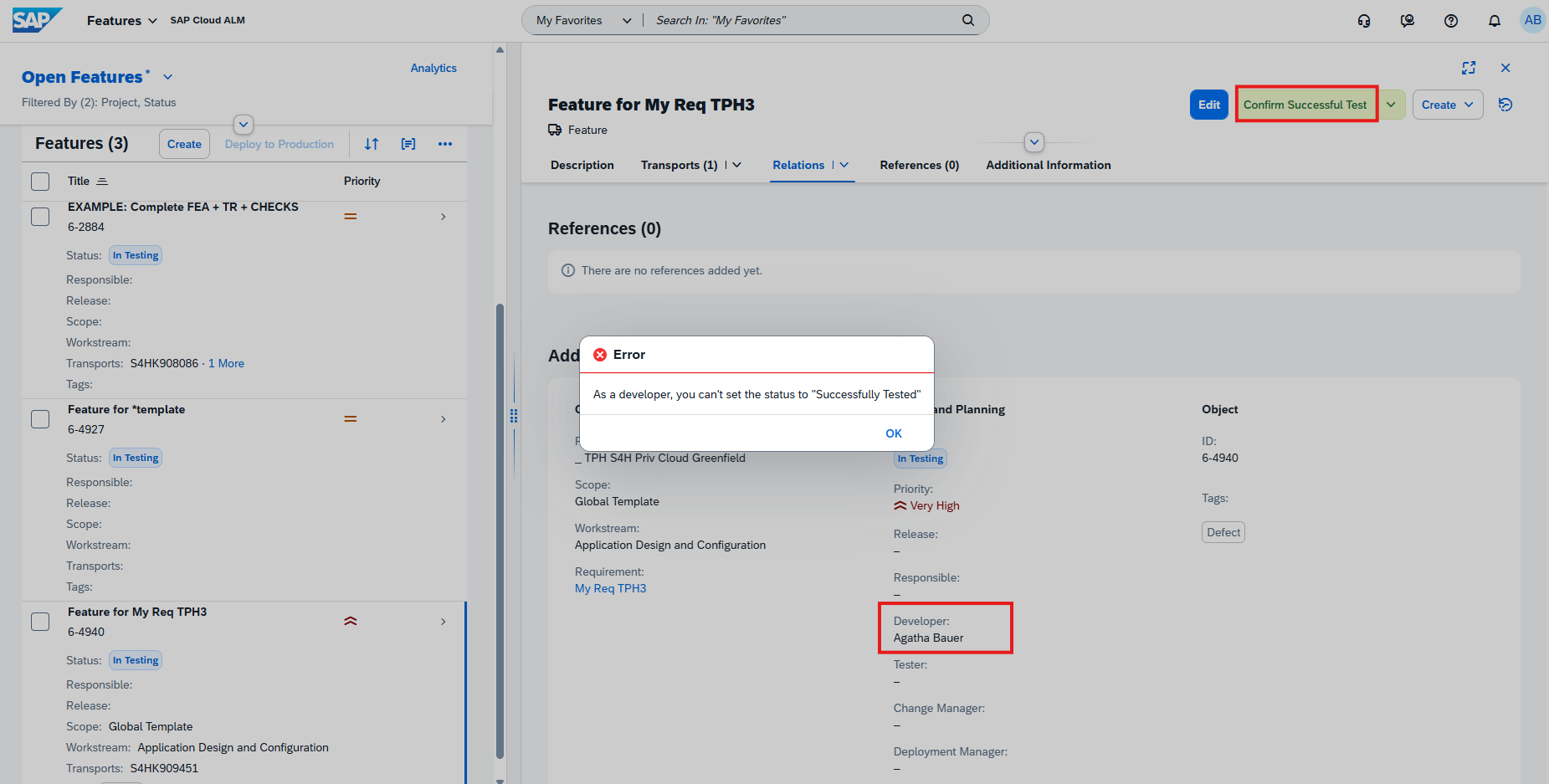
The role collection recommendation for testers has also been simplified. The Tester role template (imp_cdm_Tester) now only needs to be combined with the Project Viewer role collection to allow users to change a feature’s status to Successfully Tested.
Together, these enhancements make test preparation more flexible and simplify the authorization setup required for testers working with features.
TL;DR:
Test cases can now be assigned to features earlier in their lifecycle, while simplified Tester role requirements make it easier to manage successful test confirmation.
New Priority, Readiness, and Package Information for Library Elements
The Libraries is enhanced with additional fields that provide more information for managing and organizing library elements.
For Interface, Application, and Configuration library elements, the new Priority and Readiness fields are now available. Development library elements additionally receive a Package Name field alongside Priority and Readiness.
These fields can also be used as filters in library element lists, making it easier to identify elements based on their importance, implementation readiness, or development package. They are also supported when uploading library elements via spreadsheet, enabling more structured bulk maintenance.
This enhancement provides greater flexibility for organizing and prioritizing library content while improving visibility into the readiness of implementation artifacts.
TL;DR:
Library elements now include new Priority and Readiness information, while Development elements also support Package Name, with the fields available for filtering and spreadsheet uploads.
Sequence Dependency Processing for Automatic Retrofit
The Retrofit app is enhanced with support for sequence dependency processing, improving the handling of automatic retrofits involving multiple source transports.
Users can now perform automatic retrofit for multiple source transports within a selected subset while considering dependencies between the transports. This helps ensure that objects are processed in the correct sequence and reduces the risk of inconsistencies or downgrades during retrofit activities.
To use the functionality and prevent potential downgrades, SAP Note 3778082 must be implemented with ST-PI 740 SP33/34/35 or ST-PI 758 SP01/02.
This enhancement makes automatic retrofit processing more reliable when working with related transports that need to be handled in a specific sequence.
TL;DR:
Retrofit now supports sequence dependency processing for multiple source transports, helping ensure the correct processing order and reduce downgrade risks during automatic retrofit.
Operations – Real User Monitoring, Configuration & Security Analysis – Validation, Integration & Exception Monitoring
Filter and Group Requests by Application Component
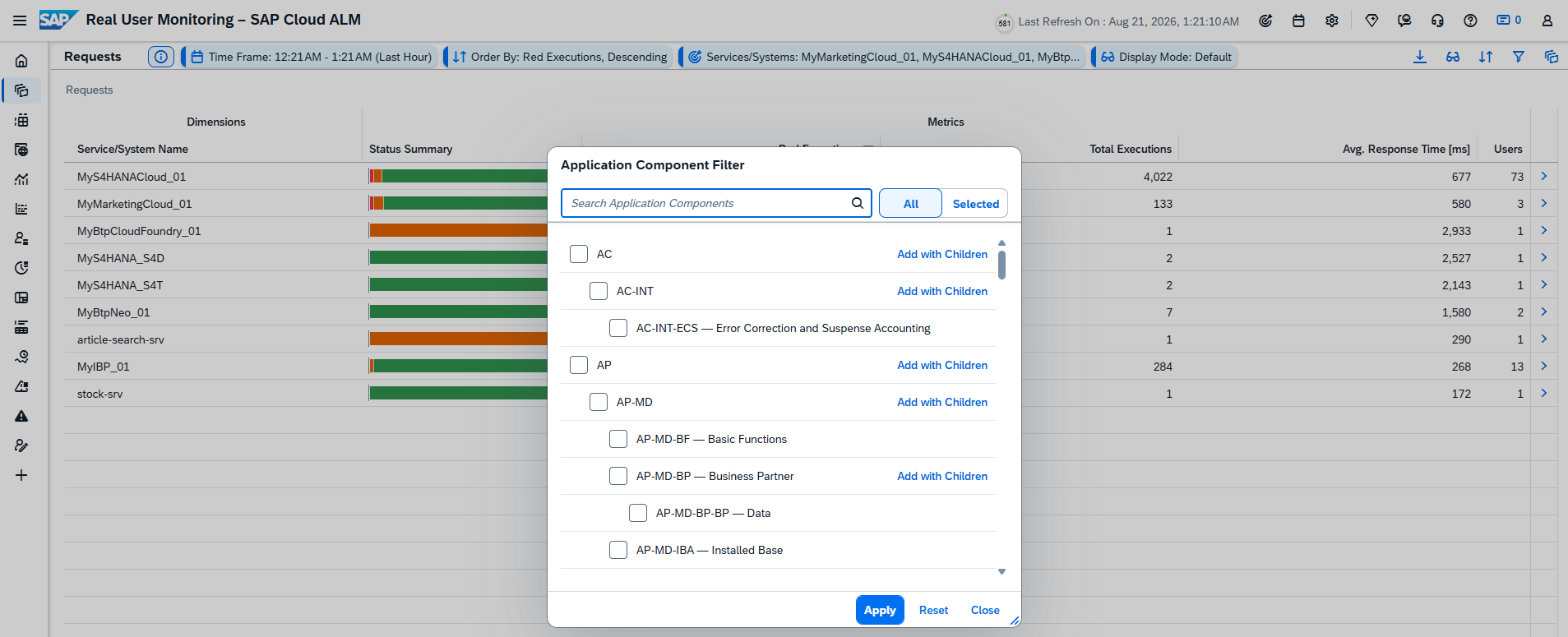
Real User Monitoring is enhanced with support for the Application Component Hierarchy (ACH), providing more flexibility when analyzing requests across the landscape.
In the Requests view, users can now use application components to filter requests or group them as a dimension. This makes it easier to focus on requests associated with a specific application component and analyze their behavior without manually identifying individual requests.
The enhancement provides additional context for request analysis and helps teams investigate performance and usage patterns at the application component level.
TL;DR:
Real User Monitoring now supports filtering and grouping requests by application component, making it easier to analyze requests for specific components in the landscape.
HANA SQL Expressions for Custom Checks
Configuration & Security Analysis – Validation expands the flexibility of Custom Checks with a new HANA SQL Expression operator.
The new operator allows users to define compliance and non-compliance rules using HANA SQL expressions, enabling more advanced validation scenarios that go beyond standard comparison operators.
This provides organizations with greater flexibility when creating Custom Checks and allows validation logic to be tailored more precisely to specific configuration, security, and compliance requirements.
TL;DR:
Custom Checks now support HANA SQL Expression rules, enabling more flexible and advanced compliance and non-compliance validation.
New Product Package Solution Support
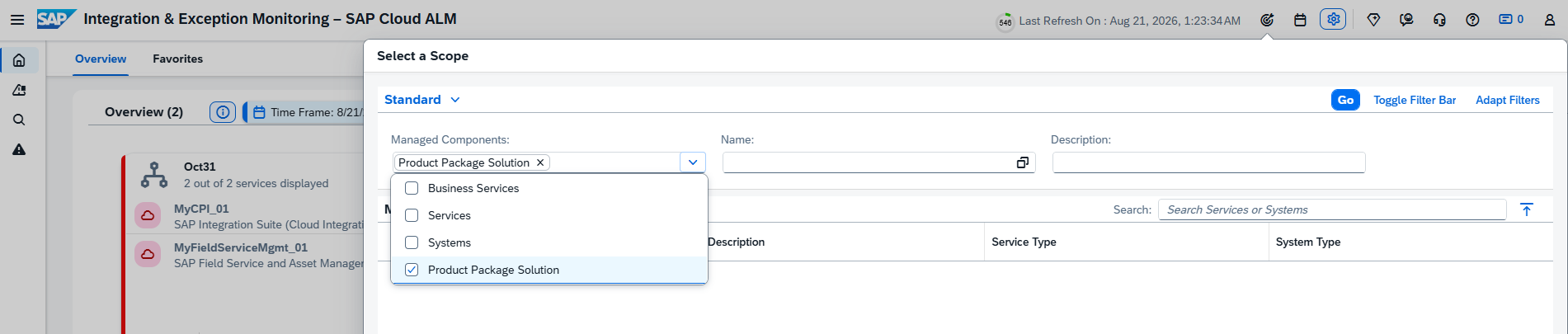
SAP Cloud ALM expands its monitoring capabilities with support for a new managed component type: Product Package Solution.
A Product Package Solution represents a set of related solutions that are provisioned together. Instead of monitoring each solution individually, users can now select and monitor the complete package as a single managed entity.
Product Package Solutions can be selected through the Managed Components filter when defining the monitoring scope. The new component type is currently supported in:
Integration & Exception Monitoring
Intelligent Event Processing
This enhancement simplifies monitoring for landscapes where multiple related solutions are delivered as a package and provides a more consolidated view of their operational status.
TL;DR:
Product Package Solution is now supported as a managed component type in Integration & Exception Monitoring and Intelligent Event Processing, allowing related solutions to be monitored and processed as a single entity.
Service – Issues and Actions Management
Filter Issues and Actions by Assigned Role
Issues and Actions Management introduces a new Assigned Role filter, providing more flexibility when identifying work items based on responsibilities.
Users can add the filter through Adapt Filters and select one or multiple standard roles to display only the relevant issues or standalone actions. The available roles are standard roles and are not specific to individual projects.
This enhancement makes it easier to focus on issues and actions associated with particular responsibilities, especially when working with larger lists of work items.
TL;DR:
A new Assigned Role filter allows users to filter issues and standalone actions by one or multiple standard roles, making it easier to focus on relevant responsibilities.
New Joule Capabilities for Issues and Actions
Joule with SAP Cloud ALM is now integrated with Issues and Actions Management, providing AI-assisted access to issue information directly through the Joule chat.
Users can ask Joule to generate summaries of issues by priority or status and refine the results using parameters such as Priority, Status, Creation Date, Due Date, Category, and Last Changed On. The generated summary can also be exported to a spreadsheet or opened directly in Issues and Actions Management for further analysis.
To use these capabilities, Joule with SAP Cloud ALM must first be activated through SAP for Me.
This enhancement provides a faster and more intuitive way to analyze issue data and identify relevant work items without manually configuring multiple filters and views.
TL;DR:
Joule with SAP Cloud ALM can now summarize and filter issues using natural language, with options to export the results or open them directly in Issues and Actions Management.
Enhanced Default Filters
The Manage Issues and Manage Standalone Actions pages now provide a cleaner starting view with fewer filters displayed by default.
Users can continue to customize their filtering experience through Adapt Filters, where additional filters can be added according to their needs. The sequence of columns in the table is also aligned with the order of the default filters, providing a more consistent layout.
This update simplifies the initial interface while retaining the flexibility to create more detailed filtering configurations when required.
TL;DR:
Manage Issues and Manage Standalone Actions now show fewer default filters, providing a cleaner interface while keeping additional filtering options available through Adapt Filters.
SAP Cloud ALM continues to evolve with enhancements that improve automation, governance, analytics, and day-to-day usability across the platform.
Week 28 and Week 30 introduce significant updates in the Operations area, including more intelligent event processing, enhanced compliance validation, and expanded monitoring capabilities. Together, these improvements help organizations automate operational processes more effectively, strengthen compliance management, and gain better visibility into the health of their SAP landscapes.
The Implementation area delivers new analytics capabilities, stronger governance for process management, centralized program team administration, and several enhancements to Retrofit, making project execution, reporting, and landscape management more efficient.
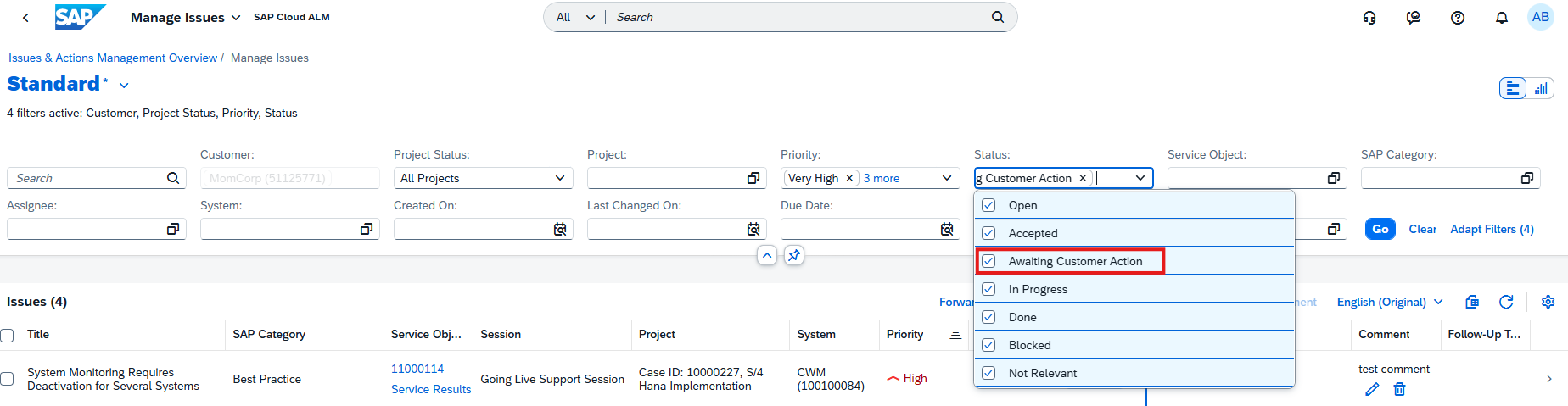
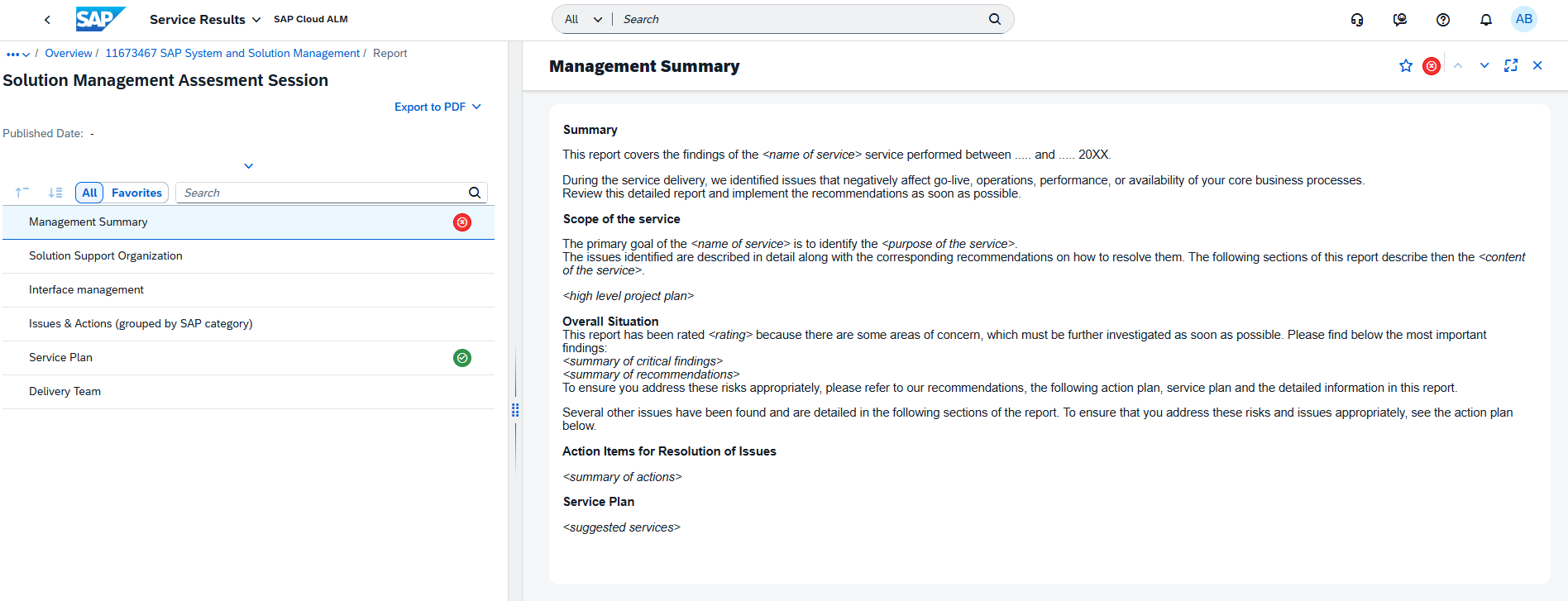
In the Service area, Issues and Actions Management becomes more flexible with bulk comment creation, the new Awaiting Customer Action status, and additional filtering options that improve collaboration and work item management. AI Assistance for Innovation Adoption also expands with new analysis capabilities, while Service Results receives a refreshed user interface to improve usability.
Together, these enhancements simplify daily operations, strengthen governance, improve reporting and collaboration, and provide organizations with more intelligent tools for managing their SAP Cloud ALM landscape.
SAP Business Transformation Center – Data Management, Scoping
Enhanced Data Assessment and Correction Governance in Data Management
The Data Management capabilities in SAP Business Transformation Center have been enhanced with improvements that provide greater flexibility when managing data assessments and stronger governance for correction activities.
The Manage Data Assessments app now allows the destination (endpoint) to be managed independently of the source system. When creating or editing data assessments, users can select, view, and update the destination directly within the assessment itself, making it easier to adapt to changing system landscapes and maintain assessment configurations without modifying the associated source system.
In addition, Correction runs now include a new Correction Approval Flow that introduces an approval step before execution. Authorized users can review submitted correction runs and either approve or reject them using new workflow statuses and actions. Depending on the environment type, approval can be mandatory – for example, in productive environments – to ensure that data changes are properly reviewed before they are applied.
Together, these enhancements improve both the flexibility of landscape management and the governance of data correction processes, helping organizations maintain greater control over their data transformation activities.
TL;DR: Data Management now supports independent endpoint management for data assessments and introduces a Correction Approval Flow to strengthen governance and control over correction runs.
Improved Scoping Experience with ZIP Support and Scan Progress Tracking
The Scoping capabilities in SAP Business Transformation Center have been enhanced with improvements that simplify analysis file handling and provide greater visibility into system scan execution.
The Manage Analysis Files app now supports uploading SAP ERP Maintenance Readiness Check analysis files in ZIP format, in addition to the previously supported JSON format. This eliminates the need to manually extract or convert analysis files before uploading, making it easier to prepare data for transformation planning. The uploaded analysis is then used to provide transition guidance and generate a tailored scenario fit recommendation in the Find Transformation Approach app.
In addition, a new Scan Progress bar provides real-time visibility into system scans by displaying the exact percentage of completion. This allows users to monitor long-running scans more effectively, understand how much of the process has been completed, and better estimate the remaining execution time.
Together, these enhancements streamline the scoping process by simplifying analysis file management and improving transparency during system analysis.
TL;DR: Scoping now supports direct upload of ZIP-based Maintenance Readiness Check files and introduces a real-time scan progress bar, making transformation analysis easier and more transparent.
RISE with SAP Methodology – Business Modifications, Customer Objects, Operations View
New Business Modifications App
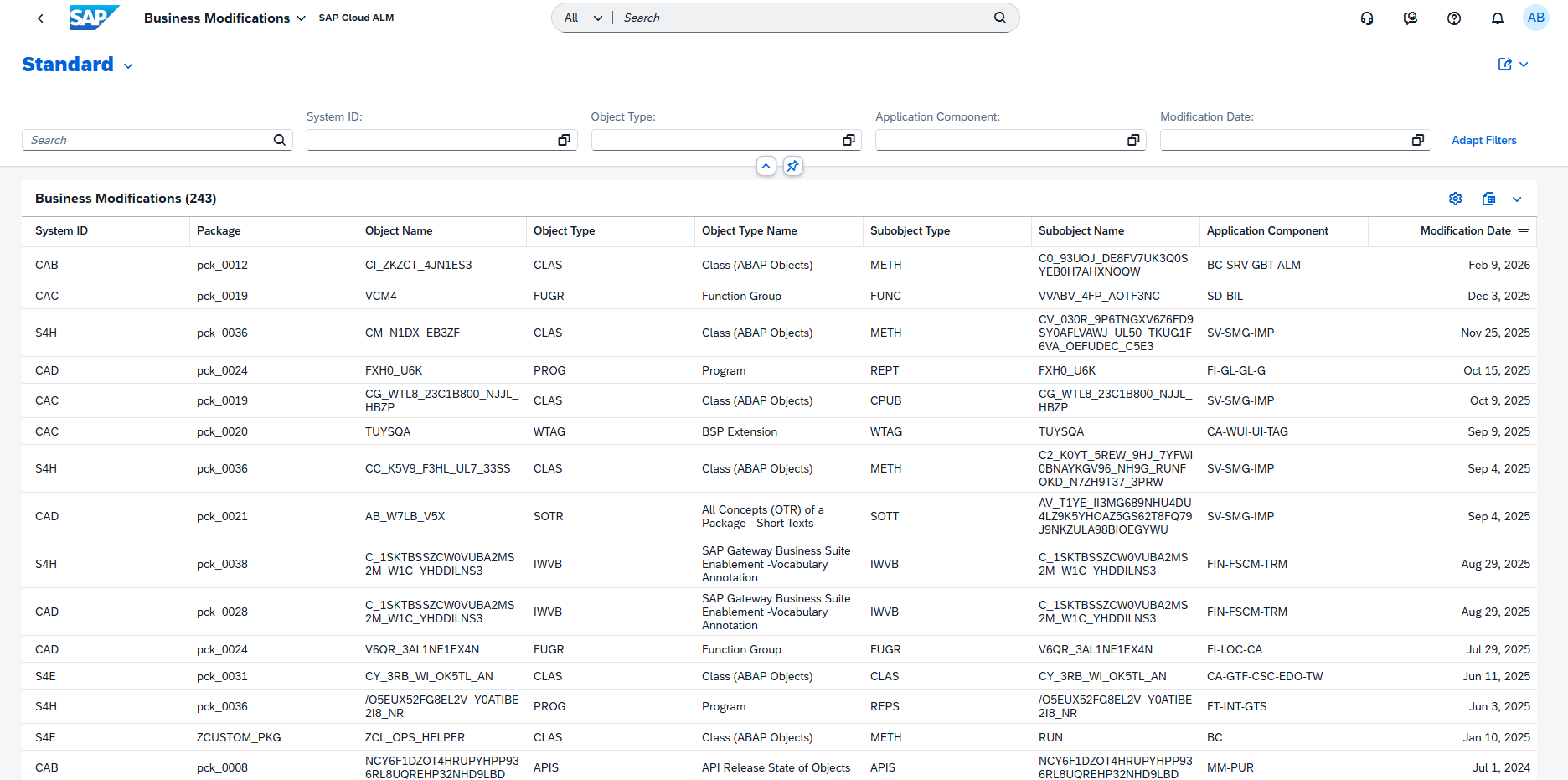
SAP Cloud ALM introduces a new Business Modifications dashboard within the RISE with SAP Methodology, providing a dedicated view for analyzing custom business modifications in SAP systems.
The dashboard helps organizations identify business modifications; a subset of ABAP Classic Extensions recorded in the SMODILOG table. Since these modifications are not clean core compliant and not upgrade-stable, they represent areas that should be reviewed and, where possible, reduced as part of a clean core transformation strategy.
The dashboard offers a detailed overview of each modification, including information such as the package, object name, object type, application component, and modification date, enabling teams to identify affected objects and prioritize remediation efforts.
To improve navigation, the dashboard is available directly from the RISE with SAP Methodology launchpad and can also be accessed from the System View through the Extensibility tab.
When launched from the System View, the dashboard is automatically filtered for the selected system, allowing users to begin their analysis immediately.
These enhancements provide greater visibility into custom modifications and support organizations in preparing for a more maintainable, upgrade-friendly, and clean core SAP landscape.
TL;DR: A new Business Modifications dashboard helps identify and analyze non-clean-core ABAP business modifications and can be accessed directly from both the RISE with SAP Methodology launchpad and the System View.
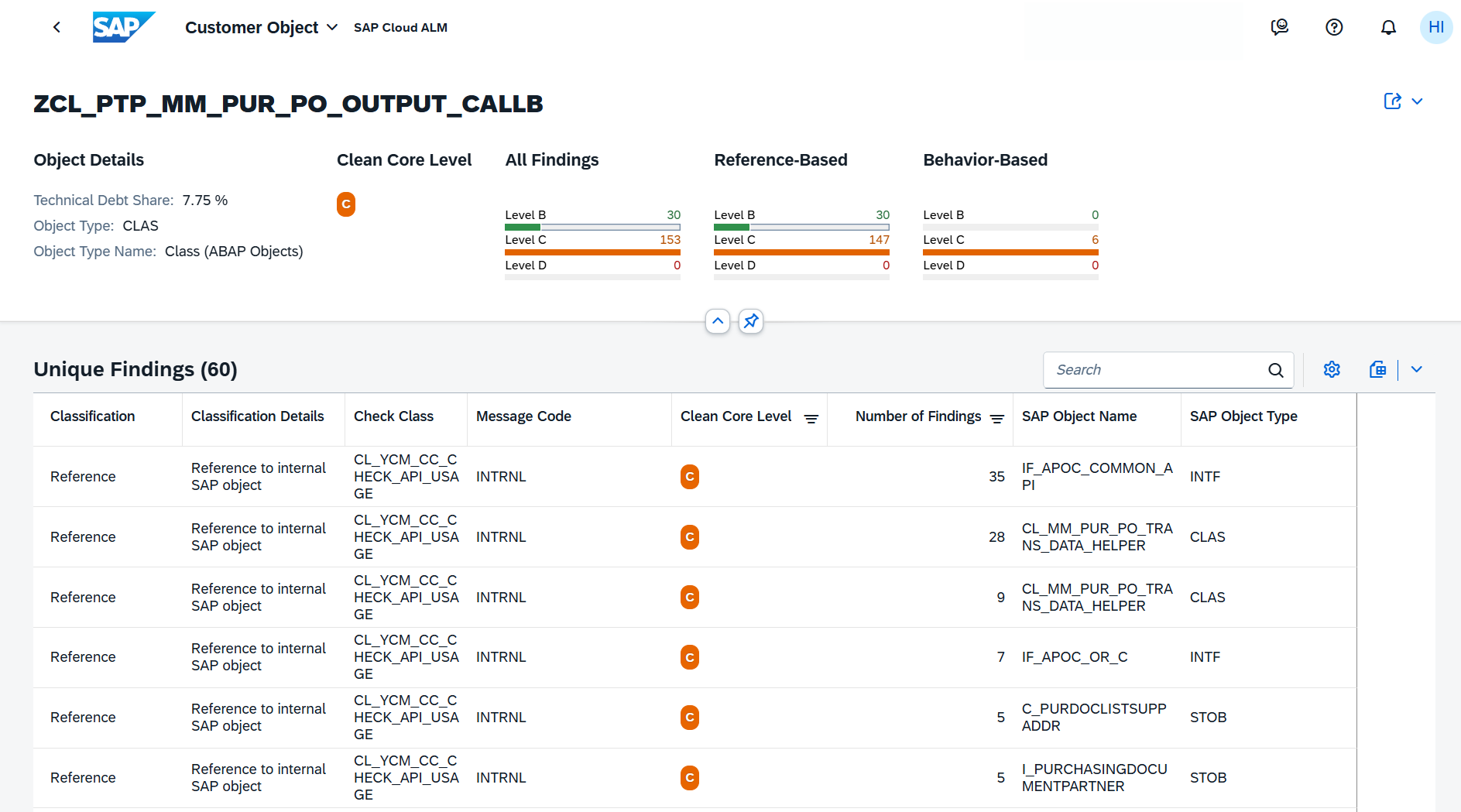
New Unique Findings View for ATC Analysis in Customer Objects
The Customer Objects dashboard now includes a new Unique Findings table view that simplifies the analysis of ABAP Test Cockpit (ATC) check results.
Instead of displaying individual raw ATC findings, the new view consolidates related findings into a single entry by combining the check class, message code, and referenced SAP object. This provides a clearer overview of clean core compliance issues affecting each customer object and makes it easier to focus on the most relevant remediation activities.
By reducing duplicate findings and presenting technical issues in a more structured way, the Unique Findings view helps development teams identify technical debt, prioritize corrective actions, and track progress toward a more clean core-compliant SAP landscape.
The view becomes available after importing a new ATC check result into the System View and can be accessed by selecting a customer object in the Customer Objects dashboard.
TL;DR: The new Unique Findings view consolidates ATC check results, making it easier to identify, prioritize, and remediate clean core compliance issues for customer objects.
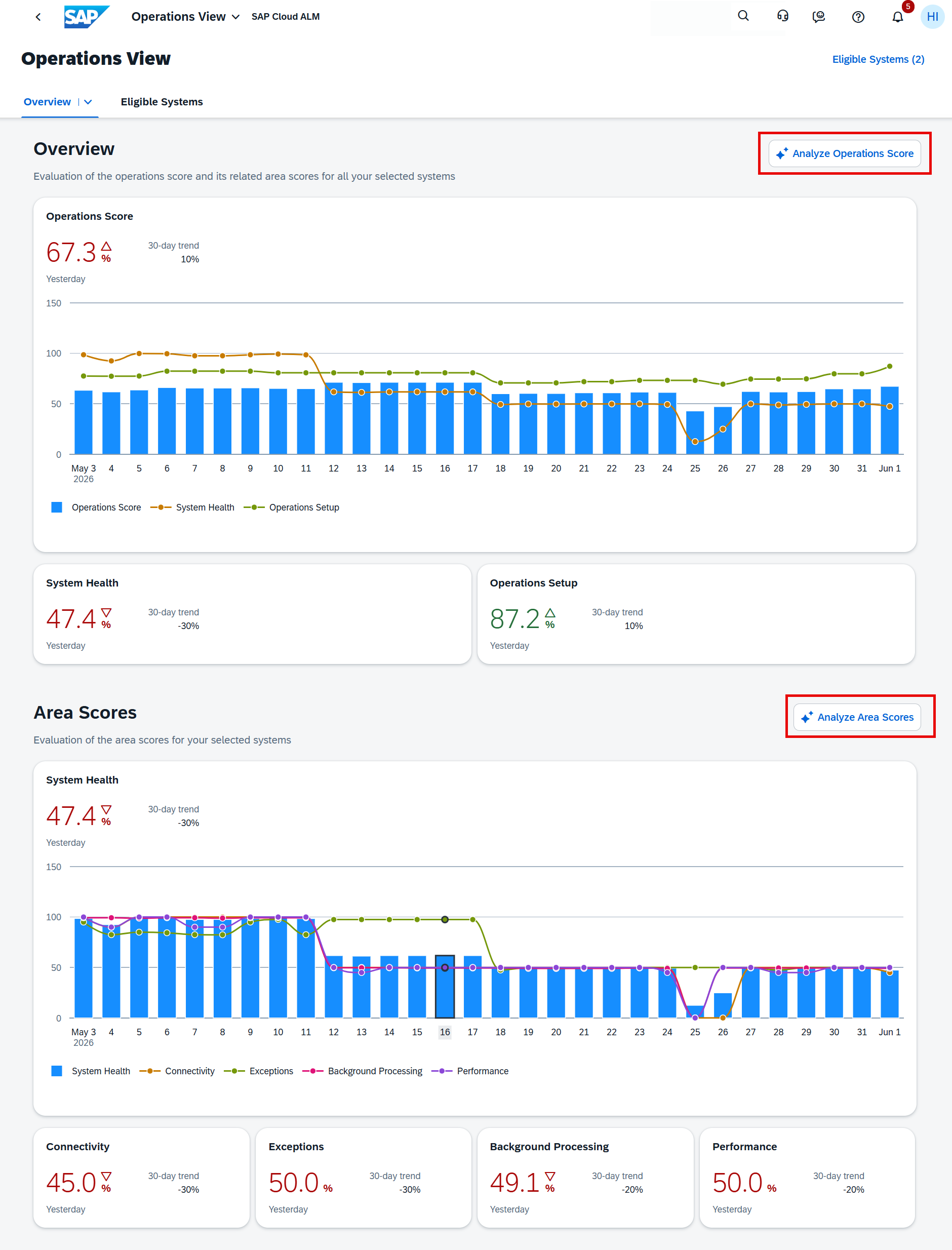
AI-Assisted Operations Score Analysis in Operations View
The Operations View now includes AI-assisted analysis, helping organizations better understand their operational health scores and identify the improvements that will have the greatest impact.
Users can analyze both the overall Operations Score and individual Area Scores to see how the scores are calculated. The AI-assisted analysis identifies the top three KPIs and metrics influencing the selected score, explains how each contributes to the overall result, and provides prioritized recommendations with an estimated impact on the score. This enables teams to focus on the actions that deliver the most significant operational improvements.
The analysis is organized into four sections:
Summary – An overview of the current score and its key drivers.
Score Breakdown – A detailed explanation of how the score is calculated.
All Issues – A consolidated list of findings affecting the score.
Next Steps – Recommended actions to improve system health and increase the score.
The analysis is generated based on the systems currently selected in the Operations View, allowing organizations to evaluate individual systems or groups of systems according to their operational priorities.
TL;DR: The Operations View now offers AI-assisted analysis that explains Operations and Area Scores, highlights the most impactful KPIs, and provides prioritized recommendations to improve operational health.
Implementation – Analytics, Process Management, Process Hierarchy, Projects and Setup, Retrofit
Enhanced Analytics and Reporting
SAP Cloud ALM continues to expand its analytics capabilities with new applications and reporting enhancements that provide greater flexibility for analyzing project progress, risks, and delivery quality.
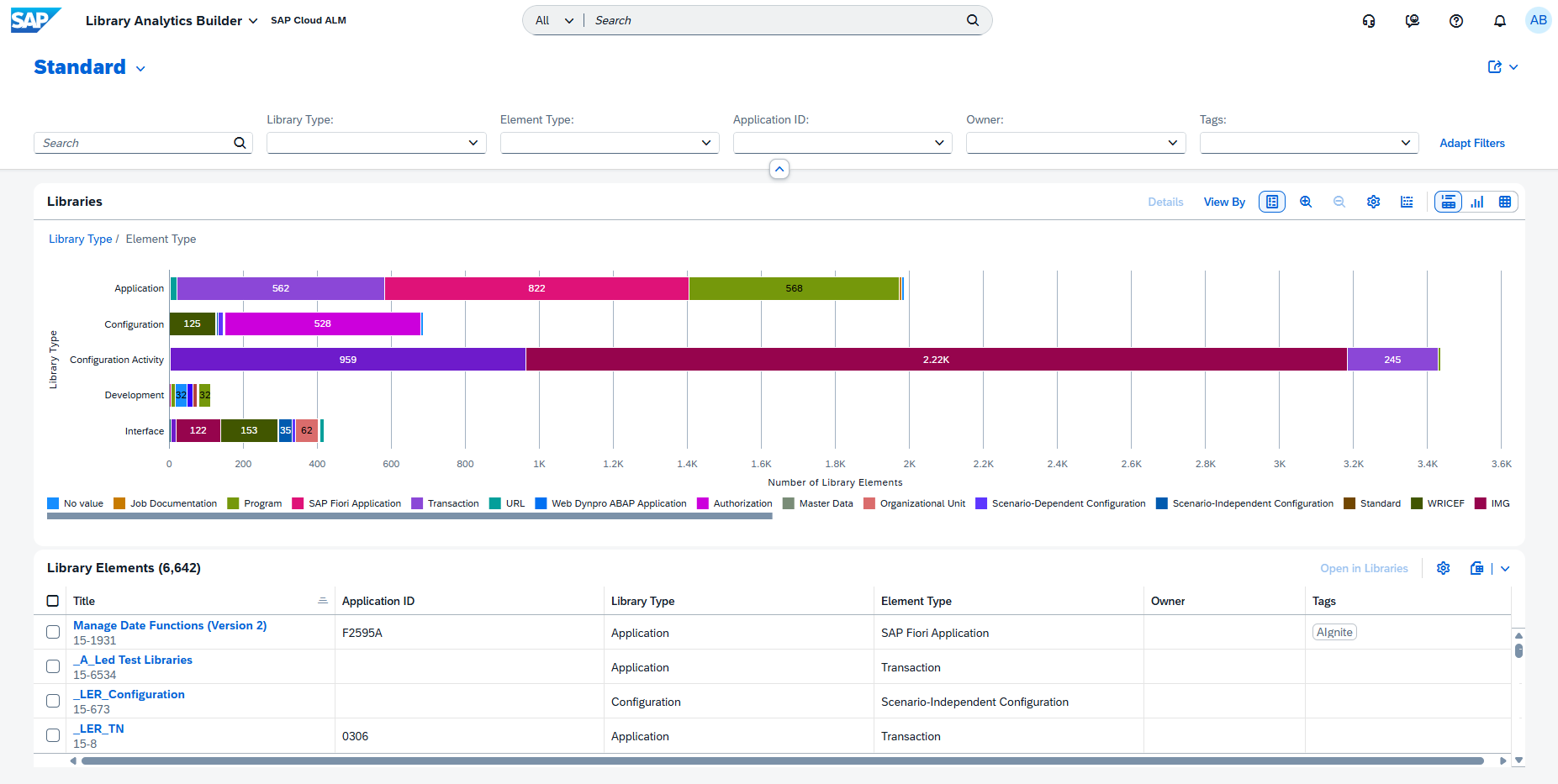
A new Library Analytics Builder application is now available, allowing users to analyze and compare library elements across different library and element types. The application supports interactive charts, filtering, drill-down capabilities, and variant management, making it easier to explore and evaluate reusable content within libraries.
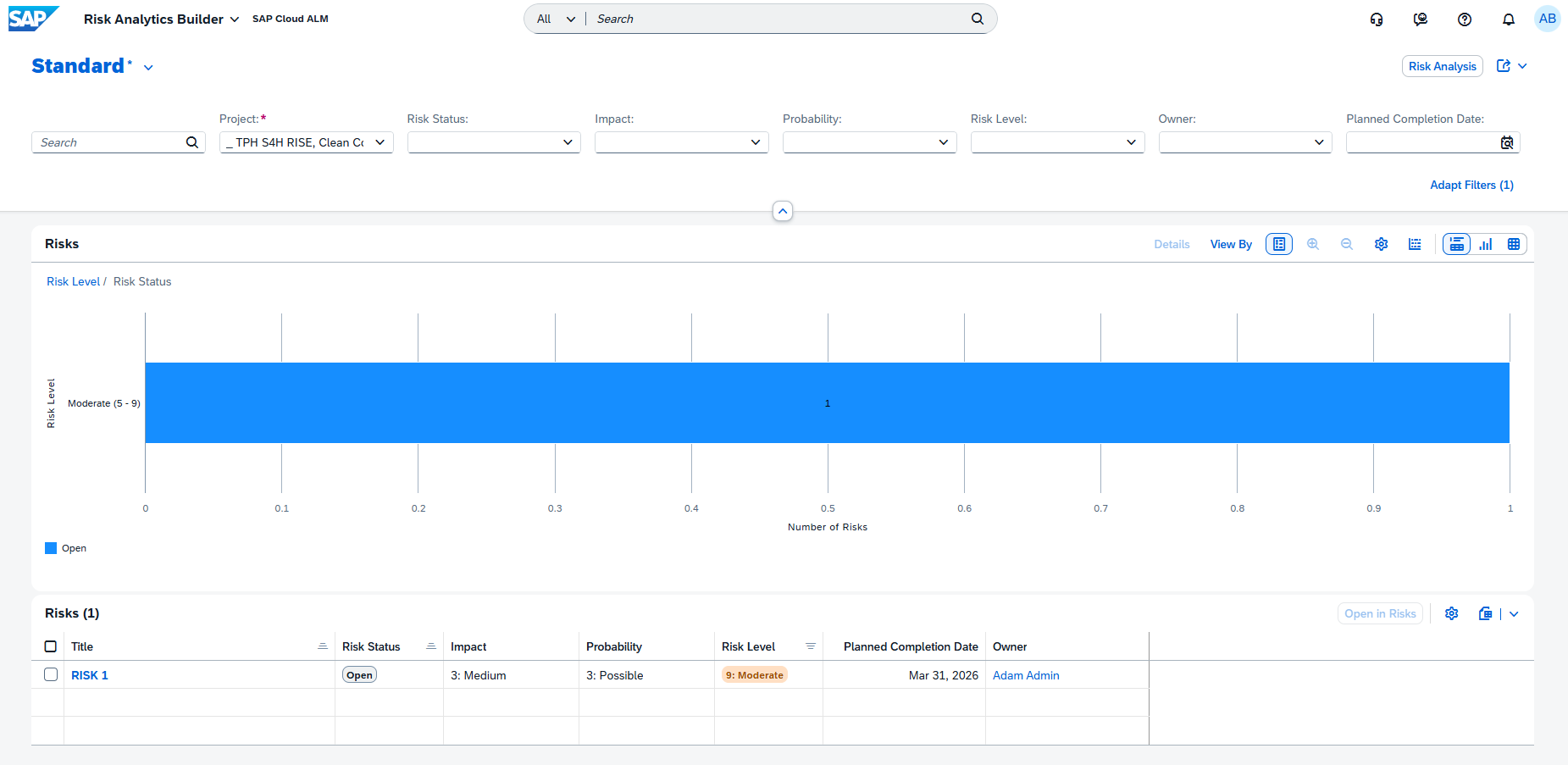
The former Risk Distribution application has been renamed to Risk Analytics Builder, reflecting its evolution into a more flexible analytics tool. Users can now configure chart types, dimensions, and measures to create customized views that better support project reporting and decision-making.
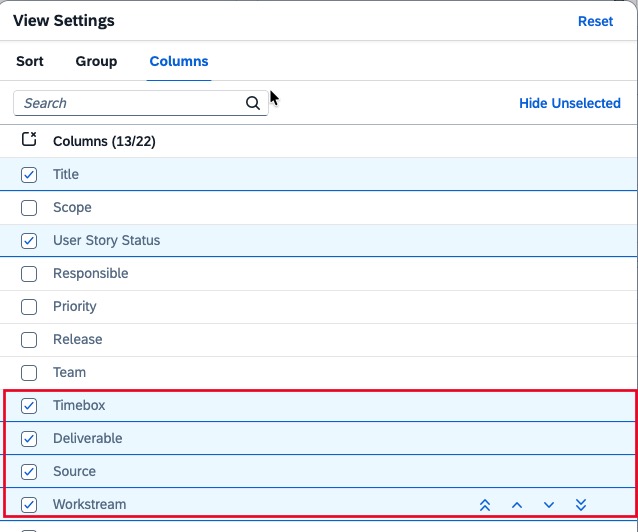
Reporting capabilities have also been enhanced across existing analytics applications. In User Story Traceability, the fields Timebox, Deliverable, Source, and Workstream can now be displayed as optional table columns and are also included when exporting data to Excel.
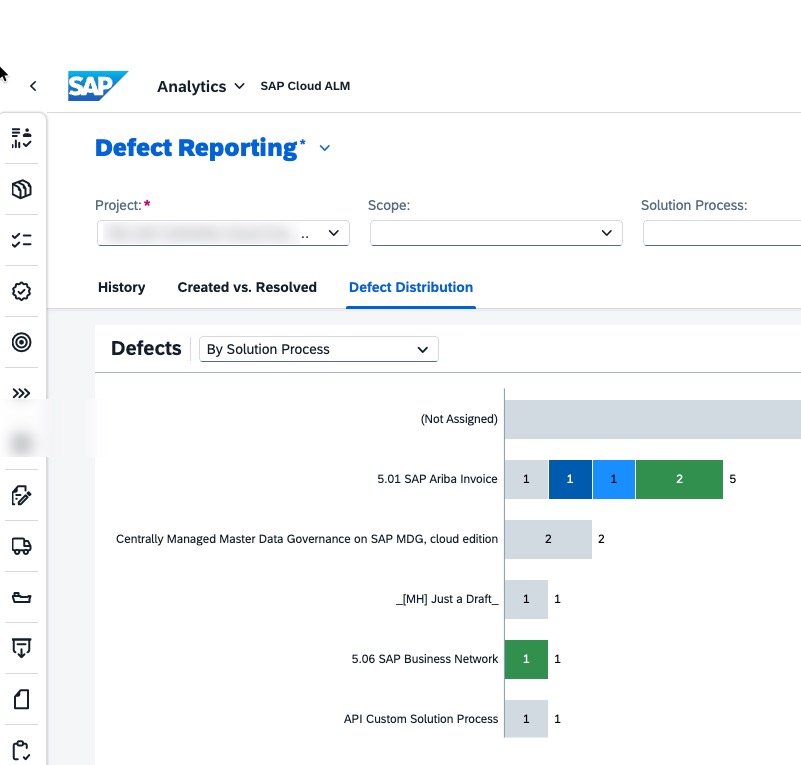
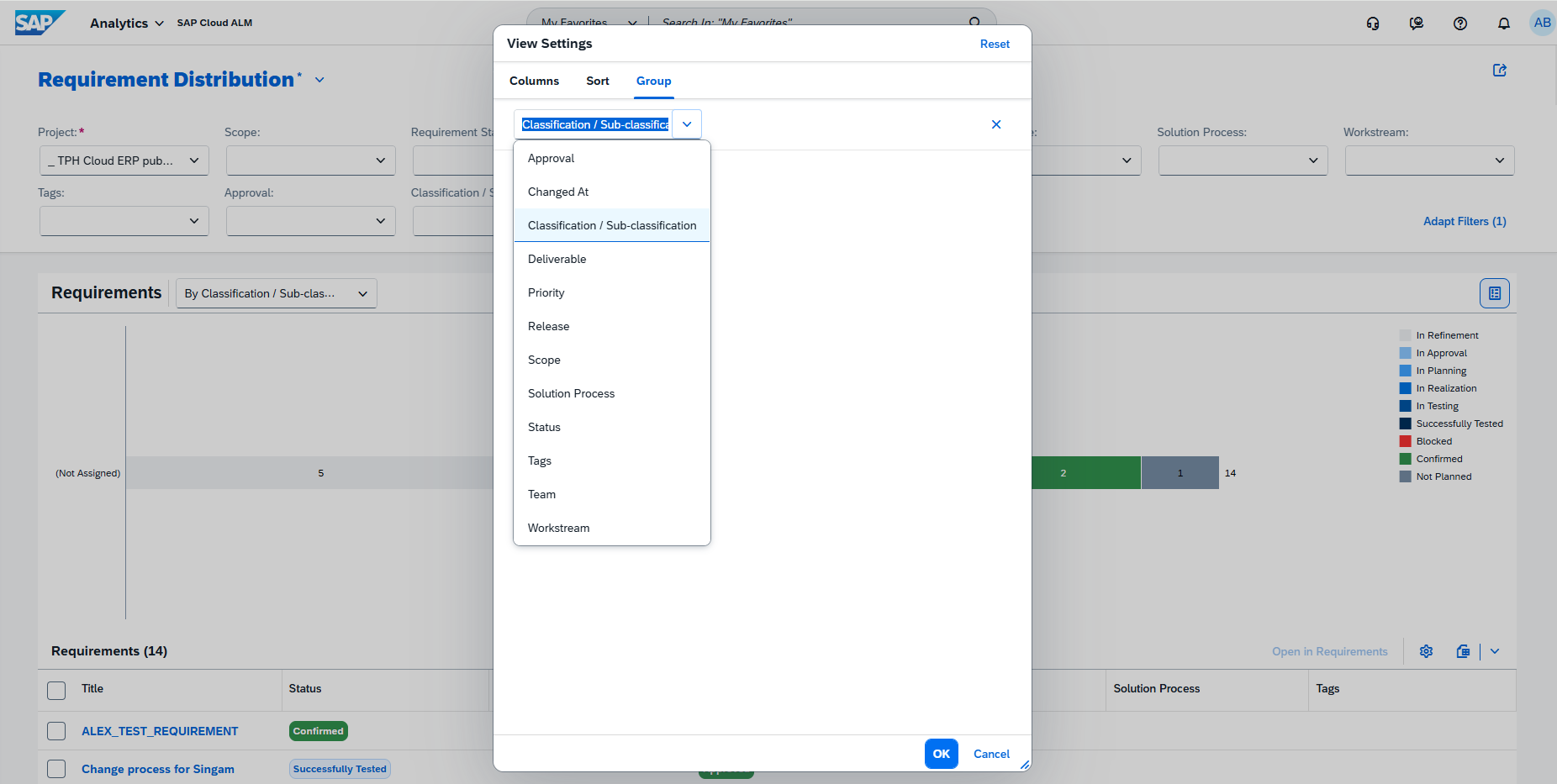
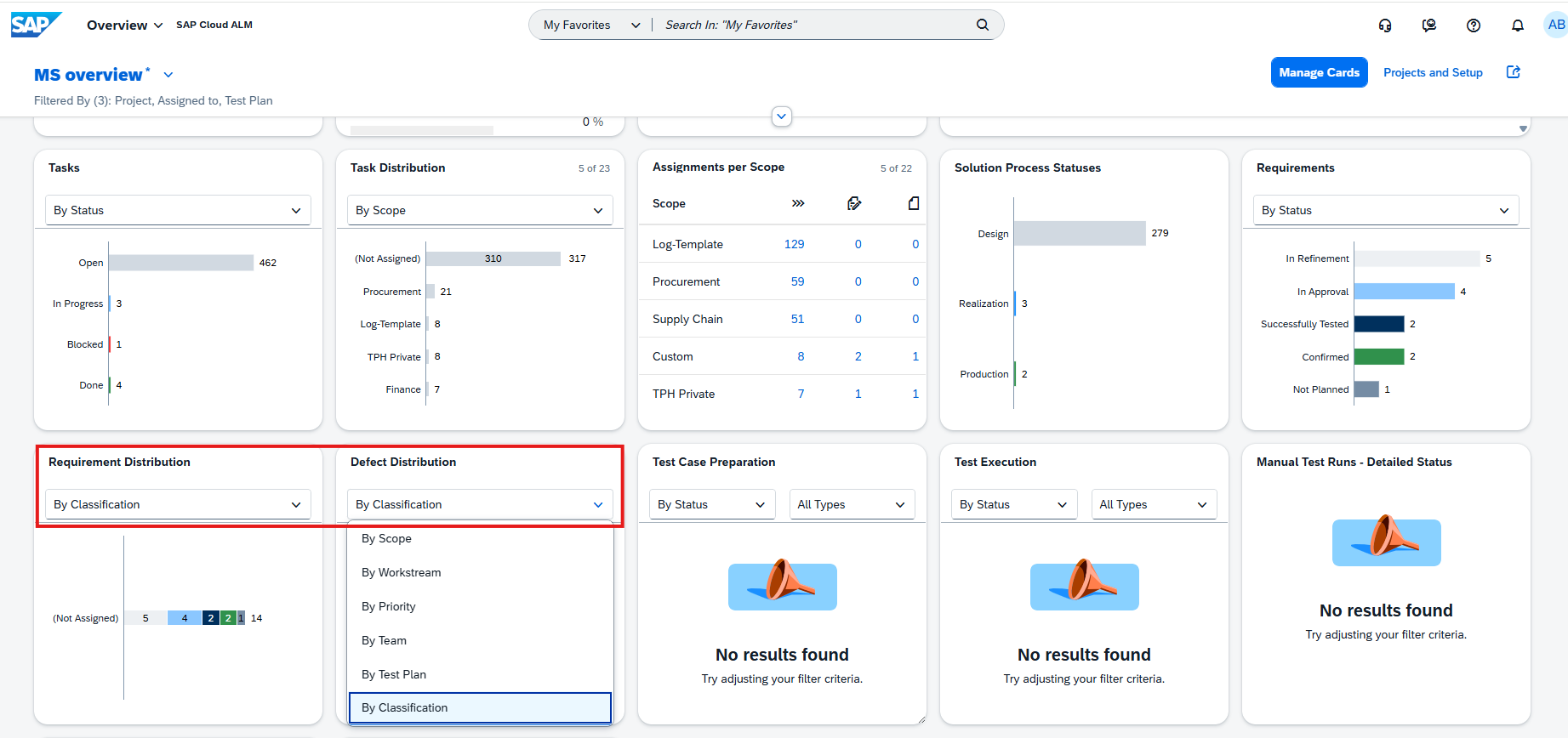
In addition, Defect Distribution and Defects Reporting introduces a new By Solution Process view, allowing defects to be analyzed and grouped according to the affected solution processes for improved visibility into quality trends.
Together, these enhancements provide better reporting capabilities and greater flexibility for analyzing project execution, delivery progress, and solution quality.
TL;DR: Analytics now includes the new Library Analytics Builder, an enhanced Risk Analytics Builder, expanded reporting in User Story Traceability, and a new By Solution Process view for defect analysis.
Stronger Process Governance and Management
SAP Cloud ALM strengthens governance capabilities with new authorization options and usability improvements for managing solution processes.
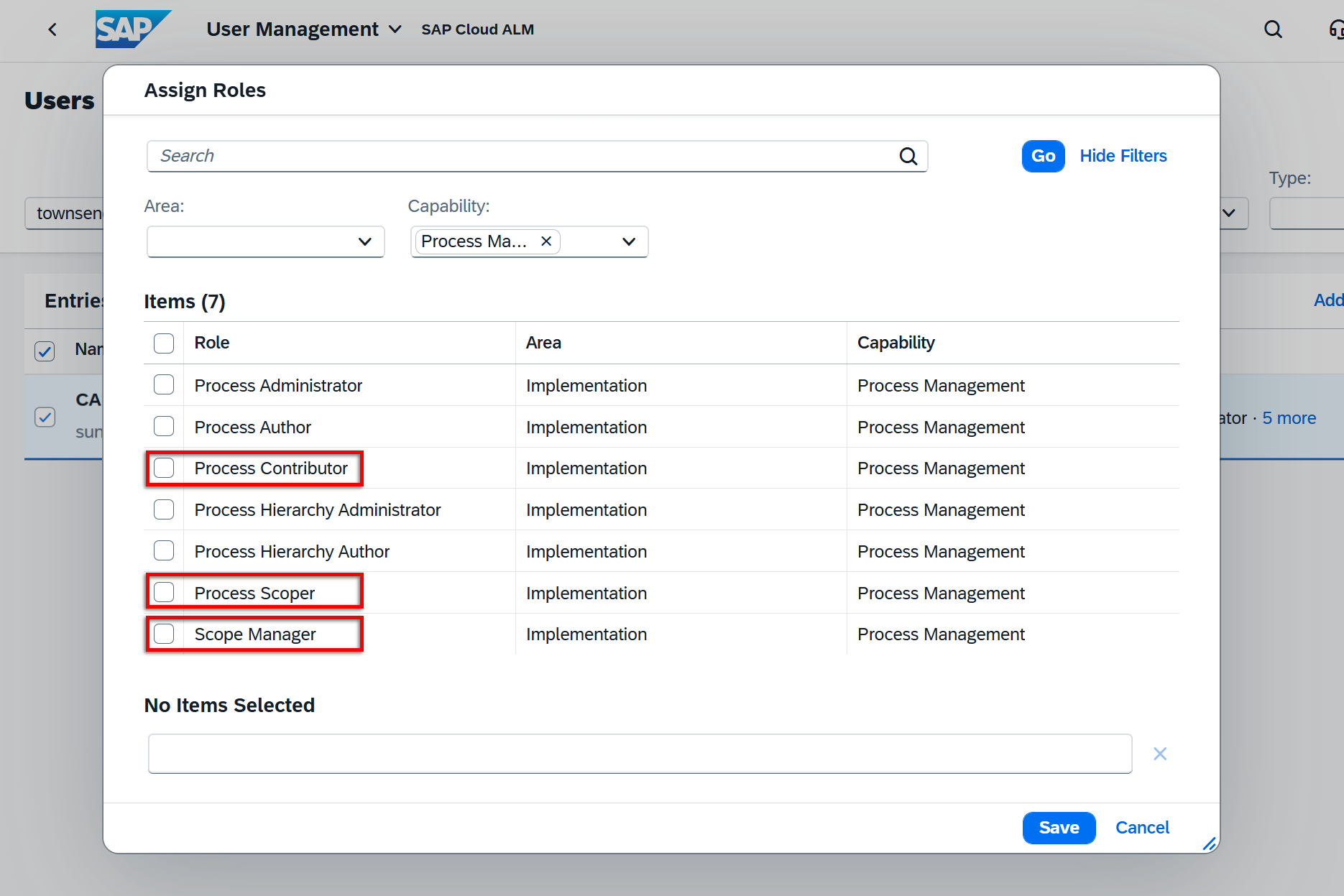
To provide better control over critical scoping activities, three new Process Management roles have been introduced: Process Contributor, Process Scoper, and Scope Manager. These roles allow organizations to restrict responsibilities such as maintaining process assignments, managing solution scopes, and updating process ownership, making it easier to separate duties and enforce governance within implementation projects.
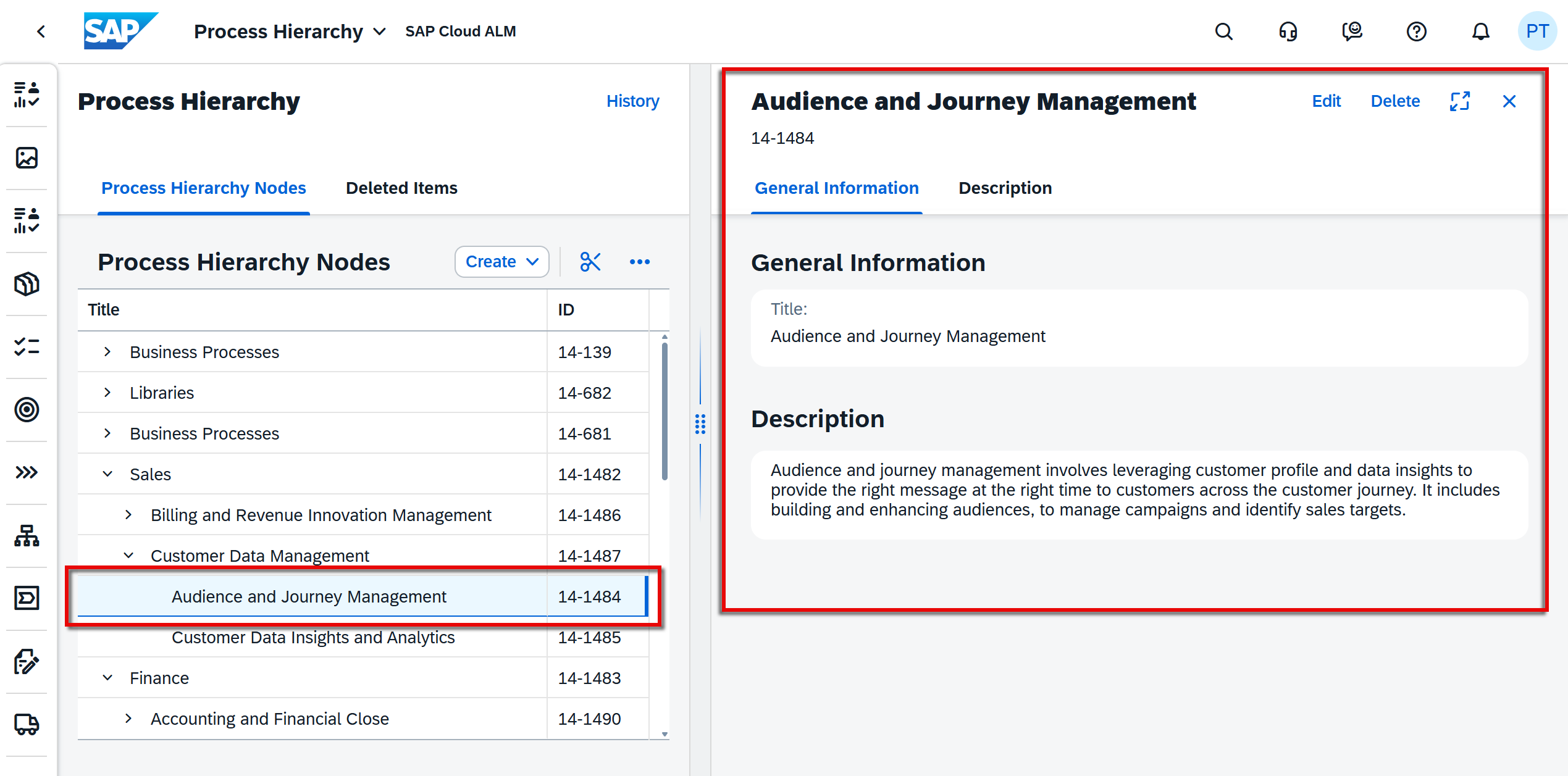
The Process Hierarchy application has also been redesigned with a new two-column layout. Selecting a node now opens a dedicated detail view displaying additional attributes and information alongside the hierarchy. From this view, users can directly edit node details, while actions such as deleting or restoring nodes automatically update the displayed content, creating a more efficient and intuitive maintenance experience.
These enhancements improve both governance and usability, helping organizations maintain well-structured solution documentation while ensuring that critical changes remain under appropriate control.
TL;DR: New Process Management roles strengthen governance for scope management, while the redesigned Process Hierarchy improves the maintenance of solution documentation.
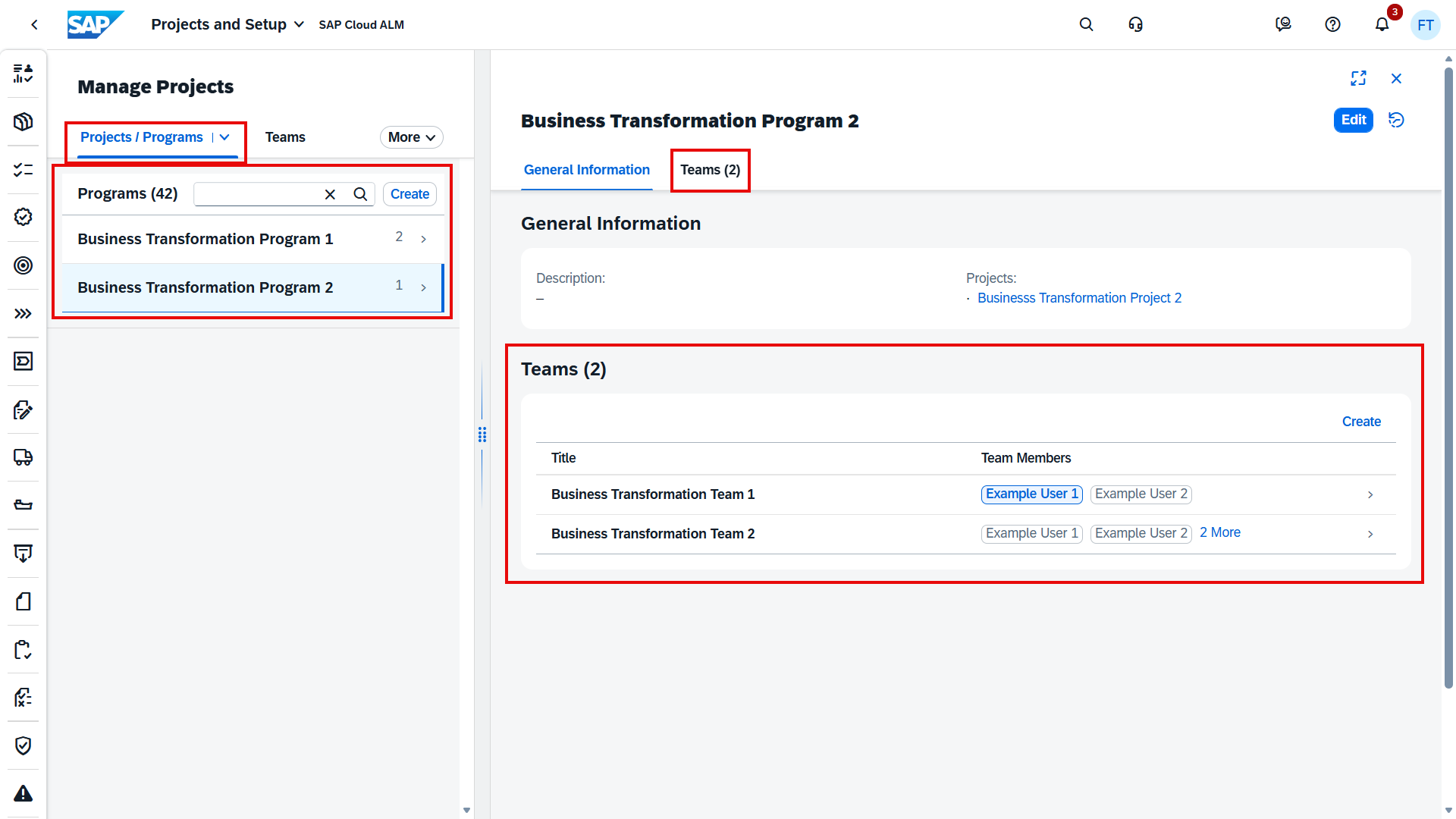
Introduction of program teams in Projects and Setup
Managing teams across multiple projects is now easier with the introduction of Program Teams.
A new Program Administrator role allows organizations to create and manage teams, members, and roles at the program level instead of maintaining them separately within individual projects. Program teams can also be copied between projects and programs, helping organizations standardize team structures and reduce repetitive administration.
This enhancement simplifies resource management across larger implementation programs and promotes greater consistency when multiple projects are executed within the same program.
TL;DR: Program Teams introduce centralized team management at the program level, making it easier to reuse and manage teams across multiple projects.
Retrofit Improvements
The Retrofit application receives several enhancements that simplify conflict analysis and the management of retrofit items.
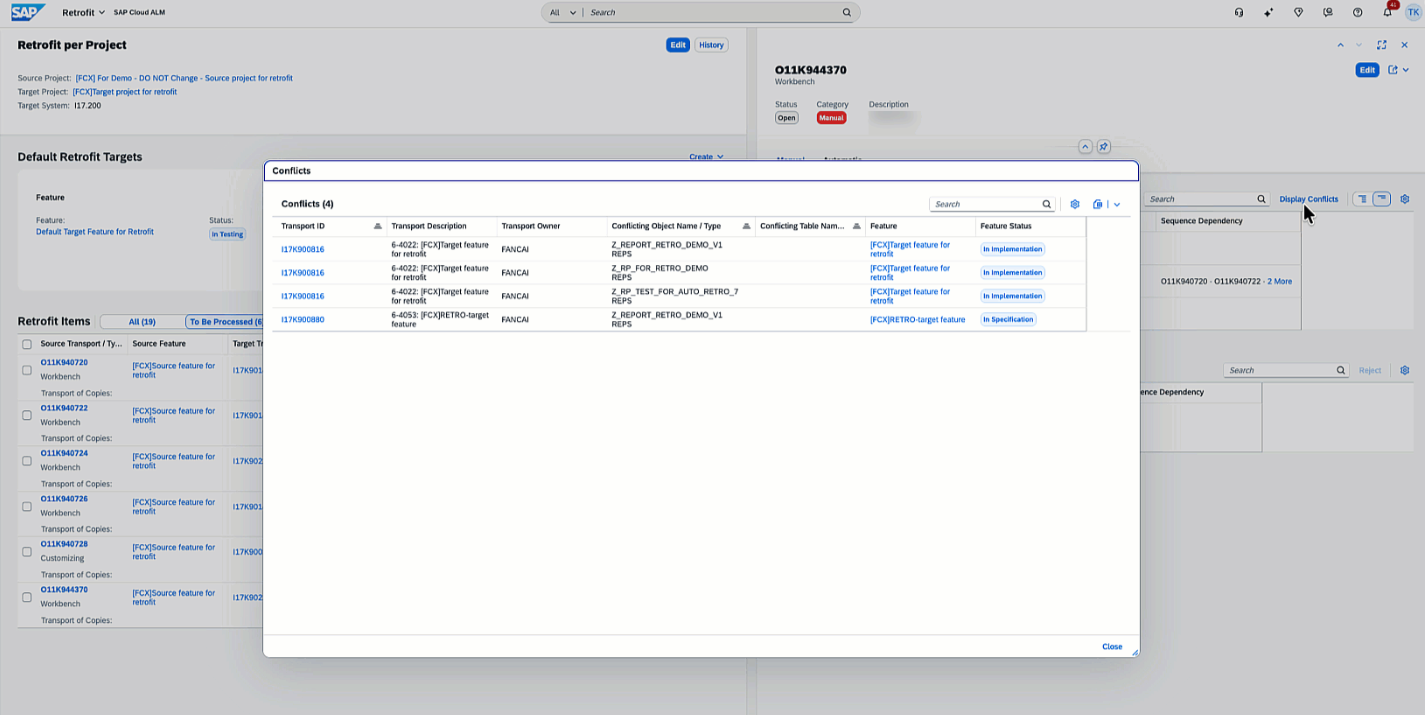
A new Display Conflicts function allows users to identify which objects are responsible for conflicts in source transports categorized as Manual or Manual and Automatic. This provides greater transparency during retrofit activities and helps teams resolve conflicts more efficiently.
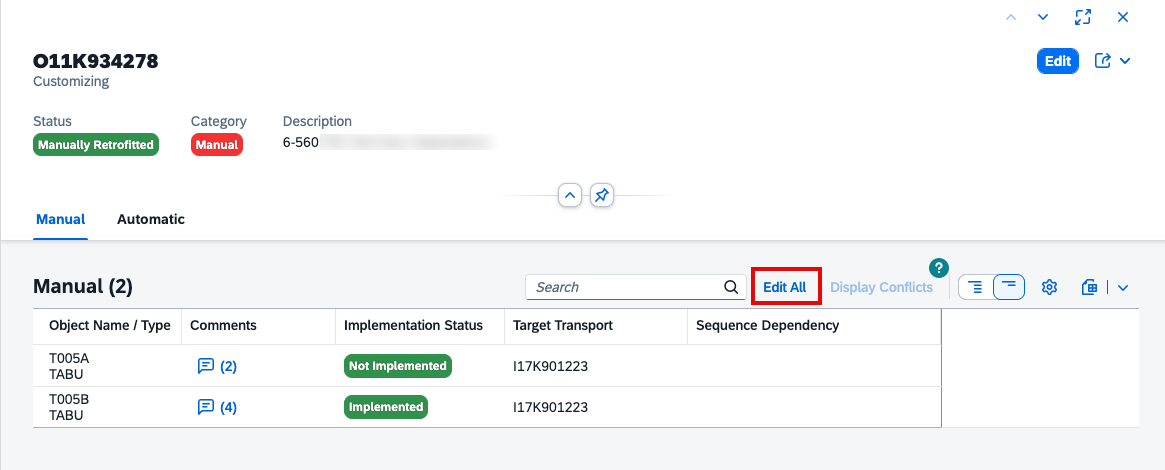
Managing manual retrofit objects has also become easier with the new Edit All functionality, enabling users to update the implementation status and target transport for multiple manual objects simultaneously.
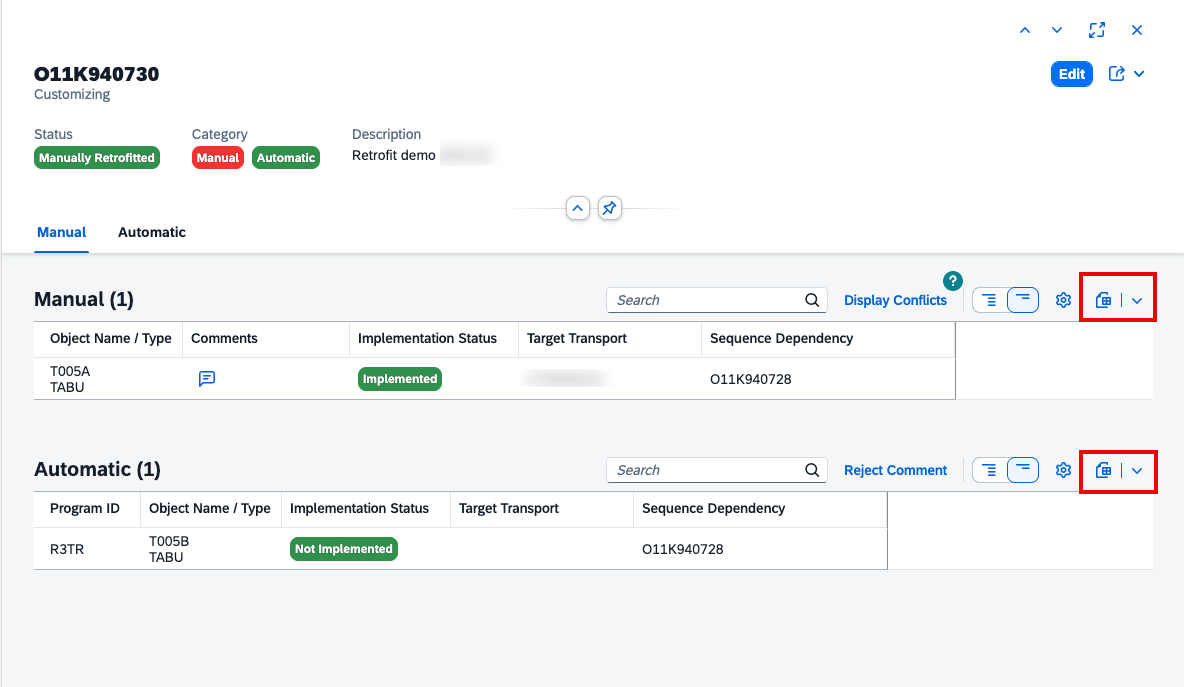
Additional usability improvements include the ability to export separate tables for manual and automatic objects, as well as recording ToC (Transport of Copies) removal in the retrofit history for improved traceability.
Together, these enhancements streamline retrofit processing, reduce manual effort, and improve visibility throughout the retrofit lifecycle.
TL;DR: Retrofit now provides Display Conflicts, Edit All for manual objects, improved export capabilities, and enhanced history tracking to simplify retrofit management.
Enhanced Event Action Configuration Across Operations Applications
SAP Cloud ALM introduces several enhancements that make event actions more flexible, configurable, and efficient across multiple Operations applications.
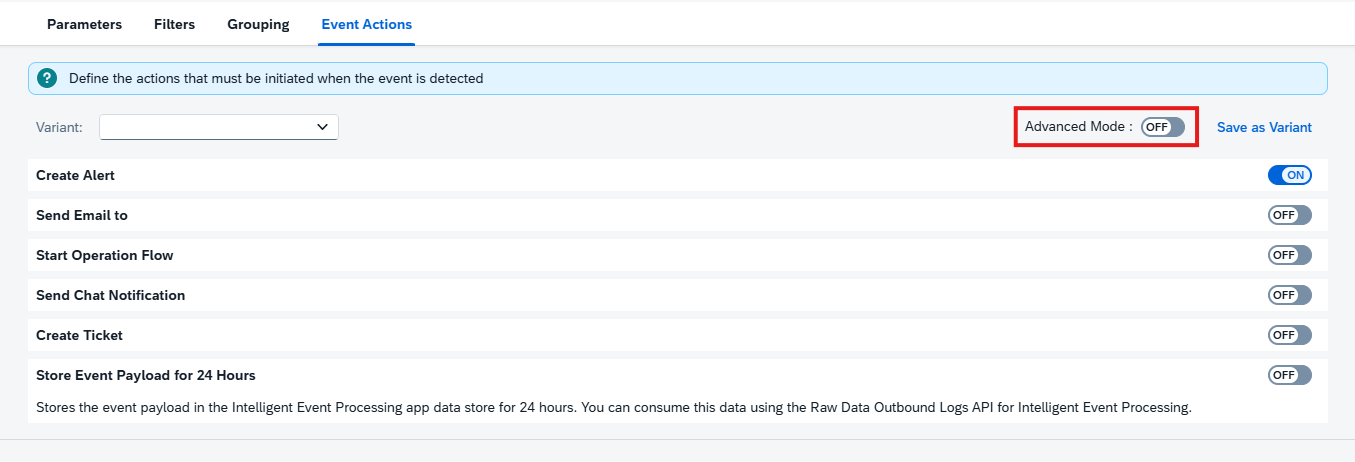
A new Advanced Mode provides greater control over event automation by allowing users to define multiple event actions with different start conditions. This makes it possible to create more sophisticated automation scenarios tailored to different operational events and workflows.
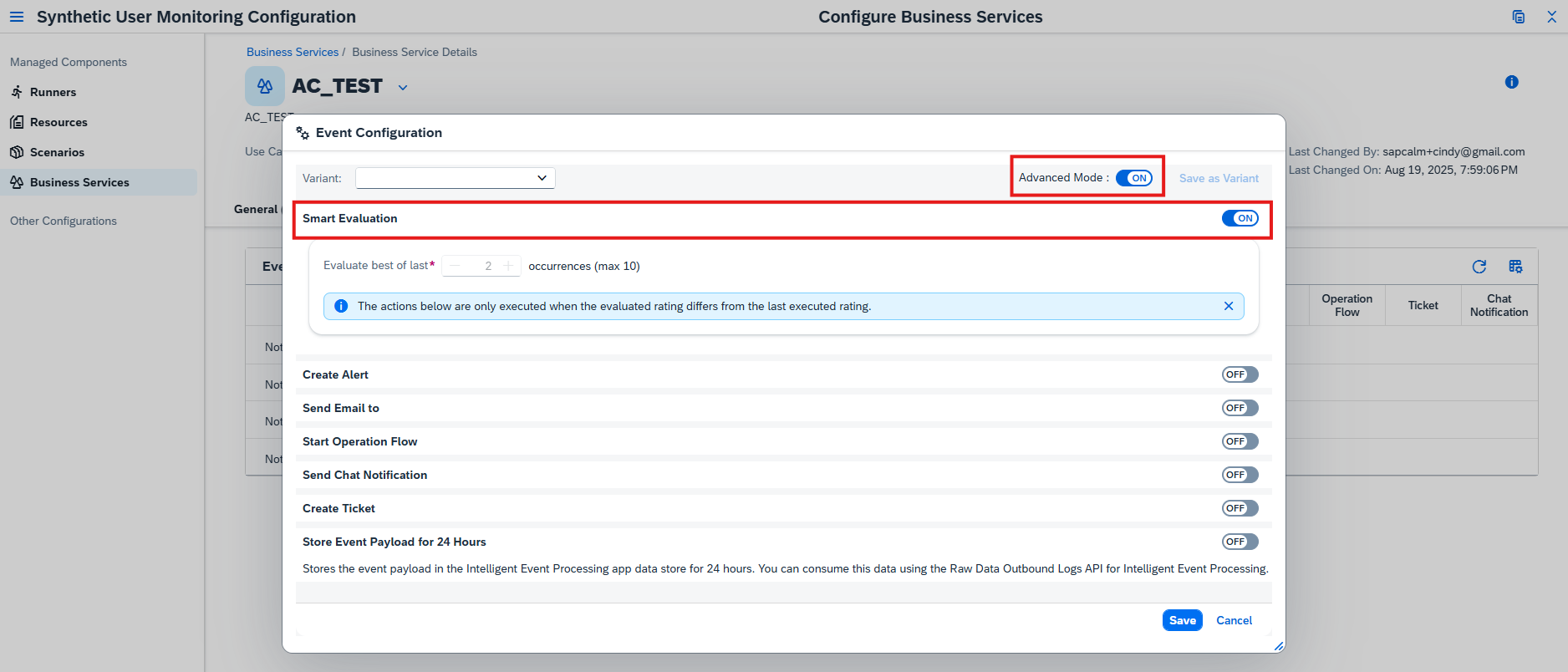
To reduce unnecessary notifications, Smart Evaluation has been added to event action configuration. Instead of repeatedly triggering actions for every occurrence of an ongoing event, Smart Evaluation waits until the event’s rating changes consistently over a configurable number of occurrences before initiating actions again. This helps minimize alert fatigue while ensuring that significant changes still receive attention.
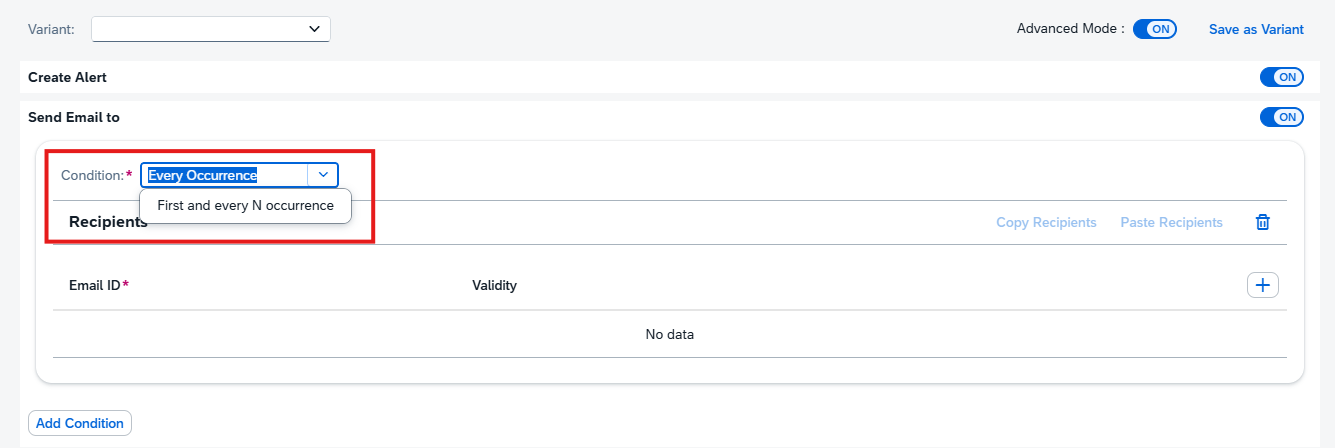
Another new option, First and Every N Occurrence, gives administrators finer control over recurring stateless events. Rather than executing an action every time an event occurs, actions can now be triggered only on the first occurrence and then after a specified number of subsequent occurrences, reducing repetitive processing for frequently recurring events.
Event action configuration has also been made more intuitive by displaying the associated Automation ID when configuring Operation Flows. This additional context helps administrators identify the correct automation and simplifies configuration in environments with multiple automation flows.
Together, these enhancements provide greater flexibility for event automation while reducing operational noise and simplifying configuration.
TL;DR: Event actions now support Advanced Mode, Smart Evaluation, First and Every N Occurrence, and visible Automation IDs, providing more flexible automation and reducing unnecessary event processing.
Improved Event Visibility and Troubleshooting
SAP Cloud ALM also improves how operational events can be analyzed and understood, making troubleshooting faster and more transparent.
Integration & Exception Monitoring now classifies events according to their lifecycle and event grouping, providing additional context for how different event types are processed. Combined with the new event action capabilities, this classification enables more precise monitoring behavior for different categories of events.
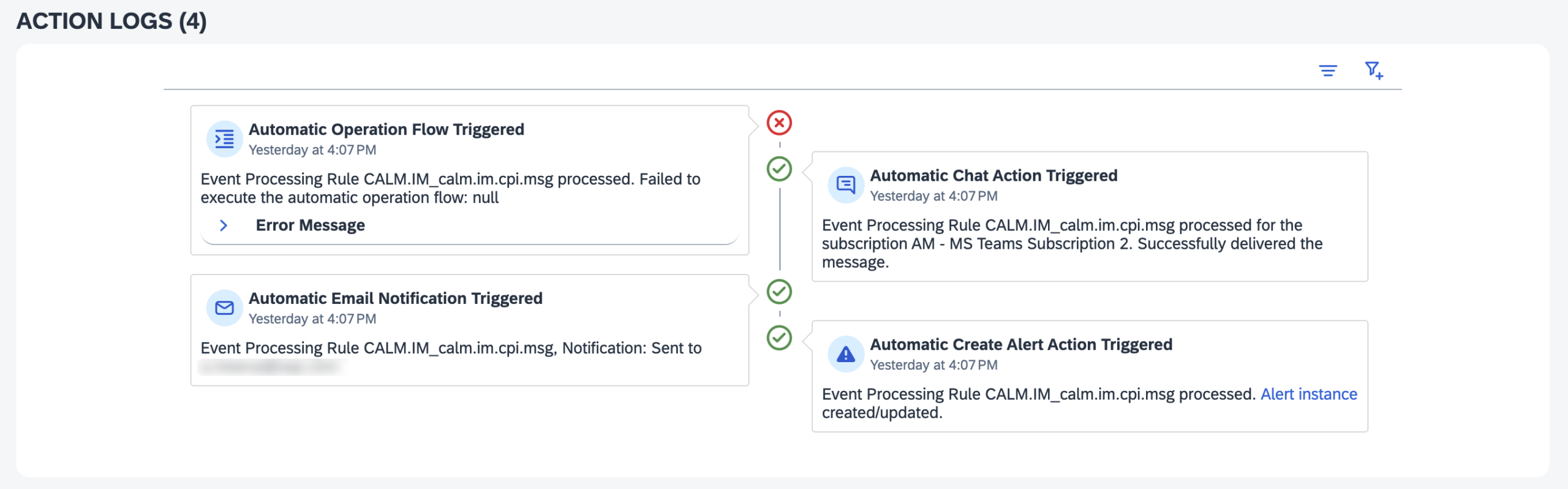
For Intelligent Event Processing, Action Logs have been enhanced to display the condition name that triggered an action alongside existing information such as the rule, action, execution status, and status details. This makes it significantly easier to understand why an action was executed and simplifies root cause analysis when troubleshooting automation.
These improvements provide operations teams with better visibility into both event behavior and automation execution, helping reduce investigation time when incidents occur.
TL;DR: Event classification and enhanced Action Logs provide greater visibility into event processing, making operational troubleshooting faster and more transparent.
More Flexible Compliance Rules and Policies in Configuration & Security Analysis – Validation
Configuration & Security Analysis – Validation continues to expand its compliance capabilities with enhancements that make validation rules more powerful and adaptable to organizational requirements.
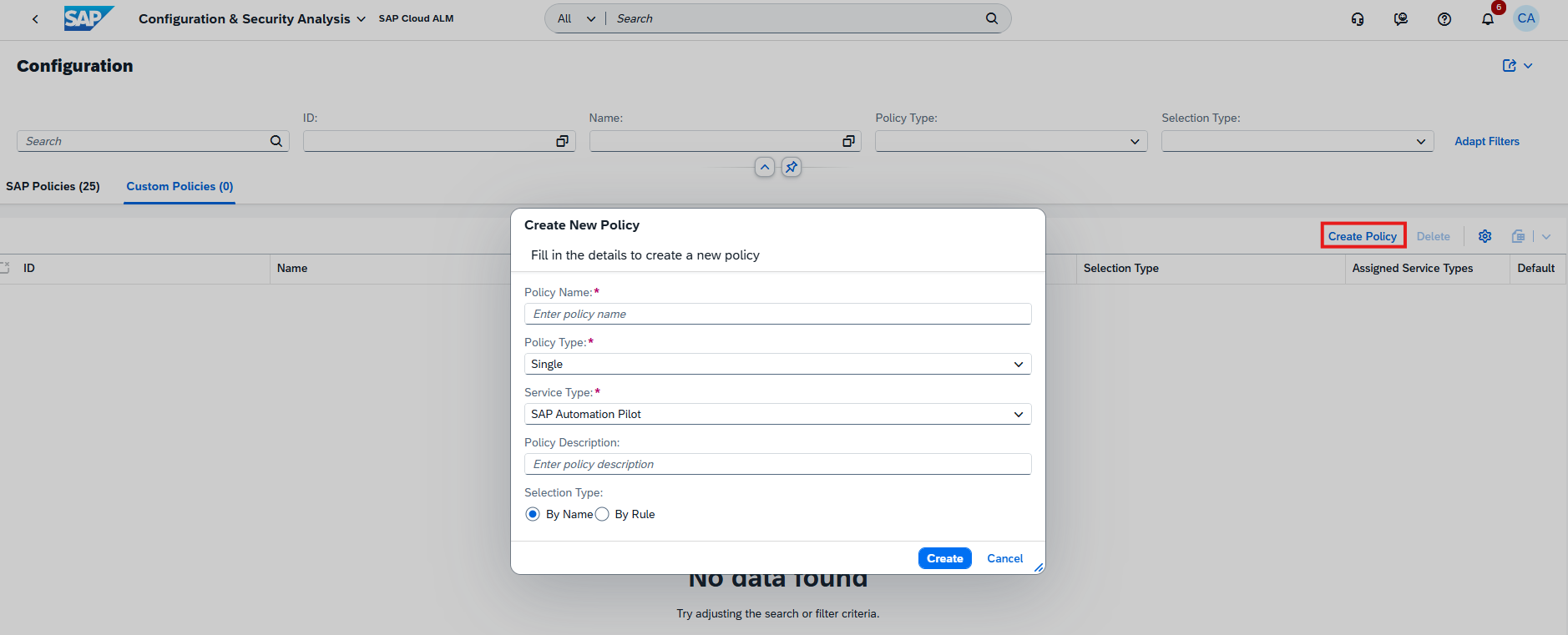
Organizations can now create custom policies, allowing multiple checks or existing policies to be grouped into a single compliance assessment. This provides a centralized way to evaluate services against organization-specific governance requirements while simplifying compliance management.
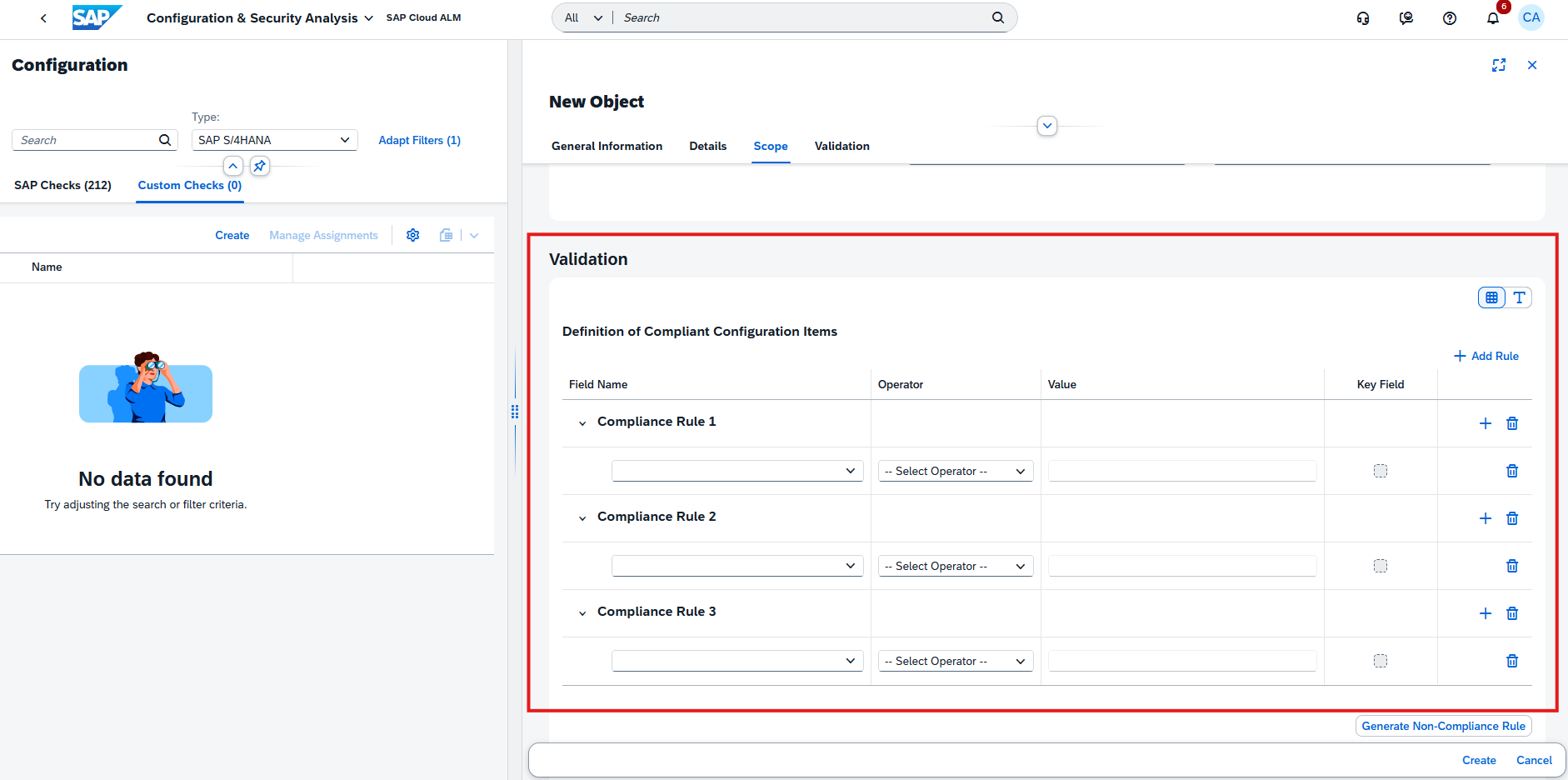
Custom checks have also become more flexible by supporting multiple compliance rules within a single check. Instead of creating separate checks for different validation scenarios, administrators can now define several rules that collectively evaluate compliance against multiple conditions.
To further enhance rule definitions, two new operators – IN and NOT IN – have been introduced. These operators simplify the creation of rules that validate values against predefined lists, making complex compliance scenarios easier to configure and maintain.
Together, these enhancements enable organizations to build more comprehensive compliance frameworks that better reflect internal governance and security requirements.
TL;DR: Configuration & Security Analysis now supports custom policies, multiple compliance rules, and new IN/NOT IN operators, enabling more flexible and comprehensive compliance validation.
Administration – Landscape Management
Processing Logs for Landscape Changes
Landscape Management now includes Processing Logs, providing a comprehensive audit trail for changes made to managed landscape objects.
Each log entry records who performed a change, when it occurred, what was modified, and the corresponding old and new values. This gives administrators complete visibility into configuration changes, making it easier to review modifications, troubleshoot unexpected behavior, and maintain governance across the landscape.
Processing Logs are available for services, systems, business services, and access control groups, helping organizations track configuration changes consistently across key landscape objects.
By increasing transparency and traceability, this enhancement supports stronger governance, simplifies auditing, and helps administrators better understand the history of landscape configuration changes.
TL;DR: Processing Logs provide a detailed audit trail of configuration changes across services, systems, business services, and access control groups, improving transparency and governance.
Service – AI Assistance for Innovation Adoption, Issues and Actions Management, Service Results
Enhanced and New Innovation Analysis Capabilities in AI Assistance for Innovation Adoption
The AI Assistance for Innovation Adoption app continues to expand with enhancements to existing capabilities and the introduction of two new areas of analysis.
The following existing capabilities have been enhanced:
Adoption Potential now includes a new Automation Adoption dashboard page and a Financial Documents – Automation Rate tile on the start page, providing additional insights into automation opportunities and adoption progress.
Enduring Cybersecurity introduces a new SAP HANA Database Security dashboard page. The Critical Authorizations view has been enhanced to show how many users can execute external operating system commands, while the Security Hardening page now also evaluates whether the client change option is configured appropriately.
Evolution Readiness has been refined with minor dashboard improvements for a more streamlined user experience.
In addition, two new capabilities are now available:
Clean Core Integration – Analyzes the SAP S/4HANA integration landscape to evaluate how well interfaces comply with SAP’s clean core principles. It classifies integration technologies by their compliance level, identifies interfaces that should be modernized, highlights unused or non-compliant integrations, and provides insights into integration monitoring coverage.
The capability also evaluates the adoption of SAP integration technologies such as SAP Integration Suite, SAP BTP, SAP Datasphere, and SAP Cloud ALM, while identifying opportunities to introduce AI scenarios based on the current integration landscape.
Analysis results are presented through a comprehensive dashboard and can automatically generate follow-up activities in Issues and Actions Management, enabling teams to track and manage required improvements.
Data Quality – Analyzes SAP S/4HANA master and transactional data to assess its accuracy, completeness, and consistency across key business areas.
It identifies data quality issues affecting SAP Business Partner, Enterprise Asset Management, and Finance General Ledger data, while also highlighting opportunities to use Business Data Validation (BDV) during SAP S/4HANA transformations and system consolidations.
Findings are presented in a dedicated dashboard with actionable recommendations and are automatically integrated with Issues and Actions Management, allowing organizations to create follow-up tasks and systematically improve data quality over time.
To further improve usability, a new View Page Recommendations button is now available on the dashboard. The button displays the number of recommendations identified for the currently open dashboard page and provides direct access to those recommendations, allowing users to focus on the most relevant improvement opportunities without reviewing the entire dashboard.
Together, these enhancements expand the app’s ability to provide actionable insights into automation, cybersecurity, clean core adoption, integration governance, and data quality, while making it easier to identify and act on recommendations that accelerate SAP transformation.
TL;DR: AI Assistance for Innovation Adoption introduces Clean Core Integration and Data Quality capabilities, enhances Adoption Potential, Enduring Cybersecurity, and Evolution Readiness, and adds a View Page Recommendations feature for quicker access to relevant improvement recommendations.
Enhanced Collaboration and Workflow Management in Issues and Actions Management
Issues and Actions Management continues to improve collaboration and day-to-day work management with enhancements to comments, status tracking, and filtering capabilities.
Users can now add the same comment to one or more issues or actions simultaneously directly from the Manage Issues or Manage Actions list. After selecting the relevant items, choosing Create Comment applies the entered comment to each selected issue or action, eliminating the need to update them individually.
Comments can also be added when forwarding an issue or action to an external system or creating a follow-up task. In every case, the newly added comment is immediately visible in the Comment column, providing better transparency and making it easier to track recent updates.
To better reflect the progress of customer-related activities, a new Awaiting Customer Action status is now available. The new status can be assigned to issues and actions and is also available when filtering or reviewing work items, making it easier to identify activities that are waiting for customer feedback or action.
Filtering capabilities have also been expanded with a new Project Status filter available on both the Issues and Standalone Actions Overview page and the Manage Issues and Manage Standalone Actions pages. By default, the filter displays items from Active Projects, while users can switch to All Projects to include issues and actions belonging to closed projects.
Together, these enhancements streamline collaboration, improve workflow visibility, and provide more flexible ways to organize and manage issues and actions throughout their lifecycle.
TL;DR: Users can now create comments for multiple issues or actions at once, including during forwarding and follow-up task creation. The new Awaiting Customer Action status and Project Status filter further improve collaboration, tracking, and work item management.
Redesign of the Service Results app
The Service Results app has been redesigned to provide a more flexible and user-friendly workspace for reviewing service information.
As part of the redesign, the object header has been moved to the sidebar, creating more space for the main content area while keeping key object information readily accessible. In addition, the sidebar is now resizable, allowing users to adjust the layout according to their preferences and the amount of information they need to display.
These interface improvements enhance navigation and make it easier to work with service results, particularly when reviewing larger datasets or using different screen sizes.
TL;DR: The Service Results app features a redesigned interface with a sidebar-based object header and a resizable sidebar, providing a more flexible and efficient user experience.
SAP Cloud ALM continues to evolve with enhancements that improve usability, governance, and collaboration across the platform.
The week 26 release focuses primarily on the Implementation area, introducing improvements to analytics, feature management, process hierarchy administration, and classification-based reporting. Together, these updates deliver more powerful filtering, stronger governance through role-based controls, improved traceability, and a more consistent analytics experience across implementation applications.
The Service area enhances Issues and Actions Management with more flexible comment handling and new visual filters that make it easier to organize and prioritize work. In addition, cross-application updates include revised IP address ranges for the Europe (Frankfurt) – cf-eu10 region, helping customers maintain secure and uninterrupted connectivity with SAP Cloud ALM.
Together, these enhancements simplify daily project execution, strengthen governance, and provide teams with more intuitive tools for managing implementation activities and collaborating across SAP Cloud ALM.
Implementation – Analytics, Features, Overview, Process Hierarchy, * Several apps
Enhanced Test Plan Selection in Traceability Apps – Analytics
The Solution Process Traceability and User Story Traceability apps now feature an enhanced Value Help dialog for selecting test plans.
The updated dialog introduces:
A search field for quickly locating test plans
A Define Conditions tab for creating advanced search rules and filters
This enhancement makes it easier to find the right test plans and apply more precise filtering. For example, users can exclude test cases assigned to the “None” test plan by defining a condition such as “not equal” in the first dropdown and type “None” in the input field.
By providing more powerful search and filtering capabilities, the updated Value Help dialog improves usability and makes traceability analysis more efficient.
TL;DR:
The Solution Process Traceability and User Story Traceability apps now include an enhanced Value Help dialog with search and advanced filtering, making test plan selection faster and more flexible.
Enhanced Governance and Improved Relations Management in Features
The Features app is enhanced with updates that strengthen governance and simplify navigation between related project artifacts.
A new feature status switch check introduces additional control during the testing process. Users assigned as Developers to a feature can no longer confirm that the feature has been successfully tested, helping enforce separation of duties between development and validation. If no developer is assigned to the feature, this validation check is not applied.
In addition, related artifacts are now organized more consistently. User stories, project tasks, and other linked objects are grouped together under a dedicated Relations tab and section, providing a centralized view of all related work items.
These enhancements improve governance, support clearer role separation, and make it easier to navigate relationships between implementation artifacts.
TL;DR:
The Features app now enforces developer-independent test confirmation and consolidates related artifacts into a dedicated Relations section for improved governance and usability.
Enhanced Test Plan Selection in Overview
The Overview app now includes an enhanced Value Help dialog for selecting test plans, making it easier to locate and filter relevant test data.
The updated dialog introduces:
A search field for quickly finding test plans
A Define Conditions tab for creating advanced search rules and filter criteria
This enables more precise filtering of test-related information. For example, users can exclude test cases assigned to the “None” test plan by defining the condition “not equal” in the first dropdown and type “None” in the input field.
The enhancement improves usability and provides greater flexibility when working with test plan filters in the Overview app.
TL;DR:
The Overview app now features an enhanced Value Help dialog with search and advanced filtering capabilities, making test plan selection faster and more flexible.
Lock Visibility and Administrator Controls in Process Hierarchy
The Process Hierarchy app now provides improved visibility and administration of locked process hierarchy nodes.
When external applications, such as SAP Signavio, lock a root node (subtree) to prevent concurrent editing, a lock icon is now displayed next to the node title, making it easy to identify locked sections of the hierarchy. While a subtree is locked, editing is disabled for the root node and all its child nodes in SAP Cloud ALM, although the root node can still be reordered using Move Up and Move Down.
To support administrative scenarios, SAP Cloud ALM introduces a new Process Hierarchy Administrator role. This role includes all permissions of the existing Process Hierarchy Author role and adds the ability to unlock locked process hierarchy nodes when required. An Unlock button is available whenever locked nodes exist in the hierarchy and becomes active after selecting a locked root node, allowing administrators to resolve emergency situations without relying on external applications.
These enhancements improve transparency around externally locked content while providing controlled administrative capabilities for exceptional cases.
TL;DR:
The Process Hierarchy now displays locked nodes with visual indicators and introduces a new Process Hierarchy Administrator role that can unlock hierarchy nodes when necessary.
Enhanced Classification Analysis for Requirements and Defects
The analytics capabilities for requirements and defects are enhanced with improved support for classification and sub-classification analysis across the Overview and distribution apps.
The Requirement Distribution and Defect Distribution apps now support grouping, filtering, and analysis based on classification hierarchies. Users can switch between different views using the dropdown or apply filters to analyze data by Classification and Sub-classification, with improved table layouts and consistent navigation throughout the analytics experience.
The Overview app is also enhanced with a new By Classification view for both the Requirement Distribution and Defect Distribution cards. Selecting this option updates the charts to group data by classification, and the selected view is preserved when navigating from the Overview card to the corresponding analytics application.
These enhancements make it easier to analyze trends, identify patterns, and explore implementation data using a consistent classification model.
TL;DR:
Requirement and Defect analytics now support classification and sub-classification grouping, filtering, and visualization, providing more powerful and consistent analysis across the Overview and analytics apps.
Service – Issues and Actions Management
Edit and Delete Comments
Issues and Actions Management now provides better flexibility for managing discussions around issues and standalone actions.
Users can now edit or delete comments directly from the Issues and Standalone Actions lists, making it easier to keep discussions accurate and up to date without navigating into individual objects.
This enhancement simplifies collaboration and helps teams maintain clear and relevant communication throughout issue resolution.
TL;DR:
Comments on issues and standalone actions can now be edited or deleted directly from the list view, improving collaboration and usability.
New Visual Filters for Issues and Standalone Actions
The Manage Issues and Manage Standalone Actions pages are enhanced with two additional visual filters to simplify finding relevant work items.
Users can now filter issues and standalone actions by:
Creation Date
Upcoming Due Date
Like the existing visual filters, selecting a filter automatically updates the table below to display only the matching records, providing a faster and more intuitive way to focus on recently created items or work that is approaching its deadline.
These enhancements improve navigation and help users prioritize activities more efficiently.
TL;DR:
New visual filters for Creation Date and Upcoming Due Date make it easier to identify and prioritize issues and standalone actions.
Cross-Application – Updated IP Addresses
SAP has updated the IP address ranges used by SAP Cloud ALM for the Europe (Frankfurt) – cf-eu10 region.
Customers using IP allowlists for firewalls, SAP Cloud Connector, or proxy configurations should review and update their network settings to ensure uninterrupted connectivity between SAP Cloud ALM and connected services and systems.
To maintain connectivity, network configurations should allow:
We recommend subscribing to SAP BTP region notifications or cloud email notifications in SAP for Me to stay informed about future IP address changes. This helps to ensure reliable communication between SAP Cloud ALM and managed landscapes while minimizing the risk of connectivity issues after infrastructure changes.
TL;DR:
The Europe (Frankfurt) – cf-eu10 region has updated SAP Cloud ALM IP addresses. Customers using IP allowlists should update their network configurations to maintain uninterrupted connectivity
We use cookies and similar technologies to improve your experience on our website.