This year’s SAP ALM Summit EMEA focused on adoption and responsibility. One thing became clear in Darmstadt: The technical foundations have been laid – over 12,000 Cloud ALM tenants are already in use.
But the real question is: How many of them are actually being used and used correctly?
There may still be a long road between deployment and tangible value. Many companies have activated Cloud ALM, but haven’t truly integrated it. The result: data silos instead of transparency, activity instead of control.
This is precisely where it will be decided whether Cloud ALM delivers as a platform – or fizzles out as just another tool.
Cloud ALM as Orchestrator
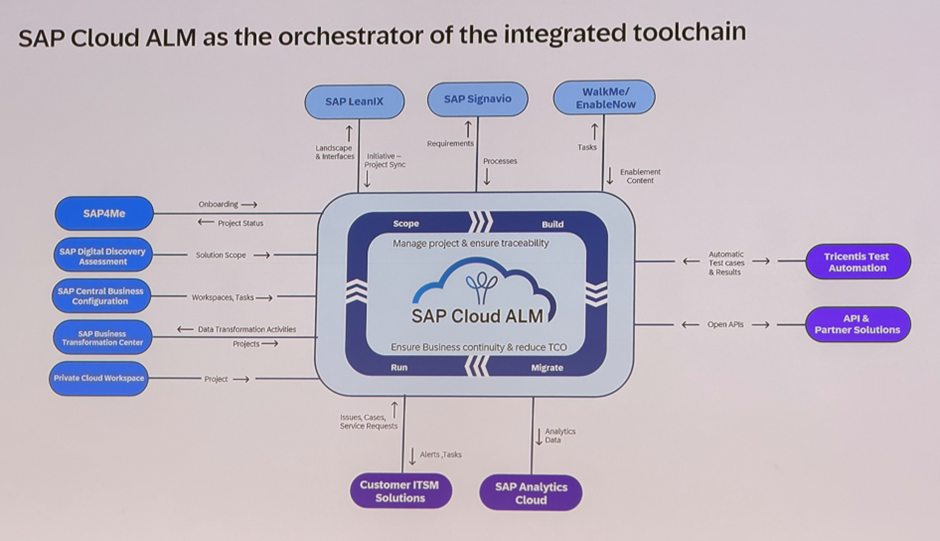
SAP positions Cloud ALM as the core of an integrated toolchain from scoping to operations.
Not as an additional tool, but as the unifying layer between strategy, execution, and stability.
(Foto: SAP Cloud ALM – Orchestrator of the integrated toolchain)
The slides in Darmstadt impressively demonstrated how closely Cloud ALM is now integrated with the entire SAP landscape:
SAP4Me provides status and onboarding data
Central Business Configuration defines structures and tasks
Signavio adds process context
Tricentis Test Automation enhances quality assurance
and partner solutions are integrated via open APIs
This creates a landscape where project, operations, and quality don’t exist side by side, but work together. Cloud ALM doesn’t just manage tasks, it orchestrates dependencies and ensures traceability across the entire lifecycle.
The direction is clear: moving away from isolated rollouts toward an orchestrated way of working which is then structured, integrated, and traceable.
Clean Core as Prerequisite
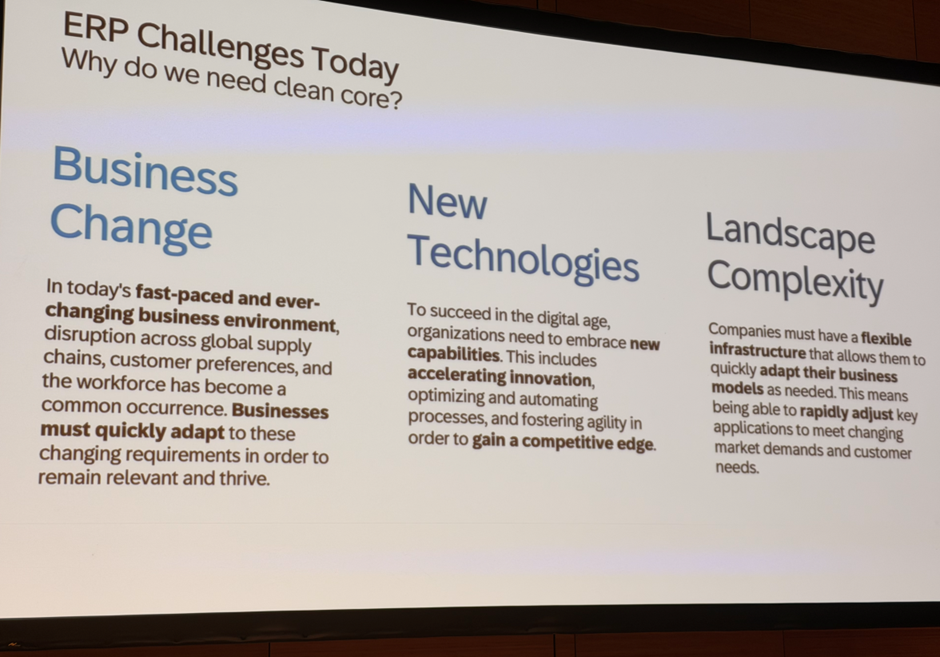
Clean Core was one of the central topics of the summit. Not as a question of architecture, but as a response to three concrete challenges:
Business Change
Companies operate in an environment that is constantly changing, driven by new customer demands, supply chains, and work models.
Only those who keep their systems flexible and close to standard can respond to these changes without having to start from scratch each time.
New Technologies
Innovation today happens in short cycles.
To benefit from this, systems must remain open to new technologies, whether for automation, integration or the usage of AI.
A clean core is the prerequisite for adopting these innovations safely and quickly.
Landscape Complexity
The more systems, interfaces, and variants are involved, the greater the dependency becomes.
Clean Core reduces this complexity by simplifying structures and making changes manageable.
At the same time, Clean Core is the foundation for becoming Public (!) Cloud ready in the long term.
Because standardization and a clear extension logic are prerequisites for adopting future operating models without having to migrate again.
(Foto: Clean Core Slide / „ERP Challenges Today“)
Change and Deployment Management Matures
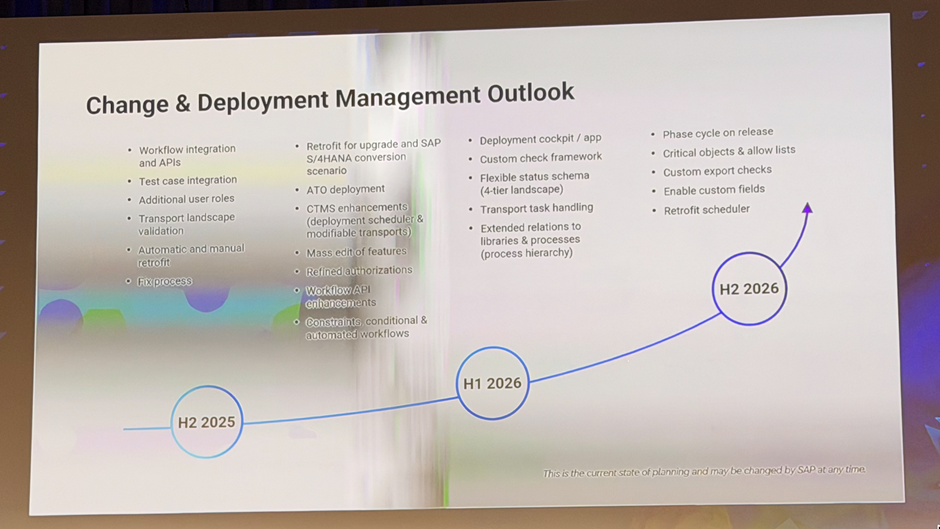
CDM in Cloud ALM is evolving rapidly, not in theory, but along a clear roadmap.
By H2 2026, the solution is expected to be on par with Solution Manager. Both functionally and conceptually.
(Foto: Change & Deployment Management Outlook)
The scope is already expanding significantly:
New roles and APIs, test case integration, transport landscape validation, and automatic retrofit are laying the foundation for end-to-end processes.
In 2025, scenarios for S/4HANA conversion, mass edit of features and ATO deployment will follow, making CDM relevant for complex customer landscapes.
In 2026, the features that have so far set Solution Manager apart will follow:
Deployment Cockpit, Custom Check Framework, flexible four-system landscapes, more granular authorizations, and extended process relationships.
This will make Cloud ALM a tool in change management that combines governance, automation, and transparency.
But the same applies here:
Technical maturity is only part of the equation. Real value is only created when companies adapt their processes, roles, and approval workflows to this new logic and its possibilities.
AI as a Tool – Not a Promise
AI was also present in Darmstadt, but less as hype and more as a clearly defined development path.
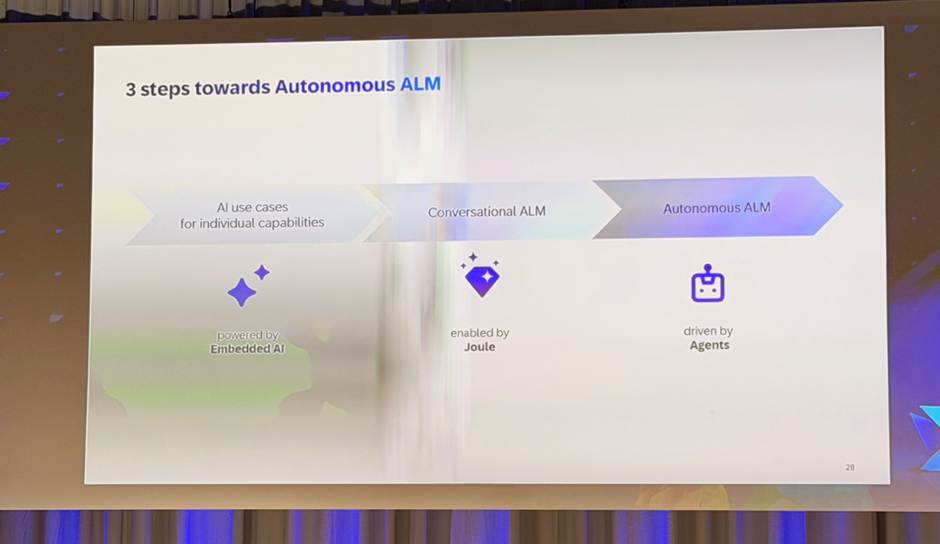
SAP outlines the path in three stages:
Embedded AI – specific use cases within individual functions: automatic anomaly detection, ticket analysis, or test suggestions.
They provide immediate relief to teams and create transparency in day-to-day operations.
Conversational ALM – enabled by Joule.
This enables dialogue with the system: queries, analyses, and controls in natural language.
The goal: less navigation, more understanding.
Autonomous ALM – driven by agents.
In this phase, intelligent assistants independently take over recurring tasks – based on rules, context, and experience.
Human responsibility remains, but it shifts from doing to deciding.
(Foto: 3 Steps towards Autonomous ALM)
This makes it clear: Autonomous ALM is not a leap, but a transition. Step by step, from analysis to assistance, from assistance to autonomy.
Our Conclusion
The ALM Summit 2025 was not a future congress, but a reality check.
The platform is here. The features are here. What matters now is usage – consistent, integrated, and traceable.
Those who truly want to understand Cloud ALM must live it. With clear methodology, governance, and responsibility.
Because value is not created through deployment, but through application.
SAP Cloud ALM continues to evolve with frequent updates, bringing new capabilities that make daily work more efficient, transparent, and easier to manage. The latest set of enhancements delivered in week 34 introduces features that simplify administration, strengthen project execution, and provide greater operational insights.
We’ve taken a closer look at the updates and selected the ones we believe add the most value. From streamlining issues and action handling, to improving scoping in digital blueprints, to extending monitoring with new KPIs, these enhancements offer practical improvements for administrators, project managers, consultants, and operations teams alike.
Services – Issues and Actions Management
The latest updates in Issues and Actions Management focus on making task handling more efficient, transparent, and user-friendly. Whether it’s managing supporting documentation, reassigning multiple items at once, or quickly finding the right assignee, these improvements save time and reduce friction in daily project work.
A readable display of all uploaded documents for issues and standalone actions
With the latest update, all uploaded, or newly attached documents are now displayed in a structured, readable tabular format. This small but impactful change improves visibility and makes it much easier for project managers, consultants, and teams to access, review, and verify the supporting information tied to each issue or action.
The result is a clearer, more transparent workflow, ensuring that supporting documentation is never overlooked and can be used more effectively in reviews, audits, or handovers.
TL;DR:
Documents uploaded to issues or actions are now displayed in a user-friendly table, improving visibility and traceability.
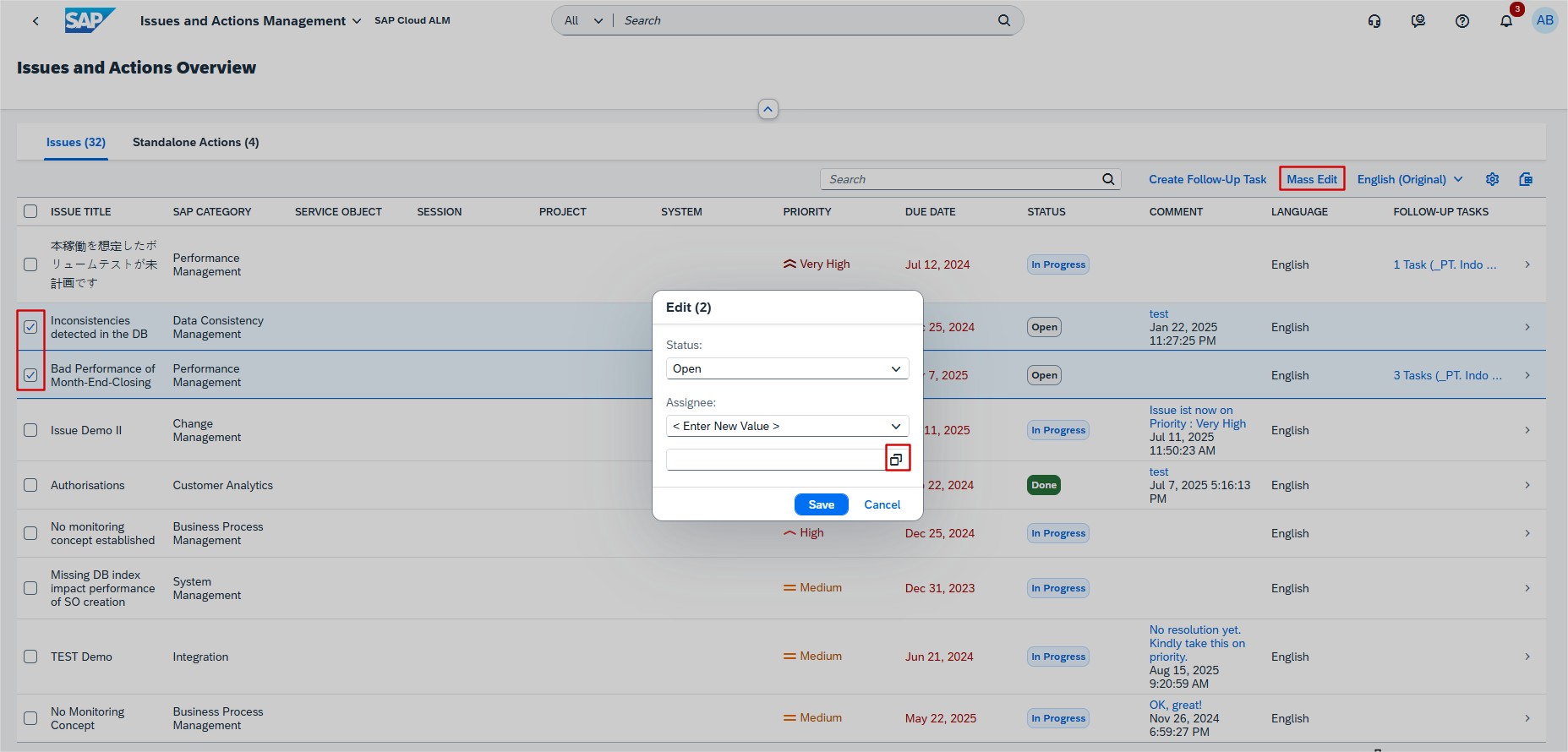
Update the assignee of multiple issues and standalone actions in one go
Reassigning multiple issues or actions has traditionally been a time-intensive, repetitive task, requiring updates one by one. For large projects with frequent ownership changes, this quickly became a bottleneck for keeping responsibility aligned and workloads balanced.
The new feature allows administrators, and team leads to update the assignee of multiple issues and standalone actions at once, directly from the Issues and Actions Overview page. This streamlined workflow saves valuable time, reduces administrative effort, and helps teams stay agile when responsibilities shift.
By simplifying the reassignment process, this enhancement also minimizes the risk of missed updates, ensuring that ownership remains consistent across the project.
TL;DR:
Update the assignee for multiple issues and actions in one go, saving time and keeping responsibilities aligned.
Search for Assignee with auto-suggestions and value help
Assigning or reassigning tasks is one of the most common actions in Issues and Actions Management. However, manually searching for users could slow down workflows, particularly in larger organizations with many potential assignees.
The new auto-suggestion and value help functionality on the Issue Details and Action Details pages significantly improves this process. Users can now quickly search by name or value, receive smart suggestions, and easily assign or override the current assignee with the right person.
This enhancement not only speeds up day-to-day work but also reduces errors when assigning tasks, ensuring that the right responsibilities are always matched to the right team members.
TL;DR:
Smart assignee search with auto-suggestions makes it faster and easier to assign or reassign issues and actions.
SAP Business Transformation Center – Scoping
The recent enhancements in the SAP Business Transformation Center focus on improving scoping clarity and flexibility within digital blueprints. By offering better visibility of active solution patterns and enabling selective scoping through organizational slices, these updates make it easier for project teams to design migration strategies that are both efficient and transparent.
Active solution patterns list
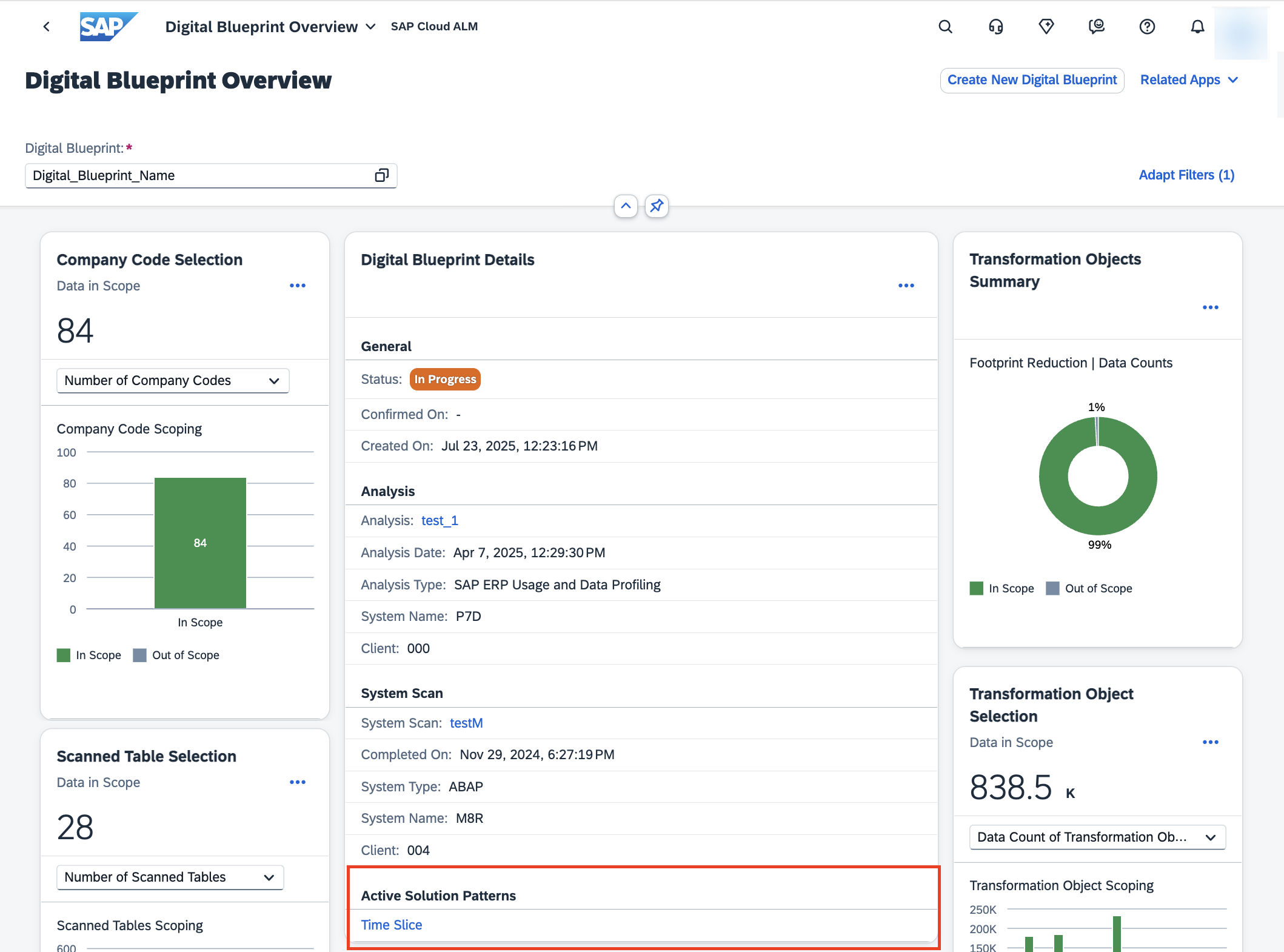
You can now view a list of all active solution patterns directly in the Digital Blueprint Overview app. Until now, project teams had to rely on memory or manual documentation to keep track of which solution patterns were applied to a blueprint. With this update, the system provides a clear, consolidated view of all active patterns in one place.
This improvement increases transparency and alignment across teams. Project managers can quickly verify the scope, consultants can validate whether the right patterns are applied, and stakeholders gain a reliable overview of the blueprint setup without additional effort. By eliminating guesswork and improving visibility, it becomes easier to manage scope and avoid inconsistencies during transformation.
TL;DR:
View all active solution patterns for a digital blueprint in one place to improve scope transparency, alignment, and decision-making.
New org slice solution pattern
A new org slice solution pattern is now available, enabling users to selectively exclude data for specific organizational units (such as company codes) from the scope of a digital blueprint. This feature is particularly valuable in complex landscapes, where only certain parts of the organization need to be migrated at a given time.
By narrowing the migration scope to targeted organizational units, project teams can reduce system size and complexity, which often results in faster processing, fewer errors, and more efficient transformation activities. For example, if a company is migrating only selected regions or business units in a phased approach, the org slice pattern ensures that the blueprint reflects only the relevant data, avoiding unnecessary workload.
TL;DR:
Apply org slices to exclude specific organizational units from a digital blueprint, reducing complexity and supporting more efficient, targeted migrations.
Operations – Business Process Monitoring
The latest enhancements in Business Process Monitoring continue to strengthen data quality and operational reliability across end-to-end processes. By introducing targeted KPIs, SAP Cloud ALM helps organizations identify gaps, detect risks early, and ensure smooth execution of business-critical activities such as payroll. These improvements support HR, operations, and project teams in maintaining accuracy, compliance, and employee satisfaction.
New KPI for SAP SuccessFactors Payroll
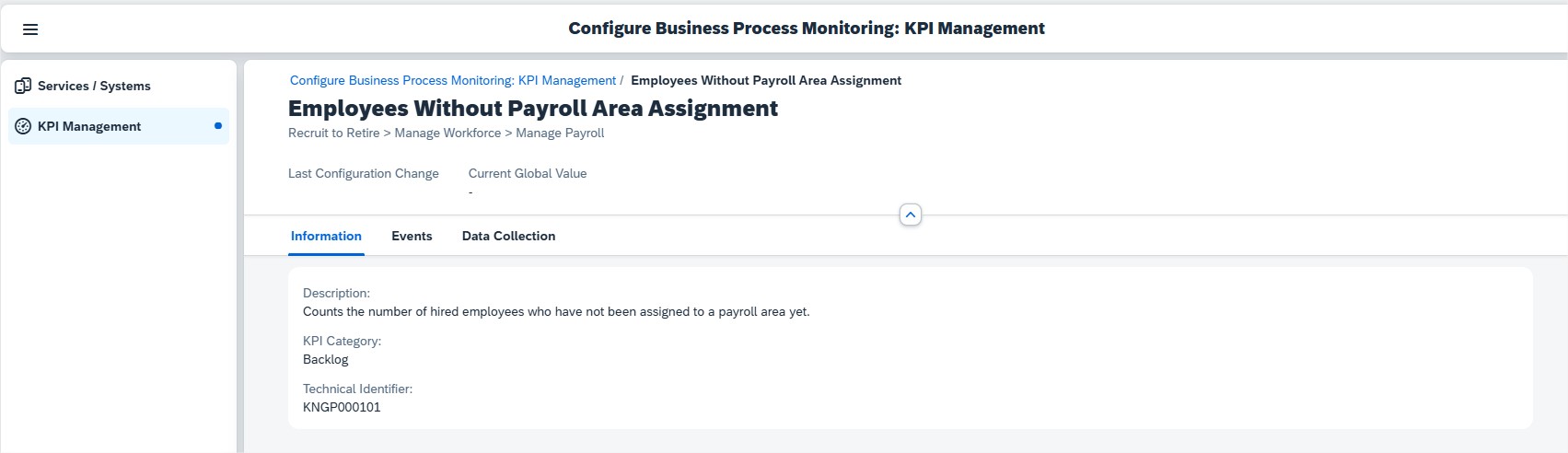
A new KPI, Employees Without Payroll Area Assignment, is now available within Business Process Monitoring for SAP SuccessFactors Payroll, under the end-to-end process Recruit to Retire.
This KPI is activated automatically once the setup steps for SAP SuccessFactors Payroll are completed and the relevant data is being generated. It helps organizations identify employees who have not been assigned to a payroll area, a critical prerequisite for correct payroll processing.
This update is especially valuable for HR and payroll teams who need to ensure accurate master data maintenance, project managers overseeing HR process reliability, and operations teams monitoring overall data quality in end-to-end HR processes. By detecting missing assignments early, payroll errors can be avoided and employee satisfaction maintained.
TL;DR:
The new KPI “Employees Without Payroll Area Assignment” in SAP SuccessFactors Payroll helps ensure data quality and prevents payroll disruptions by identifying unassigned employees early.
Implementation – Test Plans, Cross-Project Overview, Guided Implementation
Recent updates in the Implementation area add new flexibility for managing test plans, better visibility of process structures, and more control over documentation and project timelines. These enhancements make it easier for teams to organize, track, and align implementation activities across projects.
Tag assignment for Test Plans
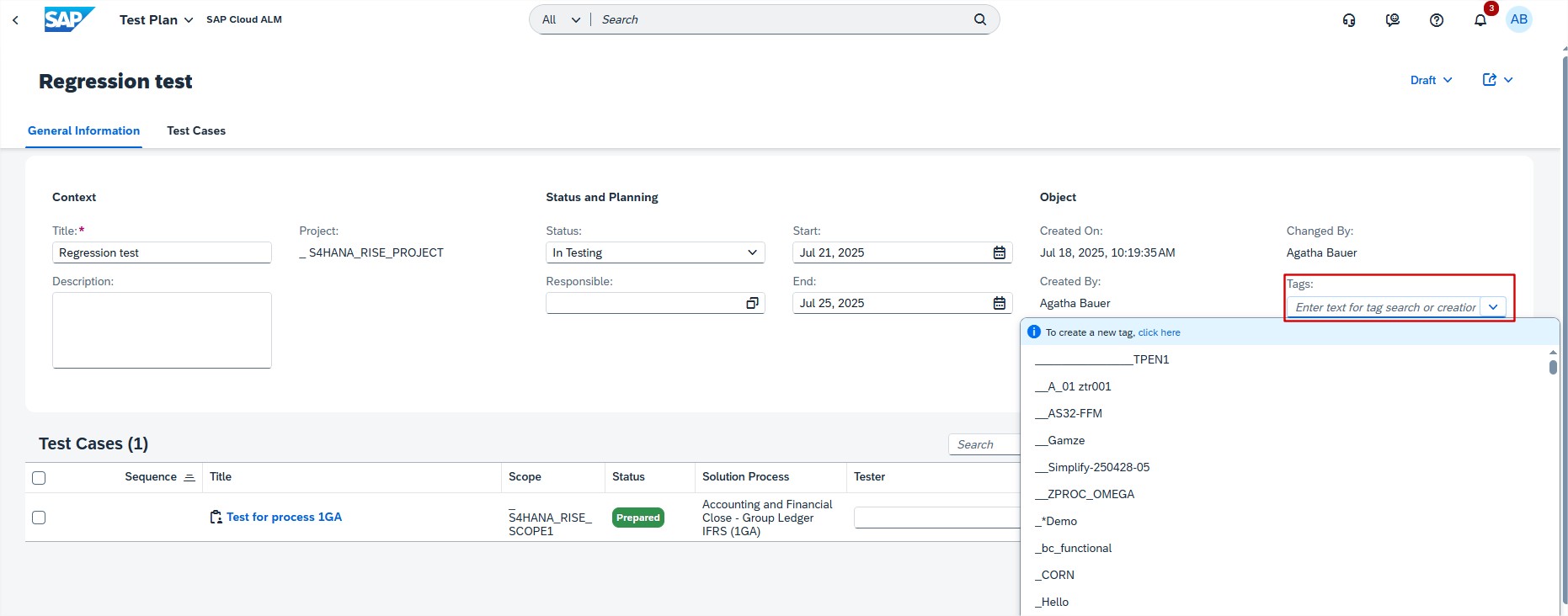
A new tagging capability has been introduced in the Test Plans app. Tags allow users to assign meaningful labels to test plans, grouping them based on business area, scope, priority, or any other project-specific attribute. This makes it far easier to search for and filter test plans in the list view, particularly in large projects with extensive testing scope.
An additional benefit is that tags are automatically removed when no longer in use, ensuring that the system remains free from clutter or outdated entries. For project managers and test leads, this means they can quickly identify related test plans, keep test cycles organized, and support structured test execution.
At blue.works, we complement capabilities with dedicated Test & Quality services – from operative test management and test automation to tailored test strategies, concepts, and tool support. Explore our Test & Quality offering to see how we can help strengthen testing in your projects.
TL;DR:
Assign tags to test plans to organize them by common attributes and simplify searching, filtering, and reporting.
Process Hierarchy Assignments – Interface column enhancement
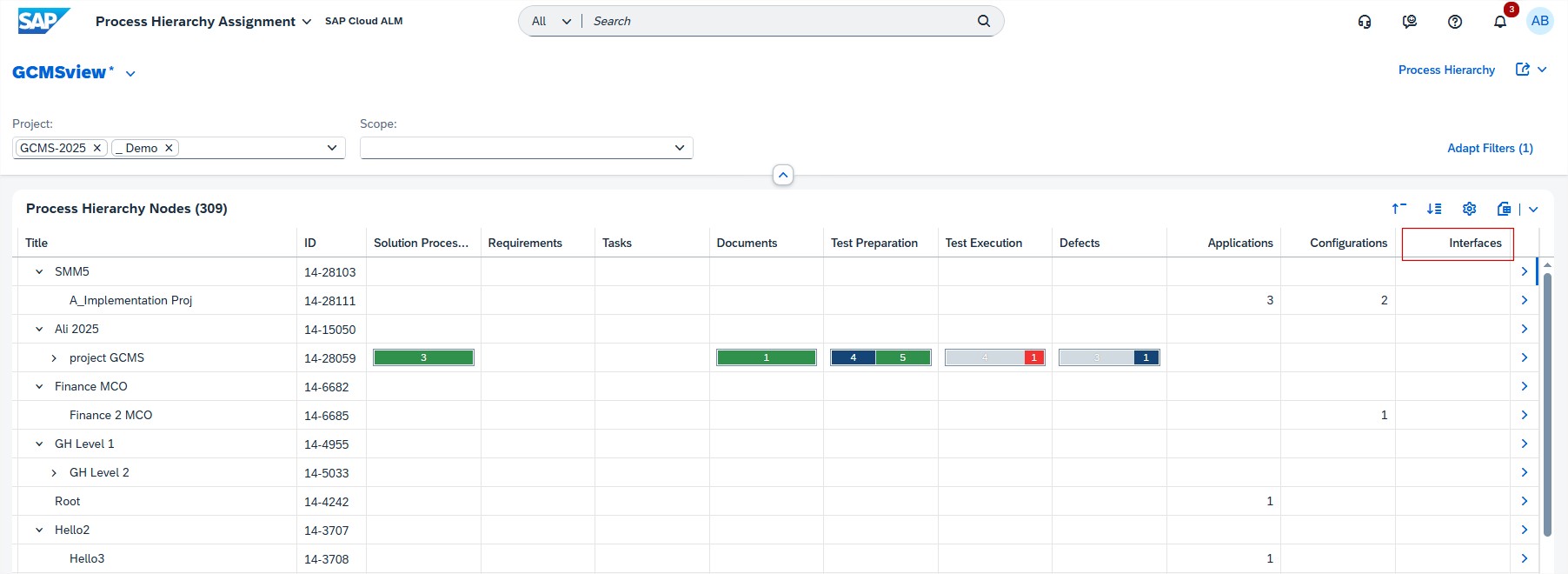
The Process Hierarchy Assignments app has been enhanced with a new column for library type Interfaces. This addition improves transparency in how interfaces are mapped to hierarchy nodes. Until now, managing and validating interface dependencies often required switching between views or relying on external documentation.
With this enhancement, teams can directly see which interfaces are tied to specific hierarchy elements, helping ensure all dependencies are accounted for during project scoping and design. This is particularly valuable in integration-heavy projects, where overlooking a single interface could cause downstream issues.
TL;DR:
The new Interfaces column in Process Hierarchy Assignments provides clearer visibility of interface dependencies, making scoping and validation easier.
Edit sprints and milestones in detail view
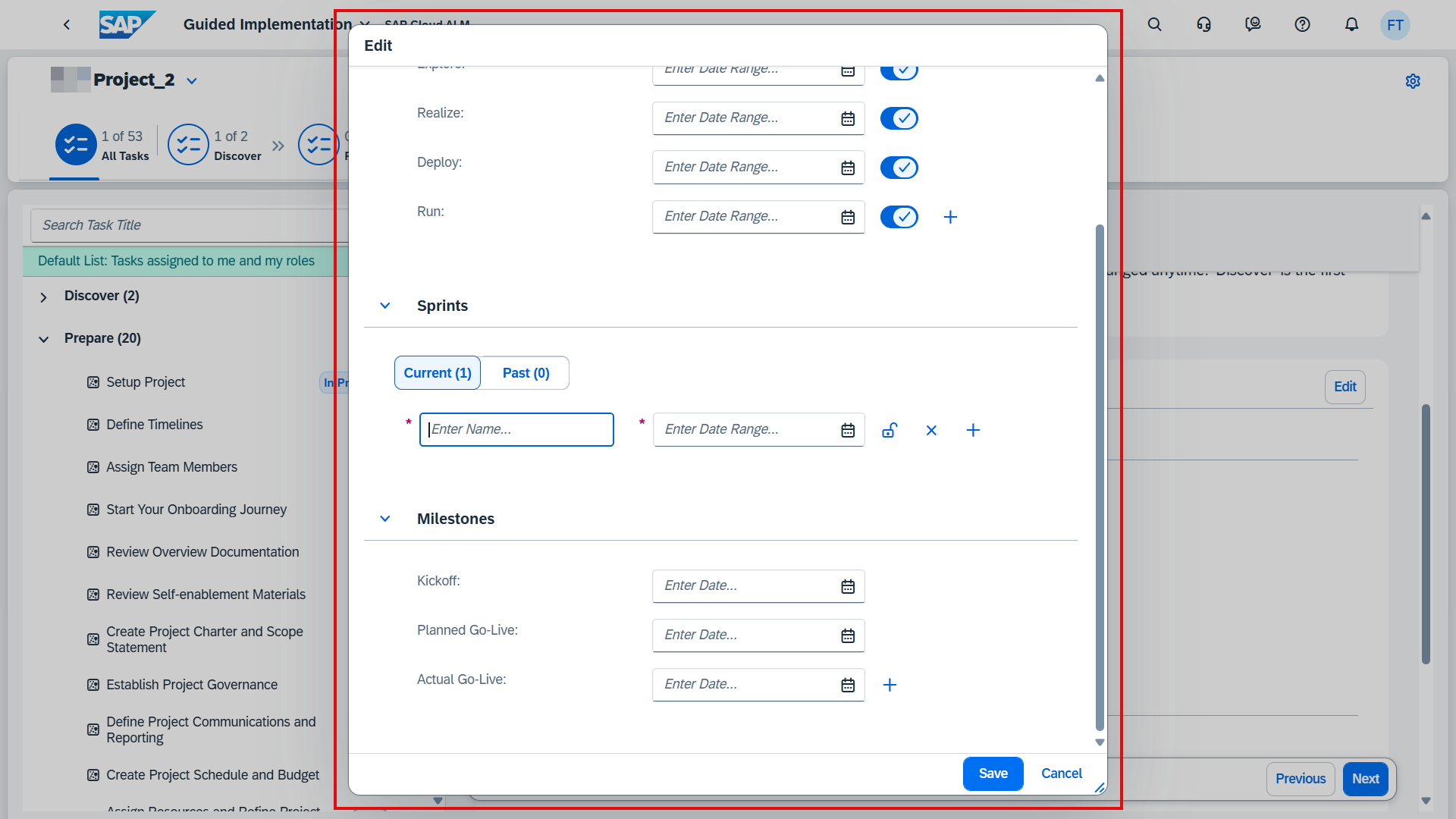
Project timelines often need adjustment as priorities shift and new requirements emerge. To support this, the Guided Implementation task Define Timelines now allows sprints and milestones to be edited directly in the detail view.
This enhancement streamlines planning by letting teams make timeline adjustments where they are already working, without navigating back to separate configuration areas. For project leads and scrum masters, it enables more agile project management, making it easier to keep plans aligned with reality while maintaining a clear structure of tasks and milestones.
TL;DR:
Sprints and milestones can now be edited directly in the Define Timelines task, giving teams greater flexibility and agility in project planning.
Administration – Landscape Management
The Administration area of SAP Cloud ALM is steadily evolving to give system administrators and user managers more streamlined tools to handle configuration, access, and governance. Recent enhancements aim to reduce complexity, improve efficiency, and respond directly to community feedback shared through SAP Influence requests.
Central Clean-Up for use case configuration
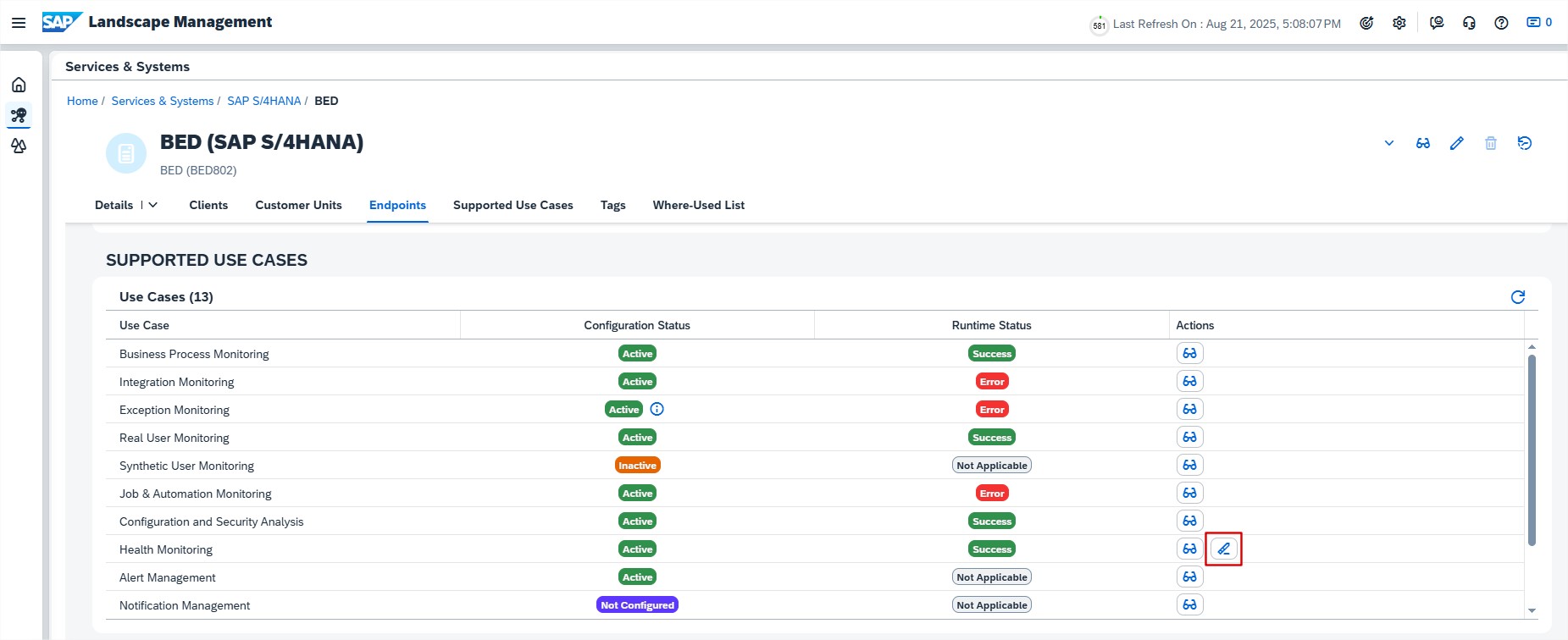
One of the more time-consuming challenges administrators have faced in SAP Cloud ALM is the complexity of de-registering use cases. Until now, removing configurations for a particular use case required following a multi-step, fragmented procedure across different monitoring applications – such as Health Monitoring, Business Process Monitoring, Integration & Exception Monitoring, or Job & Automation Monitoring. Each application had its own steps, making the process not only lengthy but also prone to oversight or errors.
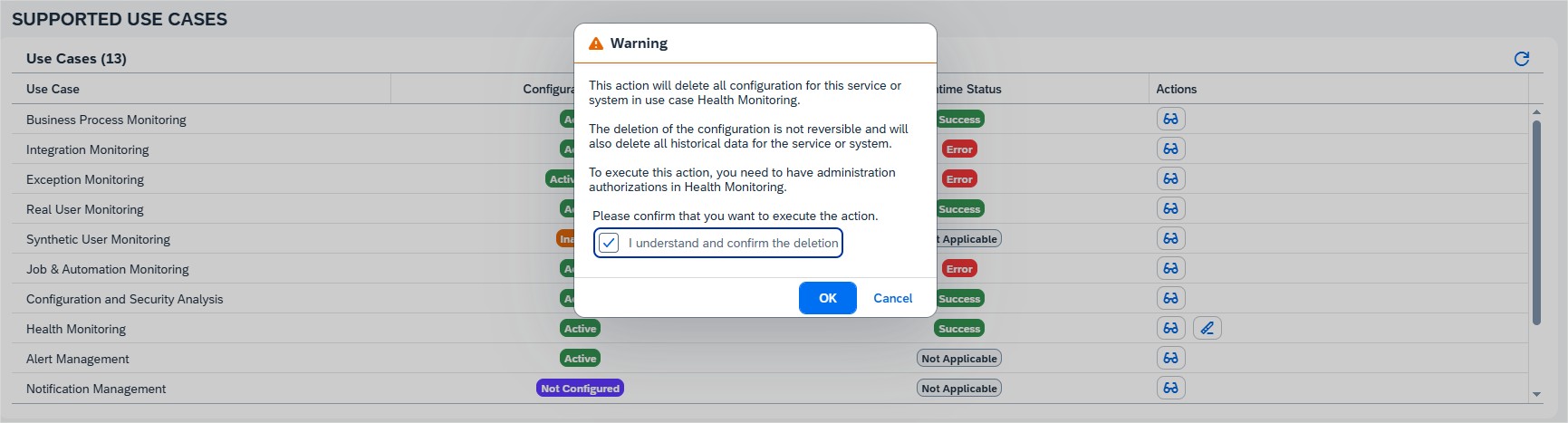
With the new Central Clean-Up capability in Landscape Management, SAP has taken the first step toward addressing this pain point. This feature allows administrators to centrally clean up configurations for supported use cases, starting with Health Monitoring. This marks a significant improvement in reducing complexity, saving time, and ensuring a more consistent and user-friendly de-registration workflow.
This capability also reflects feedback from the SAP community. In fact, we initiated an SAP Influence request to simplify and unify the de-registration process, which has now materialized into this first step toward the streamlined clean-up we envisioned. You can follow the progress of our request and add your support here.
The benefits are clear: administrators gain efficiency by avoiding repetitive steps across multiple applications, the risk of errors is lowered through a standardized approach, and overall productivity is improved by freeing up time for more value-adding tasks.
While currently available only for Health Monitoring, this enhancement is the first real step toward a unified, streamlined clean-up process across all monitoring use cases. At blue.works, we’re looking forward to seeing this capability extended to other areas like Job & Automation Monitoring, Integration & Exception Monitoring, and Business Process Monitoring in future updates – making system clean-up faster, simpler, and far less error-prone.
TL;DR:
Central Clean-Up in Landscape Management simplifies the de-registration of Health Monitoring configurations, delivering time savings, reduced complexity, and more consistency. It also marks progress on the SAP Influence request for a unified de-registration process – paving the way for similar improvements across other monitoring use cases.
SAP Cloud ALM continues to advance with every update, bringing more features and a smoother user experience. This update highlights the most recent enhancements from the past two weeks – focused on improving usability and expanding capabilities to help streamline daily operations and support more efficient landscape management. If you missed the previous post in our update series, you can find it here.
Services
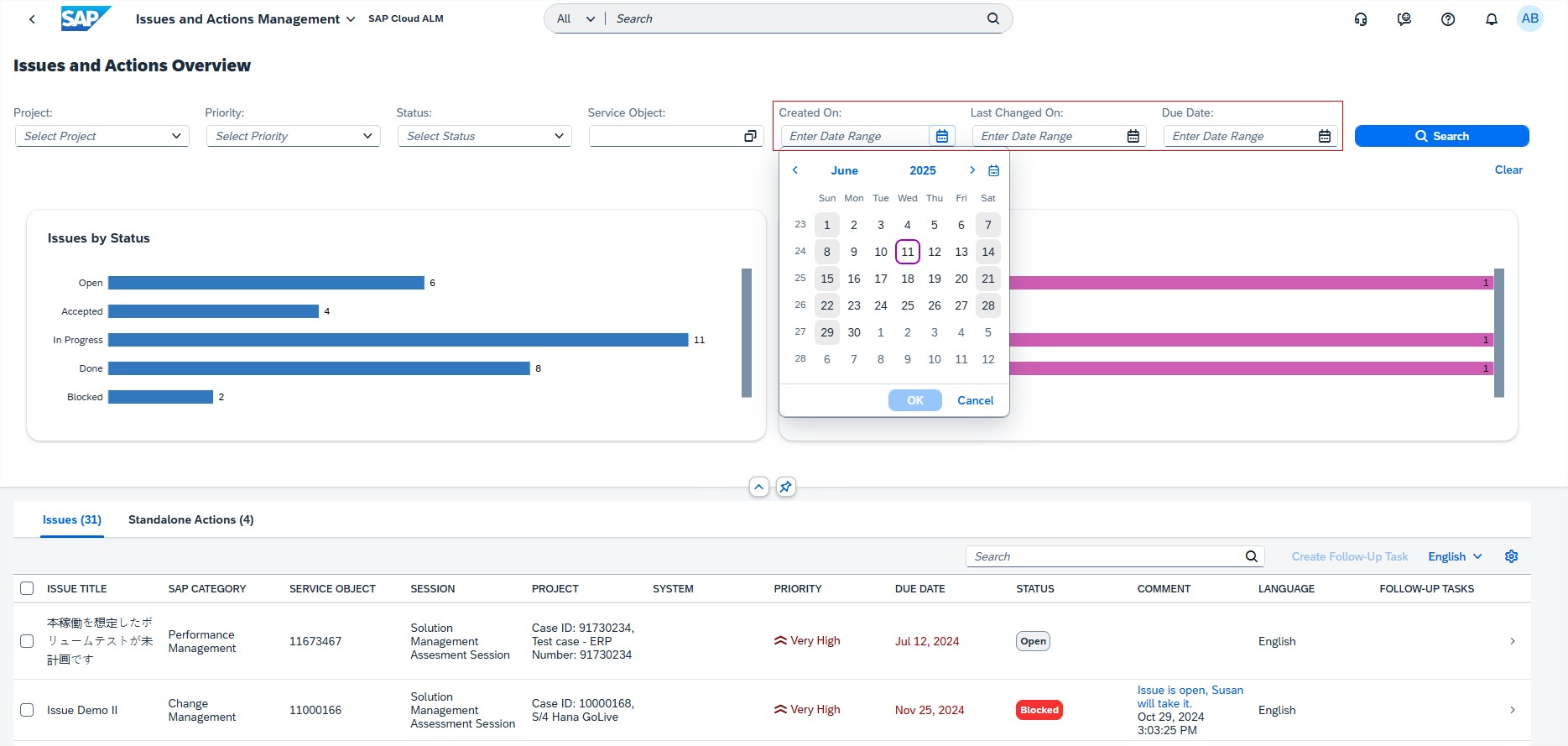
Issues and Actions Management has new date range filters such as Created On, Last Changed On, and Due Date for a refined search of issues and standalone actions on Overview page. These filters help users quickly narrow down results based on key timelines, making it easier to stay organized and focused on what matters most.
Implementation
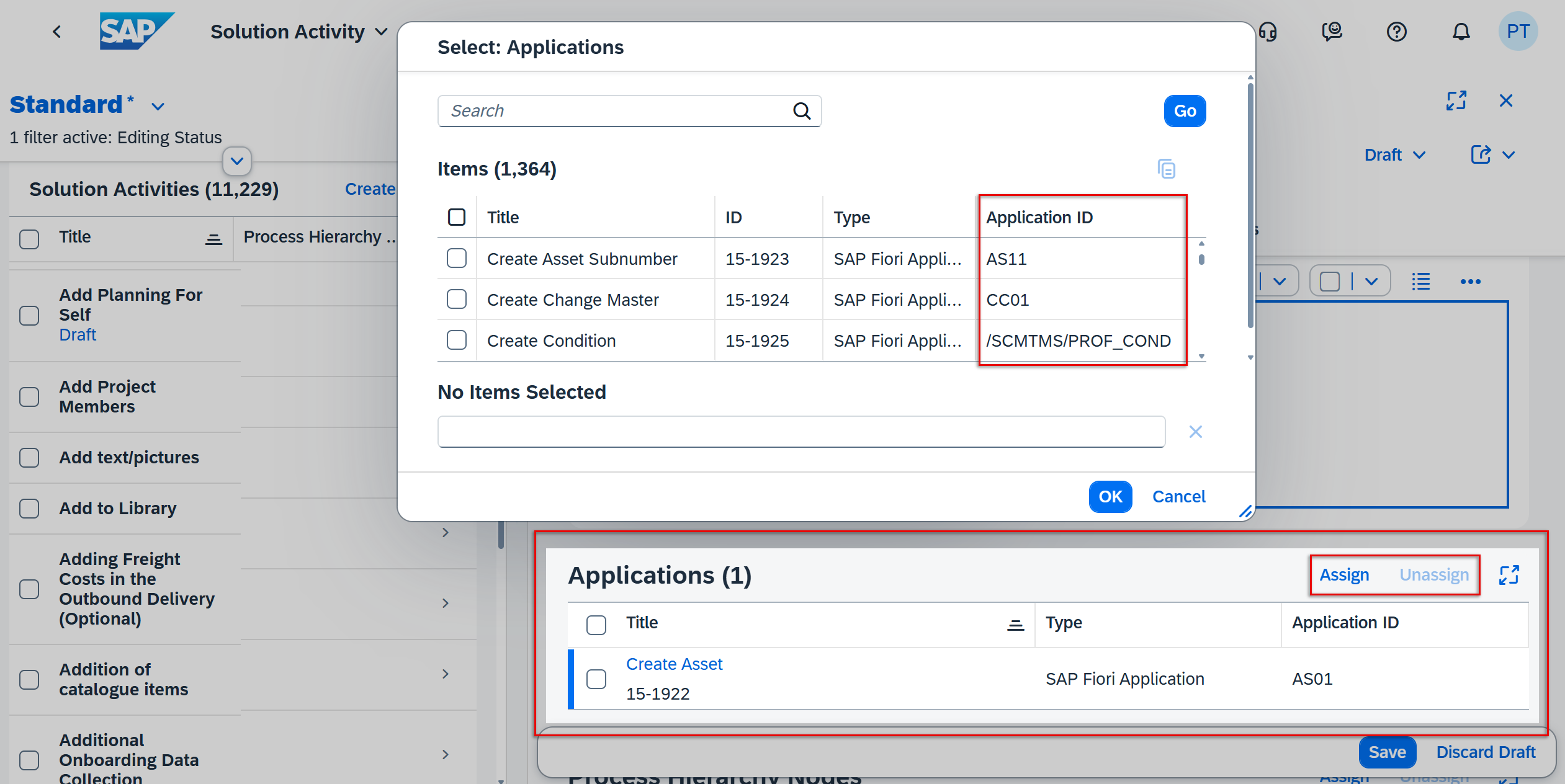
In Process Authoring, users can now see the Application ID of any applications linked to a solution activity in the Solution Activities list. In Edit mode, they can also easily assign or unassign applications directly from this list. As before, the application name remains a clickable link that opens its details in the Libraries app. These updates make managing applications within solution activities faster and more convenient.
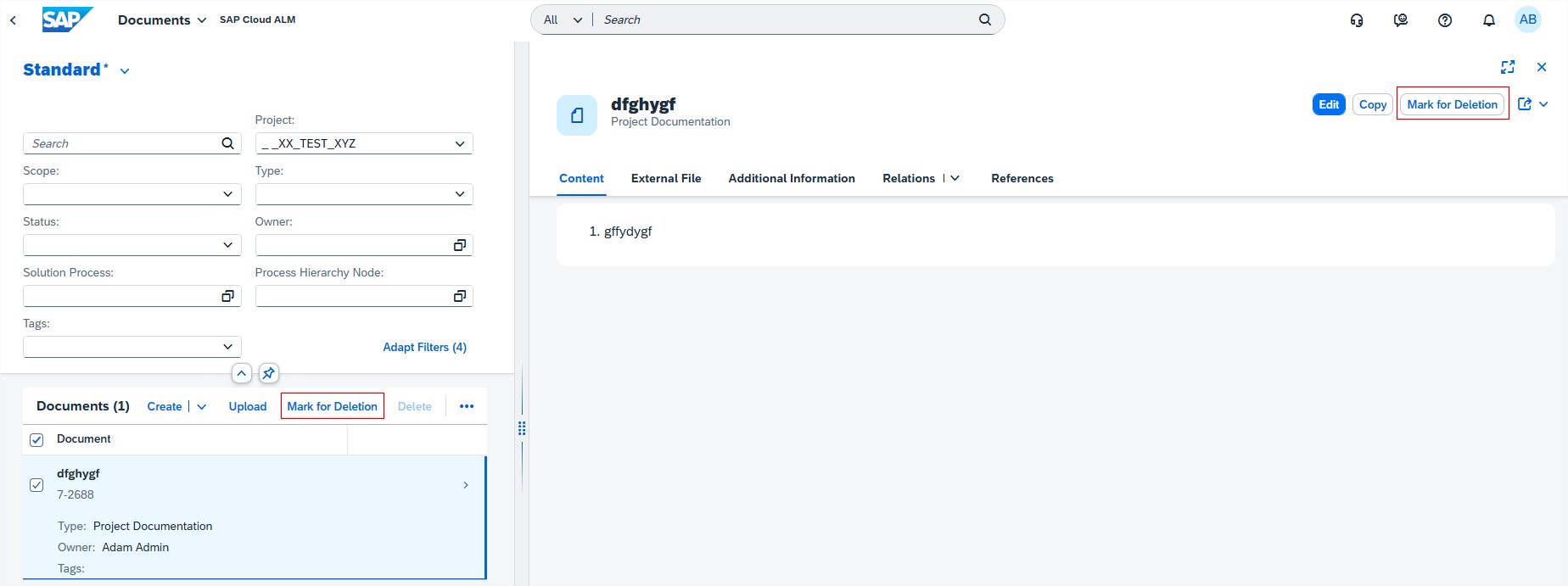
Documents introduced access restrictions for Deleting documents. As of now, only users with the role of Project Lead or Project Administrator can delete documents.
Users with the role Project Member can no longer permanently delete documents, but they can still mark them for deletion. Documents in status Marked for deletion can’t be changed, copied or unassigned (only from other apps can the document be unassigned). To restore a document that is marked for deletion open details view on object page and filter documents that are marked for deletion, open the on needing restoring and choose Restore.
This change helps protect important files and adds more control over document management.
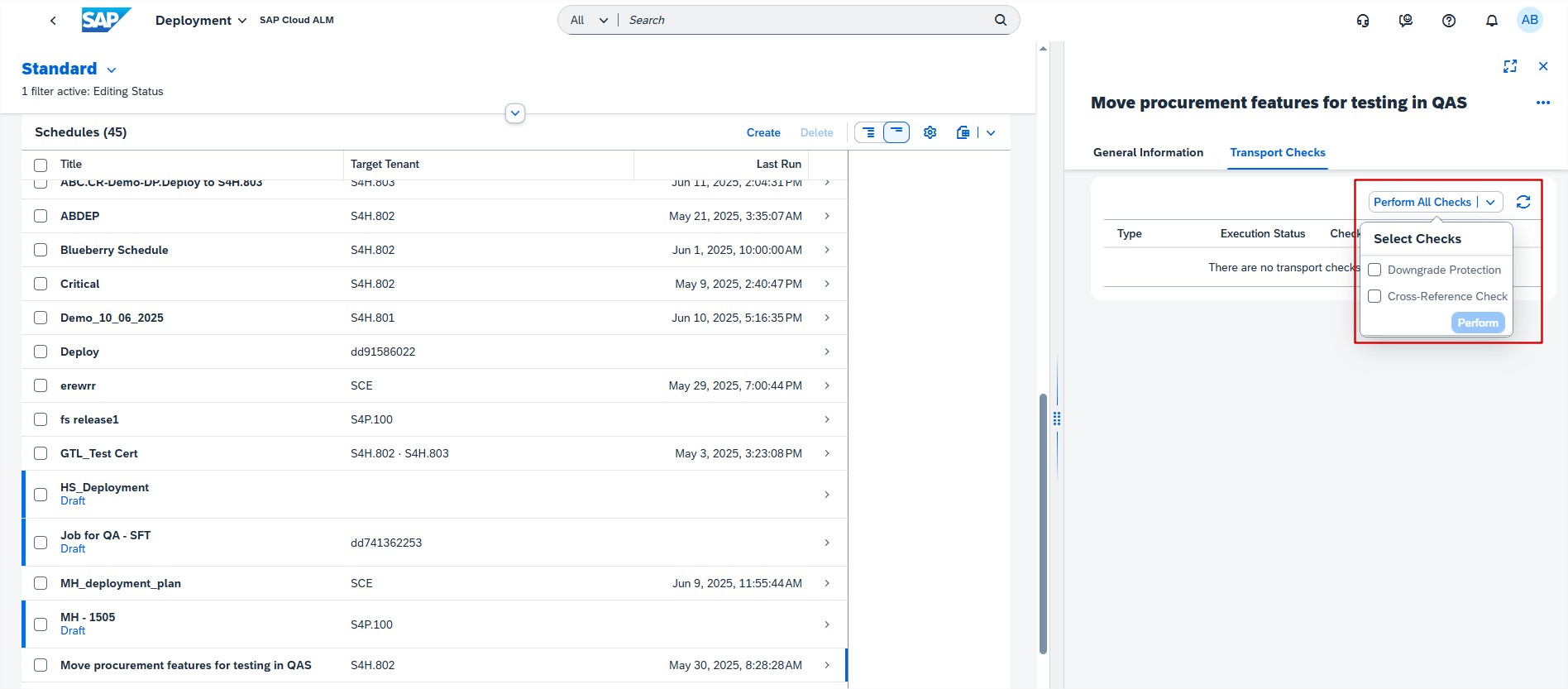
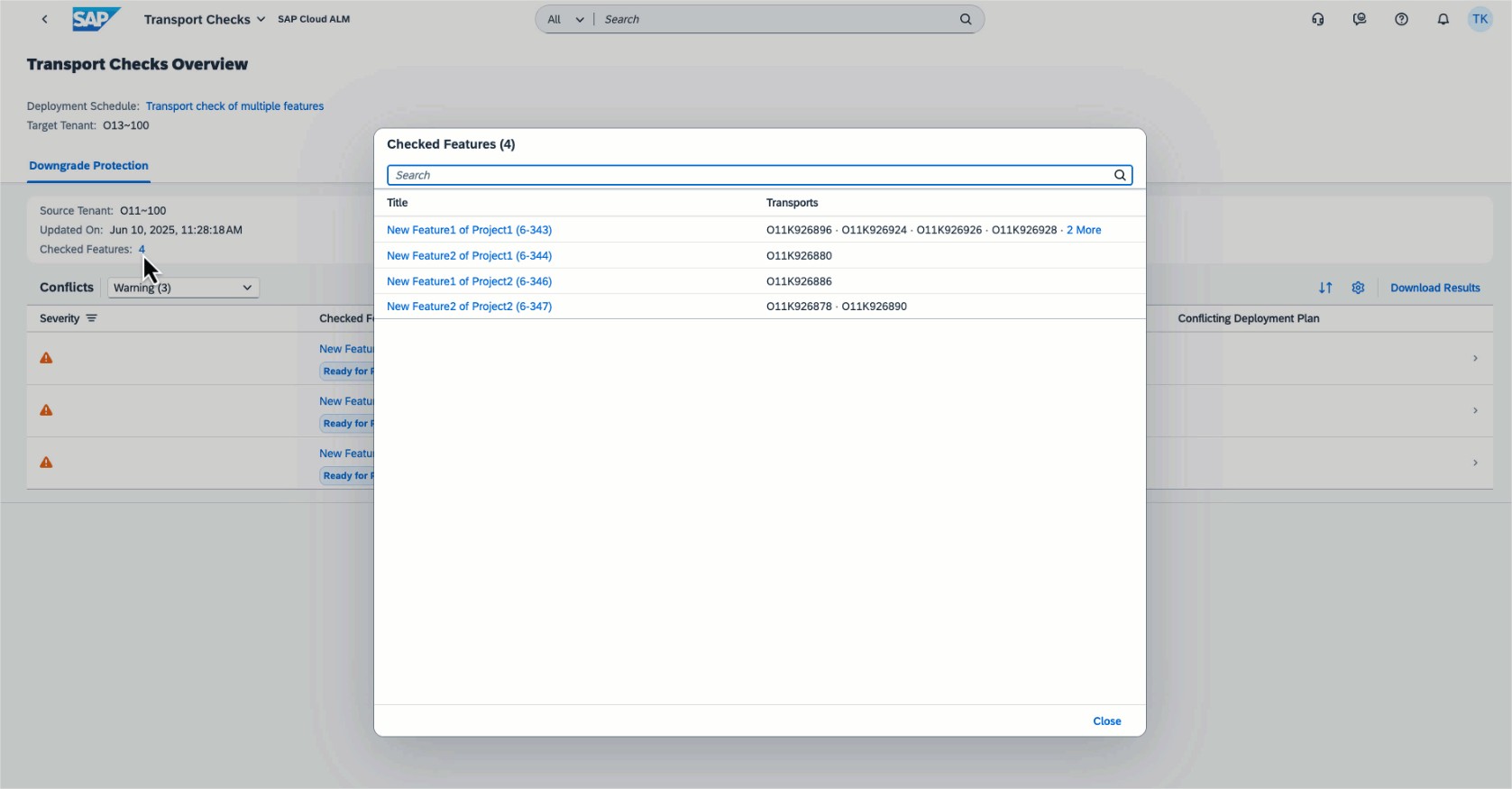
Deployment now allows users to perform Downgrade Protection and Cross-Reference Checks on deployment schedule for a feature bundle. When users perform transport checks, all transports that will be selected for upcoming deployment are checked. Keep in mind that the bundle of transports based on feature selection can change until the deployment is performed. In case the transport checks show a warning or error, make sure to fix the issues before the deployment is performed. These checks ensure smoother, more reliable deployments by catching potential issues early.
In the Transport Checks app, users can see which features and transports with the same target tenant and check type of deployment plan were checked.
Several apps
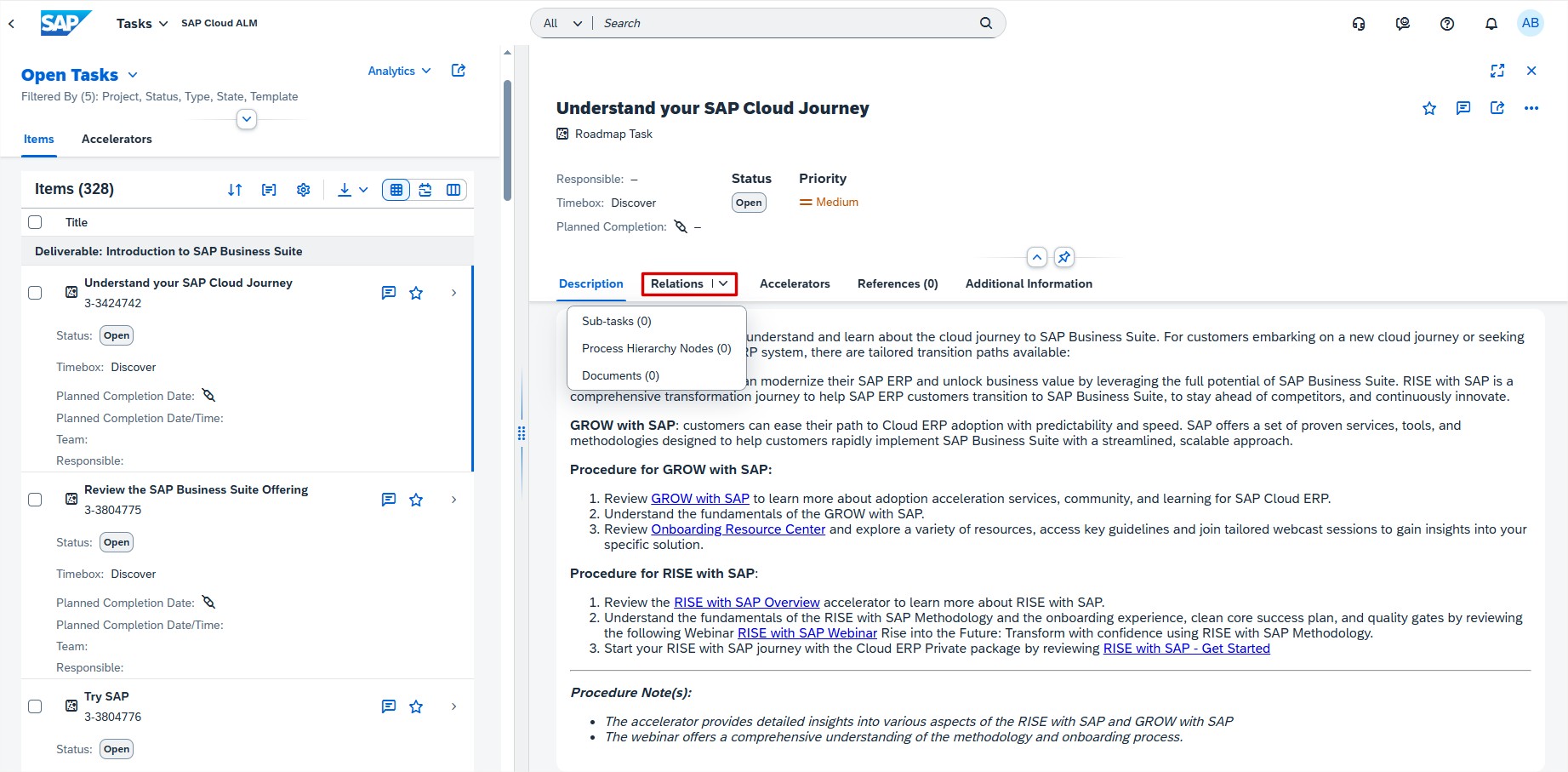
In the Tasks, the Requirements, the Defects, and the Quality Gates app, users can now use the drop-down menu of the new Relations tab to view all relations of an item.
Operations
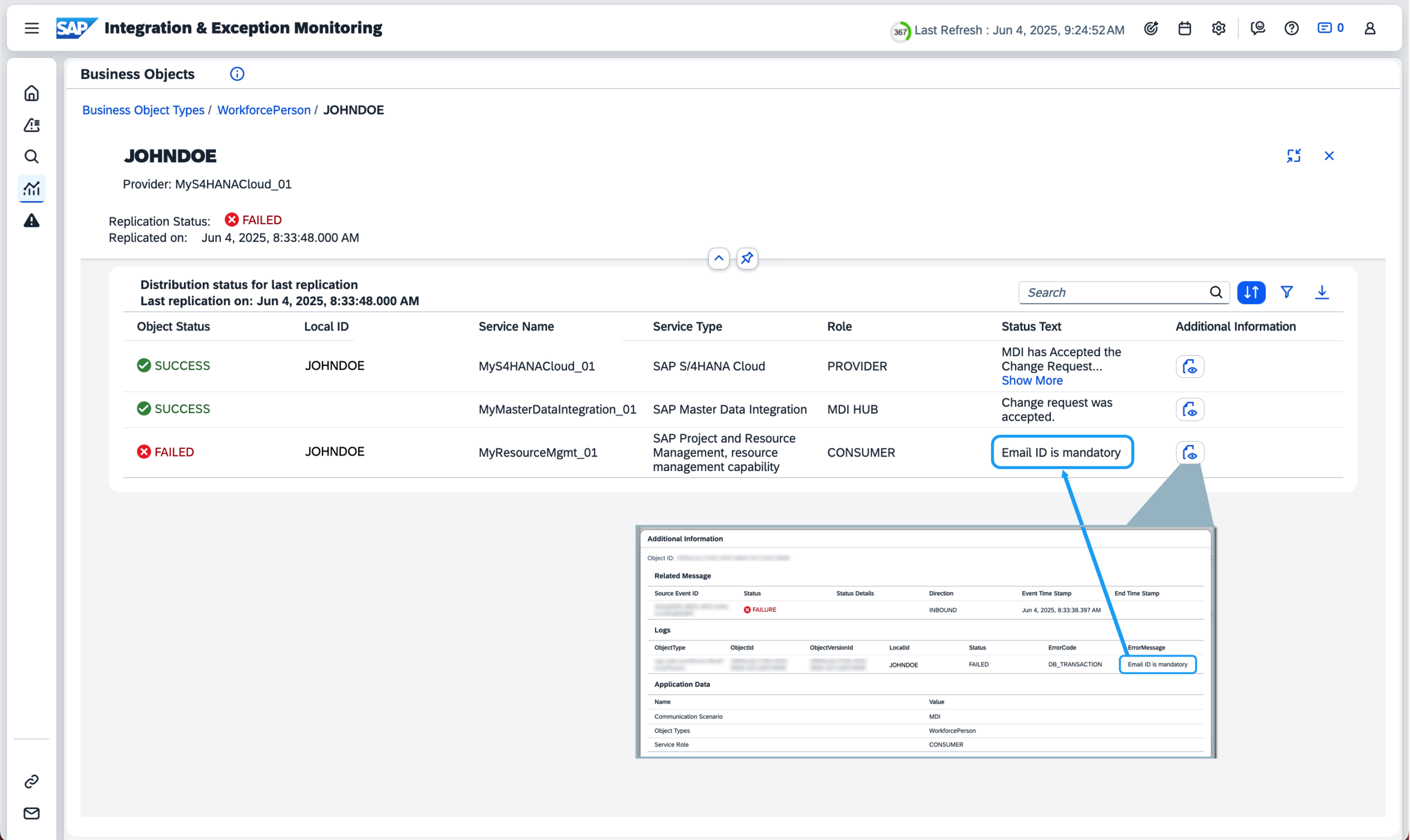
Integration & Exception Monitoring had enhancements made to the Business Objects page. The Status Text column in the Business Objects table now shows success or error messages directly from the application data sent by the managed component, offering more context about each replication instance.
In the Business Object Details pane, the status text from the managed component, whether success or error, is now visible. Meanwhile, in the Business Object view, the most recent or most critical status text related to the replication instance is shown. Previously, only the status from the MDI service within the integration was displayed.
In Job & Automation Monitoring has now a new Context column in Monitoring and Analysis pages displaying additional context information about a job. This information is retrieved from the sap.jam.job_context attribute in Raw Data Inbound Logs API as sent by the data provider.
For example: if an external scheduler sends the sap.jam.job_context attribute as the name of the managed component, this name is displayed in the Context column.
It’s possible to do the following for the Context value:
Filter using the value in Monitoring Filters and Analysis Filters
Use it as an Event Filter parameter.
Context value is displayed for managed components of Unspecific Cloud Service (HTTP) type only.
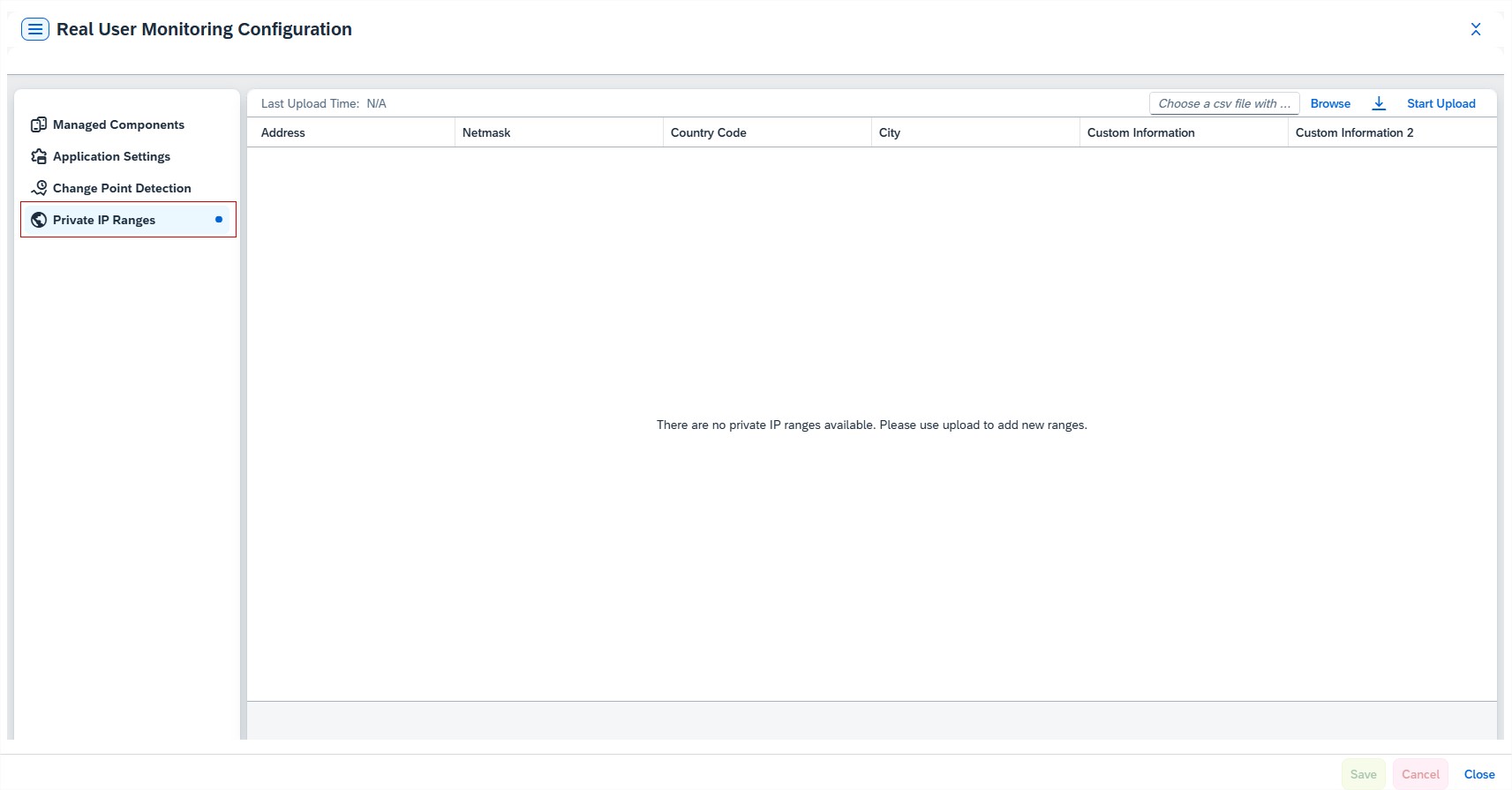
Real User Monitoring introduced a new feature allowing users to upload a CSV file containing their own IP address ranges and associated location details for enhanced configuration. This enables a drilldown capability for private IP addresses in the monitoring UI, providing more detailed insights and control over network monitoring.
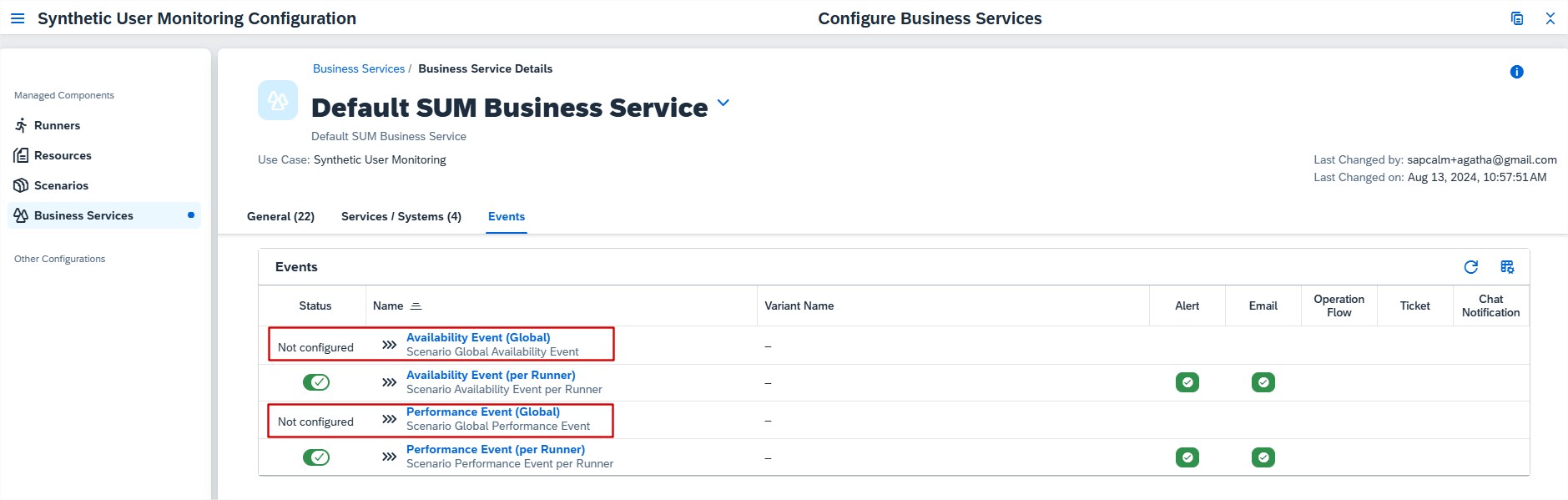
Synthetic User Monitoring now includes new events that can be enabled at the scenario level. These scenario-level alerts notify users when availability or performance issues occur across runners. This helps users quickly spot problems, act faster, and keep systems running smoothly with better visibility into scenario performance.
SAP Cloud ALM keeps evolving, bringing sharper tools and improved workflows to help users better oversee their landscapes. This latest update highlights the impactful enhancements from the past two weeks. With a focus on usability and expanded capabilities, each change is designed to simplify daily tasks and boost overall efficiency. If you missed the previous post in our update series, you can find it here.
Administration
User Management has 2 new updates:
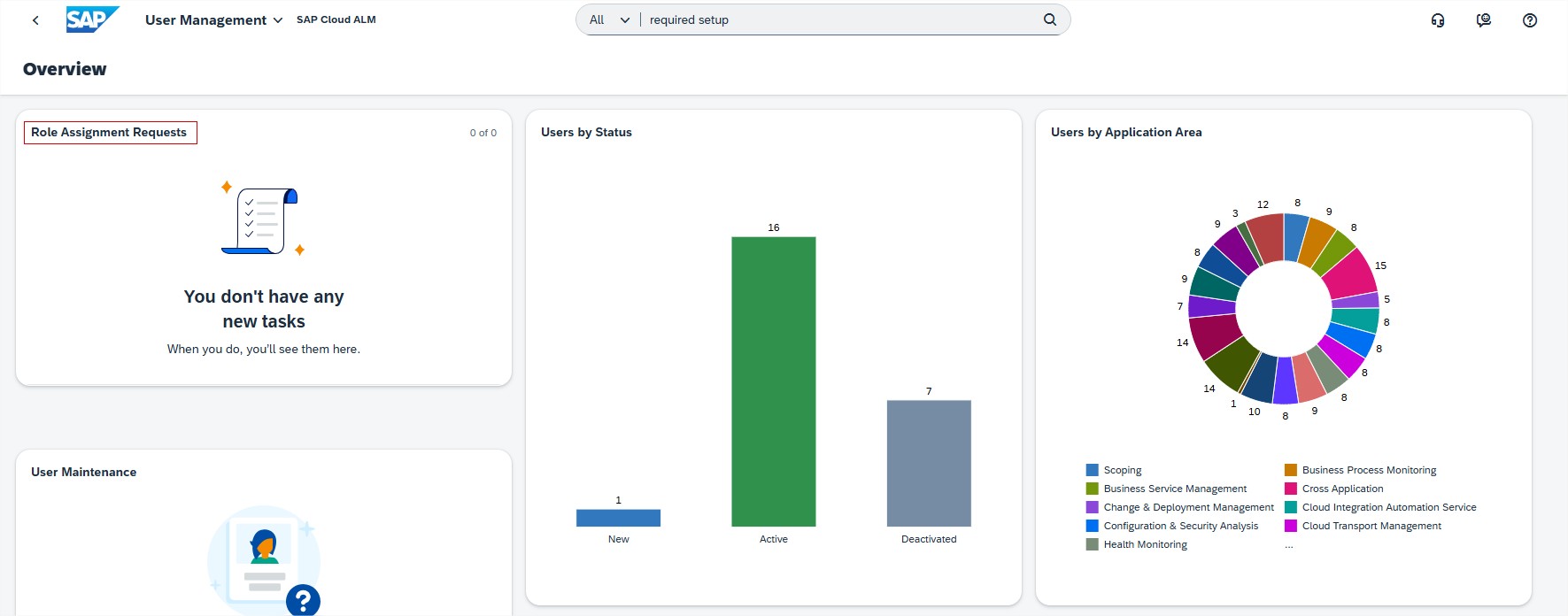
The Approval Requests card has been renamed to Role Assignment Requests.
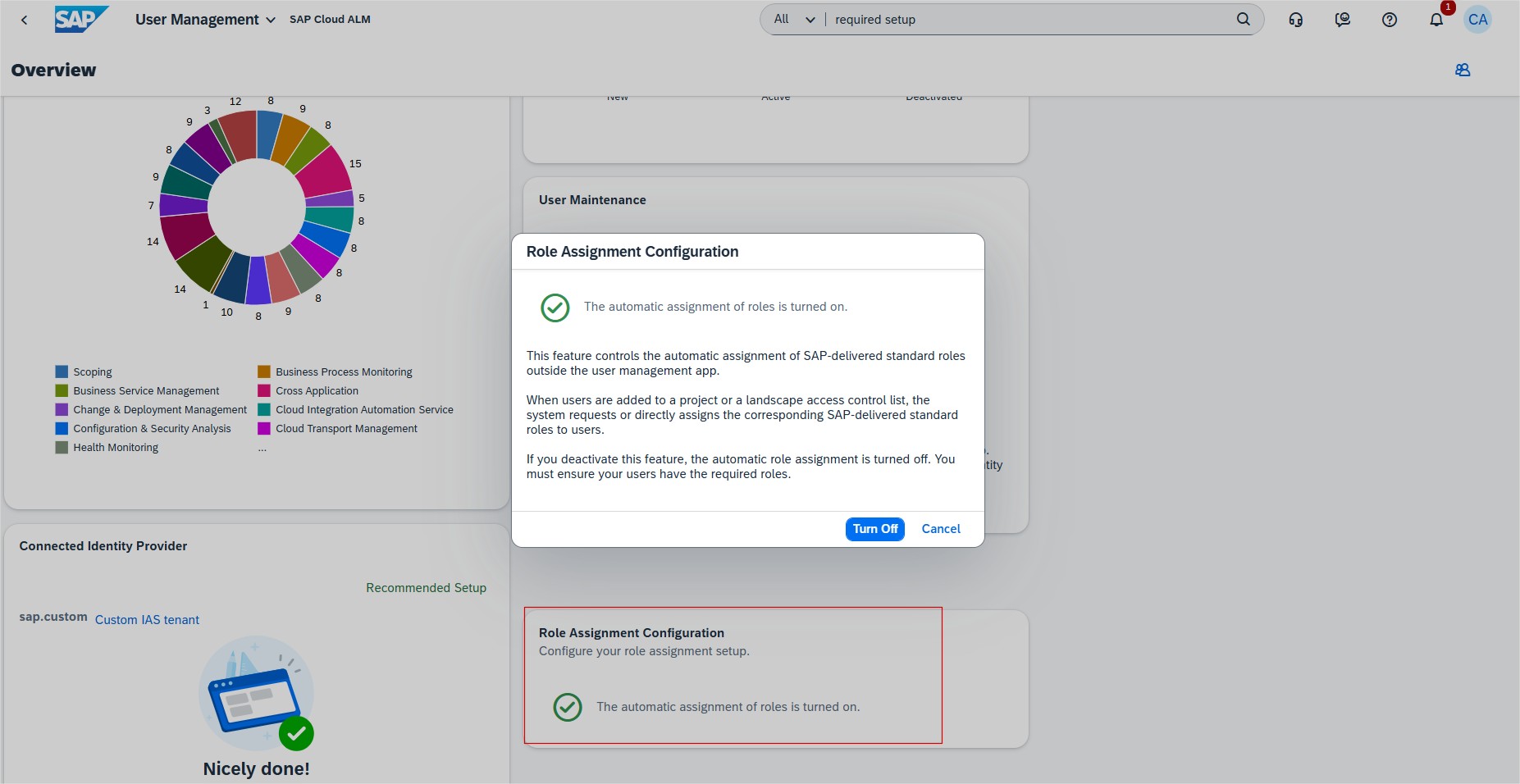
There is also a new card available called Role Assignment Configuration. New card allows user administrators to turn off the automatic assignment of roles in SAP Cloud ALM, providing flexibility to use custom roles instead of SAP-delivered standard roles. This is beneficial for organizations with internal role management systems, ensuring that user authorizations align with their specific requirements.
Activate this feature to turn on the automatic assignment of roles.
Deactivate this feature to turn off the automatic assignment of roles.
Keep in mind that turning off the automatic assignment of roles, all current role assignment requests will be deleted. Also note that user administrators need to take care of the role assignment.
Implementation
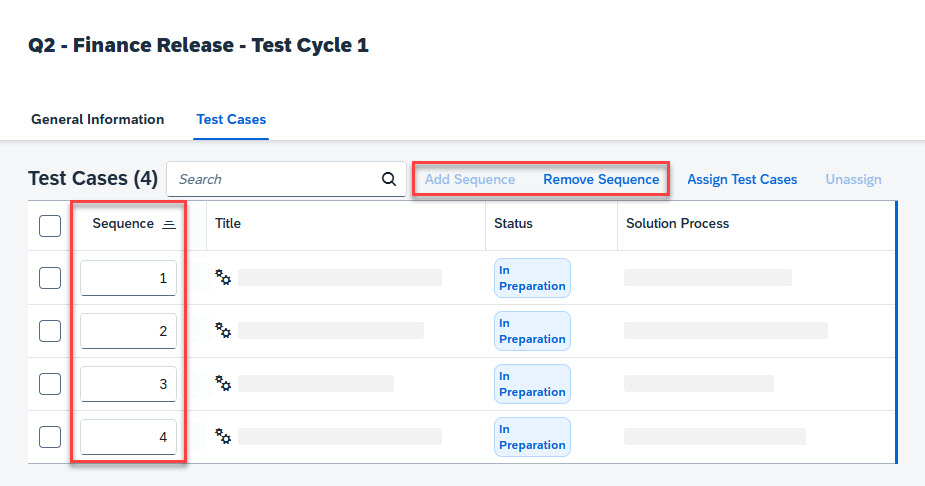
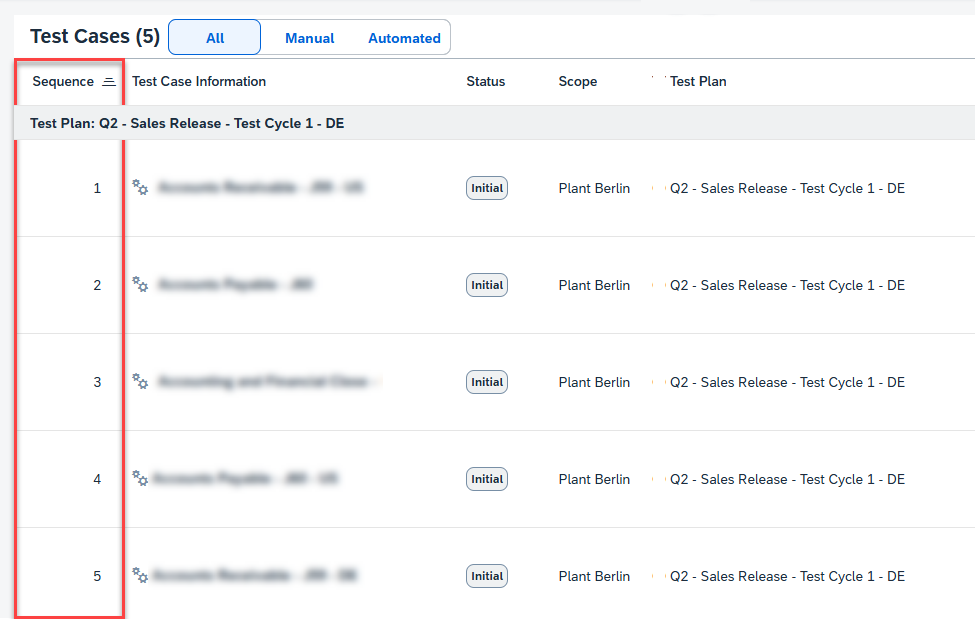
Test Plans introduced Testing Sequence feature which allows Users to define the sequence of test cases within a test plan. The defined sequence determines the order in which the test cases are displayed in the Test Execution app.
To add a sequence to the unordered test case list, choose Add Sequence. Then enter numbers (without decimals) to represent each test case’s position in the sequence.
Test Execution displays now Sequence column showing predefined logical sequence added in Test Plans application.
Processes allows now users to view additional attributes in the solution process viewer for assigned library elements.
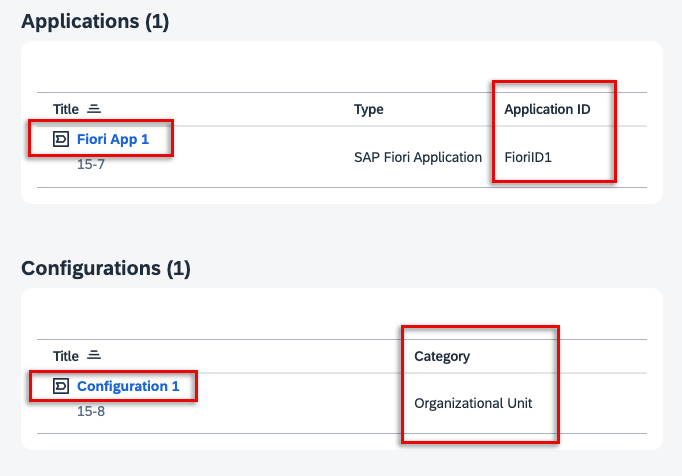
For Applications assigned to solution activities, users can now see the Application ID as well as the Type, Title, technical ID and icon if the assignment was created in the Process Authoring app.
For any Interfaces assigned to solution processes and Configurations assigned to solution processes or activities, a new column shows you the Category of that library.
Clicking the title of the assigned library element allows users to navigate directly to its corresponding entity in the Libraries app. For application assignments that originate from standard content, it’s not possible to navigate directly to the Libraries app as the corresponding application does not exist there.
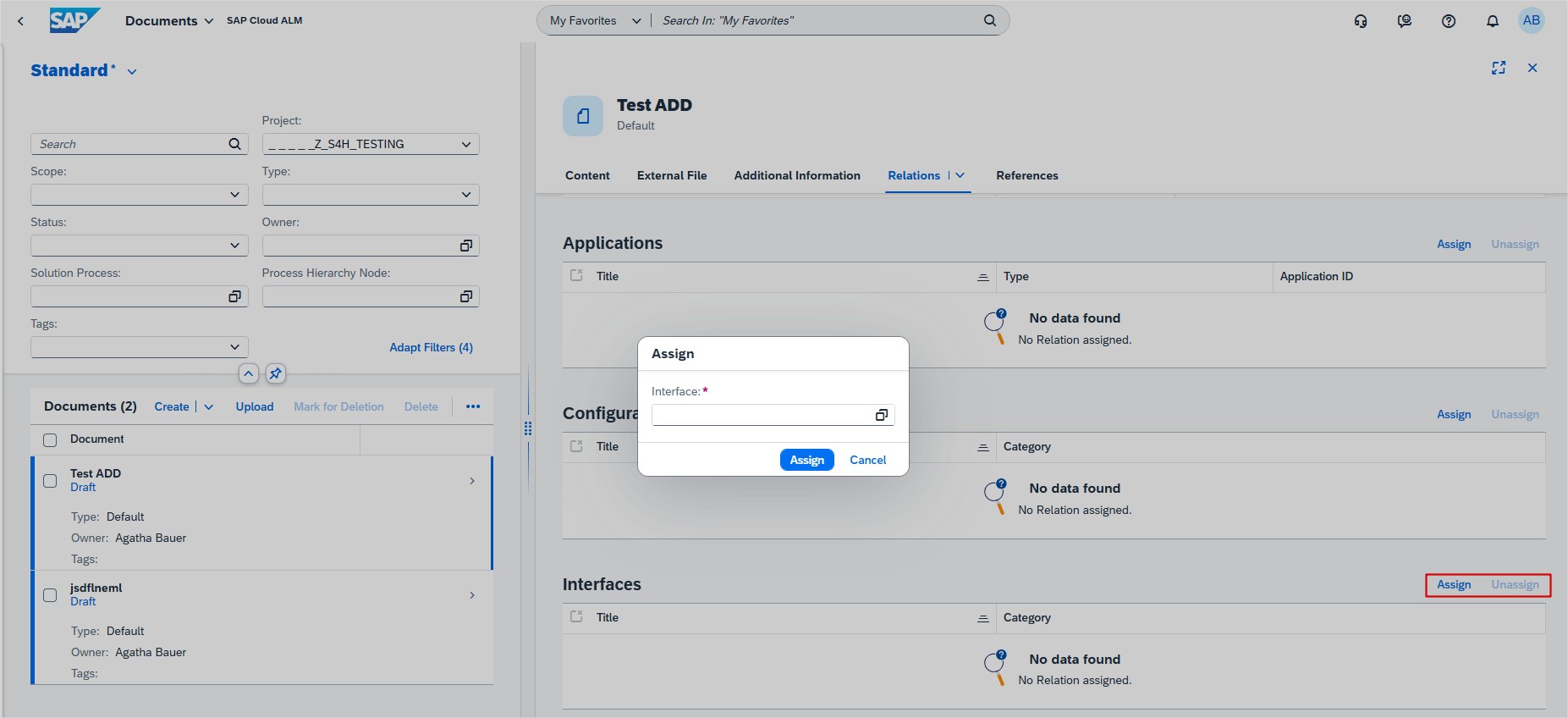
Documents has new interface library relation available. Users can now assign or unassign relations to the interfaces library elements from within the Documents app. Allowing to see the assigned relations listed in the table Interfaces on the object page of a document.
Several apps
SAP has released new how-to videos to help users get more from SAP Cloud ALM:
These quick guides offer practical tips for improving efficiency and managing changes effectively.
Operations
Integration & Exception Monitoring supports now monitoring messages for SAP Sales Cloudand SAP Service Cloud Version 2. Users get a detailed status overview of the incoming and outgoing messages and it’s possible to drill down to single messages to check individual issues and message details.
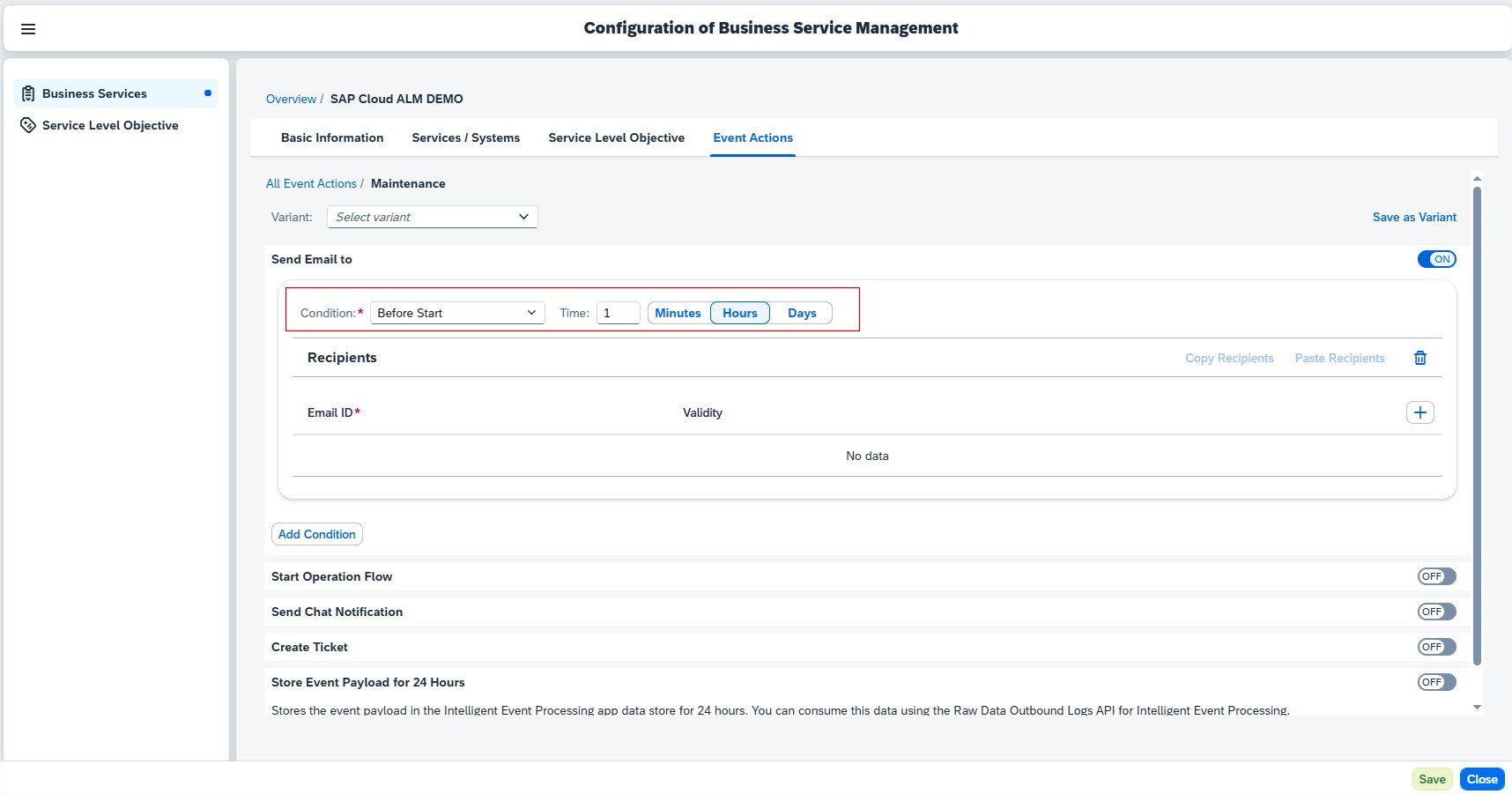
Business Service Management allows now to configure reminders in the form of Event Actions x minutes, hours, or days before the Maintenance event starts. For this, users need to have the Business Service Management Administrator role in application.
For event actions such as email, chat notification, and operation flow, it’s possible to set the Condition to Before Start and enter the Time in the following range:
Minutes: 5 minutes – 44640 minutes
Hours: 1 hour – 744 hours
Days: 1 day – 31 days
Several areas
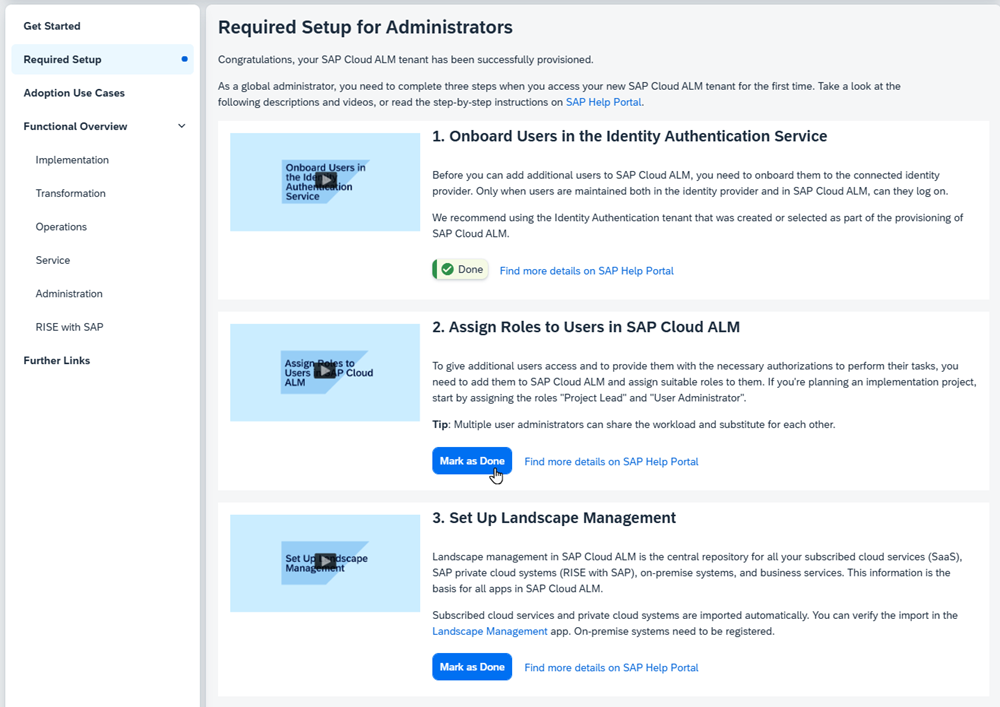
Get to know SAP Cloud ALM, Required Setup section now features helpful videos to guide global administrators through the steps that are necessary to set up SAP Cloud ALM for productive use.
Additionally, it’s possible to indicate which steps have been completed by choosing Mark as Done.
There’s quite a bit of information to explore – feel free to watch the videos, review the descriptions, or follow the step-by-step instructions at your own pace. If anything is unclear or you need assistance, don’t hesitate to reach out – we’re here to help.
SAP Cloud ALM continues to grow with every update, delivering smarter tools and smoother experiences for users managing their landscapes. This update brings users the key enhancements introduced over the past two weeks. From usability improvements to expanded functionality, these changes are all about making day-to-day operations more streamlined and effective.
Services
Issues and Actions Management has 2 new Features available.
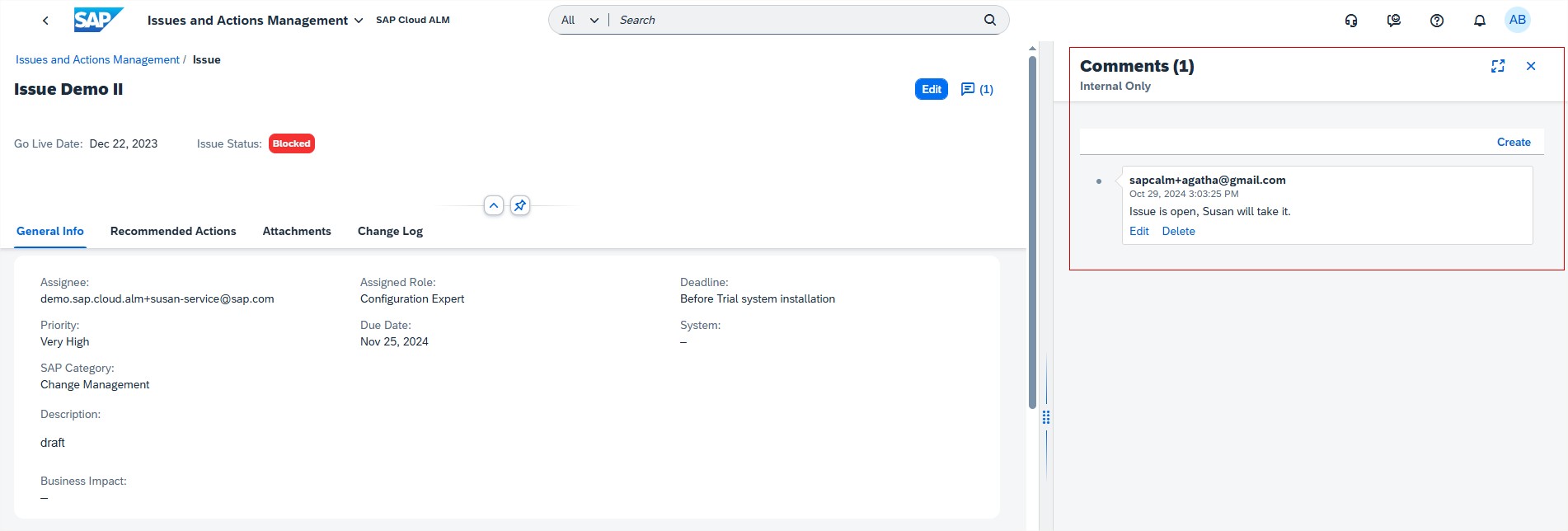
Users can now view the existing comments by default in the Issue/Actions Details page. Earlier, the comments had to be accessed manually using Show/Hide Comments.
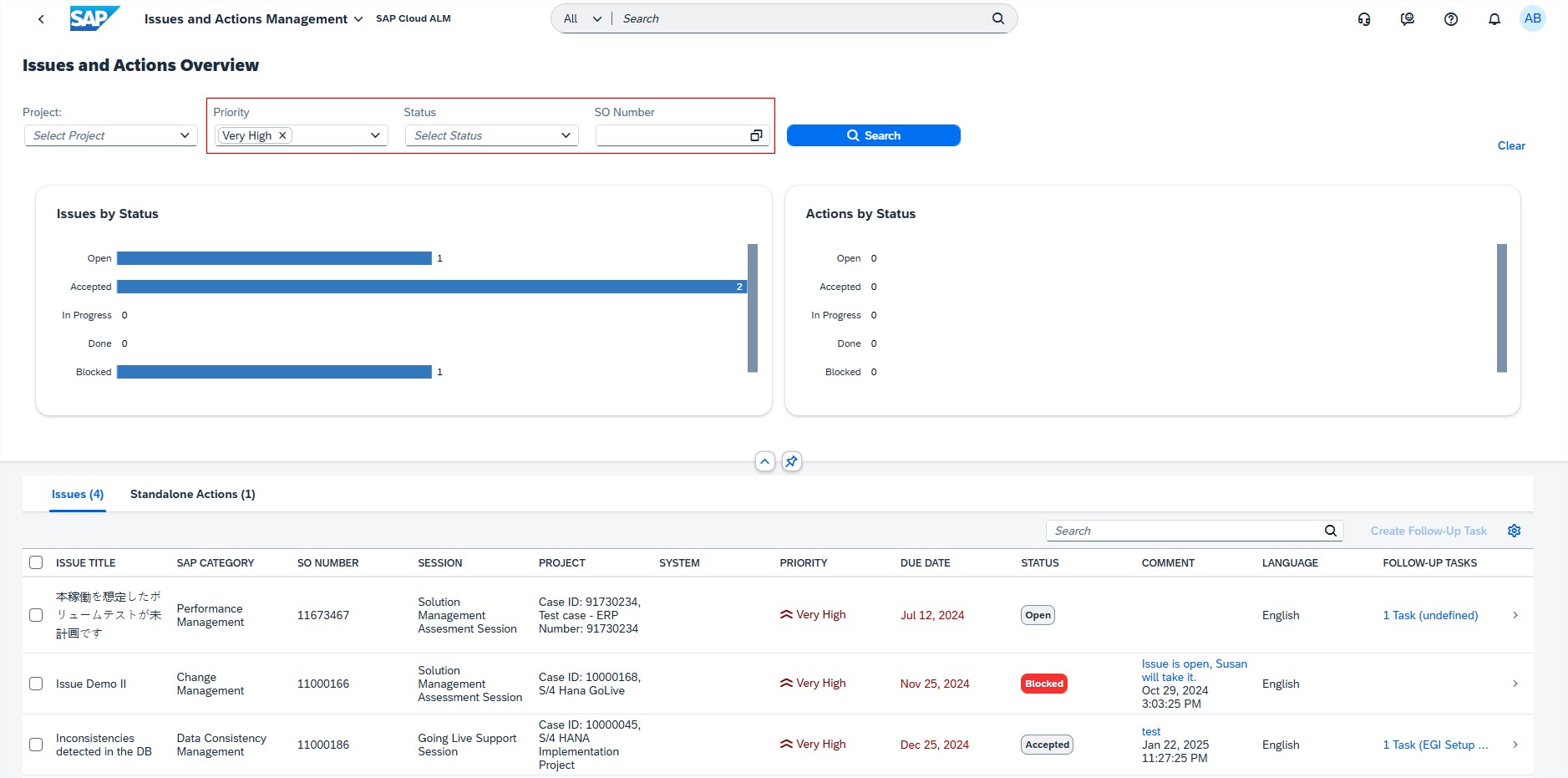
Overview page has new filters available for the issues and/or actions, allowing users to filter by Priority, Status, and SO Number.
SAP Business Transformation Center
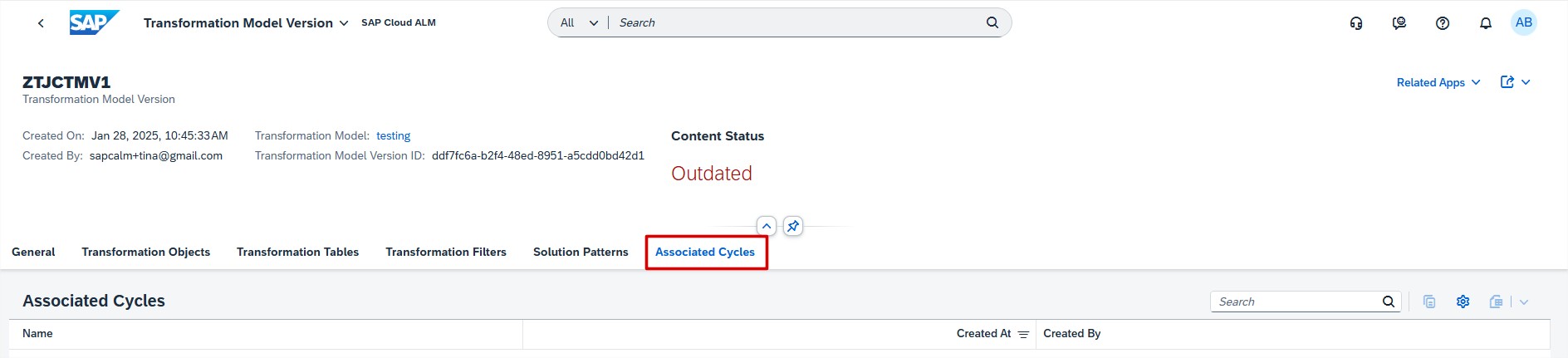
Modeling introduced new Associated Cycles tab in the Transformation Model Version app. This tab lists all cycles that have been derived from the selected transformation model version.
Cycle and Monitoring allows now to restart the cycle preparation and cycle transformation while still in progress, even with the status “In Progress with Error”.
Implementation
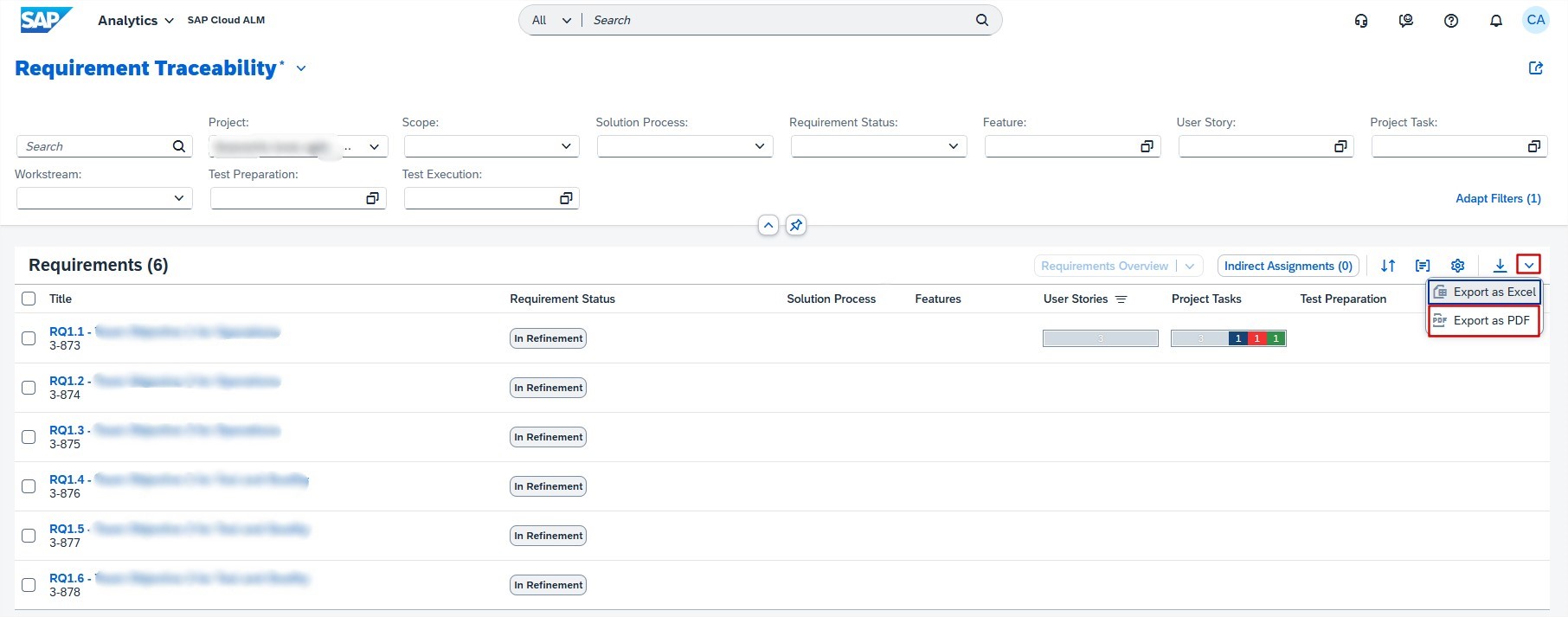
Analytics has new export to PDF feature in the Requirement Distribution app. This allows users to export requirement traceability data into a PDF format, including a cover page, table of contents, and detailed requirement information. This functionality is beneficial for users who need to share or archive traceability data in a standardized and easily accessible format.
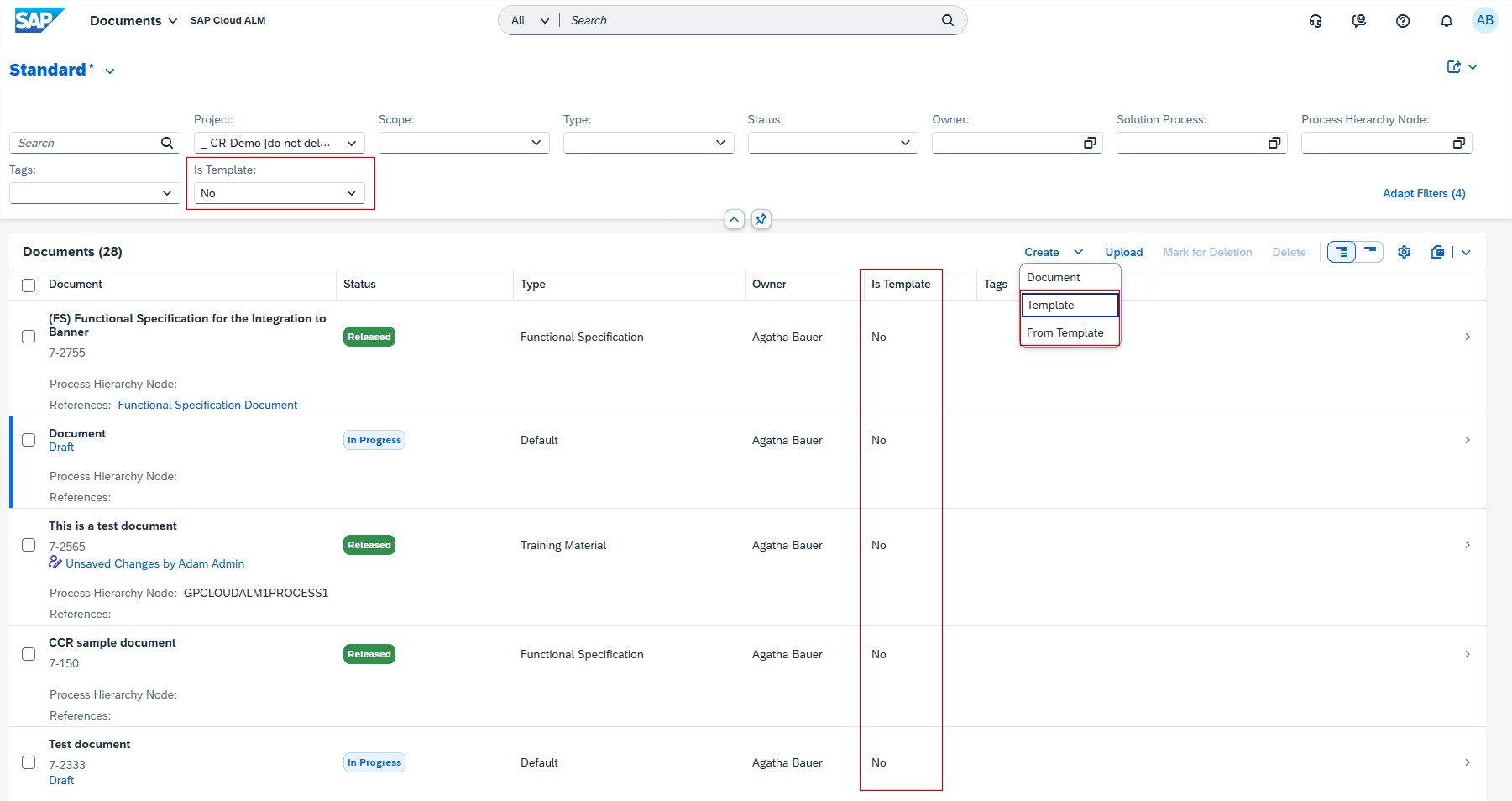
Documents allows now to create templates for the consistent structure of documents and use them for the document creation.
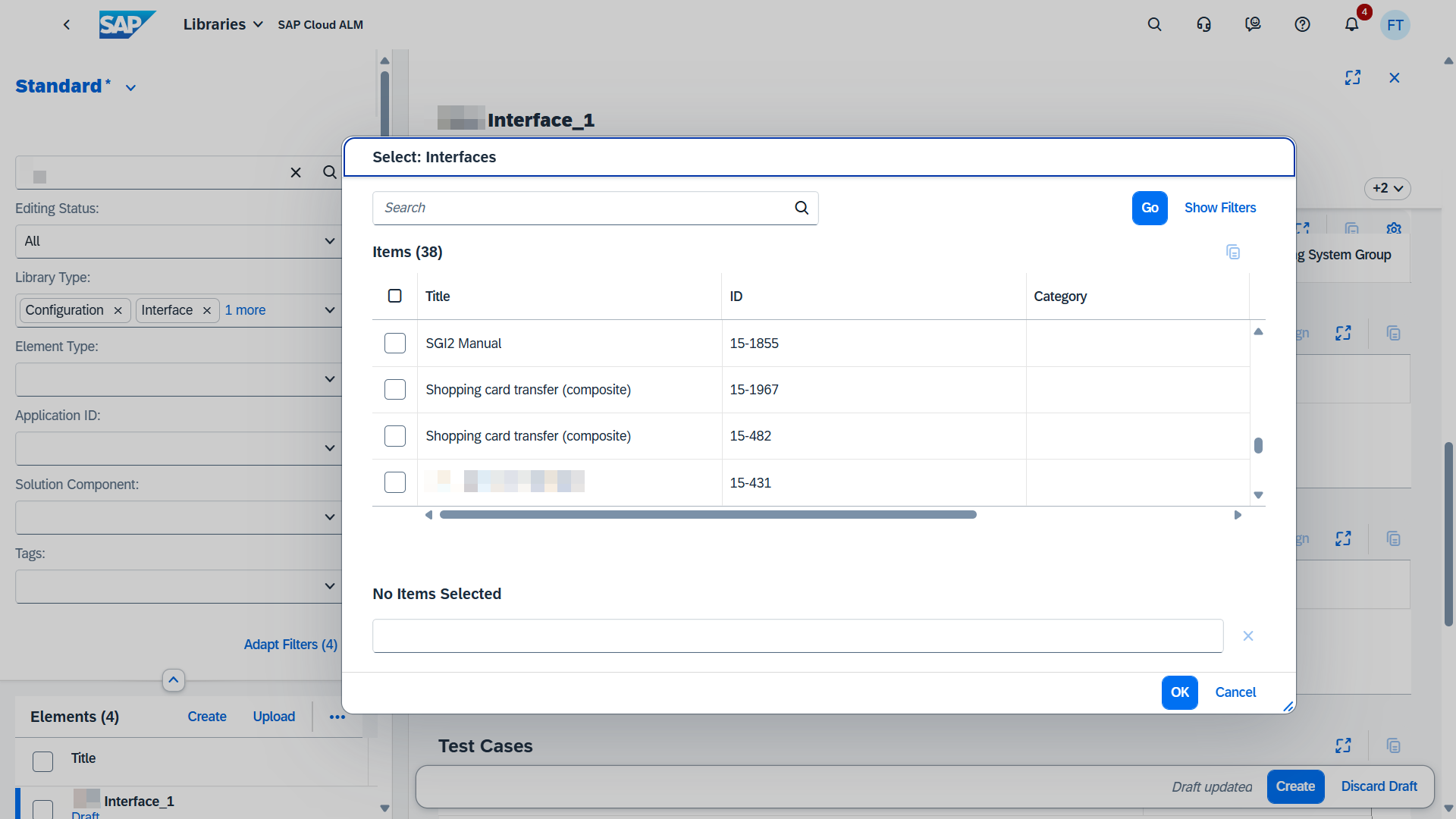
In Libraries it’s now possible to maintain relations between interfaces by assigning and unassigning interfaces in the app.
Processes has 2 new updates available.
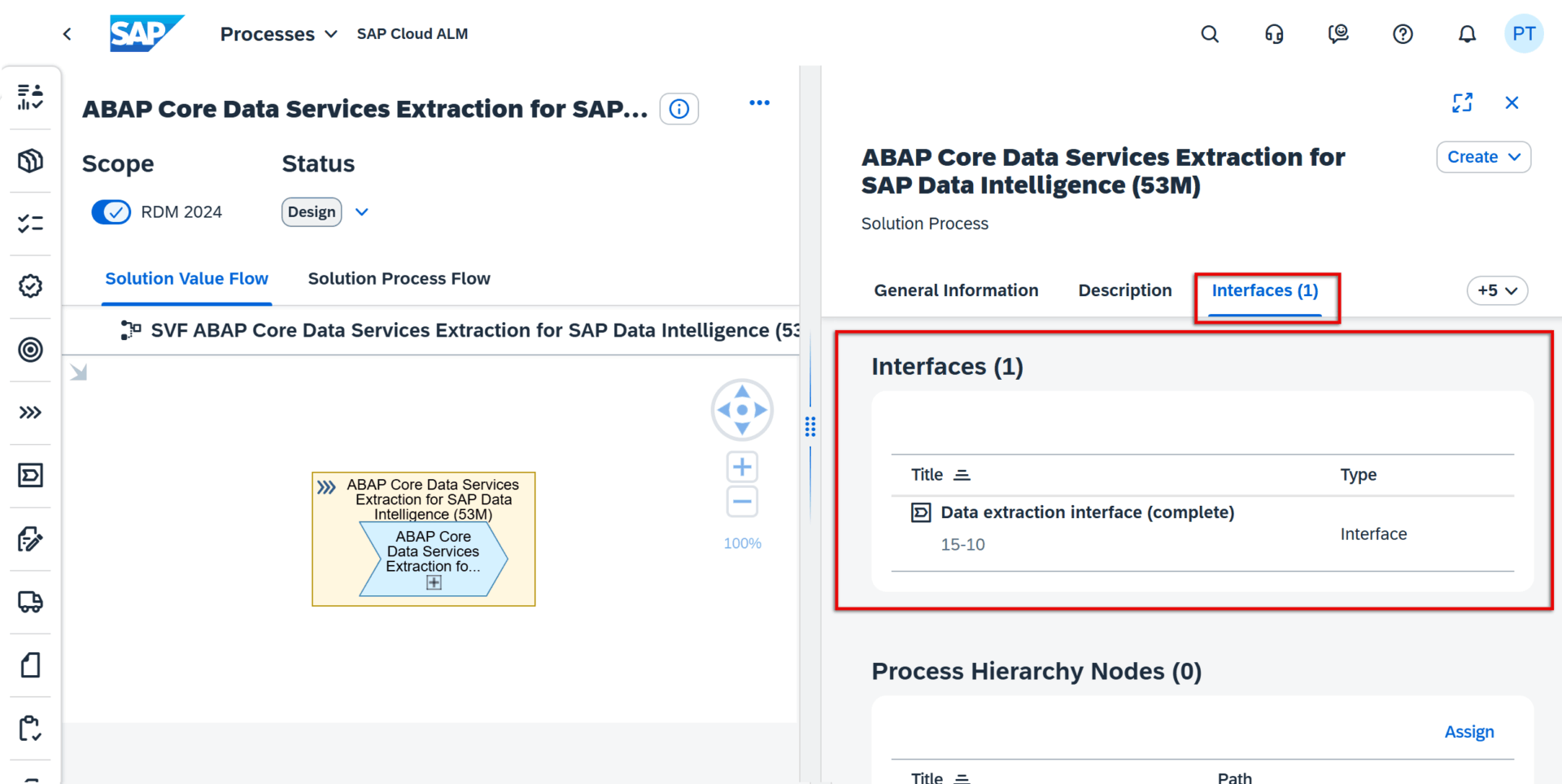
When calling up the details for a solution process in the Solution Process Viewer, users can now see information about any interfaces that are assigned to it. As well as the name of any assigned interfaces, users can also see their respective IDs and icon representing the Process Authoring app as the origin of where these interface library types were created.
The Interfaces section is currently only shown if corresponding assignments exist.
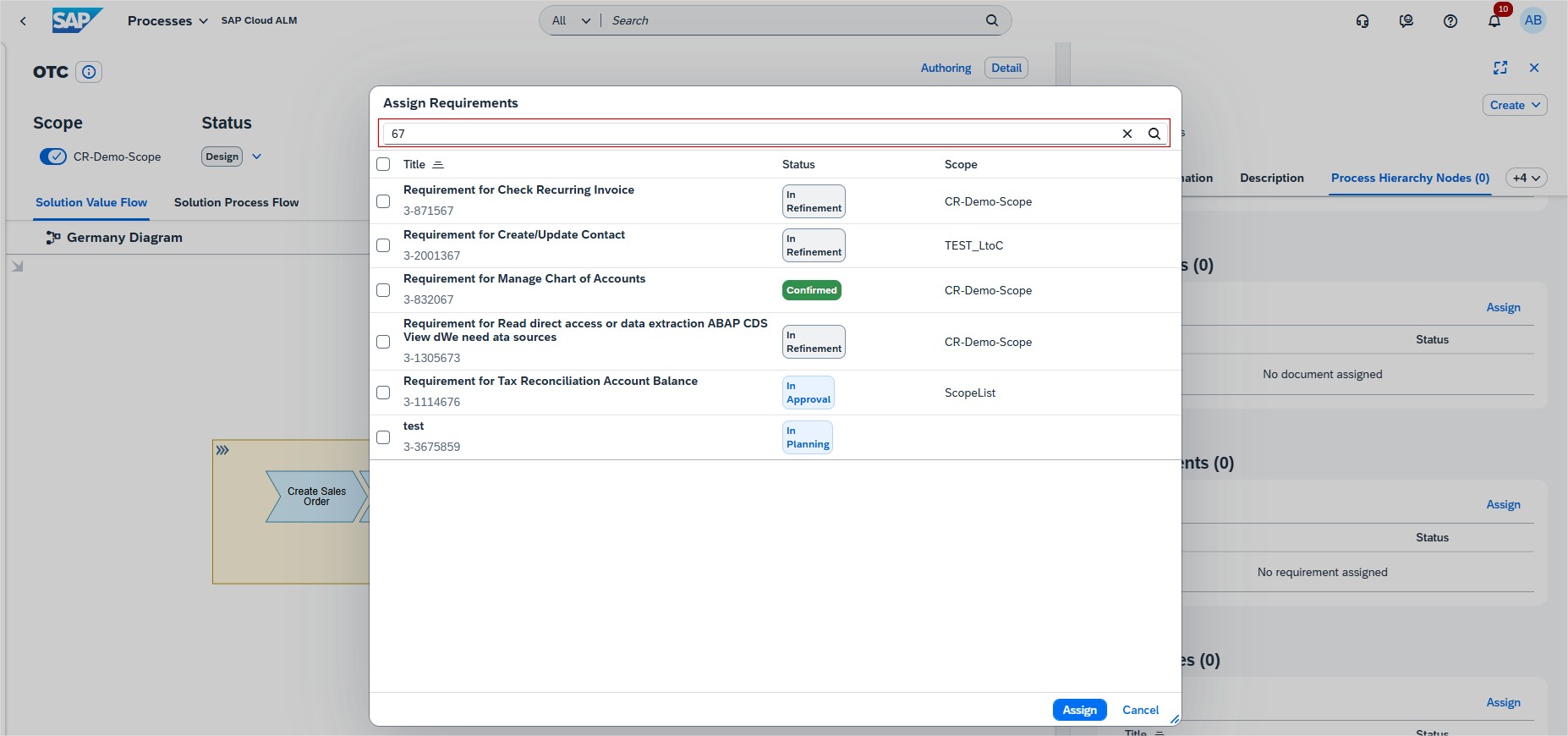
Users can now see the respective IDs for any requirements, user stories and tasks that are assigned to a solution process. Furthermore, to make it easier to find the right items when assigning requirements, user stories or tasks to a process, users can now search through the list of proposed values using either parts of their title, their ID, or the scope title.
Operations
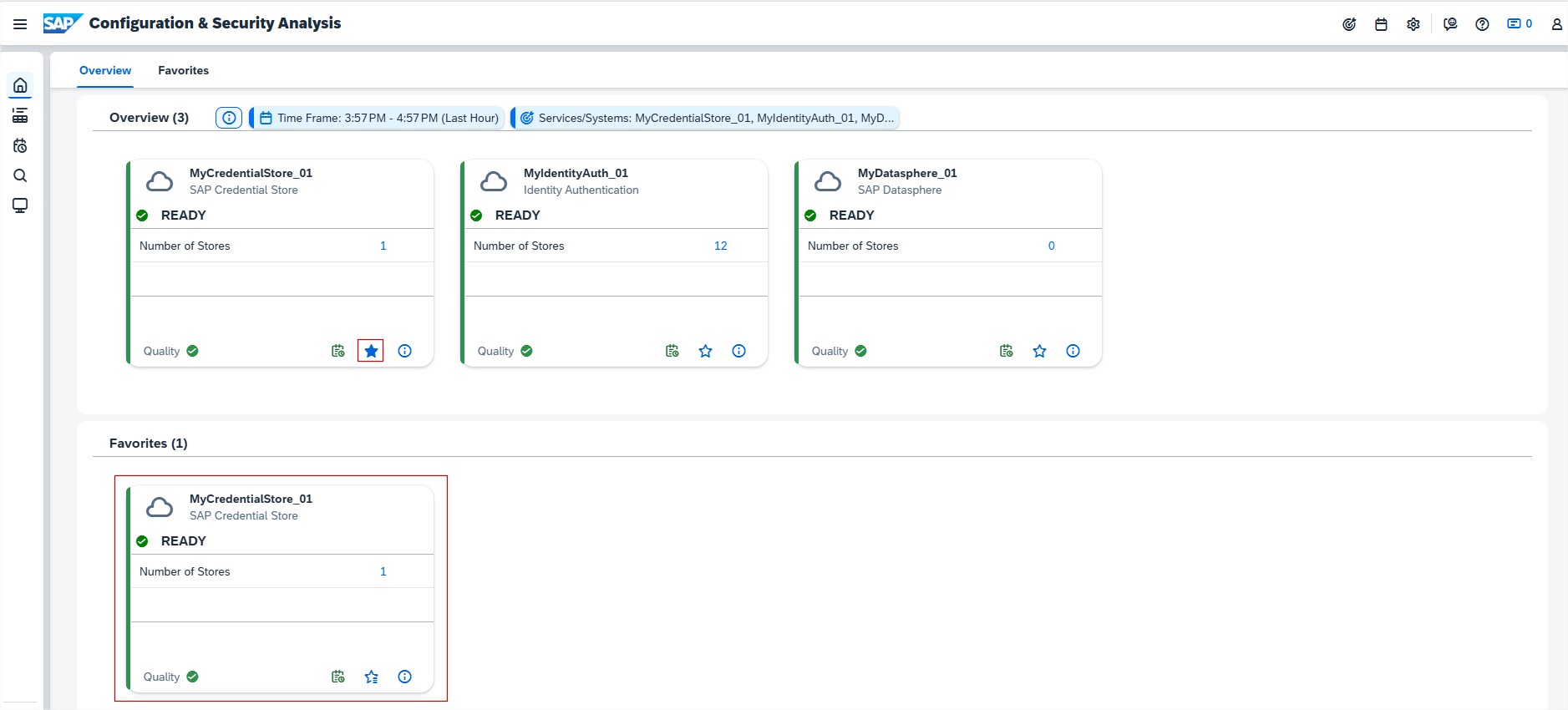
Configuration & Security Analysis allows now users to mark preferred managed components as Favorites. Managed components that are marked as Favorites show up in the Favorites section of the home page. And they are displayed even if they aren’t included in the selected scope. This allows users to quickly navigate frequently used or preferred managed components without having to define the scope every time.
RISE with SAP
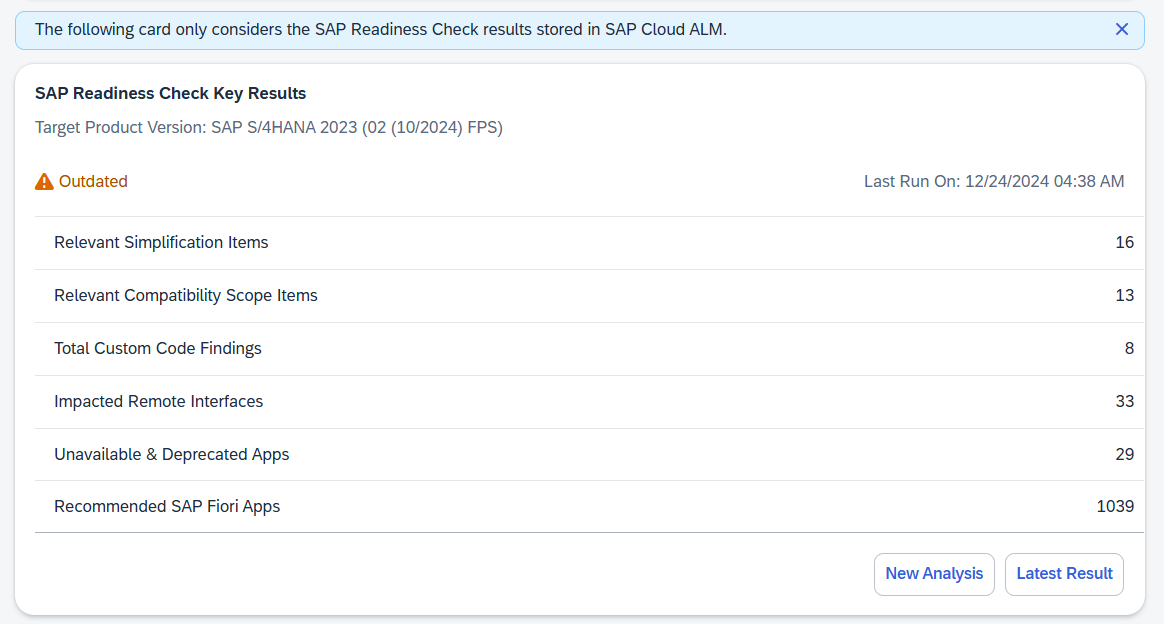
System View has enhanced the Upgrade Assessment card under Software Stack category and renamed it to SAP Readiness Check Key Results. The card now provides an overview of the most important findings of the latest SAP Readiness Check for SAP S/4HANA Upgrades run for system. Users can assess if they’re prepared to upgrade system or estimate the effort required for it.
The card displays the following key results:
Number of Relevant Simplification Items
Number of Relevant Compatibility Scope Items
Number of Total Custom Code Findings
Number of Impacted Remote Interfaces
Number of Unavailable & Deprecated Apps in the target release
Number of Recommended SAP Fiori Apps
To initiate a new SAP Readiness Check, choose New Analysis. To view all the details of the last SAP Readiness Check run, choose Latest Result.
With the latest updates, SAP continues to fine-tune and expand its capabilities, streamlining operations, boosting productivity, and making your daily work easier. In this edition, we highlight the key enhancements from the past 4 weeks, giving you a quick and clear look at the newest features designed to simplify workflows and elevate the user’s experience.
SAP Business Transformation Center
Modeling has this time 2 new updates available.
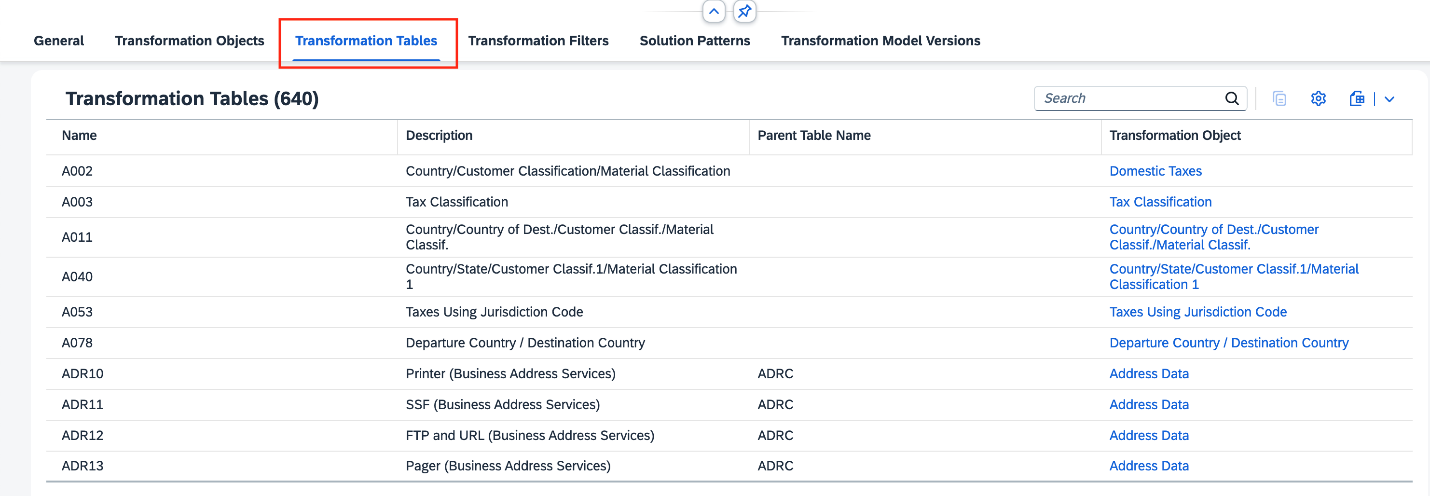
There is now a new tab called Transformation Tables, in the Manage Transformation Model app, where users can see a list of all tables from the corresponding transformation model taking part in the migration project. A Transformation Tables tab is also available in the Transformation Model Versions app, where users can see a list of all tables that are part of the corresponding transformation model version.
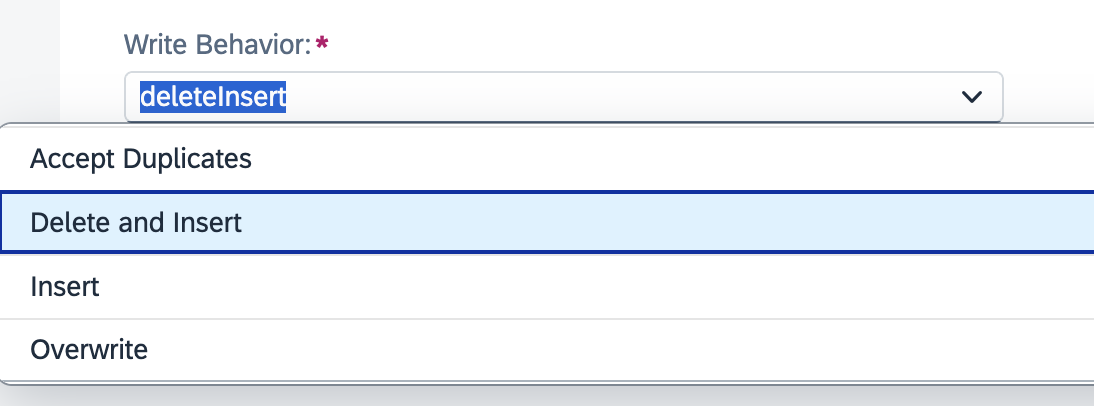
A new write behavior type Delete and Insert is also now available. It allows users to delete all records from a custom transformation object in an SAP S/4HANA target table and refill it with data from the source system, ensuring the table contains only the latest data.
In Cycle and Monitoring now the target system preparation phase automatically deletes HCM Configuration table data, if copied from source system during shell system creation.
Implementation
Processes has a new solution scenario, SAP Services Content for Airline Backoffice now available and has been added to the list of supported solutions for Process Management.
Test Preparation introduced 3 new enhancements.
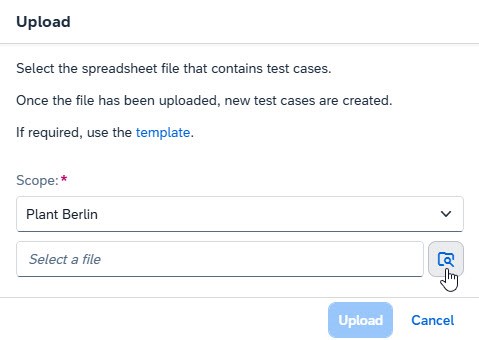
Test Preparation allows now a mass-upload of manual test cases from scratch by using a spreadsheet. It’s also possible to use the template provided directly in the app, if needed.
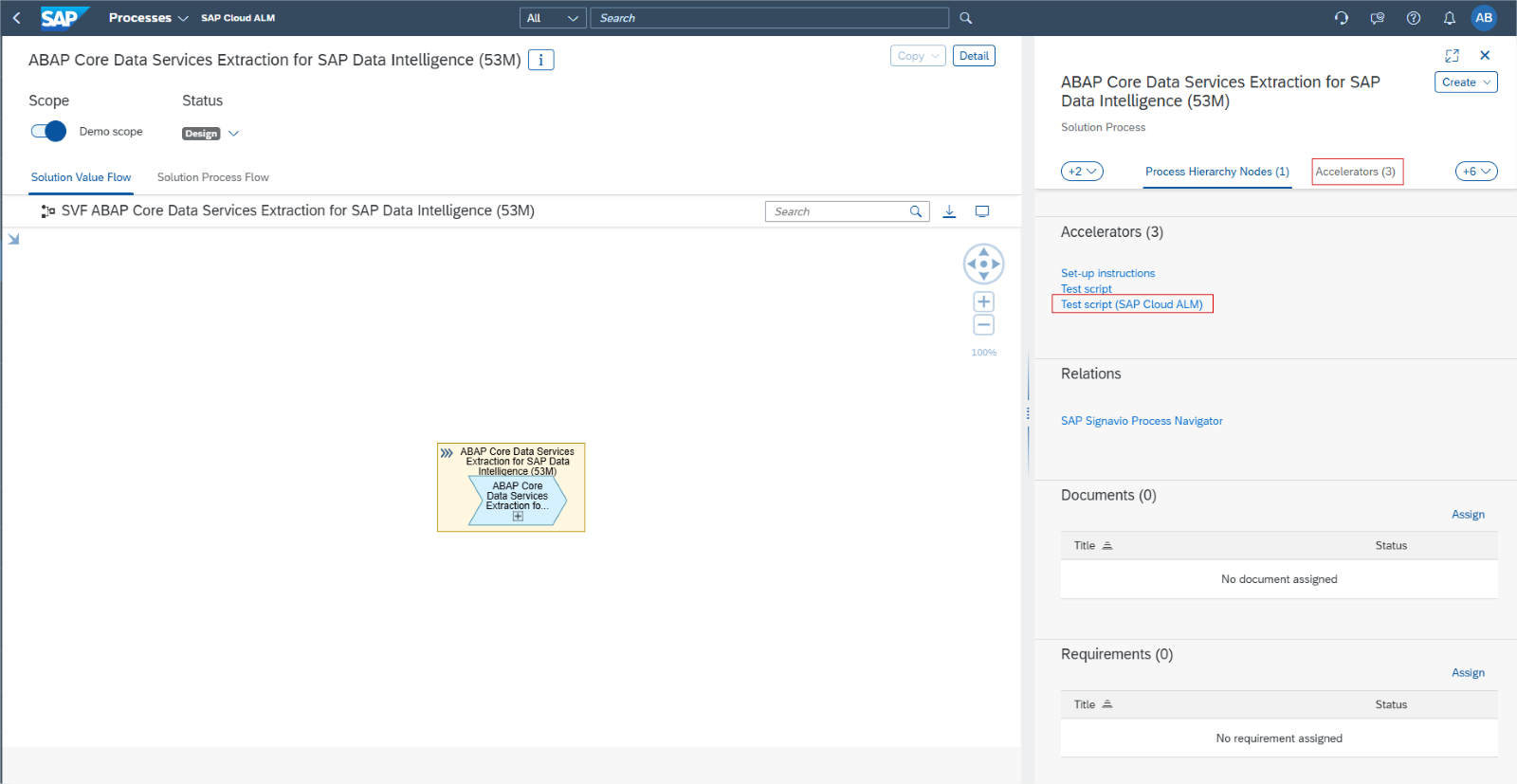
Users can now also upload test cases that are based on SAP Best Practices test scripts. These test scripts can be found in the relevant solution processes, under Accelerators.
The SAP Best Practices test scripts are based on entire solution processes, so it’s recommended to adjust them to users’ needs before uploading them. It’s also recommended limiting the number of activities to 20 and the number of actions to 100 per test case.
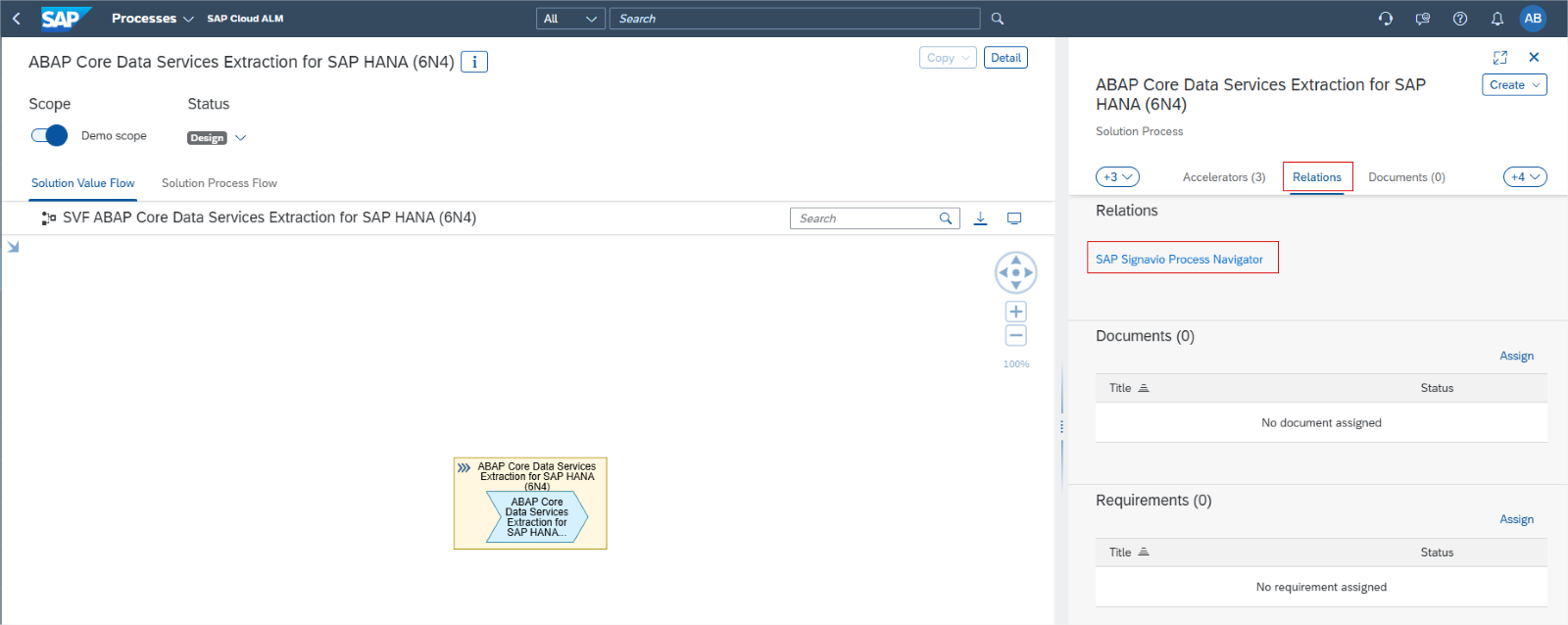
Under Relations, users can now assign interface library elements to test cases. This helps to ensure the interface’s test coverage and improve overall traceability throughout implementation project. It also lets users track the statuses of related test cases from the Libraries app.
Tasks has 4 new updates this time.
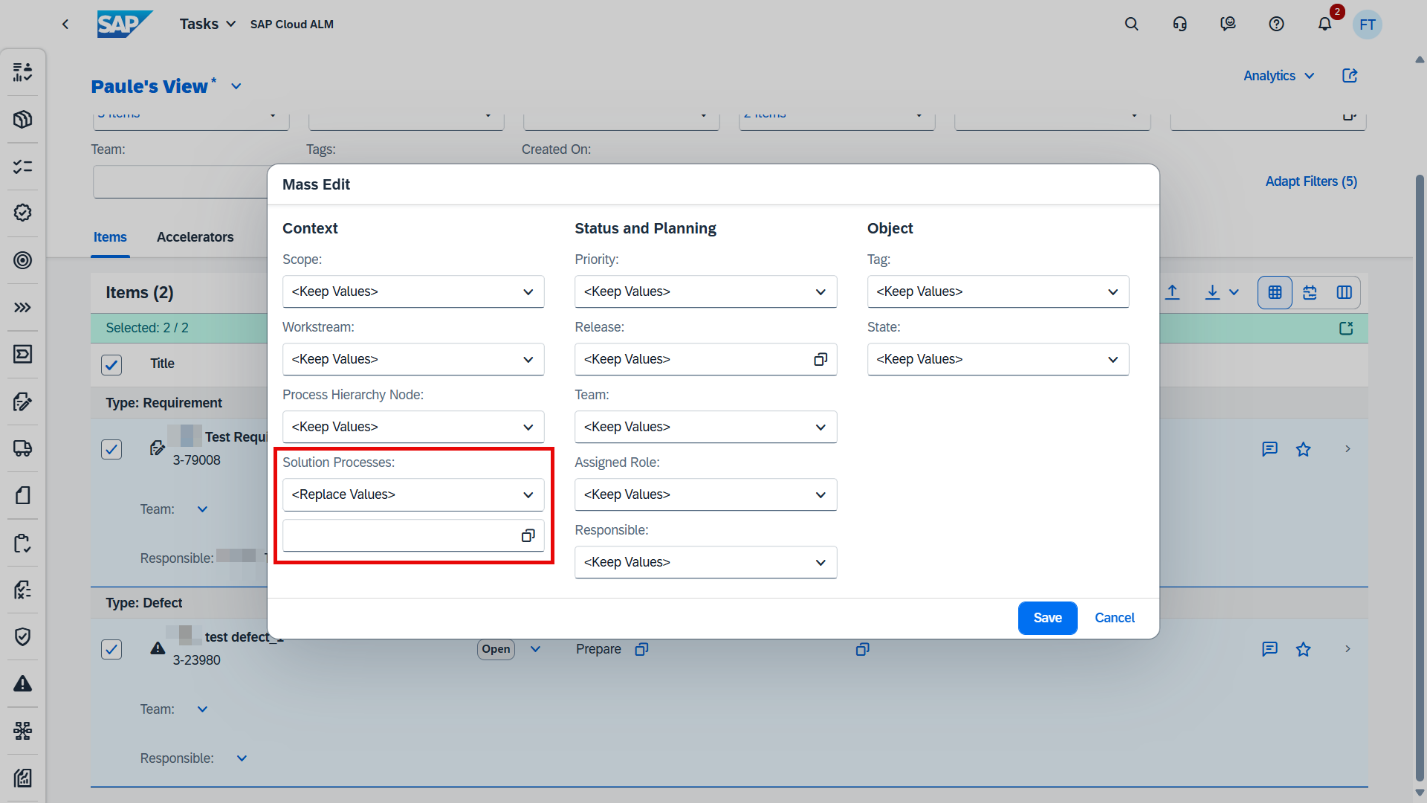
Tasksintroduced the possibility to assign multiple processes to project tasks, requirements, user stories, and defects using Mass Edit functionality.
It’s also possible now to assign sprints and other timeboxes as start and end dates to items via the Task API.
Changes made to custom fields in Tasks API are now visible in the history.
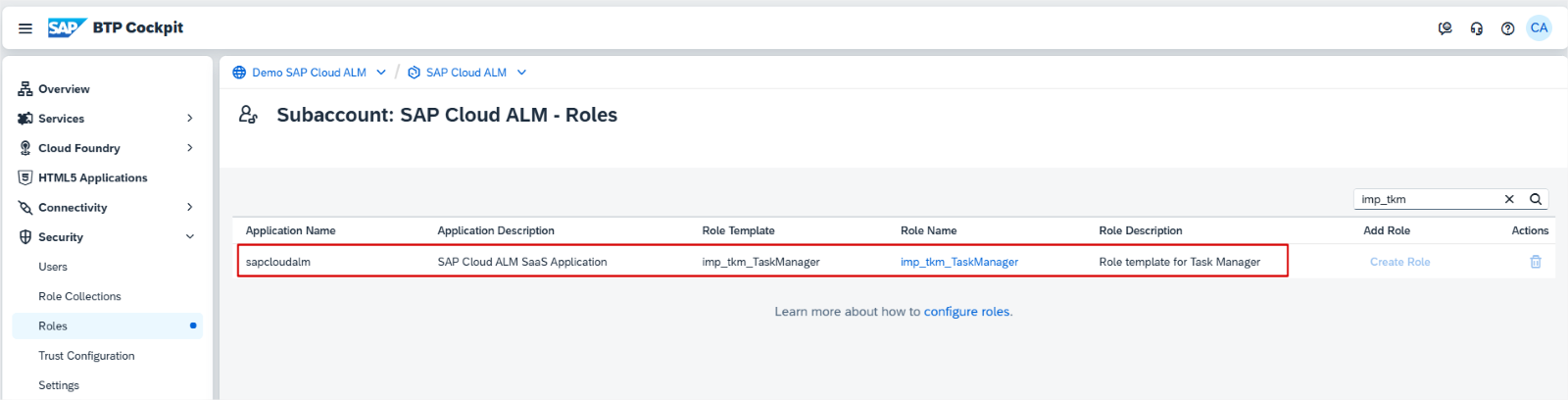
There’s new role template task manger imp_tkm_TaskManager is available. Assigning this role template to a role collection, user can manage user stories, project tasks, requirements, test cases, defects, and quality gates. It’s recommended to combining this role template with the Project Viewer role collection to enable navigating to all related entities.
In Projects and Setup, the SAP Activate Roadmap SAP S/4HANA Cloud Public Edition (3-system landscape) – Implementation, is now available in Japanese.
Features has now Transport of copies notification available. If the creation, release, or import of a transport of copies fails, the user who triggered the action receives a notification.
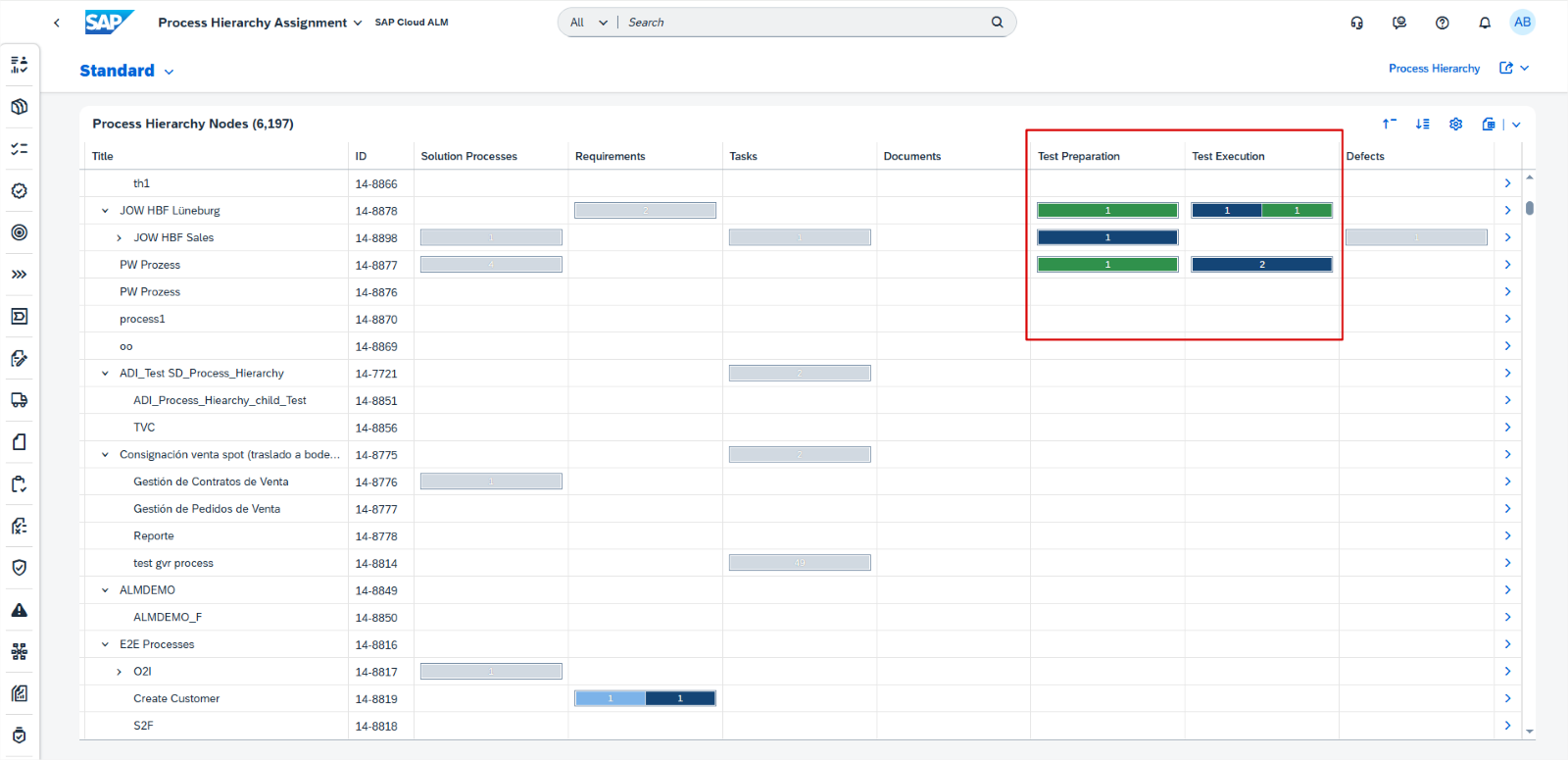
In Cross-Project Overview, the Process Hierarchy Assignments app now includes new columns and tabs for Test Preparation and Test Execution, enhancing user experience by providing structured access to test-related data.
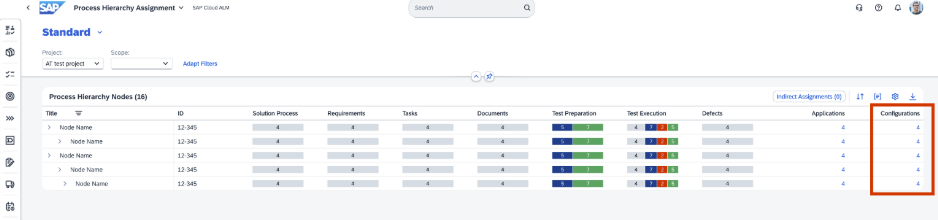
There’s also a new column configuration for library type, allowing users to view and manage library elements assigned to hierarchy nodes.
In Libraries it’s now possible to display test cases that were assigned to interfaces. Links can be used to navigate to the Test Preparation app.
Requirements has 2 new updates this time:
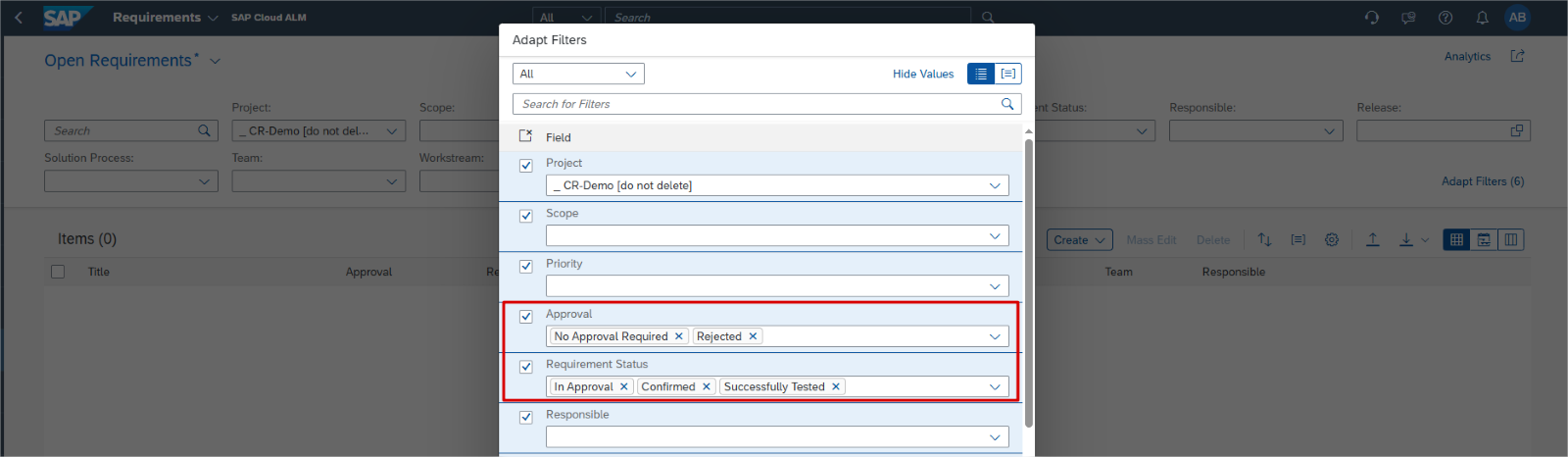
For requirement statuses and approval states, there is now a controlled and structured workflow to ensure that approvals follow a defined process.
To ensure that the scope of a requirement is locked and no longer changeable, the descriptions of requirements that have been set to the following approval states or requirement statuses are now read-only:
Requirement statuses:
Successfully Tested
Confirmed
In Approval
Approval states:
No Approval Required
Rejected
Operations
Configuration & Security Analysis now supports monitoring for:
SAP security recommendation data for SAP Custom Domain service, Cloud Foundry environment
SAP security recommendation data for SAP Cloud Logging service.
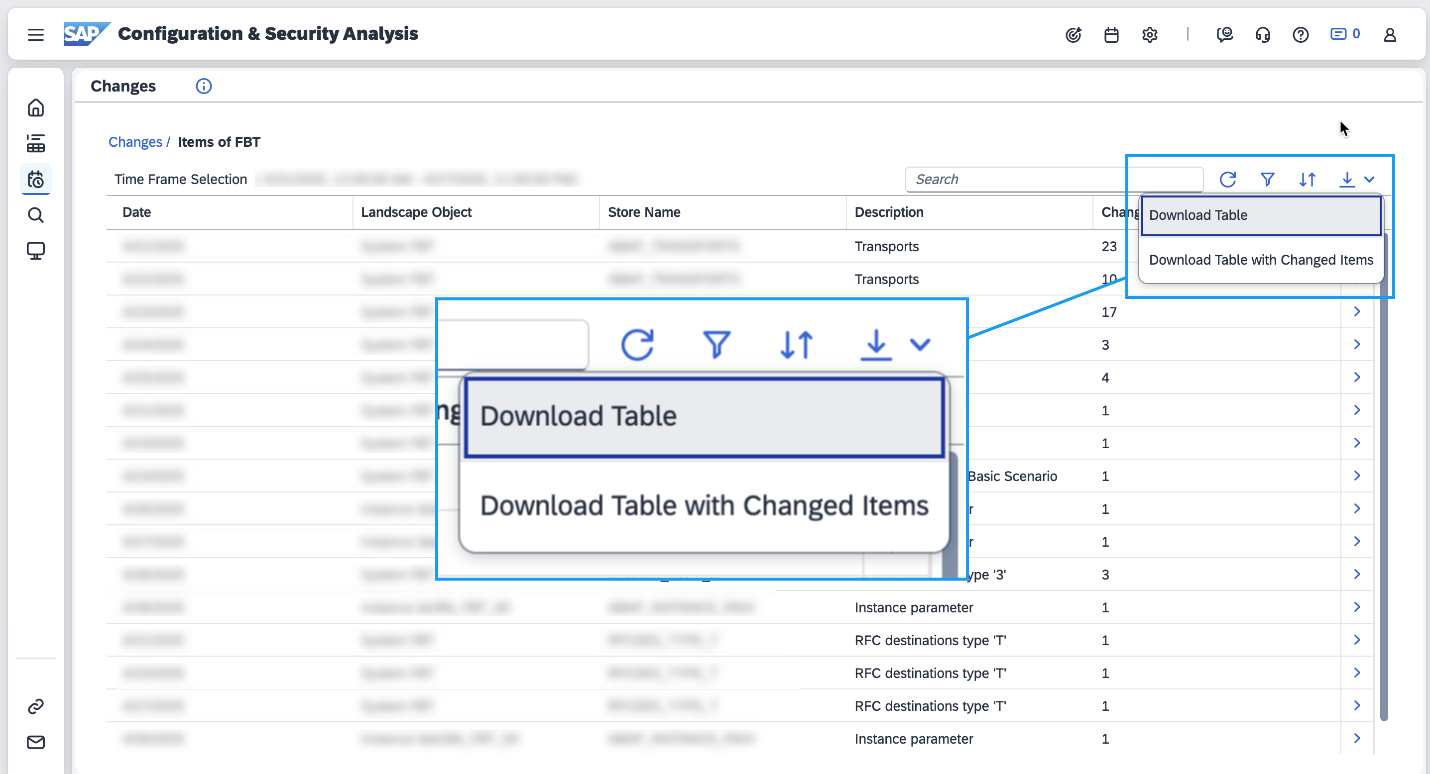
Configuration & Security Analysis has also enhancement to the download functionality in the Changes page. There are now additional options to download the entries in the Stores table in the Changes page.
The available options are:
Download Table – Downloads the Stores table.
Download Table with Changed Items – Downloads the Stores table and the details of changed items in the stores.
Real User Monitoring introduced new service type view. Now, the New Request Overview enhances the existing Request Overview page by allowing users to filter and view dimensions such as Service Name, Request Name, Request Type, and Action. This improvement provides a comprehensive overview of service metrics, aiding users in better analyzing and managing their requests efficiently.
Job & Automation Monitoring now supports resolution P, the metric value for the provided period, is now supported in Job & Automation Monitoring Analytics API.
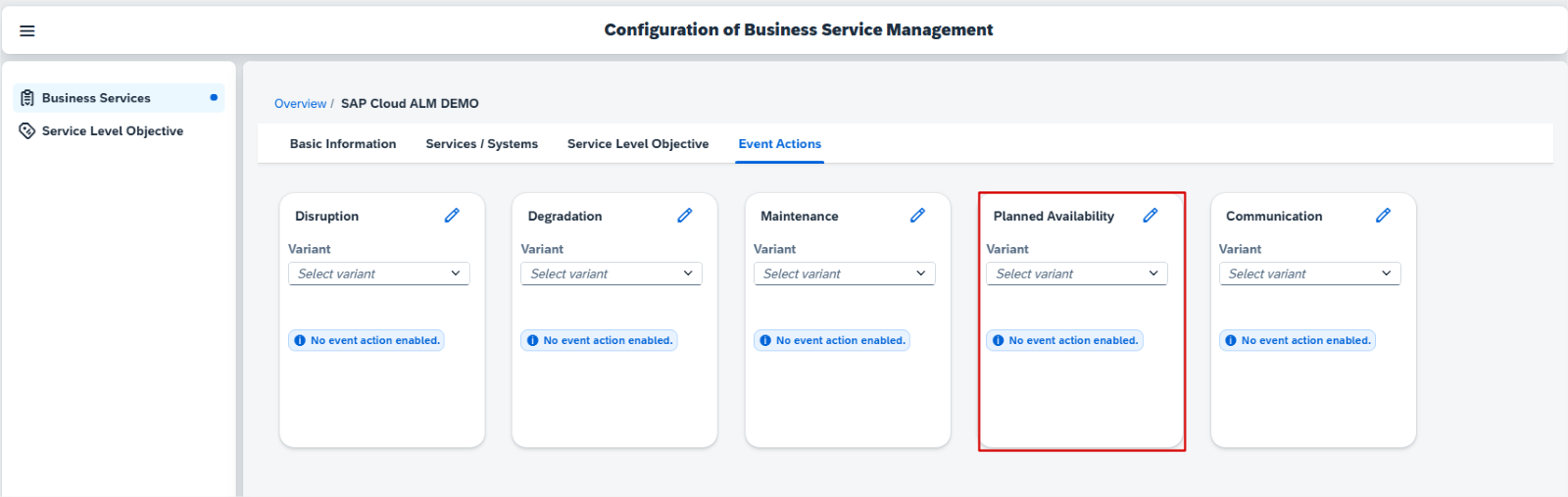
Business Service Management allows now to receive events of type Planned Availability. These events from SAP are for private cloud systems. These are usually up-time reservations that are required to perform a service request. These events are either created by SAP or in the Event Calendar. Users can also configure Event Actions for this event type.
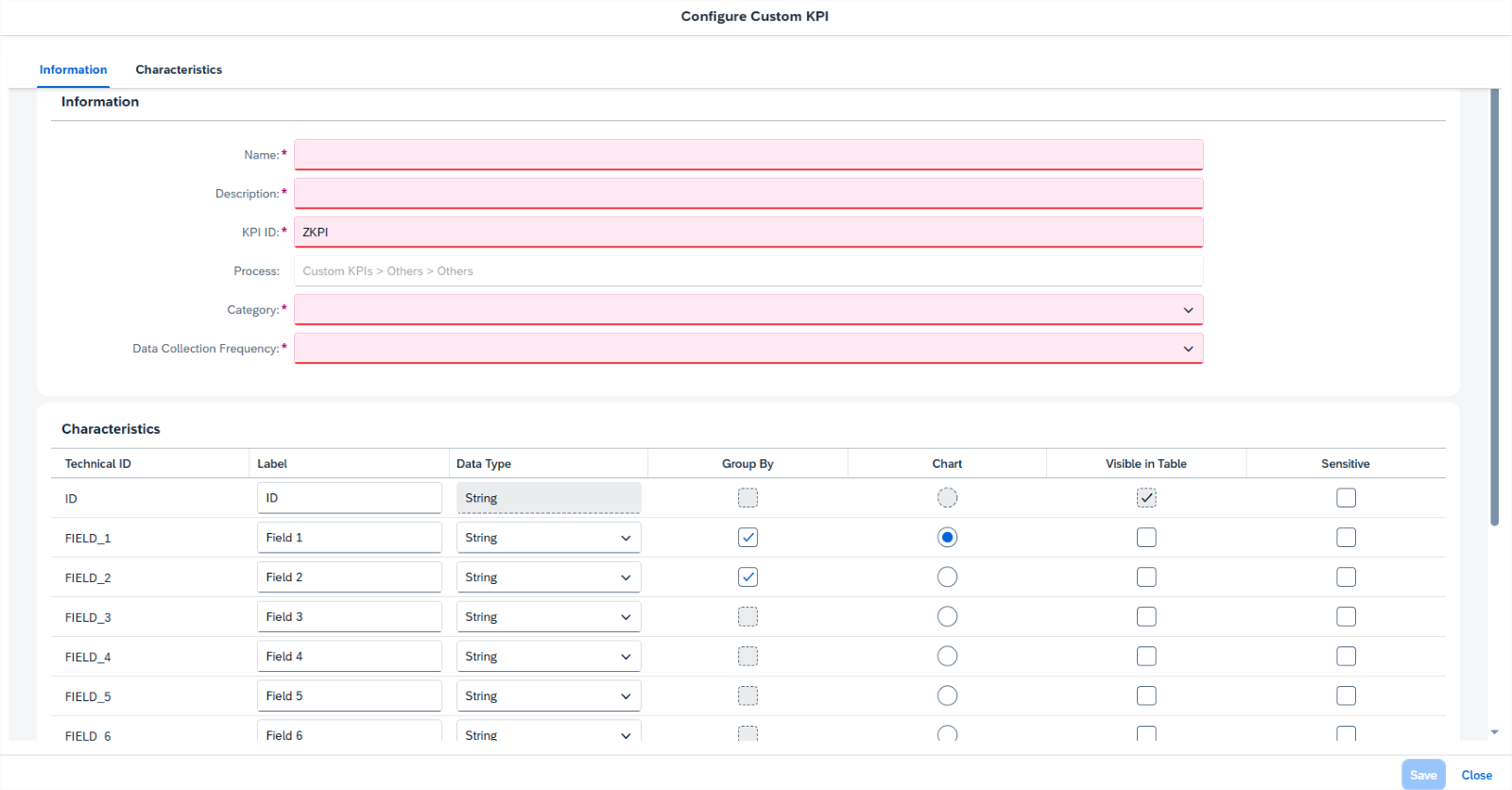
In Business Process Monitoring, it’s now possible to create up to 15 custom KPIs for components based on SAP BTP. Once the initial setup is completed, the custom KPIs can be used for monitoring purposes in the same way as standard KPIs, allowing users to get fully personalized insights tailored to specific business needs.
RISE with SAP
System View has now enhanced Software Stack Assessment, to align with the clean core principles, ensuring that system is always on the latest SAP S/4HANA release or at least the latest feature package stack. It’s equally important to install the latest feature package stack/support package stack to take advantage of SAP-delivered innovations and mitigate security risks.
Besides checking the status of the current SAP S/4HANA release installed on system, users can now assess if software stack has the status Innovation-Ready and Security-Compliant.
Services
Service Results has a new subsection, called Issue Overview, under the Management Summary at the template level. It shows the overview of issues embedded in the content of the service results.
Several Areas*
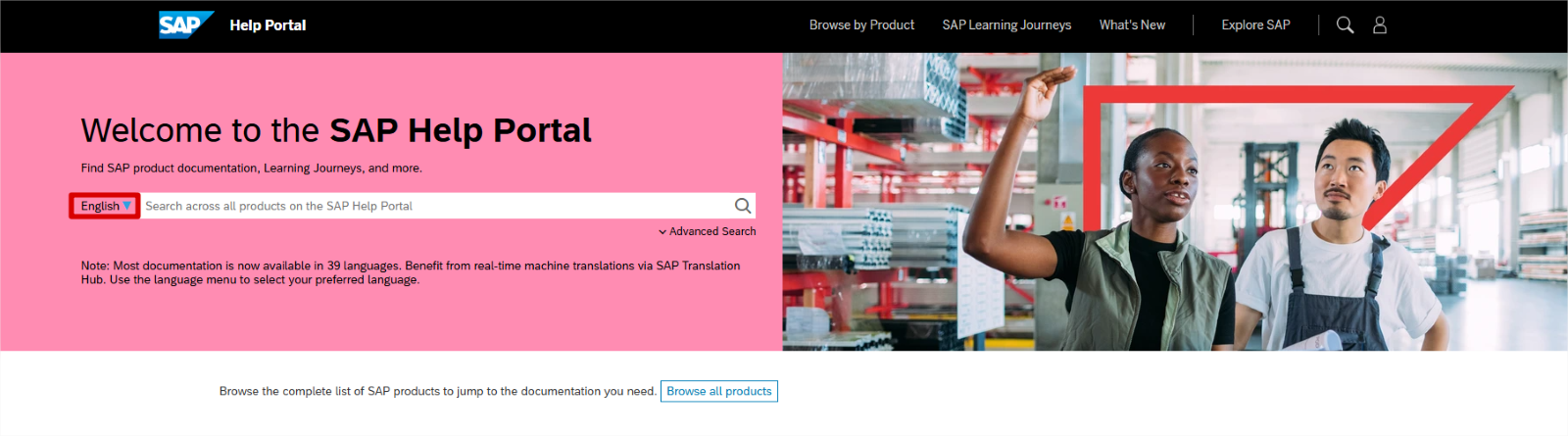
It’s now possible to instantly translate any SAP Help Portal page into 39 languages using AI-powered machine translation.
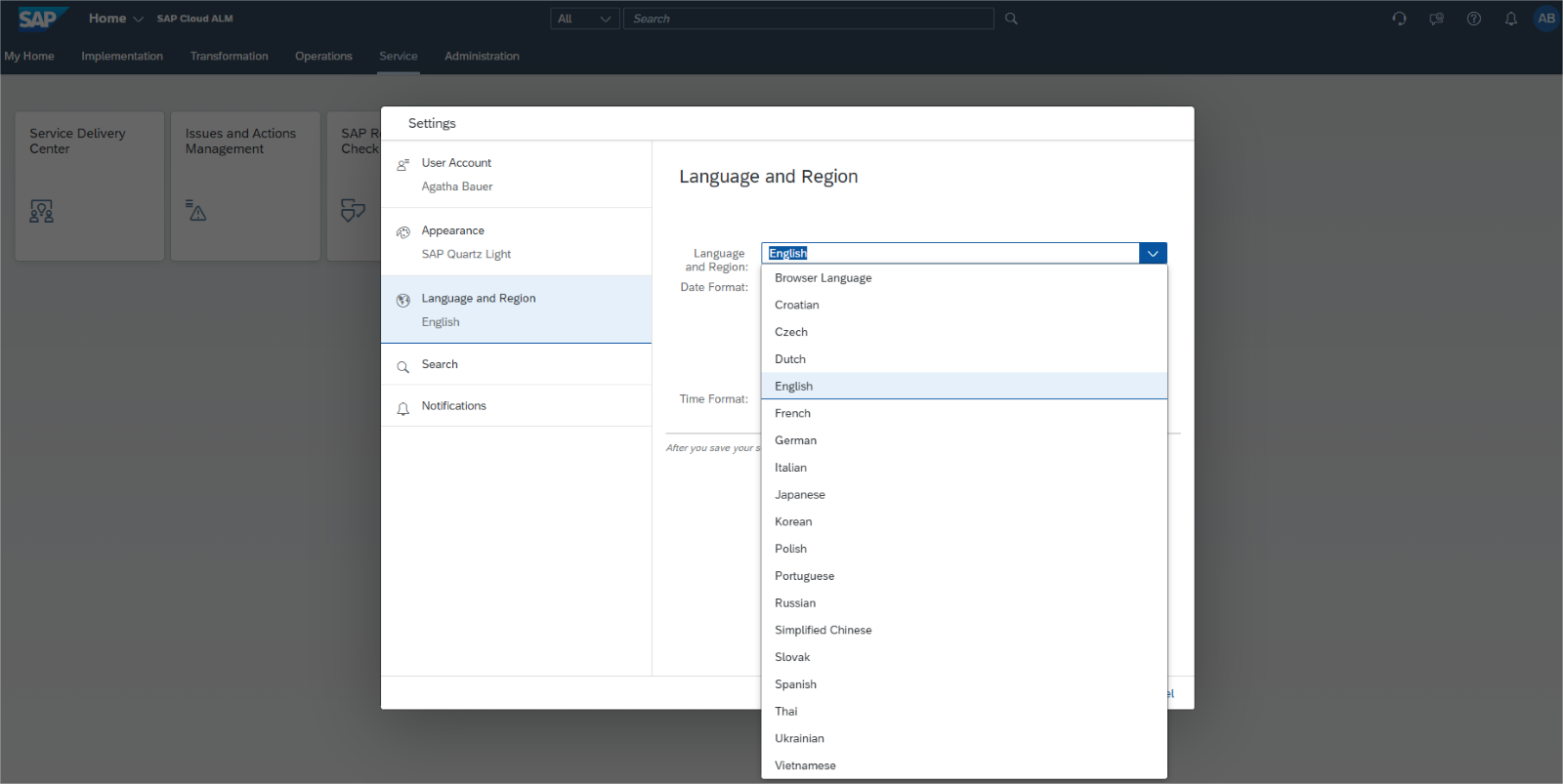
SAP Cloud ALM is now available in the following additional languages, which users can select in profile settings:
Czech
Croatian
Dutch
Polish
Slovak
Thai
Ukrainian
Vietnamese
We use cookies and similar technologies to improve your experience on our website.